Can't complete scan - hard drive very busy - ssqro?

blackadder

New member
Hiya

I have AVG8, Ad-Aware, Zonealarm, and Spybot (all updated) on my comp but can't complete a scan with any of them - the comp just dies. It can just about manage a fast scan with AdAware every now and again.

There is also a file called system32\ssqro.exe which doesn't seem to exist anymore when I boot up the comp - it gives me a warning saying as much. This may have been removed some time ago when using Spybot maybe? Would like to know if it's still there and if it isn't, why I'm still getting the warning.

Also, my hard drive is whirring like crazy when I have very little running and can make the comp cut out at times.

Here is the most recent HiJackThis log. Many thanks for your help...

Logfile of Trend Micro HijackThis v2.0.2
Scan saved at 09:44:05, on 23/01/2009
Platform: Windows XP SP3 (WinNT 5.01.2600)
MSIE: Internet Explorer v7.00 (7.00.6000.16762)
Boot mode: Normal

Running processes:
C:\WINDOWS\System32\smss.exe
C:\WINDOWS\system32\winlogon.exe
C:\WINDOWS\system32\services.exe
C:\WINDOWS\system32\lsass.exe
C:\WINDOWS\system32\svchost.exe
C:\WINDOWS\System32\svchost.exe
C:\WINDOWS\system32\svchost.exe
C:\WINDOWS\system32\ZoneLabs\vsmon.exe
C:\WINDOWS\Explorer.EXE
C:\Program Files\Common Files\Symantec Shared\ccSetMgr.exe
C:\Program Files\Common Files\Symantec Shared\SNDSrvc.exe
C:\Program Files\Lavasoft\Ad-Aware\aawservice.exe
C:\WINDOWS\system32\spoolsv.exe
C:\PROGRA~1\AVG\AVG8\avgwdsvc.exe
C:\Program Files\Common Files\GtFlashSwitch\GtFlashSwitch.exe
C:\Program Files\Java\jre6\bin\jqs.exe
C:\Program Files\Norton AntiVirus\navapsvc.exe
C:\Program Files\Norton AntiVirus\IWP\NPFMntor.exe
C:\Program Files\Common Files\Protexis\License Service\PSIService.exe
C:\PROGRA~1\AVG\AVG8\avgrsx.exe
C:\WINDOWS\system32\svchost.exe
C:\Program Files\Common Files\Symantec Shared\Security Center\SymWSC.exe
C:\Program Files\Common Files\Symantec Shared\ccApp.exe
C:\Program Files\Zone Labs\ZoneAlarm\zlclient.exe
C:\Program Files\Java\jre6\bin\jusched.exe
C:\WINDOWS\system32\ctfmon.exe
C:\Program Files\Orange\ICON2 USB Connect\ICON2 USB Connect.exe
C:\Program Files\Mozilla Firefox\firefox.exe
C:\Program Files\Trend Micro\HijackThis\HijackThis.exe

R0 - HKCU\Software\Microsoft\Internet Explorer\Main,Start Page = http://www.virginmedia.com
R1 - HKLM\Software\Microsoft\Internet Explorer\Main,Default_Page_URL = http://go.microsoft.com/fwlink/?LinkId=69157
R1 - HKLM\Software\Microsoft\Internet Explorer\Main,Default_Search_URL = http://go.microsoft.com/fwlink/?LinkId=54896
R1 - HKLM\Software\Microsoft\Internet Explorer\Main,Search Page = http://go.microsoft.com/fwlink/?LinkId=54896
R0 - HKLM\Software\Microsoft\Internet Explorer\Main,Start Page = http://go.microsoft.com/fwlink/?LinkId=69157
R1 - HKCU\Software\Microsoft\Windows\CurrentVersion\Internet Settings,ProxyOverride = *.local
F3 - REG:win.ini: load=C:\WINDOWS\system32\ssqro.exe
O2 - BHO: Adobe PDF Reader Link Helper - {06849E9F-C8D7-4D59-B87D-784B7D6BE0B3} - C:\Program Files\Adobe\Acrobat 7.0\ActiveX\AcroIEHelper.dll
O2 - BHO: (no name) - {2B3CBDC2-8AB6-45B1-B59E-7B0DEE595917} - C:\WINDOWS\system32\gebyxxu.dll (file missing)
O2 - BHO: WormRadar.com IESiteBlocker.NavFilter - {3CA2F312-6F6E-4B53-A66E-4E65E497C8C0} - C:\Program Files\AVG\AVG8\avgssie.dll
O2 - BHO: Spybot-S&D IE Protection - {53707962-6F74-2D53-2644-206D7942484F} - C:\PROGRA~1\SPYBOT~1\SDHelper.dll
O2 - BHO: (no name) - {7219EFDE-CBF9-44F7-AC7D-7184B36B67E8} - C:\WINDOWS\system32\ssqro.dll (file missing)
O2 - BHO: Java(tm) Plug-In SSV Helper - {761497BB-D6F0-462C-B6EB-D4DAF1D92D43} - C:\Program Files\Java\jre6\bin\ssv.dll
O2 - BHO: NAV Helper - {BDF3E430-B101-42AD-A544-FADC6B084872} - C:\Program Files\Norton AntiVirus\NavShExt.dll
O2 - BHO: Java(tm) Plug-In 2 SSV Helper - {DBC80044-A445-435b-BC74-9C25C1C588A9} - C:\Program Files\Java\jre6\bin\jp2ssv.dll
O2 - BHO: JQSIEStartDetectorImpl - {E7E6F031-17CE-4C07-BC86-EABFE594F69C} - C:\Program Files\Java\jre6\lib\deploy\jqs\ie\jqs_plugin.dll
O2 - BHO: (no name) - {F0D4B231-DA4B-4daf-81E4-DFEE4931A4AA} - (no file)
O3 - Toolbar: Norton AntiVirus - {42CDD1BF-3FFB-4238-8AD1-7859DF00B1D6} - C:\Program Files\Norton AntiVirus\NavShExt.dll
O4 - HKLM\..\Run: [SynTPLpr] C:\Program Files\Synaptics\SynTP\SynTPLpr.exe
O4 - HKLM\..\Run: [SynTPEnh] C:\Program Files\Synaptics\SynTP\SynTPEnh.exe
O4 - HKLM\..\Run: [eabconfg.cpl] C:\Program Files\HPQ\Quick Launch Buttons\EabServr.exe /Start
O4 - HKLM\..\Run: [Cpqset] C:\Program Files\HPQ\Default Settings\cpqset.exe
O4 - HKLM\..\Run: [iRiver AutoDB] C:\Program Files\iRiver\Service\MLService.exe
O4 - HKLM\..\Run: [iRiver Updater] C:\Program Files\iRiver\Service\Updater.exe
O4 - HKLM\..\Run: [ISUSScheduler] "C:\Program Files\Common Files\InstallShield\UpdateService\issch.exe" -start
O4 - HKLM\..\Run: [ccApp] "C:\Program Files\Common Files\Symantec Shared\ccApp.exe"
O4 - HKLM\..\Run: [ZoneAlarm Client] "C:\Program Files\Zone Labs\ZoneAlarm\zlclient.exe"
O4 - HKLM\..\Run: [WinampAgent] "C:\Program Files\Winamp\winampa.exe"
O4 - HKLM\..\Run: [SunJavaUpdateSched] "C:\Program Files\Java\jre6\bin\jusched.exe"
O4 - HKCU\..\Run: [ctfmon.exe] C:\WINDOWS\system32\ctfmon.exe
O4 - HKCU\..\Run: [SpybotSD TeaTimer] C:\Program Files\Spybot - Search & Destroy\TeaTimer.exe
O4 - HKCU\..\Run: [kdx] C:\Program Files\Kontiki\KHost.exe -all
O4 - HKCU\..\Run: [updateMgr] "C:\Program Files\Adobe\Acrobat 7.0\Reader\AdobeUpdateManager.exe" AcRdB7_0_9 -reboot 1
O4 - HKUS\S-1-5-18\..\Run: [CTFMON.EXE] C:\WINDOWS\system32\CTFMON.EXE (User 'SYSTEM')
O4 - HKUS\.DEFAULT\..\Run: [CTFMON.EXE] C:\WINDOWS\system32\CTFMON.EXE (User 'Default user')
O4 - Startup: ERUNT AutoBackup.lnk = C:\Program Files\ERUNT\AUTOBACK.EXE
O4 - Global Startup: Adobe Reader Speed Launch.lnk = C:\Program Files\Adobe\Acrobat 7.0\Reader\reader_sl.exe
O4 - Global Startup: ICON2 USB Connect.lnk = C:\Program Files\Orange\ICON2 USB Connect\ICON2 USB Connect.exe
O8 - Extra context menu item: E&xport to Microsoft Excel - res://C:\PROGRA~1\MICROS~3\OFFICE11\EXCEL.EXE/3000
O9 - Extra button: Research - {92780B25-18CC-41C8-B9BE-3C9C571A8263} - C:\PROGRA~1\MICROS~3\OFFICE11\REFIEBAR.DLL
O9 - Extra button: (no name) - {DFB852A3-47F8-48C4-A200-58CAB36FD2A2} - C:\PROGRA~1\SPYBOT~1\SDHelper.dll
O9 - Extra 'Tools' menuitem: Spybot - Search & Destroy Configuration - {DFB852A3-47F8-48C4-A200-58CAB36FD2A2} - C:\PROGRA~1\SPYBOT~1\SDHelper.dll
O9 - Extra button: (no name) - {e2e2dd38-d088-4134-82b7-f2ba38496583} - C:\WINDOWS\Network Diagnostic\xpnetdiag.exe
O9 - Extra 'Tools' menuitem: @xpsp3res.dll,-20001 - {e2e2dd38-d088-4134-82b7-f2ba38496583} - C:\WINDOWS\Network Diagnostic\xpnetdiag.exe
O9 - Extra button: Messenger - {FB5F1910-F110-11d2-BB9E-00C04F795683} - C:\Program Files\Messenger\msmsgs.exe
O9 - Extra 'Tools' menuitem: Windows Messenger - {FB5F1910-F110-11d2-BB9E-00C04F795683} - C:\Program Files\Messenger\msmsgs.exe
O14 - IERESET.INF: START_PAGE_URL=http://ie.redirect.hp.com/svs/rdr?TYPE=3&tp=iehome&locale=EN_GB&c=Q105&bd=presario&pf=laptop
O16 - DPF: {17492023-C23A-453E-A040-C7C580BBF700} (Windows Genuine Advantage Validation Tool) - http://go.microsoft.com/fwlink/?linkid=39204
O16 - DPF: {6414512B-B978-451D-A0D8-FCFDF33E833C} (WUWebControl Class) - http://www.update.microsoft.com/mic...ls/en/x86/client/wuweb_site.cab?1186598090046
O16 - DPF: {6E32070A-766D-4EE6-879C-DC1FA91D2FC3} (MUWebControl Class) - http://www.update.microsoft.com/mic...ls/en/x86/client/muweb_site.cab?1186598075984
O16 - DPF: {7B297BFD-85E4-4092-B2AF-16A91B2EA103} (WScanCtl Class) - http://www.ca.com/us/securityadvisor/virusinfo/webscan.cab
O16 - DPF: {917623D1-D8E5-11D2-BE8B-00104B06BDE3} (CamImage Class) - http://handy-wf.de:8080/activex/AxisCamControl.cab
O16 - DPF: {CAFEEFAC-0016-0000-0002-ABCDEFFEDCBA} (Java Plug-in 1.6.0_02) -
O16 - DPF: {CAFEEFAC-0016-0000-0003-ABCDEFFEDCBA} (Java Plug-in 1.6.0_03) -
O16 - DPF: {CAFEEFAC-0016-0000-0010-ABCDEFFEDCBA} (Java Plug-in 1.6.0_10) -
O16 - DPF: {DE625294-70E6-45ED-B895-CFFA13AEB044} (AxisMediaControlEmb Class) - http://85.235.16.146/activex/AMC.cab
O17 - HKLM\System\CCS\Services\Tcpip\..\{4F4516B6-07A9-4585-B713-CDE1E708EC2B}: NameServer = 192.168.0.4
O17 - HKLM\System\CCS\Services\Tcpip\..\{9BFC924E-05D2-4633-87F7-8BB32D8ACDEB}: NameServer = 192.168.0.4
O17 - HKLM\System\CS2\Services\Tcpip\..\{31732A7F-D9B9-4B53-9CCC-01D88E18486B}: NameServer = 192.168.0.1
O18 - Protocol: linkscanner - {F274614C-63F8-47D5-A4D1-FBDDE494F8D1} - C:\Program Files\AVG\AVG8\avgpp.dll
O18 - Protocol: skype4com - {FFC8B962-9B40-4DFF-9458-1830C7DD7F5D} - C:\PROGRA~1\COMMON~1\Skype\SKYPE4~1.DLL
O20 - AppInit_DLLs: avgrsstx.dll
O20 - Winlogon Notify: gebyxxu - gebyxxu.dll (file missing)
O20 - Winlogon Notify: winmxw32 - C:\WINDOWS\
O23 - Service: Lavasoft Ad-Aware Service (aawservice) - Lavasoft - C:\Program Files\Lavasoft\Ad-Aware\aawservice.exe
O23 - Service: AVG Free8 WatchDog (avg8wd) - AVG Technologies CZ, s.r.o. - C:\PROGRA~1\AVG\AVG8\avgwdsvc.exe
O23 - Service: Symantec Settings Manager (ccSetMgr) - Symantec Corporation - C:\Program Files\Common Files\Symantec Shared\ccSetMgr.exe
O23 - Service: getPlus(R) Helper - NOS Microsystems Ltd. - C:\Program Files\NOS\bin\getPlus_HelperSvc.exe
O23 - Service: GtFlashSwitch - OptionNV - C:\Program Files\Common Files\GtFlashSwitch\GtFlashSwitch.exe
O23 - Service: HP WMI Interface (hpqwmi) - Hewlett-Packard Development Company, L.P. - C:\Program Files\HPQ\SHARED\HPQWMI.exe
O23 - Service: Java Quick Starter (JavaQuickStarterService) - Sun Microsystems, Inc. - C:\Program Files\Java\jre6\bin\jqs.exe
O23 - Service: Norton AntiVirus Auto-Protect Service (navapsvc) - Symantec Corporation - C:\Program Files\Norton AntiVirus\navapsvc.exe
O23 - Service: Norton AntiVirus Firewall Monitor Service (NPFMntor) - Symantec Corporation - C:\Program Files\Norton AntiVirus\IWP\NPFMntor.exe
O23 - Service: ProtexisLicensing - Unknown owner - C:\Program Files\Common Files\Protexis\License Service\PSIService.exe
O23 - Service: SAVScan - Symantec Corporation - C:\Program Files\Norton AntiVirus\SAVScan.exe
O23 - Service: ScriptBlocking Service (SBService) - Symantec Corporation - C:\PROGRA~1\COMMON~1\SYMANT~1\SCRIPT~1\SBServ.exe
O23 - Service: Symantec Network Drivers Service (SNDSrvc) - Symantec Corporation - C:\Program Files\Common Files\Symantec Shared\SNDSrvc.exe
O23 - Service: Symantec SPBBCSvc (SPBBCSvc) - Symantec Corporation - C:\Program Files\Common Files\Symantec Shared\SPBBC\SPBBCSvc.exe
O23 - Service: SymWMI Service (SymWSC) - Symantec Corporation - C:\Program Files\Common Files\Symantec Shared\Security Center\SymWSC.exe
O23 - Service: TrueVector Internet Monitor (vsmon) - Zone Labs, LLC - C:\WINDOWS\system32\ZoneLabs\vsmon.exe

--
End of file - 10154 bytes
 
Please note that all instructions given are customised for this computer only, the tools used may cause damage if used on a computer with different infections.

If you think you have similar problems, please post a log in the HJT forum and wait for help.
Hi blackadder and welcome to Safer Networking :)

I'm Dakeyras and I am going to try to assist you with your problem. Please take note of the below:
  • I will start working on your Malware issues, this may or may not, solve other issues you have with your machine.
  • The fixes are specific to your problem and should only be used for this issue on this machine!.
  • The process is not instant. Please continue to review my answers until I tell you your machine is clear. Absence of symptoms does not mean that everything is clear.
  • If you don't know, stop and ask! Don't keep going on.
  • Please reply to this thread. Do not start a new topic.
  • Refrain from running self fixes as this will hinder the malware removal process.
  • It may prove beneficial if you print of the following instructions or save them to notepad as I post them.
  • Your security programs may give warnings for some of the tools I will ask you to use. Be assured, any links I give are safe.
Next:

In the meantime I would like to view a list of currently installed software applications on you're PC. How to provide as follows:

Run HiJackThis and click on Open the Misc Tools section.

  • Click Open Uninstall Manager...
  • Click Save list... and save it to your Desktop.
  • Copy and paste the file uninstall_list.txt into your next reply.
 
Hey Dakeyras, thanks so much for your help on this. Here's the log you requested...


ACDSee for PENTAX 3.0
Acrobat.com
Acrobat.com
Ad-Aware
Adobe AIR
Adobe AIR
Adobe Flash Player ActiveX
Adobe Flash Player Plugin
Adobe Reader 7.0.9
AVG Free 8.0
AXIS Media Control Embedded
BroadJump Client Foundation
ccCommon
Conexant AC-Link Audio
CorelDRAW Graphics Suite X3
DivX Codec
EasyGPRS
EN
ERUNT 1.1j
FontNav
getPlus(R) for Adobe
Google Earth
GSmart Mini
HijackThis 2.0.2
Hotfix for Windows Internet Explorer 7 (KB947864)
Hotfix for Windows Media Format 11 SDK (KB929399)
Hotfix for Windows Media Player 11 (KB939683)
Hotfix for Windows XP (KB952287)
ICON2 USB Connect
Intel(R) Extreme Graphics 2 Driver
Internet Worm Protection
InterVideo WinDVD
iRiver AutoDB
Java(TM) 6 Update 11
K-Lite Codec Pack 2.84 Standard
LiveReg (Symantec Corporation)
LiveUpdate 2.6 (Symantec Corporation)
Microsoft .NET Framework 1.1
Microsoft .NET Framework 1.1 Hotfix (KB928366)
Microsoft .NET Framework 2.0 Service Pack 1
Microsoft Compression Client Pack 1.0 for Windows XP
Microsoft Internationalized Domain Names Mitigation APIs
Microsoft National Language Support Downlevel APIs
Microsoft Office Professional Edition 2003
Microsoft User-Mode Driver Framework Feature Pack 1.0
Microsoft Visual C++ 2005 Redistributable
Microsoft Works
Mozilla Firefox (3.0.5)
MSXML 4.0 SP2 (KB927978)
MSXML 4.0 SP2 (KB936181)
MSXML 4.0 SP2 (KB954430)
Norton AntiVirus 2005
Norton AntiVirus 2005 (Symantec Corporation)
Norton AntiVirus Help
Norton AntiVirus Parent MSI
Norton Security Center
Norton WMI Update
Quick Launch Buttons 5.00 C2
QuickTime
SAMSUNG Mobile USB Modem 1.0 Software
Samsung PC Studio 2.0 PIM & File Manager
Samsung PC Studio II Image Editor
Security Update for CAPICOM (KB931906)
Security Update for Step By Step Interactive Training (KB923723)
Security Update for Windows Internet Explorer 7 (KB938127)
Security Update for Windows Internet Explorer 7 (KB942615)
Security Update for Windows Internet Explorer 7 (KB950759)
Security Update for Windows Internet Explorer 7 (KB953838)
Security Update for Windows Internet Explorer 7 (KB956390)
Security Update for Windows Internet Explorer 7 (KB958215)
Security Update for Windows Internet Explorer 7 (KB960714)
Security Update for Windows Media Player (KB952069)
Security Update for Windows Media Player 11 (KB936782)
Security Update for Windows Media Player 11 (KB954154)
Security Update for Windows Media Player 9 (KB917734)
Security Update for Windows XP (KB938464)
Security Update for Windows XP (KB941569)
Security Update for Windows XP (KB946648)
Security Update for Windows XP (KB950760)
Security Update for Windows XP (KB950762)
Security Update for Windows XP (KB950974)
Security Update for Windows XP (KB951066)
Security Update for Windows XP (KB951376)
Security Update for Windows XP (KB951376-v2)
Security Update for Windows XP (KB951698)
Security Update for Windows XP (KB951748)
Security Update for Windows XP (KB952954)
Security Update for Windows XP (KB953839)
Security Update for Windows XP (KB954211)
Security Update for Windows XP (KB954459)
Security Update for Windows XP (KB954600)
Security Update for Windows XP (KB955069)
Security Update for Windows XP (KB956391)
Security Update for Windows XP (KB956802)
Security Update for Windows XP (KB956803)
Security Update for Windows XP (KB956841)
Security Update for Windows XP (KB957095)
Security Update for Windows XP (KB957097)
Security Update for Windows XP (KB958644)
Security Update for Windows XP (KB958687)
Skype™ 3.8
SoftV92 Data Fax Modem with SmartCP
Sonic RecordNow!
Sonic Update Manager
SoulSeek Client 156c
SPBBC
Spybot - Search & Destroy
Symantec
Symantec Script Blocking Installer
SymNet
Synaptics Pointing Device Driver
Texas Instruments PCIxx21/x515 drivers.
Update for Windows XP (KB951072-v2)
Update for Windows XP (KB951978)
Update for Windows XP (KB955839)
Update Manager
VBA
VLC media player 0.9.8a
WinAce Archiver
Windows Live Messenger
Windows Media Format 11 runtime
Windows Media Player 11
Windows Media Player Firefox Plugin
Windows XP Service Pack 3
ZoneAlarm
ZoneAlarm Spy Blocker
 
Hi :)

Hey Dakeyras, thanks so much for your help on this.
Youre welcome!

Now we have some preliminary steps to address before we begin the malware removal process as follows:

Remove Norton Anti-Virus:

Only if you don't have an active subscription, use below link to uninstall Norton.

Please click HERE and follow the instructions to download and run the norton removal tool for your own version. You have Norton AntiVirus 2005 installed.

It is strongly recommended that you run only one antivirus program at a time. Having more than one antivirus program active in memory uses additional resources and can result in program conflicts and false virus alerts.

Next:

You appear to have ZoneAlarm Spy Blocker installed, this is a undesirible application and based upon the Ask Toolbar. I highly advice you uninstall this as follows:

Now please go to Start >> Control Panel >> Add/Remove Programs and remove the following (if present):

ZoneAlarm Spy Blocker

Note: Take extra care in answering questions posed by any Uninstaller. Some questions may be worded to deceive you into keeping the program.

When completed the above, please post back the following:

  • Any problems encountered and or further symptoms at all ?
  • A new Uninstall list.
  • A new HijackThis Log.
 
Hi Dakeyras - thanks again.

I still get a warning at boot-up that Windows cannot find the system32\ssqro.exe file, and asking if I want to delete it from the registry (I woudn't even know how!!!).

Since removing Norton and ZoneAlarm toolbar from the system Spybot asked about some registry changes as well.

The hard drive isn't whirring quite as much, though I haven't attempted a full scan yet.

Here are the latest logs you requested...

Here's the Uninstall list first...


ACDSee for PENTAX 3.0
Acrobat.com
Acrobat.com
Ad-Aware
Adobe AIR
Adobe AIR
Adobe Flash Player ActiveX
Adobe Flash Player Plugin
Adobe Reader 7.0.9
AVG Free 8.0
AXIS Media Control Embedded
BroadJump Client Foundation
Conexant AC-Link Audio
CorelDRAW Graphics Suite X3
DivX Codec
EasyGPRS
EN
ERUNT 1.1j
FontNav
getPlus(R) for Adobe
Google Earth
GSmart Mini
HijackThis 2.0.2
Hotfix for Windows Internet Explorer 7 (KB947864)
Hotfix for Windows Media Format 11 SDK (KB929399)
Hotfix for Windows Media Player 11 (KB939683)
Hotfix for Windows XP (KB952287)
ICON2 USB Connect
Intel(R) Extreme Graphics 2 Driver
InterVideo WinDVD
iRiver AutoDB
Java(TM) 6 Update 11
K-Lite Codec Pack 2.84 Standard
Microsoft .NET Framework 1.1
Microsoft .NET Framework 1.1 Hotfix (KB928366)
Microsoft .NET Framework 2.0 Service Pack 1
Microsoft Compression Client Pack 1.0 for Windows XP
Microsoft Internationalized Domain Names Mitigation APIs
Microsoft National Language Support Downlevel APIs
Microsoft Office Professional Edition 2003
Microsoft User-Mode Driver Framework Feature Pack 1.0
Microsoft Visual C++ 2005 Redistributable
Microsoft Works
Mozilla Firefox (3.0.5)
MSXML 4.0 SP2 (KB927978)
MSXML 4.0 SP2 (KB936181)
MSXML 4.0 SP2 (KB954430)
Quick Launch Buttons 5.00 C2
QuickTime
SAMSUNG Mobile USB Modem 1.0 Software
Samsung PC Studio 2.0 PIM & File Manager
Samsung PC Studio II Image Editor
Security Update for CAPICOM (KB931906)
Security Update for Step By Step Interactive Training (KB923723)
Security Update for Windows Internet Explorer 7 (KB938127)
Security Update for Windows Internet Explorer 7 (KB942615)
Security Update for Windows Internet Explorer 7 (KB950759)
Security Update for Windows Internet Explorer 7 (KB953838)
Security Update for Windows Internet Explorer 7 (KB956390)
Security Update for Windows Internet Explorer 7 (KB958215)
Security Update for Windows Internet Explorer 7 (KB960714)
Security Update for Windows Media Player (KB952069)
Security Update for Windows Media Player 11 (KB936782)
Security Update for Windows Media Player 11 (KB954154)
Security Update for Windows Media Player 9 (KB917734)
Security Update for Windows XP (KB938464)
Security Update for Windows XP (KB941569)
Security Update for Windows XP (KB946648)
Security Update for Windows XP (KB950760)
Security Update for Windows XP (KB950762)
Security Update for Windows XP (KB950974)
Security Update for Windows XP (KB951066)
Security Update for Windows XP (KB951376)
Security Update for Windows XP (KB951376-v2)
Security Update for Windows XP (KB951698)
Security Update for Windows XP (KB951748)
Security Update for Windows XP (KB952954)
Security Update for Windows XP (KB953839)
Security Update for Windows XP (KB954211)
Security Update for Windows XP (KB954459)
Security Update for Windows XP (KB954600)
Security Update for Windows XP (KB955069)
Security Update for Windows XP (KB956391)
Security Update for Windows XP (KB956802)
Security Update for Windows XP (KB956803)
Security Update for Windows XP (KB956841)
Security Update for Windows XP (KB957095)
Security Update for Windows XP (KB957097)
Security Update for Windows XP (KB958644)
Security Update for Windows XP (KB958687)
Skype™ 3.8
SoftV92 Data Fax Modem with SmartCP
Sonic RecordNow!
Sonic Update Manager
SoulSeek Client 156c
Spybot - Search & Destroy
Synaptics Pointing Device Driver
Texas Instruments PCIxx21/x515 drivers.
Update for Windows XP (KB951072-v2)
Update for Windows XP (KB951978)
Update for Windows XP (KB955839)
Update Manager
VBA
VLC media player 0.9.8a
WinAce Archiver
Windows Live Messenger
Windows Media Format 11 runtime
Windows Media Player 11
Windows Media Player Firefox Plugin
Windows XP Service Pack 3
ZoneAlarm

And a HiJackThis log...


Logfile of Trend Micro HijackThis v2.0.2
Scan saved at 01:51:43, on 26/01/2009
Platform: Windows XP SP3 (WinNT 5.01.2600)
MSIE: Internet Explorer v7.00 (7.00.6000.16762)
Boot mode: Normal

Running processes:
C:\WINDOWS\System32\smss.exe
C:\WINDOWS\system32\winlogon.exe
C:\WINDOWS\system32\services.exe
C:\WINDOWS\system32\lsass.exe
C:\WINDOWS\system32\svchost.exe
C:\WINDOWS\System32\svchost.exe
C:\WINDOWS\system32\svchost.exe
C:\WINDOWS\system32\ZoneLabs\vsmon.exe
C:\WINDOWS\Explorer.EXE
C:\Program Files\Lavasoft\Ad-Aware\aawservice.exe
C:\WINDOWS\system32\spoolsv.exe
C:\PROGRA~1\AVG\AVG8\avgwdsvc.exe
C:\Program Files\Common Files\GtFlashSwitch\GtFlashSwitch.exe
C:\Program Files\Java\jre6\bin\jqs.exe
C:\Program Files\Common Files\Protexis\License Service\PSIService.exe
C:\WINDOWS\system32\svchost.exe
C:\PROGRA~1\AVG\AVG8\avgrsx.exe
C:\Program Files\Zone Labs\ZoneAlarm\zlclient.exe
C:\Program Files\Java\jre6\bin\jusched.exe
C:\WINDOWS\system32\ctfmon.exe
C:\Program Files\Orange\ICON2 USB Connect\ICON2 USB Connect.exe
C:\Program Files\Mozilla Firefox\firefox.exe
C:\Program Files\Trend Micro\HijackThis\HijackThis.exe

R0 - HKCU\Software\Microsoft\Internet Explorer\Main,Start Page = http://www.virginmedia.com
R1 - HKLM\Software\Microsoft\Internet Explorer\Main,Default_Page_URL = http://go.microsoft.com/fwlink/?LinkId=69157
R1 - HKLM\Software\Microsoft\Internet Explorer\Main,Default_Search_URL = http://go.microsoft.com/fwlink/?LinkId=54896
R1 - HKLM\Software\Microsoft\Internet Explorer\Main,Search Page = http://go.microsoft.com/fwlink/?LinkId=54896
R0 - HKLM\Software\Microsoft\Internet Explorer\Main,Start Page = http://go.microsoft.com/fwlink/?LinkId=69157
R1 - HKCU\Software\Microsoft\Windows\CurrentVersion\Internet Settings,ProxyOverride = *.local
F3 - REG:win.ini: load=C:\WINDOWS\system32\ssqro.exe
O2 - BHO: Adobe PDF Reader Link Helper - {06849E9F-C8D7-4D59-B87D-784B7D6BE0B3} - C:\Program Files\Adobe\Acrobat 7.0\ActiveX\AcroIEHelper.dll
O2 - BHO: (no name) - {2B3CBDC2-8AB6-45B1-B59E-7B0DEE595917} - C:\WINDOWS\system32\gebyxxu.dll (file missing)
O2 - BHO: WormRadar.com IESiteBlocker.NavFilter - {3CA2F312-6F6E-4B53-A66E-4E65E497C8C0} - C:\Program Files\AVG\AVG8\avgssie.dll
O2 - BHO: Spybot-S&D IE Protection - {53707962-6F74-2D53-2644-206D7942484F} - C:\PROGRA~1\SPYBOT~1\SDHelper.dll
O2 - BHO: (no name) - {7219EFDE-CBF9-44F7-AC7D-7184B36B67E8} - C:\WINDOWS\system32\ssqro.dll (file missing)
O2 - BHO: Java(tm) Plug-In SSV Helper - {761497BB-D6F0-462C-B6EB-D4DAF1D92D43} - C:\Program Files\Java\jre6\bin\ssv.dll
O2 - BHO: (no name) - {BDF3E430-B101-42AD-A544-FADC6B084872} - (no file)
O2 - BHO: Java(tm) Plug-In 2 SSV Helper - {DBC80044-A445-435b-BC74-9C25C1C588A9} - C:\Program Files\Java\jre6\bin\jp2ssv.dll
O2 - BHO: JQSIEStartDetectorImpl - {E7E6F031-17CE-4C07-BC86-EABFE594F69C} - C:\Program Files\Java\jre6\lib\deploy\jqs\ie\jqs_plugin.dll
O2 - BHO: (no name) - {F0D4B231-DA4B-4daf-81E4-DFEE4931A4AA} - (no file)
O4 - HKLM\..\Run: [SynTPLpr] C:\Program Files\Synaptics\SynTP\SynTPLpr.exe
O4 - HKLM\..\Run: [SynTPEnh] C:\Program Files\Synaptics\SynTP\SynTPEnh.exe
O4 - HKLM\..\Run: [eabconfg.cpl] C:\Program Files\HPQ\Quick Launch Buttons\EabServr.exe /Start
O4 - HKLM\..\Run: [Cpqset] C:\Program Files\HPQ\Default Settings\cpqset.exe
O4 - HKLM\..\Run: [iRiver AutoDB] C:\Program Files\iRiver\Service\MLService.exe
O4 - HKLM\..\Run: [iRiver Updater] C:\Program Files\iRiver\Service\Updater.exe
O4 - HKLM\..\Run: [ISUSScheduler] "C:\Program Files\Common Files\InstallShield\UpdateService\issch.exe" -start
O4 - HKLM\..\Run: [ZoneAlarm Client] "C:\Program Files\Zone Labs\ZoneAlarm\zlclient.exe"
O4 - HKLM\..\Run: [WinampAgent] "C:\Program Files\Winamp\winampa.exe"
O4 - HKLM\..\Run: [SunJavaUpdateSched] "C:\Program Files\Java\jre6\bin\jusched.exe"
O4 - HKCU\..\Run: [ctfmon.exe] C:\WINDOWS\system32\ctfmon.exe
O4 - HKCU\..\Run: [SpybotSD TeaTimer] C:\Program Files\Spybot - Search & Destroy\TeaTimer.exe
O4 - HKCU\..\Run: [kdx] C:\Program Files\Kontiki\KHost.exe -all
O4 - HKCU\..\Run: [updateMgr] "C:\Program Files\Adobe\Acrobat 7.0\Reader\AdobeUpdateManager.exe" AcRdB7_0_9 -reboot 1
O4 - HKUS\S-1-5-18\..\Run: [CTFMON.EXE] C:\WINDOWS\system32\CTFMON.EXE (User 'SYSTEM')
O4 - HKUS\.DEFAULT\..\Run: [CTFMON.EXE] C:\WINDOWS\system32\CTFMON.EXE (User 'Default user')
O4 - Startup: ERUNT AutoBackup.lnk = C:\Program Files\ERUNT\AUTOBACK.EXE
O4 - Global Startup: Adobe Reader Speed Launch.lnk = C:\Program Files\Adobe\Acrobat 7.0\Reader\reader_sl.exe
O4 - Global Startup: ICON2 USB Connect.lnk = C:\Program Files\Orange\ICON2 USB Connect\ICON2 USB Connect.exe
O8 - Extra context menu item: E&xport to Microsoft Excel - res://C:\PROGRA~1\MICROS~3\OFFICE11\EXCEL.EXE/3000
O9 - Extra button: Research - {92780B25-18CC-41C8-B9BE-3C9C571A8263} - C:\PROGRA~1\MICROS~3\OFFICE11\REFIEBAR.DLL
O9 - Extra button: (no name) - {DFB852A3-47F8-48C4-A200-58CAB36FD2A2} - C:\PROGRA~1\SPYBOT~1\SDHelper.dll
O9 - Extra 'Tools' menuitem: Spybot - Search & Destroy Configuration - {DFB852A3-47F8-48C4-A200-58CAB36FD2A2} - C:\PROGRA~1\SPYBOT~1\SDHelper.dll
O9 - Extra button: (no name) - {e2e2dd38-d088-4134-82b7-f2ba38496583} - C:\WINDOWS\Network Diagnostic\xpnetdiag.exe
O9 - Extra 'Tools' menuitem: @xpsp3res.dll,-20001 - {e2e2dd38-d088-4134-82b7-f2ba38496583} - C:\WINDOWS\Network Diagnostic\xpnetdiag.exe
O9 - Extra button: Messenger - {FB5F1910-F110-11d2-BB9E-00C04F795683} - C:\Program Files\Messenger\msmsgs.exe
O9 - Extra 'Tools' menuitem: Windows Messenger - {FB5F1910-F110-11d2-BB9E-00C04F795683} - C:\Program Files\Messenger\msmsgs.exe
O14 - IERESET.INF: START_PAGE_URL=http://ie.redirect.hp.com/svs/rdr?TYPE=3&tp=iehome&locale=EN_GB&c=Q105&bd=presario&pf=laptop
O16 - DPF: {17492023-C23A-453E-A040-C7C580BBF700} (Windows Genuine Advantage Validation Tool) - http://go.microsoft.com/fwlink/?linkid=39204
O16 - DPF: {6414512B-B978-451D-A0D8-FCFDF33E833C} (WUWebControl Class) - http://www.update.microsoft.com/mic...ls/en/x86/client/wuweb_site.cab?1186598090046
O16 - DPF: {6E32070A-766D-4EE6-879C-DC1FA91D2FC3} (MUWebControl Class) - http://www.update.microsoft.com/mic...ls/en/x86/client/muweb_site.cab?1186598075984
O16 - DPF: {7B297BFD-85E4-4092-B2AF-16A91B2EA103} (WScanCtl Class) - http://www.ca.com/us/securityadvisor/virusinfo/webscan.cab
O16 - DPF: {917623D1-D8E5-11D2-BE8B-00104B06BDE3} (CamImage Class) - http://handy-wf.de:8080/activex/AxisCamControl.cab
O16 - DPF: {CAFEEFAC-0016-0000-0002-ABCDEFFEDCBA} (Java Plug-in 1.6.0_02) -
O16 - DPF: {CAFEEFAC-0016-0000-0003-ABCDEFFEDCBA} (Java Plug-in 1.6.0_03) -
O16 - DPF: {CAFEEFAC-0016-0000-0010-ABCDEFFEDCBA} (Java Plug-in 1.6.0_10) -
O16 - DPF: {DE625294-70E6-45ED-B895-CFFA13AEB044} (AxisMediaControlEmb Class) - http://85.235.16.146/activex/AMC.cab
O17 - HKLM\System\CCS\Services\Tcpip\..\{4F4516B6-07A9-4585-B713-CDE1E708EC2B}: NameServer = 192.168.0.4
O17 - HKLM\System\CCS\Services\Tcpip\..\{9BFC924E-05D2-4633-87F7-8BB32D8ACDEB}: NameServer = 192.168.0.4
O17 - HKLM\System\CS2\Services\Tcpip\..\{31732A7F-D9B9-4B53-9CCC-01D88E18486B}: NameServer = 192.168.0.1
O18 - Protocol: linkscanner - {F274614C-63F8-47D5-A4D1-FBDDE494F8D1} - C:\Program Files\AVG\AVG8\avgpp.dll
O18 - Protocol: skype4com - {FFC8B962-9B40-4DFF-9458-1830C7DD7F5D} - C:\PROGRA~1\COMMON~1\Skype\SKYPE4~1.DLL
O20 - AppInit_DLLs: avgrsstx.dll
O20 - Winlogon Notify: gebyxxu - gebyxxu.dll (file missing)
O20 - Winlogon Notify: winmxw32 - C:\WINDOWS\
O23 - Service: Lavasoft Ad-Aware Service (aawservice) - Lavasoft - C:\Program Files\Lavasoft\Ad-Aware\aawservice.exe
O23 - Service: AVG Free8 WatchDog (avg8wd) - AVG Technologies CZ, s.r.o. - C:\PROGRA~1\AVG\AVG8\avgwdsvc.exe
O23 - Service: getPlus(R) Helper - NOS Microsystems Ltd. - C:\Program Files\NOS\bin\getPlus_HelperSvc.exe
O23 - Service: GtFlashSwitch - OptionNV - C:\Program Files\Common Files\GtFlashSwitch\GtFlashSwitch.exe
O23 - Service: HP WMI Interface (hpqwmi) - Hewlett-Packard Development Company, L.P. - C:\Program Files\HPQ\SHARED\HPQWMI.exe
O23 - Service: Java Quick Starter (JavaQuickStarterService) - Sun Microsystems, Inc. - C:\Program Files\Java\jre6\bin\jqs.exe
O23 - Service: ProtexisLicensing - Unknown owner - C:\Program Files\Common Files\Protexis\License Service\PSIService.exe
O23 - Service: TrueVector Internet Monitor (vsmon) - Zone Labs, LLC - C:\WINDOWS\system32\ZoneLabs\vsmon.exe

--
End of file - 8504 bytes
 
Hi :)

Hi Dakeyras - thanks again.
You're welcome!

I still get a warning at boot-up that Windows cannot find the system32\ssqro.exe file, and asking if I want to delete it from the registry (I woudn't even know how!!!).
That is fine we will be addressing this issue shortly.

Since removing Norton and ZoneAlarm toolbar from the system Spybot asked about some registry changes as well.
This is normal behavioral characteristics for SpyBot S&D's registry guard feature and not a cause for alarm.

The hard drive isn't whirring quite as much, though I haven't attempted a full scan yet.
OK thank you for informing myself. This is a marked improvement and I may investigate the actual health of your Hard-Drive at a later date if I deem it necessary.

You have done very well so far and we will now begin the malware removal process as follows.

Next:

We need to disable the registry guard feature of Spybot S&D as these will actually hinder the malware removal process. You may re-enable this when I give the all clear.

Disable Spybot's TeaTimer:

This is a two step process.

First step:
  • Right-click the Spybot Icon in the System Tray (looks like a blue/white calendar with a padlock symbol)
  • If you have the older version 1.4, Click on Exit Spybot S&D Resident
  • If you have the new version 1.6, Click once on Resident Protection, then Right click the Spybot icon again and make sure Resident Protection is now Unchecked. The Spybot icon in the System tray should now be now colorless.
Second step, For Either Version:
  • Open Spybot S&D
  • Click Mode, choose Advanced Mode
  • Go To the bottom of the Vertical Panel on the Left, Click Tools
  • then, also in left panel, click Resident (shows a red/white shield).
  • If your firewall raises a question, say OK
  • In the Resident protection status frame, Uncheck the box labeled Resident "Tea-Timer"(Protection of over-all system settings) active
  • OK any prompts.
  • Use File, Exit to terminate Spybot
  • Reboot your machine for the changes to take effect.
Next:

Please download Malwarebytes' Anti-Malware to your desktop.

  • Double-click mbam-setup.exe and follow the prompts to install the program.
  • At the end, be sure a checkmark is placed next to Update Malwarebytes' Anti-Malware and Launch Malwarebytes' Anti-Malware, then click Finish.
  • If an update is found, it will download and install the latest version.
  • Once the program has loaded, select Perform full scan, then click Scan.
  • When the scan is complete, click OK, then Show Results to view the results.
  • Be sure that everything is checked, and click Remove Selected.
  • When completed, a log will open in Notepad. Please post that log in your next reply.
The log can also be found here:
  1. Launch Malwarebytes' Anti-Malware
  2. Click on the Logs radio tab.

Note: If MBAM encounters a file that is difficult to remove, you will be presented with 1 of 2 prompts, click OK to either and let MBAM proceed with the disinfection process, if asked to restart the computer, please do so immediately.

Next:

Download ComboFix from one of these locations:

Link 1
Link 2
Link 3

* IMPORTANT !!! Save ComboFix.exe to your Desktop

  • Disable your AntiVirus and AntiSpyware applications, usually via a right click on the System Tray icon. They may otherwise interfere with our tools
  • How To Temporarily Disable Your Anti-virus, Firewall And Anti-malware Programs can be read here
  • Double click on ComboFix.exe & follow the prompts.
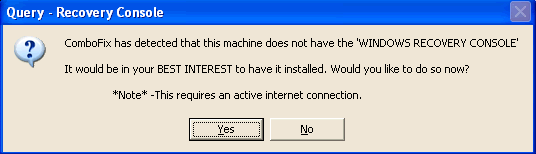
  • As part of it's process, ComboFix will check to see if the Microsoft Windows Recovery Console is installed. With malware infections being as they are today, it's strongly recommended to have this pre-installed on your machine before doing any malware removal. It will allow you to boot up into a special recovery/repair mode that will allow us to more easily help you should your computer have a problem after an attempted removal of malware.
  • Follow the prompts to allow ComboFix to download and install the Microsoft Windows Recovery Console, and when prompted, agree to the End-User License Agreement to install the Microsoft Windows Recovery Console.

**Please note: If the Microsoft Windows Recovery Console is already installed, ComboFix will continue it's malware removal procedures.

RcAuto1.gif

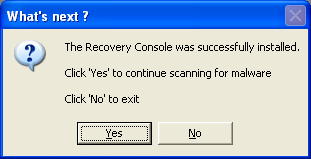
Once the Microsoft Windows Recovery Console is installed using ComboFix, you should see the following message:

whatnext.png


Click on Yes, to continue scanning for malware.

When finished, it shall produce a log for you. Please include the C:\ComboFix.txt in your next reply.

Note: Do not forget to re-enable your Anti-Virus application after running the above scan!

When completed the above, please post back the following in the order asked for:

  • How is you computer performing now, any other symptoms and or problems encountered?
  • Malwarebytes' Anti-Malware Log.
  • ComboFix Log.
  • A new HijackThis Log.
 
Hi Dakeyras :)

The comp is doing ok - it managed all the scans which I was happy with! It does seem a bit quieter as well.

The Malwarebytes scan needed the computer to be rebooted in order to delete everything, so the scan I display here is the one saved before the reboot - hope thats ok?

Combofix scan was fine, found and deleted some bad stuff I think.

Here are the scans in the order you wanted them...

First, the Malwarebytes log...


Malwarebytes' Anti-Malware 1.33
Database version: 1696
Windows 5.1.2600 Service Pack 3

26/01/2009 21:56:39
mbam-log-2009-01-26 (21-56-39).txt

Scan type: Full Scan (C:\|)
Objects scanned: 119020
Time elapsed: 1 hour(s), 4 minute(s), 52 second(s)

Memory Processes Infected: 0
Memory Modules Infected: 0
Registry Keys Infected: 12
Registry Values Infected: 1
Registry Data Items Infected: 1
Folders Infected: 0
Files Infected: 4

Memory Processes Infected:
(No malicious items detected)

Memory Modules Infected:
(No malicious items detected)

Registry Keys Infected:
HKEY_LOCAL_MACHINE\SOFTWARE\Microsoft\Windows\CurrentVersion\Explorer\Browser Helper Objects\{2b3cbdc2-8ab6-45b1-b59e-7b0dee595917} (Trojan.Vundo.H) -> Quarantined and deleted successfully.
HKEY_LOCAL_MACHINE\SOFTWARE\Microsoft\Windows NT\CurrentVersion\Winlogon\Notify\gebyxxu (Trojan.Vundo.H) -> Quarantined and deleted successfully.
HKEY_CLASSES_ROOT\CLSID\{2b3cbdc2-8ab6-45b1-b59e-7b0dee595917} (Trojan.Vundo.H) -> Quarantined and deleted successfully.
HKEY_CLASSES_ROOT\minibugtransporter.minibugtransporterx (Adware.Minibug) -> Quarantined and deleted successfully.
HKEY_CLASSES_ROOT\minibugtransporter.minibugtransporterx.1 (Adware.Minibug) -> Quarantined and deleted successfully.
HKEY_CLASSES_ROOT\Interface\{04a38f6b-006f-4247-ba4c-02a139d5531c} (Adware.Minibug) -> Quarantined and deleted successfully.
HKEY_CLASSES_ROOT\CLSID\{2b96d5cc-c5b5-49a5-a69d-cc0a30f9028c} (Adware.Minibug) -> Quarantined and deleted successfully.
HKEY_CLASSES_ROOT\Typelib\{3c2d2a1e-031f-4397-9614-87c932a848e0} (Adware.Minibug) -> Quarantined and deleted successfully.
HKEY_CURRENT_USER\SOFTWARE\Microsoft\Windows\CurrentVersion\Ext\Stats\{f10587e9-0e47-4cbe-84ae-7dd20b8684bb} (Trojan.BHO) -> Quarantined and deleted successfully.
HKEY_CURRENT_USER\SOFTWARE\Microsoft\Windows\CurrentVersion\Ext\Stats\{2b3cbdc2-8ab6-45b1-b59e-7b0dee595917} (Trojan.Vundo) -> Quarantined and deleted successfully.
HKEY_LOCAL_MACHINE\SOFTWARE\Microsoft\Windows NT\CurrentVersion\Winlogon\Notify\winmxw32 (Dialer) -> Quarantined and deleted successfully.
HKEY_LOCAL_MACHINE\SOFTWARE\Microsoft\FCOVM (Trojan.Vundo) -> Quarantined and deleted successfully.

Registry Values Infected:
HKEY_LOCAL_MACHINE\SOFTWARE\Microsoft\Windows\CurrentVersion\Explorer\ShellExecuteHooks\{2b3cbdc2-8ab6-45b1-b59e-7b0dee595917} (Trojan.Vundo) -> Quarantined and deleted successfully.

Registry Data Items Infected:
HKEY_CURRENT_USER\SOFTWARE\Microsoft\Windows\CurrentVersion\Explorer\Advanced\StartMenuLogOff (Hijack.StartMenu) -> Bad: (1) Good: (0) -> Quarantined and deleted successfully.

Folders Infected:
(No malicious items detected)

Files Infected:
C:\WINDOWS\system32\gebyxxu.dll (Trojan.Vundo.H) -> Quarantined and deleted successfully.
C:\WINDOWS\system32\ (Dialer) -> Delete on reboot.
C:\WINDOWS\cookies.ini (Malware.Trace) -> Quarantined and deleted successfully.
C:\WINDOWS\inf\ultra.PNF (Malware.Trace) -> Quarantined and deleted successfully.

Next, the combofix log...

ComboFix 09-01-21.04 - Oliver 2009-01-26 22:21:48.3 - NTFSx86
Microsoft Windows XP Home Edition 5.1.2600.3.1252.1.1033.18.478.185 [GMT 0:00]
Running from: c:\documents and settings\Oliver\Desktop\ComboFix.exe
AV: AVG Anti-Virus Free *On-access scanning disabled* (Updated)
FW: ZoneAlarm Firewall *disabled*
* Created a new restore point
.

((((((((((((((((((((((((((((((((((((((( Other Deletions )))))))))))))))))))))))))))))))))))))))))))))))))
.

c:\program files\Helper
c:\windows\IE4 Error Log.txt
c:\windows\jmmpqr.ini
c:\windows\oooopo.ini
c:\windows\portwa.ini
c:\windows\vvxbay.ini

.
((((((((((((((((((((((((( Files Created from 2008-12-26 to 2009-01-26 )))))))))))))))))))))))))))))))
.

2009-01-26 20:49 . 2009-01-26 20:49 <DIR> d-------- c:\program files\Malwarebytes' Anti-Malware
2009-01-26 20:49 . 2009-01-26 20:49 <DIR> d-------- c:\documents and settings\Oliver\Application Data\Malwarebytes
2009-01-26 20:49 . 2009-01-26 20:49 <DIR> d-------- c:\documents and settings\All Users\Application Data\Malwarebytes
2009-01-26 20:49 . 2009-01-14 16:11 38,496 --a------ c:\windows\system32\drivers\mbamswissarmy.sys
2009-01-26 20:49 . 2009-01-14 16:11 15,504 --a------ c:\windows\system32\drivers\mbam.sys
2009-01-23 09:42 . 2009-01-23 09:42 <DIR> d-------- c:\program files\Trend Micro
2009-01-23 09:37 . 2009-01-23 09:38 <DIR> d-------- c:\program files\ERUNT
2009-01-22 21:49 . 2009-01-22 21:49 <DIR> d-------- c:\documents and settings\Oliver\Application Data\dvdcss
2009-01-19 21:51 . 2009-01-26 22:11 <DIR> d-------- c:\windows\system32\drivers\Avg
2009-01-19 21:51 . 2009-01-19 21:51 <DIR> d-------- c:\program files\AVG
2009-01-19 21:51 . 2009-01-19 21:51 <DIR> d-------- c:\documents and settings\All Users\Application Data\avg8
2009-01-19 21:51 . 2009-01-19 21:51 97,928 --a------ c:\windows\system32\drivers\avgldx86.sys
2009-01-19 21:51 . 2009-01-19 21:51 10,520 --a------ c:\windows\system32\avgrsstx.dll
2009-01-11 13:23 . 2009-01-11 13:23 <DIR> d-------- c:\documents and settings\Oliver\Application Data\DivX
2009-01-11 13:20 . 2009-01-11 13:20 <DIR> d-------- c:\program files\DivX
2009-01-11 13:18 . 2009-01-11 13:18 <DIR> d-------- c:\documents and settings\Oliver\Application Data\ACD Systems
2009-01-11 13:17 . 2009-01-11 13:17 <DIR> d-------- c:\program files\Common Files\ACD Systems
2009-01-11 13:17 . 2009-01-11 13:17 <DIR> d-------- c:\program files\ACD Systems
2009-01-11 13:17 . 2009-01-11 13:17 <DIR> d-------- c:\documents and settings\All Users\Application Data\ACD Systems

.
(((((((((((((((((((((((((((((((((((((((( Find3M Report ))))))))))))))))))))))))))))))))))))))))))))))))))))
.
2009-01-26 22:29 23,572,512 --sha-w c:\windows\system32\drivers\fidbox.dat
2009-01-26 22:25 277,196 --sha-w c:\windows\system32\drivers\fidbox.idx
2009-01-26 20:35 --------- d-----w c:\documents and settings\Oliver\Application Data\uTorrent
2009-01-25 23:10 --------- d-----w c:\program files\Common Files\Symantec Shared
2009-01-19 21:52 --------- d-----w c:\documents and settings\All Users\Application Data\Grisoft
2008-12-24 15:40 --------- d-----w c:\program files\QuickTime
2008-12-23 19:10 --------- d-----w c:\documents and settings\Oliver\Application Data\vlc
2008-12-23 12:14 --------- d-----w c:\program files\Soulseek
2008-12-17 23:22 --------- d-----w c:\program files\Java
2008-12-17 23:01 --------- d-----w c:\program files\Common Files\Adobe AIR
2008-12-11 10:57 333,952 ----a-w c:\windows\system32\drivers\srv.sys
2007-02-22 00:05 4,322,304 ----a-w c:\program files\aawsepersonal.exe
2007-02-21 20:45 6,469,352 ----a-w c:\program files\avgas-setup-7.5.0.50.exe
2007-02-17 13:45 18,895,728 ----a-w c:\program files\Install_Messenger.exe
2007-01-05 14:21 244 ----a-w c:\documents and settings\Oliver\Application Data\wklnhst.dat
2006-06-01 09:24 937,001 ----a-w c:\program files\slsk156c.exe
2005-07-09 02:44 777 ----a-w c:\program files\trial_setup.ini
2005-07-09 02:44 5,137,920 ----a-w c:\program files\trial_setup.msi
2005-07-09 02:44 40,448 ----a-w c:\program files\trial_setup.exe
2004-11-14 14:25 44,032 ----a-w c:\documents and settings\Oliver\Application Data\iebar.dll
2007-08-02 19:24 88 --sha-r c:\windows\system32\CC6E208781.sys
2007-08-02 19:24 2,828 --sha-w c:\windows\system32\KGyGaAvL.sys
2008-10-24 20:09 32,768 --sha-w c:\windows\system32\config\systemprofile\Local Settings\History\History.IE5\MSHist012008102420081025\index.dat
.

((((((((((((((((((((((((((((((((((((((((((((( AWF ))))))))))))))))))))))))))))))))))))))))))))))))))))))))))
.
----a-w 180,269 2005-11-20 16:20:50 c:\program files\Common Files\Real\Update_OB\bak\realsched.exe

----a-w 110,592 2003-08-19 01:01:00 c:\program files\Common Files\Sonic\Update Manager\bak\sgtray.exe

----a-w 58,992 2005-03-23 14:34:32 c:\program files\Common Files\Symantec Shared\bak\ccApp.exe

----a-w 229,438 2004-10-13 17:34:48 c:\program files\HPQ\Default Settings\bak\cpqset.exe

----a-w 290,816 2004-09-17 16:19:42 c:\program files\HPQ\Quick Launch Buttons\bak\EabServr.exe

----a-w 1,040,384 2004-09-10 04:06:57 c:\program files\iRiver\Service\bak\MLService.exe

----a-w 212,992 2004-09-07 23:09:54 c:\program files\iRiver\Service\bak\Updater.exe

----a-w 32,881 2004-06-03 22:05:08 c:\program files\Java\j2re1.4.2_05\bin\bak\jusched.exe

----a-w 98,304 2004-12-14 04:59:58 c:\program files\QuickTime\bak\qttask.exe

----a-w 688,218 2004-10-05 16:24:28 c:\program files\Synaptics\SynTP\bak\SynTPEnh.exe

----a-w 98,394 2004-10-05 16:25:10 c:\program files\Synaptics\SynTP\bak\SynTPLpr.exe

----a-w 15,360 2004-08-04 08:00:00 c:\windows\system32\bak\ctfmon.exe
----a-w 15,360 2008-04-14 00:12:16 c:\windows\system32\ctfmon.exe

----a-w 118,784 2004-06-17 20:43:58 c:\windows\system32\bak\hkcmd.exe

----a-w 155,648 2004-06-17 20:48:08 c:\windows\system32\bak\igfxtray.exe

----a-w 340,480 2004-08-04 08:00:00 c:\windows\system32\bak\regscan.exe

.
((((((((((((((((((((((((((((((((((((( Reg Loading Points ))))))))))))))))))))))))))))))))))))))))))))))))))
.
.
*Note* empty entries & legit default entries are not shown
REGEDIT4

[HKEY_CURRENT_USER\SOFTWARE\Microsoft\Windows\CurrentVersion\Run]
"ctfmon.exe"="c:\windows\system32\ctfmon.exe" [2008-04-14 15360]
"kdx"="c:\program files\Kontiki\KHost.exe" [N/A]
"updateMgr"="c:\program files\Adobe\Acrobat 7.0\Reader\AdobeUpdateManager.exe" [N/A]

[HKEY_LOCAL_MACHINE\SOFTWARE\Microsoft\Windows\CurrentVersion\Run]
"SynTPLpr"="c:\program files\Synaptics\SynTP\SynTPLpr.exe" [N/A]
"SynTPEnh"="c:\program files\Synaptics\SynTP\SynTPEnh.exe" [N/A]
"eabconfg.cpl"="c:\program files\HPQ\Quick Launch Buttons\EabServr.exe" [N/A]
"Cpqset"="c:\program files\HPQ\Default Settings\cpqset.exe" [N/A]
"iRiver AutoDB"="c:\program files\iRiver\Service\MLService.exe" [N/A]
"iRiver Updater"="c:\program files\iRiver\Service\Updater.exe" [N/A]
"ISUSScheduler"="c:\program files\Common Files\InstallShield\UpdateService\issch.exe" [N/A]
"ZoneAlarm Client"="c:\program files\Zone Labs\ZoneAlarm\zlclient.exe" [2008-07-09 919016]
"WinampAgent"="c:\program files\Winamp\winampa.exe" [N/A]
"SunJavaUpdateSched"="c:\program files\Java\jre6\bin\jusched.exe" [2008-11-10 136600]

[HKEY_USERS\.DEFAULT\Software\Microsoft\Windows\CurrentVersion\Run]
"CTFMON.EXE"="c:\windows\system32\CTFMON.EXE" [2008-04-14 15360]

c:\documents and settings\Oliver\Start Menu\Programs\Startup\
ERUNT AutoBackup.lnk - c:\program files\ERUNT\AUTOBACK.EXE [2005-10-20 38912]

c:\documents and settings\All Users\Start Menu\Programs\Startup\
Adobe Reader Speed Launch.lnk - c:\program files\Adobe\Acrobat 7.0\Reader\reader_sl.exe [2005-09-23 29696]
ICON2 USB Connect.lnk - c:\program files\Orange\ICON2 USB Connect\ICON2 USB Connect.exe [2007-07-20 794624]

[HKEY_LOCAL_MACHINE\software\microsoft\windows nt\currentversion\drivers32]
"VIDC.SP54"= SP5X_32.DLL
"VIDC.SP55"= SP5X_32.DLL
"VIDC.SP56"= SP5X_32.DLL
"VIDC.SP57"= SP5X_32.DLL
"VIDC.SP58"= SP5X_32.DLL
"VIDC.ACDV"= ACDV.dll

[HKEY_LOCAL_MACHINE\software\microsoft\security center]
"AntiVirusDisableNotify"=dword:00000001

[HKEY_LOCAL_MACHINE\software\microsoft\security center\Monitoring\SymantecAntiVirus]
"DisableMonitoring"=dword:00000001

[HKEY_LOCAL_MACHINE\software\microsoft\security center\Monitoring\SymantecFirewall]
"DisableMonitoring"=dword:00000001

[HKEY_LOCAL_MACHINE\software\microsoft\security center\Monitoring\ZoneLabsFirewall]
"DisableMonitoring"=dword:00000001

[HKLM\~\services\sharedaccess\parameters\firewallpolicy\standardprofile]
"EnableFirewall"= 0 (0x0)

[HKLM\~\services\sharedaccess\parameters\firewallpolicy\standardprofile\AuthorizedApplications\List]
"c:\\WINDOWS\\system32\\ZoneLabs\\avsys\\ScanningProcess.exe"=
"c:\\Program Files\\uTorrent\\uTorrent.exe"=
"%windir%\\Network Diagnostic\\xpnetdiag.exe"=
"c:\\Program Files\\Skype\\Phone\\Skype.exe"=
"%windir%\\system32\\sessmgr.exe"=
"c:\\Program Files\\AVG\\AVG8\\avgupd.exe"=

R1 AvgLdx86;AVG Free AVI Loader Driver x86;c:\windows\system32\drivers\avgldx86.sys [2009-01-19 97928]
R3 GTMNDISIRPXP;GT M 3G+ IRP NDIS;c:\windows\system32\drivers\Gtm51Irp.sys [2007-04-14 122496]
R3 GTPTSER;GT PT SER;c:\windows\system32\drivers\gtptser.sys [2007-04-14 8064]
R3 GTUQBUS;GT UQ BUS;c:\windows\system32\drivers\gtuqbus.sys [2007-04-14 37120]
R4 avg8wd;AVG Free8 WatchDog;c:\progra~1\AVG\AVG8\avgwdsvc.exe [2009-01-19 231704]
R4 GtFlashSwitch;GtFlashSwitch;c:\program files\Common Files\GtFlashSwitch\GtFlashSwitch.exe [2007-02-09 176128]
S3 CA500AI;GSmart Mini Still Image Capture;c:\windows\system32\drivers\BULK2NM.sys [2005-11-30 11117]
S3 CA500AV;GSmart Mini WDM Video Capture;c:\windows\system32\drivers\ca500av.SYS [2005-11-30 492619]
S3 getPlus(R) Helper;getPlus(R) Helper;c:\program files\NOS\bin\getPlus_HelperSvc.exe [2008-11-12 33752]
S3 MLFILEM;MLFILEM;c:\windows\system32\drivers\MLFILEM.SYS [2006-01-14 28160]
.
- - - - ORPHANS REMOVED - - - -

BHO-{7219EFDE-CBF9-44F7-AC7D-7184B36B67E8} - c:\windows\system32\ssqro.dll


.
------- Supplementary Scan -------
.
uStart Page = hxxp://www.virginmedia.com
uInternet Connection Wizard,ShellNext = iexplore
uInternet Settings,ProxyOverride = *.local
IE: E&xport to Microsoft Excel - c:\progra~1\MICROS~3\OFFICE11\EXCEL.EXE/3000
Trusted Zone: gmail.com
Trusted Zone: google.com\mail
TCP: {4F4516B6-07A9-4585-B713-CDE1E708EC2B} = 192.168.0.4
TCP: {9BFC924E-05D2-4633-87F7-8BB32D8ACDEB} = 192.168.0.4
DPF: {DE625294-70E6-45ED-B895-CFFA13AEB044} - hxxp://85.235.16.146/activex/AMC.cab
FF - ProfilePath - c:\documents and settings\Oliver\Application Data\Mozilla\Firefox\Profiles\jvy67j0r.default\
FF - component: c:\program files\AVG\AVG8\Firefox\components\avgssff.dll
FF - plugin: c:\program files\Mozilla Firefox\plugins\np-mswmp.dll
.

**************************************************************************

catchme 0.3.1367 W2K/XP/Vista - rootkit/stealth malware detector by Gmer, http://www.gmer.net
Rootkit scan 2009-01-26 22:27:57
Windows 5.1.2600 Service Pack 3 NTFS

scanning hidden processes ...

scanning hidden autostart entries ...

scanning hidden files ...

scan completed successfully
hidden files: 0

**************************************************************************
.
------------------------ Other Running Processes ------------------------
.
c:\windows\system32\ZoneLabs\vsmon.exe
c:\program files\Lavasoft\Ad-Aware\aawservice.exe
c:\program files\Java\jre6\bin\jqs.exe
c:\program files\Common Files\Protexis\License Service\PSIService.exe
c:\progra~1\AVG\AVG8\avgrsx.exe
c:\windows\system32\wscntfy.exe
.
**************************************************************************
.
Completion time: 2009-01-26 22:34:05 - machine was rebooted [Oliver]
ComboFix-quarantined-files.txt 2009-01-26 22:33:58
ComboFix2.txt 2007-08-09 13:22:44

Pre-Run: 20,205,891,584 bytes free
Post-Run: 21,979,602,944 bytes free

WindowsXP-KB310994-SP2-Home-BootDisk-ENU.exe
[boot loader]
timeout=2
default=multi(0)disk(0)rdisk(0)partition(1)\WINDOWS
[operating systems]
c:\cmdcons\BOOTSECT.DAT="Microsoft Windows Recovery Console" /cmdcons
multi(0)disk(0)rdisk(0)partition(1)\WINDOWS="Microsoft Windows XP Home Edition" /noexecute=optin /fastdetect

197 --- E O F --- 2009-01-14 00:35:47

And finally a new HiJackThis log...

Logfile of Trend Micro HijackThis v2.0.2
Scan saved at 22:46:25, on 26/01/2009
Platform: Windows XP SP3 (WinNT 5.01.2600)
MSIE: Internet Explorer v7.00 (7.00.6000.16762)
Boot mode: Normal

Running processes:
C:\WINDOWS\System32\smss.exe
C:\WINDOWS\system32\winlogon.exe
C:\WINDOWS\system32\services.exe
C:\WINDOWS\system32\lsass.exe
C:\WINDOWS\system32\svchost.exe
C:\WINDOWS\System32\svchost.exe
C:\WINDOWS\system32\svchost.exe
C:\WINDOWS\system32\ZoneLabs\vsmon.exe
C:\Program Files\Lavasoft\Ad-Aware\aawservice.exe
C:\WINDOWS\system32\spoolsv.exe
C:\PROGRA~1\AVG\AVG8\avgwdsvc.exe
C:\Program Files\Common Files\GtFlashSwitch\GtFlashSwitch.exe
C:\Program Files\Java\jre6\bin\jqs.exe
C:\Program Files\Common Files\Protexis\License Service\PSIService.exe
C:\WINDOWS\system32\svchost.exe
C:\PROGRA~1\AVG\AVG8\avgrsx.exe
C:\Program Files\Zone Labs\ZoneAlarm\zlclient.exe
C:\Program Files\Java\jre6\bin\jusched.exe
C:\WINDOWS\system32\ctfmon.exe
C:\Program Files\Orange\ICON2 USB Connect\ICON2 USB Connect.exe
C:\WINDOWS\system32\wscntfy.exe
C:\WINDOWS\explorer.exe
C:\WINDOWS\system32\notepad.exe
C:\Program Files\Mozilla Firefox\firefox.exe
C:\WINDOWS\system32\NOTEPAD.EXE
C:\Program Files\Trend Micro\HijackThis\HijackThis.exe

R0 - HKCU\Software\Microsoft\Internet Explorer\Main,Start Page = http://www.virginmedia.com
R1 - HKLM\Software\Microsoft\Internet Explorer\Main,Default_Page_URL = http://go.microsoft.com/fwlink/?LinkId=69157
R1 - HKLM\Software\Microsoft\Internet Explorer\Main,Default_Search_URL = http://go.microsoft.com/fwlink/?LinkId=54896
R1 - HKLM\Software\Microsoft\Internet Explorer\Main,Search Page = http://go.microsoft.com/fwlink/?LinkId=54896
R0 - HKLM\Software\Microsoft\Internet Explorer\Main,Start Page = http://go.microsoft.com/fwlink/?LinkId=69157
R1 - HKCU\Software\Microsoft\Windows\CurrentVersion\Internet Settings,ProxyOverride = *.local
O2 - BHO: Adobe PDF Reader Link Helper - {06849E9F-C8D7-4D59-B87D-784B7D6BE0B3} - C:\Program Files\Adobe\Acrobat 7.0\ActiveX\AcroIEHelper.dll
O2 - BHO: WormRadar.com IESiteBlocker.NavFilter - {3CA2F312-6F6E-4B53-A66E-4E65E497C8C0} - C:\Program Files\AVG\AVG8\avgssie.dll
O2 - BHO: Spybot-S&D IE Protection - {53707962-6F74-2D53-2644-206D7942484F} - C:\PROGRA~1\SPYBOT~1\SDHelper.dll
O2 - BHO: Java(tm) Plug-In SSV Helper - {761497BB-D6F0-462C-B6EB-D4DAF1D92D43} - C:\Program Files\Java\jre6\bin\ssv.dll
O2 - BHO: (no name) - {BDF3E430-B101-42AD-A544-FADC6B084872} - (no file)
O2 - BHO: Java(tm) Plug-In 2 SSV Helper - {DBC80044-A445-435b-BC74-9C25C1C588A9} - C:\Program Files\Java\jre6\bin\jp2ssv.dll
O2 - BHO: JQSIEStartDetectorImpl - {E7E6F031-17CE-4C07-BC86-EABFE594F69C} - C:\Program Files\Java\jre6\lib\deploy\jqs\ie\jqs_plugin.dll
O2 - BHO: (no name) - {F0D4B231-DA4B-4daf-81E4-DFEE4931A4AA} - (no file)
O4 - HKLM\..\Run: [SynTPLpr] C:\Program Files\Synaptics\SynTP\SynTPLpr.exe
O4 - HKLM\..\Run: [SynTPEnh] C:\Program Files\Synaptics\SynTP\SynTPEnh.exe
O4 - HKLM\..\Run: [eabconfg.cpl] C:\Program Files\HPQ\Quick Launch Buttons\EabServr.exe /Start
O4 - HKLM\..\Run: [Cpqset] C:\Program Files\HPQ\Default Settings\cpqset.exe
O4 - HKLM\..\Run: [iRiver AutoDB] C:\Program Files\iRiver\Service\MLService.exe
O4 - HKLM\..\Run: [iRiver Updater] C:\Program Files\iRiver\Service\Updater.exe
O4 - HKLM\..\Run: [ISUSScheduler] "C:\Program Files\Common Files\InstallShield\UpdateService\issch.exe" -start
O4 - HKLM\..\Run: [ZoneAlarm Client] "C:\Program Files\Zone Labs\ZoneAlarm\zlclient.exe"
O4 - HKLM\..\Run: [WinampAgent] "C:\Program Files\Winamp\winampa.exe"
O4 - HKLM\..\Run: [SunJavaUpdateSched] "C:\Program Files\Java\jre6\bin\jusched.exe"
O4 - HKCU\..\Run: [ctfmon.exe] C:\WINDOWS\system32\ctfmon.exe
O4 - HKCU\..\Run: [kdx] C:\Program Files\Kontiki\KHost.exe -all
O4 - HKCU\..\Run: [updateMgr] "C:\Program Files\Adobe\Acrobat 7.0\Reader\AdobeUpdateManager.exe" AcRdB7_0_9 -reboot 1
O4 - HKUS\S-1-5-18\..\Run: [CTFMON.EXE] C:\WINDOWS\system32\CTFMON.EXE (User 'SYSTEM')
O4 - HKUS\.DEFAULT\..\Run: [CTFMON.EXE] C:\WINDOWS\system32\CTFMON.EXE (User 'Default user')
O4 - Startup: ERUNT AutoBackup.lnk = C:\Program Files\ERUNT\AUTOBACK.EXE
O4 - Global Startup: Adobe Reader Speed Launch.lnk = C:\Program Files\Adobe\Acrobat 7.0\Reader\reader_sl.exe
O4 - Global Startup: ICON2 USB Connect.lnk = C:\Program Files\Orange\ICON2 USB Connect\ICON2 USB Connect.exe
O8 - Extra context menu item: E&xport to Microsoft Excel - res://C:\PROGRA~1\MICROS~3\OFFICE11\EXCEL.EXE/3000
O9 - Extra button: Research - {92780B25-18CC-41C8-B9BE-3C9C571A8263} - C:\PROGRA~1\MICROS~3\OFFICE11\REFIEBAR.DLL
O9 - Extra button: (no name) - {DFB852A3-47F8-48C4-A200-58CAB36FD2A2} - C:\PROGRA~1\SPYBOT~1\SDHelper.dll
O9 - Extra 'Tools' menuitem: Spybot - Search & Destroy Configuration - {DFB852A3-47F8-48C4-A200-58CAB36FD2A2} - C:\PROGRA~1\SPYBOT~1\SDHelper.dll
O9 - Extra button: (no name) - {e2e2dd38-d088-4134-82b7-f2ba38496583} - C:\WINDOWS\Network Diagnostic\xpnetdiag.exe
O9 - Extra 'Tools' menuitem: @xpsp3res.dll,-20001 - {e2e2dd38-d088-4134-82b7-f2ba38496583} - C:\WINDOWS\Network Diagnostic\xpnetdiag.exe
O9 - Extra button: Messenger - {FB5F1910-F110-11d2-BB9E-00C04F795683} - C:\Program Files\Messenger\msmsgs.exe
O9 - Extra 'Tools' menuitem: Windows Messenger - {FB5F1910-F110-11d2-BB9E-00C04F795683} - C:\Program Files\Messenger\msmsgs.exe
O14 - IERESET.INF: START_PAGE_URL=http://ie.redirect.hp.com/svs/rdr?TYPE=3&tp=iehome&locale=EN_GB&c=Q105&bd=presario&pf=laptop
O16 - DPF: {17492023-C23A-453E-A040-C7C580BBF700} (Windows Genuine Advantage Validation Tool) - http://go.microsoft.com/fwlink/?linkid=39204
O16 - DPF: {6414512B-B978-451D-A0D8-FCFDF33E833C} (WUWebControl Class) - http://www.update.microsoft.com/mic...ls/en/x86/client/wuweb_site.cab?1186598090046
O16 - DPF: {6E32070A-766D-4EE6-879C-DC1FA91D2FC3} (MUWebControl Class) - http://www.update.microsoft.com/mic...ls/en/x86/client/muweb_site.cab?1186598075984
O16 - DPF: {7B297BFD-85E4-4092-B2AF-16A91B2EA103} (WScanCtl Class) - http://www.ca.com/us/securityadvisor/virusinfo/webscan.cab
O16 - DPF: {917623D1-D8E5-11D2-BE8B-00104B06BDE3} (CamImage Class) - http://handy-wf.de:8080/activex/AxisCamControl.cab
O16 - DPF: {CAFEEFAC-0016-0000-0002-ABCDEFFEDCBA} (Java Plug-in 1.6.0_02) -
O16 - DPF: {CAFEEFAC-0016-0000-0003-ABCDEFFEDCBA} (Java Plug-in 1.6.0_03) -
O16 - DPF: {CAFEEFAC-0016-0000-0010-ABCDEFFEDCBA} (Java Plug-in 1.6.0_10) -
O16 - DPF: {DE625294-70E6-45ED-B895-CFFA13AEB044} (AxisMediaControlEmb Class) - http://85.235.16.146/activex/AMC.cab
O17 - HKLM\System\CCS\Services\Tcpip\..\{4F4516B6-07A9-4585-B713-CDE1E708EC2B}: NameServer = 192.168.0.4
O17 - HKLM\System\CCS\Services\Tcpip\..\{9BFC924E-05D2-4633-87F7-8BB32D8ACDEB}: NameServer = 192.168.0.4
O17 - HKLM\System\CS2\Services\Tcpip\..\{31732A7F-D9B9-4B53-9CCC-01D88E18486B}: NameServer = 192.168.0.1
O18 - Protocol: linkscanner - {F274614C-63F8-47D5-A4D1-FBDDE494F8D1} - C:\Program Files\AVG\AVG8\avgpp.dll
O18 - Protocol: skype4com - {FFC8B962-9B40-4DFF-9458-1830C7DD7F5D} - C:\PROGRA~1\COMMON~1\Skype\SKYPE4~1.DLL
O23 - Service: Lavasoft Ad-Aware Service (aawservice) - Lavasoft - C:\Program Files\Lavasoft\Ad-Aware\aawservice.exe
O23 - Service: AVG Free8 WatchDog (avg8wd) - AVG Technologies CZ, s.r.o. - C:\PROGRA~1\AVG\AVG8\avgwdsvc.exe
O23 - Service: getPlus(R) Helper - NOS Microsystems Ltd. - C:\Program Files\NOS\bin\getPlus_HelperSvc.exe
O23 - Service: GtFlashSwitch - OptionNV - C:\Program Files\Common Files\GtFlashSwitch\GtFlashSwitch.exe
O23 - Service: HP WMI Interface (hpqwmi) - Hewlett-Packard Development Company, L.P. - C:\Program Files\HPQ\SHARED\HPQWMI.exe
O23 - Service: Java Quick Starter (JavaQuickStarterService) - Sun Microsystems, Inc. - C:\Program Files\Java\jre6\bin\jqs.exe
O23 - Service: ProtexisLicensing - Unknown owner - C:\Program Files\Common Files\Protexis\License Service\PSIService.exe
O23 - Service: TrueVector Internet Monitor (vsmon) - Zone Labs, LLC - C:\WINDOWS\system32\ZoneLabs\vsmon.exe

--
End of file - 8092 bytes

Hope this helps again :)
 
Hi :)

The comp is doing ok - it managed all the scans which I was happy with! It does seem a bit quieter as well.
:bigthumb:

The Malwarebytes scan needed the computer to be rebooted in order to delete everything, so the scan I display here is the one saved before the reboot - hope thats ok?
That is fine thank you for informing myself.

Combofix scan was fine, found and deleted some bad stuff I think.
OK, it appears this is the third time ComboFix has been run on this system. An old Combofix report is present on your system it should be located at:
C:\ComboFix2.txt
The actual creation date for the aforementioned log is 2007-08-09 13:22:44

Could you post this log in your next reply please as I would like to view it and could you confirm if you have received Anti-Malware assistance in the past or not. This nothing to be concerned about OK. As I merely wish to check what/if any infections were present in the past as a precaution.

I have a further inquiry regarding a the possibility you have ran a online scan with Kaspersky. There is indication this may very well be the case, can you confirm for myself if this is the case or not and if so why did you run this scan ?

If I may recall your attention to my first post to your good-self:
Refrain from running self fixes as this will hinder the malware removal process.

Peer To Peer Applications:

If may bring to your attention the forum policy about these applications: File Sharing, otherwise known as Peer To Peer. (P2P)

Specifically this post. Recent scans have revealed traces of the aforementioned applications which I will be removing after we have carried out my next set of tasks. If in the meantime you have installed any of these applications since we began the malware removal process, please remove them, thank you.

OK we are making a good in-roads to getting your system clean but I wish to run a few more scans to determine the correct course of action before proceeding with the malware removal process as follows.

Next:

Click here to download FindAWF.exe and save it to your desktop.
  • Double-click on the FindAWF.exe file to run it.
  • It will open a command prompt and ask you to Press any key to continue.
  • Press 1 and then Enter, and the FindAWF tool will begin scanning your computer for the infected AWF files and the backups the trojan created.
  • It may take a few minutes to complete so be patient.
  • When it is complete, it will open a text file in notepad called AWF.txt which will automatically be saved to your desktop or to the same location as FindAWF.exe.
  • Copy and paste the contents of the AWF.txt file in your next reply.
Next:

Download Rooter.exe to your desktop.
  • Then double-click it to start the tool.
  • A Notepad file containing the report will open, also found at %systemdrive%\Rooter.txt. Post that here.
When completed the above, please post back the following in the order asked for:

  • ComboFix2.txt
  • Answer to my Kaspersky query.
  • AWF.txt.
  • Rooter.txt.
  • A new HijackThis Log.
 
Hey Dakeyras

Yes I have used the assistance on this site once before for this computer when I first got it (and once for my parent's computer - but that went kaput anyway). Have not had a problem since the first time I came here.
Here is a link from the first time.

Yes I was asked to run a scan with Kaspersky when I first came on this site.

Like it says on this site - I dont go anywhere near Vundofix, Combofix, Kaspersky, etc normally!

I haven't installed any kind of p2p since we started this process no. I have removed uTorrent as you asked.

Here's the Combofix2 log: You'll notice the time of the log you requested is different to the time on the log in that named file on my machine. Not sure why this is?


ComboFix 07-08-09.3 - "Oliver" 2007-08-09 13:31:05.1 - NTFSx86
Microsoft Windows XP Home Edition 5.1.2600.2.1252.1.1033.18.182 [GMT 1:00]
* Created a new restore point


((((((((((((((((((((((((((((((((((((((( Other Deletions )))))))))))))))))))))))))))))))))))))))))))))))))


C:\DOCUME~1\Oliver\APPLIC~1.\macromedia\Flash Player\#SharedObjects\CQ4QZTMP\www.broadcaster.com
C:\DOCUME~1\Oliver\APPLIC~1.\macromedia\Flash Player\macromedia.com\support\flashplayer\sys\#www.broadcaster.com
C:\DOCUME~1\Oliver\APPLIC~1.\macromedia\Flash Player\macromedia.com\support\flashplayer\sys\#www.broadcaster.com\settings.sol
C:\DOCUME~1\Oliver\APPLIC~1\tmp1.tmp.exe
C:\DOCUME~1\Oliver\APPLIC~1\tmp2.tmp.exe
C:\DOCUME~1\Oliver\APPLIC~1\tmp3.tmp.exe
C:\DOCUME~1\Oliver\APPLIC~1\tmp30E7.tmp.exe
C:\DOCUME~1\Oliver\APPLIC~1\tmp30E9.tmp.exe
C:\WINDOWS\system32\dn428972d1.dat
C:\WINDOWS\system32\geebcda.dll
C:\WINDOWS\system32\ldinfo.ldr
C:\WINDOWS\system32\lz3ega.dll
C:\WINDOWS\system32\qwerty12.exe
C:\WINDOWS\system32\tmp30E9.tmp.dll


((((((((((((((((((((((((((((((((((((((( Drivers/Services )))))))))))))))))))))))))))))))))))))))))))))))))


-------\LEGACY_DOMAINSERVICE
-------\DomainService


((((((((((((((((((((((((( Files Created from 2007-07-09 to 2007-08-09 )))))))))))))))))))))))))))))))


2007-08-09 13:29 51,200 --a------ C:\WINDOWS\nircmd.exe
2007-08-09 13:25 24,576 --a------ C:\WINDOWS\system32\VundoFixSVC.exe
2007-08-09 13:10 <DIR> d-------- C:\VundoFix Backups
2007-08-09 08:53 <DIR> d-------- C:\Program Files\Microsoft CAPICOM 2.1.0.2
2007-08-09 08:47 <DIR> d-------- C:\Program Files\MSXML 4.0
2007-08-09 08:46 23,040 --------- C:\WINDOWS\system32\dllcache\fltmc.exe
2007-08-09 08:46 16,896 --------- C:\WINDOWS\system32\dllcache\fltlib.dll
2007-08-09 08:46 128,896 --------- C:\WINDOWS\system32\dllcache\fltmgr.sys
2007-08-08 19:45 22,752 --a------ C:\WINDOWS\system32\spupdsvc.exe
2007-08-08 19:45 <DIR> d-------- C:\WINDOWS\system32\PreInstall
2007-08-08 19:36 271,224 --a------ C:\WINDOWS\system32\mucltui.dll
2007-08-08 19:35 43,352 --a------ C:\WINDOWS\system32\wups2.dll
2007-08-08 19:35 <DIR> d-------- C:\WINDOWS\system32\SoftwareDistribution
2007-08-08 00:19 <DIR> d-------- C:\DOCUME~1\ALLUSE~1\APPLIC~1\Spybot - Search & Destroy
2007-08-05 19:01 25,664 --a------ C:\WINDOWS\system32\uibrN100.exe
2007-07-31 18:16 <DIR> d-------- C:\WINDOWS\pss
2007-07-19 09:22 <DIR> d-------- C:\Program Files\7-Zip
2007-07-18 08:00 44,032 --a------ C:\DOCUME~1\Oliver\APPLIC~1\iebar.dll
2007-07-12 18:51 88 -r-hs---- C:\WINDOWS\system32\CC6E208781.sys
2007-07-12 18:51 <DIR> d-------- C:\DOCUME~1\Oliver\APPLIC~1\Corel
2007-07-11 17:17 <DIR> d-------- C:\DOCUME~1\ALLUSE~1\APPLIC~1\InstallShield
2007-07-11 17:15 <DIR> d-------- C:\Program Files\Common Files\Protexis
2007-07-11 17:15 <DIR> d-------- C:\Program Files\Common Files\Corel
2007-07-11 17:15 <DIR> d-------- C:\DOCUME~1\ALLUSE~1\APPLIC~1\Corel
2007-07-11 17:13 2,828 --ahs---- C:\WINDOWS\system32\KGyGaAvL.sys


(((((((((((((((((((((((((((((((((((((((( Find3M Report ))))))))))))))))))))))))))))))))))))))))))))))))))))

2007-08-09 11:11 --------- d-------- C:\Program Files\Common Files\Symantec Shared
2007-08-05 19:01 --------- d-------- C:\Program Files\Winamp
2007-08-03 00:17 --------- d-------- C:\Program Files\Soulseek
2007-07-11 17:17 --------- d-------- C:\Program Files\Common Files\InstallShield
2007-05-16 16:12 86528 --------- C:\WINDOWS\system32\dllcache\directdb.dll
2007-05-16 16:12 85504 --------- C:\WINDOWS\system32\dllcache\wabimp.dll
2007-05-16 16:12 683520 --a------ C:\WINDOWS\system32\inetcomm.dll
2007-05-16 16:12 683520 --------- C:\WINDOWS\system32\dllcache\inetcomm.dll
2007-05-16 16:12 510976 --------- C:\WINDOWS\system32\dllcache\wab32.dll
2007-05-16 16:12 1314816 --------- C:\WINDOWS\system32\dllcache\msoe.dll
2007-02-22 01:05 4322304 --a------ C:\Program Files\aawsepersonal.exe
2007-02-21 21:45 6469352 --a------ C:\Program Files\avgas-setup-7.5.0.50.exe
2007-02-17 14:45 18895728 --a------ C:\Program Files\Install_Messenger.exe
2007-01-05 15:21 244 --a------ C:\DOCUME~1\Oliver\APPLIC~1\wklnhst.dat
2006-06-01 10:24 937001 --a------ C:\Program Files\slsk156c.exe
2005-07-09 03:44 777 --a------ C:\Program Files\trial_setup.ini
2005-07-09 03:44 5137920 --a------ C:\Program Files\trial_setup.msi
2005-07-09 03:44 40448 --a------ C:\Program Files\trial_setup.exe


((((((((((((((((((((((((((((((((((((( Reg Loading Points ))))))))))))))))))))))))))))))))))))))))))))))))))


*Note* empty entries & legit default entries are not shown

[HKEY_LOCAL_MACHINE\SOFTWARE\Microsoft\Windows\CurrentVersion\Run]
"SynTPLpr"="C:\Program Files\Synaptics\SynTP\SynTPLpr.exe" []
"SynTPEnh"="C:\Program Files\Synaptics\SynTP\SynTPEnh.exe" []
"eabconfg.cpl"="C:\Program Files\HPQ\Quick Launch Buttons\EabServr.exe" []
"Cpqset"="C:\Program Files\HPQ\Default Settings\cpqset.exe" []
"iRiver AutoDB"="C:\Program Files\iRiver\Service\MLService.exe" []
"iRiver Updater"="C:\Program Files\iRiver\Service\Updater.exe" []
"SunJavaUpdateSched"="C:\Program Files\Java\jre1.6.0_01\bin\jusched.exe" [2007-03-14 03:43]
"ISUSPM Startup"="C:\PROGRA~1\COMMON~1\INSTAL~1\UPDATE~1\ISUSPM.exe" [2005-02-16 16:15]
"ISUSScheduler"="C:\Program Files\Common Files\InstallShield\UpdateService\issch.exe" [2005-02-16 16:15]
"ccApp"="C:\Program Files\Common Files\Symantec Shared\ccApp.exe" [2004-08-14 10:17]

[HKEY_CURRENT_USER\SOFTWARE\Microsoft\Windows\CurrentVersion\Run]
"ctfmon.exe"="C:\WINDOWS\system32\ctfmon.exe" [2004-08-04 14:00]

[HKEY_LOCAL_MACHINE\software\microsoft\windows nt\currentversion\winlogon\notify\c_8tui]
c_8tui.dll

R1 eabfiltr;EABFiltr;\??\C:\WINDOWS\system32\drivers\EABFiltr.sys
R1 WmiAcpi;Microsoft Windows Management Interface for ACPI;C:\WINDOWS\system32\DRIVERS\wmiacpi.sys
R3 CAMCAUD;Conexant AMC 3D Environmental Audio;C:\WINDOWS\system32\drivers\camcaud.sys
R3 CAMCHALA;CAMCHALA;C:\WINDOWS\system32\drivers\camchal.sys
R3 HSFHWICH;HSFHWICH;C:\WINDOWS\system32\DRIVERS\HSFHWICH.sys
R3 RTL8023xp;Realtek RTL8139/810x/8169/8110 all in one NDIS XP Driver;C:\WINDOWS\system32\DRIVERS\Rtlnicxp.sys
R3 sdbus;sdbus;C:\WINDOWS\system32\DRIVERS\sdbus.sys
R3 tifm21;tifm21;C:\WINDOWS\system32\drivers\tifm21.sys
R3 w29n51;Intel(R) PRO/Wireless 2200BG Network Connection Driver for Windows XP;C:\WINDOWS\system32\DRIVERS\w29n51.sys
S3 CA500AI;GSmart Mini Still Image Capture;C:\WINDOWS\system32\Drivers\BULK2NM.sys
S3 CA500AV;GSmart Mini WDM Video Capture;C:\WINDOWS\system32\DRIVERS\CA500AV.SYS
S3 eabusb;eabusb;\??\C:\WINDOWS\system32\drivers\eabusb.sys
S3 MLFILEM;MLFILEM;\??\C:\WINDOWS\system32\drivers\MLFILEM.SYS
S3 ss_bus;Samsung Mobile USB Device 1.0 driver (WDM);C:\WINDOWS\system32\DRIVERS\ss_bus.sys
S3 ss_mdfl;SAMSUNG Mobile USB Modem 1.0 Filter;C:\WINDOWS\system32\DRIVERS\ss_mdfl.sys
S3 ss_mdm;SAMSUNG Mobile USB Modem 1.0 Drivers;C:\WINDOWS\system32\DRIVERS\ss_mdm.sys


Contents of the 'Scheduled Tasks' folder
2007-08-07 23:01:01 C:\WINDOWS\Tasks\At1.job
2007-08-09 08:01:00 C:\WINDOWS\Tasks\At10.job - C:\WINDOWS\system32\uibrN100.exe
2007-08-08 09:01:01 C:\WINDOWS\Tasks\At11.job
2007-08-09 10:01:56 C:\WINDOWS\Tasks\At12.job - C:\WINDOWS\system32\uibrN100.exe
2007-08-09 11:01:00 C:\WINDOWS\Tasks\At13.job - C:\WINDOWS\system32\uibrN100.exe
2007-08-09 12:01:00 C:\WINDOWS\Tasks\At14.job - C:\WINDOWS\system32\uibrN100.exe
2007-08-05 18:01:21 C:\WINDOWS\Tasks\At15.job - C:\WINDOWS\system32\uibrN100.exe
2007-08-05 18:01:21 C:\WINDOWS\Tasks\At16.job - C:\WINDOWS\system32\uibrN100.exe
2007-08-05 18:01:21 C:\WINDOWS\Tasks\At17.job
2007-08-05 18:01:21 C:\WINDOWS\Tasks\At18.job - C:\WINDOWS\system32\uibrN100.exe
2007-08-08 17:01:01 C:\WINDOWS\Tasks\At19.job - C:\WINDOWS\system32\uibrN100.exe
2007-08-08 00:01:56 C:\WINDOWS\Tasks\At2.job - C:\WINDOWS\system32\uibrN100.exe
2007-08-08 18:02:03 C:\WINDOWS\Tasks\At20.job - C:\WINDOWS\system32\uibrN100.exe
2007-08-08 19:01:58 C:\WINDOWS\Tasks\At21.job - C:\WINDOWS\system32\uibrN100.exe
2007-08-06 20:01:02 C:\WINDOWS\Tasks\At22.job - C:\WINDOWS\system32\uibrN100.exe
2007-08-05 21:01:00 C:\WINDOWS\Tasks\At23.job - C:\WINDOWS\system32\uibrN100.exe
2007-08-06 22:01:01 C:\WINDOWS\Tasks\At24.job - C:\WINDOWS\system32\uibrN100.exe
2007-08-08 01:01:00 C:\WINDOWS\Tasks\At3.job - C:\WINDOWS\system32\uibrN100.exe
2007-08-05 18:01:21 C:\WINDOWS\Tasks\At4.job - C:\WINDOWS\system32\uibrN100.exe
2007-08-05 18:01:21 C:\WINDOWS\Tasks\At5.job - C:\WINDOWS\system32\uibrN100.exe
2007-08-05 18:01:21 C:\WINDOWS\Tasks\At6.job - C:\WINDOWS\system32\uibrN100.exe
2007-08-05 18:01:21 C:\WINDOWS\Tasks\At7.job - C:\WINDOWS\system32\uibrN100.exe
2007-08-05 18:01:21 C:\WINDOWS\Tasks\At8.job - C:\WINDOWS\system32\uibrN100.exe
2007-08-05 18:01:21 C:\WINDOWS\Tasks\At9.job - C:\WINDOWS\system32\uibrN100.exe
2007-08-03 19:00:39 C:\WINDOWS\Tasks\Norton AntiVirus - Scan my computer - Oliver.job - C:\PROGRA~1\NORTON~1\Navw32.exe
2005-08-23 22:52:51 C:\WINDOWS\Tasks\Symantec NetDetect.job - C:\Program Files\Symantec\LiveUpdate\NDETECT.EXE

**************************************************************************

catchme 0.3.1061 W2K/XP/Vista - rootkit/stealth malware detector by Gmer, http://www.gmer.net
Rootkit scan 2007-08-09 13:35:47
Windows 5.1.2600 Service Pack 2 NTFS

scanning hidden processes ...

scanning hidden registry entries ...

scanning hidden files ...

scan completed successfully
hidden files: 0

**************************************************************************

Completion time: 2007-08-09 13:37:40 - machine was rebooted
C:\ComboFix-quarantined-files.txt ... 2007-08-09 13:37

--- E O F ---


Next, the AWF log:


Find AWF report by noahdfear ©2006
Version 1.40

The current date is: 27/01/2009
The current time is: 22:01:22.78


bak folders found
~~~~~~~~~~~


Directory of C:\PROGRA~1\MSNMES~1\BAK

0 File(s) 0 bytes

Directory of C:\PROGRA~1\QUICKT~1\BAK

14/12/2004 04:59 98,304 qttask.exe
1 File(s) 98,304 bytes

Directory of C:\WINDOWS\SYSTEM32\BAK

04/08/2004 08:00 15,360 ctfmon.exe
17/06/2004 20:43 118,784 hkcmd.exe
17/06/2004 20:48 155,648 igfxtray.exe
04/08/2004 08:00 340,480 regscan.exe
4 File(s) 630,272 bytes

Directory of C:\PROGRA~1\COMMON~1\SYMANT~1\BAK

23/03/2005 14:34 58,992 ccApp.exe
1 File(s) 58,992 bytes

Directory of C:\PROGRA~1\HPQ\DEFAUL~1\BAK

13/10/2004 17:34 229,438 cpqset.exe
1 File(s) 229,438 bytes

Directory of C:\PROGRA~1\HPQ\QUICKL~1\BAK

17/09/2004 16:19 290,816 EabServr.exe
1 File(s) 290,816 bytes

Directory of C:\PROGRA~1\IRIVER\SERVICE\BAK

10/09/2004 04:06 1,040,384 MLService.exe
07/09/2004 23:09 212,992 Updater.exe
2 File(s) 1,253,376 bytes

Directory of C:\PROGRA~1\SYNAPT~1\SYNTP\BAK

05/10/2004 16:24 688,218 SynTPEnh.exe
05/10/2004 16:25 98,394 SynTPLpr.exe
2 File(s) 786,612 bytes

Directory of C:\PROGRA~1\COMMON~1\REAL\UPDATE~1\BAK

20/11/2005 16:20 180,269 realsched.exe
1 File(s) 180,269 bytes

Directory of C:\PROGRA~1\COMMON~1\SONIC\UPDATE~1\BAK

19/08/2003 01:01 110,592 sgtray.exe
1 File(s) 110,592 bytes

Directory of C:\PROGRA~1\JAVA\J2RE14~1.2_0\BIN\BAK

03/06/2004 22:05 32,881 jusched.exe
1 File(s) 32,881 bytes


Duplicate files of bak directory contents
~~~~~~~~~~~~~~~~~~~~~~~

98304 14 Dec 2004 "C:\Program Files\QuickTime\bak\qttask.exe"
15360 14 Apr 2008 "C:\WINDOWS\system32\ctfmon.exe"
15360 4 Aug 2004 "C:\WINDOWS\system32\bak\ctfmon.exe"
118784 17 Jun 2004 "C:\swsetup\Video\hkcmd.exe"
118784 17 Jun 2004 "C:\swsetup\Video\Win2000\hkcmd.exe"
118784 17 Jun 2004 "C:\WINDOWS\system32\bak\hkcmd.exe"
155648 17 Jun 2004 "C:\swsetup\Video\igfxtray.exe"
155648 17 Jun 2004 "C:\swsetup\Video\Win2000\igfxtray.exe"
155648 17 Jun 2004 "C:\WINDOWS\system32\bak\igfxtray.exe"
340480 4 Aug 2004 "C:\WINDOWS\system32\bak\regscan.exe"
58992 23 Mar 2005 "C:\Program Files\Common Files\Symantec Shared\bak\ccApp.exe"
58488 14 Aug 2004 "C:\swsetup\NAV05\02\Support\ccCommon\ccCommon\ccApp.exe"
58488 14 Aug 2004 "C:\swsetup\NAV05\37\Support\ccCommon\ccCommon\ccApp.exe"
58488 14 Aug 2004 "C:\swsetup\NAV05\US\Support\ccCommon\ccCommon\ccApp.exe"
229438 13 Oct 2004 "C:\Program Files\HPQ\Default Settings\bak\cpqset.exe"
290816 17 Sep 2004 "C:\Program Files\HPQ\Quick Launch Buttons\bak\EabServr.exe"
1040384 10 Sep 2004 "C:\Program Files\iRiver\Service\bak\MLService.exe"
242168 17 Dec 2008 "C:\Program Files\Mozilla Firefox\updater.exe"
212992 7 Sep 2004 "C:\Program Files\iRiver\Service\bak\Updater.exe"
688218 5 Oct 2004 "C:\swsetup\Touchpad\SynTPEnh.exe"
688218 5 Oct 2004 "C:\Program Files\Synaptics\SynTP\bak\SynTPEnh.exe"
688218 5 Oct 2004 "C:\Program Files\Synaptics\SynTP\Media\SynTPEnh.exe"
98394 5 Oct 2004 "C:\swsetup\Touchpad\SynTPLpr.exe"
98394 5 Oct 2004 "C:\Program Files\Synaptics\SynTP\bak\SynTPLpr.exe"
98394 5 Oct 2004 "C:\Program Files\Synaptics\SynTP\Media\SynTPLpr.exe"
180269 20 Nov 2005 "C:\Program Files\Common Files\Real\Update_OB\bak\realsched.exe"
110592 19 Aug 2003 "C:\Program Files\Common Files\Sonic\Update Manager\bak\sgtray.exe"
136600 10 Nov 2008 "C:\Program Files\Java\jre6\bin\jusched.exe"
32881 3 Jun 2004 "C:\Program Files\Java\j2re1.4.2_05\bin\bak\jusched.exe"


end of report


Next, the rooter text:

Microsoft Windows XP Home Edition ( v5.1.2600 ) Service Pack 3
X86-based PC ( Uniprocessor Free : Intel(R) Pentium(R) M processor 1.50GHz )
BIOS : Phoenix NoteBIOS 4.0 Release 6.0
USER : Oliver ( Administrator )
BOOT : Normal boot

Antivirus : AVG Anti-Virus Free 8.0 (Activated)
Firewall : ZoneAlarm Firewall 7.0.483.000 (Activated)

C:\ (Local Disk) - NTFS - Total:55 Go (Free:17 Go)
D:\ (CD or DVD)

27/01/2009|22:07

----------------------\\ Search..

No infections found !


1 - "C:\Rooter$\Rooter_1.txt" - 27/01/2009|22:08

----------------------\\ Scan completed at 22:08


And finally a new HiJackThis log...


Logfile of Trend Micro HijackThis v2.0.2
Scan saved at 22:09:39, on 27/01/2009
Platform: Windows XP SP3 (WinNT 5.01.2600)
MSIE: Internet Explorer v7.00 (7.00.6000.16762)
Boot mode: Normal

Running processes:
C:\WINDOWS\System32\smss.exe
C:\WINDOWS\system32\winlogon.exe
C:\WINDOWS\system32\services.exe
C:\WINDOWS\system32\lsass.exe
C:\WINDOWS\system32\svchost.exe
C:\WINDOWS\System32\svchost.exe
C:\WINDOWS\system32\svchost.exe
C:\WINDOWS\system32\ZoneLabs\vsmon.exe
C:\WINDOWS\Explorer.EXE
C:\Program Files\Lavasoft\Ad-Aware\aawservice.exe
C:\WINDOWS\system32\spoolsv.exe
C:\PROGRA~1\AVG\AVG8\avgwdsvc.exe
C:\Program Files\Common Files\GtFlashSwitch\GtFlashSwitch.exe
C:\Program Files\Java\jre6\bin\jqs.exe
C:\Program Files\Common Files\Protexis\License Service\PSIService.exe
C:\WINDOWS\system32\svchost.exe
C:\PROGRA~1\AVG\AVG8\avgrsx.exe
C:\Program Files\Zone Labs\ZoneAlarm\zlclient.exe
C:\Program Files\Java\jre6\bin\jusched.exe
C:\WINDOWS\system32\ctfmon.exe
C:\Program Files\Orange\ICON2 USB Connect\ICON2 USB Connect.exe
C:\Program Files\Mozilla Firefox\firefox.exe
C:\WINDOWS\system32\notepad.exe
C:\WINDOWS\system32\cmd.exe
C:\WINDOWS\system32\NOTEPAD.EXE
C:\Program Files\Trend Micro\HijackThis\HijackThis.exe

R0 - HKCU\Software\Microsoft\Internet Explorer\Main,Start Page = http://www.virginmedia.com
R1 - HKLM\Software\Microsoft\Internet Explorer\Main,Default_Page_URL = http://go.microsoft.com/fwlink/?LinkId=69157
R1 - HKLM\Software\Microsoft\Internet Explorer\Main,Default_Search_URL = http://go.microsoft.com/fwlink/?LinkId=54896
R1 - HKLM\Software\Microsoft\Internet Explorer\Main,Search Page = http://go.microsoft.com/fwlink/?LinkId=54896
R0 - HKLM\Software\Microsoft\Internet Explorer\Main,Start Page = http://go.microsoft.com/fwlink/?LinkId=69157
R1 - HKCU\Software\Microsoft\Windows\CurrentVersion\Internet Settings,ProxyOverride = *.local
O2 - BHO: Adobe PDF Reader Link Helper - {06849E9F-C8D7-4D59-B87D-784B7D6BE0B3} - C:\Program Files\Adobe\Acrobat 7.0\ActiveX\AcroIEHelper.dll
O2 - BHO: WormRadar.com IESiteBlocker.NavFilter - {3CA2F312-6F6E-4B53-A66E-4E65E497C8C0} - C:\Program Files\AVG\AVG8\avgssie.dll
O2 - BHO: Spybot-S&D IE Protection - {53707962-6F74-2D53-2644-206D7942484F} - C:\PROGRA~1\SPYBOT~1\SDHelper.dll
O2 - BHO: Java(tm) Plug-In SSV Helper - {761497BB-D6F0-462C-B6EB-D4DAF1D92D43} - C:\Program Files\Java\jre6\bin\ssv.dll
O2 - BHO: (no name) - {BDF3E430-B101-42AD-A544-FADC6B084872} - (no file)
O2 - BHO: Java(tm) Plug-In 2 SSV Helper - {DBC80044-A445-435b-BC74-9C25C1C588A9} - C:\Program Files\Java\jre6\bin\jp2ssv.dll
O2 - BHO: JQSIEStartDetectorImpl - {E7E6F031-17CE-4C07-BC86-EABFE594F69C} - C:\Program Files\Java\jre6\lib\deploy\jqs\ie\jqs_plugin.dll
O2 - BHO: (no name) - {F0D4B231-DA4B-4daf-81E4-DFEE4931A4AA} - (no file)
O4 - HKLM\..\Run: [SynTPLpr] C:\Program Files\Synaptics\SynTP\SynTPLpr.exe
O4 - HKLM\..\Run: [SynTPEnh] C:\Program Files\Synaptics\SynTP\SynTPEnh.exe
O4 - HKLM\..\Run: [eabconfg.cpl] C:\Program Files\HPQ\Quick Launch Buttons\EabServr.exe /Start
O4 - HKLM\..\Run: [Cpqset] C:\Program Files\HPQ\Default Settings\cpqset.exe
O4 - HKLM\..\Run: [iRiver AutoDB] C:\Program Files\iRiver\Service\MLService.exe
O4 - HKLM\..\Run: [iRiver Updater] C:\Program Files\iRiver\Service\Updater.exe
O4 - HKLM\..\Run: [ISUSScheduler] "C:\Program Files\Common Files\InstallShield\UpdateService\issch.exe" -start
O4 - HKLM\..\Run: [ZoneAlarm Client] "C:\Program Files\Zone Labs\ZoneAlarm\zlclient.exe"
O4 - HKLM\..\Run: [WinampAgent] "C:\Program Files\Winamp\winampa.exe"
O4 - HKLM\..\Run: [SunJavaUpdateSched] "C:\Program Files\Java\jre6\bin\jusched.exe"
O4 - HKCU\..\Run: [ctfmon.exe] C:\WINDOWS\system32\ctfmon.exe
O4 - HKCU\..\Run: [kdx] C:\Program Files\Kontiki\KHost.exe -all
O4 - HKCU\..\Run: [updateMgr] "C:\Program Files\Adobe\Acrobat 7.0\Reader\AdobeUpdateManager.exe" AcRdB7_0_9 -reboot 1
O4 - HKUS\S-1-5-18\..\Run: [CTFMON.EXE] C:\WINDOWS\system32\CTFMON.EXE (User 'SYSTEM')
O4 - HKUS\.DEFAULT\..\Run: [CTFMON.EXE] C:\WINDOWS\system32\CTFMON.EXE (User 'Default user')
O4 - Startup: ERUNT AutoBackup.lnk = C:\Program Files\ERUNT\AUTOBACK.EXE
O4 - Global Startup: Adobe Reader Speed Launch.lnk = C:\Program Files\Adobe\Acrobat 7.0\Reader\reader_sl.exe
O4 - Global Startup: ICON2 USB Connect.lnk = C:\Program Files\Orange\ICON2 USB Connect\ICON2 USB Connect.exe
O8 - Extra context menu item: E&xport to Microsoft Excel - res://C:\PROGRA~1\MICROS~3\OFFICE11\EXCEL.EXE/3000
O9 - Extra button: Research - {92780B25-18CC-41C8-B9BE-3C9C571A8263} - C:\PROGRA~1\MICROS~3\OFFICE11\REFIEBAR.DLL
O9 - Extra button: (no name) - {DFB852A3-47F8-48C4-A200-58CAB36FD2A2} - C:\PROGRA~1\SPYBOT~1\SDHelper.dll
O9 - Extra 'Tools' menuitem: Spybot - Search & Destroy Configuration - {DFB852A3-47F8-48C4-A200-58CAB36FD2A2} - C:\PROGRA~1\SPYBOT~1\SDHelper.dll
O9 - Extra button: (no name) - {e2e2dd38-d088-4134-82b7-f2ba38496583} - C:\WINDOWS\Network Diagnostic\xpnetdiag.exe
O9 - Extra 'Tools' menuitem: @xpsp3res.dll,-20001 - {e2e2dd38-d088-4134-82b7-f2ba38496583} - C:\WINDOWS\Network Diagnostic\xpnetdiag.exe
O9 - Extra button: Messenger - {FB5F1910-F110-11d2-BB9E-00C04F795683} - C:\Program Files\Messenger\msmsgs.exe
O9 - Extra 'Tools' menuitem: Windows Messenger - {FB5F1910-F110-11d2-BB9E-00C04F795683} - C:\Program Files\Messenger\msmsgs.exe
O14 - IERESET.INF: START_PAGE_URL=http://ie.redirect.hp.com/svs/rdr?TYPE=3&tp=iehome&locale=EN_GB&c=Q105&bd=presario&pf=laptop
O16 - DPF: {17492023-C23A-453E-A040-C7C580BBF700} (Windows Genuine Advantage Validation Tool) - http://go.microsoft.com/fwlink/?linkid=39204
O16 - DPF: {6414512B-B978-451D-A0D8-FCFDF33E833C} (WUWebControl Class) - http://www.update.microsoft.com/mic...ls/en/x86/client/wuweb_site.cab?1186598090046
O16 - DPF: {6E32070A-766D-4EE6-879C-DC1FA91D2FC3} (MUWebControl Class) - http://www.update.microsoft.com/mic...ls/en/x86/client/muweb_site.cab?1186598075984
O16 - DPF: {7B297BFD-85E4-4092-B2AF-16A91B2EA103} (WScanCtl Class) - http://www.ca.com/us/securityadvisor/virusinfo/webscan.cab
O16 - DPF: {917623D1-D8E5-11D2-BE8B-00104B06BDE3} (CamImage Class) - http://handy-wf.de:8080/activex/AxisCamControl.cab
O16 - DPF: {CAFEEFAC-0016-0000-0002-ABCDEFFEDCBA} (Java Plug-in 1.6.0_02) -
O16 - DPF: {CAFEEFAC-0016-0000-0003-ABCDEFFEDCBA} (Java Plug-in 1.6.0_03) -
O16 - DPF: {CAFEEFAC-0016-0000-0010-ABCDEFFEDCBA} (Java Plug-in 1.6.0_10) -
O16 - DPF: {DE625294-70E6-45ED-B895-CFFA13AEB044} (AxisMediaControlEmb Class) - http://85.235.16.146/activex/AMC.cab
O17 - HKLM\System\CCS\Services\Tcpip\..\{4F4516B6-07A9-4585-B713-CDE1E708EC2B}: NameServer = 192.168.0.4
O17 - HKLM\System\CCS\Services\Tcpip\..\{9BFC924E-05D2-4633-87F7-8BB32D8ACDEB}: NameServer = 192.168.0.4
O17 - HKLM\System\CS2\Services\Tcpip\..\{31732A7F-D9B9-4B53-9CCC-01D88E18486B}: NameServer = 192.168.0.1
O18 - Protocol: linkscanner - {F274614C-63F8-47D5-A4D1-FBDDE494F8D1} - C:\Program Files\AVG\AVG8\avgpp.dll
O18 - Protocol: skype4com - {FFC8B962-9B40-4DFF-9458-1830C7DD7F5D} - C:\PROGRA~1\COMMON~1\Skype\SKYPE4~1.DLL
O23 - Service: Lavasoft Ad-Aware Service (aawservice) - Lavasoft - C:\Program Files\Lavasoft\Ad-Aware\aawservice.exe
O23 - Service: AVG Free8 WatchDog (avg8wd) - AVG Technologies CZ, s.r.o. - C:\PROGRA~1\AVG\AVG8\avgwdsvc.exe
O23 - Service: getPlus(R) Helper - NOS Microsystems Ltd. - C:\Program Files\NOS\bin\getPlus_HelperSvc.exe
O23 - Service: GtFlashSwitch - OptionNV - C:\Program Files\Common Files\GtFlashSwitch\GtFlashSwitch.exe
O23 - Service: HP WMI Interface (hpqwmi) - Hewlett-Packard Development Company, L.P. - C:\Program Files\HPQ\SHARED\HPQWMI.exe
O23 - Service: Java Quick Starter (JavaQuickStarterService) - Sun Microsystems, Inc. - C:\Program Files\Java\jre6\bin\jqs.exe
O23 - Service: ProtexisLicensing - Unknown owner - C:\Program Files\Common Files\Protexis\License Service\PSIService.exe
O23 - Service: TrueVector Internet Monitor (vsmon) - Zone Labs, LLC - C:\WINDOWS\system32\ZoneLabs\vsmon.exe

--
End of file - 8088 bytes
 
Hi :)

Thanks for answering my query's etc, no problems OK :bigthumb:
You'll notice the time of the log you requested is different to the time on the log in that named file on my machine. Not sure why this is?
Aye I have indeed. A strange one but I suspect the time discrepancy is due to the fact during the course of its run ComboFix resets the time on a system. So a possibility the actual CMOS battery on your computer may at the time have been in its recharge cycle. This is not a cause for concern however and we will proceed as follows.

Cleanup AWF bak folders:

Copy the file paths in the code box below to the clipboard by highlighting ALL of them and pressing CTRL + C (or, after highlighting, right-click and choose copy):

Code:
"C:\Program Files\QuickTime\bak\qttask.exe"
"C:\WINDOWS\system32\bak\ctfmon.exe"
"C:\WINDOWS\system32\bak\hkcmd.exe"
"C:\WINDOWS\system32\bak\igfxtray.exe"
"C:\WINDOWS\system32\bak\regscan.exe"
"C:\Program Files\Common Files\Symantec Shared\bak\ccApp.exe"
"C:\Program Files\HPQ\Default Settings\bak\cpqset.exe"
"C:\Program Files\HPQ\Quick Launch Buttons\bak\EabServr.exe"
"C:\Program Files\iRiver\Service\bak\MLService.exe"
"C:\Program Files\iRiver\Service\bak\Updater.exe"
"C:\Program Files\Synaptics\SynTP\bak\SynTPEnh.exe"
"C:\Program Files\Synaptics\SynTP\bak\SynTPLpr.exe"
"C:\Program Files\Common Files\Real\Update_OB\bak\realsched.exe"
"C:\Program Files\Common Files\Sonic\Update Manager\bak\sgtray.exe"
"C:\Program Files\Java\j2re1.4.2_05\bin\bak\jusched.exe"
  • Double-click on the FindAWF.exe file to run it.
  • It will open a command prompt and ask you to "Press any key to continue".
  • Press 2 then Enter
  • Notepad will open a file named FindAWF.txt. It will appear with instructions to click below the line and paste the list of files to be restored.
  • Right click below this line and select Edit, Paste, to paste the list of files copied to the clipboard earlier. Save and close the document.
  • The program will proceed to move the legit files and will perform another scan for bak folders.
  • It may take a few minutes to complete, so please be patient.
  • When it is complete, it will open a text file in Notepad called AWF.txt.
  • Please copy and paste the contents of the AWF.txt file in your next reply.
When completed the above, please post back the following:

  • AWF.txt.
 
Hey man

Here's the AWF log you requested

In other news, its definitely running quicker, and is actually shutting down now.

Previously, it wouldn't fully shut down and would just run and run even when i shut the laptop itself. I know I haven't mentioned this before - just remembered it oops!

How's it looking? How badly infected was it?


Find AWF report by noahdfear ©2006
Version 1.40
Option 2 run successfully

The current date is: 28/01/2009
The current time is: 18:28:10.90


bak folders found
~~~~~~~~~~~


Directory of C:\PROGRA~1\MSNMES~1\BAK

0 File(s) 0 bytes

Directory of C:\PROGRA~1\QUICKT~1\BAK

14/12/2004 04:59 98,304 qttask.exe
1 File(s) 98,304 bytes

Directory of C:\WINDOWS\SYSTEM32\BAK

04/08/2004 08:00 15,360 ctfmon.exe
17/06/2004 20:43 118,784 hkcmd.exe
17/06/2004 20:48 155,648 igfxtray.exe
04/08/2004 08:00 340,480 regscan.exe
4 File(s) 630,272 bytes

Directory of C:\PROGRA~1\COMMON~1\SYMANT~1\BAK

23/03/2005 14:34 58,992 ccApp.exe
1 File(s) 58,992 bytes

Directory of C:\PROGRA~1\HPQ\DEFAUL~1\BAK

13/10/2004 17:34 229,438 cpqset.exe
1 File(s) 229,438 bytes

Directory of C:\PROGRA~1\HPQ\QUICKL~1\BAK

17/09/2004 16:19 290,816 EabServr.exe
1 File(s) 290,816 bytes

Directory of C:\PROGRA~1\IRIVER\SERVICE\BAK

10/09/2004 04:06 1,040,384 MLService.exe
07/09/2004 23:09 212,992 Updater.exe
2 File(s) 1,253,376 bytes

Directory of C:\PROGRA~1\SYNAPT~1\SYNTP\BAK

05/10/2004 16:24 688,218 SynTPEnh.exe
05/10/2004 16:25 98,394 SynTPLpr.exe
2 File(s) 786,612 bytes

Directory of C:\PROGRA~1\COMMON~1\REAL\UPDATE~1\BAK

20/11/2005 16:20 180,269 realsched.exe
1 File(s) 180,269 bytes

Directory of C:\PROGRA~1\COMMON~1\SONIC\UPDATE~1\BAK

19/08/2003 01:01 110,592 sgtray.exe
1 File(s) 110,592 bytes

Directory of C:\PROGRA~1\JAVA\J2RE14~1.2_0\BIN\BAK

03/06/2004 22:05 32,881 jusched.exe
1 File(s) 32,881 bytes


Duplicate files of bak directory contents
~~~~~~~~~~~~~~~~~~~~~~~

98304 14 Dec 2004 "C:\Program Files\QuickTime\qttask.exe"
98304 14 Dec 2004 "C:\Program Files\QuickTime\bak\qttask.exe"
15360 4 Aug 2004 "C:\WINDOWS\system32\ctfmon.exe"
15360 4 Aug 2004 "C:\WINDOWS\system32\bak\ctfmon.exe"
118784 17 Jun 2004 "C:\swsetup\Video\hkcmd.exe"
118784 17 Jun 2004 "C:\WINDOWS\system32\hkcmd.exe"
118784 17 Jun 2004 "C:\swsetup\Video\Win2000\hkcmd.exe"
118784 17 Jun 2004 "C:\WINDOWS\system32\bak\hkcmd.exe"
155648 17 Jun 2004 "C:\swsetup\Video\igfxtray.exe"
155648 17 Jun 2004 "C:\WINDOWS\system32\igfxtray.exe"
155648 17 Jun 2004 "C:\swsetup\Video\Win2000\igfxtray.exe"
155648 17 Jun 2004 "C:\WINDOWS\system32\bak\igfxtray.exe"
340480 4 Aug 2004 "C:\WINDOWS\system32\regscan.exe"
340480 4 Aug 2004 "C:\WINDOWS\system32\bak\regscan.exe"
58992 23 Mar 2005 "C:\Program Files\Common Files\Symantec Shared\ccApp.exe"
58992 23 Mar 2005 "C:\Program Files\Common Files\Symantec Shared\bak\ccApp.exe"
58488 14 Aug 2004 "C:\swsetup\NAV05\02\Support\ccCommon\ccCommon\ccApp.exe"
58488 14 Aug 2004 "C:\swsetup\NAV05\37\Support\ccCommon\ccCommon\ccApp.exe"
58488 14 Aug 2004 "C:\swsetup\NAV05\US\Support\ccCommon\ccCommon\ccApp.exe"
229438 13 Oct 2004 "C:\Program Files\HPQ\Default Settings\cpqset.exe"
229438 13 Oct 2004 "C:\Program Files\HPQ\Default Settings\bak\cpqset.exe"
290816 17 Sep 2004 "C:\Program Files\HPQ\Quick Launch Buttons\EabServr.exe"
290816 17 Sep 2004 "C:\Program Files\HPQ\Quick Launch Buttons\bak\EabServr.exe"
1040384 10 Sep 2004 "C:\Program Files\iRiver\Service\MLService.exe"
1040384 10 Sep 2004 "C:\Program Files\iRiver\Service\bak\MLService.exe"
242168 17 Dec 2008 "C:\Program Files\Mozilla Firefox\updater.exe"
212992 7 Sep 2004 "C:\Program Files\iRiver\Service\Updater.exe"
212992 7 Sep 2004 "C:\Program Files\iRiver\Service\bak\Updater.exe"
688218 5 Oct 2004 "C:\swsetup\Touchpad\SynTPEnh.exe"
688218 5 Oct 2004 "C:\Program Files\Synaptics\SynTP\SynTPEnh.exe"
688218 5 Oct 2004 "C:\Program Files\Synaptics\SynTP\bak\SynTPEnh.exe"
688218 5 Oct 2004 "C:\Program Files\Synaptics\SynTP\Media\SynTPEnh.exe"
98394 5 Oct 2004 "C:\swsetup\Touchpad\SynTPLpr.exe"
98394 5 Oct 2004 "C:\Program Files\Synaptics\SynTP\SynTPLpr.exe"
98394 5 Oct 2004 "C:\Program Files\Synaptics\SynTP\bak\SynTPLpr.exe"
98394 5 Oct 2004 "C:\Program Files\Synaptics\SynTP\Media\SynTPLpr.exe"
180269 20 Nov 2005 "C:\Program Files\Common Files\Real\Update_OB\realsched.exe"
180269 20 Nov 2005 "C:\Program Files\Common Files\Real\Update_OB\bak\realsched.exe"
110592 19 Aug 2003 "C:\Program Files\Common Files\Sonic\Update Manager\sgtray.exe"
110592 19 Aug 2003 "C:\Program Files\Common Files\Sonic\Update Manager\bak\sgtray.exe"
32881 3 Jun 2004 "C:\Program Files\Java\j2re1.4.2_05\bin\jusched.exe"
136600 10 Nov 2008 "C:\Program Files\Java\jre6\bin\jusched.exe"
32881 3 Jun 2004 "C:\Program Files\Java\j2re1.4.2_05\bin\bak\jusched.exe"


end of report
 
Hi :)

In other news, its definitely running quicker, and is actually shutting down now.

Previously, it wouldn't fully shut down and would just run and run even when i shut the laptop itself. I know I haven't mentioned this before - just remembered it oops!
OK, thank you for informing myself.

How's it looking? How badly infected was it?
We are getting there slowly but surely :bigthumb: As for infected machines I have dealt with far worse ;)

Cleanup AWF bak folders:

Copy the file paths in the code box below to the clipboard by highlighting ALL of them and pressing CTRL + C (or, after highlighting, right-click and choose copy):

Code:
C:\Program Files\QuickTime\bak\qttask.exe
C:\WINDOWS\system32\bak\ctfmon.exe
C:\WINDOWS\system32\bak\hkcmd.exe
C:\WINDOWS\system32\bak\igfxtray.exe
C:\WINDOWS\system32\bak\regscan.exe
C:\Program Files\HPQ\Default Settings\bak\cpqset.exe
C:\Program Files\HPQ\Quick Launch Buttons\bak\EabServr.exe
C:\Program Files\iRiver\Service\bak\MLService.exe
C:\Program Files\iRiver\Service\bak\Updater.exe
C:\Program Files\Synaptics\SynTP\bak\SynTPEnh.exe
C:\Program Files\Synaptics\SynTP\bak\SynTPLpr.exe
C:\Program Files\Common Files\Real\Update_OB\bak\realsched.exe
C:\Program Files\Common Files\Sonic\Update Manager\bak\sgtray.exe
C:\Program Files\Java\j2re1.4.2_05\bin\bak\jusched.exe
  • Double-click on the FindAWF.exe file to run it.
  • It will open a command prompt and ask you to "Press any key to continue".
  • Select Option 3 from the menu and press Enter.
  • Press any key to continue.
  • A Notepad document FindAWF.txt will appear with instructions to click below the line and paste the list of folders to be removed.
  • Right click below this line and select Paste, to paste the list of folders copied to the clipboard earlier. Save and close the document.
  • The program will proceed to remove the folders and will perform another scan for bak folders.
  • It may take a few minutes to complete so be patient.
  • When it is complete, it will open a text file in Notepad called AWF.txt.
  • Please copy and paste the contents of the AWF.txt file in your next reply.
Before you close FindAWF, Select Option 4 from the menu and press Enter.
When it's finished the tool will return to the main menu.
Press E to close FindAWF.

When completed the above, please post back the following in the order asked for:

  • AWF.txt.
  • A new HijackThis Log.
 
Hey man
Slight bit of confusion...

1. Now when I boot up the comp there is the Synaptics Pointing Device logo at the bottome near the clock. It's never been there before - just thought I'd let you know.

2. The notepad screen which I need to paste into isn't called "FindAWF.txt" but "folders" instead. It still has all the relevant writing e.g. "paste below the line" etc

3. The computer locked when AWF was doing it's thing - the clock didnt even move. I had to hold the power button down until it switched off, then restart again.

4. Since then on the desktop there are two new logo's called 'Process' and 'Locate'.

I won't do anything until you give me instructions...
 
Hi :)

OK, not a problem and or a cause for concern. I just need to get my next course of action approved by the Anti-Malware Expert checking my work and we will continue :bigthumb:

In the meantime please be patient and do not change anything and I will post back asap.
 
Ok no worries man

Its actually quite cool having the synaptics thing back - the scrolling thing i could do when i first got the comp has reappeared again.
i think that disappeared when i first got infected some time ago.
 
Hi :)

1. Now when I boot up the comp there is the Synaptics Pointing Device logo at the bottome near the clock. It's never been there before - just thought I'd let you know.
That is fine, actually malware had hijacked this process that is why you have not seen it before/and or for a long time.

2. The notepad screen which I need to paste into isn't called "FindAWF.txt" but "folders" instead. It still has all the relevant writing e.g. "paste below the line" etc
That is correct, I apoligise and have confirmed it does say that I will post a amended set of instructions.

3. The computer locked when AWF was doing it's thing - the clock didnt even move. I had to hold the power button down until it switched off, then restart again.
That is because FindAWF was waiting for you to input the script saved and then basically stalled the system.

4. Since then on the desktop there are two new logo's called 'Process' and 'Locate'.
That is fine and not a cause for concern, leave them in place. When we re-run FindAWF they will disappear after it has finished processing.

Cleanup AWF bak folders:

Copy the paths in the quote box below to the clipboard by highlighting ALL of them and pressing CTRL + C (or, after highlighting, right-click and choose copy):

Code:
C:\Program Files\QuickTime\bak\qttask.exe
C:\WINDOWS\system32\bak\ctfmon.exe
C:\WINDOWS\system32\bak\hkcmd.exe
C:\WINDOWS\system32\bak\igfxtray.exe
C:\WINDOWS\system32\bak\regscan.exe
C:\Program Files\HPQ\Default Settings\bak\cpqset.exe
C:\Program Files\HPQ\Quick Launch Buttons\bak\EabServr.exe
C:\Program Files\iRiver\Service\bak\MLService.exe
C:\Program Files\iRiver\Service\bak\Updater.exe
C:\Program Files\Synaptics\SynTP\bak\SynTPEnh.exe
C:\Program Files\Synaptics\SynTP\bak\SynTPLpr.exe
C:\Program Files\Common Files\Real\Update_OB\bak\realsched.exe
C:\Program Files\Common Files\Sonic\Update Manager\bak\sgtray.exe
C:\Program Files\Java\j2re1.4.2_05\bin\bak\jusched.exe
  • Double-click on the FindAWF.exe file to run it.
  • It will open a command prompt and ask you to "Press any key to continue".
  • Select Option 3 from the menu and press Enter.
  • Press any key to continue.
  • A Notepad document Folders will appear with instructions to click below the line and paste the list of folders to be removed.
  • Right click below this line and select Paste, to paste the list of folders copied to the clipboard earlier. Save and close the document.
  • The program will proceed to remove the folders and will perform another scan for bak folders.
  • It may take a few minutes to complete so be patient.
  • When it is complete, it will open a text file in Notepad called AWF.txt.
  • Please copy and paste the contents of the AWF.txt file in your next reply.
Before you close FindAWF, Select Option 4 from the menu and press Enter.
When it's finished the tool will return to the main menu.
Press E to close FindAWF.

When completed the above, please post back the following in the order asked for:

  • AWF.txt.
  • A new HijackThis Log.
 
Hey again

Same thing happened again. After I paste the text in the 'folders' box, save it, and close it, the comp just locks.

It makes a bit of noise for a bit then just doesn't do anything. The clock stops.

I waited 10mins or so, then had to force shutdown and restart.

Any ideas?..........
 
Hi :)

OK lets check something first as follows:

Click on Start >> Run and copy/paste the following command into the box and press OK

Code:
cmd /c dir C:\*.* /L /A:D /B /S|Find "bak" >> "%userprofile%\desktop\look.txt"
A file called look.txt should appear on your Desktop. Please post the contents of that file in your next reply.
 
Here you go man...

c:\program files\common files\real\update_ob\bak
c:\program files\common files\sonic\update manager\bak
c:\program files\common files\symantec shared\bak
c:\program files\hpq\default settings\bak
c:\program files\hpq\quick launch buttons\bak
c:\program files\iriver\service\bak
c:\program files\java\j2re1.4.2_05\bin\bak
c:\program files\msn messenger\bak
c:\program files\quicktime\bak
c:\program files\synaptics\syntp\bak
c:\windows\system32\bak
 
Hi :)

We are going to attempt to eradicate the AWF infection again as as follows:

Cleanup AWF bak folders:

  • Double-click on the FindAWF.exe file to run it.
  • It will open a command prompt and ask you to Press any key to continue.
  • Press 1 and then Enter, and the FindAWF tool will begin scanning your computer for the infected AWF files and the backups the trojan created.
  • It may take a few minutes to complete so be patient.
  • When it is complete, it will open a text file in notepad called AWF.txt which will automatically be saved to your desktop or to the same location as FindAWF.exe.
  • Copy and paste the contents of the AWF.txt file in your next reply.
 
Back
Top