

Let's do this first...
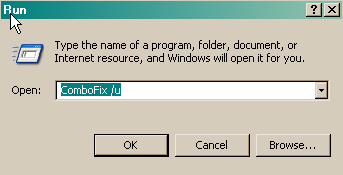
Remove combofix from the computer like this:
Click START then RUN
Now type or copy Combofix /u in the runbox and click OK.
Note the space between the X and the U, it needs to be there.
Clean the System Restore files like this:
Turn off System Restore.
On the Desktop, right-click My Computer.
Click Properties.
Click the System Restore tab.
Check Turn off System Restore.
Click Apply, and then click OK.
Reboot
Turn ON System Restore,
On the Desktop, right-click My Computer.
Click Properties.
Click the System Restore tab.
UN-Check *Turn off System Restore*.
Click Apply, and then click OK.
Update MBAM and scan to be sure we missed none of the junk, there is no need to post a clean scan result.
(MBAM is yours to keep if you wish, update it and run it once a month or so)
Update Eset and scan the system, to be sure it is running right and scanning clean. If you have problems with the program, contact tech support for instructions.
Here is information about Spybot S&D, be sure you are totally up to date and fully immunized before running Spybot S&D:
http://www.safer-networking.org/en/
http://www.safer-networking.org/en/news/2008-07-08.html
http://www.safer-networking.org/en/faq/index.html
http://www.safer-networking.org/en/tutorial/index.html
If all is well at this point, let me know and I will close the topic.
Since I do not see a firewall running, you may wish to read this information.
Is XP Firewall Safe? Here Are The Issues
http://www.guard-privacy-and-online-security.com/is-xp-firewall-safe.html
Some good information for you:
http://users.telenet.be/bluepatchy/miekiemoes/slowcomputer.html
http://www.microsoft.com/windowsxp/using/helpandsupport/learnmore/tips/mcgill1.mspx
Here is some great information from experts in this field that will help you stay clean and safe online.
http://users.telenet.be/bluepatchy/miekiemoes/prevention.html
http://forums.spybot.info/showthread.php?t=279
http://russelltexas.com/malware/allclear.htm
http://forum.malwareremoval.com/viewtopic.php?t=14
http://www.bleepingcomputer.com/forums/topict2520.html
http://cybercoyote.org/security/not-admin.shtml
http://www.malwarecomplaints.info/
Thanks...pskelley
Safer Networking Forums
http://www.spybot.info/en/donate/index.html
If you are reading this information...thank a teacher,
If you are reading it in English...thank a soldier.
http://users.telenet.be/bluepatchy/miekiemoes/Links.html
Remove combofix from the computer like this:
Click START then RUN
Now type or copy Combofix /u in the runbox and click OK.
Note the space between the X and the U, it needs to be there.
Clean the System Restore files like this:
Turn off System Restore.
On the Desktop, right-click My Computer.
Click Properties.
Click the System Restore tab.
Check Turn off System Restore.
Click Apply, and then click OK.
Reboot
Turn ON System Restore,
On the Desktop, right-click My Computer.
Click Properties.
Click the System Restore tab.
UN-Check *Turn off System Restore*.
Click Apply, and then click OK.
Update MBAM and scan to be sure we missed none of the junk, there is no need to post a clean scan result.
(MBAM is yours to keep if you wish, update it and run it once a month or so)
Update Eset and scan the system, to be sure it is running right and scanning clean. If you have problems with the program, contact tech support for instructions.
Here is information about Spybot S&D, be sure you are totally up to date and fully immunized before running Spybot S&D:
http://www.safer-networking.org/en/
http://www.safer-networking.org/en/news/2008-07-08.html
http://www.safer-networking.org/en/faq/index.html
http://www.safer-networking.org/en/tutorial/index.html
If all is well at this point, let me know and I will close the topic.
Since I do not see a firewall running, you may wish to read this information.
Is XP Firewall Safe? Here Are The Issues
http://www.guard-privacy-and-online-security.com/is-xp-firewall-safe.html
Some good information for you:
http://users.telenet.be/bluepatchy/miekiemoes/slowcomputer.html
http://www.microsoft.com/windowsxp/using/helpandsupport/learnmore/tips/mcgill1.mspx
Here is some great information from experts in this field that will help you stay clean and safe online.
http://users.telenet.be/bluepatchy/miekiemoes/prevention.html
http://forums.spybot.info/showthread.php?t=279
http://russelltexas.com/malware/allclear.htm
http://forum.malwareremoval.com/viewtopic.php?t=14
http://www.bleepingcomputer.com/forums/topict2520.html
http://cybercoyote.org/security/not-admin.shtml
http://www.malwarecomplaints.info/
Thanks...pskelley
Safer Networking Forums
http://www.spybot.info/en/donate/index.html
If you are reading this information...thank a teacher,
If you are reading it in English...thank a soldier.
http://users.telenet.be/bluepatchy/miekiemoes/Links.html