Trojans

Status
Not open for further replies.
The MalwareBytes log:

Malwarebytes' Anti-Malware 1.33
Database version: 1675
Windows 5.1.2600 Service Pack 3

1/21/2009 4:19:11 PM
mbam-log-2009-01-21 (16-19-11).txt

Scan type: Full Scan (C:\|)
Objects scanned: 112949
Time elapsed: 32 minute(s), 46 second(s)

Memory Processes Infected: 0
Memory Modules Infected: 0
Registry Keys Infected: 10
Registry Values Infected: 1
Registry Data Items Infected: 0
Folders Infected: 0
Files Infected: 8

Memory Processes Infected:
(No malicious items detected)

Memory Modules Infected:
(No malicious items detected)

Registry Keys Infected:
HKEY_CLASSES_ROOT\popcaploader.popcaploaderctrl2 (Adware.PopCap) -> Quarantined and deleted successfully.
HKEY_CLASSES_ROOT\popcaploader.popcaploaderctrl2.1 (Adware.PopCap) -> Quarantined and deleted successfully.
HKEY_CLASSES_ROOT\Interface\{abcdecef-4b15-11d1-abed-709549c10000} (Trojan.FakeAlert) -> Quarantined and deleted successfully.
HKEY_CLASSES_ROOT\Interface\{e4e3e0f8-cd30-4380-8ce9-b96904bdefca} (Adware.PopCap) -> Quarantined and deleted successfully.
HKEY_CLASSES_ROOT\Interface\{fe8a736f-4124-4d9c-b4b1-3b12381efabe} (Adware.PopCap) -> Quarantined and deleted successfully.
HKEY_CLASSES_ROOT\Typelib\{c9c5deaf-0a1f-4660-8279-9edfad6fefe1} (Adware.PopCap) -> Quarantined and deleted successfully.
HKEY_CLASSES_ROOT\Typelib\{abcdece2-4b15-11d1-abed-709549c10000} (Trojan.FakeAlert) -> Quarantined and deleted successfully.
HKEY_CLASSES_ROOT\webmedia.chl (Trojan.Zlob) -> Quarantined and deleted successfully.
HKEY_LOCAL_MACHINE\SOFTWARE\Microsoft\Windows\CurrentVersion\Uninstall\IExplorer add-on (Trojan.Zlob) -> Quarantined and deleted successfully.
HKEY_LOCAL_MACHINE\SOFTWARE\Microsoft\Multimedia\WMPlayer\Schemes\f3pss (Adware.MyWebSearch) -> Quarantined and deleted successfully.

Registry Values Infected:
HKEY_LOCAL_MACHINE\SOFTWARE\Microsoft\Windows\CurrentVersion\SharedDLLs\C:\WINDOWS\Downloaded Program Files\popcaploader.dll (Adware.PopCap) -> Quarantined and deleted successfully.

Registry Data Items Infected:
(No malicious items detected)

Folders Infected:
(No malicious items detected)

Files Infected:
C:\WINDOWS\Downloaded Program Files\popcaploader.dll (Adware.PopCap) -> Quarantined and deleted successfully.
C:\System Volume Information\_restore{202550A8-7A33-4BCA-9586-051D24DDBF8F}\RP296\A0063411.exe (Rogue.Installer) -> Quarantined and deleted successfully.
C:\Pass2.cmd (Trojan.Agent) -> Quarantined and deleted successfully.
C:\WINDOWS\inf\ultra.PNF (Malware.Trace) -> Quarantined and deleted successfully.
C:\Documents and Settings\Karen Lindberg\Favorites\Run Virus Scan.url (Trojan.Zlob) -> Quarantined and deleted successfully.
C:\Documents and Settings\All Users\Start Menu\Programs\Accessories\System Tools\Run Virus Scan.url (Trojan.Zlob) -> Quarantined and deleted successfully.
C:\Documents and Settings\Karen Lindberg\Start Menu\VirusResponse Lab 2009 2.1.lnk (Rogue.AntiVirusLab) -> Quarantined and deleted successfully.
C:\Documents and Settings\Karen Lindberg\Application Data\Microsoft\Internet Explorer\Quick Launch\VirusResponse Lab 2009 2.1.lnk (Rogue.AntiVirusLab) -> Quarantined and deleted successfully.
 
And a HFT log:

Logfile of Trend Micro HijackThis v2.0.2
Scan saved at 4:21:23 PM, on 1/21/2009
Platform: Windows XP SP3 (WinNT 5.01.2600)
MSIE: Internet Explorer v7.00 (7.00.6000.16762)
Boot mode: Normal

Running processes:
C:\WINDOWS\System32\smss.exe
C:\WINDOWS\system32\winlogon.exe
C:\WINDOWS\system32\services.exe
C:\WINDOWS\system32\lsass.exe
C:\WINDOWS\system32\svchost.exe
C:\WINDOWS\System32\svchost.exe
C:\WINDOWS\System32\WLTRYSVC.EXE
C:\WINDOWS\System32\bcmwltry.exe
C:\WINDOWS\system32\spoolsv.exe
C:\Program Files\Common Files\Apple\Mobile Device Support\bin\AppleMobileDeviceService.exe
C:\PROGRA~1\AVG\AVG8\avgwdsvc.exe
C:\Program Files\Seagate\Basics\Service\SyncServicesBasics.exe
C:\WINDOWS\system32\bgsvcgen.exe
C:\Program Files\Bonjour\mDNSResponder.exe
C:\Program Files\Dell\NICCONFIGSVC\NICCONFIGSVC.exe
C:\WINDOWS\system32\svchost.exe
C:\PROGRA~1\AVG\AVG8\avgrsx.exe
C:\WINDOWS\system32\wscntfy.exe
C:\PROGRA~1\AVG\AVG8\avgtray.exe
C:\WINDOWS\system32\ctfmon.exe
C:\Program Files\Google\GoogleToolbarNotifier\GoogleToolbarNotifier.exe
C:\Program Files\Panasonic\VideoCamSuite\VideoCamSuiteAutoStart.exe
C:\WINDOWS\System32\svchost.exe
C:\WINDOWS\explorer.exe
C:\Program Files\Internet Explorer\IEXPLORE.EXE
C:\Program Files\Malwarebytes' Anti-Malware\mbam.exe
C:\Program Files\Trend Micro\HijackThis\HijackThis.exe

R1 - HKLM\Software\Microsoft\Internet Explorer\Main,Default_Page_URL = http://go.microsoft.com/fwlink/?LinkId=69157
R1 - HKLM\Software\Microsoft\Internet Explorer\Main,Default_Search_URL = http://go.microsoft.com/fwlink/?LinkId=54896
R1 - HKLM\Software\Microsoft\Internet Explorer\Main,Search Page = http://go.microsoft.com/fwlink/?LinkId=54896
R1 - HKCU\Software\Microsoft\Windows\CurrentVersion\Internet Settings,ProxyOverride = *.local
O2 - BHO: Adobe PDF Reader Link Helper - {06849E9F-C8D7-4D59-B87D-784B7D6BE0B3} - C:\Program Files\Adobe\Acrobat 7.0\ActiveX\AcroIEHelper.dll
O2 - BHO: WormRadar.com IESiteBlocker.NavFilter - {3CA2F312-6F6E-4B53-A66E-4E65E497C8C0} - C:\Program Files\AVG\AVG8\avgssie.dll
O2 - BHO: SSVHelper Class - {761497BB-D6F0-462C-B6EB-D4DAF1D92D43} - C:\Program Files\Java\jre1.6.0_03\bin\ssv.dll
O2 - BHO: AVG Security Toolbar - {A057A204-BACC-4D26-9990-79A187E2698E} - C:\PROGRA~1\AVG\AVG8\AVGTOO~1.DLL
O2 - BHO: Google Toolbar Helper - {AA58ED58-01DD-4d91-8333-CF10577473F7} - c:\program files\google\googletoolbar2.dll
O2 - BHO: Google Toolbar Notifier BHO - {AF69DE43-7D58-4638-B6FA-CE66B5AD205D} - C:\Program Files\Google\GoogleToolbarNotifier\3.1.807.1746\swg.dll
O3 - Toolbar: &Google - {2318C2B1-4965-11d4-9B18-009027A5CD4F} - c:\program files\google\googletoolbar2.dll
O3 - Toolbar: AVG Security Toolbar - {A057A204-BACC-4D26-9990-79A187E2698E} - C:\PROGRA~1\AVG\AVG8\AVGTOO~1.DLL
O4 - HKLM\..\Run: [basicsmssmenu] "C:\Program Files\Seagate\Basics\Basics Status\MaxMenuMgrBasics.exe"
O4 - HKLM\..\Run: [AVG8_TRAY] C:\PROGRA~1\AVG\AVG8\avgtray.exe
O4 - HKLM\..\RunOnce: [Malwarebytes' Anti-Malware] C:\Program Files\Malwarebytes' Anti-Malware\mbamgui.exe /install /silent
O4 - HKCU\..\Run: [ctfmon.exe] C:\WINDOWS\system32\ctfmon.exe
O4 - HKCU\..\Run: [swg] C:\Program Files\Google\GoogleToolbarNotifier\GoogleToolbarNotifier.exe
O4 - HKCU\..\RunOnce: [FlashPlayerUpdate] C:\WINDOWS\system32\Macromed\Flash\FlashUtil9f.exe
O4 - Global Startup: Auto run of VideoCam Suite 1.0.lnk = ?
O8 - Extra context menu item: E&xport to Microsoft Excel - res://C:\PROGRA~1\MICROS~4\Office10\EXCEL.EXE/3000
O9 - Extra button: (no name) - {08B0E5C0-4FCB-11CF-AAA5-00401C608501} - C:\Program Files\Java\jre1.6.0_03\bin\ssv.dll
O9 - Extra 'Tools' menuitem: Sun Java Console - {08B0E5C0-4FCB-11CF-AAA5-00401C608501} - C:\Program Files\Java\jre1.6.0_03\bin\ssv.dll
O9 - Extra button: PartyPoker.com - {B7FE5D70-9AA2-40F1-9C6B-12A255F085E1} - C:\Program Files\PartyGaming\PartyPoker\RunApp.exe (file missing)
O9 - Extra 'Tools' menuitem: PartyPoker.com - {B7FE5D70-9AA2-40F1-9C6B-12A255F085E1} - C:\Program Files\PartyGaming\PartyPoker\RunApp.exe (file missing)
O9 - Extra button: (no name) - {CD67F990-D8E9-11d2-98FE-00C0F0318AFE} - (no file)
O9 - Extra button: (no name) - {e2e2dd38-d088-4134-82b7-f2ba38496583} - C:\WINDOWS\Network Diagnostic\xpnetdiag.exe
O9 - Extra 'Tools' menuitem: @xpsp3res.dll,-20001 - {e2e2dd38-d088-4134-82b7-f2ba38496583} - C:\WINDOWS\Network Diagnostic\xpnetdiag.exe
O9 - Extra button: Messenger - {FB5F1910-F110-11d2-BB9E-00C04F795683} - C:\Program Files\Messenger\msmsgs.exe
O9 - Extra 'Tools' menuitem: Windows Messenger - {FB5F1910-F110-11d2-BB9E-00C04F795683} - C:\Program Files\Messenger\msmsgs.exe
O16 - DPF: {0CCA191D-13A6-4E29-B746-314DEE697D83} (Facebook Photo Uploader 5 Control) - http://upload.facebook.com/controls/2008.10.10_v5.5.8/FacebookPhotoUploader5.cab
O16 - DPF: {0EB0E74A-2A76-4AB3-A7FB-9BD8C29F7F75} (CKAVWebScan Object) - http://www.kaspersky.com/kos/english/kavwebscan_unicode.cab
O16 - DPF: {1754A1BA-A1DF-4F10-B199-AA55AA1A120F} (InstallerBehaviorFactory Class) - https://signup.msn.com/pages/MsnInstC.cab
O16 - DPF: {406B5949-7190-4245-91A9-30A17DE16AD0} (Snapfish Activia) - http://www2.snapfish.com/SnapfishActivia.cab
O16 - DPF: {4ED9DDF0-7479-4BBE-9335-5A1EDB1D8A21} - http://download.mcafee.com/molbin/shared/mcinsctl/4,0,0,101/mcinsctl.cab
O16 - DPF: {4F1E5B1A-2A80-42CA-8532-2D05CB959537} (MSN Photo Upload Tool) - http://gfx1.hotmail.com/mail/w2/pr02/resources/MSNPUpld.cab
O16 - DPF: {6E32070A-766D-4EE6-879C-DC1FA91D2FC3} (MUWebControl Class) - http://www.update.microsoft.com/mic...ls/en/x86/client/muweb_site.cab?1192246852328
O16 - DPF: {6F750202-1362-4815-A476-88533DE61D0C} (Kodak Gallery Easy Upload Manager Class) - http://www.kodakgallery.com/downloads/BUM/BUM_WIN_IE_2/axofupld.cab
O16 - DPF: {9AA73F41-EC64-489E-9A73-9CD52E528BC4} (ZoneAxRcMgr Class) - http://cdn2.zone.msn.com/binframework/v10/ZAxRcMgr.cab31267.cab
O16 - DPF: {A9DD5FE2-5567-4983-971F-C792375025A6} (PhoenixBody Class) - http://software.musicnow.com/musicnow/phoenix/4.0.0.34/MusicNow.cab
O16 - DPF: {B8BE5E93-A60C-4D26-A2DC-220313175592} (MSN Games - Installer) - http://cdn2.zone.msn.com/binFramework/v10/ZIntro.cab56649.cab
O16 - DPF: {CB50428B-657F-47DF-9B32-671F82AA73F7} (Photodex Presenter AX control) - http://www.photodex.com/pxplay.cab
O16 - DPF: {E5D419D6-A846-4514-9FAD-97E826C84822} (HeartbeatCtl Class) - http://fdl.msn.com/zone/datafiles/heartbeat.cab
O18 - Protocol: linkscanner - {F274614C-63F8-47D5-A4D1-FBDDE494F8D1} - C:\Program Files\AVG\AVG8\avgpp.dll
O23 - Service: Apple Mobile Device - Apple, Inc. - C:\Program Files\Common Files\Apple\Mobile Device Support\bin\AppleMobileDeviceService.exe
O23 - Service: AVG Free8 WatchDog (avg8wd) - AVG Technologies CZ, s.r.o. - C:\PROGRA~1\AVG\AVG8\avgwdsvc.exe
O23 - Service: Basics Service - Seagate Technology LLC - C:\Program Files\Seagate\Basics\Service\SyncServicesBasics.exe
O23 - Service: B's Recorder GOLD Library General Service (bgsvcgen) - B.H.A Corporation - C:\WINDOWS\system32\bgsvcgen.exe
O23 - Service: Bonjour Service - Apple Inc. - C:\Program Files\Bonjour\mDNSResponder.exe
O23 - Service: Google Updater Service (gusvc) - Google - C:\Program Files\Google\Common\Google Updater\GoogleUpdaterService.exe
O23 - Service: iPod Service - Apple Inc. - C:\Program Files\iPod\bin\iPodService.exe
O23 - Service: NICCONFIGSVC - Dell Inc. - C:\Program Files\Dell\NICCONFIGSVC\NICCONFIGSVC.exe
O23 - Service: Dell Wireless WLAN Tray Service (wltrysvc) - Unknown owner - C:\WINDOWS\System32\WLTRYSVC.EXE

--
End of file - 7601 bytes
 
How is the computer running now?


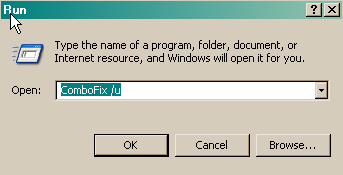
Remove combofix from the computer like this:

Click START then RUN
Now type or copy Combofix /u in the runbox and click OK.
Note the space between the X and the U, it needs to be there.

CF_Cleanup.png


Clean the System Restore files like this:

Turn off System Restore.
On the Desktop, right-click My Computer.
Click Properties.
Click the System Restore tab.
Check Turn off System Restore.
Click Apply, and then click OK.

Reboot

Turn ON System Restore,
On the Desktop, right-click My Computer.
Click Properties.
Click the System Restore tab.
UN-Check *Turn off System Restore*.
Click Apply, and then click OK.

Update MBAM and scan to be sure we missed none of the junk, there is no need to post a clean scan result.
(MBAM is yours to keep if you wish, update it and run it once a month or so)

Update AVG8 and scan the system, to be sure it is running right and scanning clean.
Good AVG information: http://www.avg.com/faq
AVG Free Forum: http://freeforum.avg.com/

If all is well at this point, let me know and I will close the topic.

Some good information for you:
http://users.telenet.be/bluepatchy/miekiemoes/slowcomputer.html
http://www.microsoft.com/windowsxp/using/helpandsupport/learnmore/tips/mcgill1.mspx

Here is some great information from experts in this field that will help you stay clean and safe online.
http://users.telenet.be/bluepatchy/miekiemoes/prevention.html
http://forums.spybot.info/showthread.php?t=279
http://russelltexas.com/malware/allclear.htm
http://forum.malwareremoval.com/viewtopic.php?t=14
http://www.bleepingcomputer.com/forums/topict2520.html
http://cybercoyote.org/security/not-admin.shtml

http://www.malwarecomplaints.info/

Thanks...pskelley
Safer Networking Forums
http://www.spybot.info/en/donate/index.html
If you are reading this information...thank a teacher,
If you are reading it in English...thank a soldier.

http://users.telenet.be/bluepatchy/miekiemoes/Links.html
 
Malwarebytes's Anti-Malware found 0 threats.

AVG just found tracking cookies.

Performance is back to normal. Thanks so much!

Do you recommend just Spybot and AVG with XP's firewall or are there other I should be running too?

Thanks again!
 
Kapersky's online scanner finds the following. Is this an issue?

--------------------------------------------------------------------------------
KASPERSKY ONLINE SCANNER 7 REPORT
Thursday, January 22, 2009
Operating System: Microsoft Windows XP Home Edition Service Pack 3 (build 2600)
Kaspersky Online Scanner 7 version: 7.0.25.0
Program database last update: Wednesday, January 21, 2009 23:22:09
Records in database: 1661608
--------------------------------------------------------------------------------

Scan settings:
Scan using the following database: extended
Scan archives: yes
Scan mail databases: yes

Scan area - My Computer:
C:\
D:\

Scan statistics:
Files scanned: 65307
Threat name: 2
Infected objects: 3
Suspicious objects: 0
Duration of the scan: 01:31:41


File name / Threat name / Threats count
C:\Documents and Settings\Karen Lindberg\Application Data\Sun\Java\Deployment\cache\javapi\v1.0\file\omfg.class-1674405-20cb1e06.class Infected: Trojan-Downloader.Java.OpenStream.y 1
C:\Documents and Settings\Karen Lindberg\Application Data\Sun\Java\Deployment\cache\javapi\v1.0\file\omfge.class-2b3d7713-50f895fa.class Infected: Trojan-Downloader.Java.OpenStream.y 1
C:\WINDOWS\system32\drivers\etc\hosts.20070817-133934.backup Infected: Trojan.Win32.Qhost.mg 1

The selected area was scanned.
 
ATF-Cleaner should have cleaned the Java cache, see this:
The instructions said to "Select All" and the Java cache is the second box up and it would have been cleaned?
http://www.nutnworks.com/forums/showthread.php?t=1925

You can manually clean the Java cache like this:
http://support.f-secure.com/enu/home/virusproblem/howtoclean/cleanjavacache.shtml

C:\WINDOWS\system32\drivers\etc\hosts.20070817-133934.backup Infected: Trojan.Win32.Qhost.mg
This is a backup of the hosts file, delete it manually.
Make sure you can view all files and folders:
http://www.bleepingcomputer.com/tutorials/tutorial62.html
Then navigate to that file in red and delete it, empty the Recycle Bin on the Desktop,
Do you recommend just Spybot and AVG with XP's firewall or are there other I should be running too?
I suggest you read the links I provided, those experts should answer all of your questions:

Is XP Firewall Safe? Here Are The Issues:
http://www.guard-privacy-and-online-security.com/is-xp-firewall-safe.html

Thanks
 
Thanks for taking the time to let me know, safe surfing and Happy New Year:)
 
Status
Not open for further replies.
Back
Top