Let's get it checked out by the experts

Please send an E-Mail to --
detections AT spybot.info (replace AT with @, no spaces)
As the message title put --
Suspicious iexplore.exe
Include this link in the body of the E-Mail --
http://forums.spybot.info/showthread.php?p=141959#post141959
Please include any comments you would like to make
Attach
Requested Files[date:Time].cab
now send the mail.
Navigate to
C:\Documents and Settings\Bob\iexplore.exe
Make sure you can see
.exe on the end of iexplore
Right click and select
Rename
Rename it to
iexplore.exe.vir
That will stop it from running untill we find out what it is :laugh:
Apart from that, .........
Congratulations your logs look clean

Let's see if I can help you keep it that way
First lets tidy up
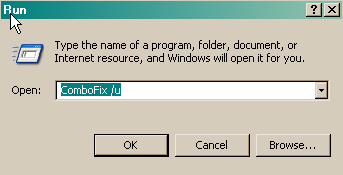
- Click START then RUN
- Now type Combofix /u in the runbox and click OK. Note the space between the X and the U, it needs to be there.
Please delete
suspicious file packer
Requested Files[date:Time].cab
You can also delete any logs we have produced, and empty your Recycle bin.
Reset System Restore.
Now you should disable System restore to purge any infected files and then re-enable it,
On the Desktop, right-click My Computer.
Click Properties.
Click the System Restore tab.
Check Turn off System Restore.
Click Apply, and then click OK.
Restart your computer
Turn ON System Restore
On the Desktop, right-click My Computer.
Click Properties.
Click the System Restore tab.
Un-Check Turn off System Restore.
Click Apply, and then click OK.
AntiSpyware
AntiSpyware is not the same thing as Antivirus.
Different AntiSpyware programs detect different things, so in this case it is recommended that you have more than one.
You should only have one running all the time, the other/s should be used "on demand" on a regular basis.
All the programs in this list have a free version.
it is worth paying for one and having "realtime" protection, unless you intend to do a manual scan often.- Spybot - Search & Destroy <<< A must have program
- It includes host protection and registry protection
- A hosts file is a bit like a phone book, it points to the actual numeric address (i.e. the IP address) from the human friendly name of a website. This feature can be used to block malicious websites
- a-squared Free <<< A good "realtime" or "on demand" scanner
- AVG Anti-Spyware 7.5 <<< A good "realtime" or "on demand" scanner
- superantispyware <<< A good "realtime" or "on demand" scanner
- Ad-Aware 2007 Free <<< A good "realtime" or "on demand" scanner
Prevention
These programs don't detect malware, they help stop it getting on your machine in the first place.
Each does a different job, so you can have more than one- Winpatrol
- An excellent startup manager and then some !!
- Notifies you if programs are added to startup
- Allows delayed startup
- A must have addition
- SpywareBlaster 3.5.1
- SpywareBlaster sets killbits in the registry to prevent known malicious activex controls from installing themselves on your computer.
- SpywareGuard 2.2
- SpywareGuard provides real-time protection against spyware.
- Not required if you have other "realtime" antispyware or Winpatrol
- ZonedOut
- Formerly known as IE-SPYAD, adds a long list of sites and domains associated with known advertisers and marketers to the Restricted sites zone of Internet Explorer.
- MVPS HOSTS
- This little program packs a powerful punch as it blocks ads, banners, 3rd party Cookies, 3rd party page counters, web bugs, and many hijackers.
- For information on how to download and install, please read this tutorial by WinHelp2002.
- Not required if you are using other host file protections
Internet Browsers
Microsoft has worked hard to make IE.7 a more secure browser, unfortunately whilst it is still the leading browser of choice it will always be under attack from the bad guys.
Using a different web browser can help stop malware getting on your machine.
- Make your Internet Explorer more secure - This can be done by following these simple instructions:
- From within Internet Explorer click on the Tools menu and then click on Options.
- Click once on the Security tab
- Click once on the Internet icon so it becomes highlighted.
- Click once on the Custom Level button.
- Change the Download signed ActiveX controls to Prompt
- Change the Download unsigned ActiveX controls to Disable
- Change the Initialise and script ActiveX controls not marked as safe to Disable
- Change the Installation of desktop items to Prompt
- Change the Launching programs and files in an IFRAME to Prompt
- Change the Navigate sub-frames across different domains to Prompt
- When all these settings have been made, click on the OK button.
- If it prompts you as to whether or not you want to save the settings, press the Yes button.
- Next press the Apply button and then the OK to exit the Internet Properties page.
If you are still using IE6 then either update, or get one of the following.
- FireFox
- With many addons available that make customization easy this is a very popular choice
- NoScript and AdBlockPlus addons are essential
- Opera
- Another popular alternative
- Netscape
- Another popular alternative
- Also has Addons available
Cleaning Temporary Internet Files and Tracking Cookies
Temporary Internet Files are mainly the files that are downloaded when you open a web page.
Unfortunately, if the site you visit is of a dubious nature or has been hacked, they can also be an entry point for malware.
It is a good idea to empty the Temporary Internet Files folder on a regular basis.
Tracking Cookies are files that websites use to monitor which sites you visit and how often.
A lot of Antispyware scanners pick up these tracking cookies and flag them as unwanted.
CAUTION :- If you delete all your cookies you will lose any autologin information for sites that you visit, and will need your passwords
Both of these can be cleaned manually, but a quicker option is to use a program- ATF Cleaner
- Free and very simple to use
- CCleaner
- Free and very flexible, you can chose which cookies to keep
Also
PLEASE read this article.......
So How Did I Get Infected In The First Place
The last and most important thing I can tell you is
UPDATE.
If you don't update your security programs (Antivirus, Antispyware even Windows) then you are at risk.
Malware changes on a day to day basis. You should update every week at the very least.
If you follow this advice then (with a bit of luck) you will never have to hear from me again
If you could post back one more time to let me know everything is OK, then I can have this thread archived.
Happy surfing K'