Hello
One final thing, could you direct me to rid my computer of quarantined files? Am I able to go into the directory and just delete them?
It should be safe to delete any quarantined files from the tools we used, same goes for any folders.
Time for some housekeeping
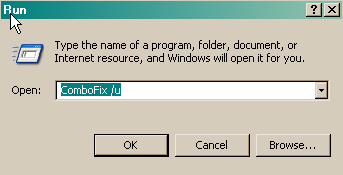
- Click START then RUN
- Now type Combofix /u in the runbox and click OK
- When shown the disclaimer, Select "2"
The above procedure will:
- Delete the following:
- ComboFix and its associated files and folders.
- VundoFix backups, if present
- The C:\Deckard folder, if present
- The C:_OtMoveIt folder, if present
- Reset the clock settings.
- Hide file extensions, if required.
- Hide System/Hidden files, if required.
- Reset System Restore.
Please re-enable TeaTimer
- Open Spybot Search & Destroy.
- In the Mode menu click "Advanced mode" if not already selected.
- Choose "Yes" at the Warning prompt.
- Expand the "Tools" menu.
- Click "Resident".
- check the "Resident "TeaTimer" (Protection of overall system settings) active." box.
- In the File menu click "Exit" to exit Spybot Search & Destroy.
Below I have included a number of recommendations for how to protect your computer against malware infections.
* Keep Windows updated by regularly checking their website at :
http://windowsupdate.microsoft.com/
This will ensure your computer has always the latest security updates available installed on your computer.
* To reduce re-infection for malware in the future, I strongly recommend installing these free programs:
SpywareBlaster protects against bad ActiveX
IE-SPYAD puts over 5000 sites in your restricted zone so you'll be protected when you visit innocent-looking sites that aren't actually innocent at all
* I recommend the following anti-spyware programs to protect yourself against spyware, make sure you only use one real-time anti-spyware protection program though :
AVG anti-spyware
SUPERAntiSpyware
Spybot - Search and Destroy
Ad-Aware 2007 Free
* Please consider using an alternate browser. Mozilla's Firefox browser is fantastic; it is much more
secure than Internet Explorer, immune to almost all known browser hijackers, and also has the best built-in pop up
blocker (as an added benefit!) that I have ever seen. If you are interested, Firefox may be downloaded from
Here
* Some good free firewalls are
ZoneAlarm,
Comodo, or
Outpost
Make sure you only use one firewall though. A tutorial on understanding and using firewalls may be found
here.
* I notice that you have no anti-virus program on your PC, this is extremely dangerous and leaves your PC open to vulnerabilities, so please download and install one of the following programs :
AVG makes an excellent free antivirus client, as do
AntiVir or
avast!.
* Take a good look at the following suggestions for malware prevention by reading Tony Klein’s article 'How Did I Get Infected In The First Place'
Here
Thank you for your patience, and performing all of the procedures requested.