
Hello!
I am seeing a reproducible Immunization problem with Spybot Search & Destroy 2.9.85.5 on Windows 11 Pro 25H2. This issue carried over from Windows 10 Pro, where it also occurred.
Environment:
- Windows 11 Pro 25H2, build 26200.9278
- Spybot Search & Destroy 2.9.85.5
- SDImmunize.exe 2.9.85.136 / ProductVersion 2.9.85.5
- SDScan.exe 2.9.85.200 / ProductVersion 2.9.85.2
- Firefox 154.0.1
- SpywareBlaster 6.0
- ESET and Malwarebytes installed
Initially, Spybot Immunization reported:
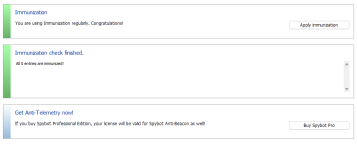
“All 0 entries are immunized!”
and Firefox entries in Show Details were shown as Unprocessed.
I then isolated the Firefox problem by changing the selections in Show Details.
With both Firefox and Mozilla entries unchecked, “Check system” reported:
“246135 of 403077 entries are already immunized, but 15636 are still unprotected!”
I then left all Firefox entries unchecked and re-enabled the Mozilla entries. Spybot was able to process the selected entries successfully and reported:
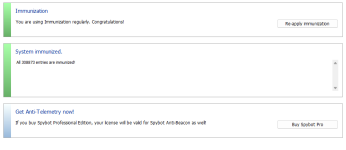
“All 308873 entries are immunized!”
Further testing has now isolated the Firefox problem more clearly:
If ANY Firefox checkbox in Show Details is selected — even a single Firefox entry — clicking “Apply Immunization” causes the progress bar to stop before completing and Spybot reports:
“All 0 entries are immunized!”
Repeatedly clicking Apply Immunization produces the same result as long as any Firefox entry remains selected.
Spybot will only process the immunization run to completion when ALL Firefox checkboxes are unchecked. With every Firefox entry unchecked, clicking Apply Immunization allows the progress bar to complete normally and Spybot reports:
“All 308873 entries are immunized!”
This suggests that the Firefox processing failure is blocking the entire immunization run rather than affecting only the Firefox entries themselves. Firefox is at the top of the list in Show Details, so the behaviour appears consistent with Spybot failing while processing Firefox and aborting before the remaining browser entries are reached, although I cannot confirm Spybot’s internal processing order.
During earlier isolation testing, I also observed that when Firefox processing failed, Spybot automatically deselected the top Firefox checkbox while leaving other entries in that group selected.
That top entry was the Firefox Cookies entry (194 entries). The following Images, Installations and Popups entries each contained 15636 entries.
At one point during this testing Spybot displayed one Firefox profile under the unusual label:
PE_C_DEFAULTAPPPOOL (default)
On a later launch, however, Spybot displayed the normal Firefox profile labels again (“default” and “default-release”), so I do not know whether that transient label is relevant to the underlying problem.
I therefore left ALL Firefox entries unchecked and left the Mozilla entries checked.
This exposed a second, separate problem.
After applying immunization in that configuration, Spybot correctly reported:
“All 308873 entries are immunized!”
I then completely closed Spybot and reopened it.
On a fresh launch, the Immunization page initially said:
“You are using Immunization regularly. Congratulations!”
but displayed no immunized-entry count.
Clicking “Check system” then reported:
“All 0 entries are immunized!”
In Show Details, all Firefox entries were still unchecked and the Mozilla entries were still checked, so Spybot had remembered the checkbox configuration.
Because all Firefox entries were already disabled, I could then click “Apply Immunization” directly from the main Immunization page without changing anything.
Spybot processed the selected entries normally and once again reported:
“All 308873 entries are immunized!”
If I then completely close Spybot, reopen it and click “Check system” again, it returns to:
“All 0 entries are immunized!”
Clicking Apply Immunization again, without changing any settings, again processes the same entries and returns to:
“All 308873 entries are immunized!”
This cycle repeats after every restart of Spybot.
Therefore there appear to be two distinct problems:
1. Firefox is a complete blocker for the Immunization process. If even one Firefox checkbox is selected, the progress bar fails to complete and Spybot reports “All 0 entries are immunized!”. No successful immunization run is possible until ALL Firefox entries are unchecked.
2. Even with Firefox completely excluded and 308873 other entries successfully immunized, Spybot does not recognise that immunization after the application is closed and reopened. The checkbox selections persist, but “Check system” returns to 0 until Apply Immunization is run again.
Troubleshooting already performed:
- Temporarily disabled ESET real-time protection: no change.
- Completely exited Malwarebytes: no change.
- Disabled both ESET and Malwarebytes together: no change.
- Resource Monitor found no process holding Firefox permissions.sqlite open.
- permissions.sqlite is not read-only.
- NTFS permissions give the current user, Administrators and SYSTEM Full Control.
- An exclusive read/write test of permissions.sqlite still returned Access Denied even with ESET and Malwarebytes disabled.
- No Firefox profile or permissions.sqlite database exists under Windows ServiceProfiles or a real DefaultAppPool profile.
- Firefox itself works normally.
- SpywareBlaster 6.0, which previously crashed when attempting to process Firefox entries, now successfully processes and protects Firefox after updating to Spybot Search & Destroy 2.9.85.5. Ironically, updating Spybot fixed the Firefox issue in SpywareBlaster but did not fix Spybot’s own Firefox immunization problem.
There is an existing forum thread titled “All 0 entries are immunized!” that appears to describe similar behaviour.
Has Team Spybot reproduced either of these issues with current Firefox/Windows 11 versions? Is a fix for either issue planned?
