- Software Version
- 5.4.7
- Operating System
- Windows 10 (64 bit)
Just purchased a new license for Spybot Anti-Beacon Plus and installed it on a new Windows Server 2022 (21H2) OS setup. (Windows 10 x64 based.)
It runs, every time it shows that it's checking everything and says it is protected. No errors are generated.
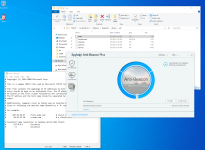
But, the HOSTS file is empty. It writes nothing there. (C:\Windows\System32\drivers\etc\hosts)
I've checked it repeatedly... while Anti-Beacon Plus is running, right after it scans and reports that everything is protected, after it closes, etc.
The HOSTS file isn't touched at any point.
So, that implies that the program is not working or protecting anything while it reports that it is working and protecting everything.
That's not good. It shouldn't work like that.
It runs, every time it shows that it's checking everything and says it is protected. No errors are generated.
But, the HOSTS file is empty. It writes nothing there. (C:\Windows\System32\drivers\etc\hosts)
I've checked it repeatedly... while Anti-Beacon Plus is running, right after it scans and reports that everything is protected, after it closes, etc.
The HOSTS file isn't touched at any point.
So, that implies that the program is not working or protecting anything while it reports that it is working and protecting everything.
That's not good. It shouldn't work like that.