Spyware Guard 2008

Status
Not open for further replies.

GeorgeB

New member
My XP Home laptop picked up this little nasty about three weeks ago. It must be pretty powerful stuff: It suppresses HTL Log installer and System Restore, both in regular and Safe Mode. It will not allow Spybot to launch, even in Safe Mode. It will not allow me to visit certain sites: TrendMicro, Safer-Networking, MS XP Updates, or LavaSoft. It redirects and claims to be running emergency spyware checks.

I learned that I could order Spybot to scan folders and files by right-clicking on the target, so I turned it loose on the Windows folder in Programs. After five days of continuous scanning it found and claimed to have deleted a couple dozen baddies, but Spyware Guard 2008 is still there, I suppose re-installing itself from somewhere else.

Now whenever I try to use Safe Mode I get a message something to the effect that "...the system is shutting down. Please save all....Shutdown was initiated by NT Authority`sytem.......because the DCM Server Process Launcher service terminated unexpectedly." or something like that. I've tried it several times.

I was able to get a Resident Log from Spybot, and I can attach it, but I'm not very confident that it will help.

I am using my desktop (clean) computer to contact you, because I can't contact any security sites with my infected laptop.
 
Welcome to Safer Networking, I wish to be sure you have viewed and understand this information.
"BEFORE you POST" (READ this Procedure before Requesting Assistance) http://forums.spybot.info/showthread.php?t=288
All advice given is taken at your own risk.
Please make sure you have read this information so we are on the same page.

Make sure you read and follow the directions, anything else will slow the process and waste both of our time. I suggest you keep this computer offline except when troubleshooting, the junk may download more. If you have any tool I use, delete it and download it new from the link I provide. Read and follow the directions carefully, the tools will not work unless you do.
The junk can be tough to remove, so do not expect fast or easy.

I apologize for the wait, volunteers are swamped at all forums with infected computers. If you have resolved your issues, please post to let me know so I can close this topic.

George, this is a tough infection because the hackers use a rootkit that blocks malware sites and tools. They are trying to cause you to give them money for a worthless rouge products (called fraud). As I said, it is tough but some folks are able to defeat this infection with some methods that are available. Before I post I wish to be sure you are still trying to clean the infection and if there is any new information you think I should have. I will also say some folks have become discouraged and opted to reformat, and all I can promise you if you wish to proced, are my best efforts.

Thanks...Phil
 
Hi Phil,

Well, I'm still hoping I won't have to go the nuclear route, although I can still put my files on a stick if necessary and write down the programs I'll have to reinstall if all else fails.

I'm ready to try 'most anything you suggest. My laptop is already disconnected from the internet.

Thanks in advance.
 
If you can't get the infected computer online, you would have to bring combofix to it, keep in mind combofix is 2.77 MB's.


DO NOT use any TOOLS such as Combofix, Vundofix, or HijackThis fixes without supervision.

Doing so could make your pc inoperatible and could require a full reinstall of your OS, losing all your programs and data.


Stay with this topic until I give you the all clean post.

You might want to print these instructions out.

I suggest you do this:

Double-click My Computer.
Click the Tools menu, and then click Folder Options.
Click the View tab.
Uncheck "Hide file extensions for known file types."
Under the "Hidden files" folder, select "Show hidden files and folders."
Uncheck "Hide protected operating system files."
Click Apply, and then click OK.


Please do not delete anything unless instructed to.

NOTE: worksnow is actually Combofix renamed so user is able download and run Combofix

Download worksnow from HERE:


* IMPORTANT !!! Save worksnow to your Desktop


  • Disable your AntiVirus and AntiSpyware applications, usually via a right click on the System Tray icon. They may otherwise interfere with our tools. Note: If you are having difficulty properly disabling your protective programs, or are unsure as to what programs need to be disabled, please refer to the information available through this link : Protective Programs

  • Double click on worksnow & follow the prompts.

    Note: worksnow will run without the Recovery Console installed.

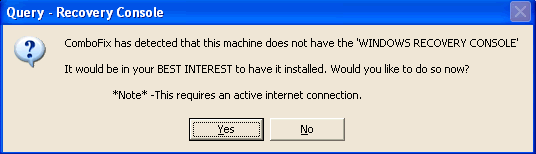
  • As part of it's process, combofix will check to see if the Microsoft Windows Recovery Console is installed. With malware infections being as they are today, it's strongly recommended to have this pre-installed on your machine before doing any malware removal. It will allow you to boot up into a special recovery/repair mode that will allow us to more easily help you should your computer have a problem after an attempted removal of malware.

  • Follow the prompts to allow ComboFix to download and install the Microsoft Windows Recovery Console, and when prompted, agree to the End-User License Agreement to install the Microsoft Windows Recovery Console.

**Please note: If the Microsoft Windows Recovery Console is already installed, ComboFix will continue it's malware removal procedures.


RcAuto1.gif


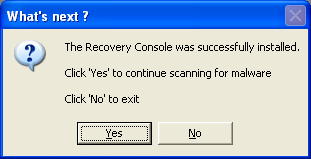
Once the Microsoft Windows Recovery Console is installed using ComboFix, you should see the following message:

whatnext.png


Click on Yes, to continue scanning for malware.

When finished, it shall produce a log for you. Please include the C:\ComboFix.txt in your next reply.
"copy/paste" a new HijackThis log file into this thread as well.

Notes:

1.Do not mouse-click Combofix's window while it is running. That may cause it to stall.
2. ComboFix may reset a number of Internet Explorer's settings, including making I-E the default browser.
3. Combofix prevents autorun of ALL CD, floppy and USB devices to assist with malware removal & increase security. If this is an issue or makes it difficult for you -- please tell your helper.
4. CF disconnects your machine from the internet. The connection is automatically restored before CF completes its run. If CF runs into difficulty and terminates prematurely, the connection can be manually restored by restarting your machine.

Give it atleast 20-30 minutes to finish if needed.

Also please describe how your computer behaves at the moment.

Thanks
 
Phil,

ComboFix detected a rootkit and rebooted. After I logged in again CF started up automatically. Eventually it went through a series that ended with "Completed Stage_50". Its next lines read " C:\windows\system32\ is not recognized as an internal or external command, operable program, or batch file." and hung there. After 1-1/2 hours I decided to check back with you. I don't see any .txt log anywhere, and Windows has not fully loaded yet. I'm not sure what do do about this.
 
I'm not sure either, the log will be here: C:\combofix.txt if it is anywhere. Try restarting the computer and run it again to see what happens. If that does not work, try running combofix in safe mode:

http://spyware-free.us/tutorials/safemode/

The hackers change their junk so often, seems no two repairs are the same.

Thanks
 
George, if you get the error messages again when you try to run combofix, could you make sure of exactly word for word and post that information. I may have to ask sUBs (creator) about the message?

Thanks
 
I have another member getting the same message, so either it is the infection or an issue with combofix trying to remove the infection. I have posted for the creator to see if he can give us any advice. In the meantime, I suggest you see if you can get MBAM to run, follow the directions carefully.

Download Malwarebytes' Anti-Malware to your Desktop
http://www.malwarebytes.org/

* Double-click mbam-setup.exe and follow the prompts to install the program.
* Be sure a checkmark is placed next to Update Malwarebytes' Anti-Malware and Launch Malwarebytes' Anti-Malware, then click Finish.
* If an update is found, it will download and install the latest version.
* Once the program has loaded, select Perform FULL SCAN, then click Scan.
* When the scan is complete, click OK, then Show Results to view the results.
* Be sure that everything is checked, and click Remove Selected.
* When completed, a log will open in Notepad. Please save it to a convenient location. The log can also be opened by going to Start > All Programs > Malwarebytes' Anti-Malware > Logs > log-date.txt
* Please post contents of that file & a new HJT log in your next reply.

Note: If MBAM encounters a file that is difficult to remove, you will be presented with 1 of 2 prompts. Click OK to either and let MBAM proceed with the disinfection process. If asked to restart the computer, please do so immediately. Failure to reboot will prevent MBAM from removing all the malware.

Tutorial if needed:
http://www.techsupportteam.org/forum/tutorials/2282-malwarebytes-anti-malware-mbam.html

Thanks
 
You may try this either before or after the MBAM run.

provided by the folks who maintain combofix:

This issue was fixed with ver_09-01-10.02. Have your user delete existing ComboFix.exe from desktop (don't uninstall it), and download a fresh copy.

Post the combofix log if you get it or let me know the results.

Thanks
 
When I first ran CF yesterday it asked for permission to download the latest version. I gave it, and it ran up to the point I mentioned, both times.

Today I deleted the CF program from my desktop and downloaded a new one. It also asked if I wanted the newer version.

Again I clicked yes, and it downloaded and went to work. This time after Completed Stage_50, it read:

Deleting files:
"C\documents and Settings\NetworkService\Application Data\wsnpoem\audio.dll"

Deleting folders:

"C\documents and Settings\NetworkService\Application Data\wsnpoem"

'"C:\Windows\System\32\" is not recognized..........'

As before, there it hangs up, and I cannot find a CF log.

MalwareBytes downloaded and scanned OK. Log below.

Apparently enough was removed to allow HTL to install, and I've included its log, below.

I'm not exactly sure what do do next. SAFE mode still self-closes.


Malwarebytes' Anti-Malware 1.32
Database version: 1643
Windows 5.1.2600 Service Pack 3

2009-01-11 09:52:06
mbam-log-2009-01-11 (09-52-06).txt

Scan type: Full Scan (C:\|D:\|)
Objects scanned: 120333
Time elapsed: 40 minute(s), 5 second(s)

Memory Processes Infected: 0
Memory Modules Infected: 1
Registry Keys Infected: 1
Registry Values Infected: 0
Registry Data Items Infected: 0
Folders Infected: 0
Files Infected: 11

Memory Processes Infected:
(No malicious items detected)

Memory Modules Infected:
C:\WINDOWS\system32\Px.ax (Backdoor.Dimpy) -> Delete on reboot.

Registry Keys Infected:
HKEY_CURRENT_USER\SOFTWARE\Spyware Guard 2008 (Rogue.SpywareGuard) -> Quarantined and deleted successfully.

Registry Values Infected:
(No malicious items detected)

Registry Data Items Infected:
(No malicious items detected)

Folders Infected:
(No malicious items detected)

Files Infected:
C:\Qoobox\Quarantine\C\WINDOWS\system32\TDSSbrsr.dll.vir (Trojan.TDSS) -> Quarantined and deleted successfully.
C:\Qoobox\Quarantine\C\WINDOWS\system32\TDSSotqh.dll.vir (Trojan.TDSS) -> Quarantined and deleted successfully.
C:\Qoobox\Quarantine\C\WINDOWS\system32\TDSSriqp.dll.vir (Trojan.TDSS) -> Quarantined and deleted successfully.
C:\Qoobox\Quarantine\C\WINDOWS\system32\TDSSxfum.dll.vir (Trojan.TDSS) -> Quarantined and deleted successfully.
C:\Qoobox\Quarantine\C\WINDOWS\system32\drivers\TDSSmqlt.sys.vir (Trojan.TDSS) -> Quarantined and deleted successfully.
C:\System Volume Information\_restore{129201FA-B0AC-49B3-96B2-DEB8B91E727B}\RP368\A0017699.sys (Trojan.TDSS) -> Quarantined and deleted successfully.
C:\System Volume Information\_restore{129201FA-B0AC-49B3-96B2-DEB8B91E727B}\RP368\A0017700.dll (Trojan.TDSS) -> Quarantined and deleted successfully.
C:\System Volume Information\_restore{129201FA-B0AC-49B3-96B2-DEB8B91E727B}\RP368\A0017701.dll (Trojan.TDSS) -> Quarantined and deleted successfully.
C:\System Volume Information\_restore{129201FA-B0AC-49B3-96B2-DEB8B91E727B}\RP368\A0017702.dll (Trojan.TDSS) -> Quarantined and deleted successfully.
C:\System Volume Information\_restore{129201FA-B0AC-49B3-96B2-DEB8B91E727B}\RP368\A0017703.dll (Trojan.TDSS) -> Quarantined and deleted successfully.
C:\WINDOWS\system32\Px.ax (Backdoor.Dimpy) -> Delete on reboot.


Logfile of Trend Micro HijackThis v2.0.2
Scan saved at 10:01, on 2009-01-11
Platform: Windows XP SP3 (WinNT 5.01.2600)
MSIE: Internet Explorer v7.00 (7.00.6000.16762)
Boot mode: Normal

Running processes:
C:\WINDOWS\System32\smss.exe
C:\WINDOWS\system32\winlogon.exe
C:\WINDOWS\system32\services.exe
C:\WINDOWS\system32\lsass.exe
C:\WINDOWS\system32\svchost.exe
C:\Program Files\Windows Defender\MsMpEng.exe
C:\WINDOWS\System32\svchost.exe
C:\Program Files\Intel\Wireless\Bin\EvtEng.exe
C:\Program Files\Intel\Wireless\Bin\S24EvMon.exe
C:\Program Files\Intel\Wireless\Bin\WLKeeper.exe
C:\Program Files\Lavasoft\Ad-Aware\aawservice.exe
C:\WINDOWS\system32\LEXBCES.EXE
C:\WINDOWS\system32\spoolsv.exe
C:\WINDOWS\system32\LEXPPS.EXE
C:\PROGRA~1\COMMON~1\AOL\ACS\AOLacsd.exe
C:\WINDOWS\eHome\ehRecvr.exe
C:\WINDOWS\eHome\ehSched.exe
C:\Program Files\Java\jre6\bin\jqs.exe
C:\Program Files\Common Files\Microsoft Shared\VS7DEBUG\MDM.EXE
C:\Program Files\Microsoft SQL Server\MSSQL$MICROSOFTSMLBIZ\Binn\sqlservr.exe
C:\Program Files\Dell\NICCONFIGSVC\NICCONFIGSVC.exe
C:\WINDOWS\System32\svchost.exe
C:\Program Files\Intel\Wireless\Bin\RegSrvc.exe
C:\Program Files\Dell Support Center\bin\sprtsvc.exe
C:\WINDOWS\system32\svchost.exe
C:\WINDOWS\system32\dllhost.exe
C:\WINDOWS\system32\wuauclt.exe
C:\Program Files\Intel\Wireless\Bin\ZcfgSvc.exe
C:\WINDOWS\Explorer.EXE
C:\PROGRA~1\Intel\Wireless\Bin\1XConfig.exe
C:\WINDOWS\system32\wscntfy.exe
C:\WINDOWS\system32\ctfmon.exe
C:\WINDOWS\ehome\ehtray.exe
C:\WINDOWS\system32\hkcmd.exe
C:\WINDOWS\system32\igfxsrvc.exe
C:\WINDOWS\eHome\ehmsas.exe
C:\WINDOWS\system32\igfxpers.exe
C:\Program Files\Synaptics\SynTP\SynTPEnh.exe
C:\Program Files\Intel\Wireless\Bin\ifrmewrk.exe
C:\WINDOWS\stsystra.exe
C:\Program Files\Dell\Media Experience\DMXLauncher.exe
C:\Program Files\Dell\QuickSet\quickset.exe
C:\Program Files\Real\RealPlayer\RealPlay.exe
C:\PROGRA~1\MUSICM~1\MUSICM~3\mm_tray.exe
C:\PROGRA~1\MUSICM~1\MUSICM~3\MMDiag.exe
C:\Program Files\Common Files\InstallShield\UpdateService\issch.exe
C:\WINDOWS\System32\DLA\DLACTRLW.EXE
C:\Program Files\Google\Google Desktop Search\GoogleDesktop.exe
C:\Program Files\Adobe\Photoshop Album Starter Edition\3.2\Apps\apdproxy.exe
C:\Program Files\Dell Support Center\bin\sprtcmd.exe
C:\Program Files\TextBridge Pro Millennium\Bin\InstantAccess.exe
C:\Program Files\Hp\HP Software Update\HPWuSchd2.exe
C:\Program Files\MUSICMATCH\Musicmatch Jukebox\mim.exe
C:\Program Files\Google\Google Desktop Search\GoogleDesktopIndex.exe
C:\Program Files\Java\jre6\bin\jusched.exe
C:\Program Files\NetWaiting\netWaiting.exe
C:\Program Files\Google\Google Desktop Search\GoogleDesktopDisplay.exe
C:\Program Files\Google\GoogleToolbarNotifier\GoogleToolbarNotifier.exe
C:\Program Files\DellSupport\DSAgnt.exe
C:\Program Files\Adobe\Acrobat 6.0\Distillr\acrotray.exe
C:\Program Files\Adobe\Acrobat 7.0\Reader\reader_sl.exe
C:\Program Files\Digital Line Detect\DLG.exe
C:\ScanPanel\ScnPanel.exe
C:\Program Files\Microsoft SQL Server\80\Tools\Binn\sqlmangr.exe
C:\Program Files\Trend Micro\HijackThis\HijackThis.exe

R0 - HKCU\Software\Microsoft\Internet Explorer\Main,Start Page = http://by130w.bay130.mail.live.com/...00000-0000-0000-0000-000000000001&n=469203389
R1 - HKLM\Software\Microsoft\Internet Explorer\Main,Default_Page_URL = http://go.microsoft.com/fwlink/?LinkId=69157
R1 - HKLM\Software\Microsoft\Internet Explorer\Main,Default_Search_URL = http://go.microsoft.com/fwlink/?LinkId=54896
R1 - HKLM\Software\Microsoft\Internet Explorer\Main,Search Page = http://go.microsoft.com/fwlink/?LinkId=54896
R0 - HKLM\Software\Microsoft\Internet Explorer\Main,Start Page = http://go.microsoft.com/fwlink/?LinkId=69157
O2 - BHO: Java(tm) Plug-In SSV Helper - {761497BB-D6F0-462C-B6EB-D4DAF1D92D43} - C:\Program Files\Java\jre6\bin\ssv.dll
O2 - BHO: Java(tm) Plug-In 2 SSV Helper - {DBC80044-A445-435b-BC74-9C25C1C588A9} - C:\Program Files\Java\jre6\bin\jp2ssv.dll
O2 - BHO: JQSIEStartDetectorImpl - {E7E6F031-17CE-4C07-BC86-EABFE594F69C} - C:\Program Files\Java\jre6\lib\deploy\jqs\ie\jqs_plugin.dll
O3 - Toolbar: &Google - {2318C2B1-4965-11d4-9B18-009027A5CD4F} - c:\program files\google\googletoolbar4.dll
O4 - HKLM\..\Run: [ehTray] C:\WINDOWS\ehome\ehtray.exe
O4 - HKLM\..\Run: [igfxtray] C:\WINDOWS\system32\igfxtray.exe
O4 - HKLM\..\Run: [igfxhkcmd] C:\WINDOWS\system32\hkcmd.exe
O4 - HKLM\..\Run: [igfxpers] C:\WINDOWS\system32\igfxpers.exe
O4 - HKLM\..\Run: [SynTPEnh] C:\Program Files\Synaptics\SynTP\SynTPEnh.exe
O4 - HKLM\..\Run: [IntelWireless] C:\Program Files\Intel\Wireless\Bin\ifrmewrk.exe /tf Intel PROSet/Wireless
O4 - HKLM\..\Run: [SigmatelSysTrayApp] stsystra.exe
O4 - HKLM\..\Run: [DMXLauncher] C:\Program Files\Dell\Media Experience\DMXLauncher.exe
O4 - HKLM\..\Run: [Dell QuickSet] C:\Program Files\Dell\QuickSet\quickset.exe
O4 - HKLM\..\Run: [ShowLOMControl] 
O4 - HKLM\..\Run: [RealTray] C:\Program Files\Real\RealPlayer\RealPlay.exe SYSTEMBOOTHIDEPLAYER
O4 - HKLM\..\Run: [QuickTime Task] "C:\Program Files\QuickTime\qttask.exe" -atboottime
O4 - HKLM\..\Run: [MimBoot] C:\PROGRA~1\MUSICM~1\MUSICM~3\mimboot.exe
O4 - HKLM\..\Run: [MMTray] C:\PROGRA~1\MUSICM~1\MUSICM~3\mm_tray.exe
O4 - HKLM\..\Run: [ISUSPM Startup] "C:\Program Files\Common Files\InstallShield\UpdateService\isuspm.exe" -startup
O4 - HKLM\..\Run: [ISUSScheduler] "C:\Program Files\Common Files\InstallShield\UpdateService\issch.exe" -start
O4 - HKLM\..\Run: [DLA] C:\WINDOWS\System32\DLA\DLACTRLW.EXE
O4 - HKLM\..\Run: [Google Desktop Search] "C:\Program Files\Google\Google Desktop Search\GoogleDesktop.exe" /startup
O4 - HKLM\..\Run: [DellHelp] C:\Dell\DellHelp\DellHelp.exe /c
O4 - HKLM\..\Run: [Adobe Photo Downloader] "C:\Program Files\Adobe\Photoshop Album Starter Edition\3.2\Apps\apdproxy.exe"
O4 - HKLM\..\Run: [dscactivate] "C:\Program Files\Dell Support Center\gs_agent\custom\dsca.exe"
O4 - HKLM\..\Run: [DellSupportCenter] "C:\Program Files\Dell Support Center\bin\sprtcmd.exe" /P DellSupportCenter
O4 - HKLM\..\Run: [InstantAccess] C:\Program Files\TextBridge Pro Millennium\Bin\InstantAccess.exe /h
O4 - HKLM\..\Run: [HP Software Update] C:\Program Files\Hp\HP Software Update\HPWuSchd2.exe
O4 - HKLM\..\Run: [SunJavaUpdateSched] "C:\Program Files\Java\jre6\bin\jusched.exe"
O4 - HKCU\..\Run: [ModemOnHold] C:\Program Files\NetWaiting\netWaiting.exe
O4 - HKCU\..\Run: [ctfmon.exe] C:\WINDOWS\system32\ctfmon.exe
O4 - HKCU\..\Run: [MSMSGS] "C:\Program Files\Messenger\msmsgs.exe" /background
O4 - HKCU\..\Run: [swg] C:\Program Files\Google\GoogleToolbarNotifier\GoogleToolbarNotifier.exe
O4 - HKCU\..\Run: [DellSupport] "C:\Program Files\DellSupport\DSAgnt.exe" /startup
O4 - HKCU\..\Run: [DellSupportCenter] "C:\Program Files\Dell Support Center\bin\sprtcmd.exe" /P DellSupportCenter
O4 - HKCU\..\Run: [SpybotSD TeaTimer] C:\Program Files\Spybot - Search & Destroy\TeaTimer.exe
O4 - HKUS\S-1-5-18\..\Run: [DWQueuedReporting] "C:\PROGRA~1\COMMON~1\MICROS~1\DW\dwtrig20.exe" -t (User 'SYSTEM')
O4 - HKUS\.DEFAULT\..\Run: [DWQueuedReporting] "C:\PROGRA~1\COMMON~1\MICROS~1\DW\dwtrig20.exe" -t (User 'Default user')
O4 - Global Startup: Acrobat Assistant.lnk = C:\Program Files\Adobe\Acrobat 6.0\Distillr\acrotray.exe
O4 - Global Startup: Adobe Reader Speed Launch.lnk = C:\Program Files\Adobe\Acrobat 7.0\Reader\reader_sl.exe
O4 - Global Startup: Digital Line Detect.lnk = ?
O4 - Global Startup: ScanPanel.lnk = C:\ScanPanel\ScnPanel.exe
O4 - Global Startup: Service Manager.lnk = C:\Program Files\Microsoft SQL Server\80\Tools\Binn\sqlmangr.exe
O8 - Extra context menu item: E&xport to Microsoft Excel - res://C:\PROGRA~1\MICROS~2\OFFICE11\EXCEL.EXE/3000
O12 - Plugin for .tif: C:\Program Files\Internet Explorer\PLUGINS\npqtplugin6.dll
O16 - DPF: {6E32070A-766D-4EE6-879C-DC1FA91D2FC3} (MUWebControl Class) - http://www.update.microsoft.com/mic...ls/en/x86/client/muweb_site.cab?1193534766156
O23 - Service: Lavasoft Ad-Aware Service (aawservice) - Lavasoft - C:\Program Files\Lavasoft\Ad-Aware\aawservice.exe
O23 - Service: AOL Connectivity Service (AOL ACS) - America Online, Inc. - C:\PROGRA~1\COMMON~1\AOL\ACS\AOLacsd.exe
O23 - Service: DSBrokerService - Unknown owner - C:\Program Files\DellSupport\brkrsvc.exe
O23 - Service: EvtEng - Intel Corporation - C:\Program Files\Intel\Wireless\Bin\EvtEng.exe
O23 - Service: Google Updater Service (gusvc) - Google - C:\Program Files\Google\Common\Google Updater\GoogleUpdaterService.exe
O23 - Service: Java Quick Starter (JavaQuickStarterService) - Sun Microsystems, Inc. - C:\Program Files\Java\jre6\bin\jqs.exe
O23 - Service: LexBce Server (LexBceS) - Lexmark International, Inc. - C:\WINDOWS\system32\LEXBCES.EXE
O23 - Service: NICCONFIGSVC - Dell Inc. - C:\Program Files\Dell\NICCONFIGSVC\NICCONFIGSVC.exe
O23 - Service: RegSrvc - Intel Corporation - C:\Program Files\Intel\Wireless\Bin\RegSrvc.exe
O23 - Service: Spectrum24 Event Monitor (S24EventMonitor) - Intel Corporation - C:\Program Files\Intel\Wireless\Bin\S24EvMon.exe
O23 - Service: SupportSoft Sprocket Service (dellsupportcenter) (sprtsvc_dellsupportcenter) - SupportSoft, Inc. - C:\Program Files\Dell Support Center\bin\sprtsvc.exe
O23 - Service: WLANKEEPER - Intelョ Corporation - C:\Program Files\Intel\Wireless\Bin\WLKeeper.exe
O24 - Desktop Component 0: (no name) - file:///C:/DOCUME~1/LGB/LOCALS~1/Temp/msohtml1/01/clip_image002.jpg
O24 - Desktop Component 1: (no name) - file:///C:/DOCUME~1/LGB/LOCALS~1/Temp/msohtml1/01/clip_image001.jpg
O24 - Desktop Component 2: (no name) - file:///C:/DOCUME~1/LGB/LOCALS~1/Temp/msohtml1/01/clip_image002.gif
O24 - Desktop Component 3: (no name) - file:///C:/DOCUME~1/LGB/LOCALS~1/Temp/msohtml1/02/clip_image002.jpg

--
End of file - 9872 bytes
 
Hi George, first...I have sent two private messages and asked in both that you let me know you were receiving them and can't see where you did. Check junk in case spam filters sent them there and set Safer Networking to your inbox while we work. We may not need pm's now?


We seem to be making some prograss. If you look at the MBAM scan results, you will see:
C:\Qoobox\Quarantine\ <<< that is stuff combofix removed and quarantined. MBAM also needed to remove at least one backdoor on reboot, so I hope you allowed that to happen. Before we do anything else, I would like to do a scan with SDFix. The HJT log looks good, but most of this junk is hidden from it.

Since there are items quarantined, there should be a file here: C:\ComboFix.txt <<< post that information if it is there.


Thanks to andymanchesta and anyone else who helped with the fix.

Download SDFix and save it to your Desktop
http://downloads.andymanchesta.com/RemovalTools/SDFix.exe

Double click SDFix.exe and it will extract the files to %systemdrive%
(Drive that contains the Windows Directory, typically C:\SDFix)

Please then reboot your computer in Safe Mode by doing the following :
Restart your computer
After hearing your computer beep once during startup, but before the Windows icon appears, tap the F8 key continually;
Instead of Windows loading as normal, the Advanced Options Menu should appear;
Select the first option, to run Windows in Safe Mode, then press Enter.
Choose your usual account.
Open the extracted SDFix folder and double click RunThis.bat to start the script.
Type Y to begin the cleanup process.
It will remove any Trojan Services and Registry Entries that it finds then prompt you to press any key to Reboot.
Press any Key and it will restart the PC.
When the PC restarts the Fixtool will run again and complete the removal process then display Finished, press any key to end the script and load your desktop icons.
Once the desktop icons load the SDFix report will open on screen and also save into the SDFix folder as Report.txt
(Report.txt will also be copied to Clipboard ready for posting back on the forum).
Finally post the contents of the Report.txt back on the forum with the combofix report if you locate it.

Let me know how the computer is running now.

Thanks...Phil
 
Hi Phil,

After spending the weekend punching F5 every time I walked by, I failed to notice until just now there was a second page available. Sorry

Cannot find any email from you.

I've been sending emails since 1988, and I'm still a computer tyro....sigh....

Amazingly, safe mode worked OK this time. Well, I did start clicking things right away--perhaps that stopped the shutdown process...

Here's the log you requested.


SDFix: Version 1.240
Run by LGB on 2009-01-12 at 19:23

Microsoft Windows XP [Version 5.1.2600]
Running From: C:\SDFix

Checking Services :


Restoring Default Security Values
Restoring Default Hosts File

Rebooting


Checking Files :

Trojan Files Found:

C:\Program Files\Microsoft Common\svchost.exe - Deleted


Folder C:\Program Files\Microsoft Common - Removed


Removing Temp Files

ADS Check :


Final Check :

catchme 0.3.1361.2 W2K/XP/Vista - rootkit/stealth malware detector by Gmer, http://www.gmer.net
Rootkit scan 2009-01-12 19:40:23
Windows 5.1.2600 Service Pack 3 NTFS

scanning hidden processes ...

scanning hidden services & system hive ...

scanning hidden registry entries ...

[HKEY_LOCAL_MACHINE\SOFTWARE\Microsoft\Windows NT\CurrentVersion\Windows]
"DeviceNotSelectedTimeout"="15"
"GDIProcessHandleQuota"=dword:00002710
"Spooler"="yes"
"swapdisk"=""
"TransmissionRetryTimeout"="90"
"USERProcessHandleQuota"=dword:00002710
[HKEY_CURRENT_USER\Software\Microsoft\Windows\CurrentVersion\Explorer\ComputerDescriptions]
"R%\xa0%-?P?C?"=""

scanning hidden files ...

scan completed successfully
hidden processes: 0
hidden services: 0
hidden files: 0


Remaining Services :


Authorized Application Key Export:

[HKEY_LOCAL_MACHINE\system\currentcontrolset\services\sharedaccess\parameters\firewallpolicy\standardprofile\authorizedapplications\list]
"%windir%\\system32\\sessmgr.exe"="%windir%\\system32\\sessmgr.exe:*:enabled:@xpsp2res.dll,-22019"
"C:\\Program Files\\Messenger\\msmsgs.exe"="C:\\Program Files\\Messenger\\msmsgs.exe:*:Enabled:Windows Messenger"
"%windir%\\Network Diagnostic\\xpnetdiag.exe"="%windir%\\Network Diagnostic\\xpnetdiag.exe:*:Enabled:@xpsp3res.dll,-20000"
"C:\\WINDOWS\\system32\\fxsclnt.exe"="C:\\WINDOWS\\system32\\fxsclnt.exe:*:Enabled:Microsoft Fax Console"
"C:\\Program Files\\Common Files\\AOL\\ACS\\AOLDial.exe"="C:\\Program Files\\Common Files\\AOL\\ACS\\AOLDial.exe:*:Disabled:AOL"
"C:\\Program Files\\Common Files\\AOL\\ACS\\AOLacsd.exe"="C:\\Program Files\\Common Files\\AOL\\ACS\\AOLacsd.exe:*:Disabled:AOL"
"C:\\Program Files\\America Online 9.0\\waol.exe"="C:\\Program Files\\America Online 9.0\\waol.exe:*:Disabled:AOL"

[HKEY_LOCAL_MACHINE\system\currentcontrolset\services\sharedaccess\parameters\firewallpolicy\domainprofile\authorizedapplications\list]
"%windir%\\system32\\sessmgr.exe"="%windir%\\system32\\sessmgr.exe:*:enabled:@xpsp2res.dll,-22019"
"C:\\Program Files\\Common Files\\AOL\\ACS\\AOLDial.exe"="C:\\Program Files\\Common Files\\AOL\\ACS\\AOLDial.exe:*:Enabled:AOL"
"C:\\Program Files\\Common Files\\AOL\\ACS\\AOLacsd.exe"="C:\\Program Files\\Common Files\\AOL\\ACS\\AOLacsd.exe:*:Enabled:AOL"
"C:\\Program Files\\America Online 9.0\\waol.exe"="C:\\Program Files\\America Online 9.0\\waol.exe:*:Enabled:AOL"
"%windir%\\Network Diagnostic\\xpnetdiag.exe"="%windir%\\Network Diagnostic\\xpnetdiag.exe:*:Enabled:@xpsp3res.dll,-20000"

Remaining Files :


File Backups: - C:\SDFix\backups\backups.zip

Files with Hidden Attributes :

Wed 1 Sep 2004 54,384 A..H. --- "C:\Program Files\America Online 9.0\aolphx.exe"
Wed 1 Sep 2004 156,784 A..H. --- "C:\Program Files\America Online 9.0\aoltray.exe"
Wed 1 Sep 2004 31,344 A..H. --- "C:\Program Files\America Online 9.0\RBM.exe"
Wed 22 Oct 2008 949,072 A.SHR --- "C:\Program Files\Spybot - Search & Destroy\advcheck.dll"
Mon 15 Sep 2008 1,562,960 A.SHR --- "C:\Program Files\Spybot - Search & Destroy\SDHelper.dll"
Mon 7 Jul 2008 1,429,840 A.SHR --- "C:\Program Files\Spybot - Search & Destroy\SDUpdate.exe"
Mon 7 Jul 2008 4,891,472 A.SHR --- "C:\Program Files\Spybot - Search & Destroy\SpybotSD.exe"
Tue 16 Sep 2008 1,833,296 A.SHR --- "C:\Program Files\Spybot - Search & Destroy\TeaTimer.exe"
Wed 22 Oct 2008 962,896 A.SHR --- "C:\Program Files\Spybot - Search & Destroy\Tools.dll"
Thu 13 Jul 2006 3,604,480 A..H. --- "C:\RECYCLER\S-1-5-21-2309674831-234553023-2207934604-1006\Dc2.tmp"
Sat 1 Jul 2006 43,520 A..H. --- "C:\RECYCLER\S-1-5-21-2309674831-234553023-2207934604-1006\Dc3.tmp"
Sun 6 Aug 2006 56 ..SHR --- "C:\WINDOWS\system32\0475E3B95E.sys"
Sun 6 Aug 2006 3,766 A.SH. --- "C:\WINDOWS\system32\KGyGaAvL.sys"
Wed 2 Apr 2008 0 A.SH. --- "C:\Documents and Settings\All Users\DRM\Cache\Indiv01.tmp"
Tue 8 May 2007 8 A..H. --- "C:\Documents and Settings\LGB\Application Data\Gtek\GTUpdate\AUpdate\Channels\ch_u1\lock.tmp"
Tue 8 May 2007 8 A..H. --- "C:\Documents and Settings\LGB\Application Data\Gtek\GTUpdate\AUpdate\Channels\ch_u2\lock.tmp"
Wed 9 May 2007 8 A..H. --- "C:\Documents and Settings\LGB\Application Data\Gtek\GTUpdate\AUpdate\Channels\ch_u3\lock.tmp"
Thu 7 Jun 2007 8 A..H. --- "C:\Documents and Settings\LGB\Application Data\Gtek\GTUpdate\AUpdate\Channels\ch_u4\lock.tmp"

Finished!
 
Hi George, I can see you have this infection in your System Restore files, so DO NOT use System Restore for any reason until we clean those files later.

SDFix remove some junk, we are finished with that program. Please delete it from your computer.

I would like you to delete any version of combofix you have on the computer. Look this tutorial over:
http://www.bleepingcomputer.com/combofix/how-to-use-combofix

Then download it new to your Desktop from here:

http://download.bleepingcomputer.com/sUBs/ComboFix.exe

and run it, then post the log. If you have any issues running it, boot to safe mode and try it there. Let me know how it goes.

Thanks...Phil
 
After deleting everything you asked, I had to download the new ComboFix.exe to a memory stick on my current desktop and copy/paste it to my laptop desktop. Running both in regular and safe mode, it still hangs up at the same place as before. c:\combofix.txt does not exist anywhere, not even in the recycle bin where I dumped the old one (in fact, the bin is empty, no doubt on command from CF).
 
Thanks George, guess we give up on combofix...this is one of about 1/2 dozen computers that would not run it in many thousands. Delete combofix from the computer.

Please update MBAM to the newest version and Perform a full scan. Post the results unless the are clean and tell me how the computer is running. Post a new HJT log with that.

What are you running for an antivirus program, am I missing something?

Thanks...Phil
 
Hi Phil,

The only antivirus I can afford is SpyBot/TeaTimer and Windows Defender. I'm retired, on a fixed income, and I'm looking for ways to reduce expenses these days. ZoneAlarm seemed to interfere with my wireless router (so I was told by Dell), so I stopped using it.

The computer seems to work OK now, both regular and safe mode.

IE works.

I haven't tried System Restore, on your orders.

Here are the logs you requested.

Malwarebytes' Anti-Malware 1.32
Database version: 1648
Windows 5.1.2600 Service Pack 3

2009-01-13 08:46:10
mbam-log-2009-01-13 (08-46-10).txt

Scan type: Full Scan (C:\|D:\|)
Objects scanned: 121002
Time elapsed: 39 minute(s), 25 second(s)

Memory Processes Infected: 0
Memory Modules Infected: 0
Registry Keys Infected: 0
Registry Values Infected: 0
Registry Data Items Infected: 0
Folders Infected: 0
Files Infected: 0

Memory Processes Infected:
(No malicious items detected)

Memory Modules Infected:
(No malicious items detected)

Registry Keys Infected:
(No malicious items detected)

Registry Values Infected:
(No malicious items detected)

Registry Data Items Infected:
(No malicious items detected)

Folders Infected:
(No malicious items detected)

Files Infected:
(No malicious items detected)


Logfile of Trend Micro HijackThis v2.0.2
Scan saved at 08:47, on 2009-01-13
Platform: Windows XP SP3 (WinNT 5.01.2600)
MSIE: Internet Explorer v7.00 (7.00.6000.16762)
Boot mode: Normal

Running processes:
C:\WINDOWS\System32\smss.exe
C:\WINDOWS\system32\winlogon.exe
C:\WINDOWS\system32\services.exe
C:\WINDOWS\system32\lsass.exe
C:\WINDOWS\system32\svchost.exe
C:\Program Files\Windows Defender\MsMpEng.exe
C:\WINDOWS\System32\svchost.exe
C:\Program Files\Intel\Wireless\Bin\EvtEng.exe
C:\Program Files\Intel\Wireless\Bin\S24EvMon.exe
C:\Program Files\Intel\Wireless\Bin\WLKeeper.exe
C:\Program Files\Lavasoft\Ad-Aware\aawservice.exe
C:\Program Files\Intel\Wireless\Bin\ZcfgSvc.exe
C:\WINDOWS\Explorer.EXE
C:\WINDOWS\system32\LEXBCES.EXE
C:\WINDOWS\system32\spoolsv.exe
C:\WINDOWS\system32\LEXPPS.EXE
C:\PROGRA~1\COMMON~1\AOL\ACS\AOLacsd.exe
C:\WINDOWS\eHome\ehRecvr.exe
C:\WINDOWS\eHome\ehSched.exe
C:\Program Files\Java\jre6\bin\jqs.exe
C:\Program Files\Common Files\Microsoft Shared\VS7DEBUG\MDM.EXE
C:\WINDOWS\ehome\ehtray.exe
C:\WINDOWS\system32\hkcmd.exe
C:\WINDOWS\system32\igfxpers.exe
C:\Program Files\Synaptics\SynTP\SynTPEnh.exe
C:\Program Files\Intel\Wireless\Bin\ifrmewrk.exe
C:\WINDOWS\stsystra.exe
C:\Program Files\Dell\Media Experience\DMXLauncher.exe
C:\Program Files\Dell\QuickSet\quickset.exe
C:\Program Files\Real\RealPlayer\RealPlay.exe
C:\Program Files\Microsoft SQL Server\MSSQL$MICROSOFTSMLBIZ\Binn\sqlservr.exe
C:\WINDOWS\system32\igfxsrvc.exe
C:\PROGRA~1\MUSICM~1\MUSICM~3\mm_tray.exe
C:\Program Files\Common Files\InstallShield\UpdateService\issch.exe
C:\WINDOWS\System32\DLA\DLACTRLW.EXE
C:\Program Files\Google\Google Desktop Search\GoogleDesktop.exe
C:\Program Files\Adobe\Photoshop Album Starter Edition\3.2\Apps\apdproxy.exe
C:\Program Files\Dell Support Center\bin\sprtcmd.exe
C:\Program Files\TextBridge Pro Millennium\Bin\InstantAccess.exe
C:\Program Files\Hp\HP Software Update\HPWuSchd2.exe
C:\Program Files\Java\jre6\bin\jusched.exe
C:\PROGRA~1\MUSICM~1\MUSICM~3\MMDiag.exe
C:\Program Files\NetWaiting\netWaiting.exe
C:\Program Files\Dell\NICCONFIGSVC\NICCONFIGSVC.exe
C:\WINDOWS\system32\ctfmon.exe
C:\Program Files\Google\GoogleToolbarNotifier\GoogleToolbarNotifier.exe
C:\WINDOWS\System32\svchost.exe
C:\Program Files\DellSupport\DSAgnt.exe
C:\Program Files\Google\Google Desktop Search\GoogleDesktopIndex.exe
C:\Program Files\Intel\Wireless\Bin\RegSrvc.exe
C:\Program Files\Dell Support Center\bin\sprtsvc.exe
C:\WINDOWS\system32\svchost.exe
C:\Program Files\Adobe\Acrobat 6.0\Distillr\acrotray.exe
C:\Program Files\Digital Line Detect\DLG.exe
C:\ScanPanel\ScnPanel.exe
C:\Program Files\Google\Google Desktop Search\GoogleDesktopDisplay.exe
C:\Program Files\Microsoft SQL Server\80\Tools\Binn\sqlmangr.exe
C:\Program Files\MUSICMATCH\Musicmatch Jukebox\mim.exe
C:\WINDOWS\system32\dllhost.exe
C:\WINDOWS\system32\wscntfy.exe
C:\WINDOWS\eHome\ehmsas.exe
C:\PROGRA~1\Intel\Wireless\Bin\1XConfig.exe
C:\Program Files\Trend Micro\HijackThis\HijackThis.exe

R0 - HKCU\Software\Microsoft\Internet Explorer\Main,Start Page = http://by130w.bay130.mail.live.com/...00000-0000-0000-0000-000000000001&n=469203389
R1 - HKLM\Software\Microsoft\Internet Explorer\Main,Default_Page_URL = http://go.microsoft.com/fwlink/?LinkId=69157
R1 - HKLM\Software\Microsoft\Internet Explorer\Main,Default_Search_URL = http://go.microsoft.com/fwlink/?LinkId=54896
R1 - HKLM\Software\Microsoft\Internet Explorer\Main,Search Page = http://go.microsoft.com/fwlink/?LinkId=54896
R0 - HKLM\Software\Microsoft\Internet Explorer\Main,Start Page = http://go.microsoft.com/fwlink/?LinkId=69157
O2 - BHO: Java(tm) Plug-In SSV Helper - {761497BB-D6F0-462C-B6EB-D4DAF1D92D43} - C:\Program Files\Java\jre6\bin\ssv.dll
O2 - BHO: Java(tm) Plug-In 2 SSV Helper - {DBC80044-A445-435b-BC74-9C25C1C588A9} - C:\Program Files\Java\jre6\bin\jp2ssv.dll
O2 - BHO: JQSIEStartDetectorImpl - {E7E6F031-17CE-4C07-BC86-EABFE594F69C} - C:\Program Files\Java\jre6\lib\deploy\jqs\ie\jqs_plugin.dll
O3 - Toolbar: &Google - {2318C2B1-4965-11d4-9B18-009027A5CD4F} - c:\program files\google\googletoolbar4.dll
O4 - HKLM\..\Run: [ehTray] C:\WINDOWS\ehome\ehtray.exe
O4 - HKLM\..\Run: [igfxtray] C:\WINDOWS\system32\igfxtray.exe
O4 - HKLM\..\Run: [igfxhkcmd] C:\WINDOWS\system32\hkcmd.exe
O4 - HKLM\..\Run: [igfxpers] C:\WINDOWS\system32\igfxpers.exe
O4 - HKLM\..\Run: [SynTPEnh] C:\Program Files\Synaptics\SynTP\SynTPEnh.exe
O4 - HKLM\..\Run: [IntelWireless] C:\Program Files\Intel\Wireless\Bin\ifrmewrk.exe /tf Intel PROSet/Wireless
O4 - HKLM\..\Run: [SigmatelSysTrayApp] stsystra.exe
O4 - HKLM\..\Run: [DMXLauncher] C:\Program Files\Dell\Media Experience\DMXLauncher.exe
O4 - HKLM\..\Run: [Dell QuickSet] C:\Program Files\Dell\QuickSet\quickset.exe
O4 - HKLM\..\Run: [ShowLOMControl] 
O4 - HKLM\..\Run: [RealTray] C:\Program Files\Real\RealPlayer\RealPlay.exe SYSTEMBOOTHIDEPLAYER
O4 - HKLM\..\Run: [QuickTime Task] "C:\Program Files\QuickTime\qttask.exe" -atboottime
O4 - HKLM\..\Run: [MimBoot] C:\PROGRA~1\MUSICM~1\MUSICM~3\mimboot.exe
O4 - HKLM\..\Run: [MMTray] C:\PROGRA~1\MUSICM~1\MUSICM~3\mm_tray.exe
O4 - HKLM\..\Run: [ISUSPM Startup] "C:\Program Files\Common Files\InstallShield\UpdateService\isuspm.exe" -startup
O4 - HKLM\..\Run: [ISUSScheduler] "C:\Program Files\Common Files\InstallShield\UpdateService\issch.exe" -start
O4 - HKLM\..\Run: [DLA] C:\WINDOWS\System32\DLA\DLACTRLW.EXE
O4 - HKLM\..\Run: [Google Desktop Search] "C:\Program Files\Google\Google Desktop Search\GoogleDesktop.exe" /startup
O4 - HKLM\..\Run: [DellHelp] C:\Dell\DellHelp\DellHelp.exe /c
O4 - HKLM\..\Run: [Adobe Photo Downloader] "C:\Program Files\Adobe\Photoshop Album Starter Edition\3.2\Apps\apdproxy.exe"
O4 - HKLM\..\Run: [dscactivate] "C:\Program Files\Dell Support Center\gs_agent\custom\dsca.exe"
O4 - HKLM\..\Run: [DellSupportCenter] "C:\Program Files\Dell Support Center\bin\sprtcmd.exe" /P DellSupportCenter
O4 - HKLM\..\Run: [InstantAccess] C:\Program Files\TextBridge Pro Millennium\Bin\InstantAccess.exe /h
O4 - HKLM\..\Run: [HP Software Update] C:\Program Files\Hp\HP Software Update\HPWuSchd2.exe
O4 - HKLM\..\Run: [SunJavaUpdateSched] "C:\Program Files\Java\jre6\bin\jusched.exe"
O4 - HKLM\..\RunOnce: [Malwarebytes' Anti-Malware] C:\Program Files\Malwarebytes' Anti-Malware\mbamgui.exe /install /silent
O4 - HKCU\..\Run: [ModemOnHold] C:\Program Files\NetWaiting\netWaiting.exe
O4 - HKCU\..\Run: [ctfmon.exe] C:\WINDOWS\system32\ctfmon.exe
O4 - HKCU\..\Run: [MSMSGS] "C:\Program Files\Messenger\msmsgs.exe" /background
O4 - HKCU\..\Run: [swg] C:\Program Files\Google\GoogleToolbarNotifier\GoogleToolbarNotifier.exe
O4 - HKCU\..\Run: [DellSupport] "C:\Program Files\DellSupport\DSAgnt.exe" /startup
O4 - HKCU\..\Run: [DellSupportCenter] "C:\Program Files\Dell Support Center\bin\sprtcmd.exe" /P DellSupportCenter
O4 - HKCU\..\Run: [SpybotSD TeaTimer] C:\Program Files\Spybot - Search & Destroy\TeaTimer.exe
O4 - HKUS\S-1-5-18\..\Run: [DWQueuedReporting] "C:\PROGRA~1\COMMON~1\MICROS~1\DW\dwtrig20.exe" -t (User 'SYSTEM')
O4 - HKUS\.DEFAULT\..\Run: [DWQueuedReporting] "C:\PROGRA~1\COMMON~1\MICROS~1\DW\dwtrig20.exe" -t (User 'Default user')
O4 - Global Startup: Acrobat Assistant.lnk = C:\Program Files\Adobe\Acrobat 6.0\Distillr\acrotray.exe
O4 - Global Startup: Adobe Reader Speed Launch.lnk = C:\Program Files\Adobe\Acrobat 7.0\Reader\reader_sl.exe
O4 - Global Startup: Digital Line Detect.lnk = ?
O4 - Global Startup: ScanPanel.lnk = C:\ScanPanel\ScnPanel.exe
O4 - Global Startup: Service Manager.lnk = C:\Program Files\Microsoft SQL Server\80\Tools\Binn\sqlmangr.exe
O8 - Extra context menu item: E&xport to Microsoft Excel - res://C:\PROGRA~1\MICROS~2\OFFICE11\EXCEL.EXE/3000
O12 - Plugin for .tif: C:\Program Files\Internet Explorer\PLUGINS\npqtplugin6.dll
O16 - DPF: {6E32070A-766D-4EE6-879C-DC1FA91D2FC3} (MUWebControl Class) - http://www.update.microsoft.com/mic...ls/en/x86/client/muweb_site.cab?1193534766156
O23 - Service: Lavasoft Ad-Aware Service (aawservice) - Lavasoft - C:\Program Files\Lavasoft\Ad-Aware\aawservice.exe
O23 - Service: AOL Connectivity Service (AOL ACS) - America Online, Inc. - C:\PROGRA~1\COMMON~1\AOL\ACS\AOLacsd.exe
O23 - Service: DSBrokerService - Unknown owner - C:\Program Files\DellSupport\brkrsvc.exe
O23 - Service: EvtEng - Intel Corporation - C:\Program Files\Intel\Wireless\Bin\EvtEng.exe
O23 - Service: Google Updater Service (gusvc) - Google - C:\Program Files\Google\Common\Google Updater\GoogleUpdaterService.exe
O23 - Service: Java Quick Starter (JavaQuickStarterService) - Sun Microsystems, Inc. - C:\Program Files\Java\jre6\bin\jqs.exe
O23 - Service: LexBce Server (LexBceS) - Lexmark International, Inc. - C:\WINDOWS\system32\LEXBCES.EXE
O23 - Service: NICCONFIGSVC - Dell Inc. - C:\Program Files\Dell\NICCONFIGSVC\NICCONFIGSVC.exe
O23 - Service: RegSrvc - Intel Corporation - C:\Program Files\Intel\Wireless\Bin\RegSrvc.exe
O23 - Service: Spectrum24 Event Monitor (S24EventMonitor) - Intel Corporation - C:\Program Files\Intel\Wireless\Bin\S24EvMon.exe
O23 - Service: SupportSoft Sprocket Service (dellsupportcenter) (sprtsvc_dellsupportcenter) - SupportSoft, Inc. - C:\Program Files\Dell Support Center\bin\sprtsvc.exe
O23 - Service: WLANKEEPER - Intelョ Corporation - C:\Program Files\Intel\Wireless\Bin\WLKeeper.exe
O24 - Desktop Component 0: (no name) - file:///C:/DOCUME~1/LGB/LOCALS~1/Temp/msohtml1/01/clip_image002.jpg
O24 - Desktop Component 1: (no name) - file:///C:/DOCUME~1/LGB/LOCALS~1/Temp/msohtml1/01/clip_image001.jpg
O24 - Desktop Component 2: (no name) - file:///C:/DOCUME~1/LGB/LOCALS~1/Temp/msohtml1/01/clip_image002.gif
O24 - Desktop Component 3: (no name) - file:///C:/DOCUME~1/LGB/LOCALS~1/Temp/msohtml1/02/clip_image002.jpg

--
End of file - 9907 bytes
 
George, please watch for a private message I am sending in a few minutes. I am going out soon so you may not get responses for several hours.

Please disable TeaTimer until we are finished.
We need first to disable TeaTimer that it doesn't interfere with fixes. You can re-enable it when you're clean again:
* Run Spybot-S&D in Advanced Mode.
* If it is not already set to do this Go to the Mode menu select "Advanced Mode"
* On the left hand side, Click on Tools
* Then click on the Resident Icon in the List
* Uncheck "Resident TeaTimer" and OK any prompts.
* Restart your computer.
(leave TT disabled until we finish)


I run AVG 8 free, but here are three good freeware programs. Install one, update it and scan the system, post the results if you can or let me know how the scan turned out.

1) http://free.grisoft.com/ww.download-avg-anti-virus-free-edition
How to Install Free version AVG 8.0 without LinkScanner feature
http://russelltexas.com/tutorials/avg8install.htm

2) http://www.avast.com/eng/avast_4_home.html

3) http://www.free-av.com/

Thanks
 
Phil, in the last stages of the install, AVG gave me this message:

Local machine: installation failed
Installation:
Error: Action failed for registry key HKLM\SOFTWARE\Microsoft\Windows NT\CurrentVersion\Windows: creating registry key....
Error 0x80070005

Before I do anything else, I suspect I should wait for your opinion.
 
I see infomation about that:
http://www.google.com/search?hl=en&...indows:+creating+registry+key....&btnG=Search

but I suggest you delete what you installed, then turn off Windows Defender:
Click on "Tools"
Click on "General Settings"
Scroll down to "Real-time protection options"
Uncheck "Turn on Real-time protection (recommended)"
Click "Save"
Make sure to turn your protection back on when you finish.

It may be blocking something, then try again. If it does not work the next time, delete it and try one of the other two.

Thanks
(you get the email I sent?)
 
Yes Phil, I got the email. But I think you wanted to finish this here before any email stuff.

Anyway, Avast ran a check after reboot and found an infection by:

win32:goldun-NP [Trj]

and asked if I want them to delete, move to chest, or repair.

So I'm stuck at about 41% of the scan. Should I request the delete?

Larry
 
Status
Not open for further replies.
Back
Top