virtrumunde help please repost

Status
Not open for further replies.
It downloaded fine for me, can you download it to a known clean computer and transfer it to a CD or thumb drive and install it on the infected computer

Sometimes this stuff is hard to remove and its getting worse :sad:


Run this free online scan using Internet Explorer:
Kaspersky Online Virus Scanner

Next Click on Launch Kaspersky Online Scanner

You will be prompted to install an ActiveX component from Kaspersky, Click Yes.
  • The program will launch and then begin downloading the latest definition files:
  • Once the files have been downloaded click on NEXT
  • Now click on Scan Settings
  • In the scan settings make that the following are selected:
  • Scan using the following Anti-Virus database:
  • Standard
  • Scan Options:
  • Scan Archives
  • Scan Mail Bases
  • Click OK
  • Now under select a target to scan: Select My Computer
  • This will program will start and scan your system.
  • The scan will take a while so be patient and let it run.
  • Once the scan is complete it will display if your system has been infected.
  • Now click on the Save as Text button:
  • Save the file to your desktop.
Post the log along with a New HJT Log into your next reply.
 
ok I finally got that program to download and it didn't find anything

here is my kaspersky log

--------------------------------------------------------------------------------
KASPERSKY ONLINE SCANNER 7 REPORT
Saturday, January 10, 2009
Operating System: Microsoft Windows XP Home Edition Service Pack 3 (build 2600)
Kaspersky Online Scanner 7 version: 7.0.25.0
Program database last update: Sunday, January 11, 2009 00:37:05
Records in database: 1600142
--------------------------------------------------------------------------------

Scan settings:
Scan using the following database: extended
Scan archives: yes
Scan mail databases: yes

Scan area - My Computer:
A:\
C:\
D:\
E:\
F:\
G:\
H:\
I:\

Scan statistics:
Files scanned: 85419
Threat name: 13
Infected objects: 21
Suspicious objects: 0
Duration of the scan: 01:31:59


File name / Threat name / Threats count
C:\Documents and Settings\All Users\Application Data\Symantec\Symantec AntiVirus Corporate Edition\7.5\Quarantine\00940000.VBN Infected: Trojan.Win32.Monder.alks 1
C:\Documents and Settings\All Users\Application Data\Symantec\Symantec AntiVirus Corporate Edition\7.5\Quarantine\05840000\4DDC1409.VBN Infected: Trojan-Downloader.Win32.Agent.ayum 1
C:\Documents and Settings\All Users\Application Data\Symantec\Symantec AntiVirus Corporate Edition\7.5\Quarantine\05840001\4DDC1417.VBN Infected: Backdoor.Win32.Agent.xez 1
C:\Documents and Settings\All Users\Application Data\Symantec\Symantec AntiVirus Corporate Edition\7.5\Quarantine\06500000\4F716C0D.VBN Infected: Trojan.Win32.Monder.afvy 1
C:\Documents and Settings\All Users\Application Data\Symantec\Symantec AntiVirus Corporate Edition\7.5\Quarantine\06C40000\4FCED8E8.VBN Infected: Trojan-Downloader.Win32.Agent.auhc 1
C:\Documents and Settings\All Users\Application Data\Symantec\Symantec AntiVirus Corporate Edition\7.5\Quarantine\086C0000\497D6FB2.VBN Infected: Trojan.Win32.Monder.aehd 1
C:\Documents and Settings\All Users\Application Data\Symantec\Symantec AntiVirus Corporate Edition\7.5\Quarantine\09600000\497997B9.VBN Infected: Trojan.Win32.Monder.aghz 1
C:\Documents and Settings\All Users\Application Data\Symantec\Symantec AntiVirus Corporate Edition\7.5\Quarantine\09600001\497997D3.VBN Infected: Trojan.Win32.Monder.aiiq 1
C:\Documents and Settings\All Users\Application Data\Symantec\Symantec AntiVirus Corporate Edition\7.5\Quarantine\09600002\497997E3.VBN Infected: Trojan.Win32.Monder.aiiq 1
C:\Documents and Settings\All Users\Application Data\Symantec\Symantec AntiVirus Corporate Edition\7.5\Quarantine\09600004\49799803.VBN Infected: Trojan.Win32.Monder.aicu 1
C:\Documents and Settings\All Users\Application Data\Symantec\Symantec AntiVirus Corporate Edition\7.5\Quarantine\09600006\49799A58.VBN Infected: Trojan.Win32.Monder.alks 1
C:\Documents and Settings\All Users\Application Data\Symantec\Symantec AntiVirus Corporate Edition\7.5\Quarantine\09840000\49D45589.VBN Infected: Trojan.Win32.Agent.bbdb 1
C:\Documents and Settings\All Users\Application Data\Symantec\Symantec AntiVirus Corporate Edition\7.5\Quarantine\09A00000\49E2C236.VBN Infected: Trojan.Win32.Monder.ajhz 1
C:\Documents and Settings\All Users\Application Data\Symantec\Symantec AntiVirus Corporate Edition\7.5\Quarantine\0CCC0000\4DDC68F1.VBN Infected: Trojan.Win32.Monder.aehd 1
C:\Documents and Settings\All Users\Application Data\Symantec\Symantec AntiVirus Corporate Edition\7.5\Quarantine\0DA40000\4DFD5297.VBN Infected: Trojan.Win32.Monder.agor 1
C:\Qoobox\Quarantine\C\WINDOWS\system32\fjilgvbq.dll.vir Infected: Trojan.Win32.Monder.aiiq 1
C:\Qoobox\Quarantine\C\WINDOWS\system32\neijuo.dll.vir Infected: Trojan.Win32.Monder.aiiq 1
C:\Qoobox\Quarantine\C\WINDOWS\system32\tuvVPhFW.dll.vir Infected: Trojan.Win32.Monder.aicu 1
C:\WINDOWS\system32\hozekopo.dll.tmp Infected: Trojan-GameThief.Win32.Magania.aroj 1
C:\WINDOWS\system32\riyerefo.dll.tmp Infected: Trojan-GameThief.Win32.Magania.aroj 1
C:\WINDOWS\system32\zoyulolu.dll.tmp Infected: Trojan-GameThief.Win32.Magania.aroj 1

The selected area was scanned.

Logfile of Trend Micro HijackThis v2.0.2
Scan saved at 10:17:19 PM, on 1/10/2009
Platform: Windows XP SP3 (WinNT 5.01.2600)
MSIE: Internet Explorer v7.00 (7.00.6000.16441)
Boot mode: Normal

Running processes:
C:\WINDOWS\System32\smss.exe
C:\WINDOWS\system32\winlogon.exe
C:\WINDOWS\system32\services.exe
C:\WINDOWS\system32\lsass.exe
C:\WINDOWS\system32\Ati2evxx.exe
C:\WINDOWS\system32\svchost.exe
C:\WINDOWS\System32\svchost.exe
C:\WINDOWS\system32\spoolsv.exe
C:\Program Files\Common Files\Apple\Mobile Device Support\bin\AppleMobileDeviceService.exe
C:\Program Files\Common Files\Symantec Shared\ccEvtMgr.exe
C:\Program Files\Common Files\Symantec Shared\ccSetMgr.exe
C:\Program Files\Symantec AntiVirus\DefWatch.exe
C:\Program Files\Java\jre6\bin\jqs.exe
C:\Program Files\Common Files\Symantec Shared\SPBBC\SPBBCSvc.exe
C:\WINDOWS\system32\svchost.exe
C:\Program Files\Symantec AntiVirus\Rtvscan.exe
C:\WINDOWS\system32\Ati2evxx.exe
C:\WINDOWS\Explorer.EXE
C:\Program Files\CyberLink\PowerDVD\PDVDServ.exe
C:\Program Files\NVIDIA Corporation\NvMixer\NVMixerTray.exe
C:\Program Files\Common Files\Symantec Shared\ccApp.exe
C:\PROGRA~1\SYMANT~1\VPTray.exe
C:\Program Files\HP\hpcoretech\hpcmpmgr.exe
C:\Program Files\Hewlett-Packard\HP Software Update\HPWuSchd.exe
C:\WINDOWS\system32\spool\drivers\w32x86\3\hpztsb09.exe
C:\Program Files\Common Files\Real\Update_OB\realsched.exe
C:\Program Files\QuickTime\QTTask.exe
C:\Program Files\iTunes\iTunesHelper.exe
C:\Program Files\Java\jre6\bin\jusched.exe
C:\WINDOWS\system32\ctfmon.exe
C:\Program Files\SUPERAntiSpyware\SUPERAntiSpyware.exe
C:\Program Files\Gigabyte\Gigabyte WP01GS Wireless PCI Adapter SoftAP\Installer\WINXP\RaUI.exe
C:\Program Files\Logitech\SetPoint\SetPoint.exe
C:\Program Files\Common Files\Logitech\KHAL\KHALMNPR.EXE
C:\Program Files\iPod\bin\iPodService.exe
C:\WINDOWS\System32\svchost.exe
C:\Program Files\Windows Live\Messenger\usnsvc.exe
C:\Program Files\Internet Explorer\iexplore.exe
C:\Program Files\Mozilla Firefox\firefox.exe
C:\WINDOWS\system32\NOTEPAD.EXE
C:\Program Files\Trend Micro\HijackThis\HijackThis.exe

R1 - HKLM\Software\Microsoft\Internet Explorer\Main,Default_Page_URL = http://go.microsoft.com/fwlink/?LinkId=69157
R1 - HKLM\Software\Microsoft\Internet Explorer\Main,Default_Search_URL = http://go.microsoft.com/fwlink/?LinkId=54896
R1 - HKLM\Software\Microsoft\Internet Explorer\Main,Search Page = http://go.microsoft.com/fwlink/?LinkId=54896
R0 - HKLM\Software\Microsoft\Internet Explorer\Main,Start Page = http://go.microsoft.com/fwlink/?LinkId=69157
O2 - BHO: (no name) - {61f8568b-42ba-4b47-b6f4-aec2198ec005} - (no file)
O2 - BHO: SSVHelper Class - {761497BB-D6F0-462C-B6EB-D4DAF1D92D43} - C:\Program Files\Java\jre6\bin\ssv.dll
O4 - HKLM\..\Run: [RemoteControl] "C:\Program Files\CyberLink\PowerDVD\PDVDServ.exe"
O4 - HKLM\..\Run: [NeroFilterCheck] C:\WINDOWS\system32\NeroCheck.exe
O4 - HKLM\..\Run: [NVMixerTray] "C:\Program Files\NVIDIA Corporation\NvMixer\NVMixerTray.exe"
O4 - HKLM\..\Run: [NvCplDaemon] RUNDLL32.EXE C:\WINDOWS\system32\NvCpl.dll,NvStartup
O4 - HKLM\..\Run: [nwiz] nwiz.exe /install
O4 - HKLM\..\Run: [ccApp] "C:\Program Files\Common Files\Symantec Shared\ccApp.exe"
O4 - HKLM\..\Run: [vptray] C:\PROGRA~1\SYMANT~1\VPTray.exe
O4 - HKLM\..\Run: [HP Component Manager] "C:\Program Files\HP\hpcoretech\hpcmpmgr.exe"
O4 - HKLM\..\Run: [HP Software Update] "C:\Program Files\Hewlett-Packard\HP Software Update\HPWuSchd.exe"
O4 - HKLM\..\Run: [HPDJ Taskbar Utility] C:\WINDOWS\system32\spool\drivers\w32x86\3\hpztsb09.exe
O4 - HKLM\..\Run: [Adobe Reader Speed Launcher] "C:\Program Files\Adobe\Reader 8.0\Reader\Reader_sl.exe"
O4 - HKLM\..\Run: [TkBellExe] "C:\Program Files\Common Files\Real\Update_OB\realsched.exe" -osboot
O4 - HKLM\..\Run: [QuickTime Task] "C:\Program Files\QuickTime\QTTask.exe" -atboottime
O4 - HKLM\..\Run: [iTunesHelper] "C:\Program Files\iTunes\iTunesHelper.exe"
O4 - HKLM\..\Run: [SunJavaUpdateSched] "C:\Program Files\Java\jre6\bin\jusched.exe"
O4 - HKCU\..\Run: [MsnMsgr] "C:\Program Files\Windows Live\Messenger\MsnMsgr.Exe" /background
O4 - HKCU\..\Run: [NVIEW] rundll32.exe nview.dll,nViewLoadHook
O4 - HKCU\..\Run: [NBJ] "C:\Program Files\Ahead\Nero BackItUp\NBJ.exe"
O4 - HKCU\..\Run: [ctfmon.exe] C:\WINDOWS\system32\ctfmon.exe
O4 - HKCU\..\Run: [SUPERAntiSpyware] C:\Program Files\SUPERAntiSpyware\SUPERAntiSpyware.exe
O4 - Global Startup: GN-WP01GS Utility.lnk = C:\Program Files\Gigabyte\Gigabyte WP01GS Wireless PCI Adapter SoftAP\Installer\WINXP\RaUI.exe
O4 - Global Startup: Logitech SetPoint.lnk = C:\Program Files\Logitech\SetPoint\SetPoint.exe
O9 - Extra button: (no name) - {08B0E5C0-4FCB-11CF-AAA5-00401C608501} - C:\Program Files\Java\jre6\bin\npjpi160_11.dll
O9 - Extra 'Tools' menuitem: Sun Java Console - {08B0E5C0-4FCB-11CF-AAA5-00401C608501} - C:\Program Files\Java\jre6\bin\npjpi160_11.dll
O9 - Extra button: AIM - {AC9E2541-2814-11d5-BC6D-00B0D0A1DE45} - C:\Program Files\AIM\aim.exe
O9 - Extra button: (no name) - {e2e2dd38-d088-4134-82b7-f2ba38496583} - C:\WINDOWS\Network Diagnostic\xpnetdiag.exe
O9 - Extra 'Tools' menuitem: @xpsp3res.dll,-20001 - {e2e2dd38-d088-4134-82b7-f2ba38496583} - C:\WINDOWS\Network Diagnostic\xpnetdiag.exe
O9 - Extra button: Messenger - {FB5F1910-F110-11d2-BB9E-00C04F795683} - C:\Program Files\Messenger\msmsgs.exe
O9 - Extra 'Tools' menuitem: Windows Messenger - {FB5F1910-F110-11d2-BB9E-00C04F795683} - C:\Program Files\Messenger\msmsgs.exe
O16 - DPF: {4F1E5B1A-2A80-42CA-8532-2D05CB959537} (MSN Photo Upload Tool) - http://gfx1.hotmail.com/mail/w2/resources/MSNPUpld.cab
O16 - DPF: {5C051655-FCD5-4969-9182-770EA5AA5565} (Solitaire Showdown Class) - http://messenger.zone.msn.com/binary/SolitaireShowdown.cab56986.cab
O16 - DPF: {5D6F45B3-9043-443D-A792-115447494D24} (UnoCtrl Class) - http://messenger.zone.msn.com/EN-US/a-UNO1/GAME_UNO1.cab
O16 - DPF: {6414512B-B978-451D-A0D8-FCFDF33E833C} (WUWebControl Class) - http://www.update.microsoft.com/win...ls/en/x86/client/wuweb_site.cab?1220740696055
O16 - DPF: {8E0D4DE5-3180-4024-A327-4DFAD1796A8D} (MessengerStatsClient Class) - http://messenger.zone.msn.com/binary/MessengerStatsClient.cab31267.cab
O16 - DPF: {C3F79A2B-B9B4-4A66-B012-3EE46475B072} (MessengerStatsClient Class) - http://messenger.zone.msn.com/binary/MessengerStatsPAClient.cab56907.cab
O16 - DPF: {D27CDB6E-AE6D-11CF-96B8-444553540000} (Shockwave Flash Object) - http://fpdownload2.macromedia.com/get/shockwave/cabs/flash/swflash.cab
O16 - DPF: {F6BF0D00-0B2A-4A75-BF7B-F385591623AF} (Solitaire Showdown Class) - http://messenger.zone.msn.com/binary/SolitaireShowdown.cab31267.cab
O20 - Winlogon Notify: !SASWinLogon - C:\Program Files\SUPERAntiSpyware\SASWINLO.DLL
O23 - Service: Apple Mobile Device - Apple Inc. - C:\Program Files\Common Files\Apple\Mobile Device Support\bin\AppleMobileDeviceService.exe
O23 - Service: Ati HotKey Poller - ATI Technologies Inc. - C:\WINDOWS\system32\Ati2evxx.exe
O23 - Service: Symantec Event Manager (ccEvtMgr) - Symantec Corporation - C:\Program Files\Common Files\Symantec Shared\ccEvtMgr.exe
O23 - Service: Symantec Settings Manager (ccSetMgr) - Symantec Corporation - C:\Program Files\Common Files\Symantec Shared\ccSetMgr.exe
O23 - Service: Symantec AntiVirus Definition Watcher (DefWatch) - Symantec Corporation - C:\Program Files\Symantec AntiVirus\DefWatch.exe
O23 - Service: InstallDriver Table Manager (IDriverT) - Macrovision Corporation - C:\Program Files\Common Files\InstallShield\Driver\11\Intel 32\IDriverT.exe
O23 - Service: iPod Service - Apple Inc. - C:\Program Files\iPod\bin\iPodService.exe
O23 - Service: Java Quick Starter (JavaQuickStarterService) - Sun Microsystems, Inc. - C:\Program Files\Java\jre6\bin\jqs.exe
O23 - Service: LiveUpdate - Symantec Corporation - C:\PROGRA~1\Symantec\LIVEUP~1\LUCOMS~1.EXE
O23 - Service: NVIDIA Driver Helper Service (NVSvc) - NVIDIA Corporation - C:\WINDOWS\system32\nvsvc32.exe
O23 - Service: SAVRoam (SavRoam) - symantec - C:\Program Files\Symantec AntiVirus\SavRoam.exe
O23 - Service: Symantec Network Drivers Service (SNDSrvc) - Symantec Corporation - C:\Program Files\Common Files\Symantec Shared\SNDSrvc.exe
O23 - Service: Symantec SPBBCSvc (SPBBCSvc) - Symantec Corporation - C:\Program Files\Common Files\Symantec Shared\SPBBC\SPBBCSvc.exe
O23 - Service: Symantec AntiVirus - Symantec Corporation - C:\Program Files\Symantec AntiVirus\Rtvscan.exe

--
End of file - 8543 bytes

 
These need to go, everything else the scan found was in the Norton Quarantine folder, you can remove it all, nothing in there you want to keep.

The rest was found in Qoobox which is a backup of what Combofix removed, we will get rid of that at the final cleanup.

Please download the OTMoveIt3 by OldTimer.

  • Save it to your desktop.
  • Please double-click OTMoveIt3.exe to run it. (Note: If you are running on Vista, right-click on the file and choose Run As Administrator).
  • Copy the lines in the codebox below to the clipboard by highlighting ALL of them and pressing CTRL + C (or, after highlighting, right-click and choose Copy):

Code:
:Files
C:\WINDOWS\system32\hozekopo.dll.tmp
C:\WINDOWS\system32\riyerefo.dll.tmp
C:\WINDOWS\system32\zoyulolu.dll.tmp
C:\WINDOWS\system32\hozekopo.dll
C:\WINDOWS\system32\riyerefo.dll
C:\WINDOWS\system32\zoyulolu.dll

  • Return to OTMoveIt3, right click in the "Paste Instructions for Items to be Moved" window (under the yellow bar) and choose Paste.
  • Click the red Moveit! button.
  • Copy everything in the Results window (under the green bar) to the clipboard by highlighting ALL of them and pressing CTRL + C (or, after highlighting, right-click and choose copy), and paste it in your next reply.
  • Close OTMoveIt3

Note: If a file or folder cannot be moved immediately you may be asked to reboot the machine to finish the move process. If you are asked to reboot the machine choose Yes. In this case, after the reboot, open Notepad (Start->All Programs->Accessories->Notepad), click File->Open, in the File Name box enter *.log and press the Enter key, navigate to the C:\_OTMoveIt\MovedFiles folder, and open the newest .log file present, and copy/paste the contents of that document back here in your next post.

Post one last HJT log for me to look at also please
 
========== FILES ==========
C:\WINDOWS\system32\hozekopo.dll.tmp moved successfully.
C:\WINDOWS\system32\riyerefo.dll.tmp moved successfully.
C:\WINDOWS\system32\zoyulolu.dll.tmp moved successfully.
File/Folder C:\WINDOWS\system32\hozekopo.dll not found.
File/Folder C:\WINDOWS\system32\riyerefo.dll not found.
File/Folder C:\WINDOWS\system32\zoyulolu.dll not found.

OTMoveIt3 by OldTimer - Version 1.0.8.0 log created on 01112009_021301

Logfile of Trend Micro HijackThis v2.0.2
Scan saved at 2:13:59 AM, on 1/11/2009
Platform: Windows XP SP3 (WinNT 5.01.2600)
MSIE: Internet Explorer v7.00 (7.00.6000.16441)
Boot mode: Normal

Running processes:
C:\WINDOWS\System32\smss.exe
C:\WINDOWS\system32\winlogon.exe
C:\WINDOWS\system32\services.exe
C:\WINDOWS\system32\lsass.exe
C:\WINDOWS\system32\Ati2evxx.exe
C:\WINDOWS\system32\svchost.exe
C:\WINDOWS\System32\svchost.exe
C:\WINDOWS\system32\spoolsv.exe
C:\Program Files\Common Files\Apple\Mobile Device Support\bin\AppleMobileDeviceService.exe
C:\Program Files\Common Files\Symantec Shared\ccEvtMgr.exe
C:\Program Files\Common Files\Symantec Shared\ccSetMgr.exe
C:\Program Files\Symantec AntiVirus\DefWatch.exe
C:\Program Files\Java\jre6\bin\jqs.exe
C:\Program Files\Common Files\Symantec Shared\SPBBC\SPBBCSvc.exe
C:\WINDOWS\system32\svchost.exe
C:\Program Files\Symantec AntiVirus\Rtvscan.exe
C:\WINDOWS\system32\Ati2evxx.exe
C:\WINDOWS\Explorer.EXE
C:\Program Files\CyberLink\PowerDVD\PDVDServ.exe
C:\Program Files\NVIDIA Corporation\NvMixer\NVMixerTray.exe
C:\Program Files\Common Files\Symantec Shared\ccApp.exe
C:\PROGRA~1\SYMANT~1\VPTray.exe
C:\Program Files\HP\hpcoretech\hpcmpmgr.exe
C:\Program Files\Hewlett-Packard\HP Software Update\HPWuSchd.exe
C:\WINDOWS\system32\spool\drivers\w32x86\3\hpztsb09.exe
C:\Program Files\Common Files\Real\Update_OB\realsched.exe
C:\Program Files\QuickTime\QTTask.exe
C:\Program Files\iTunes\iTunesHelper.exe
C:\Program Files\Java\jre6\bin\jusched.exe
C:\WINDOWS\system32\ctfmon.exe
C:\Program Files\SUPERAntiSpyware\SUPERAntiSpyware.exe
C:\Program Files\Gigabyte\Gigabyte WP01GS Wireless PCI Adapter SoftAP\Installer\WINXP\RaUI.exe
C:\Program Files\Logitech\SetPoint\SetPoint.exe
C:\Program Files\Common Files\Logitech\KHAL\KHALMNPR.EXE
C:\Program Files\iPod\bin\iPodService.exe
C:\WINDOWS\System32\svchost.exe
C:\Program Files\Windows Live\Messenger\usnsvc.exe
C:\Program Files\Mozilla Firefox\firefox.exe
C:\Program Files\Trend Micro\HijackThis\HijackThis.exe

R1 - HKLM\Software\Microsoft\Internet Explorer\Main,Default_Page_URL = http://go.microsoft.com/fwlink/?LinkId=69157
R1 - HKLM\Software\Microsoft\Internet Explorer\Main,Default_Search_URL = http://go.microsoft.com/fwlink/?LinkId=54896
R1 - HKLM\Software\Microsoft\Internet Explorer\Main,Search Page = http://go.microsoft.com/fwlink/?LinkId=54896
R0 - HKLM\Software\Microsoft\Internet Explorer\Main,Start Page = http://go.microsoft.com/fwlink/?LinkId=69157
O2 - BHO: (no name) - {61f8568b-42ba-4b47-b6f4-aec2198ec005} - (no file)
O2 - BHO: SSVHelper Class - {761497BB-D6F0-462C-B6EB-D4DAF1D92D43} - C:\Program Files\Java\jre6\bin\ssv.dll
O4 - HKLM\..\Run: [RemoteControl] "C:\Program Files\CyberLink\PowerDVD\PDVDServ.exe"
O4 - HKLM\..\Run: [NeroFilterCheck] C:\WINDOWS\system32\NeroCheck.exe
O4 - HKLM\..\Run: [NVMixerTray] "C:\Program Files\NVIDIA Corporation\NvMixer\NVMixerTray.exe"
O4 - HKLM\..\Run: [NvCplDaemon] RUNDLL32.EXE C:\WINDOWS\system32\NvCpl.dll,NvStartup
O4 - HKLM\..\Run: [nwiz] nwiz.exe /install
O4 - HKLM\..\Run: [ccApp] "C:\Program Files\Common Files\Symantec Shared\ccApp.exe"
O4 - HKLM\..\Run: [vptray] C:\PROGRA~1\SYMANT~1\VPTray.exe
O4 - HKLM\..\Run: [HP Component Manager] "C:\Program Files\HP\hpcoretech\hpcmpmgr.exe"
O4 - HKLM\..\Run: [HP Software Update] "C:\Program Files\Hewlett-Packard\HP Software Update\HPWuSchd.exe"
O4 - HKLM\..\Run: [HPDJ Taskbar Utility] C:\WINDOWS\system32\spool\drivers\w32x86\3\hpztsb09.exe
O4 - HKLM\..\Run: [Adobe Reader Speed Launcher] "C:\Program Files\Adobe\Reader 8.0\Reader\Reader_sl.exe"
O4 - HKLM\..\Run: [TkBellExe] "C:\Program Files\Common Files\Real\Update_OB\realsched.exe" -osboot
O4 - HKLM\..\Run: [QuickTime Task] "C:\Program Files\QuickTime\QTTask.exe" -atboottime
O4 - HKLM\..\Run: [iTunesHelper] "C:\Program Files\iTunes\iTunesHelper.exe"
O4 - HKLM\..\Run: [SunJavaUpdateSched] "C:\Program Files\Java\jre6\bin\jusched.exe"
O4 - HKCU\..\Run: [MsnMsgr] "C:\Program Files\Windows Live\Messenger\MsnMsgr.Exe" /background
O4 - HKCU\..\Run: [NVIEW] rundll32.exe nview.dll,nViewLoadHook
O4 - HKCU\..\Run: [NBJ] "C:\Program Files\Ahead\Nero BackItUp\NBJ.exe"
O4 - HKCU\..\Run: [ctfmon.exe] C:\WINDOWS\system32\ctfmon.exe
O4 - HKCU\..\Run: [SUPERAntiSpyware] C:\Program Files\SUPERAntiSpyware\SUPERAntiSpyware.exe
O4 - Global Startup: GN-WP01GS Utility.lnk = C:\Program Files\Gigabyte\Gigabyte WP01GS Wireless PCI Adapter SoftAP\Installer\WINXP\RaUI.exe
O4 - Global Startup: Logitech SetPoint.lnk = C:\Program Files\Logitech\SetPoint\SetPoint.exe
O9 - Extra button: (no name) - {08B0E5C0-4FCB-11CF-AAA5-00401C608501} - C:\Program Files\Java\jre6\bin\npjpi160_11.dll
O9 - Extra 'Tools' menuitem: Sun Java Console - {08B0E5C0-4FCB-11CF-AAA5-00401C608501} - C:\Program Files\Java\jre6\bin\npjpi160_11.dll
O9 - Extra button: AIM - {AC9E2541-2814-11d5-BC6D-00B0D0A1DE45} - C:\Program Files\AIM\aim.exe
O9 - Extra button: (no name) - {e2e2dd38-d088-4134-82b7-f2ba38496583} - C:\WINDOWS\Network Diagnostic\xpnetdiag.exe
O9 - Extra 'Tools' menuitem: @xpsp3res.dll,-20001 - {e2e2dd38-d088-4134-82b7-f2ba38496583} - C:\WINDOWS\Network Diagnostic\xpnetdiag.exe
O9 - Extra button: Messenger - {FB5F1910-F110-11d2-BB9E-00C04F795683} - C:\Program Files\Messenger\msmsgs.exe
O9 - Extra 'Tools' menuitem: Windows Messenger - {FB5F1910-F110-11d2-BB9E-00C04F795683} - C:\Program Files\Messenger\msmsgs.exe
O16 - DPF: {4F1E5B1A-2A80-42CA-8532-2D05CB959537} (MSN Photo Upload Tool) - http://gfx1.hotmail.com/mail/w2/resources/MSNPUpld.cab
O16 - DPF: {5C051655-FCD5-4969-9182-770EA5AA5565} (Solitaire Showdown Class) - http://messenger.zone.msn.com/binary/SolitaireShowdown.cab56986.cab
O16 - DPF: {5D6F45B3-9043-443D-A792-115447494D24} (UnoCtrl Class) - http://messenger.zone.msn.com/EN-US/a-UNO1/GAME_UNO1.cab
O16 - DPF: {6414512B-B978-451D-A0D8-FCFDF33E833C} (WUWebControl Class) - http://www.update.microsoft.com/win...ls/en/x86/client/wuweb_site.cab?1220740696055
O16 - DPF: {8E0D4DE5-3180-4024-A327-4DFAD1796A8D} (MessengerStatsClient Class) - http://messenger.zone.msn.com/binary/MessengerStatsClient.cab31267.cab
O16 - DPF: {C3F79A2B-B9B4-4A66-B012-3EE46475B072} (MessengerStatsClient Class) - http://messenger.zone.msn.com/binary/MessengerStatsPAClient.cab56907.cab
O16 - DPF: {D27CDB6E-AE6D-11CF-96B8-444553540000} (Shockwave Flash Object) - http://fpdownload2.macromedia.com/get/shockwave/cabs/flash/swflash.cab
O16 - DPF: {F6BF0D00-0B2A-4A75-BF7B-F385591623AF} (Solitaire Showdown Class) - http://messenger.zone.msn.com/binary/SolitaireShowdown.cab31267.cab
O20 - Winlogon Notify: !SASWinLogon - C:\Program Files\SUPERAntiSpyware\SASWINLO.DLL
O23 - Service: Apple Mobile Device - Apple Inc. - C:\Program Files\Common Files\Apple\Mobile Device Support\bin\AppleMobileDeviceService.exe
O23 - Service: Ati HotKey Poller - ATI Technologies Inc. - C:\WINDOWS\system32\Ati2evxx.exe
O23 - Service: Symantec Event Manager (ccEvtMgr) - Symantec Corporation - C:\Program Files\Common Files\Symantec Shared\ccEvtMgr.exe
O23 - Service: Symantec Settings Manager (ccSetMgr) - Symantec Corporation - C:\Program Files\Common Files\Symantec Shared\ccSetMgr.exe
O23 - Service: Symantec AntiVirus Definition Watcher (DefWatch) - Symantec Corporation - C:\Program Files\Symantec AntiVirus\DefWatch.exe
O23 - Service: InstallDriver Table Manager (IDriverT) - Macrovision Corporation - C:\Program Files\Common Files\InstallShield\Driver\11\Intel 32\IDriverT.exe
O23 - Service: iPod Service - Apple Inc. - C:\Program Files\iPod\bin\iPodService.exe
O23 - Service: Java Quick Starter (JavaQuickStarterService) - Sun Microsystems, Inc. - C:\Program Files\Java\jre6\bin\jqs.exe
O23 - Service: LiveUpdate - Symantec Corporation - C:\PROGRA~1\Symantec\LIVEUP~1\LUCOMS~1.EXE
O23 - Service: NVIDIA Driver Helper Service (NVSvc) - NVIDIA Corporation - C:\WINDOWS\system32\nvsvc32.exe
O23 - Service: SAVRoam (SavRoam) - symantec - C:\Program Files\Symantec AntiVirus\SavRoam.exe
O23 - Service: Symantec Network Drivers Service (SNDSrvc) - Symantec Corporation - C:\Program Files\Common Files\Symantec Shared\SNDSrvc.exe
O23 - Service: Symantec SPBBCSvc (SPBBCSvc) - Symantec Corporation - C:\Program Files\Common Files\Symantec Shared\SPBBC\SPBBCSvc.exe
O23 - Service: Symantec AntiVirus - Symantec Corporation - C:\Program Files\Symantec AntiVirus\Rtvscan.exe

--
End of file - 8460 bytes
 
Hi,

Remove this one.
O2 - BHO: (no name) - {61f8568b-42ba-4b47-b6f4-aec2198ec005} - (no file)


Any problems post back, I will leave this thread open for a few days if you have issues

OTMoveIt <---Drag it to the trash

ATF Cleaner <-- Yours to keep, run it now and then to clean out the clutter.

Malwarebytes <-- Yours to keep also, check for updates and run a scan now and then.

Hijackthis <---Your call, hopefully you won't need it again, if you do you can redownload it

Combofix <---Is not a general cleaning tool, just run it with supervision or you can bork your system

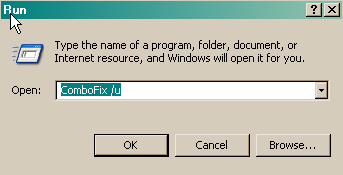
  • Click START then RUN
  • Now type Combofix /u in the runbox and click OK. Note the space between the X and the U, it needs to be there.

    • CF_Cleanup.png

  • When shown the disclaimer, Select "2"

The above procedure will:
  • Delete the following:
    • ComboFix and its associated files and folders.
    • VundoFix backups, if present
    • The C:\Deckard folder, if present
    • The C:_OtMoveIt folder, if present
  • Reset the clock settings.
  • Hide file extensions, if required.
  • Hide System/Hidden files, if required.
  • Reset System Restore.


Keep in mind if you install some of these programs. Only ONE Anti Virus and only ONE Firewall is recommended, more is overkill and can cause you problems. You can install all the Spyware programs I have listed without any problems. If you install Spyware Blaster, you can still install Spybot Search and Destroy but do not enable the TeaTimer in Spybot.

Here are some free programs to install, all free and highly regarded by the fine people in the Malware Removal Community
  • Spybot Search and Destroy 1.6
    Check for Updates/ Immunize and run a Full System Scan on a regular basis. If you install Spyware Blaster ( Recommended ) then do not enable the TeaTimer in Spybot Search and Destroy.
  • Spyware Blaster It will prevent most spyware from ever being installed. No scan to run, just update about once a week and enable all protection.
  • Spyware Guard It offers realtime protection from spyware installation attempts, again, no scan to run, just install it and let it do its thing.
  • IE-Spyad
    IE-Spyad places over 6000 web sites and domains in the IE Restricted list which will severely impair attempts to infect your system. It basically prevents any downloads (cookies etc) from the sites listed, although you will still be able to connect to the sites.
  • Firefox 3 It has more features and is a lot more secure than IE. It is a very easy and painless download and install, it will no way interfere with IE, you can use them both.


Safe Surfn
Ken
 
Since this issue appears to be resolved ... this Topic has been closed. Glad I could help.
 
Status
Not open for further replies.
Back
Top