Virtumonde and possible others

Status
Not open for further replies.
OK I did another spy bot scan and it informed me that I had the following things on my computer:

win32.small.ddx
fraud, xp antivirus
hupigon 13
virtumonde

I had spy bot remove them but these weren't actually there before They just appeared with this last scan. (except the virtumonde that was always there) Malware told me that everything was clean but spy bot says otherwise. I will run the spy bot again tonight to see if they are still they even after it said that it was removed.
 
Those are most likely left over entries, the actual infection is gone. What you need to do is run Spybot and remove them....Reboot you computer...run Spybot again , it may take a time or two before it comes up clean.

Ken :)
 
Ok they are still coming up, I will continue to run spybot a few more times and let you know the results
 
Run Spybot in Safemode


To Enter Safemode
  • Go to Start> Shut off your Computer> Restart
  • As the computer starts to boot-up, Tap the F8 KEY somewhat rapidly,
    this will bring up a menu.
  • Use the Up and Down Arrow Keys to scroll up to Safemode
  • Then press the Enter Key on your Keyboard
Tutorial if you need it How to boot into Safemode
 
Hello,

I just wanted to touch base with you so that you did not close the thread yet LOL. I had gotten extremely busy the past couple of days and I will be running spybot in safe mode tonight. I usually have to do it at night because I do alot of work on my computer for school and it really slows it down sometimes. But I will be getting back with you shortly. thank you for being patient
 
Well Everything seems to be cleared up. I ran the scans a couple of times and they have come up clean now. I also got rid of McAffee and Got Norton as well. Thank you so much for your help :present: :yahoo::2thumb:
 
Great :bigthumb:

ATF Cleaner <-- Yours to keep, run it now and then to clean out the clutter.

Malwarebytes <-- Yours to keep also, check for updates and run a scan now and then.

Combofix <---Is not a general cleaning tool, just run it with supervision or you can bork your system

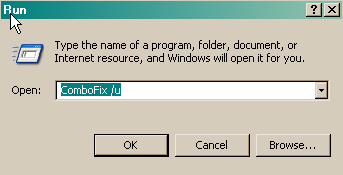
  • Click START then RUN
  • Now type Combofix /u in the runbox and click OK. Note the space between the X and the U, it needs to be there.

    • CF_Cleanup.png

  • When shown the disclaimer, Select "2"

The above procedure will:
  • Delete the following:
    • ComboFix and its associated files and folders.
    • VundoFix backups, if present
    • The C:\Deckard folder, if present
    • The C:_OtMoveIt folder, if present
  • Reset the clock settings.
  • Hide file extensions, if required.
  • Hide System/Hidden files, if required.
  • Reset System Restore.


Keep in mind if you install some of these programs. Only ONE Anti Virus and only ONE Firewall is recommended, more is overkill and can cause you problems. You can install all the Spyware programs I have listed without any problems. If you install Spyware Blaster and Spyware Guard, they will conflict with the TeaTimer in Spybot , you can still install Spybot Search and Destroy but do not enable the TeaTimer .


Here are some free programs to install, all free and highly regarded by the fine people in the Malware Removal Community
  • Spybot Search and Destroy 1.6
    Check for Updates/ Immunize and run a Full System Scan on a regular basis. If you install Spyware Blaster ( Recommended ) then do not enable the TeaTimer in Spybot Search and Destroy.
  • Spyware Blaster It will prevent most spyware from ever being installed. No scan to run, just update about once a week and enable all protection.
  • Spyware Guard It offers realtime protection from spyware installation attempts, again, no scan to run, just install it and let it do its thing.
  • IE-Spyad
    IE-Spyad places over 6000 web sites and domains in the IE Restricted list which will severely impair attempts to infect your system. It basically prevents any downloads (cookies etc) from the sites listed, although you will still be able to connect to the sites.
  • Firefox 3 It has more features and is a lot more secure than IE. It is a very easy and painless download and install, it will no way interfere with IE, you can use them both.


Safe Surfn
Ken
 
Since this issue appears to be resolved ... this Topic has been closed. Glad I could help.
 
Status
Not open for further replies.
Back
Top