Virtumonde and Smitfraud, Take 583

Hello!

Please install antivirus program after the Kaspersky scan. I dont want you to get reinfected. Unfornately the Kaspersky scan is very slow but it is one of the best.
 
Kaspersky scan mostly containing ancient email attachments which never got deleted. (Some of this is so old that when I originally downloaded the email it was on my old Linux box.)

--------------------------------------------------------------------------------
KASPERSKY ONLINE SCANNER 7 REPORT
Friday, January 16, 2009
Operating System: Microsoft Windows XP Home Edition Service Pack 2 (build 2600)
Kaspersky Online Scanner 7 version: 7.0.25.0
Program database last update: Friday, January 16, 2009 11:13:24
Records in database: 1630661
--------------------------------------------------------------------------------

Scan settings:
Scan using the following database: extended
Scan archives: yes
Scan mail databases: yes

Scan area - My Computer:
C:\
D:\
E:\

Scan statistics:
Files scanned: 351918
Threat name: 37
Infected objects: 67
Suspicious objects: 42
Duration of the scan: 05:17:08


File name / Threat name / Threats count
C:\Documents and Settings\thea\Application Data\Thunderbird\Profiles\x0299xcc.default\Mail\Local Folders\beddes.com.sbd\maura@beddes.com Suspicious: Trojan-Spy.HTML.Fraud.gen 1
C:\Documents and Settings\thea\Application Data\Thunderbird\Profiles\x0299xcc.default\Mail\Local Folders\Inbox Infected: Trojan-Downloader.Win32.Small.eyd 1
C:\Documents and Settings\thea\Application Data\Thunderbird\Profiles\x0299xcc.default\Mail\Local Folders\Inbox Infected: Trojan-Downloader.Win32.Diehard.ca 1
C:\Documents and Settings\thea\Application Data\Thunderbird\Profiles\x0299xcc.default\Mail\Local Folders\Inbox Infected: Trojan-Downloader.Win32.Agent.fke 1
C:\Documents and Settings\thea\Application Data\Thunderbird\Profiles\x0299xcc.default\Mail\Local Folders\Inbox Suspicious: Trojan-Spy.HTML.Fraud.gen 20
C:\Documents and Settings\thea\Application Data\Thunderbird\Profiles\x0299xcc.default\Mail\Local Folders\Inbox Infected: Trojan-Downloader.Win32.Zanoza.fw 1
C:\Documents and Settings\thea\Application Data\Thunderbird\Profiles\x0299xcc.default\Mail\Local Folders\Inbox Infected: Trojan-Downloader.Win32.Zanoza.gc 1
C:\Documents and Settings\thea\Application Data\Thunderbird\Profiles\x0299xcc.default\Mail\Local Folders\Inbox Infected: Trojan-Downloader.JS.Agent.cxx 2
C:\Documents and Settings\thea\Application Data\Thunderbird\Profiles\x0299xcc.default\Mail\Local Folders\Inbox Infected: Trojan-Dropper.Win32.Agent.slh 1
C:\Documents and Settings\thea\Application Data\Thunderbird\Profiles\x0299xcc.default\Mail\Local Folders\Inbox Infected: Trojan-Clicker.HTML.Agent.ag 6
C:\Documents and Settings\thea\Application Data\Thunderbird\Profiles\x0299xcc.default\Mail\Local Folders\Inbox Infected: Trojan.Win32.Pakes.dft 1
C:\Documents and Settings\thea\Application Data\Thunderbird\Profiles\x0299xcc.default\Mail\Local Folders\Inbox Infected: Backdoor.Win32.Agent.nnn 1
C:\Documents and Settings\thea\Application Data\Thunderbird\Profiles\x0299xcc.default\Mail\Local Folders\Inbox Infected: Trojan-Downloader.Win32.Small.aafc 1
C:\Documents and Settings\thea\Application Data\Thunderbird\Profiles\x0299xcc.default\Mail\Local Folders\Inbox Infected: Trojan-Spy.Win32.Zbot.edw 1
C:\Documents and Settings\thea\Application Data\Thunderbird\Profiles\x0299xcc.default\Mail\Local Folders\Inbox Infected: Worm.Win32.AutoRun.mwj 1
C:\Documents and Settings\thea\Application Data\Thunderbird\Profiles\x0299xcc.default\Mail\Local Folders\Inbox Infected: Backdoor.Win32.Hijack.e 1
C:\Documents and Settings\thea\Application Data\Thunderbird\Profiles\x0299xcc.default\Mail\Local Folders\Inbox Infected: Trojan-Downloader.Win32.Agent.aggp 3
C:\Documents and Settings\thea\Application Data\Thunderbird\Profiles\x0299xcc.default\Mail\Local Folders\Inbox Infected: Trojan-Dropper.Win32.Agent.xgg 1
C:\Documents and Settings\thea\Application Data\Thunderbird\Profiles\x0299xcc.default\Mail\Local Folders\Inbox Infected: Trojan-Spy.Win32.Goldun.bbg 1
C:\Documents and Settings\thea\Application Data\Thunderbird\Profiles\x0299xcc.default\Mail\Local Folders\Inbox Infected: Worm.Win32.AutoRun.qzc 1
C:\Documents and Settings\thea\Application Data\Thunderbird\Profiles\x0299xcc.default\Mail\Local Folders\Inbox Infected: Trojan.Win32.Pakes.lgd 1
C:\Documents and Settings\thea\Application Data\Thunderbird\Profiles\x0299xcc.default\Mail\Local Folders\Inbox Infected: Trojan-Downloader.Win32.Small.afqu 1
C:\Documents and Settings\thea\Application Data\Thunderbird\Profiles\x0299xcc.default\Mail\Local Folders\Inbox Infected: Trojan-Downloader.Win32.Banload.xlm 1
C:\Documents and Settings\thea\Application Data\Thunderbird\Profiles\x0299xcc.default\Mail\Local Folders\Inbox Infected: Worm.Win32.AutoRun.rwo 1
C:\Documents and Settings\thea\Application Data\Thunderbird\Profiles\x0299xcc.default\Mail\Local Folders\Inbox Infected: Trojan-Downloader.Win32.Agent.aqkx 1
C:\Documents and Settings\thea\Application Data\Thunderbird\Profiles\x0299xcc.default\Mail\Local Folders\Junk Infected: Trojan-Downloader.Win32.Diehard.ca 1
C:\Documents and Settings\thea\Application Data\Thunderbird\Profiles\x0299xcc.default\Mail\Local Folders\Junk Infected: Trojan-Downloader.Win32.Agent.fke 1
C:\Documents and Settings\thea\Application Data\Thunderbird\Profiles\x0299xcc.default\Mail\Local Folders\Junk Suspicious: Trojan-Spy.HTML.Fraud.gen 19
C:\Documents and Settings\thea\Application Data\Thunderbird\Profiles\x0299xcc.default\Mail\Local Folders\Junk Infected: Trojan-Dropper.Win32.Agent.slh 1
C:\Documents and Settings\thea\Application Data\Thunderbird\Profiles\x0299xcc.default\Mail\Local Folders\Junk Infected: Backdoor.Win32.Agent.nnn 1
C:\Documents and Settings\thea\Application Data\Thunderbird\Profiles\x0299xcc.default\Mail\Local Folders\Junk Infected: Trojan-Downloader.Win32.Small.aafc 1
C:\Documents and Settings\thea\Application Data\Thunderbird\Profiles\x0299xcc.default\Mail\Local Folders\Junk Infected: Backdoor.Win32.Hijack.e 1
C:\Documents and Settings\thea\Application Data\Thunderbird\Profiles\x0299xcc.default\Mail\Local Folders\Junk Infected: Trojan-Downloader.Win32.Agent.aggp 3
C:\Documents and Settings\thea\Application Data\Thunderbird\Profiles\x0299xcc.default\Mail\Local Folders\Junk Suspicious: Password-protected-EXE 1
C:\Documents and Settings\thea\Application Data\Thunderbird\Profiles\x0299xcc.default\Mail\Local Folders\kudaranai.net.sbd\akatonbo@kudaranai.net Suspicious: Password-protected-EXE 1
C:\Documents and Settings\thea\Application Data\Thunderbird\Profiles\x0299xcc.default\Mail\Local Folders\kudaranai.net.sbd\akatonbo@kudaranai.net Infected: Exploit.Win32.PDF-URI.l 1
C:\Documents and Settings\thea\Application Data\Thunderbird\Profiles\x0299xcc.default\Mail\Local Folders\kudaranai.net.sbd\akatonbo@kudaranai.net Infected: Trojan-Spy.Win32.Zbot.dkx 1
C:\Documents and Settings\thea\Application Data\Thunderbird\Profiles\x0299xcc.default\Mail\Local Folders\kudaranai.net.sbd\akatonbo@kudaranai.net Infected: Trojan-Spy.Win32.Zbot.edw 1
C:\Documents and Settings\thea\Application Data\Thunderbird\Profiles\x0299xcc.default\Mail\Local Folders\kudaranai.net.sbd\akatonbo@kudaranai.net Infected: Worm.Win32.AutoRun.mwj 1
C:\Documents and Settings\thea\Desktop\avitompeg15.exe Infected: not-a-virus:WebToolbar.Win32.VB.e 1
C:\Documents and Settings\thea\Desktop\From Old Machines\From Hisoka\From Nuriko\text_dir.tar.gz Infected: not-a-virus:NetTool.Win32.ICMPPing 1
C:\Documents and Settings\thea\Desktop\From Old Machines\Installers\cute4032.exe Infected: not-a-virus:AdWare.Win32.TimeSink 4
C:\Documents and Settings\thea\Desktop\From Old Machines\Installers\kazaalite_202_b1.zip Infected: not-a-virus:AdWare.Win32.Altnet.o 1
C:\Documents and Settings\thea\Desktop\From Old Machines\Mailbox\ayashi.net.box Infected: Net-Worm.Win32.Nimda.d 1
C:\Documents and Settings\thea\Desktop\From Old Machines\Mailbox\ayashi.net.box.bak Infected: Net-Worm.Win32.Nimda.d 1
C:\Documents and Settings\thea\Desktop\From Old Machines\Mailbox\Master Mailbox.box Infected: Net-Worm.Win32.Nimda.d 1
C:\Documents and Settings\thea\Desktop\From Old Machines\Mailbox\Master Mailbox.box.bak Infected: Net-Worm.Win32.Nimda.d 1
C:\Documents and Settings\thea\Desktop\From Old Machines\Post-Crash Stuff\Calpyso Mailboxen\ayashi.net.box Infected: Net-Worm.Win32.Nimda.d 1
C:\Documents and Settings\thea\Desktop\From Old Machines\Post-Crash Stuff\Calpyso Mailboxen\kudaranai.net.box Infected: Trojan-Spy.HTML.Bankfraud.ci 1
C:\Documents and Settings\thea\Desktop\From Old Machines\Post-Crash Stuff\Calpyso Mailboxen\kudaranai.net.box Infected: Trojan-Spy.HTML.Smitfraud.c 1
C:\Documents and Settings\thea\Desktop\From Old Machines\Post-Crash Stuff\Calpyso Mailboxen\Master Mailbox.box Infected: Net-Worm.Win32.Nimda.d 1
C:\Documents and Settings\thea\Desktop\From Old Machines\Post-Crash Stuff\Installers\mirc616.exe Infected: not-a-virus:Client-IRC.Win32.mIRC.616 1
C:\Documents and Settings\thea\Desktop\From Old Machines\Stuff From Downstairs\kudaranai.net.box Infected: Trojan-Spy.HTML.Bankfraud.ci 1
C:\Documents and Settings\thea\Desktop\From Old Machines\Stuff From Downstairs\kudaranai.net.box Infected: Trojan-Spy.HTML.Smitfraud.c 1
C:\Documents and Settings\thea\Desktop\From Old Machines\Stuff From Downstairs\kudaranai.net.box Infected: Trojan-Spy.HTML.Wamufraud.bo 2
C:\Documents and Settings\thea\Desktop\From Old Machines\Stuff From Downstairs\kudaranai.net.box Infected: Trojan-Spy.HTML.Bankfraud.dq 1
C:\Installers\mirc616.exe Infected: not-a-virus:Client-IRC.Win32.mIRC.616 1
C:\Program Files\mIRC\mirc.exe Infected: not-a-virus:Client-IRC.Win32.mIRC.616 1

The selected area was scanned.
 
Logfile of Trend Micro HijackThis v2.0.2
Scan saved at 2:47:05 PM, on 1/16/2009
Platform: Windows XP SP2 (WinNT 5.01.2600)
MSIE: Internet Explorer v6.00 SP2 (6.00.2900.2180)
Boot mode: Normal

Running processes:
C:\WINDOWS\System32\smss.exe
C:\WINDOWS\system32\winlogon.exe
C:\WINDOWS\system32\services.exe
C:\WINDOWS\system32\lsass.exe
C:\WINDOWS\system32\Ati2evxx.exe
C:\WINDOWS\system32\svchost.exe
C:\WINDOWS\System32\svchost.exe
C:\WINDOWS\system32\Ati2evxx.exe
C:\WINDOWS\system32\spoolsv.exe
C:\Program Files\Common Files\Apple\Mobile Device Support\bin\AppleMobileDeviceService.exe
C:\Program Files\Bonjour\mDNSResponder.exe
C:\WINDOWS\system32\CTsvcCDA.EXE
C:\Program Files\FolderSize\FolderSizeSvc.exe
C:\Program Files\Intel\Intel Application Accelerator\iaantmon.exe
C:\Program Files\Java\jre6\bin\jqs.exe
C:\WINDOWS\system32\svchost.exe
C:\WINDOWS\system32\MsPMSPSv.exe
C:\Program Files\Analog Devices\Core\smax4pnp.exe
C:\Program Files\Intel\Intel Application Accelerator\iaanotif.exe
C:\Program Files\Intel\Modem Event Monitor\IntelMEM.exe
C:\Program Files\CyberLink\PowerDVD\DVDLauncher.exe
C:\Program Files\Dell\Media Experience\DMXLauncher.exe
C:\Program Files\Musicmatch\Musicmatch Jukebox\mmtask.exe
C:\WINDOWS\system32\dla\tfswctrl.exe
C:\Program Files\Java\jre6\bin\jusched.exe
C:\progra~1\vision~1\paperp~1\pptd40nt.exe
C:\WINDOWS\twain_32\paprport\3100b\flatbed.exe
C:\Program Files\iTunes\iTunesHelper.exe
C:\Program Files\Google\GoogleToolbarNotifier\GoogleToolbarNotifier.exe
C:\Program Files\ATI Technologies\ATI.ACE\Core-Static\MOM.EXE
C:\Program Files\Common Files\DataViz\DvzIncMsgr.exe
C:\Program Files\Palm\Hotsync.exe
C:\Program Files\iPod\bin\iPodService.exe
C:\WINDOWS\system32\wscntfy.exe
C:\Program Files\ATI Technologies\ATI.ACE\Core-Static\ccc.exe
C:\Program Files\JGsoft\EditPadLite\EditPad.exe
C:\WINDOWS\system32\wuauclt.exe
C:\WINDOWS\explorer.exe
C:\Program Files\Mozilla Firefox\firefox.exe
C:\Program Files\Java\jre6\bin\java.exe
C:\Program Files\Mozilla Thunderbird\thunderbird.exe
C:\Program Files\Trend Micro\HijackThis\HijackThis.exe

R0 - HKCU\Software\Microsoft\Internet Explorer\Main,Start Page = about:blank
R1 - HKLM\Software\Microsoft\Internet Explorer\Main,Default_Page_URL = http://go.microsoft.com/fwlink/?LinkId=69157
R1 - HKLM\Software\Microsoft\Internet Explorer\Main,Default_Search_URL = http://go.microsoft.com/fwlink/?LinkId=54896
R1 - HKLM\Software\Microsoft\Internet Explorer\Main,Search Page = http://go.microsoft.com/fwlink/?LinkId=54896
R1 - HKCU\Software\Microsoft\Internet Connection Wizard,ShellNext = http://www.dell4me.com/myway
R1 - HKCU\Software\Microsoft\Windows\CurrentVersion\Internet Settings,ProxyOverride = *.local
O2 - BHO: Java(tm) Plug-In SSV Helper - {761497BB-D6F0-462C-B6EB-D4DAF1D92D43} - C:\Program Files\Java\jre6\bin\ssv.dll
O2 - BHO: Java(tm) Plug-In 2 SSV Helper - {DBC80044-A445-435b-BC74-9C25C1C588A9} - C:\Program Files\Java\jre6\bin\jp2ssv.dll
O3 - Toolbar: TextAloud - {F053C368-5458-45B2-9B4D-D8914BDDDBFF} - C:\PROGRA~1\TEXTAL~1\TAForIE.dll
O3 - Toolbar: &Google - {2318C2B1-4965-11d4-9B18-009027A5CD4F} - c:\program files\google\googletoolbar4.dll
O4 - HKLM\..\Run: [SoundMAXPnP] C:\Program Files\Analog Devices\Core\smax4pnp.exe
O4 - HKLM\..\Run: [IAAnotif] C:\Program Files\Intel\Intel Application Accelerator\iaanotif.exe
O4 - HKLM\..\Run: [ATIPTA] "C:\Program Files\ATI Technologies\ATI Control Panel\atiptaxx.exe"
O4 - HKLM\..\Run: [IntelMeM] C:\Program Files\Intel\Modem Event Monitor\IntelMEM.exe
O4 - HKLM\..\Run: [DVDLauncher] "C:\Program Files\CyberLink\PowerDVD\DVDLauncher.exe"
O4 - HKLM\..\Run: [DMXLauncher] C:\Program Files\Dell\Media Experience\DMXLauncher.exe
O4 - HKLM\..\Run: [UpdateManager] "C:\Program Files\Common Files\Sonic\Update Manager\sgtray.exe" /r
O4 - HKLM\..\Run: [mmtask] C:\Program Files\Musicmatch\Musicmatch Jukebox\mmtask.exe
O4 - HKLM\..\Run: [dla] C:\WINDOWS\system32\dla\tfswctrl.exe
O4 - HKLM\..\Run: [SunJavaUpdateSched] "C:\Program Files\Java\jre6\bin\jusched.exe"
O4 - HKLM\..\Run: [PaperPort PTD] c:\progra~1\vision~1\paperp~1\pptd40nt.exe
O4 - HKLM\..\Run: [PP3100b] C:\WINDOWS\twain_32\paprport\3100b\flatbed.exe
O4 - HKLM\..\Run: [StartCCC] "C:\Program Files\ATI Technologies\ATI.ACE\Core-Static\CLIStart.exe"
O4 - HKLM\..\Run: [QuickTime Task] "C:\Program Files\QuickTime\QTTask.exe" -atboottime
O4 - HKLM\..\Run: [iTunesHelper] "C:\Program Files\iTunes\iTunesHelper.exe"
O4 - HKCU\..\Run: [swg] C:\Program Files\Google\GoogleToolbarNotifier\GoogleToolbarNotifier.exe
O4 - HKCU\..\Run: [updateMgr] "C:\Program Files\Adobe\Acrobat 7.0\Reader\AdobeUpdateManager.exe" AcRdB7_0_8 -reboot 1
O4 - HKCU\..\Run: [Semagic] C:\Program Files\Semagic\LiveJournalU.exe
O4 - Global Startup: Adobe Gamma Loader.exe.lnk = C:\Program Files\Common Files\Adobe\Calibration\Adobe Gamma Loader.exe
O4 - Global Startup: Adobe Reader Speed Launch.lnk = C:\Program Files\Adobe\Acrobat 7.0\Reader\reader_sl.exe
O4 - Global Startup: DataViz Inc Messenger.lnk = C:\Program Files\Common Files\DataViz\DvzIncMsgr.exe
O4 - Global Startup: HOTSYNCSHORTCUTNAME.lnk = C:\Program Files\Palm\Hotsync.exe
O4 - Global Startup: MLB.TV NexDef Plug-in.lnk = C:\Program Files\Autobahn\mlb-nexdef-autobahn.exe
O4 - Global Startup: QuickBooks Update Agent.lnk = C:\Program Files\Common Files\Intuit\QuickBooks\QBUpdate\qbupdate.exe
O9 - Extra button: AIM - {AC9E2541-2814-11d5-BC6D-00B0D0A1DE45} - C:\PROGRA~1\AIM\aim.exe
O9 - Extra button: Real.com - {CD67F990-D8E9-11d2-98FE-00C0F0318AFE} - C:\WINDOWS\system32\Shdocvw.dll
O9 - Extra button: Messenger - {FB5F1910-F110-11d2-BB9E-00C04F795683} - C:\Program Files\Messenger\msmsgs.exe
O9 - Extra 'Tools' menuitem: Windows Messenger - {FB5F1910-F110-11d2-BB9E-00C04F795683} - C:\Program Files\Messenger\msmsgs.exe
O16 - DPF: {17492023-C23A-453E-A040-C7C580BBF700} (Windows Genuine Advantage Validation Tool) - http://go.microsoft.com/fwlink/?linkid=39204
O16 - DPF: {362C56AA-6E4F-40C7-A0B5-85501DBDAD77} (Scanner.SysScanner) - http://i.dell.com/images/global/js/scanner/SysProExe.cab
O23 - Service: Apple Mobile Device - Apple Inc. - C:\Program Files\Common Files\Apple\Mobile Device Support\bin\AppleMobileDeviceService.exe
O23 - Service: Ati HotKey Poller - ATI Technologies Inc. - C:\WINDOWS\system32\Ati2evxx.exe
O23 - Service: ATI Smart - Unknown owner - C:\WINDOWS\SYSTEM32\ati2sgag.exe
O23 - Service: Bonjour Service - Apple Inc. - C:\Program Files\Bonjour\mDNSResponder.exe
O23 - Service: Cepstral License Server - Cepstral, LLC - C:\Program Files\Cepstral\lib\LicenseServer.exe
O23 - Service: Creative Service for CDROM Access - Creative Technology Ltd - C:\WINDOWS\system32\CTsvcCDA.EXE
O23 - Service: Folder Size (FolderSize) - Brio - C:\Program Files\FolderSize\FolderSizeSvc.exe
O23 - Service: Google Updater Service (gusvc) - Google - C:\Program Files\Google\Common\Google Updater\GoogleUpdaterService.exe
O23 - Service: IAA Event Monitor (IAANTMon) - Intel Corporation - C:\Program Files\Intel\Intel Application Accelerator\iaantmon.exe
O23 - Service: InstallDriver Table Manager (IDriverT) - Macrovision Corporation - C:\Program Files\Common Files\InstallShield\Driver\11\Intel 32\IDriverT.exe
O23 - Service: iPod Service - Apple Inc. - C:\Program Files\iPod\bin\iPodService.exe
O23 - Service: Java Quick Starter (JavaQuickStarterService) - Sun Microsystems, Inc. - C:\Program Files\Java\jre6\bin\jqs.exe

--
End of file - 7513 bytes
 
Hello!

Is kudaranai.net your email account?

Can you tell me anything about these?

C:\Documents and Settings\thea\Desktop\From Old Machines\Mailbox\ayashi.net.box
C:\Documents and Settings\thea\Desktop\From Old Machines\Mailbox\ayashi.net.box.bak
C:\Documents and Settings\thea\Desktop\From Old Machines\Mailbox\Master Mailbox.box
C:\Documents and Settings\thea\Desktop\From Old Machines\Mailbox\Master Mailbox.box.bak
C:\Documents and Settings\thea\Desktop\From Old Machines\Post-Crash Stuff\Calpyso Mailboxen\ayashi.net.box
C:\Documents and Settings\thea\Desktop\From Old Machines\Post-Crash Stuff\Calpyso Mailboxen\kudaranai.net.box
C:\Documents and Settings\thea\Desktop\From Old Machines\Post-Crash Stuff\Calpyso Mailboxen\Master Mailbox.box
C:\Documents and Settings\thea\Desktop\From Old Machines\Stuff From Downstairs\kudaranai.net.box
You need to empty your Thunderbirds junk folder and delete this email C:\Documents and Settings\thea\Application Data\Thunderbird\Profiles\x0299xcc.default\Mail\Local Folders\beddes.com.sbd\maura@beddes.com


Show All Files And Folders Windows XP


  • Click Start.
  • Open My Computer.
  • Select the Tools menu and click Folder Options.
  • Select the View Tab.
  • Under the Hidden files and folders heading select Show hidden files and folders.
  • Uncheck Hide file extensions for known file types
  • Uncheck the Hide protected operating system files (recommended) option.
  • Click Apply to confirm.
  • Click OK.


Delete files

Using Windows Explore by right-clicking the start button and left clicking Explore navigate to and find the following files: if found, delete them (some may not be present after previous steps):


  • Files:
    C:\Documents and Settings\thea\Desktop\From Old Machines\From Hisoka\From Nuriko\text_dir.tar.gz
    C:\Documents and Settings\thea\Desktop\From Old Machines\Installers\cute4032.exe
 
Yes, kudaranai.net is my domain and thus I have a number of email addresses there. All of the items you enclosed in the box are all old mailboxes from when I was using Calypso to read my mail instead of Thunderbird, and a few old backups of those oldmailboxes. I keep them around because I have old mail in there that I still want to be able to refer back to, but some day when I have nothing better to do I should really delete most of it; I used to have a bad habit of not deleting mail.

I have deleted
C:\Documents and Settings\thea\Desktop\From Old Machines\Installers\cute4032.exe
(which I am fairly sure is an ancient CuteFTP installer)

The other file is an archive of old textfiles which was tgzed over 10 years ago and contains mostly stuff from over 15 years ago. If it's truly infected with something dangerous then I'd appreciate directions on how to clean it WITHOUT deleting the contents, many of which are irreplaceable chatlogs.

Also, the Thunderbird file you've directed me to delete is an entire mail subfolder, and I likewise would prefer to be able to eliminate any nasties in it without also deleting email I was keeping for a reason. I deleted a junkmail message that was still in there that had a file called winmail.dat attached to it; is there something I can do to see if that's resolved the issue? That was the only thing that had an attachment that I didn't know exactly where it came from, although I also deleted most of the other messages with attachments. Have emptied the trash in Thunderbird as well.
 
Hello!

In light of this information, they are most likely false positives so no cause for alarm. you can keep them. You did well. Could you please post me new HijackThis log. Do you still have any problems?
 
No problems that I can identify. As I said, I haven't actually had many noticeable issues to begin with, it was just that I noticed I must have caught something because my browser was being occasionally hijacked, and then when I did the scan I had things that Spyboy couldn't clean out. (I'll be following many of the recommendations in the 'how did I get infected' post once given the all-clear. I let myself get sloppy.)

Logfile of Trend Micro HijackThis v2.0.2
Scan saved at 4:10:16 PM, on 1/16/2009
Platform: Windows XP SP2 (WinNT 5.01.2600)
MSIE: Internet Explorer v6.00 SP2 (6.00.2900.2180)
Boot mode: Normal

Running processes:
C:\WINDOWS\System32\smss.exe
C:\WINDOWS\system32\winlogon.exe
C:\WINDOWS\system32\services.exe
C:\WINDOWS\system32\lsass.exe
C:\WINDOWS\system32\Ati2evxx.exe
C:\WINDOWS\system32\svchost.exe
C:\WINDOWS\System32\svchost.exe
C:\Program Files\Alwil Software\Avast4\aswUpdSv.exe
C:\Program Files\Alwil Software\Avast4\ashServ.exe
C:\WINDOWS\system32\Ati2evxx.exe
C:\WINDOWS\system32\spoolsv.exe
C:\Program Files\Common Files\Apple\Mobile Device Support\bin\AppleMobileDeviceService.exe
C:\Program Files\Bonjour\mDNSResponder.exe
C:\WINDOWS\system32\CTsvcCDA.EXE
C:\Program Files\FolderSize\FolderSizeSvc.exe
C:\Program Files\Intel\Intel Application Accelerator\iaantmon.exe
C:\Program Files\Java\jre6\bin\jqs.exe
C:\WINDOWS\system32\svchost.exe
C:\WINDOWS\Explorer.EXE
C:\WINDOWS\system32\MsPMSPSv.exe
C:\Program Files\Alwil Software\Avast4\ashMaiSv.exe
C:\Program Files\Alwil Software\Avast4\ashWebSv.exe
C:\Program Files\Analog Devices\Core\smax4pnp.exe
C:\Program Files\Intel\Intel Application Accelerator\iaanotif.exe
C:\Program Files\Intel\Modem Event Monitor\IntelMEM.exe
C:\Program Files\CyberLink\PowerDVD\DVDLauncher.exe
C:\Program Files\Dell\Media Experience\DMXLauncher.exe
C:\Program Files\Common Files\Sonic\Update Manager\sgtray.exe
C:\Program Files\Musicmatch\Musicmatch Jukebox\mmtask.exe
C:\WINDOWS\system32\dla\tfswctrl.exe
C:\Program Files\Java\jre6\bin\jusched.exe
C:\progra~1\vision~1\paperp~1\pptd40nt.exe
C:\WINDOWS\twain_32\paprport\3100b\flatbed.exe
C:\Program Files\iTunes\iTunesHelper.exe
C:\PROGRA~1\ALWILS~1\Avast4\ashDisp.exe
C:\Program Files\Google\GoogleToolbarNotifier\GoogleToolbarNotifier.exe
C:\Program Files\ATI Technologies\ATI.ACE\Core-Static\MOM.EXE
C:\Program Files\Semagic\LiveJournalU.exe
C:\Program Files\Adobe\Acrobat 7.0\Reader\reader_sl.exe
C:\Program Files\Common Files\DataViz\DvzIncMsgr.exe
C:\Program Files\Palm\Hotsync.exe
C:\Program Files\Autobahn\mlb-nexdef-autobahn.exe
C:\Program Files\iPod\bin\iPodService.exe
C:\WINDOWS\system32\wuauclt.exe
C:\Program Files\ATI Technologies\ATI.ACE\Core-Static\ccc.exe
C:\WINDOWS\system32\wscntfy.exe
C:\WINDOWS\system32\wuauclt.exe
C:\Program Files\Mozilla Thunderbird\thunderbird.exe
C:\Program Files\Mozilla Firefox\firefox.exe
C:\Program Files\Trend Micro\HijackThis\HijackThis.exe

R0 - HKCU\Software\Microsoft\Internet Explorer\Main,Start Page = about:blank
R1 - HKLM\Software\Microsoft\Internet Explorer\Main,Default_Page_URL = http://go.microsoft.com/fwlink/?LinkId=69157
R1 - HKLM\Software\Microsoft\Internet Explorer\Main,Search Page = http://go.microsoft.com/fwlink/?LinkId=54896
R1 - HKCU\Software\Microsoft\Internet Connection Wizard,ShellNext = http://www.dell4me.com/myway
R1 - HKCU\Software\Microsoft\Windows\CurrentVersion\Internet Settings,ProxyOverride = *.local
O2 - BHO: Java(tm) Plug-In SSV Helper - {761497BB-D6F0-462C-B6EB-D4DAF1D92D43} - C:\Program Files\Java\jre6\bin\ssv.dll
O2 - BHO: Java(tm) Plug-In 2 SSV Helper - {DBC80044-A445-435b-BC74-9C25C1C588A9} - C:\Program Files\Java\jre6\bin\jp2ssv.dll
O3 - Toolbar: TextAloud - {F053C368-5458-45B2-9B4D-D8914BDDDBFF} - C:\PROGRA~1\TEXTAL~1\TAForIE.dll
O3 - Toolbar: &Google - {2318C2B1-4965-11d4-9B18-009027A5CD4F} - c:\program files\google\googletoolbar4.dll
O4 - HKLM\..\Run: [SoundMAXPnP] C:\Program Files\Analog Devices\Core\smax4pnp.exe
O4 - HKLM\..\Run: [IAAnotif] C:\Program Files\Intel\Intel Application Accelerator\iaanotif.exe
O4 - HKLM\..\Run: [ATIPTA] "C:\Program Files\ATI Technologies\ATI Control Panel\atiptaxx.exe"
O4 - HKLM\..\Run: [IntelMeM] C:\Program Files\Intel\Modem Event Monitor\IntelMEM.exe
O4 - HKLM\..\Run: [DVDLauncher] "C:\Program Files\CyberLink\PowerDVD\DVDLauncher.exe"
O4 - HKLM\..\Run: [DMXLauncher] C:\Program Files\Dell\Media Experience\DMXLauncher.exe
O4 - HKLM\..\Run: [UpdateManager] "C:\Program Files\Common Files\Sonic\Update Manager\sgtray.exe" /r
O4 - HKLM\..\Run: [mmtask] C:\Program Files\Musicmatch\Musicmatch Jukebox\mmtask.exe
O4 - HKLM\..\Run: [dla] C:\WINDOWS\system32\dla\tfswctrl.exe
O4 - HKLM\..\Run: [SunJavaUpdateSched] "C:\Program Files\Java\jre6\bin\jusched.exe"
O4 - HKLM\..\Run: [PaperPort PTD] c:\progra~1\vision~1\paperp~1\pptd40nt.exe
O4 - HKLM\..\Run: [PP3100b] C:\WINDOWS\twain_32\paprport\3100b\flatbed.exe
O4 - HKLM\..\Run: [StartCCC] "C:\Program Files\ATI Technologies\ATI.ACE\Core-Static\CLIStart.exe"
O4 - HKLM\..\Run: [QuickTime Task] "C:\Program Files\QuickTime\QTTask.exe" -atboottime
O4 - HKLM\..\Run: [iTunesHelper] "C:\Program Files\iTunes\iTunesHelper.exe"
O4 - HKLM\..\Run: [avast!] C:\PROGRA~1\ALWILS~1\Avast4\ashDisp.exe
O4 - HKCU\..\Run: [swg] C:\Program Files\Google\GoogleToolbarNotifier\GoogleToolbarNotifier.exe
O4 - HKCU\..\Run: [updateMgr] "C:\Program Files\Adobe\Acrobat 7.0\Reader\AdobeUpdateManager.exe" AcRdB7_0_8 -reboot 1
O4 - HKCU\..\Run: [Semagic] C:\Program Files\Semagic\LiveJournalU.exe
O4 - HKUS\S-1-5-21-2324101170-372812451-705993485-1006\..\Run: [swg] C:\Program Files\Google\GoogleToolbarNotifier\GoogleToolbarNotifier.exe (User '?')
O4 - HKUS\S-1-5-21-2324101170-372812451-705993485-1006\..\Run: [updateMgr] "C:\Program Files\Adobe\Acrobat 7.0\Reader\AdobeUpdateManager.exe" AcRdB7_0_8 -reboot 1 (User '?')
O4 - HKUS\S-1-5-21-2324101170-372812451-705993485-1006\..\Run: [Semagic] C:\Program Files\Semagic\LiveJournalU.exe (User '?')
O4 - Global Startup: Adobe Gamma Loader.exe.lnk = C:\Program Files\Common Files\Adobe\Calibration\Adobe Gamma Loader.exe
O4 - Global Startup: Adobe Reader Speed Launch.lnk = C:\Program Files\Adobe\Acrobat 7.0\Reader\reader_sl.exe
O4 - Global Startup: DataViz Inc Messenger.lnk = C:\Program Files\Common Files\DataViz\DvzIncMsgr.exe
O4 - Global Startup: HOTSYNCSHORTCUTNAME.lnk = C:\Program Files\Palm\Hotsync.exe
O4 - Global Startup: MLB.TV NexDef Plug-in.lnk = C:\Program Files\Autobahn\mlb-nexdef-autobahn.exe
O4 - Global Startup: QuickBooks Update Agent.lnk = C:\Program Files\Common Files\Intuit\QuickBooks\QBUpdate\qbupdate.exe
O9 - Extra button: AIM - {AC9E2541-2814-11d5-BC6D-00B0D0A1DE45} - C:\PROGRA~1\AIM\aim.exe
O9 - Extra button: Real.com - {CD67F990-D8E9-11d2-98FE-00C0F0318AFE} - C:\WINDOWS\system32\Shdocvw.dll
O9 - Extra button: Messenger - {FB5F1910-F110-11d2-BB9E-00C04F795683} - C:\Program Files\Messenger\msmsgs.exe
O9 - Extra 'Tools' menuitem: Windows Messenger - {FB5F1910-F110-11d2-BB9E-00C04F795683} - C:\Program Files\Messenger\msmsgs.exe
O16 - DPF: {17492023-C23A-453E-A040-C7C580BBF700} (Windows Genuine Advantage Validation Tool) - http://go.microsoft.com/fwlink/?linkid=39204
O16 - DPF: {362C56AA-6E4F-40C7-A0B5-85501DBDAD77} (Scanner.SysScanner) - http://i.dell.com/images/global/js/scanner/SysProExe.cab
O23 - Service: Apple Mobile Device - Apple Inc. - C:\Program Files\Common Files\Apple\Mobile Device Support\bin\AppleMobileDeviceService.exe
O23 - Service: avast! iAVS4 Control Service (aswUpdSv) - ALWIL Software - C:\Program Files\Alwil Software\Avast4\aswUpdSv.exe
O23 - Service: Ati HotKey Poller - ATI Technologies Inc. - C:\WINDOWS\system32\Ati2evxx.exe
O23 - Service: ATI Smart - Unknown owner - C:\WINDOWS\SYSTEM32\ati2sgag.exe
O23 - Service: avast! Antivirus - ALWIL Software - C:\Program Files\Alwil Software\Avast4\ashServ.exe
O23 - Service: avast! Mail Scanner - ALWIL Software - C:\Program Files\Alwil Software\Avast4\ashMaiSv.exe
O23 - Service: avast! Web Scanner - ALWIL Software - C:\Program Files\Alwil Software\Avast4\ashWebSv.exe
O23 - Service: Bonjour Service - Apple Inc. - C:\Program Files\Bonjour\mDNSResponder.exe
O23 - Service: Cepstral License Server - Cepstral, LLC - C:\Program Files\Cepstral\lib\LicenseServer.exe
O23 - Service: Creative Service for CDROM Access - Creative Technology Ltd - C:\WINDOWS\system32\CTsvcCDA.EXE
O23 - Service: Folder Size (FolderSize) - Brio - C:\Program Files\FolderSize\FolderSizeSvc.exe
O23 - Service: Google Updater Service (gusvc) - Google - C:\Program Files\Google\Common\Google Updater\GoogleUpdaterService.exe
O23 - Service: IAA Event Monitor (IAANTMon) - Intel Corporation - C:\Program Files\Intel\Intel Application Accelerator\iaantmon.exe
O23 - Service: InstallDriver Table Manager (IDriverT) - Macrovision Corporation - C:\Program Files\Common Files\InstallShield\Driver\11\Intel 32\IDriverT.exe
O23 - Service: iPod Service - Apple Inc. - C:\Program Files\iPod\bin\iPodService.exe
O23 - Service: Java Quick Starter (JavaQuickStarterService) - Sun Microsystems, Inc. - C:\Program Files\Java\jre6\bin\jqs.exe

--
End of file - 8769 bytes

 
Update Adobe Reader

Please uninstall older version of Adobe Reader before installing the latest version


  • Click Start
  • Control Panel
  • Double clicking on Add/Remove Programs
  • Locate older version of Adobe Reader and click on Change/Remove to uninstall it
  • Click HERE to download the latest version of Adobe Acrobat Reader.
  • Select your Windows version and click on Download. If you are using Internet Explorer, you will receive prompts. Allow the installation to be ran and it will be installed automatically for you. If you are using other browsers, it will prompt you to save a file. Save this file to your desktop and run it to install the latest version of Adobe Reader.
  • Close your Internet browser and open it again.


Your log now appears to be clean. Congratulations!

You can get rid of the tools we used:

  • RSIT (You can just delete the exe file from your desktop) and the folder C:/rsit
  • ATF-cleaner (You can just delete the exe file from your desktop)


Please take the time to tell us what you would like to be done about the people who are behind all the problems you have had. We can only get something done about this if the people that we help, like you, are prepared to complain. We have a dedicated forum for collecting these complaints Malware Complaints. You need to be registered to post as, unfortunately, we were hit with too many spam posts to allow guest posting to continue. Just find your country room and register your complaint.


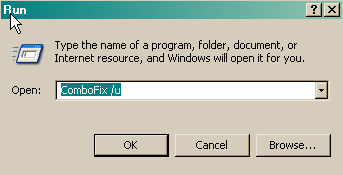
  • Delete ComboFix and Clean Up
    Click Start > Run > type combofix /u > OK (Note the space between combofix and /u)
    CF_Cleanup.png

    Please advise if this step is missed for any reason as it performs some important actions.

    General Security and Computer Health
    Below are some steps to follow in order to dramatically lower the chances of reinfection. You may have already implemented some of the steps below, however you should follow any steps that you have not already implemented.
  • Make sure that you keep your antivirus updated
    New viruses come out every minute, so it is essential that you have the latest signatures for your antivirus program to provide you with the best possible protection from malicious software.
    NOTE:You should only have one antivirus installed at a time. Having more than one antivirus program installed at once is likely to cause conflicts and may well decrease your overall protection as well as impairing the performance of your PC.
  • Security Updates for Windows, Internet Explorer & Microsoft Office
    Whenever a security problem in its software is found, Microsoft will usually create a patch so that after the patch is installed, attackers can't use the vulnerability to install malicious software on your PC. Keeping up with these patches will help to prevent malicious software being installed on your PC. Ensure you are registered for Windows updates via Start > right-click on My Computer > Properties > Automatic Updates tab or visit the Microsoft Update site on a regular basis.
    NOTE: The update process uses ActiveX, so you will need to use internet explorer for it and allow the ActiveX control to install.
  • Update Non-Microsoft Programs
    Microsoft isn't the only company whose products can contain security vulnerabilities. To check whether other programs running on your PC are in need of an update, you can use the Secunia Software Inspector or F-secure Health Check. I suggest that you run one of them at least once a month.
  • Make Internet Explorer More Secure
    You are using Internet Explorer v.6.
    • From within Internet Explorer click on the Tools menu and then click on Options.
    • Click once on the Security tab
    • Click once on the Internet icon so it becomes highlighted.
    • Click once on the Custom Level button.
    • Change the Download signed ActiveX controls to Prompt
    • Change the Download unsigned ActiveX controls to Disable
    • Change the Initialise and script ActiveX controls not marked as safe to Disable
    • Change the Installation of desktop items to Prompt
    • Change the Launching programs and files in an IFRAME to Prompt
    • Change the Navigate sub-frames across different domains to Prompt
    • When all these settings have been made, click on the OK button.
    • If it prompts you as to whether or not you want to save the settings, press the Yes button.
      Next press the Apply button and then the OK to exit the Internet Properties page.


Recommended Programs

I would recommend the download and installation of some or all of the following programs (if not already present), and the updating of them on a regular basis.


  • WinPatrol
    As a robust security monitor, WinPatrol will alert you to hijackings, malware attacks and critical changes made to your computer without your permission. WinPatrol takes snapshot of your critical system resources and alerts you to any changes that may occur without your knowledge. For more information, please visit HERE.
  • SpywareBlaster
    SpywareBlaster sets killbits in the registry to prevent known malicious ActiveX controls from installing on your computer. If you don't know what ActiveX controls are, see HERE. You can download SpywareBlaster from HERE.
  • Malwarebytes' Anti-Malware
    Malwarebytes' Anti-Malware is an anti-malware application that can thoroughly remove even the most advanced malware. It includes a number of features, including a built in protection monitor that blocks malicious processes before they even start.You can download Malwarebytes' Anti-Malware from HERE. Here are two tutorials: Malwarebytes' Anti-Malware Setup Guide and Malwarebytes' Anti-Malware Scanning Guide.
  • Hosts File
    For added protection you may also like to add a host file. A simple explanation of what a Hosts file does is HERE and for more information regarding host files read HERE.
  • Use an alternative Internet Browser
    Many of the exploits are directed to users of Internet Explorer. Try using a different browser instead:Firefox or Opera


Finally I am trying to make one point very clear. It is ABSOLUTELY ESSENTIAL to keep all of your security programs up to date.

I'd be grateful if you could reply to this post so that I know you have read it and, if you've no other questions, the thread can be closed.

Happy surfing and stay clean!

Bio-Hazard
 
Thank you! I will get on all those steps shortly, and I don't believe I have any further questions. I really appreciate the help.
 
Back
Top