Virtumonde (possibly others as well?) - Please help

crs01

New member
According to AdAware and at least one other antivirus program, we've got Virtumonde on my wife's computer, apparently along with Adload_r.EQ , Generic12.APRX , and Generic12.AOVJ according to AVG Antivirus (Free edition).

We've already lost nearly a week trying to get rid of this, so any help will be very much appreciated. We've tried running the Microsoft malware remover (downloaded directly from their site) with obviously no solution. Symptoms include VERY slow internet loading, inability to do Microsoft Updates despite all their "fix" suggestions followed, and many pop-ups advertising various things. Following is the HJT log. Thanks!


Logfile of Trend Micro HijackThis v2.0.2
Scan saved at 2:09:11 PM, on 1/10/2009
Platform: Windows XP SP3 (WinNT 5.01.2600)
MSIE: Internet Explorer v7.00 (7.00.6000.16762)
Boot mode: Normal

Running processes:
C:\WINDOWS\System32\smss.exe
C:\WINDOWS\system32\winlogon.exe
C:\WINDOWS\system32\services.exe
C:\WINDOWS\system32\lsass.exe
C:\WINDOWS\system32\svchost.exe
C:\WINDOWS\System32\svchost.exe
C:\WINDOWS\system32\ZoneLabs\vsmon.exe
C:\Program Files\Lavasoft\Ad-Aware\aawservice.exe
C:\WINDOWS\system32\spoolsv.exe
C:\Program Files\AskBarDis\bar\bin\AskService.exe
C:\PROGRA~1\AVG\AVG8\avgwdsvc.exe
C:\Program Files\Java\jre6\bin\jqs.exe
C:\Program Files\Common Files\LightScribe\LSSrvc.exe
C:\PROGRA~1\AVG\AVG8\avgrsx.exe
C:\WINDOWS\system32\svchost.exe
C:\PROGRA~1\AVG\AVG8\avgemc.exe
C:\WINDOWS\system32\wscntfy.exe
C:\WINDOWS\Explorer.EXE
C:\WINDOWS\system32\igfxtray.exe
C:\WINDOWS\system32\hkcmd.exe
C:\WINDOWS\system32\igfxpers.exe
C:\WINDOWS\RTHDCPL.EXE
C:\WINDOWS\system32\igfxsrvc.exe
C:\Program Files\QuickTime\qttask.exe
C:\WINDOWS\System32\svchost.exe
C:\Program Files\Common Files\Research In Motion\Auto Update\RIMAutoUpdate.exe
C:\Program Files\Java\jre6\bin\jusched.exe
C:\PROGRA~1\AVG\AVG8\avgtray.exe
C:\WINDOWS\system32\rundll32.exe
C:\Program Files\Zone Labs\ZoneAlarm\zlclient.exe
C:\WINDOWS\system32\ctfmon.exe
C:\Program Files\TomTom HOME 2\HOMERunner.exe
C:\Program Files\Common Files\InstallShield\UpdateService\ISUSPM.exe
C:\Program Files\OpenOffice.org 2.4\program\soffice.exe
C:\Program Files\OpenOffice.org 2.4\program\soffice.BIN
C:\Program Files\Mozilla Firefox\firefox.exe
C:\Documents and Settings\M[name deleted]\Desktop\HiJackThis.exe

R1 - HKLM\Software\Microsoft\Internet Explorer\Main,Default_Page_URL = http://go.microsoft.com/fwlink/?LinkId=69157
R1 - HKLM\Software\Microsoft\Internet Explorer\Main,Default_Search_URL = http://go.microsoft.com/fwlink/?LinkId=54896
R1 - HKLM\Software\Microsoft\Internet Explorer\Main,Search Page = http://go.microsoft.com/fwlink/?LinkId=54896
R0 - HKLM\Software\Microsoft\Internet Explorer\Main,Start Page = http://go.microsoft.com/fwlink/?LinkId=69157
R0 - HKCU\Software\Microsoft\Internet Explorer\Main,Local Page =
R1 - HKCU\Software\Microsoft\Internet Connection Wizard,ShellNext = http://www.nero.com/
O3 - Toolbar: ZoneAlarm Spy Blocker Toolbar - {3041d03e-fd4b-44e0-b742-2d9b88305f98} - C:\Program Files\AskBarDis\bar\bin\askBar.dll
O4 - HKLM\..\Run: [IgfxTray] C:\WINDOWS\system32\igfxtray.exe
O4 - HKLM\..\Run: [HotKeysCmds] C:\WINDOWS\system32\hkcmd.exe
O4 - HKLM\..\Run: [Persistence] C:\WINDOWS\system32\igfxpers.exe
O4 - HKLM\..\Run: [RTHDCPL] RTHDCPL.EXE
O4 - HKLM\..\Run: [Alcmtr] ALCMTR.EXE
O4 - HKLM\..\Run: [Recguard] C:\WINDOWS\SMINST\RECGUARD.EXE
O4 - HKLM\..\Run: [Adobe Reader Speed Launcher] "C:\Program Files\Adobe\Reader 8.0\Reader\Reader_sl.exe"
O4 - HKLM\..\Run: [NeroFilterCheck] C:\Program Files\Common Files\Ahead\Lib\NeroCheck.exe
O4 - HKLM\..\Run: [QuickTime Task] "C:\Program Files\QuickTime\qttask.exe" -atboottime
O4 - HKLM\..\Run: [BlackBerryAutoUpdate] C:\Program Files\Common Files\Research In Motion\Auto Update\RIMAutoUpdate.exe /background
O4 - HKLM\..\Run: [RoxWatchTray] "C:\Program Files\Common Files\Roxio Shared\9.0\SharedCOM\RoxWatchTray9.exe"
O4 - HKLM\..\Run: [SunJavaUpdateSched] "C:\Program Files\Java\jre6\bin\jusched.exe"
O4 - HKLM\..\Run: [AVG8_TRAY] C:\PROGRA~1\AVG\AVG8\avgtray.exe
O4 - HKLM\..\Run: [a4e375bb] rundll32.exe "C:\WINDOWS\system32\lwcuohif.dll",b
O4 - HKLM\..\Run: [ZoneAlarm Client] "C:\Program Files\Zone Labs\ZoneAlarm\zlclient.exe"
O4 - HKCU\..\Run: [ctfmon.exe] C:\WINDOWS\system32\ctfmon.exe
O4 - HKCU\..\Run: [TomTomHOME.exe] "C:\Program Files\TomTom HOME 2\HOMERunner.exe"
O4 - HKCU\..\Run: [ISUSPM] "C:\Program Files\Common Files\InstallShield\UpdateService\ISUSPM.exe" -scheduler
O4 - Startup: Epson printer Registration.lnk = E:\E_reg\EpsonReg.EXE
O4 - Startup: OpenOffice.org 2.4.lnk = C:\Program Files\OpenOffice.org 2.4\program\quickstart.exe
O4 - Global Startup: Adobe Gamma Loader.lnk = ?
O8 - Extra context menu item: Add to Google Photos Screensa&ver - res://C:\WINDOWS\system32\GPhotos.scr/200
O8 - Extra context menu item: E&xport to Microsoft Excel - res://C:\PROGRA~1\MICROS~2\Office12\EXCEL.EXE/3000
O9 - Extra button: (no name) - {08B0E5C0-4FCB-11CF-AAA5-00401C608501} - C:\Program Files\Java\jre6\bin\jp2iexp.dll
O9 - Extra 'Tools' menuitem: Sun Java Console - {08B0E5C0-4FCB-11CF-AAA5-00401C608501} - C:\Program Files\Java\jre6\bin\jp2iexp.dll
O9 - Extra button: Research - {92780B25-18CC-41C8-B9BE-3C9C571A8263} - C:\PROGRA~1\MICROS~2\Office12\REFIEBAR.DLL
O9 - Extra button: (no name) - {e2e2dd38-d088-4134-82b7-f2ba38496583} - C:\WINDOWS\Network Diagnostic\xpnetdiag.exe
O9 - Extra 'Tools' menuitem: @xpsp3res.dll,-20001 - {e2e2dd38-d088-4134-82b7-f2ba38496583} - C:\WINDOWS\Network Diagnostic\xpnetdiag.exe
O9 - Extra button: Messenger - {FB5F1910-F110-11d2-BB9E-00C04F795683} - C:\Program Files\Messenger\msmsgs.exe
O9 - Extra 'Tools' menuitem: Windows Messenger - {FB5F1910-F110-11d2-BB9E-00C04F795683} - C:\Program Files\Messenger\msmsgs.exe
O16 - DPF: {5ED80217-570B-4DA9-BF44-BE107C0EC166} (Windows Live Safety Center Base Module) - http://cdn.scan.onecare.live.com/resource/download/scanner/wlscbase6662.cab
O16 - DPF: {6E32070A-766D-4EE6-879C-DC1FA91D2FC3} (MUWebControl Class) - http://update.microsoft.com/microsoftupdate/v6/V5Controls/en/x86/client/muweb_site.cab?1231076138187
O18 - Protocol: linkscanner - {F274614C-63F8-47D5-A4D1-FBDDE494F8D1} - C:\Program Files\AVG\AVG8\avgpp.dll
O20 - AppInit_DLLs: ,avgrsstx.dll wtajyg.dll
O23 - Service: Lavasoft Ad-Aware Service (aawservice) - Lavasoft - C:\Program Files\Lavasoft\Ad-Aware\aawservice.exe
O23 - Service: ASKService - Unknown owner - C:\Program Files\AskBarDis\bar\bin\AskService.exe
O23 - Service: AVG Free8 E-mail Scanner (avg8emc) - AVG Technologies CZ, s.r.o. - C:\PROGRA~1\AVG\AVG8\avgemc.exe
O23 - Service: AVG Free8 WatchDog (avg8wd) - AVG Technologies CZ, s.r.o. - C:\PROGRA~1\AVG\AVG8\avgwdsvc.exe
O23 - Service: Google Updater Service (gusvc) - Google - C:\Program Files\Google\Common\Google Updater\GoogleUpdaterService.exe
O23 - Service: InstallDriver Table Manager (IDriverT) - Macrovision Corporation - C:\Program Files\Common Files\InstallShield\Driver\1050\Intel 32\IDriverT.exe
O23 - Service: Java Quick Starter (JavaQuickStarterService) - Sun Microsystems, Inc. - C:\Program Files\Java\jre6\bin\jqs.exe
O23 - Service: LightScribeService Direct Disc Labeling Service (LightScribeService) - Hewlett-Packard Company - C:\Program Files\Common Files\LightScribe\LSSrvc.exe
O23 - Service: NBService - Nero AG - C:\Program Files\Nero\Nero 7\Nero BackItUp\NBService.exe
O23 - Service: NMIndexingService - Nero AG - C:\Program Files\Common Files\Ahead\Lib\NMIndexingService.exe
O23 - Service: Roxio UPnP Renderer 9 - Sonic Solutions - C:\Program Files\Roxio\Digital Home 9\RoxioUPnPRenderer9.exe
O23 - Service: Roxio Upnp Server 9 - Sonic Solutions - C:\Program Files\Roxio\Digital Home 9\RoxioUpnpService9.exe
O23 - Service: LiveShare P2P Server 9 (RoxLiveShare9) - Sonic Solutions - C:\Program Files\Common Files\Roxio Shared\9.0\SharedCOM\RoxLiveShare9.exe
O23 - Service: RoxMediaDB9 - Sonic Solutions - C:\Program Files\Common Files\Roxio Shared\9.0\SharedCOM\RoxMediaDB9.exe
O23 - Service: Roxio Hard Drive Watcher 9 (RoxWatch9) - Sonic Solutions - C:\Program Files\Common Files\Roxio Shared\9.0\SharedCOM\RoxWatch9.exe
O23 - Service: TrueVector Internet Monitor (vsmon) - Check Point Software Technologies LTD - C:\WINDOWS\system32\ZoneLabs\vsmon.exe

--
End of file - 7742 bytes
 
Last edited by a moderator:
Hi crs01

Rename HijackThis.exe to crs01.exe and post back a fresh HijackThis log, please :)
 
New HJT Log

Note: I've changed the name of part of the path on the last line of the first section of the log below. Here is what the new line looks like:

C:\Documents and Settings\[name deleted]\Desktop\HiJackThis.exe

The [name deleted] portion simply replaces a personal name for privacy reasons. I presume that change will not affect this fix - the line is otherwise as it exists in the new HJT log. If for any reason you need the exact line, I can repost it, but would prefer not to if not necessary.

I look forward to your reply. Thank you.

crs01
===========================================================

Logfile of Trend Micro HijackThis v2.0.2
Scan saved at 6:52:23 PM, on 1/15/2009
Platform: Windows XP SP3 (WinNT 5.01.2600)
MSIE: Internet Explorer v7.00 (7.00.6000.16762)
Boot mode: Normal

Running processes:
C:\WINDOWS\System32\smss.exe
C:\WINDOWS\system32\winlogon.exe
C:\WINDOWS\system32\services.exe
C:\WINDOWS\system32\lsass.exe
C:\WINDOWS\system32\svchost.exe
C:\WINDOWS\System32\svchost.exe
C:\WINDOWS\system32\ZoneLabs\vsmon.exe
C:\WINDOWS\Explorer.EXE
C:\Program Files\Lavasoft\Ad-Aware\aawservice.exe
C:\WINDOWS\system32\spoolsv.exe
C:\Program Files\AskBarDis\bar\bin\AskService.exe
C:\PROGRA~1\AVG\AVG8\avgwdsvc.exe
C:\Program Files\Java\jre6\bin\jqs.exe
C:\Program Files\Common Files\LightScribe\LSSrvc.exe
C:\PROGRA~1\AVG\AVG8\avgrsx.exe
C:\WINDOWS\system32\svchost.exe
C:\PROGRA~1\AVG\AVG8\avgemc.exe
C:\WINDOWS\system32\wscntfy.exe
C:\WINDOWS\system32\igfxtray.exe
C:\WINDOWS\system32\hkcmd.exe
C:\WINDOWS\system32\igfxsrvc.exe
C:\WINDOWS\system32\igfxpers.exe
C:\WINDOWS\RTHDCPL.EXE
C:\Program Files\QuickTime\qttask.exe
C:\Program Files\Common Files\Research In Motion\Auto Update\RIMAutoUpdate.exe
C:\Program Files\Java\jre6\bin\jusched.exe
C:\PROGRA~1\AVG\AVG8\avgtray.exe
C:\Program Files\Zone Labs\ZoneAlarm\zlclient.exe
C:\WINDOWS\System32\svchost.exe
C:\WINDOWS\system32\rundll32.exe
C:\WINDOWS\system32\ctfmon.exe
C:\Program Files\TomTom HOME 2\HOMERunner.exe
C:\Program Files\Common Files\InstallShield\UpdateService\ISUSPM.exe
C:\Program Files\OpenOffice.org 2.4\program\soffice.exe
C:\Program Files\OpenOffice.org 2.4\program\soffice.BIN
C:\Program Files\Mozilla Firefox\firefox.exe
C:\Documents and Settings\[name deleted]\Desktop\HiJackThis.exe

R1 - HKLM\Software\Microsoft\Internet Explorer\Main,Default_Page_URL = http://go.microsoft.com/fwlink/?LinkId=69157
R1 - HKLM\Software\Microsoft\Internet Explorer\Main,Default_Search_URL = http://go.microsoft.com/fwlink/?LinkId=54896
R1 - HKLM\Software\Microsoft\Internet Explorer\Main,Search Page = http://go.microsoft.com/fwlink/?LinkId=54896
R0 - HKLM\Software\Microsoft\Internet Explorer\Main,Start Page = http://go.microsoft.com/fwlink/?LinkId=69157
R0 - HKCU\Software\Microsoft\Internet Explorer\Main,Local Page =
R1 - HKCU\Software\Microsoft\Internet Connection Wizard,ShellNext = http://www.nero.com/
O2 - BHO: (no name) - {51552A9D-F0BE-4B82-8E32-034A87B2F02E} - C:\WINDOWS\system32\fccaYsrs.dll (file missing)
O2 - BHO: (no name) - {6D794CB4-C7CD-4c6f-BFDC-9B77AFBDC02C} - (no file)
O2 - BHO: SSVHelper Class - {761497BB-D6F0-462C-B6EB-D4DAF1D92D43} - C:\Program Files\Java\jre6\bin\ssv.dll
O2 - BHO: (no name) - {93E46F8E-5EE0-4CFB-B0F4-417CD3B90067} - (no file)
O2 - BHO: Java(tm) Plug-In 2 SSV Helper - {DBC80044-A445-435b-BC74-9C25C1C588A9} - C:\Program Files\Java\jre6\bin\jp2ssv.dll
O3 - Toolbar: ZoneAlarm Spy Blocker Toolbar - {3041d03e-fd4b-44e0-b742-2d9b88305f98} - C:\Program Files\AskBarDis\bar\bin\askBar.dll
O4 - HKLM\..\Run: [IgfxTray] C:\WINDOWS\system32\igfxtray.exe
O4 - HKLM\..\Run: [HotKeysCmds] C:\WINDOWS\system32\hkcmd.exe
O4 - HKLM\..\Run: [Persistence] C:\WINDOWS\system32\igfxpers.exe
O4 - HKLM\..\Run: [RTHDCPL] RTHDCPL.EXE
O4 - HKLM\..\Run: [Alcmtr] ALCMTR.EXE
O4 - HKLM\..\Run: [Recguard] C:\WINDOWS\SMINST\RECGUARD.EXE
O4 - HKLM\..\Run: [Adobe Reader Speed Launcher] "C:\Program Files\Adobe\Reader 8.0\Reader\Reader_sl.exe"
O4 - HKLM\..\Run: [NeroFilterCheck] C:\Program Files\Common Files\Ahead\Lib\NeroCheck.exe
O4 - HKLM\..\Run: [QuickTime Task] "C:\Program Files\QuickTime\qttask.exe" -atboottime
O4 - HKLM\..\Run: [BlackBerryAutoUpdate] C:\Program Files\Common Files\Research In Motion\Auto Update\RIMAutoUpdate.exe /background
O4 - HKLM\..\Run: [RoxWatchTray] "C:\Program Files\Common Files\Roxio Shared\9.0\SharedCOM\RoxWatchTray9.exe"
O4 - HKLM\..\Run: [SunJavaUpdateSched] "C:\Program Files\Java\jre6\bin\jusched.exe"
O4 - HKLM\..\Run: [AVG8_TRAY] C:\PROGRA~1\AVG\AVG8\avgtray.exe
O4 - HKLM\..\Run: [ZoneAlarm Client] "C:\Program Files\Zone Labs\ZoneAlarm\zlclient.exe"
O4 - HKLM\..\Run: [a4e375bb] rundll32.exe "C:\WINDOWS\system32\aghwfecn.dll",b
O4 - HKCU\..\Run: [ctfmon.exe] C:\WINDOWS\system32\ctfmon.exe
O4 - HKCU\..\Run: [TomTomHOME.exe] "C:\Program Files\TomTom HOME 2\HOMERunner.exe"
O4 - HKCU\..\Run: [ISUSPM] "C:\Program Files\Common Files\InstallShield\UpdateService\ISUSPM.exe" -scheduler
O4 - Startup: Epson printer Registration.lnk = E:\E_reg\EpsonReg.EXE
O4 - Startup: OpenOffice.org 2.4.lnk = C:\Program Files\OpenOffice.org 2.4\program\quickstart.exe
O4 - Global Startup: Adobe Gamma Loader.lnk = ?
O8 - Extra context menu item: Add to Google Photos Screensa&ver - res://C:\WINDOWS\system32\GPhotos.scr/200
O8 - Extra context menu item: E&xport to Microsoft Excel - res://C:\PROGRA~1\MICROS~2\Office12\EXCEL.EXE/3000
O9 - Extra button: (no name) - {08B0E5C0-4FCB-11CF-AAA5-00401C608501} - C:\Program Files\Java\jre6\bin\jp2iexp.dll
O9 - Extra 'Tools' menuitem: Sun Java Console - {08B0E5C0-4FCB-11CF-AAA5-00401C608501} - C:\Program Files\Java\jre6\bin\jp2iexp.dll
O9 - Extra button: Research - {92780B25-18CC-41C8-B9BE-3C9C571A8263} - C:\PROGRA~1\MICROS~2\Office12\REFIEBAR.DLL
O9 - Extra button: (no name) - {e2e2dd38-d088-4134-82b7-f2ba38496583} - C:\WINDOWS\Network Diagnostic\xpnetdiag.exe
O9 - Extra 'Tools' menuitem: @xpsp3res.dll,-20001 - {e2e2dd38-d088-4134-82b7-f2ba38496583} - C:\WINDOWS\Network Diagnostic\xpnetdiag.exe
O9 - Extra button: Messenger - {FB5F1910-F110-11d2-BB9E-00C04F795683} - C:\Program Files\Messenger\msmsgs.exe
O9 - Extra 'Tools' menuitem: Windows Messenger - {FB5F1910-F110-11d2-BB9E-00C04F795683} - C:\Program Files\Messenger\msmsgs.exe
O16 - DPF: {5ED80217-570B-4DA9-BF44-BE107C0EC166} (Windows Live Safety Center Base Module) - http://cdn.scan.onecare.live.com/resource/download/scanner/wlscbase6662.cab
O16 - DPF: {6E32070A-766D-4EE6-879C-DC1FA91D2FC3} (MUWebControl Class) - http://update.microsoft.com/microsoftupdate/v6/V5Controls/en/x86/client/muweb_site.cab?1231076138187
O18 - Protocol: linkscanner - {F274614C-63F8-47D5-A4D1-FBDDE494F8D1} - C:\Program Files\AVG\AVG8\avgpp.dll
O20 - AppInit_DLLs: ,avgrsstx.dll
O20 - Winlogon Notify: ssqPfGwv - ssqPfGwv.dll (file missing)
O23 - Service: Lavasoft Ad-Aware Service (aawservice) - Lavasoft - C:\Program Files\Lavasoft\Ad-Aware\aawservice.exe
O23 - Service: ASKService - Unknown owner - C:\Program Files\AskBarDis\bar\bin\AskService.exe
O23 - Service: AVG Free8 E-mail Scanner (avg8emc) - AVG Technologies CZ, s.r.o. - C:\PROGRA~1\AVG\AVG8\avgemc.exe
O23 - Service: AVG Free8 WatchDog (avg8wd) - AVG Technologies CZ, s.r.o. - C:\PROGRA~1\AVG\AVG8\avgwdsvc.exe
O23 - Service: Google Updater Service (gusvc) - Google - C:\Program Files\Google\Common\Google Updater\GoogleUpdaterService.exe
O23 - Service: InstallDriver Table Manager (IDriverT) - Macrovision Corporation - C:\Program Files\Common Files\InstallShield\Driver\1050\Intel 32\IDriverT.exe
O23 - Service: Java Quick Starter (JavaQuickStarterService) - Sun Microsystems, Inc. - C:\Program Files\Java\jre6\bin\jqs.exe
O23 - Service: LightScribeService Direct Disc Labeling Service (LightScribeService) - Hewlett-Packard Company - C:\Program Files\Common Files\LightScribe\LSSrvc.exe
O23 - Service: NBService - Nero AG - C:\Program Files\Nero\Nero 7\Nero BackItUp\NBService.exe
O23 - Service: NMIndexingService - Nero AG - C:\Program Files\Common Files\Ahead\Lib\NMIndexingService.exe
O23 - Service: Roxio UPnP Renderer 9 - Sonic Solutions - C:\Program Files\Roxio\Digital Home 9\RoxioUPnPRenderer9.exe

O23 - Service: Roxio Upnp Server 9 - Sonic Solutions - C:\Program Files\Roxio\Digital Home 9\RoxioUpnpService9.exe
O23 - Service: LiveShare P2P Server 9 (RoxLiveShare9) - Sonic Solutions - C:\Program Files\Common Files\Roxio Shared\9.0\SharedCOM\RoxLiveShare9.exe
O23 - Service: RoxMediaDB9 - Sonic Solutions - C:\Program Files\Common Files\Roxio Shared\9.0\SharedCOM\RoxMediaDB9.exe
O23 - Service: Roxio Hard Drive Watcher 9 (RoxWatch9) - Sonic Solutions - C:\Program Files\Common Files\Roxio Shared\9.0\SharedCOM\RoxWatch9.exe
O23 - Service: TrueVector Internet Monitor (vsmon) - Check Point Software Technologies LTD - C:\WINDOWS\system32\ZoneLabs\vsmon.exe

--
End of file - 8289 bytes
 
Move HijackThis.exe to own folder in desktop.

After that:

Please download ComboFix from one of these locations:

Link 1
Link 2
Link 3

* IMPORTANT !!! Save ComboFix.exe to your Desktop

  • Disable your AntiVirus and AntiSpyware applications, usually via a right click on the System Tray icon. They may otherwise interfere with our tools
  • Double click on ComboFix.exe & follow the prompts.
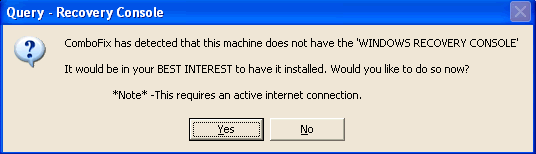
  • As part of it's process, ComboFix will check to see if the Microsoft Windows Recovery Console is installed. With malware infections being as they are today, it's strongly recommended to have this pre-installed on your machine before doing any malware removal. It will allow you to boot up into a special recovery/repair mode that will allow us to more easily help you should your computer have a problem after an attempted removal of malware.
  • Follow the prompts to allow ComboFix to download and install the Microsoft Windows Recovery Console, and when prompted, agree to the End-User License Agreement to install the Microsoft Windows Recovery Console.

**Please note: If the Microsoft Windows Recovery Console is already installed, ComboFix will continue it's malware removal procedures.

RcAuto1.gif

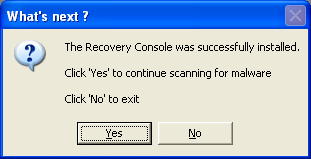
Once the Microsoft Windows Recovery Console is installed using ComboFix, you should see the following message:

whatnext.png


Click on Yes, to continue scanning for malware.

When finished, it will produce a log for you. Please include the C:\ComboFix.txt in your next reply along with a fresh HijackThis log.

This tool is not a toy and not for everyday use.
ComboFix SHOULD NOT be used unless requested by a forum helper


If you need help, see this link:
http://www.bleepingcomputer.com/combofix/how-to-use-combofix
 
Note: I changed names in file paths to "[name deleted]" - otherwise, the log below is exactly as produced by Combo Fix followed by HJT:


ComboFix 09-01-15.01 - [name deleted] 2009-01-16 7:33:13.1 - NTFSx86
Microsoft Windows XP Professional 5.1.2600.3.1252.1.1033.18.2038.1570 [GMT -5:00]
Running from: c:\documents and settings\[name deleted]\Desktop\ComboFix.exe
FW: ZoneAlarm Firewall *disabled*
* Created a new restore point
.

((((((((((((((((((((((((((((((((((((((( Other Deletions )))))))))))))))))))))))))))))))))))))))))))))))))
.

c:\program files\GetModule
c:\program files\iCheck
c:\program files\iCheck\Uninstall.exe
c:\windows\system32\aghwfecn.dll
c:\windows\system32\bgypxann.ini
c:\windows\system32\bvdsknmn.ini
c:\windows\system32\encapi32.dll
c:\windows\system32\fihoucwl.ini
c:\windows\system32\forvpiuo.dll
c:\windows\system32\gqvyloko.ini
c:\windows\system32\ncefwhga.ini
c:\windows\system32\ouipvrof.ini
c:\windows\system32\pfioiygy.ini
c:\windows\system32\RAGfPqru.ini
c:\windows\system32\RAGfPqru.ini2
c:\windows\system32\srsYaccf.ini
c:\windows\system32\srsYaccf.ini2
c:\windows\system32\vcqoqjfv.ini
c:\windows\wiaserviv.log
D:\Autorun.inf

.
((((((((((((((((((((((((( Files Created from 2008-12-16 to 2009-01-16 )))))))))))))))))))))))))))))))
.

2009-01-16 07:11 . 2008-05-23 19:37 <DIR> d-------- c:\documents and settings\[name deleted]\WINDOWS
2009-01-16 07:11 . 2008-05-23 19:37 <DIR> d-------- c:\documents and settings\[name deleted]\Application Data\SampleView
2009-01-16 07:11 . 2008-05-23 19:37 <DIR> d-------- c:\documents and settings\[name deleted]\Application Data\Ahead
2009-01-16 07:11 . 2009-01-16 07:11 <DIR> d-------- c:\documents and settings\[name deleted]
2009-01-10 12:44 . 2009-01-10 12:44 <DIR> d-------- c:\program files\AskBarDis
2009-01-10 12:43 . 2009-01-10 12:43 <DIR> d-------- c:\program files\Zone Labs
2009-01-10 12:43 . 2008-11-13 15:18 1,221,008 --a------ c:\windows\system32\zpeng25.dll
2009-01-10 12:43 . 2009-01-16 07:34 348,371 --a------ c:\windows\system32\vsconfig.xml
2009-01-07 20:55 . 2009-01-07 20:55 <DIR> d-------- c:\documents and settings\[name deleted]\Application Data\Roxio
2009-01-07 20:55 . 2009-01-07 20:55 <DIR> d-------- c:\documents and settings\LocalService\Application Data\Roxio
2009-01-07 20:55 . 2009-01-07 21:48 156 --a------ c:\windows\Twunk001.MTX
2009-01-07 20:55 . 2009-01-07 21:48 3 --a------ c:\windows\Twain001.Mtx
2009-01-07 20:55 . 2009-01-07 20:55 0 --a------ c:\windows\Twunk002.MTX
2009-01-05 01:06 . 2009-01-05 01:06 <DIR> d-------- c:\program files\Lavasoft
2009-01-05 01:05 . 2009-01-05 01:05 <DIR> d-------- c:\program files\Common Files\Wise Installation Wizard
2009-01-04 19:50 . 2009-01-04 19:50 <DIR> d-------- c:\program files\AVG
2009-01-04 15:10 . 2009-01-10 12:12 <DIR> d-------- c:\program files\RegVac Registry Cleaner
2009-01-04 14:58 . 2009-01-10 12:11 <DIR> d-------- c:\program files\RegVac
2009-01-04 14:58 . 1999-07-17 02:21 4,608 --a------ c:\windows\system32\W95Inf32.DLL
2009-01-04 14:58 . 1999-07-17 02:21 2,272 --a------ c:\windows\system32\W95Inf16.DLL
2009-01-04 08:46 . 2009-01-04 08:47 <DIR> d-------- c:\program files\Keyfinder Magic Jellybean Finder
2009-01-04 02:26 . 2009-01-10 20:38 <DIR> d-------- c:\program files\Windows Live Safety Center
2009-01-03 23:13 . 2009-01-05 01:06 <DIR> d-------- c:\documents and settings\All Users\Application Data\Lavasoft
2009-01-03 22:04 . 2009-01-10 20:23 <DIR> d-------- c:\program files\Panda Security
2008-12-30 19:58 . 2008-12-30 19:58 <DIR> d-------- c:\documents and settings\[name deleted]\Application Data\Research In Motion
2008-12-30 19:43 . 2008-12-30 19:43 <DIR> d-------- c:\program files\Roxio
2008-12-30 19:43 . 2008-12-30 19:43 <DIR> d-------- c:\program files\Common Files\Sonic Shared
2008-12-30 19:41 . 2008-12-30 19:41 <DIR> d-------- c:\program files\Research In Motion
2008-12-30 19:41 . 2008-12-30 19:42 <DIR> d-------- c:\program files\Common Files\Research In Motion
2008-12-16 10:42 . 2009-01-07 23:21 256 --a------ c:\windows\system32\pool.bin
2008-12-16 10:40 . 2008-12-16 10:40 <DIR> d-------- c:\documents and settings\All Users\Application Data\Sonic
2008-12-16 10:40 . 2008-12-16 10:40 <DIR> d-------- c:\documents and settings\All Users\Application Data\InstallShield
2008-12-16 10:39 . 2008-12-30 19:43 <DIR> d-------- c:\program files\Common Files\Roxio Shared
2008-12-16 10:39 . 2008-12-30 19:43 <DIR> d-------- c:\documents and settings\All Users\Application Data\Roxio
2008-12-16 10:36 . 2007-01-18 10:24 26,496 -ra------ c:\windows\system32\drivers\RimSerial.sys
2008-12-16 10:28 . 2008-12-16 10:28 <DIR> d--hs---- c:\windows\ftpcache

.
(((((((((((((((((((((((((((((((((((((((( Find3M Report ))))))))))))))))))))))))))))))))))))))))))))))))))))
.
2009-01-16 12:35 --------- d-----w c:\documents and settings\[name deleted]\Application Data\OpenOffice.org2
2009-01-16 12:26 --------- d-----w c:\documents and settings\All Users\Application Data\avg8
2009-01-04 19:49 --------- d-----w c:\program files\Java
2009-01-04 04:06 --------- d-----w c:\program files\A1Click Ultra PC Cleaner
2009-01-04 03:54 --------- d-----w c:\program files\MSWorks
2008-12-31 00:44 --------- d-----w c:\documents and settings\[name deleted]\Application Data\InstallShield
2008-12-17 03:19 --------- d-----w c:\program files\OpenOffice.org 2.4
2008-12-16 15:39 --------- d-----w c:\program files\Common Files\InstallShield
2008-12-12 02:09 --------- d-----w c:\program files\Cricut Software
2008-12-08 18:13 --------- d-----w c:\program files\Common Files\Adobe
2008-12-06 04:30 --------- d-----w c:\program files\Corel
2008-11-15 17:07 88 --sh--r c:\documents and settings\All Users\Application Data\F59D359475.sys
2008-11-15 17:07 2,516 --sha-w c:\documents and settings\All Users\Application Data\KGyGaAvL.sys
2008-09-01 16:02 0 --sha-w c:\windows\SMINST\HPCD.sys
.

((((((((((((((((((((((((((((((((((((( Reg Loading Points ))))))))))))))))))))))))))))))))))))))))))))))))))
.
.
*Note* empty entries & legit default entries are not shown
REGEDIT4

[HKEY_LOCAL_MACHINE\SOFTWARE\Microsoft\Internet Explorer\Toolbar]
"{3041d03e-fd4b-44e0-b742-2d9b88305f98}"= "c:\program files\AskBarDis\bar\bin\askBar.dll" [2008-10-16 333192]

[HKEY_CLASSES_ROOT\clsid\{3041d03e-fd4b-44e0-b742-2d9b88305f98}]
[HKEY_CLASSES_ROOT\TypeLib\{4b1c1e16-6b34-430e-b074-5928eca4c150}]

[HKEY_CURRENT_USER\SOFTWARE\Microsoft\Windows\CurrentVersion\Run]
"ctfmon.exe"="c:\windows\system32\ctfmon.exe" [2008-04-13 15360]
"TomTomHOME.exe"="c:\program files\TomTom HOME 2\HOMERunner.exe" [2008-09-22 206184]
"ISUSPM"="c:\program files\Common Files\InstallShield\UpdateService\ISUSPM.exe" [2007-08-30 205480]

[HKEY_LOCAL_MACHINE\SOFTWARE\Microsoft\Windows\CurrentVersion\Run]
"IgfxTray"="c:\windows\system32\igfxtray.exe" [2007-09-05 141848]
"HotKeysCmds"="c:\windows\system32\hkcmd.exe" [2007-09-05 166424]
"Persistence"="c:\windows\system32\igfxpers.exe" [2007-09-05 137752]
"Recguard"="c:\windows\SMINST\RECGUARD.EXE" [2005-07-19 999424]
"Adobe Reader Speed Launcher"="c:\program files\Adobe\Reader 8.0\Reader\Reader_sl.exe" [2008-01-11 39792]
"NeroFilterCheck"="c:\program files\Common Files\Ahead\Lib\NeroCheck.exe" [2007-03-01 153136]
"QuickTime Task"="c:\program files\QuickTime\qttask.exe" [2008-09-23 282624]
"BlackBerryAutoUpdate"="c:\program files\Common Files\Research In Motion\Auto Update\RIMAutoUpdate.exe" [2008-11-04 615696]
"RoxWatchTray"="c:\program files\Common Files\Roxio Shared\9.0\SharedCOM\RoxWatchTray9.exe" [2008-09-19 236016]
"SunJavaUpdateSched"="c:\program files\Java\jre6\bin\jusched.exe" [2008-11-10 136600]
"ZoneAlarm Client"="c:\program files\Zone Labs\ZoneAlarm\zlclient.exe" [2008-11-13 981904]
"RTHDCPL"="RTHDCPL.EXE" [2007-08-20 c:\windows\RTHDCPL.exe]

c:\documents and settings\All Users\Start Menu\Programs\Startup\
Adobe Gamma Loader.lnk - c:\program files\Common Files\Adobe\Calibration\Adobe Gamma Loader.exe [2008-12-08 113664]

[hkey_local_machine\software\microsoft\windows\currentversion\explorer\ShellExecuteHooks]
"{EDB0E980-90BD-11D4-8599-0008C7D3B6F8}"= "c:\program files\Qualcomm\Eudora\EuShlExt.dll" [2006-08-17 86016]

[HKEY_LOCAL_MACHINE\software\microsoft\security center\Monitoring\ZoneLabsFirewall]
"DisableMonitoring"=dword:00000001

[HKLM\~\services\sharedaccess\parameters\firewallpolicy\standardprofile]
"EnableFirewall"= 0 (0x0)

[HKLM\~\services\sharedaccess\parameters\firewallpolicy\standardprofile\AuthorizedApplications\List]
"%windir%\\system32\\sessmgr.exe"=
"c:\\Program Files\\Microsoft Office\\Office12\\OUTLOOK.EXE"=
"%windir%\\Network Diagnostic\\xpnetdiag.exe"=

R4 ASKService;ASKService;c:\program files\AskBarDis\bar\bin\AskService.exe [2009-01-10 464264]

[HKEY_CURRENT_USER\software\microsoft\windows\currentversion\explorer\mountpoints2\{0217b335-b011-11dc-b373-001cc00e2e60}]
\Shell\AutoRun\command - F:\setup.cmd

[HKEY_CURRENT_USER\software\microsoft\windows\currentversion\explorer\mountpoints2\{3a8b66c0-c542-11dc-b375-001cc00e2e60}]
\Shell\AutoRun\command - E:\

[HKEY_CURRENT_USER\software\microsoft\windows\currentversion\explorer\mountpoints2\{6288be6c-0f29-11dd-b37f-001cc00e2e60}]
\Shell\AutoRun\command - E:\setup.cmd

[HKEY_CURRENT_USER\software\microsoft\windows\currentversion\explorer\mountpoints2\{85b09f3c-c621-11dc-b37a-001cc00e2e60}]
\Shell\AutoRun\command - E:\setup.cmd

[HKEY_LOCAL_MACHINE\software\microsoft\active setup\installed components\{10880D85-AAD9-4558-ABDC-2AB1552D831F}]
"c:\program files\Common Files\LightScribe\LSRunOnce.exe"
.
- - - - ORPHANS REMOVED - - - -

BHO-{51552A9D-F0BE-4B82-8E32-034A87B2F02E} - c:\windows\system32\fccaYsrs.dll
BHO-{93E46F8E-5EE0-4CFB-B0F4-417CD3B90067} - (no file)
Notify-ssqPfGwv - ssqPfGwv.dll


.
------- Supplementary Scan -------
.
uStart Page = hxxp://www.google.com/advanced_search?hl=en
uInternet Connection Wizard,ShellNext = hxxp://www.nero.com/
IE: Add to Google Photos Screensa&ver - c:\windows\system32\GPhotos.scr/200
IE: E&xport to Microsoft Excel - c:\progra~1\MICROS~2\Office12\EXCEL.EXE/3000
Trusted Zone: www.update.microsoft.com

O16 -: Microsoft XML Parser for Java - file:///C:/WINDOWS/Java/classes/xmldso.cab
c:\windows\Downloaded Program Files\Microsoft XML Parser for Java.osd
FF - ProfilePath - c:\documents and settings\[name deleted]\Application Data\Mozilla\Firefox\Profiles\10bzqv15.default\
FF - prefs.js: browser.startup.homepage - about:blank
FF - plugin: c:\documents and settings\[name deleted]\Application Data\Mozilla\Firefox\Profiles\10bzqv15.default\extensions\moveplayer@movenetworks.com\platform\WINNT_x86-msvc\plugins\npmnqmp071101000055.dll
FF - plugin: c:\program files\Google\Picasa3\npPicasa3.dll
.

**************************************************************************

catchme 0.3.1367 W2K/XP/Vista - rootkit/stealth malware detector by Gmer, http://www.gmer.net
Rootkit scan 2009-01-16 07:37:06
Windows 5.1.2600 Service Pack 3 NTFS

scanning hidden processes ...

scanning hidden autostart entries ...

scanning hidden files ...

scan completed successfully
hidden files: 0

**************************************************************************
.
------------------------ Other Running Processes ------------------------
.
c:\windows\system32\ZoneLabs\vsmon.exe
c:\program files\Lavasoft\Ad-Aware\aawservice.exe
c:\windows\system32\igfxsrvc.exe
c:\program files\Java\jre6\bin\jqs.exe
c:\program files\Common Files\LightScribe\LSSrvc.exe
c:\program files\OpenOffice.org 2.4\program\soffice.exe
c:\program files\OpenOffice.org 2.4\program\soffice.bin
c:\windows\system32\wscntfy.exe
.
**************************************************************************
.
Completion time: 2009-01-16 7:39:15 - machine was rebooted [[name deleted]]
ComboFix-quarantined-files.txt 2009-01-16 12:39:13

Pre-Run: 207,233,929,216 bytes free
Post-Run: 207,398,133,760 bytes free

WindowsXP-KB310994-SP2-Pro-BootDisk-ENU.exe
[boot loader]
timeout=2
default=multi(0)disk(0)rdisk(0)partition(1)\WINDOWS
[operating systems]
c:\cmdcons\BOOTSECT.DAT="Microsoft Windows Recovery Console" /cmdcons
multi(0)disk(0)rdisk(0)partition(1)\WINDOWS="Microsoft Windows XP Professional" /noexecute=optin /fastdetect

189 --- E O F --- 2008-12-19 17:39:01


Logfile of Trend Micro HijackThis v2.0.2
Scan saved at 8:00:22 AM, on 1/16/2009
Platform: Windows XP SP3 (WinNT 5.01.2600)
MSIE: Internet Explorer v7.00 (7.00.6000.16762)
Boot mode: Normal

Running processes:
C:\WINDOWS\System32\smss.exe
C:\WINDOWS\system32\winlogon.exe
C:\WINDOWS\system32\services.exe
C:\WINDOWS\system32\lsass.exe
C:\WINDOWS\system32\svchost.exe
C:\WINDOWS\System32\svchost.exe
C:\WINDOWS\system32\ZoneLabs\vsmon.exe
C:\Program Files\Lavasoft\Ad-Aware\aawservice.exe
C:\WINDOWS\system32\spoolsv.exe
C:\WINDOWS\system32\igfxtray.exe
C:\WINDOWS\system32\hkcmd.exe
C:\WINDOWS\system32\igfxpers.exe
C:\WINDOWS\system32\igfxsrvc.exe
C:\WINDOWS\RTHDCPL.EXE
C:\Program Files\QuickTime\qttask.exe
C:\Program Files\Common Files\Research In Motion\Auto Update\RIMAutoUpdate.exe
C:\Program Files\AskBarDis\bar\bin\AskService.exe
C:\Program Files\Java\jre6\bin\jusched.exe
C:\Program Files\Zone Labs\ZoneAlarm\zlclient.exe
C:\Program Files\Java\jre6\bin\jqs.exe
C:\Program Files\Common Files\LightScribe\LSSrvc.exe
C:\WINDOWS\system32\ctfmon.exe
C:\Program Files\TomTom HOME 2\HOMERunner.exe
C:\Program Files\Common Files\InstallShield\UpdateService\ISUSPM.exe
C:\Program Files\OpenOffice.org 2.4\program\soffice.exe
C:\Program Files\OpenOffice.org 2.4\program\soffice.BIN
C:\WINDOWS\system32\svchost.exe
C:\WINDOWS\system32\wscntfy.exe
C:\WINDOWS\system32\notepad.exe
C:\WINDOWS\explorer.exe
C:\Program Files\Mozilla Firefox\firefox.exe
C:\Documents and Settings\[name deleted]\Desktop\HiJackThis.exe

R1 - HKLM\Software\Microsoft\Internet Explorer\Main,Default_Page_URL = http://go.microsoft.com/fwlink/?LinkId=69157
R1 - HKLM\Software\Microsoft\Internet Explorer\Main,Default_Search_URL = http://go.microsoft.com/fwlink/?LinkId=54896
R1 - HKLM\Software\Microsoft\Internet Explorer\Main,Search Page = http://go.microsoft.com/fwlink/?LinkId=54896
R0 - HKLM\Software\Microsoft\Internet Explorer\Main,Start Page = http://go.microsoft.com/fwlink/?LinkId=69157
R0 - HKCU\Software\Microsoft\Internet Explorer\Main,Local Page =
R1 - HKCU\Software\Microsoft\Internet Connection Wizard,ShellNext = http://www.nero.com/
O2 - BHO: SSVHelper Class - {761497BB-D6F0-462C-B6EB-D4DAF1D92D43} - C:\Program Files\Java\jre6\bin\ssv.dll
O2 - BHO: Java(tm) Plug-In 2 SSV Helper - {DBC80044-A445-435b-BC74-9C25C1C588A9} - C:\Program Files\Java\jre6\bin\jp2ssv.dll
O3 - Toolbar: ZoneAlarm Spy Blocker Toolbar - {3041d03e-fd4b-44e0-b742-2d9b88305f98} - C:\Program Files\AskBarDis\bar\bin\askBar.dll
O4 - HKLM\..\Run: [IgfxTray] C:\WINDOWS\system32\igfxtray.exe
O4 - HKLM\..\Run: [HotKeysCmds] C:\WINDOWS\system32\hkcmd.exe
O4 - HKLM\..\Run: [Persistence] C:\WINDOWS\system32\igfxpers.exe
O4 - HKLM\..\Run: [RTHDCPL] RTHDCPL.EXE
O4 - HKLM\..\Run: [Recguard] C:\WINDOWS\SMINST\RECGUARD.EXE
O4 - HKLM\..\Run: [Adobe Reader Speed Launcher] "C:\Program Files\Adobe\Reader 8.0\Reader\Reader_sl.exe"
O4 - HKLM\..\Run: [NeroFilterCheck] C:\Program Files\Common Files\Ahead\Lib\NeroCheck.exe
O4 - HKLM\..\Run: [QuickTime Task] "C:\Program Files\QuickTime\qttask.exe" -atboottime
O4 - HKLM\..\Run: [BlackBerryAutoUpdate] C:\Program Files\Common Files\Research In Motion\Auto Update\RIMAutoUpdate.exe /background
O4 - HKLM\..\Run: [RoxWatchTray] "C:\Program Files\Common Files\Roxio Shared\9.0\SharedCOM\RoxWatchTray9.exe"
O4 - HKLM\..\Run: [SunJavaUpdateSched] "C:\Program Files\Java\jre6\bin\jusched.exe"
O4 - HKLM\..\Run: [ZoneAlarm Client] "C:\Program Files\Zone Labs\ZoneAlarm\zlclient.exe"
O4 - HKCU\..\Run: [ctfmon.exe] C:\WINDOWS\system32\ctfmon.exe
O4 - HKCU\..\Run: [TomTomHOME.exe] "C:\Program Files\TomTom HOME 2\HOMERunner.exe"
O4 - HKCU\..\Run: [ISUSPM] "C:\Program Files\Common Files\InstallShield\UpdateService\ISUSPM.exe" -scheduler
O4 - Startup: Epson printer Registration.lnk = E:\E_reg\EpsonReg.EXE
O4 - Startup: OpenOffice.org 2.4.lnk = C:\Program Files\OpenOffice.org 2.4\program\quickstart.exe
O4 - Global Startup: Adobe Gamma Loader.lnk = ?
O8 - Extra context menu item: Add to Google Photos Screensa&ver - res://C:\WINDOWS\system32\GPhotos.scr/200
O8 - Extra context menu item: E&xport to Microsoft Excel - res://C:\PROGRA~1\MICROS~2\Office12\EXCEL.EXE/3000
O9 - Extra button: (no name) - {08B0E5C0-4FCB-11CF-AAA5-00401C608501} - C:\Program Files\Java\jre6\bin\jp2iexp.dll
O9 - Extra 'Tools' menuitem: Sun Java Console - {08B0E5C0-4FCB-11CF-AAA5-00401C608501} - C:\Program Files\Java\jre6\bin\jp2iexp.dll
O9 - Extra button: Research - {92780B25-18CC-41C8-B9BE-3C9C571A8263} - C:\PROGRA~1\MICROS~2\Office12\REFIEBAR.DLL
O9 - Extra button: (no name) - {e2e2dd38-d088-4134-82b7-f2ba38496583} - C:\WINDOWS\Network Diagnostic\xpnetdiag.exe
O9 - Extra 'Tools' menuitem: @xpsp3res.dll,-20001 - {e2e2dd38-d088-4134-82b7-f2ba38496583} - C:\WINDOWS\Network Diagnostic\xpnetdiag.exe
O9 - Extra button: Messenger - {FB5F1910-F110-11d2-BB9E-00C04F795683} - C:\Program Files\Messenger\msmsgs.exe
O9 - Extra 'Tools' menuitem: Windows Messenger - {FB5F1910-F110-11d2-BB9E-00C04F795683} - C:\Program Files\Messenger\msmsgs.exe
O16 - DPF: {5ED80217-570B-4DA9-BF44-BE107C0EC166} (Windows Live Safety Center Base Module) - http://cdn.scan.onecare.live.com/resource/download/scanner/wlscbase6662.cab
O16 - DPF: {6E32070A-766D-4EE6-879C-DC1FA91D2FC3} (MUWebControl Class) - http://update.microsoft.com/microsoftupdate/v6/V5Controls/en/x86/client/muweb_site.cab?1231076138187
O23 - Service: Lavasoft Ad-Aware Service (aawservice) - Lavasoft - C:\Program Files\Lavasoft\Ad-Aware\aawservice.exe
O23 - Service: ASKService - Unknown owner - C:\Program Files\AskBarDis\bar\bin\AskService.exe
O23 - Service: Google Updater Service (gusvc) - Google - C:\Program Files\Google\Common\Google Updater\GoogleUpdaterService.exe
O23 - Service: InstallDriver Table Manager (IDriverT) - Macrovision Corporation - C:\Program Files\Common Files\InstallShield\Driver\1050\Intel 32\IDriverT.exe
O23 - Service: Java Quick Starter (JavaQuickStarterService) - Sun Microsystems, Inc. - C:\Program Files\Java\jre6\bin\jqs.exe
O23 - Service: LightScribeService Direct Disc Labeling Service (LightScribeService) - Hewlett-Packard Company - C:\Program Files\Common Files\LightScribe\LSSrvc.exe
O23 - Service: NBService - Nero AG - C:\Program Files\Nero\Nero 7\Nero BackItUp\NBService.exe
O23 - Service: NMIndexingService - Nero AG - C:\Program Files\Common Files\Ahead\Lib\NMIndexingService.exe
O23 - Service: Roxio UPnP Renderer 9 - Sonic Solutions - C:\Program Files\Roxio\Digital Home 9\RoxioUPnPRenderer9.exe
O23 - Service: Roxio Upnp Server 9 - Sonic Solutions - C:\Program Files\Roxio\Digital Home 9\RoxioUpnpService9.exe
O23 - Service: LiveShare P2P Server 9 (RoxLiveShare9) - Sonic Solutions - C:\Program Files\Common Files\Roxio Shared\9.0\SharedCOM\RoxLiveShare9.exe
O23 - Service: RoxMediaDB9 - Sonic Solutions - C:\Program Files\Common Files\Roxio Shared\9.0\SharedCOM\RoxMediaDB9.exe
O23 - Service: Roxio Hard Drive Watcher 9 (RoxWatch9) - Sonic Solutions - C:\Program Files\Common Files\Roxio Shared\9.0\SharedCOM\RoxWatch9.exe
O23 - Service: TrueVector Internet Monitor (vsmon) - Check Point Software Technologies LTD - C:\WINDOWS\system32\ZoneLabs\vsmon.exe

--
End of file - 7246 bytes


I really appreciate your help on this. Thank you very much. I'll be back home tonight after 4:00 p.m. Eastern time so there will be no more responses from me before then.
 
To access the Uninstall Manager you would do the following:

1. Start HijackThis
2. Click on the Config button
3. Click on the Misc Tools button
4. Click on the Open Uninstall Manager button.

You will now be presented with a screen similar to the one below:

uninstall-man.jpg


5. Click on the Save list... button and specify where you would like to save this file. When you press Save button a notepad will open with the contents of that file. Simply copy and paste the contents of that notepad here on your next reply.
 
1000 Solitaire Games
123 Free Solitaire
2007 Microsoft Office system
A1Click Ultra PC Cleaner 1.01 (Registered Version)
A1Click Ultra PC Cleaner 1.01 (Trial Version)
Activation Assistant for the 2007 Microsoft Office suites
Ad-Aware
Adobe Flash Player 10 Plugin
Adobe Flash Player ActiveX
Adobe Photoshop Elements 2.0
Adobe Reader 8.1.2
ArcSoft PhotoImpression 3.0
BlackBerry Desktop Software 4.7
Copy Utility
Creative Delights Companion
Cricut DesignStudio
EPSON Photo Print
EPSON Printer Software
EPSON Smart Panel
EPSON TWAIN 5
Eudora
FontPage 3.0.2
Free&Easy Font Viewer 2.0
HijackThis 2.0.2
Inkscape 0.46
Intel(R) Graphics Media Accelerator Driver
Java(TM) 6 Update 11
MemoriesOnTV
Microsoft .NET Framework 2.0
Microsoft .NET Framework 3.0
Microsoft Office Access MUI (English) 2007
Microsoft Office Access Setup Metadata MUI (English) 2007
Microsoft Office Excel MUI (English) 2007
Microsoft Office Outlook MUI (English) 2007
Microsoft Office PowerPoint MUI (English) 2007
Microsoft Office Professional Hybrid 2007
Microsoft Office Proof (English) 2007
Microsoft Office Proof (French) 2007
Microsoft Office Proof (Spanish) 2007
Microsoft Office Proofing (English) 2007
Microsoft Office Publisher MUI (English) 2007
Microsoft Office Shared MUI (English) 2007
Microsoft Office Shared Setup Metadata MUI (English) 2007
Microsoft Office Word MUI (English) 2007
Microsoft Visual C++ 2005 Redistributable
Microsoft Windows Journal Viewer
Microsoft Works 4.5
Mozilla Firefox (3.0.5)
MSXML 4.0 SP2 (KB936181)
MSXML 4.0 SP2 (KB954430)
MSXML 6.0 Parser (KB933579)
Nero 7 Essentials
neroxml
Noderator
OCA Client history tool install
OpenOffice.org 2.4
pcHugBug Browser Deluxe
pcHugWare AutoUpdater
Personal Ancestral File 5
Picasa 3
Print Artist 22 Platinum
QuickTime
Realtek High Definition Audio Driver
Roxio Media Manager
Ruscell95
ScanToWeb
Security Update for Microsoft .NET Framework 2.0 (KB928365)
Security Update for Windows Internet Explorer 7 (KB938127)
Security Update for Windows Internet Explorer 7 (KB938127-v2)
Security Update for Windows Internet Explorer 7 (KB953838)
Security Update for Windows Internet Explorer 7 (KB956390)
Security Update for Windows Internet Explorer 7 (KB958215)
Security Update for Windows Internet Explorer 7 (KB960714)
Security Update for Windows Media Player (KB952069)
Security Update for Windows XP (KB923789)
Security Update for Windows XP (KB954459)
Security Update for Windows XP (KB954600)
Security Update for Windows XP (KB955069)
Security Update for Windows XP (KB956802)
Security Update for Windows XP (KB957097)
Security Update for Windows XP (KB958687)
The Font Thing
TomTom HOME
Update for Office 2007 (KB934528)
Update for Office System 2007 Setup (KB929722)
Update for Windows XP (KB955839)
VC 9.0 Runtime
VC_MergeModuleToMSI
Windows Communication Foundation
Windows Driver Package - FTDI CDM Driver Package (06/27/2007 2.02.04)
Windows Live OneCare safety scanner
Windows Media Format 11 runtime
Windows Media Player 11
Windows Presentation Foundation
Windows Workflow Foundation
Windows XP Service Pack 3
ZoneAlarm
ZoneAlarm Spy Blocker Toolbar
 
Uninstall via add/remove programs:

ZoneAlarm Spy Blocker Toolbar

Open notepad and copy/paste the text in the codebox below into it:

Code:
Folder::
c:\program files\AskBarDis

Driver::
ASKService

Registry::
[HKEY_LOCAL_MACHINE\SOFTWARE\Microsoft\Internet Explorer\Toolbar]
"{3041d03e-fd4b-44e0-b742-2d9b88305f98}"=-

[-HKEY_CLASSES_ROOT\clsid\{3041d03e-fd4b-44e0-b742-2d9b88305f98}]

[-HKEY_CLASSES_ROOT\TypeLib\{4b1c1e16-6b34-430e-b074-5928eca4c150}]

Save this as "CFScript"

Then drag the CFScript into ComboFix.exe as you see in the screenshot below.

CFScriptB-4.gif


This will start ComboFix again. After reboot, (in case it asks to reboot), post the contents of Combofix.txt in your next reply together with a new HijackThis log.

Combofix should never take more that 20 minutes including the reboot if malware is detected.
If it does, open Task Manager then Processes tab (press ctrl, alt and del at the same time) and end any processes of findstr, find, sed or swreg, then combofix should continue.
If that happened we want to know, and also what process you had to end.
 
NOTES:
1. When ComboFix started, it gave the option to update to a new version. I selected that option, and it appears the CFScript was run. However, if it did not give a correct result, I can rerun it.

2. When we're done, I presume you will tell me which (if any) programs need to be uninstalled and then reinstalled with a clean new copy (antivirus, spy blocker, firewall, etc.). Any recommendations about those three will be appreciated - free is nice, but a better protected computer is better, so we're not locked into free software.

3. Was ZoneAlarm corrupted by the malware, or was it a problem as installed?

Again, thank you very much for your assistance.
=============================================

ComboFix 09-01-16.03 - M[name deleted] 2009-01-17 10:51:46.2 - NTFSx86
Microsoft Windows XP Professional 5.1.2600.3.1252.1.1033.18.2038.1524 [GMT -5:00]
Running from: c:\documents and settings\M[name deleted]\Desktop\ComboFix.exe
Command switches used :: c:\documents and settings\M[name deleted]\Desktop\CFScript.txt
FW: ZoneAlarm Firewall *disabled*
* Created a new restore point
.

((((((((((((((((((((((((((((((((((((((( Other Deletions )))))))))))))))))))))))))))))))))))))))))))))))))
.

c:\program files\AskBarDis
c:\program files\AskBarDis\bar\bin\askBar.dll
c:\program files\AskBarDis\bar\bin\askPopStp.dll
c:\program files\AskBarDis\bar\bin\AskService.exe
c:\program files\AskBarDis\bar\bin\psvince.dll
c:\program files\AskBarDis\bar\Settings\config.dat
c:\program files\AskBarDis\bar\Settings\config.dat.bak
c:\program files\AskBarDis\bar\Settings\prevCfg2.htm
c:\program files\AskBarDis\unins000.dat
c:\program files\AskBarDis\unins000.exe
c:\program files\AskBarDis\zonealarm.ico

.
((((((((((((((((((((((((((((((((((((((( Drivers/Services )))))))))))))))))))))))))))))))))))))))))))))))))
.

-------\Legacy_ASKSERVICE
-------\Service_ASKService


((((((((((((((((((((((((( Files Created from 2008-12-17 to 2009-01-17 )))))))))))))))))))))))))))))))
.

2009-01-17 10:40 . 2009-01-17 10:40 <DIR> d-------- c:\windows\system32\LogFiles
2009-01-16 07:11 . 2008-05-23 19:37 <DIR> d-------- c:\documents and settings\C[name deleted]\WINDOWS
2009-01-16 07:11 . 2008-05-23 19:37 <DIR> d-------- c:\documents and settings\C[name deleted]\Application Data\SampleView
2009-01-16 07:11 . 2008-05-23 19:37 <DIR> d-------- c:\documents and settings\C[name deleted]\Application Data\Ahead
2009-01-16 07:11 . 2009-01-16 07:11 <DIR> d-------- c:\documents and settings\C[name deleted]
2009-01-10 12:43 . 2009-01-10 12:43 <DIR> d-------- c:\program files\Zone Labs
2009-01-10 12:43 . 2008-11-13 15:18 1,221,008 --a------ c:\windows\system32\zpeng25.dll
2009-01-10 12:43 . 2009-01-17 10:54 348,371 --a------ c:\windows\system32\vsconfig.xml
2009-01-07 20:55 . 2009-01-07 20:55 <DIR> d-------- c:\documents and settings\M[name deleted]\Application Data\Roxio
2009-01-07 20:55 . 2009-01-07 20:55 <DIR> d-------- c:\documents and settings\LocalService\Application Data\Roxio
2009-01-07 20:55 . 2009-01-07 21:48 156 --a------ c:\windows\Twunk001.MTX
2009-01-07 20:55 . 2009-01-07 21:48 3 --a------ c:\windows\Twain001.Mtx
2009-01-07 20:55 . 2009-01-07 20:55 0 --a------ c:\windows\Twunk002.MTX
2009-01-05 01:06 . 2009-01-05 01:06 <DIR> d-------- c:\program files\Lavasoft
2009-01-05 01:05 . 2009-01-05 01:05 <DIR> d-------- c:\program files\Common Files\Wise Installation Wizard
2009-01-04 19:50 . 2009-01-04 19:50 <DIR> d-------- c:\program files\AVG
2009-01-04 15:10 . 2009-01-10 12:12 <DIR> d-------- c:\program files\RegVac Registry Cleaner
2009-01-04 14:58 . 2009-01-10 12:11 <DIR> d-------- c:\program files\RegVac
2009-01-04 14:58 . 1999-07-17 02:21 4,608 --a------ c:\windows\system32\W95Inf32.DLL
2009-01-04 14:58 . 1999-07-17 02:21 2,272 --a------ c:\windows\system32\W95Inf16.DLL
2009-01-04 08:46 . 2009-01-04 08:47 <DIR> d-------- c:\program files\Keyfinder Magic Jellybean Finder
2009-01-04 02:26 . 2009-01-10 20:38 <DIR> d-------- c:\program files\Windows Live Safety Center
2009-01-03 23:13 . 2009-01-05 01:06 <DIR> d-------- c:\documents and settings\All Users\Application Data\Lavasoft
2009-01-03 22:04 . 2009-01-10 20:23 <DIR> d-------- c:\program files\Panda Security
2008-12-30 19:58 . 2008-12-30 19:58 <DIR> d-------- c:\documents and settings\M[name deleted]\Application Data\Research In Motion
2008-12-30 19:43 . 2008-12-30 19:43 <DIR> d-------- c:\program files\Roxio
2008-12-30 19:43 . 2008-12-30 19:43 <DIR> d-------- c:\program files\Common Files\Sonic Shared
2008-12-30 19:41 . 2008-12-30 19:41 <DIR> d-------- c:\program files\Research In Motion
2008-12-30 19:41 . 2008-12-30 19:42 <DIR> d-------- c:\program files\Common Files\Research In Motion

.
(((((((((((((((((((((((((((((((((((((((( Find3M Report ))))))))))))))))))))))))))))))))))))))))))))))))))))
.
2009-01-17 15:55 --------- d-----w c:\documents and settings\M[name deleted]\Application Data\OpenOffice.org2
2009-01-16 12:26 --------- d-----w c:\documents and settings\All Users\Application Data\avg8
2009-01-04 19:49 --------- d-----w c:\program files\Java
2009-01-04 04:06 --------- d-----w c:\program files\A1Click Ultra PC Cleaner
2009-01-04 03:54 --------- d-----w c:\program files\MSWorks
2008-12-31 00:44 --------- d-----w c:\documents and settings\M[name deleted]\Application Data\InstallShield
2008-12-31 00:43 --------- d-----w c:\program files\Common Files\Roxio Shared
2008-12-31 00:43 --------- d-----w c:\documents and settings\All Users\Application Data\Roxio
2008-12-17 03:19 --------- d-----w c:\program files\OpenOffice.org 2.4
2008-12-16 15:40 --------- d-----w c:\documents and settings\All Users\Application Data\Sonic
2008-12-16 15:40 --------- d-----w c:\documents and settings\All Users\Application Data\InstallShield
2008-12-16 15:39 --------- d-----w c:\program files\Common Files\InstallShield
2008-12-12 02:09 --------- d-----w c:\program files\Cricut Software
2008-12-11 10:57 333,952 ----a-w c:\windows\system32\drivers\srv.sys
2008-12-08 18:13 --------- d-----w c:\program files\Common Files\Adobe
2008-12-06 04:30 --------- d-----w c:\program files\Corel
2008-11-15 17:07 88 --sh--r c:\documents and settings\All Users\Application Data\F59D359475.sys
2008-11-15 17:07 2,516 --sha-w c:\documents and settings\All Users\Application Data\KGyGaAvL.sys
2008-09-01 16:02 0 --sha-w c:\windows\SMINST\HPCD.sys
.

((((((((((((((((((((((((((((( snapshot@2009-01-16_ 7.38.48.53 )))))))))))))))))))))))))))))))))))))))))
.
- 2008-09-08 10:41:42 333,824 -c----w c:\windows\system32\dllcache\srv.sys
+ 2008-12-11 10:57:09 333,952 -c----w c:\windows\system32\dllcache\srv.sys
- 2008-12-09 20:24:38 17,593,280 ----a-w c:\windows\system32\MRT.exe
+ 2009-01-10 01:35:28 20,853,704 ----a-w c:\windows\system32\MRT.exe
+ 2009-01-17 15:54:55 16,384 ----atw c:\windows\Temp\Perflib_Perfdata_210.dat
.
((((((((((((((((((((((((((((((((((((( Reg Loading Points ))))))))))))))))))))))))))))))))))))))))))))))))))
.
.
*Note* empty entries & legit default entries are not shown
REGEDIT4

[HKEY_CURRENT_USER\SOFTWARE\Microsoft\Windows\CurrentVersion\Run]
"ctfmon.exe"="c:\windows\system32\ctfmon.exe" [2008-04-13 15360]
"TomTomHOME.exe"="c:\program files\TomTom HOME 2\HOMERunner.exe" [2008-09-22 206184]
"ISUSPM"="c:\program files\Common Files\InstallShield\UpdateService\ISUSPM.exe" [2007-08-30 205480]

[HKEY_LOCAL_MACHINE\SOFTWARE\Microsoft\Windows\CurrentVersion\Run]
"IgfxTray"="c:\windows\system32\igfxtray.exe" [2007-09-05 141848]
"HotKeysCmds"="c:\windows\system32\hkcmd.exe" [2007-09-05 166424]
"Persistence"="c:\windows\system32\igfxpers.exe" [2007-09-05 137752]
"Recguard"="c:\windows\SMINST\RECGUARD.EXE" [2005-07-19 999424]
"Adobe Reader Speed Launcher"="c:\program files\Adobe\Reader 8.0\Reader\Reader_sl.exe" [2008-01-11 39792]
"NeroFilterCheck"="c:\program files\Common Files\Ahead\Lib\NeroCheck.exe" [2007-03-01 153136]
"QuickTime Task"="c:\program files\QuickTime\qttask.exe" [2008-09-23 282624]
"BlackBerryAutoUpdate"="c:\program files\Common Files\Research In Motion\Auto Update\RIMAutoUpdate.exe" [2008-11-04 615696]
"RoxWatchTray"="c:\program files\Common Files\Roxio Shared\9.0\SharedCOM\RoxWatchTray9.exe" [2008-09-19 236016]
"SunJavaUpdateSched"="c:\program files\Java\jre6\bin\jusched.exe" [2008-11-10 136600]
"ZoneAlarm Client"="c:\program files\Zone Labs\ZoneAlarm\zlclient.exe" [2008-11-13 981904]
"RTHDCPL"="RTHDCPL.EXE" [2007-08-20 c:\windows\RTHDCPL.exe]

c:\documents and settings\All Users\Start Menu\Programs\Startup\
Adobe Gamma Loader.lnk - c:\program files\Common Files\Adobe\Calibration\Adobe Gamma Loader.exe [2008-12-08 113664]

[hkey_local_machine\software\microsoft\windows\currentversion\explorer\ShellExecuteHooks]
"{EDB0E980-90BD-11D4-8599-0008C7D3B6F8}"= "c:\program files\Qualcomm\Eudora\EuShlExt.dll" [2006-08-17 86016]

[HKEY_LOCAL_MACHINE\software\microsoft\security center\Monitoring\ZoneLabsFirewall]
"DisableMonitoring"=dword:00000001

[HKLM\~\services\sharedaccess\parameters\firewallpolicy\standardprofile]
"EnableFirewall"= 0 (0x0)

[HKLM\~\services\sharedaccess\parameters\firewallpolicy\standardprofile\AuthorizedApplications\List]
"%windir%\\system32\\sessmgr.exe"=
"c:\\Program Files\\Microsoft Office\\Office12\\OUTLOOK.EXE"=
"%windir%\\Network Diagnostic\\xpnetdiag.exe"=


[HKEY_CURRENT_USER\software\microsoft\windows\currentversion\explorer\mountpoints2\{0217b335-b011-11dc-b373-001cc00e2e60}]
\Shell\AutoRun\command - F:\setup.cmd

[HKEY_CURRENT_USER\software\microsoft\windows\currentversion\explorer\mountpoints2\{3a8b66c0-c542-11dc-b375-001cc00e2e60}]
\Shell\AutoRun\command - E:\

[HKEY_CURRENT_USER\software\microsoft\windows\currentversion\explorer\mountpoints2\{6288be6c-0f29-11dd-b37f-001cc00e2e60}]
\Shell\AutoRun\command - E:\setup.cmd

[HKEY_CURRENT_USER\software\microsoft\windows\currentversion\explorer\mountpoints2\{85b09f3c-c621-11dc-b37a-001cc00e2e60}]
\Shell\AutoRun\command - E:\setup.cmd

[HKEY_LOCAL_MACHINE\software\microsoft\active setup\installed components\{10880D85-AAD9-4558-ABDC-2AB1552D831F}]
"c:\program files\Common Files\LightScribe\LSRunOnce.exe"
.
.
------- Supplementary Scan -------
.
uStart Page = hxxp://www.google.com/advanced_search?hl=en
uInternet Connection Wizard,ShellNext = hxxp://www.nero.com/
IE: Add to Google Photos Screensa&ver - c:\windows\system32\GPhotos.scr/200
IE: E&xport to Microsoft Excel - c:\progra~1\MICROS~2\Office12\EXCEL.EXE/3000
Trusted Zone: www.update.microsoft.com

O16 -: Microsoft XML Parser for Java - file:///C:/WINDOWS/Java/classes/xmldso.cab
c:\windows\Downloaded Program Files\Microsoft XML Parser for Java.osd
FF - ProfilePath - c:\documents and settings\[Mname deleted]\Application Data\Mozilla\Firefox\Profiles\10bzqv15.default\
FF - prefs.js: browser.startup.homepage - about:blank
FF - plugin: c:\documents and settings\[Mname deleted]\Application Data\Mozilla\Firefox\Profiles\10bzqv15.default\extensions\moveplayer@movenetworks.com\platform\WINNT_x86-msvc\plugins\npmnqmp071101000055.dll
FF - plugin: c:\program files\Google\Picasa3\npPicasa3.dll
.

**************************************************************************

catchme 0.3.1367 W2K/XP/Vista - rootkit/stealth malware detector by Gmer, http://www.gmer.net
Rootkit scan 2009-01-17 10:56:50
Windows 5.1.2600 Service Pack 3 NTFS

scanning hidden processes ...

scanning hidden autostart entries ...

scanning hidden files ...

scan completed successfully
hidden files: 0

**************************************************************************
.
------------------------ Other Running Processes ------------------------
.
c:\windows\system32\ZoneLabs\vsmon.exe
c:\program files\Lavasoft\Ad-Aware\aawservice.exe
c:\program files\Java\jre6\bin\jqs.exe
c:\program files\Common Files\LightScribe\LSSrvc.exe
c:\windows\system32\igfxsrvc.exe
c:\program files\OpenOffice.org 2.4\program\soffice.exe
c:\program files\OpenOffice.org 2.4\program\soffice.bin
c:\windows\system32\wscntfy.exe
.
**************************************************************************
.
Completion time: 2009-01-17 10:58:53 - machine was rebooted
ComboFix-quarantined-files.txt 2009-01-17 15:58:51
ComboFix2.txt 2009-01-16 12:39:16

Pre-Run: 207,372,972,032 bytes free
Post-Run: 207,353,634,816 bytes free

176 --- E O F --- 2009-01-16 13:05:53
 
1. OK, that sounds normal.

2. Yes, I will :)

3. No, but ZoneAlarm Spy Blocker Toolbar is bad, also known as Ask Toolbar.

Please post back also a fresh HijackThis log.
 
Logfile of Trend Micro HijackThis v2.0.2
Scan saved at 12:21:20 PM, on 1/17/2009
Platform: Windows XP SP3 (WinNT 5.01.2600)
MSIE: Internet Explorer v7.00 (7.00.6000.16762)
Boot mode: Normal

Running processes:
C:\WINDOWS\System32\smss.exe
C:\WINDOWS\system32\winlogon.exe
C:\WINDOWS\system32\services.exe
C:\WINDOWS\system32\lsass.exe
C:\WINDOWS\system32\svchost.exe
C:\WINDOWS\System32\svchost.exe
C:\WINDOWS\system32\ZoneLabs\vsmon.exe
C:\Program Files\Lavasoft\Ad-Aware\aawservice.exe
C:\WINDOWS\system32\spoolsv.exe
C:\Program Files\Java\jre6\bin\jqs.exe
C:\Program Files\Common Files\LightScribe\LSSrvc.exe
C:\WINDOWS\system32\igfxtray.exe
C:\WINDOWS\system32\hkcmd.exe
C:\WINDOWS\system32\igfxpers.exe
C:\WINDOWS\RTHDCPL.EXE
C:\WINDOWS\system32\igfxsrvc.exe
C:\Program Files\QuickTime\qttask.exe
C:\Program Files\Common Files\Research In Motion\Auto Update\RIMAutoUpdate.exe
C:\Program Files\Java\jre6\bin\jusched.exe
C:\Program Files\Zone Labs\ZoneAlarm\zlclient.exe
C:\WINDOWS\system32\ctfmon.exe
C:\Program Files\TomTom HOME 2\HOMERunner.exe
C:\Program Files\Common Files\InstallShield\UpdateService\ISUSPM.exe
C:\Program Files\OpenOffice.org 2.4\program\soffice.exe
C:\Program Files\OpenOffice.org 2.4\program\soffice.BIN
C:\WINDOWS\system32\svchost.exe
C:\WINDOWS\system32\wscntfy.exe
C:\WINDOWS\explorer.exe
C:\Program Files\Mozilla Firefox\firefox.exe
C:\Documents and Settings\M[name deleted]\Desktop\HiJackThis(2).exe

R1 - HKLM\Software\Microsoft\Internet Explorer\Main,Default_Page_URL = http://go.microsoft.com/fwlink/?LinkId=69157
R1 - HKLM\Software\Microsoft\Internet Explorer\Main,Default_Search_URL = http://go.microsoft.com/fwlink/?LinkId=54896
R1 - HKLM\Software\Microsoft\Internet Explorer\Main,Search Page = http://go.microsoft.com/fwlink/?LinkId=54896
R0 - HKLM\Software\Microsoft\Internet Explorer\Main,Start Page = http://go.microsoft.com/fwlink/?LinkId=69157
R0 - HKCU\Software\Microsoft\Internet Explorer\Main,Local Page =
R1 - HKCU\Software\Microsoft\Internet Connection Wizard,ShellNext = http://www.nero.com/
O2 - BHO: SSVHelper Class - {761497BB-D6F0-462C-B6EB-D4DAF1D92D43} - C:\Program Files\Java\jre6\bin\ssv.dll
O2 - BHO: Java(tm) Plug-In 2 SSV Helper - {DBC80044-A445-435b-BC74-9C25C1C588A9} - C:\Program Files\Java\jre6\bin\jp2ssv.dll
O4 - HKLM\..\Run: [IgfxTray] C:\WINDOWS\system32\igfxtray.exe
O4 - HKLM\..\Run: [HotKeysCmds] C:\WINDOWS\system32\hkcmd.exe
O4 - HKLM\..\Run: [Persistence] C:\WINDOWS\system32\igfxpers.exe
O4 - HKLM\..\Run: [RTHDCPL] RTHDCPL.EXE
O4 - HKLM\..\Run: [Recguard] C:\WINDOWS\SMINST\RECGUARD.EXE
O4 - HKLM\..\Run: [Adobe Reader Speed Launcher] "C:\Program Files\Adobe\Reader 8.0\Reader\Reader_sl.exe"
O4 - HKLM\..\Run: [NeroFilterCheck] C:\Program Files\Common Files\Ahead\Lib\NeroCheck.exe
O4 - HKLM\..\Run: [QuickTime Task] "C:\Program Files\QuickTime\qttask.exe" -atboottime
O4 - HKLM\..\Run: [BlackBerryAutoUpdate] C:\Program Files\Common Files\Research In Motion\Auto Update\RIMAutoUpdate.exe /background
O4 - HKLM\..\Run: [RoxWatchTray] "C:\Program Files\Common Files\Roxio Shared\9.0\SharedCOM\RoxWatchTray9.exe"
O4 - HKLM\..\Run: [SunJavaUpdateSched] "C:\Program Files\Java\jre6\bin\jusched.exe"
O4 - HKLM\..\Run: [ZoneAlarm Client] "C:\Program Files\Zone Labs\ZoneAlarm\zlclient.exe"
O4 - HKCU\..\Run: [ctfmon.exe] C:\WINDOWS\system32\ctfmon.exe
O4 - HKCU\..\Run: [TomTomHOME.exe] "C:\Program Files\TomTom HOME 2\HOMERunner.exe"
O4 - HKCU\..\Run: [ISUSPM] "C:\Program Files\Common Files\InstallShield\UpdateService\ISUSPM.exe" -scheduler
O4 - Startup: Epson printer Registration.lnk = E:\E_reg\EpsonReg.EXE
O4 - Startup: OpenOffice.org 2.4.lnk = C:\Program Files\OpenOffice.org 2.4\program\quickstart.exe
O4 - Global Startup: Adobe Gamma Loader.lnk = ?
O8 - Extra context menu item: Add to Google Photos Screensa&ver - res://C:\WINDOWS\system32\GPhotos.scr/200
O8 - Extra context menu item: E&xport to Microsoft Excel - res://C:\PROGRA~1\MICROS~2\Office12\EXCEL.EXE/3000
O9 - Extra button: (no name) - {08B0E5C0-4FCB-11CF-AAA5-00401C608501} - C:\Program Files\Java\jre6\bin\jp2iexp.dll
O9 - Extra 'Tools' menuitem: Sun Java Console - {08B0E5C0-4FCB-11CF-AAA5-00401C608501} - C:\Program Files\Java\jre6\bin\jp2iexp.dll
O9 - Extra button: Research - {92780B25-18CC-41C8-B9BE-3C9C571A8263} - C:\PROGRA~1\MICROS~2\Office12\REFIEBAR.DLL
O9 - Extra button: (no name) - {e2e2dd38-d088-4134-82b7-f2ba38496583} - C:\WINDOWS\Network Diagnostic\xpnetdiag.exe
O9 - Extra 'Tools' menuitem: @xpsp3res.dll,-20001 - {e2e2dd38-d088-4134-82b7-f2ba38496583} - C:\WINDOWS\Network Diagnostic\xpnetdiag.exe
O9 - Extra button: Messenger - {FB5F1910-F110-11d2-BB9E-00C04F795683} - C:\Program Files\Messenger\msmsgs.exe
O9 - Extra 'Tools' menuitem: Windows Messenger - {FB5F1910-F110-11d2-BB9E-00C04F795683} - C:\Program Files\Messenger\msmsgs.exe
O16 - DPF: {5ED80217-570B-4DA9-BF44-BE107C0EC166} (Windows Live Safety Center Base Module) - http://cdn.scan.onecare.live.com/resource/download/scanner/wlscbase6662.cab
O16 - DPF: {6E32070A-766D-4EE6-879C-DC1FA91D2FC3} (MUWebControl Class) - http://update.microsoft.com/microsoftupdate/v6/V5Controls/en/x86/client/muweb_site.cab?1231076138187
O23 - Service: Lavasoft Ad-Aware Service (aawservice) - Lavasoft - C:\Program Files\Lavasoft\Ad-Aware\aawservice.exe
O23 - Service: Google Updater Service (gusvc) - Google - C:\Program Files\Google\Common\Google Updater\GoogleUpdaterService.exe
O23 - Service: InstallDriver Table Manager (IDriverT) - Macrovision Corporation - C:\Program Files\Common Files\InstallShield\Driver\1050\Intel 32\IDriverT.exe
O23 - Service: Java Quick Starter (JavaQuickStarterService) - Sun Microsystems, Inc. - C:\Program Files\Java\jre6\bin\jqs.exe
O23 - Service: LightScribeService Direct Disc Labeling Service (LightScribeService) - Hewlett-Packard Company - C:\Program Files\Common Files\LightScribe\LSSrvc.exe
O23 - Service: NBService - Nero AG - C:\Program Files\Nero\Nero 7\Nero BackItUp\NBService.exe
O23 - Service: NMIndexingService - Nero AG - C:\Program Files\Common Files\Ahead\Lib\NMIndexingService.exe
O23 - Service: Roxio UPnP Renderer 9 - Sonic Solutions - C:\Program Files\Roxio\Digital Home 9\RoxioUPnPRenderer9.exe
O23 - Service: Roxio Upnp Server 9 - Sonic Solutions - C:\Program Files\Roxio\Digital Home 9\RoxioUpnpService9.exe
O23 - Service: LiveShare P2P Server 9 (RoxLiveShare9) - Sonic Solutions - C:\Program Files\Common Files\Roxio Shared\9.0\SharedCOM\RoxLiveShare9.exe
O23 - Service: RoxMediaDB9 - Sonic Solutions - C:\Program Files\Common Files\Roxio Shared\9.0\SharedCOM\RoxMediaDB9.exe
O23 - Service: Roxio Hard Drive Watcher 9 (RoxWatch9) - Sonic Solutions - C:\Program Files\Common Files\Roxio Shared\9.0\SharedCOM\RoxWatch9.exe
O23 - Service: TrueVector Internet Monitor (vsmon) - Check Point Software Technologies LTD - C:\WINDOWS\system32\ZoneLabs\vsmon.exe

--
End of file - 6937 bytes
 
Please go to Kaspersky website and perform an online antivirus scan.

Note: If you are using Windows Vista, open your browser by right-clicking on its icon and select 'Run as administrator' to perform this scan.

  1. Read through the requirements and privacy statement and click on Accept button.
  2. It will start downloading and installing the scanner and virus definitions. You will be prompted to install an application from Kaspersky. Click Run.
  3. When the downloads have finished, click on Settings.
  4. Make sure these boxes are checked (ticked). If they are not, please tick them and click on the Save button:
    • Spyware, Adware, Dialers, and other potentially dangerous programs
      Archives
  5. Click on My Computer under Scan.
  6. Once the scan is complete, it will display the results. Click on View Scan Report.
  7. You will see a list of infected items there. Click on Save Report As....
  8. Save this report to a convenient place. Change the Files of type to Text file (.txt) before clicking on the Save button.
  9. Please post this log in your next reply along with a fresh HijackThis log.

If you need a tutorial, see here
 
When it's finished, will it automatically remove the threats and infected items? If not, will I have that option, and should I select it or just send the log without modifying anything? (It's still got almost another hour to go, if the % complete is accurate.)

One other question: do you have the capability of editing a piece of information in one of my posts? The forum doesn't allow us to modify our own. If you can and are willing to, I'll let you know what I'd appreciate being changed through a PM if that's acceptable.
 
It won't remove anything.

We will remove things according to log later if needed.

Yes I can your posts if needed :)
 
Finished faster than I expected! Obviously my question about the scanner was answered - there was no option to clean the computer, so here's the log along with a HJT log.

I'm very curious about the Magic Jellybean Finder. I've had that in my computer for several years after getting it from the owner of a fairly large local networking company. I just recently installed it in my wife's computer. All it's SUPPOSED to do is show the Windows Operating System product key in case it's lost (I lost mine a few years ago). Do you know if that really is a problem or not? Nothing else has ever identified it as a problem before.
=============================

--------------------------------------------------------------------------------
KASPERSKY ONLINE SCANNER 7 REPORT
Saturday, January 17, 2009
Operating System: Microsoft Windows XP Professional Service Pack 3 (build 2600)
Kaspersky Online Scanner 7 version: 7.0.25.0
Program database last update: Saturday, January 17, 2009 17:02:26
Records in database: 1637528
--------------------------------------------------------------------------------

Scan settings:
Scan using the following database: extended
Scan archives: yes
Scan mail databases: yes

Scan area - My Computer:
C:\
D:\
E:\

Scan statistics:
Files scanned: 95826
Threat name: 2
Infected objects: 3
Suspicious objects: 0
Duration of the scan: 01:02:21


File name / Threat name / Threats count
C:\Program Files\Keyfinder Magic Jellybean Finder\keyfinder.exe Infected: not-a-virus:PSWTool.Win32.RAS.a 2
C:\Qoobox\Quarantine\C\WINDOWS\system32\aghwfecn.dll.vir Infected: Trojan.Win32.Monder.aokg 1

The selected area was scanned.

============================

Logfile of Trend Micro HijackThis v2.0.2
Scan saved at 2:42:13 PM, on 1/17/2009
Platform: Windows XP SP3 (WinNT 5.01.2600)
MSIE: Internet Explorer v7.00 (7.00.6000.16762)
Boot mode: Normal

Running processes:
C:\WINDOWS\System32\smss.exe
C:\WINDOWS\system32\winlogon.exe
C:\WINDOWS\system32\services.exe
C:\WINDOWS\system32\lsass.exe
C:\WINDOWS\system32\svchost.exe
C:\WINDOWS\System32\svchost.exe
C:\WINDOWS\system32\ZoneLabs\vsmon.exe
C:\Program Files\Lavasoft\Ad-Aware\aawservice.exe
C:\WINDOWS\system32\spoolsv.exe
C:\Program Files\Java\jre6\bin\jqs.exe
C:\Program Files\Common Files\LightScribe\LSSrvc.exe
C:\WINDOWS\system32\igfxtray.exe
C:\WINDOWS\system32\hkcmd.exe
C:\WINDOWS\system32\igfxpers.exe
C:\WINDOWS\RTHDCPL.EXE
C:\WINDOWS\system32\igfxsrvc.exe
C:\Program Files\QuickTime\qttask.exe
C:\Program Files\Common Files\Research In Motion\Auto Update\RIMAutoUpdate.exe
C:\Program Files\Java\jre6\bin\jusched.exe
C:\Program Files\Zone Labs\ZoneAlarm\zlclient.exe
C:\WINDOWS\system32\ctfmon.exe
C:\Program Files\TomTom HOME 2\HOMERunner.exe
C:\Program Files\Common Files\InstallShield\UpdateService\ISUSPM.exe
C:\Program Files\OpenOffice.org 2.4\program\soffice.exe
C:\Program Files\OpenOffice.org 2.4\program\soffice.BIN
C:\WINDOWS\system32\svchost.exe
C:\WINDOWS\system32\wscntfy.exe
C:\WINDOWS\explorer.exe
C:\Program Files\Mozilla Firefox\firefox.exe
C:\Program Files\Java\jre6\bin\java.exe
C:\Documents and Settings\M[name deleted]\Desktop\HiJackThis(3).exe

R1 - HKLM\Software\Microsoft\Internet Explorer\Main,Default_Page_URL = http://go.microsoft.com/fwlink/?LinkId=69157
R1 - HKLM\Software\Microsoft\Internet Explorer\Main,Default_Search_URL = http://go.microsoft.com/fwlink/?LinkId=54896
R1 - HKLM\Software\Microsoft\Internet Explorer\Main,Search Page = http://go.microsoft.com/fwlink/?LinkId=54896
R0 - HKLM\Software\Microsoft\Internet Explorer\Main,Start Page = http://go.microsoft.com/fwlink/?LinkId=69157
R0 - HKCU\Software\Microsoft\Internet Explorer\Main,Local Page =
R1 - HKCU\Software\Microsoft\Internet Connection Wizard,ShellNext = http://www.nero.com/
O2 - BHO: SSVHelper Class - {761497BB-D6F0-462C-B6EB-D4DAF1D92D43} - C:\Program Files\Java\jre6\bin\ssv.dll
O2 - BHO: Java(tm) Plug-In 2 SSV Helper - {DBC80044-A445-435b-BC74-9C25C1C588A9} - C:\Program Files\Java\jre6\bin\jp2ssv.dll
O4 - HKLM\..\Run: [IgfxTray] C:\WINDOWS\system32\igfxtray.exe
O4 - HKLM\..\Run: [HotKeysCmds] C:\WINDOWS\system32\hkcmd.exe
O4 - HKLM\..\Run: [Persistence] C:\WINDOWS\system32\igfxpers.exe
O4 - HKLM\..\Run: [RTHDCPL] RTHDCPL.EXE
O4 - HKLM\..\Run: [Recguard] C:\WINDOWS\SMINST\RECGUARD.EXE
O4 - HKLM\..\Run: [Adobe Reader Speed Launcher] "C:\Program Files\Adobe\Reader 8.0\Reader\Reader_sl.exe"
O4 - HKLM\..\Run: [NeroFilterCheck] C:\Program Files\Common Files\Ahead\Lib\NeroCheck.exe
O4 - HKLM\..\Run: [QuickTime Task] "C:\Program Files\QuickTime\qttask.exe" -atboottime
O4 - HKLM\..\Run: [BlackBerryAutoUpdate] C:\Program Files\Common Files\Research In Motion\Auto Update\RIMAutoUpdate.exe /background
O4 - HKLM\..\Run: [RoxWatchTray] "C:\Program Files\Common Files\Roxio Shared\9.0\SharedCOM\RoxWatchTray9.exe"
O4 - HKLM\..\Run: [SunJavaUpdateSched] "C:\Program Files\Java\jre6\bin\jusched.exe"
O4 - HKLM\..\Run: [ZoneAlarm Client] "C:\Program Files\Zone Labs\ZoneAlarm\zlclient.exe"
O4 - HKCU\..\Run: [ctfmon.exe] C:\WINDOWS\system32\ctfmon.exe
O4 - HKCU\..\Run: [TomTomHOME.exe] "C:\Program Files\TomTom HOME 2\HOMERunner.exe"
O4 - HKCU\..\Run: [ISUSPM] "C:\Program Files\Common Files\InstallShield\UpdateService\ISUSPM.exe" -scheduler
O4 - Startup: Epson printer Registration.lnk = E:\E_reg\EpsonReg.EXE
O4 - Startup: OpenOffice.org 2.4.lnk = C:\Program Files\OpenOffice.org 2.4\program\quickstart.exe
O4 - Global Startup: Adobe Gamma Loader.lnk = ?
O8 - Extra context menu item: Add to Google Photos Screensa&ver - res://C:\WINDOWS\system32\GPhotos.scr/200
O8 - Extra context menu item: E&xport to Microsoft Excel - res://C:\PROGRA~1\MICROS~2\Office12\EXCEL.EXE/3000
O9 - Extra button: (no name) - {08B0E5C0-4FCB-11CF-AAA5-00401C608501} - C:\Program Files\Java\jre6\bin\jp2iexp.dll
O9 - Extra 'Tools' menuitem: Sun Java Console - {08B0E5C0-4FCB-11CF-AAA5-00401C608501} - C:\Program Files\Java\jre6\bin\jp2iexp.dll
O9 - Extra button: Research - {92780B25-18CC-41C8-B9BE-3C9C571A8263} - C:\PROGRA~1\MICROS~2\Office12\REFIEBAR.DLL
O9 - Extra button: (no name) - {e2e2dd38-d088-4134-82b7-f2ba38496583} - C:\WINDOWS\Network Diagnostic\xpnetdiag.exe
O9 - Extra 'Tools' menuitem: @xpsp3res.dll,-20001 - {e2e2dd38-d088-4134-82b7-f2ba38496583} - C:\WINDOWS\Network Diagnostic\xpnetdiag.exe
O9 - Extra button: Messenger - {FB5F1910-F110-11d2-BB9E-00C04F795683} - C:\Program Files\Messenger\msmsgs.exe
O9 - Extra 'Tools' menuitem: Windows Messenger - {FB5F1910-F110-11d2-BB9E-00C04F795683} - C:\Program Files\Messenger\msmsgs.exe
O16 - DPF: {5ED80217-570B-4DA9-BF44-BE107C0EC166} (Windows Live Safety Center Base Module) - http://cdn.scan.onecare.live.com/resource/download/scanner/wlscbase6662.cab
O16 - DPF: {6E32070A-766D-4EE6-879C-DC1FA91D2FC3} (MUWebControl Class) - http://update.microsoft.com/microsoftupdate/v6/V5Controls/en/x86/client/muweb_site.cab?1231076138187
O23 - Service: Lavasoft Ad-Aware Service (aawservice) - Lavasoft - C:\Program Files\Lavasoft\Ad-Aware\aawservice.exe
O23 - Service: Google Updater Service (gusvc) - Google - C:\Program Files\Google\Common\Google Updater\GoogleUpdaterService.exe
O23 - Service: InstallDriver Table Manager (IDriverT) - Macrovision Corporation - C:\Program Files\Common Files\InstallShield\Driver\1050\Intel 32\IDriverT.exe
O23 - Service: Java Quick Starter (JavaQuickStarterService) - Sun Microsystems, Inc. - C:\Program Files\Java\jre6\bin\jqs.exe
O23 - Service: LightScribeService Direct Disc Labeling Service (LightScribeService) - Hewlett-Packard Company - C:\Program Files\Common Files\LightScribe\LSSrvc.exe
O23 - Service: NBService - Nero AG - C:\Program Files\Nero\Nero 7\Nero BackItUp\NBService.exe
O23 - Service: NMIndexingService - Nero AG - C:\Program Files\Common Files\Ahead\Lib\NMIndexingService.exe
O23 - Service: Roxio UPnP Renderer 9 - Sonic Solutions - C:\Program Files\Roxio\Digital Home 9\RoxioUPnPRenderer9.exe
O23 - Service: Roxio Upnp Server 9 - Sonic Solutions - C:\Program Files\Roxio\Digital Home 9\RoxioUpnpService9.exe
O23 - Service: LiveShare P2P Server 9 (RoxLiveShare9) - Sonic Solutions - C:\Program Files\Common Files\Roxio Shared\9.0\SharedCOM\RoxLiveShare9.exe
O23 - Service: RoxMediaDB9 - Sonic Solutions - C:\Program Files\Common Files\Roxio Shared\9.0\SharedCOM\RoxMediaDB9.exe
O23 - Service: Roxio Hard Drive Watcher 9 (RoxWatch9) - Sonic Solutions - C:\Program Files\Common Files\Roxio Shared\9.0\SharedCOM\RoxWatch9.exe
O23 - Service: TrueVector Internet Monitor (vsmon) - Check Point Software Technologies LTD - C:\WINDOWS\system32\ZoneLabs\vsmon.exe

--
End of file - 6977 bytes
 
"I'm very curious about the Magic Jellybean Finder. I've had that in my computer for several years after getting it from the owner of a fairly large local networking company. I just recently installed it in my wife's computer. All it's SUPPOSED to do is show the Windows Operating System product key in case it's lost (I lost mine a few years ago). Do you know if that really is a problem or not? Nothing else has ever identified it as a problem before."

Yes it does just that. Kaspersky flags it because it finds passwords/product keys and that kind of program can be abused. That program you have is fine.

Empty this folder:

C:\Qoobox\Quarantine

Empty Recycle Bin.

Still problems?
 
I deleted the contents of the Quarantine folder, but left everything else in the
C:\Qoobox main folder (including the empty quarantine folder, since the instructions were only to empty that folder).

The browser is MUCH faster. Since one of the other symptoms was the inability to do a Windows update, I then went to Automatic Update in the Control Panel and got an error message that it couldn't find a "null" file (that's just from my memory - I did not copy the full message but can attempt to run it again if you need it).

However, I went directly to Microsoft.com and the automatic update worked just fine (it's still installing the two downloaded updates on her computer as I type).

So other than being unable to update through the control panel, everything appears to be working fine.
 
Hmmmm. I just discovered something else about Automatic Update. The icon in the Systray is still red because I don't have a firewall or antivirus software currently working, but Automatic Updates is "On" and green. However, when I right-click the Systray icon and select the option to go to the Microsoft Security web site, all I get is an IE window that shows "Connecting..." but nothing happens.

Also, the error message when I try to run Automatic Updates from Control Panel is:

Windows cannot find '(null)'. Make sure you typed the name correctly and try again. To search for a file ... [etc.]

Ideas? Was Virtumonde so "good" that it modified paths in the routines or scripts associated with Automatic Update? If so, how can I correct that?
 
Let's try this:

Download to your Desktop FixPolicies.exe, a self-extracting ZIP archive from here: http://downloads.malwareremoval.com/BillCastner/FixPolicies.exe

* Double-click FixPolicies.exe.
* Click the "Install" button on the bottom toolbar of the box that will open.
* The program will create a new Folder called FixPolicies.
* Double-click to Open the new Folder, and then double-click the file within: Fix_Policies.cmd.
* A black box will briefly appear and then close.
 
Back
Top