

Virtumonde.prx

Hello!

These entries are no related to malware:

[FONT=Verdana, Arial, Helvetica]WZCSLDR2.exe points to an ALPHA Networks Wireless driver

[/FONT]AirGCFG.exe[FONT=Verdana, Arial, Helvetica] points to a D-Link router driver (Airplus Wireless Router)[/FONT]

Do you use both?
Have you tried updating the drivers?
 
Thanks

Bio Hazard,
Thank you for leading me through this mine field.
I will look into those drivers.
Thank you again and all the best,
Spock
 
Your log now appears to be clean. Congratulations!

You can get rid of the tools we used:

  • ATF cleaner(You can just delete the exe file from your desktop)
  • RSIT and the folder C:/rsit(You can just delete the exe file from your desktop)


Please take the time to tell us what you would like to be done about the people who are behind all the problems you have had. We can only get something done about this if the people that we help, like you, are prepared to complain. We have a dedicated forum for collecting these complaints Malware Complaints. You need to be registered to post as, unfortunately, we were hit with too many spam posts to allow guest posting to continue. Just find your country room and register your complaint.


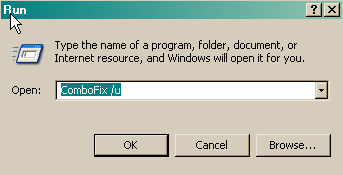
  • Delete ComboFix and Clean Up
    Click Start > Run > type combofix /u > OK (Note the space between combofix and /u)
    CF_Cleanup.png

    Please advise if this step is missed for any reason as it performs some important actions.


    Clean up with OTMoveIt3
    • Double-click OTMoveIt3.exe to start the program.
    • Close all other programs apart from OTMoveIt3 as this step will require a reboot
    • On the OTMoveIt main screen, press the CleanUp! button
    • Say Yes to the prompt and then allow the program to reboot your computer.


    Protection Programs
    Don't forget to re-enable any protection programs we disabled during your fix.

    You can now re-enable Spybots Teatimer and Windows Defender

    General Security and Computer Health
    Below are some steps to follow in order to dramatically lower the chances of reinfection. You may have already implemented some of the steps below, however you should follow any steps that you have not already implemented.
    • Make sure that you keep your antivirus updated
      New viruses come out every minute, so it is essential that you have the latest signatures for your antivirus program to provide you with the best possible protection from malicious software.
      NOTE: You should only have one antivirus installed at a time. Having more than one antivirus program installed at once is likely to cause conflicts and may well decrease your overall protection as well as impairing the performance of your PC.
    • Security Updates for Windows, Internet Explorer & Microsoft Office
      Whenever a security problem in its software is found, Microsoft will usually create a patch so that after the patch is installed, attackers can't use the vulnerability to install malicious software on your PC. Keeping up with these patches will help to prevent malicious software being installed on your PC. Ensure you are registered for Windows updates via Start > right-click on My Computer > Properties > Automatic Updates tab or visit the Microsoft Update site on a regular basis.
      NOTE: The update process uses ActiveX, so you will need to use internet explorer for it and allow the ActiveX control to install.
    • Update Non-Microsoft Programs
      Microsoft isn't the only company whose products can contain security vulnerabilities. To check whether other programs running on your PC are in need of an update, you can use the Secunia Software Inspector or F-secure Health Check. I suggest that you run one of them at least once a month.
    • Make Internet Explorer More Secure
      You are using Internet Explorer v. 7. Therefore please read and follow the recommendations at this SITE


Recommended Programs

I would recommend the download and installation of some or all of the following programs (if not already present), and the updating of them on a regular basis.


  • WinPatrol
    As a robust security monitor, WinPatrol will alert you to hijackings, malware attacks and critical changes made to your computer without your permission. WinPatrol takes snapshot of your critical system resources and alerts you to any changes that may occur without your knowledge. For more information, please visit HERE.
  • SpywareBlaster
    SpywareBlaster sets killbits in the registry to prevent known malicious ActiveX controls from installing on your computer. If you don't know what ActiveX controls are, see HERE. You can download SpywareBlaster from HERE.
  • Malwarebytes' Anti-Malware
    Malwarebytes' Anti-Malware is an anti-malware application that can thoroughly remove even the most advanced malware. It includes a number of features, including a built in protection monitor that blocks malicious processes before they even start.You can download Malwarebytes' Anti-Malware from HERE. Here are two tutorials: Malwarebytes' Anti-Malware Setup Guide and Malwarebytes' Anti-Malware Scanning Guide.
  • Hosts File
    For added protection you may also like to add a host file. A simple explanation of what a Hosts file does is HERE and for more information regarding host files read HERE.
  • Use an alternative Internet Browser
    Many of the exploits are directed to users of Internet Explorer. Try using a different browser instead: Firefox or Opera


Here is a great article by miekiemoes How to prevent Malware.


Finally I am trying to make one point very clear. It is ABSOLUTELY ESSENTIAL to keep all of your security programs up to date.

I'd be grateful if you could reply to this post so that I know you have read it and, if you've no other questions, the thread can be closed.

Happy surfing and stay clean!

Bio-Hazard
 
closing

Bio Hazard
People who willfully sabotage computers online need some discouragement. I'm working through your last comments. Thanks again.
Spock
 
Back
Top