
You are using an out of date browser. It may not display this or other websites correctly.
You should upgrade or use an alternative browser.
You should upgrade or use an alternative browser.
Warning! Potential Spyware Operation!
- Thread starter MrBV981
- Start date
 .
.
Simon V.
Retired Security Volunteer
Hi 
You should have a clean System Restore point if you've followed the advice in my previous post.
You can uninstall it, but it can do no harm to keep it on your computer. It can be used to backup the registry.
I've never instructed you to use Combofix, but this can be used to uninstall it:
Click Start then Run....
You can delete FixPolicies.
You should only have Java(TM) SE Runtime Environment 6 Update 3 installed.
If you've followed my instructions, those should all be removed.
1. Since System Restore points were infected I wanted to know if these are clean now? Do I have a fresh and clean system restore point for the moment or do I have to make a new one?
You should have a clean System Restore point if you've followed the advice in my previous post.
2. Can I uninstall ERUNT, or do I just leave it on my pc?
You can uninstall it, but it can do no harm to keep it on your computer. It can be used to backup the registry.
3. I still have a folder C:\ComboFix containing files. Can I delete this one. Same for the FixPolicies folder on my desktop?
I've never instructed you to use Combofix, but this can be used to uninstall it:
Click Start then Run....
- Type Combofix /u in the runbox and click OK. (Note: The space between the x and the /u needs to be there)
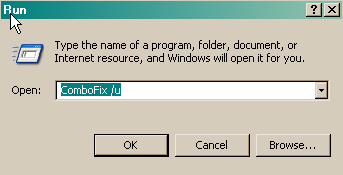
- This will uninstall Combofix.
You can delete FixPolicies.
4. In one of you previous post you also asked me to remove the following program(s): J2SE Runtime Environment 5.0 Update 11 & Java(TM) SE Runtime Environment 6 Update 1. Do I still have to do this?
You should only have Java(TM) SE Runtime Environment 6 Update 3 installed.
How can I remove all threats the Kaspersky scan has found on my pc?
If you've followed my instructions, those should all be removed.
Thank You
Hi Simon V.,
I wanted to thank you one more time for all of the time you spend to me helping to solve this problem. As you asked I have registered my complaint on the Malware Complaints forum. I hope my voice will be heard, along with many others who faced the same infection!
Nice job :bigthumb:.
Best regards,
MrBV
Hi Simon V.,
I wanted to thank you one more time for all of the time you spend to me helping to solve this problem. As you asked I have registered my complaint on the Malware Complaints forum. I hope my voice will be heard, along with many others who faced the same infection!
Nice job :bigthumb:.
Best regards,
MrBV