
You are using an out of date browser. It may not display this or other websites correctly.
You should upgrade or use an alternative browser.
You should upgrade or use an alternative browser.
Can you help remove Virtumonde trojan Please ???
- Thread starter smogman
- Start date
Malwarebytes' Anti-Malware 1.34
Database version: 1836
Windows 5.0.2195 Service Pack 4
2009-03-11 05:37:36
mbam-log-2009-03-11 (05-37-36).txt
Scan type: Full Scan (C:\|D:\|)
Objects scanned: 93297
Time elapsed: 19 minute(s), 37 second(s)
Memory Processes Infected: 0
Memory Modules Infected: 0
Registry Keys Infected: 0
Registry Values Infected: 0
Registry Data Items Infected: 0
Folders Infected: 0
Files Infected: 0
Memory Processes Infected:
(No malicious items detected)
Memory Modules Infected:
(No malicious items detected)
Registry Keys Infected:
(No malicious items detected)
Registry Values Infected:
(No malicious items detected)
Registry Data Items Infected:
(No malicious items detected)
Folders Infected:
(No malicious items detected)
Files Infected:
(No malicious items detected)
Logfile of Trend Micro HijackThis v2.0.2
Scan saved at 05:39, on 2009-03-11
Platform: Windows 2000 SP4 (WinNT 5.00.2195)
MSIE: Internet Explorer v6.00 SP1 (6.00.2800.1106)
Boot mode: Normal
Running processes:
C:\WINNT\System32\smss.exe
C:\WINNT\system32\winlogon.exe
C:\WINNT\system32\services.exe
C:\WINNT\system32\lsass.exe
C:\WINNT\system32\svchost.exe
C:\WINNT\system32\LEXBCES.EXE
C:\WINNT\system32\spoolsv.exe
C:\WINNT\system32\LEXPPS.EXE
C:\Program Files\Symantec\pcAnywhere\awhost32.exe
C:\Program Files\ISS\issSensors\DesktopProtection\blackd.exe
C:\WINNT\system32\Brmfrmps.exe
C:\PROGRA~1\Navnt\DefWatch.exe
C:\Program Files\Juniper Networks\Common Files\dsNcService.exe
C:\WINNT\System32\svchost.exe
C:\Program Files\Common Files\Microsoft Shared\VS7DEBUG\MDM.EXE
C:\PROGRA~1\Navnt\Rtvscan.exe
C:\Program Files\Novadigm\radexecd.exe
C:\Program Files\Novadigm\radsched.exe
C:\Program Files\Novadigm\Radstgms.exe
C:\WINNT\system32\regsvc.exe
C:\WINNT\system32\MSTask.exe
C:\WINNT\system32\stisvc.exe
C:\Program Files\UPHClean\uphclean.exe
C:\WINNT\System32\WBEM\WinMgmt.exe
C:\WINNT\System32\mspmspsv.exe
C:\WINNT\system32\svchost.exe
C:\WINNT\Explorer.EXE
C:\WINNT\System32\hkcmd.exe
C:\PROGRA~1\Navnt\vptray.exe
C:\Program Files\Brother\ControlCenter2\brctrcen.exe
C:\WINNT\system32\ctfmon.exe
C:\Program Files\CASIO\Photo Loader\Plauto.exe
C:\Program Files\ISS\issSensors\DesktopProtection\blackice.exe
C:\WINNT\system32\svchost.exe
C:\Program Files\internet explorer\iexplore.exe
C:\WINNT\system32\DllHost.exe
C:\Program Files\Trend Micro\HijackThis\problems.exe.exe
R0 - HKCU\Software\Microsoft\Internet Explorer\Main,Start Page = http://google.ca/
R1 - HKLM\Software\Microsoft\Internet Explorer\Main,Default_Page_URL = http://go.microsoft.com/fwlink/?LinkId=69157
R1 - HKLM\Software\Microsoft\Internet Explorer\Main,Default_Search_URL = http://go.microsoft.com/fwlink/?LinkId=54896
R1 - HKLM\Software\Microsoft\Internet Explorer\Main,Search Page = http://go.microsoft.com/fwlink/?LinkId=54896
O2 - BHO: AcroIEHlprObj Class - {06849E9F-C8D7-4D59-B87D-784B7D6BE0B3} - C:\Program Files\Adobe\Acrobat 5.0\Reader\ActiveX\AcroIEHelper.ocx
O2 - BHO: ViewerHelper Class - {78104A01-8E71-4F30-9A36-3793799615B4} - C:\Program Files\Microsoft\Rights Management Add-on\RMAFilt.dll
O4 - HKLM\..\Run: [Synchronization Manager] mobsync.exe /logon
O4 - HKLM\..\Run: [IgfxTray] C:\WINNT\System32\igfxtray.exe
O4 - HKLM\..\Run: [HotKeysCmds] C:\WINNT\System32\hkcmd.exe
O4 - HKLM\..\Run: [PrinTray] C:\WINNT\System32\spool\DRIVERS\W32X86\2\printray.exe
O4 - HKLM\..\Run: [vptray] C:\PROGRA~1\Navnt\vptray.exe
O4 - HKLM\..\Run: [SetDefPrt] C:\Program Files\Brother\Brmfl04a\BrStDvPt.exe
O4 - HKLM\..\Run: [ControlCenter2.0] C:\Program Files\Brother\ControlCenter2\brctrcen.exe /autorun
O4 - HKLM\..\Run: [JobHisInit] C:\Program Files\RMClient\JobHisInit.exe
O4 - HKLM\..\Run: [MplSetUp] C:\Program Files\RMClient\MplSetUp.exe
O4 - HKCU\..\Run: [ConfSrv] C:\Program Files\PPG\Setups\ConfSrv.vbs
O4 - HKCU\..\Run: [ctfmon.exe] ctfmon.exe
O4 - HKCU\..\Run: [AROReminder] C:\Program Files\Advanced Registry Optimizer\ARO.exe -rem
O4 - HKUS\.DEFAULT\..\Run: [internat.exe] internat.exe (User 'Default user')
O4 - HKUS\.DEFAULT\..\RunOnce: [^SetupICWDesktop] C:\Program Files\Internet Explorer\Connection Wizard\icwconn1.exe /desktop (User 'Default user')
O4 - Global Startup: Photo Loader supervisory.lnk = C:\Program Files\CASIO\Photo Loader\Plauto.exe
O4 - Global Startup: RealSecure(r) Desktop Protector.lnk = ?
O4 - Global Startup: Status Monitor.lnk = C:\Program Files\Brother\Brmfcmon\BrMfcWnd.exe
O8 - Extra context menu item: E&xport to Microsoft Excel - res://C:\PROGRA~1\MICROS~2\OFFICE11\EXCEL.EXE/3000
O9 - Extra button: (no name) - {685ec120-f786-4498-a8f0-794d47916161} - C:\Program Files\Microsoft\Rights Management Add-on\RMAFilt.dll
O9 - Extra 'Tools' menuitem: @C:\Program Files\Microsoft\Rights Management Add-on\RMARes.dll,-40971 - {685ec120-f786-4498-a8f0-794d47916161} - C:\Program Files\Microsoft\Rights Management Add-on\RMAFilt.dll
O9 - Extra button: Research - {92780B25-18CC-41C8-B9BE-3C9C571A8263} - C:\PROGRA~1\MICROS~2\OFFICE11\REFIEBAR.DLL
O9 - Extra button: @C:\Program Files\Microsoft\Rights Management Add-on\RMARes.dll,-205 - {aede78a6-42b6-4c3c-96eb-5ae6dbec4859} - C:\Program Files\Microsoft\Rights Management Add-on\RMAFilt.dll
O9 - Extra 'Tools' menuitem: @C:\Program Files\Microsoft\Rights Management Add-on\RMARes.dll,-40970 - {aede78a6-42b6-4c3c-96eb-5ae6dbec4859} - C:\Program Files\Microsoft\Rights Management Add-on\RMAFilt.dll
O9 - Extra button: (no name) - {DFB852A3-47F8-48C4-A200-58CAB36FD2A2} - C:\WINNT\system32\shdocvw.dll
O9 - Extra 'Tools' menuitem: Spybot - Search & Destroy Configuration - {DFB852A3-47F8-48C4-A200-58CAB36FD2A2} - C:\WINNT\system32\shdocvw.dll
O9 - Extra button: (no name) - {685ec120-f786-4498-a8f0-794d47916161} - C:\Program Files\Microsoft\Rights Management Add-on\RMAFilt.dll (HKCU)
O9 - Extra 'Tools' menuitem: @C:\Program Files\Microsoft\Rights Management Add-on\RMARes.dll,-40971 - {685ec120-f786-4498-a8f0-794d47916161} - C:\Program Files\Microsoft\Rights Management Add-on\RMAFilt.dll (HKCU)
O9 - Extra button: @C:\Program Files\Microsoft\Rights Management Add-on\RMARes.dll,-205 - {aede78a6-42b6-4c3c-96eb-5ae6dbec4859} - C:\Program Files\Microsoft\Rights Management Add-on\RMAFilt.dll (HKCU)
O9 - Extra 'Tools' menuitem: @C:\Program Files\Microsoft\Rights Management Add-on\RMARes.dll,-40970 - {aede78a6-42b6-4c3c-96eb-5ae6dbec4859} - C:\Program Files\Microsoft\Rights Management Add-on\RMAFilt.dll (HKCU)
O12 - Plugin for .spop: C:\Program Files\Internet Explorer\Plugins\NPDocBox.dll
O14 - IERESET.INF: START_PAGE_URL=http://insideppg.web.ppg.com
O16 - DPF: {0EB0E74A-2A76-4AB3-A7FB-9BD8C29F7F75} (CKAVWebScan Object) - http://www.kaspersky.com/kos/english/kavwebscan_unicode.cab
O16 - DPF: {17492023-C23A-453E-A040-C7C580BBF700} (Windows Genuine Advantage Validation Tool) - http://go.microsoft.com/fwlink/?linkid=39204
O16 - DPF: {67DABFBF-D0AB-41FA-9C46-CC0F21721616} - http://go.divx.com/plugin/DivXBrowserPlugin.cab
O16 - DPF: {E5F5D008-DD2C-4D32-977D-1A0ADF03058B} (JuniperSetup Control) - https://connect.ppg.com/dana-cached/setup/JuniperSetupSP1.cab
O17 - HKLM\System\CCS\Services\Tcpip\Parameters: Domain = nac.ppg.com
O17 - HKLM\System\CS1\Services\Tcpip\Parameters: Domain = nac.ppg.com
O17 - HKLM\System\CS2\Services\Tcpip\Parameters: Domain = nac.ppg.com
O23 - Service: pcAnywhere Host Service (awhost32) - Symantec Corporation - C:\Program Files\Symantec\pcAnywhere\awhost32.exe
O23 - Service: BlackICE - Internet Security Systems, Inc. - C:\Program Files\ISS\issSensors\DesktopProtection\blackd.exe
O23 - Service: Brother Popup Suspend service for Resource manager (brmfrmps) - Brother Industries, Ltd. - C:\WINNT\system32\Brmfrmps.exe
O23 - Service: DefWatch - Symantec Corporation - C:\PROGRA~1\Navnt\DefWatch.exe
O23 - Service: Logical Disk Manager Administrative Service (dmadmin) - VERITAS Software Corp. - C:\WINNT\System32\dmadmin.exe
O23 - Service: Juniper Network Connect Service (dsNcService) - Juniper Networks - C:\Program Files\Juniper Networks\Common Files\dsNcService.exe
O23 - Service: Contivity VPN Service (ExtranetAccess) - Nortel Networks NA, Inc. - C:\Program Files\WorldCom IP VPN Remote Access\Extranet_serv.exe
O23 - Service: InstallDriver Table Manager (IDriverT) - Macrovision Corporation - C:\Program Files\Common Files\InstallShield\Driver\11\Intel 32\IDriverT.exe
O23 - Service: LexBce Server (LexBceS) - Lexmark International, Inc. - C:\WINNT\system32\LEXBCES.EXE
O23 - Service: Symantec AntiVirus Client (Norton AntiVirus Server) - Symantec Corporation - C:\PROGRA~1\Navnt\Rtvscan.exe
O23 - Service: OracleOra8_HomeClientCache - Unknown owner - C:\Oracle\Ora81\BIN\ONRSD.EXE
O23 - Service: Radia Notify Daemon (radexecd) - Novadigm - C:\Program Files\Novadigm\radexecd.exe
O23 - Service: Radia Scheduler Daemon (radsched) - Novadigm - C:\Program Files\Novadigm\radsched.exe
O23 - Service: Radia MSI Redirector (Radstgms) - Novadigm - C:\Program Files\Novadigm\Radstgms.exe
O23 - Service: RapApp - Internet Security Systems, Inc. - C:\Program Files\ISS\issSensors\DesktopProtection\RapApp.exe
--
End of file - 8352 bytes
Database version: 1836
Windows 5.0.2195 Service Pack 4
2009-03-11 05:37:36
mbam-log-2009-03-11 (05-37-36).txt
Scan type: Full Scan (C:\|D:\|)
Objects scanned: 93297
Time elapsed: 19 minute(s), 37 second(s)
Memory Processes Infected: 0
Memory Modules Infected: 0
Registry Keys Infected: 0
Registry Values Infected: 0
Registry Data Items Infected: 0
Folders Infected: 0
Files Infected: 0
Memory Processes Infected:
(No malicious items detected)
Memory Modules Infected:
(No malicious items detected)
Registry Keys Infected:
(No malicious items detected)
Registry Values Infected:
(No malicious items detected)
Registry Data Items Infected:
(No malicious items detected)
Folders Infected:
(No malicious items detected)
Files Infected:
(No malicious items detected)
Logfile of Trend Micro HijackThis v2.0.2
Scan saved at 05:39, on 2009-03-11
Platform: Windows 2000 SP4 (WinNT 5.00.2195)
MSIE: Internet Explorer v6.00 SP1 (6.00.2800.1106)
Boot mode: Normal
Running processes:
C:\WINNT\System32\smss.exe
C:\WINNT\system32\winlogon.exe
C:\WINNT\system32\services.exe
C:\WINNT\system32\lsass.exe
C:\WINNT\system32\svchost.exe
C:\WINNT\system32\LEXBCES.EXE
C:\WINNT\system32\spoolsv.exe
C:\WINNT\system32\LEXPPS.EXE
C:\Program Files\Symantec\pcAnywhere\awhost32.exe
C:\Program Files\ISS\issSensors\DesktopProtection\blackd.exe
C:\WINNT\system32\Brmfrmps.exe
C:\PROGRA~1\Navnt\DefWatch.exe
C:\Program Files\Juniper Networks\Common Files\dsNcService.exe
C:\WINNT\System32\svchost.exe
C:\Program Files\Common Files\Microsoft Shared\VS7DEBUG\MDM.EXE
C:\PROGRA~1\Navnt\Rtvscan.exe
C:\Program Files\Novadigm\radexecd.exe
C:\Program Files\Novadigm\radsched.exe
C:\Program Files\Novadigm\Radstgms.exe
C:\WINNT\system32\regsvc.exe
C:\WINNT\system32\MSTask.exe
C:\WINNT\system32\stisvc.exe
C:\Program Files\UPHClean\uphclean.exe
C:\WINNT\System32\WBEM\WinMgmt.exe
C:\WINNT\System32\mspmspsv.exe
C:\WINNT\system32\svchost.exe
C:\WINNT\Explorer.EXE
C:\WINNT\System32\hkcmd.exe
C:\PROGRA~1\Navnt\vptray.exe
C:\Program Files\Brother\ControlCenter2\brctrcen.exe
C:\WINNT\system32\ctfmon.exe
C:\Program Files\CASIO\Photo Loader\Plauto.exe
C:\Program Files\ISS\issSensors\DesktopProtection\blackice.exe
C:\WINNT\system32\svchost.exe
C:\Program Files\internet explorer\iexplore.exe
C:\WINNT\system32\DllHost.exe
C:\Program Files\Trend Micro\HijackThis\problems.exe.exe
R0 - HKCU\Software\Microsoft\Internet Explorer\Main,Start Page = http://google.ca/
R1 - HKLM\Software\Microsoft\Internet Explorer\Main,Default_Page_URL = http://go.microsoft.com/fwlink/?LinkId=69157
R1 - HKLM\Software\Microsoft\Internet Explorer\Main,Default_Search_URL = http://go.microsoft.com/fwlink/?LinkId=54896
R1 - HKLM\Software\Microsoft\Internet Explorer\Main,Search Page = http://go.microsoft.com/fwlink/?LinkId=54896
O2 - BHO: AcroIEHlprObj Class - {06849E9F-C8D7-4D59-B87D-784B7D6BE0B3} - C:\Program Files\Adobe\Acrobat 5.0\Reader\ActiveX\AcroIEHelper.ocx
O2 - BHO: ViewerHelper Class - {78104A01-8E71-4F30-9A36-3793799615B4} - C:\Program Files\Microsoft\Rights Management Add-on\RMAFilt.dll
O4 - HKLM\..\Run: [Synchronization Manager] mobsync.exe /logon
O4 - HKLM\..\Run: [IgfxTray] C:\WINNT\System32\igfxtray.exe
O4 - HKLM\..\Run: [HotKeysCmds] C:\WINNT\System32\hkcmd.exe
O4 - HKLM\..\Run: [PrinTray] C:\WINNT\System32\spool\DRIVERS\W32X86\2\printray.exe
O4 - HKLM\..\Run: [vptray] C:\PROGRA~1\Navnt\vptray.exe
O4 - HKLM\..\Run: [SetDefPrt] C:\Program Files\Brother\Brmfl04a\BrStDvPt.exe
O4 - HKLM\..\Run: [ControlCenter2.0] C:\Program Files\Brother\ControlCenter2\brctrcen.exe /autorun
O4 - HKLM\..\Run: [JobHisInit] C:\Program Files\RMClient\JobHisInit.exe
O4 - HKLM\..\Run: [MplSetUp] C:\Program Files\RMClient\MplSetUp.exe
O4 - HKCU\..\Run: [ConfSrv] C:\Program Files\PPG\Setups\ConfSrv.vbs
O4 - HKCU\..\Run: [ctfmon.exe] ctfmon.exe
O4 - HKCU\..\Run: [AROReminder] C:\Program Files\Advanced Registry Optimizer\ARO.exe -rem
O4 - HKUS\.DEFAULT\..\Run: [internat.exe] internat.exe (User 'Default user')
O4 - HKUS\.DEFAULT\..\RunOnce: [^SetupICWDesktop] C:\Program Files\Internet Explorer\Connection Wizard\icwconn1.exe /desktop (User 'Default user')
O4 - Global Startup: Photo Loader supervisory.lnk = C:\Program Files\CASIO\Photo Loader\Plauto.exe
O4 - Global Startup: RealSecure(r) Desktop Protector.lnk = ?
O4 - Global Startup: Status Monitor.lnk = C:\Program Files\Brother\Brmfcmon\BrMfcWnd.exe
O8 - Extra context menu item: E&xport to Microsoft Excel - res://C:\PROGRA~1\MICROS~2\OFFICE11\EXCEL.EXE/3000
O9 - Extra button: (no name) - {685ec120-f786-4498-a8f0-794d47916161} - C:\Program Files\Microsoft\Rights Management Add-on\RMAFilt.dll
O9 - Extra 'Tools' menuitem: @C:\Program Files\Microsoft\Rights Management Add-on\RMARes.dll,-40971 - {685ec120-f786-4498-a8f0-794d47916161} - C:\Program Files\Microsoft\Rights Management Add-on\RMAFilt.dll
O9 - Extra button: Research - {92780B25-18CC-41C8-B9BE-3C9C571A8263} - C:\PROGRA~1\MICROS~2\OFFICE11\REFIEBAR.DLL
O9 - Extra button: @C:\Program Files\Microsoft\Rights Management Add-on\RMARes.dll,-205 - {aede78a6-42b6-4c3c-96eb-5ae6dbec4859} - C:\Program Files\Microsoft\Rights Management Add-on\RMAFilt.dll
O9 - Extra 'Tools' menuitem: @C:\Program Files\Microsoft\Rights Management Add-on\RMARes.dll,-40970 - {aede78a6-42b6-4c3c-96eb-5ae6dbec4859} - C:\Program Files\Microsoft\Rights Management Add-on\RMAFilt.dll
O9 - Extra button: (no name) - {DFB852A3-47F8-48C4-A200-58CAB36FD2A2} - C:\WINNT\system32\shdocvw.dll
O9 - Extra 'Tools' menuitem: Spybot - Search & Destroy Configuration - {DFB852A3-47F8-48C4-A200-58CAB36FD2A2} - C:\WINNT\system32\shdocvw.dll
O9 - Extra button: (no name) - {685ec120-f786-4498-a8f0-794d47916161} - C:\Program Files\Microsoft\Rights Management Add-on\RMAFilt.dll (HKCU)
O9 - Extra 'Tools' menuitem: @C:\Program Files\Microsoft\Rights Management Add-on\RMARes.dll,-40971 - {685ec120-f786-4498-a8f0-794d47916161} - C:\Program Files\Microsoft\Rights Management Add-on\RMAFilt.dll (HKCU)
O9 - Extra button: @C:\Program Files\Microsoft\Rights Management Add-on\RMARes.dll,-205 - {aede78a6-42b6-4c3c-96eb-5ae6dbec4859} - C:\Program Files\Microsoft\Rights Management Add-on\RMAFilt.dll (HKCU)
O9 - Extra 'Tools' menuitem: @C:\Program Files\Microsoft\Rights Management Add-on\RMARes.dll,-40970 - {aede78a6-42b6-4c3c-96eb-5ae6dbec4859} - C:\Program Files\Microsoft\Rights Management Add-on\RMAFilt.dll (HKCU)
O12 - Plugin for .spop: C:\Program Files\Internet Explorer\Plugins\NPDocBox.dll
O14 - IERESET.INF: START_PAGE_URL=http://insideppg.web.ppg.com
O16 - DPF: {0EB0E74A-2A76-4AB3-A7FB-9BD8C29F7F75} (CKAVWebScan Object) - http://www.kaspersky.com/kos/english/kavwebscan_unicode.cab
O16 - DPF: {17492023-C23A-453E-A040-C7C580BBF700} (Windows Genuine Advantage Validation Tool) - http://go.microsoft.com/fwlink/?linkid=39204
O16 - DPF: {67DABFBF-D0AB-41FA-9C46-CC0F21721616} - http://go.divx.com/plugin/DivXBrowserPlugin.cab
O16 - DPF: {E5F5D008-DD2C-4D32-977D-1A0ADF03058B} (JuniperSetup Control) - https://connect.ppg.com/dana-cached/setup/JuniperSetupSP1.cab
O17 - HKLM\System\CCS\Services\Tcpip\Parameters: Domain = nac.ppg.com
O17 - HKLM\System\CS1\Services\Tcpip\Parameters: Domain = nac.ppg.com
O17 - HKLM\System\CS2\Services\Tcpip\Parameters: Domain = nac.ppg.com
O23 - Service: pcAnywhere Host Service (awhost32) - Symantec Corporation - C:\Program Files\Symantec\pcAnywhere\awhost32.exe
O23 - Service: BlackICE - Internet Security Systems, Inc. - C:\Program Files\ISS\issSensors\DesktopProtection\blackd.exe
O23 - Service: Brother Popup Suspend service for Resource manager (brmfrmps) - Brother Industries, Ltd. - C:\WINNT\system32\Brmfrmps.exe
O23 - Service: DefWatch - Symantec Corporation - C:\PROGRA~1\Navnt\DefWatch.exe
O23 - Service: Logical Disk Manager Administrative Service (dmadmin) - VERITAS Software Corp. - C:\WINNT\System32\dmadmin.exe
O23 - Service: Juniper Network Connect Service (dsNcService) - Juniper Networks - C:\Program Files\Juniper Networks\Common Files\dsNcService.exe
O23 - Service: Contivity VPN Service (ExtranetAccess) - Nortel Networks NA, Inc. - C:\Program Files\WorldCom IP VPN Remote Access\Extranet_serv.exe
O23 - Service: InstallDriver Table Manager (IDriverT) - Macrovision Corporation - C:\Program Files\Common Files\InstallShield\Driver\11\Intel 32\IDriverT.exe
O23 - Service: LexBce Server (LexBceS) - Lexmark International, Inc. - C:\WINNT\system32\LEXBCES.EXE
O23 - Service: Symantec AntiVirus Client (Norton AntiVirus Server) - Symantec Corporation - C:\PROGRA~1\Navnt\Rtvscan.exe
O23 - Service: OracleOra8_HomeClientCache - Unknown owner - C:\Oracle\Ora81\BIN\ONRSD.EXE
O23 - Service: Radia Notify Daemon (radexecd) - Novadigm - C:\Program Files\Novadigm\radexecd.exe
O23 - Service: Radia Scheduler Daemon (radsched) - Novadigm - C:\Program Files\Novadigm\radsched.exe
O23 - Service: Radia MSI Redirector (Radstgms) - Novadigm - C:\Program Files\Novadigm\Radstgms.exe
O23 - Service: RapApp - Internet Security Systems, Inc. - C:\Program Files\ISS\issSensors\DesktopProtection\RapApp.exe
--
End of file - 8352 bytes

Remove combofix from the computer like this:
Click START then RUN
Now type or copy Combofix /u in the runbox and click OK.
Note the space between the X and the U, it needs to be there.
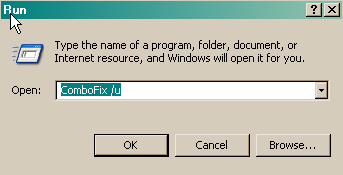
You have Kaspersky Online Scanner onboard, update that program and scan, post the results unless they are clean.
Thanks
Click START then RUN
Now type or copy Combofix /u in the runbox and click OK.
Note the space between the X and the U, it needs to be there.
You have Kaspersky Online Scanner onboard, update that program and scan, post the results unless they are clean.
Thanks
That may be an old, obsolete verion then? If you have any problems with it, uninstall it and use the new version in the instructions.
http://www.kaspersky.com/kos/eng/partner/default/languages/english/check.html?n=1213442456390
1. Note: If you are using Windows Vista, open your browser by right-clicking on its icon and select 'Run as administrator' to perform this scan.
2. Click on the Accept button and install any components it needs.
3. The program will install and then begin downloading the latest definition files.
4. After the files have been downloaded on the left side of the page in the Scan section select My Computer
5. This will start the program and scan your system.
6. The scan will take a while, so be patient and let it run.
7. Once the scan is complete, click on View scan report
8. Now, click on the Save Report as button.
9. Save the file to your desktop.
10. Copy and paste that information in your next post
http://www.kaspersky.com/kos/eng/partner/default/languages/english/check.html?n=1213442456390
1. Note: If you are using Windows Vista, open your browser by right-clicking on its icon and select 'Run as administrator' to perform this scan.
2. Click on the Accept button and install any components it needs.
3. The program will install and then begin downloading the latest definition files.
4. After the files have been downloaded on the left side of the page in the Scan section select My Computer
5. This will start the program and scan your system.
6. The scan will take a while, so be patient and let it run.
7. Once the scan is complete, click on View scan report
8. Now, click on the Save Report as button.
9. Save the file to your desktop.
10. Copy and paste that information in your next post
--------------------------------------------------------------------------------
KASPERSKY ONLINE SCANNER 7 REPORT
Wednesday, March 11, 2009
Operating System: Microsoft Windows 2000 Professional Service Pack 4 (build 2195)
Kaspersky Online Scanner 7 version: 7.0.25.0
Program database last update: Thursday, March 12, 2009 12:02:50
Records in database: 1891096
--------------------------------------------------------------------------------
Scan settings:
Scan using the following database: extended
Scan archives: yes
Scan mail databases: yes
Scan area - My Computer:
A:\
C:\
D:\
E:\
Scan statistics:
Files scanned: 31300
Threat name: 5
Infected objects: 9
Suspicious objects: 0
Duration of the scan: 01:03:17
File name / Threat name / Threats count
C:\16.tmp Infected: Trojan.Win32.Small.bct 1
C:\Documents and Settings\car4262\filip\duffy-mercy.mp3 Infected: Trojan-Downloader.WMA.GetCodec.c 1
C:\Documents and Settings\car4262\filip\ramalamabangbang.mp3 Infected: Trojan-Downloader.WMA.GetCodec.c 1
C:\Documents and Settings\car4262\filip\shake ya tailfeathers.mp3 Infected: Trojan-Downloader.WMA.GetCodec.c 1
C:\Documents and Settings\car4262\filip\skake your pom pom.mp3 Infected: Trojan-Downloader.WMA.GetCodec.c 1
C:\Documents and Settings\car4262\filip\starfield- i will go.mp3 Infected: Trojan-Downloader.WMA.GetCodec.c 1
C:\Documents and Settings\car4262\gu.exe Infected: Trojan.Win32.Buzus.aovd 1
C:\Program Files\Common Files\System\kav88.exe Infected: Backdoor.Win32.Agent.aemu 1
C:\WINNT\Downloaded Program Files\10637-69.exe Infected: Trojan.Win32.Diamin.bz 1
The selected area was scanned.
KASPERSKY ONLINE SCANNER 7 REPORT
Wednesday, March 11, 2009
Operating System: Microsoft Windows 2000 Professional Service Pack 4 (build 2195)
Kaspersky Online Scanner 7 version: 7.0.25.0
Program database last update: Thursday, March 12, 2009 12:02:50
Records in database: 1891096
--------------------------------------------------------------------------------
Scan settings:
Scan using the following database: extended
Scan archives: yes
Scan mail databases: yes
Scan area - My Computer:
A:\
C:\
D:\
E:\
Scan statistics:
Files scanned: 31300
Threat name: 5
Infected objects: 9
Suspicious objects: 0
Duration of the scan: 01:03:17
File name / Threat name / Threats count
C:\16.tmp Infected: Trojan.Win32.Small.bct 1
C:\Documents and Settings\car4262\filip\duffy-mercy.mp3 Infected: Trojan-Downloader.WMA.GetCodec.c 1
C:\Documents and Settings\car4262\filip\ramalamabangbang.mp3 Infected: Trojan-Downloader.WMA.GetCodec.c 1
C:\Documents and Settings\car4262\filip\shake ya tailfeathers.mp3 Infected: Trojan-Downloader.WMA.GetCodec.c 1
C:\Documents and Settings\car4262\filip\skake your pom pom.mp3 Infected: Trojan-Downloader.WMA.GetCodec.c 1
C:\Documents and Settings\car4262\filip\starfield- i will go.mp3 Infected: Trojan-Downloader.WMA.GetCodec.c 1
C:\Documents and Settings\car4262\gu.exe Infected: Trojan.Win32.Buzus.aovd 1
C:\Program Files\Common Files\System\kav88.exe Infected: Backdoor.Win32.Agent.aemu 1
C:\WINNT\Downloaded Program Files\10637-69.exe Infected: Trojan.Win32.Diamin.bz 1
The selected area was scanned.
Someone using this computer is downloading infected .mp3 files, I suggest you discuss this with all users and have them read this:
http://forums.spybot.info/showthread.php?t=7344
http://forums.spybot.info/showthread.php?t=282
http://www.nutnworks.com/SafeHex/file_sharing.htm
http://arstechnica.com/news.ars/pos...s-cost-one-man-750-per-song-in-riaa-suit.html
Make sure you can view hidden files and folders for your Operating System:
http://www.bleepingcomputer.com/tutorials/tutorial62.html#win2000
Navigate to these files in RED and delete them.
C:\16.tmp
C:\Documents and Settings\car4262\filip\duffy-mercy.mp3
C:\Documents and Settings\car4262\filip\ramalamabangbang.mp3
C:\Documents and Settings\car4262\filip\shake ya tailfeathers.mp3
C:\Documents and Settings\car4262\filip\skake your pom pom.mp3
C:\Documents and Settings\car4262\filip\starfield- i will go.mp3
C:\Documents and Settings\car4262\gu.exe
C:\Program Files\Common Files\System\kav88.exe
C:\WINNT\Downloaded Program Files\10637-69.exe
Empty the Recycle Bin on the Desktop, restart the computer and post a last HJT log. How is this computer is running now?
Thanks
http://forums.spybot.info/showthread.php?t=7344
http://forums.spybot.info/showthread.php?t=282
http://www.nutnworks.com/SafeHex/file_sharing.htm
http://arstechnica.com/news.ars/pos...s-cost-one-man-750-per-song-in-riaa-suit.html
Make sure you can view hidden files and folders for your Operating System:
http://www.bleepingcomputer.com/tutorials/tutorial62.html#win2000
Navigate to these files in RED and delete them.
C:\16.tmp
C:\Documents and Settings\car4262\filip\duffy-mercy.mp3
C:\Documents and Settings\car4262\filip\ramalamabangbang.mp3
C:\Documents and Settings\car4262\filip\shake ya tailfeathers.mp3
C:\Documents and Settings\car4262\filip\skake your pom pom.mp3
C:\Documents and Settings\car4262\filip\starfield- i will go.mp3
C:\Documents and Settings\car4262\gu.exe
C:\Program Files\Common Files\System\kav88.exe
C:\WINNT\Downloaded Program Files\10637-69.exe
Empty the Recycle Bin on the Desktop, restart the computer and post a last HJT log. How is this computer is running now?
Thanks
Thanks, those mp3 downloads would be my kids, which I'll need to talk to.
C:\Program Files\Common Files\System\kav88.exe
C:\WINNT\Downloaded Program Files\10637-69.exe
I deleted them all with the exception of the two above which I could not find. There is no "system" folder inside common files and 10637-69.exe was not inside downloaded program files. (I did unhide all files inside folders options, although my menu is slightly different)
The computer is running pretty good. The only comment is that I noticed that it was "thinking/working" when idle sometimes. Not sure if that's normal but I did notice that alot more before we first started this process.
Logfile of Trend Micro HijackThis v2.0.2
Scan saved at 23:12, on 2009-03-11
Platform: Windows 2000 SP4 (WinNT 5.00.2195)
MSIE: Internet Explorer v6.00 SP1 (6.00.2800.1106)
Boot mode: Normal
Running processes:
C:\WINNT\System32\smss.exe
C:\WINNT\system32\winlogon.exe
C:\WINNT\system32\services.exe
C:\WINNT\system32\lsass.exe
C:\WINNT\system32\svchost.exe
C:\WINNT\system32\LEXBCES.EXE
C:\WINNT\system32\spoolsv.exe
C:\WINNT\system32\LEXPPS.EXE
C:\Program Files\Symantec\pcAnywhere\awhost32.exe
C:\Program Files\ISS\issSensors\DesktopProtection\blackd.exe
C:\WINNT\system32\Brmfrmps.exe
C:\PROGRA~1\Navnt\DefWatch.exe
C:\Program Files\Juniper Networks\Common Files\dsNcService.exe
C:\WINNT\System32\svchost.exe
C:\Program Files\Java\jre6\bin\jqs.exe
C:\Program Files\Common Files\Microsoft Shared\VS7DEBUG\MDM.EXE
C:\PROGRA~1\Navnt\Rtvscan.exe
C:\Program Files\Novadigm\radexecd.exe
C:\Program Files\Novadigm\radsched.exe
C:\Program Files\Novadigm\Radstgms.exe
C:\WINNT\system32\regsvc.exe
C:\WINNT\system32\MSTask.exe
C:\WINNT\system32\stisvc.exe
C:\Program Files\UPHClean\uphclean.exe
C:\WINNT\System32\WBEM\WinMgmt.exe
C:\WINNT\System32\mspmspsv.exe
C:\WINNT\system32\svchost.exe
C:\WINNT\Explorer.EXE
C:\WINNT\System32\hkcmd.exe
C:\PROGRA~1\Navnt\vptray.exe
C:\Program Files\Brother\ControlCenter2\brctrcen.exe
C:\Program Files\Java\jre6\bin\jusched.exe
C:\WINNT\system32\ctfmon.exe
C:\Program Files\CASIO\Photo Loader\Plauto.exe
C:\Program Files\ISS\issSensors\DesktopProtection\blackice.exe
C:\Program Files\internet explorer\iexplore.exe
C:\WINNT\system32\DllHost.exe
C:\WINNT\system32\svchost.exe
C:\Program Files\Trend Micro\HijackThis\problems.exe.exe
R0 - HKCU\Software\Microsoft\Internet Explorer\Main,Start Page = http://google.ca/
R1 - HKLM\Software\Microsoft\Internet Explorer\Main,Default_Page_URL = http://go.microsoft.com/fwlink/?LinkId=69157
R1 - HKLM\Software\Microsoft\Internet Explorer\Main,Default_Search_URL = http://go.microsoft.com/fwlink/?LinkId=54896
R1 - HKLM\Software\Microsoft\Internet Explorer\Main,Search Page = http://go.microsoft.com/fwlink/?LinkId=54896
O2 - BHO: AcroIEHlprObj Class - {06849E9F-C8D7-4D59-B87D-784B7D6BE0B3} - C:\Program Files\Adobe\Acrobat 5.0\Reader\ActiveX\AcroIEHelper.ocx
O2 - BHO: ViewerHelper Class - {78104A01-8E71-4F30-9A36-3793799615B4} - C:\Program Files\Microsoft\Rights Management Add-on\RMAFilt.dll
O2 - BHO: Java(tm) Plug-In 2 SSV Helper - {DBC80044-A445-435b-BC74-9C25C1C588A9} - C:\Program Files\Java\jre6\bin\jp2ssv.dll
O2 - BHO: JQSIEStartDetectorImpl - {E7E6F031-17CE-4C07-BC86-EABFE594F69C} - C:\Program Files\Java\jre6\lib\deploy\jqs\ie\jqs_plugin.dll
O4 - HKLM\..\Run: [Synchronization Manager] mobsync.exe /logon
O4 - HKLM\..\Run: [IgfxTray] C:\WINNT\System32\igfxtray.exe
O4 - HKLM\..\Run: [HotKeysCmds] C:\WINNT\System32\hkcmd.exe
O4 - HKLM\..\Run: [PrinTray] C:\WINNT\System32\spool\DRIVERS\W32X86\2\printray.exe
O4 - HKLM\..\Run: [vptray] C:\PROGRA~1\Navnt\vptray.exe
O4 - HKLM\..\Run: [SetDefPrt] C:\Program Files\Brother\Brmfl04a\BrStDvPt.exe
O4 - HKLM\..\Run: [ControlCenter2.0] C:\Program Files\Brother\ControlCenter2\brctrcen.exe /autorun
O4 - HKLM\..\Run: [JobHisInit] C:\Program Files\RMClient\JobHisInit.exe
O4 - HKLM\..\Run: [MplSetUp] C:\Program Files\RMClient\MplSetUp.exe
O4 - HKLM\..\Run: [SunJavaUpdateSched] "C:\Program Files\Java\jre6\bin\jusched.exe"
O4 - HKCU\..\Run: [ConfSrv] C:\Program Files\PPG\Setups\ConfSrv.vbs
O4 - HKCU\..\Run: [ctfmon.exe] ctfmon.exe
O4 - HKCU\..\Run: [AROReminder] C:\Program Files\Advanced Registry Optimizer\ARO.exe -rem
O4 - HKUS\.DEFAULT\..\Run: [internat.exe] internat.exe (User 'Default user')
O4 - HKUS\.DEFAULT\..\RunOnce: [^SetupICWDesktop] C:\Program Files\Internet Explorer\Connection Wizard\icwconn1.exe /desktop (User 'Default user')
O4 - Global Startup: Photo Loader supervisory.lnk = C:\Program Files\CASIO\Photo Loader\Plauto.exe
O4 - Global Startup: RealSecure(r) Desktop Protector.lnk = ?
O4 - Global Startup: Status Monitor.lnk = C:\Program Files\Brother\Brmfcmon\BrMfcWnd.exe
O8 - Extra context menu item: E&xport to Microsoft Excel - res://C:\PROGRA~1\MICROS~2\OFFICE11\EXCEL.EXE/3000
O9 - Extra button: (no name) - {685ec120-f786-4498-a8f0-794d47916161} - C:\Program Files\Microsoft\Rights Management Add-on\RMAFilt.dll
O9 - Extra 'Tools' menuitem: @C:\Program Files\Microsoft\Rights Management Add-on\RMARes.dll,-40971 - {685ec120-f786-4498-a8f0-794d47916161} - C:\Program Files\Microsoft\Rights Management Add-on\RMAFilt.dll
O9 - Extra button: Research - {92780B25-18CC-41C8-B9BE-3C9C571A8263} - C:\PROGRA~1\MICROS~2\OFFICE11\REFIEBAR.DLL
O9 - Extra button: @C:\Program Files\Microsoft\Rights Management Add-on\RMARes.dll,-205 - {aede78a6-42b6-4c3c-96eb-5ae6dbec4859} - C:\Program Files\Microsoft\Rights Management Add-on\RMAFilt.dll
O9 - Extra 'Tools' menuitem: @C:\Program Files\Microsoft\Rights Management Add-on\RMARes.dll,-40970 - {aede78a6-42b6-4c3c-96eb-5ae6dbec4859} - C:\Program Files\Microsoft\Rights Management Add-on\RMAFilt.dll
O9 - Extra button: (no name) - {DFB852A3-47F8-48C4-A200-58CAB36FD2A2} - C:\WINNT\system32\shdocvw.dll
O9 - Extra 'Tools' menuitem: Spybot - Search & Destroy Configuration - {DFB852A3-47F8-48C4-A200-58CAB36FD2A2} - C:\WINNT\system32\shdocvw.dll
O9 - Extra button: (no name) - {685ec120-f786-4498-a8f0-794d47916161} - C:\Program Files\Microsoft\Rights Management Add-on\RMAFilt.dll (HKCU)
O9 - Extra 'Tools' menuitem: @C:\Program Files\Microsoft\Rights Management Add-on\RMARes.dll,-40971 - {685ec120-f786-4498-a8f0-794d47916161} - C:\Program Files\Microsoft\Rights Management Add-on\RMAFilt.dll (HKCU)
O9 - Extra button: @C:\Program Files\Microsoft\Rights Management Add-on\RMARes.dll,-205 - {aede78a6-42b6-4c3c-96eb-5ae6dbec4859} - C:\Program Files\Microsoft\Rights Management Add-on\RMAFilt.dll (HKCU)
O9 - Extra 'Tools' menuitem: @C:\Program Files\Microsoft\Rights Management Add-on\RMARes.dll,-40970 - {aede78a6-42b6-4c3c-96eb-5ae6dbec4859} - C:\Program Files\Microsoft\Rights Management Add-on\RMAFilt.dll (HKCU)
O12 - Plugin for .spop: C:\Program Files\Internet Explorer\Plugins\NPDocBox.dll
O14 - IERESET.INF: START_PAGE_URL=http://insideppg.web.ppg.com
O16 - DPF: {0EB0E74A-2A76-4AB3-A7FB-9BD8C29F7F75} (CKAVWebScan Object) - http://www.kaspersky.com/kos/english/kavwebscan_unicode.cab
O16 - DPF: {17492023-C23A-453E-A040-C7C580BBF700} (Windows Genuine Advantage Validation Tool) - http://go.microsoft.com/fwlink/?linkid=39204
O16 - DPF: {67DABFBF-D0AB-41FA-9C46-CC0F21721616} - http://go.divx.com/plugin/DivXBrowserPlugin.cab
O16 - DPF: {8AD9C840-044E-11D1-B3E9-00805F499D93} (Java Runtime Environment 1.6.0) - http://javadl.sun.com/webapps/download/AutoDL?BundleId=27986
O16 - DPF: {E5F5D008-DD2C-4D32-977D-1A0ADF03058B} (JuniperSetup Control) - https://connect.ppg.com/dana-cached/setup/JuniperSetupSP1.cab
O17 - HKLM\System\CCS\Services\Tcpip\Parameters: Domain = nac.ppg.com
O17 - HKLM\System\CS1\Services\Tcpip\Parameters: Domain = nac.ppg.com
O17 - HKLM\System\CS2\Services\Tcpip\Parameters: Domain = nac.ppg.com
O23 - Service: pcAnywhere Host Service (awhost32) - Symantec Corporation - C:\Program Files\Symantec\pcAnywhere\awhost32.exe
O23 - Service: BlackICE - Internet Security Systems, Inc. - C:\Program Files\ISS\issSensors\DesktopProtection\blackd.exe
O23 - Service: Brother Popup Suspend service for Resource manager (brmfrmps) - Brother Industries, Ltd. - C:\WINNT\system32\Brmfrmps.exe
O23 - Service: DefWatch - Symantec Corporation - C:\PROGRA~1\Navnt\DefWatch.exe
O23 - Service: Logical Disk Manager Administrative Service (dmadmin) - VERITAS Software Corp. - C:\WINNT\System32\dmadmin.exe
O23 - Service: Juniper Network Connect Service (dsNcService) - Juniper Networks - C:\Program Files\Juniper Networks\Common Files\dsNcService.exe
O23 - Service: Contivity VPN Service (ExtranetAccess) - Nortel Networks NA, Inc. - C:\Program Files\WorldCom IP VPN Remote Access\Extranet_serv.exe
O23 - Service: InstallDriver Table Manager (IDriverT) - Macrovision Corporation - C:\Program Files\Common Files\InstallShield\Driver\11\Intel 32\IDriverT.exe
O23 - Service: Java Quick Starter (JavaQuickStarterService) - Sun Microsystems, Inc. - C:\Program Files\Java\jre6\bin\jqs.exe
O23 - Service: LexBce Server (LexBceS) - Lexmark International, Inc. - C:\WINNT\system32\LEXBCES.EXE
O23 - Service: Symantec AntiVirus Client (Norton AntiVirus Server) - Symantec Corporation - C:\PROGRA~1\Navnt\Rtvscan.exe
O23 - Service: OracleOra8_HomeClientCache - Unknown owner - C:\Oracle\Ora81\BIN\ONRSD.EXE
O23 - Service: Radia Notify Daemon (radexecd) - Novadigm - C:\Program Files\Novadigm\radexecd.exe
O23 - Service: Radia Scheduler Daemon (radsched) - Novadigm - C:\Program Files\Novadigm\radsched.exe
O23 - Service: Radia MSI Redirector (Radstgms) - Novadigm - C:\Program Files\Novadigm\Radstgms.exe
O23 - Service: RapApp - Internet Security Systems, Inc. - C:\Program Files\ISS\issSensors\DesktopProtection\RapApp.exe
--
End of file - 9058 bytes
C:\Program Files\Common Files\System\kav88.exe
C:\WINNT\Downloaded Program Files\10637-69.exe
I deleted them all with the exception of the two above which I could not find. There is no "system" folder inside common files and 10637-69.exe was not inside downloaded program files. (I did unhide all files inside folders options, although my menu is slightly different)
The computer is running pretty good. The only comment is that I noticed that it was "thinking/working" when idle sometimes. Not sure if that's normal but I did notice that alot more before we first started this process.
Logfile of Trend Micro HijackThis v2.0.2
Scan saved at 23:12, on 2009-03-11
Platform: Windows 2000 SP4 (WinNT 5.00.2195)
MSIE: Internet Explorer v6.00 SP1 (6.00.2800.1106)
Boot mode: Normal
Running processes:
C:\WINNT\System32\smss.exe
C:\WINNT\system32\winlogon.exe
C:\WINNT\system32\services.exe
C:\WINNT\system32\lsass.exe
C:\WINNT\system32\svchost.exe
C:\WINNT\system32\LEXBCES.EXE
C:\WINNT\system32\spoolsv.exe
C:\WINNT\system32\LEXPPS.EXE
C:\Program Files\Symantec\pcAnywhere\awhost32.exe
C:\Program Files\ISS\issSensors\DesktopProtection\blackd.exe
C:\WINNT\system32\Brmfrmps.exe
C:\PROGRA~1\Navnt\DefWatch.exe
C:\Program Files\Juniper Networks\Common Files\dsNcService.exe
C:\WINNT\System32\svchost.exe
C:\Program Files\Java\jre6\bin\jqs.exe
C:\Program Files\Common Files\Microsoft Shared\VS7DEBUG\MDM.EXE
C:\PROGRA~1\Navnt\Rtvscan.exe
C:\Program Files\Novadigm\radexecd.exe
C:\Program Files\Novadigm\radsched.exe
C:\Program Files\Novadigm\Radstgms.exe
C:\WINNT\system32\regsvc.exe
C:\WINNT\system32\MSTask.exe
C:\WINNT\system32\stisvc.exe
C:\Program Files\UPHClean\uphclean.exe
C:\WINNT\System32\WBEM\WinMgmt.exe
C:\WINNT\System32\mspmspsv.exe
C:\WINNT\system32\svchost.exe
C:\WINNT\Explorer.EXE
C:\WINNT\System32\hkcmd.exe
C:\PROGRA~1\Navnt\vptray.exe
C:\Program Files\Brother\ControlCenter2\brctrcen.exe
C:\Program Files\Java\jre6\bin\jusched.exe
C:\WINNT\system32\ctfmon.exe
C:\Program Files\CASIO\Photo Loader\Plauto.exe
C:\Program Files\ISS\issSensors\DesktopProtection\blackice.exe
C:\Program Files\internet explorer\iexplore.exe
C:\WINNT\system32\DllHost.exe
C:\WINNT\system32\svchost.exe
C:\Program Files\Trend Micro\HijackThis\problems.exe.exe
R0 - HKCU\Software\Microsoft\Internet Explorer\Main,Start Page = http://google.ca/
R1 - HKLM\Software\Microsoft\Internet Explorer\Main,Default_Page_URL = http://go.microsoft.com/fwlink/?LinkId=69157
R1 - HKLM\Software\Microsoft\Internet Explorer\Main,Default_Search_URL = http://go.microsoft.com/fwlink/?LinkId=54896
R1 - HKLM\Software\Microsoft\Internet Explorer\Main,Search Page = http://go.microsoft.com/fwlink/?LinkId=54896
O2 - BHO: AcroIEHlprObj Class - {06849E9F-C8D7-4D59-B87D-784B7D6BE0B3} - C:\Program Files\Adobe\Acrobat 5.0\Reader\ActiveX\AcroIEHelper.ocx
O2 - BHO: ViewerHelper Class - {78104A01-8E71-4F30-9A36-3793799615B4} - C:\Program Files\Microsoft\Rights Management Add-on\RMAFilt.dll
O2 - BHO: Java(tm) Plug-In 2 SSV Helper - {DBC80044-A445-435b-BC74-9C25C1C588A9} - C:\Program Files\Java\jre6\bin\jp2ssv.dll
O2 - BHO: JQSIEStartDetectorImpl - {E7E6F031-17CE-4C07-BC86-EABFE594F69C} - C:\Program Files\Java\jre6\lib\deploy\jqs\ie\jqs_plugin.dll
O4 - HKLM\..\Run: [Synchronization Manager] mobsync.exe /logon
O4 - HKLM\..\Run: [IgfxTray] C:\WINNT\System32\igfxtray.exe
O4 - HKLM\..\Run: [HotKeysCmds] C:\WINNT\System32\hkcmd.exe
O4 - HKLM\..\Run: [PrinTray] C:\WINNT\System32\spool\DRIVERS\W32X86\2\printray.exe
O4 - HKLM\..\Run: [vptray] C:\PROGRA~1\Navnt\vptray.exe
O4 - HKLM\..\Run: [SetDefPrt] C:\Program Files\Brother\Brmfl04a\BrStDvPt.exe
O4 - HKLM\..\Run: [ControlCenter2.0] C:\Program Files\Brother\ControlCenter2\brctrcen.exe /autorun
O4 - HKLM\..\Run: [JobHisInit] C:\Program Files\RMClient\JobHisInit.exe
O4 - HKLM\..\Run: [MplSetUp] C:\Program Files\RMClient\MplSetUp.exe
O4 - HKLM\..\Run: [SunJavaUpdateSched] "C:\Program Files\Java\jre6\bin\jusched.exe"
O4 - HKCU\..\Run: [ConfSrv] C:\Program Files\PPG\Setups\ConfSrv.vbs
O4 - HKCU\..\Run: [ctfmon.exe] ctfmon.exe
O4 - HKCU\..\Run: [AROReminder] C:\Program Files\Advanced Registry Optimizer\ARO.exe -rem
O4 - HKUS\.DEFAULT\..\Run: [internat.exe] internat.exe (User 'Default user')
O4 - HKUS\.DEFAULT\..\RunOnce: [^SetupICWDesktop] C:\Program Files\Internet Explorer\Connection Wizard\icwconn1.exe /desktop (User 'Default user')
O4 - Global Startup: Photo Loader supervisory.lnk = C:\Program Files\CASIO\Photo Loader\Plauto.exe
O4 - Global Startup: RealSecure(r) Desktop Protector.lnk = ?
O4 - Global Startup: Status Monitor.lnk = C:\Program Files\Brother\Brmfcmon\BrMfcWnd.exe
O8 - Extra context menu item: E&xport to Microsoft Excel - res://C:\PROGRA~1\MICROS~2\OFFICE11\EXCEL.EXE/3000
O9 - Extra button: (no name) - {685ec120-f786-4498-a8f0-794d47916161} - C:\Program Files\Microsoft\Rights Management Add-on\RMAFilt.dll
O9 - Extra 'Tools' menuitem: @C:\Program Files\Microsoft\Rights Management Add-on\RMARes.dll,-40971 - {685ec120-f786-4498-a8f0-794d47916161} - C:\Program Files\Microsoft\Rights Management Add-on\RMAFilt.dll
O9 - Extra button: Research - {92780B25-18CC-41C8-B9BE-3C9C571A8263} - C:\PROGRA~1\MICROS~2\OFFICE11\REFIEBAR.DLL
O9 - Extra button: @C:\Program Files\Microsoft\Rights Management Add-on\RMARes.dll,-205 - {aede78a6-42b6-4c3c-96eb-5ae6dbec4859} - C:\Program Files\Microsoft\Rights Management Add-on\RMAFilt.dll
O9 - Extra 'Tools' menuitem: @C:\Program Files\Microsoft\Rights Management Add-on\RMARes.dll,-40970 - {aede78a6-42b6-4c3c-96eb-5ae6dbec4859} - C:\Program Files\Microsoft\Rights Management Add-on\RMAFilt.dll
O9 - Extra button: (no name) - {DFB852A3-47F8-48C4-A200-58CAB36FD2A2} - C:\WINNT\system32\shdocvw.dll
O9 - Extra 'Tools' menuitem: Spybot - Search & Destroy Configuration - {DFB852A3-47F8-48C4-A200-58CAB36FD2A2} - C:\WINNT\system32\shdocvw.dll
O9 - Extra button: (no name) - {685ec120-f786-4498-a8f0-794d47916161} - C:\Program Files\Microsoft\Rights Management Add-on\RMAFilt.dll (HKCU)
O9 - Extra 'Tools' menuitem: @C:\Program Files\Microsoft\Rights Management Add-on\RMARes.dll,-40971 - {685ec120-f786-4498-a8f0-794d47916161} - C:\Program Files\Microsoft\Rights Management Add-on\RMAFilt.dll (HKCU)
O9 - Extra button: @C:\Program Files\Microsoft\Rights Management Add-on\RMARes.dll,-205 - {aede78a6-42b6-4c3c-96eb-5ae6dbec4859} - C:\Program Files\Microsoft\Rights Management Add-on\RMAFilt.dll (HKCU)
O9 - Extra 'Tools' menuitem: @C:\Program Files\Microsoft\Rights Management Add-on\RMARes.dll,-40970 - {aede78a6-42b6-4c3c-96eb-5ae6dbec4859} - C:\Program Files\Microsoft\Rights Management Add-on\RMAFilt.dll (HKCU)
O12 - Plugin for .spop: C:\Program Files\Internet Explorer\Plugins\NPDocBox.dll
O14 - IERESET.INF: START_PAGE_URL=http://insideppg.web.ppg.com
O16 - DPF: {0EB0E74A-2A76-4AB3-A7FB-9BD8C29F7F75} (CKAVWebScan Object) - http://www.kaspersky.com/kos/english/kavwebscan_unicode.cab
O16 - DPF: {17492023-C23A-453E-A040-C7C580BBF700} (Windows Genuine Advantage Validation Tool) - http://go.microsoft.com/fwlink/?linkid=39204
O16 - DPF: {67DABFBF-D0AB-41FA-9C46-CC0F21721616} - http://go.divx.com/plugin/DivXBrowserPlugin.cab
O16 - DPF: {8AD9C840-044E-11D1-B3E9-00805F499D93} (Java Runtime Environment 1.6.0) - http://javadl.sun.com/webapps/download/AutoDL?BundleId=27986
O16 - DPF: {E5F5D008-DD2C-4D32-977D-1A0ADF03058B} (JuniperSetup Control) - https://connect.ppg.com/dana-cached/setup/JuniperSetupSP1.cab
O17 - HKLM\System\CCS\Services\Tcpip\Parameters: Domain = nac.ppg.com
O17 - HKLM\System\CS1\Services\Tcpip\Parameters: Domain = nac.ppg.com
O17 - HKLM\System\CS2\Services\Tcpip\Parameters: Domain = nac.ppg.com
O23 - Service: pcAnywhere Host Service (awhost32) - Symantec Corporation - C:\Program Files\Symantec\pcAnywhere\awhost32.exe
O23 - Service: BlackICE - Internet Security Systems, Inc. - C:\Program Files\ISS\issSensors\DesktopProtection\blackd.exe
O23 - Service: Brother Popup Suspend service for Resource manager (brmfrmps) - Brother Industries, Ltd. - C:\WINNT\system32\Brmfrmps.exe
O23 - Service: DefWatch - Symantec Corporation - C:\PROGRA~1\Navnt\DefWatch.exe
O23 - Service: Logical Disk Manager Administrative Service (dmadmin) - VERITAS Software Corp. - C:\WINNT\System32\dmadmin.exe
O23 - Service: Juniper Network Connect Service (dsNcService) - Juniper Networks - C:\Program Files\Juniper Networks\Common Files\dsNcService.exe
O23 - Service: Contivity VPN Service (ExtranetAccess) - Nortel Networks NA, Inc. - C:\Program Files\WorldCom IP VPN Remote Access\Extranet_serv.exe
O23 - Service: InstallDriver Table Manager (IDriverT) - Macrovision Corporation - C:\Program Files\Common Files\InstallShield\Driver\11\Intel 32\IDriverT.exe
O23 - Service: Java Quick Starter (JavaQuickStarterService) - Sun Microsystems, Inc. - C:\Program Files\Java\jre6\bin\jqs.exe
O23 - Service: LexBce Server (LexBceS) - Lexmark International, Inc. - C:\WINNT\system32\LEXBCES.EXE
O23 - Service: Symantec AntiVirus Client (Norton AntiVirus Server) - Symantec Corporation - C:\PROGRA~1\Navnt\Rtvscan.exe
O23 - Service: OracleOra8_HomeClientCache - Unknown owner - C:\Oracle\Ora81\BIN\ONRSD.EXE
O23 - Service: Radia Notify Daemon (radexecd) - Novadigm - C:\Program Files\Novadigm\radexecd.exe
O23 - Service: Radia Scheduler Daemon (radsched) - Novadigm - C:\Program Files\Novadigm\radsched.exe
O23 - Service: Radia MSI Redirector (Radstgms) - Novadigm - C:\Program Files\Novadigm\Radstgms.exe
O23 - Service: RapApp - Internet Security Systems, Inc. - C:\Program Files\ISS\issSensors\DesktopProtection\RapApp.exe
--
End of file - 9058 bytes
It is very unlikely Kaspersky would find those pathways unless they exist. I suggest you use Search to be 100% sure they are not there.
Make sure you are still viewing all files and folders. Never having owed 2000 I will have to guess it is Start > Search, then type the files you wish to search for:
kav88.exe and 10637-69.exe
It make take a while, there are a lot of files to search through.
http://www.techsupportforum.com/microsoft-support/windows-nt-2000-2003-server-2008-server/
or here: http://www.geekstogo.com/forum/Windows-XP-2000-2003-NT-f5.html
They might be able to give you some additional help with the OS.
Keep in mind all of this information will not apply to Windows 2000.
Some good information for you:
http://users.telenet.be/bluepatchy/miekiemoes/slowcomputer.html
http://www.microsoft.com/windowsxp/using/helpandsupport/learnmore/tips/mcgill1.mspx
Here is some great information from experts in this field that will help you stay clean and safe online.
http://users.telenet.be/bluepatchy/miekiemoes/prevention.html
http://forums.spybot.info/showthread.php?t=279
http://russelltexas.com/malware/allclear.htm
http://forum.malwareremoval.com/viewtopic.php?t=14
http://www.bleepingcomputer.com/forums/topict2520.html
http://cybercoyote.org/security/not-admin.shtml
http://www.malwarecomplaints.info/
Thanks...pskelley
Safer Networking Forums
http://www.spybot.info/en/donate/index.html
If you are reading this information...thank a teacher,
If you are reading it in English...thank a soldier.
http://users.telenet.be/bluepatchy/miekiemoes/Links.html
http://www.microsoft.com/windows/ie/community/columns/protection.mspx
Improve the safety of your browsing and e-mail activities
http://www.microsoft.com/protect/computer/advanced/browsing.mspx
Make sure you are still viewing all files and folders. Never having owed 2000 I will have to guess it is Start > Search, then type the files you wish to search for:
kav88.exe and 10637-69.exe
It make take a while, there are a lot of files to search through.
I guess you are saying you have a lot of activity and you have a lot of running processes. Since I am not familiar with the Operating Sytem I am going to suggest you ask for help here:The only comment is that I noticed that it was "thinking/working" when idle sometimes.
http://www.techsupportforum.com/microsoft-support/windows-nt-2000-2003-server-2008-server/
or here: http://www.geekstogo.com/forum/Windows-XP-2000-2003-NT-f5.html
They might be able to give you some additional help with the OS.
Keep in mind all of this information will not apply to Windows 2000.
Some good information for you:
http://users.telenet.be/bluepatchy/miekiemoes/slowcomputer.html
http://www.microsoft.com/windowsxp/using/helpandsupport/learnmore/tips/mcgill1.mspx
Here is some great information from experts in this field that will help you stay clean and safe online.
http://users.telenet.be/bluepatchy/miekiemoes/prevention.html
http://forums.spybot.info/showthread.php?t=279
http://russelltexas.com/malware/allclear.htm
http://forum.malwareremoval.com/viewtopic.php?t=14
http://www.bleepingcomputer.com/forums/topict2520.html
http://cybercoyote.org/security/not-admin.shtml
http://www.malwarecomplaints.info/
Thanks...pskelley
Safer Networking Forums
http://www.spybot.info/en/donate/index.html
If you are reading this information...thank a teacher,
If you are reading it in English...thank a soldier.
http://users.telenet.be/bluepatchy/miekiemoes/Links.html
http://www.microsoft.com/windows/ie/community/columns/protection.mspx
Improve the safety of your browsing and e-mail activities
http://www.microsoft.com/protect/computer/advanced/browsing.mspx
fileaudit.edm
filecurr.edm
system.bak
I have no idea what those are so it is impossible to advise you.
some information:
http://www.google.com/search?hl=en&q=edm+file&btnG=Google+Search&aq=f&oq=
http://www.google.com/search?hl=en&q=bak+file&btnG=Search
Here are free scanners to use when you are not sure about a file.
http://virusscan.jotti.org/
http://www.kaspersky.com/scanforvirus
http://www.virustotal.com/
filecurr.edm
system.bak
I have no idea what those are so it is impossible to advise you.
some information:
http://www.google.com/search?hl=en&q=edm+file&btnG=Google+Search&aq=f&oq=
http://www.google.com/search?hl=en&q=bak+file&btnG=Search
Here are free scanners to use when you are not sure about a file.
http://virusscan.jotti.org/
http://www.kaspersky.com/scanforvirus
http://www.virustotal.com/
KASPERSKY ONLINE SCANNER 7 REPORT
Friday, March 13, 2009
Operating System: Microsoft Windows 2000 Professional Service Pack 4 (build 2195)
Kaspersky Online Scanner 7 version: 7.0.25.0
Program database last update: Friday, March 13, 2009 18:50:20
Records in database: 1897167
--------------------------------------------------------------------------------
Scan settings:
Scan using the following database: extended
Scan archives: yes
Scan mail databases: yes
Scan area - My Computer:
A:\
C:\
D:\
E:\
Scan statistics:
Files scanned: 31241
Threat name: 2
Infected objects: 2
Suspicious objects: 0
Duration of the scan: 01:00:16
File name / Threat name / Threats count
C:\Program Files\Common Files\System\kav88.exe Infected: Backdoor.Win32.Agent.aemu 1
C:\WINNT\Downloaded Program Files\10637-69.exe Infected: Trojan.Win32.Diamin.bz 1
Here is another scan, looks like they are still there. The Kav88 says its a backdoor trojan. Any idea why I can find them to delete or what to do next ??
Thanks
Friday, March 13, 2009
Operating System: Microsoft Windows 2000 Professional Service Pack 4 (build 2195)
Kaspersky Online Scanner 7 version: 7.0.25.0
Program database last update: Friday, March 13, 2009 18:50:20
Records in database: 1897167
--------------------------------------------------------------------------------
Scan settings:
Scan using the following database: extended
Scan archives: yes
Scan mail databases: yes
Scan area - My Computer:
A:\
C:\
D:\
E:\
Scan statistics:
Files scanned: 31241
Threat name: 2
Infected objects: 2
Suspicious objects: 0
Duration of the scan: 01:00:16
File name / Threat name / Threats count
C:\Program Files\Common Files\System\kav88.exe Infected: Backdoor.Win32.Agent.aemu 1
C:\WINNT\Downloaded Program Files\10637-69.exe Infected: Trojan.Win32.Diamin.bz 1
Here is another scan, looks like they are still there. The Kav88 says its a backdoor trojan. Any idea why I can find them to delete or what to do next ??
Thanks
I provided that information before:
http://www.bleepingcomputer.com/tutorials/tutorial62.html
when you locate the files, point your mouse and right click, then choose DELETE. Make sure you emty the Recycle Bin on the Desktop after you Delete them.
http://www.bleepingcomputer.com/tutorials/tutorial62.html
when you locate the files, point your mouse and right click, then choose DELETE. Make sure you emty the Recycle Bin on the Desktop after you Delete them.