http://gmer.net/gmer.zip <-----link down and site down

You are using an out of date browser. It may not display this or other websites correctly.
You should upgrade or use an alternative browser.
You should upgrade or use an alternative browser.
Tinybar
- Thread starter voolak
- Start date

OK, thank you for informing myself. Please carry on with the next set of instructions I posted please:
Please download ISeeYouXP.zip by ShadowPuterDude, to your Desktop.
The GMER site went back up and I did the scan but I never saw something to press yes on.
Logfile of Trend Micro HijackThis v2.0.2
Scan saved at 4:53:43 PM, on 2/27/2009
Platform: Windows XP SP3 (WinNT 5.01.2600)
MSIE: Internet Explorer v7.00 (7.00.6000.16791)
Boot mode: Normal
Running processes:
C:\WINDOWS\System32\smss.exe
C:\WINDOWS\system32\winlogon.exe
C:\WINDOWS\system32\services.exe
C:\WINDOWS\system32\lsass.exe
C:\WINDOWS\system32\svchost.exe
C:\WINDOWS\System32\svchost.exe
C:\WINDOWS\system32\spoolsv.exe
C:\Acer\Empowering Technology\ePerformance\MemCheck.exe
C:\WINDOWS\Explorer.EXE
C:\Acer\LANScope Agent\awServ.exe
C:\Acer\LANScope Agent\awtray.exe
C:\WINDOWS\RTHDCPL.EXE
C:\Program Files\Common Files\InstallShield\UpdateService\issch.exe
C:\Program Files\ESET\ESET Smart Security\egui.exe
C:\Program Files\ESET\ESET Smart Security\ekrn.exe
C:\Program Files\DAEMON Tools Pro\DTProAgent.exe
C:\WINDOWS\system32\ctfmon.exe
c:\Program Files\Common Files\LightScribe\LSSrvc.exe
C:\MATLAB\webserver\bin\win32\matlabserver.exe
C:\WINDOWS\system32\nvsvc32.exe
C:\WINDOWS\system32\PnkBstrA.exe
C:\WINDOWS\system32\PnkBstrB.exe
C:\Acer\LANScope Agent\LockKM.exe
C:\Program Files\Mozilla Firefox\firefox.exe
C:\Documents and Settings\Divilov\Desktop\HiJackThis.exe
R0 - HKCU\Software\Microsoft\Internet Explorer\Main,Start Page = http://google.com/
R1 - HKLM\Software\Microsoft\Internet Explorer\Main,Default_Page_URL = http://go.microsoft.com/fwlink/?LinkId=69157
R1 - HKLM\Software\Microsoft\Internet Explorer\Main,Default_Search_URL = http://go.microsoft.com/fwlink/?LinkId=54896
R1 - HKLM\Software\Microsoft\Internet Explorer\Main,Search Page = http://go.microsoft.com/fwlink/?LinkId=54896
R0 - HKLM\Software\Microsoft\Internet Explorer\Main,Start Page = http://go.microsoft.com/fwlink/?LinkId=69157
R1 - HKCU\Software\Microsoft\Internet Explorer\SearchURL,(Default) = http://us.rd.yahoo.com/customize/ycomp/defaults/su/*http://www.yahoo.com
R1 - HKCU\Software\Microsoft\Internet Explorer\Main,First Home Page = http://go.microsoft.com/fwlink/?LinkId=54843
O2 - BHO: Adobe PDF Reader Link Helper - {06849E9F-C8D7-4D59-B87D-784B7D6BE0B3} - C:\Program Files\Common Files\Adobe\Acrobat\ActiveX\AcroIEHelper.dll
O2 - BHO: WormRadar.com IESiteBlocker.NavFilter - {3CA2F312-6F6E-4B53-A66E-4E65E497C8C0} - (no file)
O2 - BHO: SSVHelper Class - {761497BB-D6F0-462C-B6EB-D4DAF1D92D43} - C:\Program Files\Java\jre1.6.0_03\bin\ssv.dll
O3 - Toolbar: Acer eDataSecurity Management - {5CBE3B7C-1E47-477e-A7DD-396DB0476E29} - C:\WINDOWS\system32\eDStoolbar.dll
O4 - HKLM\..\Run: [AdminWorks Tray] "C:\Acer\LANScope Agent\awtray.exe"
O4 - HKLM\..\Run: [RTHDCPL] RTHDCPL.EXE
O4 - HKLM\..\Run: [nwiz] nwiz.exe /install
O4 - HKLM\..\Run: [NvCplDaemon] RUNDLL32.EXE C:\WINDOWS\system32\NvCpl.dll,NvStartup
O4 - HKLM\..\Run: [ISUSScheduler] "C:\Program Files\Common Files\InstallShield\UpdateService\issch.exe" -start
O4 - HKLM\..\Run: [ISUSPM Startup] C:\PROGRA~1\COMMON~1\INSTAL~1\UPDATE~1\isuspm.exe -startup
O4 - HKLM\..\Run: [egui] "C:\Program Files\ESET\ESET Smart Security\egui.exe" /hide /waitservice
O4 - HKLM\..\Run: [NvMediaCenter] RUNDLL32.EXE C:\WINDOWS\system32\NvMcTray.dll,NvTaskbarInit
O4 - HKCU\..\Run: [DAEMON Tools Pro Agent] "C:\Program Files\DAEMON Tools Pro\DTProAgent.exe"
O4 - HKCU\..\Run: [ctfmon.exe] C:\WINDOWS\system32\ctfmon.exe
O8 - Extra context menu item: E&xport to Microsoft Excel - res://C:\PROGRA~1\MICROS~2\Office12\EXCEL.EXE/3000
O9 - Extra button: (no name) - {08B0E5C0-4FCB-11CF-AAA5-00401C608501} - C:\Program Files\Java\jre1.6.0_03\bin\ssv.dll
O9 - Extra 'Tools' menuitem: Sun Java Console - {08B0E5C0-4FCB-11CF-AAA5-00401C608501} - C:\Program Files\Java\jre1.6.0_03\bin\ssv.dll
O9 - Extra button: PartyPoker.com - {B7FE5D70-9AA2-40F1-9C6B-12A255F085E1} - C:\Documents and Settings\Divilov\My Documents\DP\New Folder\PartyPoker\RunApp.exe (file missing)
O9 - Extra 'Tools' menuitem: PartyPoker.com - {B7FE5D70-9AA2-40F1-9C6B-12A255F085E1} - C:\Documents and Settings\Divilov\My Documents\DP\New Folder\PartyPoker\RunApp.exe (file missing)
O9 - Extra button: (no name) - {e2e2dd38-d088-4134-82b7-f2ba38496583} - C:\WINDOWS\Network Diagnostic\xpnetdiag.exe
O9 - Extra 'Tools' menuitem: @xpsp3res.dll,-20001 - {e2e2dd38-d088-4134-82b7-f2ba38496583} - C:\WINDOWS\Network Diagnostic\xpnetdiag.exe
O9 - Extra button: Messenger - {FB5F1910-F110-11d2-BB9E-00C04F795683} - C:\Program Files\Messenger\msmsgs.exe
O9 - Extra 'Tools' menuitem: Windows Messenger - {FB5F1910-F110-11d2-BB9E-00C04F795683} - C:\Program Files\Messenger\msmsgs.exe
O16 - DPF: vzTCPConfig - http://www2.verizon.net/help/fios_settings_POTT20009/include/vzTCPConfig.CAB
O16 - DPF: {6414512B-B978-451D-A0D8-FCFDF33E833C} (WUWebControl Class) - http://www.update.microsoft.com/win...ls/en/x86/client/wuweb_site.cab?1198781864515
O16 - DPF: {6E32070A-766D-4EE6-879C-DC1FA91D2FC3} (MUWebControl Class) - http://www.update.microsoft.com/mic...ls/en/x86/client/muweb_site.cab?1209481842781
O23 - Service: Acer ODDSpeedControl - TODO: <????> - C:\Acer\Empowering Technology\eAcoustics\ODDSpeedCtl\speedcontrol.exe
O23 - Service: Memory Check Service (AcerMemUsageCheckService) - Acer Inc. - C:\Acer\Empowering Technology\ePerformance\MemCheck.exe
O23 - Service: Ati HotKey Poller - ATI Technologies Inc. - C:\WINDOWS\system32\Ati2evxx.exe
O23 - Service: AdminWorks Agent X6 (AWService) - OSA Technologies Inc., An Avocent Company - C:\Acer\LANScope Agent\awServ.exe
O23 - Service: Eset HTTP Server (EhttpSrv) - ESET - C:\Program Files\ESET\ESET Smart Security\EHttpSrv.exe
O23 - Service: Eset Service (ekrn) - ESET - C:\Program Files\ESET\ESET Smart Security\ekrn.exe
O23 - Service: InstallDriver Table Manager (IDriverT) - Macrovision Corporation - C:\Program Files\Common Files\InstallShield\Driver\1050\Intel 32\IDriverT.exe
O23 - Service: LightScribeService Direct Disc Labeling Service (LightScribeService) - Hewlett-Packard Company - c:\Program Files\Common Files\LightScribe\LSSrvc.exe
O23 - Service: MATLAB Server (matlabserver) - Unknown owner - C:\MATLAB\webserver\bin\win32\matlabserver.exe
O23 - Service: NVIDIA Display Driver Service (NVSvc) - NVIDIA Corporation - C:\WINDOWS\system32\nvsvc32.exe
O23 - Service: PnkBstrA - Unknown owner - C:\WINDOWS\system32\PnkBstrA.exe
O23 - Service: PnkBstrB - Unknown owner - C:\WINDOWS\system32\PnkBstrB.exe
--
End of file - 6411 bytes
I don't know how to attach files on a forum so ill just make a download link.
http://rapidshare.com/files/203360734/ISeeYouXP.txt.html
Logfile of Trend Micro HijackThis v2.0.2
Scan saved at 4:53:43 PM, on 2/27/2009
Platform: Windows XP SP3 (WinNT 5.01.2600)
MSIE: Internet Explorer v7.00 (7.00.6000.16791)
Boot mode: Normal
Running processes:
C:\WINDOWS\System32\smss.exe
C:\WINDOWS\system32\winlogon.exe
C:\WINDOWS\system32\services.exe
C:\WINDOWS\system32\lsass.exe
C:\WINDOWS\system32\svchost.exe
C:\WINDOWS\System32\svchost.exe
C:\WINDOWS\system32\spoolsv.exe
C:\Acer\Empowering Technology\ePerformance\MemCheck.exe
C:\WINDOWS\Explorer.EXE
C:\Acer\LANScope Agent\awServ.exe
C:\Acer\LANScope Agent\awtray.exe
C:\WINDOWS\RTHDCPL.EXE
C:\Program Files\Common Files\InstallShield\UpdateService\issch.exe
C:\Program Files\ESET\ESET Smart Security\egui.exe
C:\Program Files\ESET\ESET Smart Security\ekrn.exe
C:\Program Files\DAEMON Tools Pro\DTProAgent.exe
C:\WINDOWS\system32\ctfmon.exe
c:\Program Files\Common Files\LightScribe\LSSrvc.exe
C:\MATLAB\webserver\bin\win32\matlabserver.exe
C:\WINDOWS\system32\nvsvc32.exe
C:\WINDOWS\system32\PnkBstrA.exe
C:\WINDOWS\system32\PnkBstrB.exe
C:\Acer\LANScope Agent\LockKM.exe
C:\Program Files\Mozilla Firefox\firefox.exe
C:\Documents and Settings\Divilov\Desktop\HiJackThis.exe
R0 - HKCU\Software\Microsoft\Internet Explorer\Main,Start Page = http://google.com/
R1 - HKLM\Software\Microsoft\Internet Explorer\Main,Default_Page_URL = http://go.microsoft.com/fwlink/?LinkId=69157
R1 - HKLM\Software\Microsoft\Internet Explorer\Main,Default_Search_URL = http://go.microsoft.com/fwlink/?LinkId=54896
R1 - HKLM\Software\Microsoft\Internet Explorer\Main,Search Page = http://go.microsoft.com/fwlink/?LinkId=54896
R0 - HKLM\Software\Microsoft\Internet Explorer\Main,Start Page = http://go.microsoft.com/fwlink/?LinkId=69157
R1 - HKCU\Software\Microsoft\Internet Explorer\SearchURL,(Default) = http://us.rd.yahoo.com/customize/ycomp/defaults/su/*http://www.yahoo.com
R1 - HKCU\Software\Microsoft\Internet Explorer\Main,First Home Page = http://go.microsoft.com/fwlink/?LinkId=54843
O2 - BHO: Adobe PDF Reader Link Helper - {06849E9F-C8D7-4D59-B87D-784B7D6BE0B3} - C:\Program Files\Common Files\Adobe\Acrobat\ActiveX\AcroIEHelper.dll
O2 - BHO: WormRadar.com IESiteBlocker.NavFilter - {3CA2F312-6F6E-4B53-A66E-4E65E497C8C0} - (no file)
O2 - BHO: SSVHelper Class - {761497BB-D6F0-462C-B6EB-D4DAF1D92D43} - C:\Program Files\Java\jre1.6.0_03\bin\ssv.dll
O3 - Toolbar: Acer eDataSecurity Management - {5CBE3B7C-1E47-477e-A7DD-396DB0476E29} - C:\WINDOWS\system32\eDStoolbar.dll
O4 - HKLM\..\Run: [AdminWorks Tray] "C:\Acer\LANScope Agent\awtray.exe"
O4 - HKLM\..\Run: [RTHDCPL] RTHDCPL.EXE
O4 - HKLM\..\Run: [nwiz] nwiz.exe /install
O4 - HKLM\..\Run: [NvCplDaemon] RUNDLL32.EXE C:\WINDOWS\system32\NvCpl.dll,NvStartup
O4 - HKLM\..\Run: [ISUSScheduler] "C:\Program Files\Common Files\InstallShield\UpdateService\issch.exe" -start
O4 - HKLM\..\Run: [ISUSPM Startup] C:\PROGRA~1\COMMON~1\INSTAL~1\UPDATE~1\isuspm.exe -startup
O4 - HKLM\..\Run: [egui] "C:\Program Files\ESET\ESET Smart Security\egui.exe" /hide /waitservice
O4 - HKLM\..\Run: [NvMediaCenter] RUNDLL32.EXE C:\WINDOWS\system32\NvMcTray.dll,NvTaskbarInit
O4 - HKCU\..\Run: [DAEMON Tools Pro Agent] "C:\Program Files\DAEMON Tools Pro\DTProAgent.exe"
O4 - HKCU\..\Run: [ctfmon.exe] C:\WINDOWS\system32\ctfmon.exe
O8 - Extra context menu item: E&xport to Microsoft Excel - res://C:\PROGRA~1\MICROS~2\Office12\EXCEL.EXE/3000
O9 - Extra button: (no name) - {08B0E5C0-4FCB-11CF-AAA5-00401C608501} - C:\Program Files\Java\jre1.6.0_03\bin\ssv.dll
O9 - Extra 'Tools' menuitem: Sun Java Console - {08B0E5C0-4FCB-11CF-AAA5-00401C608501} - C:\Program Files\Java\jre1.6.0_03\bin\ssv.dll
O9 - Extra button: PartyPoker.com - {B7FE5D70-9AA2-40F1-9C6B-12A255F085E1} - C:\Documents and Settings\Divilov\My Documents\DP\New Folder\PartyPoker\RunApp.exe (file missing)
O9 - Extra 'Tools' menuitem: PartyPoker.com - {B7FE5D70-9AA2-40F1-9C6B-12A255F085E1} - C:\Documents and Settings\Divilov\My Documents\DP\New Folder\PartyPoker\RunApp.exe (file missing)
O9 - Extra button: (no name) - {e2e2dd38-d088-4134-82b7-f2ba38496583} - C:\WINDOWS\Network Diagnostic\xpnetdiag.exe
O9 - Extra 'Tools' menuitem: @xpsp3res.dll,-20001 - {e2e2dd38-d088-4134-82b7-f2ba38496583} - C:\WINDOWS\Network Diagnostic\xpnetdiag.exe
O9 - Extra button: Messenger - {FB5F1910-F110-11d2-BB9E-00C04F795683} - C:\Program Files\Messenger\msmsgs.exe
O9 - Extra 'Tools' menuitem: Windows Messenger - {FB5F1910-F110-11d2-BB9E-00C04F795683} - C:\Program Files\Messenger\msmsgs.exe
O16 - DPF: vzTCPConfig - http://www2.verizon.net/help/fios_settings_POTT20009/include/vzTCPConfig.CAB
O16 - DPF: {6414512B-B978-451D-A0D8-FCFDF33E833C} (WUWebControl Class) - http://www.update.microsoft.com/win...ls/en/x86/client/wuweb_site.cab?1198781864515
O16 - DPF: {6E32070A-766D-4EE6-879C-DC1FA91D2FC3} (MUWebControl Class) - http://www.update.microsoft.com/mic...ls/en/x86/client/muweb_site.cab?1209481842781
O23 - Service: Acer ODDSpeedControl - TODO: <????> - C:\Acer\Empowering Technology\eAcoustics\ODDSpeedCtl\speedcontrol.exe
O23 - Service: Memory Check Service (AcerMemUsageCheckService) - Acer Inc. - C:\Acer\Empowering Technology\ePerformance\MemCheck.exe
O23 - Service: Ati HotKey Poller - ATI Technologies Inc. - C:\WINDOWS\system32\Ati2evxx.exe
O23 - Service: AdminWorks Agent X6 (AWService) - OSA Technologies Inc., An Avocent Company - C:\Acer\LANScope Agent\awServ.exe
O23 - Service: Eset HTTP Server (EhttpSrv) - ESET - C:\Program Files\ESET\ESET Smart Security\EHttpSrv.exe
O23 - Service: Eset Service (ekrn) - ESET - C:\Program Files\ESET\ESET Smart Security\ekrn.exe
O23 - Service: InstallDriver Table Manager (IDriverT) - Macrovision Corporation - C:\Program Files\Common Files\InstallShield\Driver\1050\Intel 32\IDriverT.exe
O23 - Service: LightScribeService Direct Disc Labeling Service (LightScribeService) - Hewlett-Packard Company - c:\Program Files\Common Files\LightScribe\LSSrvc.exe
O23 - Service: MATLAB Server (matlabserver) - Unknown owner - C:\MATLAB\webserver\bin\win32\matlabserver.exe
O23 - Service: NVIDIA Display Driver Service (NVSvc) - NVIDIA Corporation - C:\WINDOWS\system32\nvsvc32.exe
O23 - Service: PnkBstrA - Unknown owner - C:\WINDOWS\system32\PnkBstrA.exe
O23 - Service: PnkBstrB - Unknown owner - C:\WINDOWS\system32\PnkBstrB.exe
--
End of file - 6411 bytes
I don't know how to attach files on a forum so ill just make a download link.
http://rapidshare.com/files/203360734/ISeeYouXP.txt.html
Hi 
Next:
Please re-download ComboFix, if prompted with ComboFix.exe already exists, allow it to download and replace the existing exe file:
Link 1
Link 2
Link 3
* IMPORTANT !!! Save ComboFix.exe to your Desktop
COMBOFIX-Script:
A word of warning: Please do not run ComboFix on your own. This tool is not a toy and not for everyday use.
Download Blacklight from here:
http://www.f-secure.com/security_center/
Under "Downloads", click on Blacklight and Save it to your Desktop
or
Link to it from the ftp site: ftp://ftp.f-secure.com/anti-virus/tools/fsbl.exe
and save it to your desktop from there.
Go to Start-->Run, copy in the following text, and press Enter:
Click > scan, wait for it to fimish, then click Close
There will be a log on your desktop with the name fsbl.xxxxxxx.log (the xxxxxxx stand for numbers).
Copy and paste the contents of this log into your next reply.
When completed the above, please post back the following in the order asked for:
OK we will try a different scanner.The GMER site went back up and I did the scan but I never saw something to press yes on.
No problem I have got a copy of the log and researched it.I don't know how to attach files on a forum so ill just make a download link.
Next:
Please re-download ComboFix, if prompted with ComboFix.exe already exists, allow it to download and replace the existing exe file:
Link 1
Link 2
Link 3
* IMPORTANT !!! Save ComboFix.exe to your Desktop
COMBOFIX-Script:
A word of warning: Please do not run ComboFix on your own. This tool is not a toy and not for everyday use.
- Please open Notepad (Start -> Run -> type notepad in the Open field -> OK) and copy and paste the text present inside the code box below:
Code:KILLALL:: Driver:: gqytvjjg kaojuupk uiwusira Registry:: [-HKEY_LOCAL_MACHINE\SOFTWARE\Microsoft\Windows\CurrentVersion\Explorer\Browser Helper Objects\{3CA2F312-6F6E-4B53-A66E-4E65E497C8C0}] [-HKEY_CLASSES_ROOT\CLSID\{3CA2F312-6F6E-4B53-A66E-4E65E497C8C0}] [-HKEY_LOCAL_MACHINE\SOFTWARE\Microsoft\Internet Explorer\Extensions\{B7FE5D70-9AA2-40F1-9C6B-12A255F085E1}] [-HKEY_CLASSES_ROOT\CLSID\{B7FE5D70-9AA2-40F1-9C6B-12A255F085E1}] Rootkit:: c:\windows\system32\drivers\vgykyaks.sys c:\windows\system32\drivers\waxkxrih.sys c:\windows\system32\drivers\ownjyxnr.sys
- Save this as CFScript.txt and change the "Save as type" to "All Files" and place it on your desktop.

- Very Important! Temporarily disable your anti-virus, script blocking and any anti-malware real-time protection before following the steps below. They can interfere with ComboFix or remove some of its embedded files which may cause "unpredictable results".
- Referring to the screenshot above, drag CFScript.txt into ComboFix.exe.
- ComboFix will now run a scan on your system. It may reboot your system when it finishes. This is normal.
- When finished, it shall produce a log for you. Copy and paste the contents of the log in your next reply.
Download Blacklight from here:
http://www.f-secure.com/security_center/
Under "Downloads", click on Blacklight and Save it to your Desktop
or
Link to it from the ftp site: ftp://ftp.f-secure.com/anti-virus/tools/fsbl.exe
and save it to your desktop from there.
Go to Start-->Run, copy in the following text, and press Enter:
Accept the license agreement."%userprofile%\desktop\fsbl.exe" /expert
Click > scan, wait for it to fimish, then click Close
There will be a log on your desktop with the name fsbl.xxxxxxx.log (the xxxxxxx stand for numbers).
Copy and paste the contents of this log into your next reply.
When completed the above, please post back the following in the order asked for:
- Any problems encountered and or further symptoms at all ?
- Blacklight Log.
- ComboFix Log.
- A new HijackThis Log.
Any problems encountered and or further symptoms at all? no
03/01/09 10:12:37 [Info]: BlackLight Engine 2.2.1092 initialized
03/01/09 10:12:37 [Info]: OS: 5.1 build 2600 (Service Pack 3)
03/01/09 10:12:37 [Note]: 7019 4
03/01/09 10:12:37 [Note]: 7005 0
03/01/09 10:12:43 [Note]: 7006 0
03/01/09 10:12:43 [Note]: 7022 0
03/01/09 10:12:43 [Note]: 7011 4076
03/01/09 10:12:43 [Note]: 7035 0
03/01/09 10:12:43 [Note]: 7026 0
03/01/09 10:12:43 [Note]: 7026 0
03/01/09 10:12:43 [Note]: FSRAW library version 1.7.1024
03/01/09 10:16:30 [Note]: 7007 0
ComboFix 09-02-28.01 - Divilov 2009-03-01 10:03:54.4 - NTFSx86
Microsoft Windows XP Professional 5.1.2600.3.1252.1.1033.18.2047.1557 [GMT -5:00]
Running from: c:\documents and settings\Divilov\Desktop\ComboFix.exe
Command switches used :: c:\documents and settings\Divilov\Desktop\CFScript.txt
AV: ESET Smart Security 3.0 *On-access scanning disabled* (Updated)
FW: ESET Personal firewall *enabled*
* Created a new restore point
* Resident AV is active
.
((((((((((((((((((((((((((((((((((((((( Other Deletions )))))))))))))))))))))))))))))))))))))))))))))))))
.
.
((((((((((((((((((((((((((((((((((((((( Drivers/Services )))))))))))))))))))))))))))))))))))))))))))))))))
.
-------\Service_gqytvjjg
-------\Service_kaojuupk
-------\Service_uiwusira
((((((((((((((((((((((((( Files Created from 2009-02-01 to 2009-03-01 )))))))))))))))))))))))))))))))
.
2009-02-27 18:20 . 2009-02-16 19:39 2,736,890 --a------ c:\windows\system32\GameMon.des
2009-02-27 16:57 . 2009-02-27 16:57 250 --a------ c:\windows\gmer.ini
2009-02-27 16:48 . 2005-01-14 02:41 11,254 --a------ c:\windows\system32\locate.com
2009-02-24 14:36 . 2009-02-24 14:36 <DIR> d-------- c:\documents and settings\All Users\Application Data\NortonInstaller
2009-02-24 14:31 . 2009-01-09 14:19 1,089,593 -----c--- c:\windows\system32\dllcache\ntprint.cat
2009-02-21 16:29 . 2009-02-21 16:29 <DIR> d-------- c:\program files\G4box
2009-02-20 23:34 . 2009-02-28 23:31 <DIR> d-------- c:\program files\Garena
2009-02-20 23:30 . 2009-02-20 23:30 <DIR> d-------- C:\VertigoGames
2009-02-20 18:42 . 2009-02-20 18:42 <DIR> d-------- C:\CrashReport
2009-02-19 22:46 . 2009-02-19 22:46 <DIR> d-------- c:\windows\A7E07C2B2220441587E3784D5814BC93.TMP
2009-02-19 07:54 . 2009-02-19 07:54 <DIR> d-------- c:\documents and settings\Divilov\Application Data\Malwarebytes
2009-02-19 00:14 . 2009-02-19 00:16 <DIR> d-------- c:\program files\Counter-Strike 1.6
2009-02-18 10:08 . 2009-02-18 10:09 <DIR> d-------- C:\rsit
2009-02-18 10:07 . 2009-02-18 10:07 <DIR> d-------- c:\documents and settings\All Users\Application Data\Office Genuine Advantage
2009-02-15 13:50 . 2009-02-15 13:50 <DIR> d-------- c:\program files\Spybot - Search & Destroy
2009-02-14 11:40 . 2009-02-14 11:40 <DIR> d-------- c:\documents and settings\Divilov\Application Data\Boomzap
2009-02-14 09:40 . 2009-02-14 09:40 <DIR> d-------- c:\program files\MSECache
2009-02-14 09:37 . 2001-10-29 01:42 116,224 --a------ c:\windows\system32\pdfmonnt.dll
2009-02-14 09:35 . 2009-02-14 09:35 <DIR> d-------- c:\documents and settings\Divilov\Application Data\Bullzip
2009-02-13 18:50 . 2009-02-17 20:34 <DIR> d-------- c:\documents and settings\Divilov\Application Data\Dark Sector
2009-02-13 09:40 . 2009-01-01 14:06 8,192 --a------ c:\windows\system32\drivers\FStarForce.sys
2009-02-12 20:28 . 2009-02-12 20:28 <DIR> d-------- c:\program files\Spiderweb Software
2009-02-12 20:28 . 2009-02-12 20:28 <DIR> d-------- c:\documents and settings\Divilov\Application Data\Downloaded Installations
2009-02-12 18:17 . 2009-02-12 18:17 <DIR> d-------- c:\documents and settings\All Users\Application Data\ScreenSeven
2009-02-12 10:07 . 2009-02-12 10:07 <DIR> d-------- c:\program files\OpenAL
2009-02-10 20:07 . 2009-02-10 20:19 <DIR> d-------- c:\documents and settings\Divilov\Application Data\Crayon Physics Deluxe
2009-02-10 18:41 . 2009-02-15 14:03 95 --a------ c:\windows\WININIT.INI
2009-02-09 11:10 . 2003-07-17 04:17 5,174 --a------ c:\windows\system32\nppt9x.vxd
2009-02-09 11:10 . 2004-12-31 19:43 4,682 --a------ c:\windows\system32\npptNT2.sys
2009-02-08 22:14 . 2009-02-08 22:14 <DIR> d-------- c:\documents and settings\All Users\Application Data\STDUConverter
2009-02-08 21:57 . 2009-02-08 21:57 <DIR> d-------- c:\documents and settings\All Users\Application Data\FreePDF_XP
2009-02-08 19:19 . 2009-02-08 19:19 <DIR> d-------- c:\program files\Xfire
2009-02-08 19:19 . 2009-02-08 20:47 <DIR> d-------- c:\documents and settings\Divilov\Application Data\Xfire
2009-02-06 19:17 . 2008-10-10 04:52 4,379,984 --a------ c:\windows\system32\D3DX9_40.dll
2009-02-06 19:17 . 2008-10-10 04:52 2,036,576 --a------ c:\windows\system32\D3DCompiler_40.dll
2009-02-06 19:17 . 2008-10-10 04:52 452,440 --a------ c:\windows\system32\d3dx10_40.dll
2009-02-06 19:16 . 2008-07-12 08:18 3,851,784 --a------ c:\windows\system32\D3DX9_39.dll
2009-02-06 19:16 . 2008-07-12 08:18 1,493,528 --a------ c:\windows\system32\D3DCompiler_39.dll
2009-02-06 19:16 . 2008-10-27 10:04 514,384 --a------ c:\windows\system32\XAudio2_3.dll
2009-02-06 19:16 . 2008-07-31 10:40 509,448 --a------ c:\windows\system32\XAudio2_2.dll
2009-02-06 19:16 . 2008-07-12 08:18 467,984 --a------ c:\windows\system32\d3dx10_39.dll
2009-02-06 19:16 . 2008-07-31 10:41 238,088 --a------ c:\windows\system32\xactengine3_2.dll
2009-02-06 19:16 . 2008-10-27 10:04 235,856 --a------ c:\windows\system32\xactengine3_3.dll
2009-02-06 19:16 . 2008-10-27 10:04 70,992 --a------ c:\windows\system32\XAPOFX1_2.dll
2009-02-06 19:16 . 2008-07-31 10:41 68,616 --a------ c:\windows\system32\XAPOFX1_1.dll
2009-02-06 19:16 . 2008-10-27 10:04 23,376 --a------ c:\windows\system32\X3DAudio1_5.dll
2009-02-04 17:48 . 2009-02-04 17:48 <DIR> d-------- c:\documents and settings\All Users\Application Data\Electronic Arts
2009-02-03 22:57 . 2009-02-03 22:57 <DIR> d-------- C:\CFLog
2009-02-03 17:17 . 2009-02-03 17:17 <DIR> d-------- c:\windows\system32\AGEIA
2009-02-03 17:17 . 2009-02-03 17:17 <DIR> d-------- c:\program files\AGEIA Technologies
2009-02-01 12:20 . 2009-02-01 12:20 <DIR> d--h----- C:\BJPrinter
2009-02-01 12:20 . 2004-04-23 12:00 116,736 --a------ c:\windows\system32\CNMLM5y.DLL
2009-02-01 12:20 . 2004-04-23 12:00 7,680 --a------ c:\windows\system32\CNMVS5y.DLL
2009-02-01 12:17 . 2008-04-13 14:47 25,856 --a------ c:\windows\system32\drivers\usbprint.sys
2009-02-01 12:17 . 2008-04-13 14:47 25,856 --a--c--- c:\windows\system32\dllcache\usbprint.sys
2009-02-01 09:54 . 2009-02-10 18:34 <DIR> d-------- c:\program files\DOSBox-0.70
.
(((((((((((((((((((((((((((((((((((((((( Find3M Report ))))))))))))))))))))))))))))))))))))))))))))))))))))
.
2009-02-27 02:08 --------- d-----w c:\program files\Mozilla Thunderbird
2009-02-21 14:45 --------- d--h--w c:\program files\InstallShield Installation Information
2009-02-20 16:28 --------- d-----w c:\documents and settings\Divilov\Application Data\uTorrent
2009-02-20 03:46 --------- d-----w c:\program files\Common Files\Wise Installation Wizard
2009-02-19 23:33 --------- d-----w c:\program files\JDown
2009-02-19 14:15 --------- d---a-w c:\documents and settings\All Users\Application Data\TEMP
2009-02-15 19:48 --------- d-----w c:\documents and settings\All Users\Application Data\Spybot - Search & Destroy
2009-02-07 02:37 --------- d-----w c:\program files\Trillian
2009-01-30 19:30 --------- d-----w c:\documents and settings\LocalService\Application Data\MathWorks
2009-01-30 19:28 --------- d-----w c:\windows\system32\config\systemprofile\Application Data\ESET
2009-01-30 19:28 --------- d-----w c:\documents and settings\LocalService\Application Data\Avocent AdminWorks
2009-01-30 05:34 --------- d-----w c:\documents and settings\Divilov\Application Data\Eltima Software
2009-01-30 05:33 --------- d-----w c:\program files\Eltima Software
2009-01-26 17:27 137,824 ----a-w c:\windows\system32\drivers\PnkBstrK.sys
2009-01-23 06:02 22,328 ----a-w c:\documents and settings\Divilov\Application Data\PnkBstrK.sys
2009-01-15 01:12 --------- d-----w c:\documents and settings\Divilov\Application Data\The Longest Journey
2009-01-14 18:54 --------- d-----w c:\program files\Funcom
2009-01-13 05:46 --------- d-----w c:\documents and settings\Divilov\Application Data\GetRightToGo
2009-01-02 17:32 --------- d-----w c:\documents and settings\Divilov\Application Data\EternalEden
2008-08-31 16:04 32,768 --sha-w c:\windows\system32\config\systemprofile\Local Settings\History\History.IE5\MSHist012008083120080901\index.dat
.
((((((((((((((((((((((((((((( SnapShot_2009-02-21_ 9.54.14.77 )))))))))))))))))))))))))))))))))))))))))
.
+ 2009-02-27 21:45:38 884,736 ----a-w c:\windows\gmer.dll
+ 2008-04-18 02:13:02 811,008 ----a-w c:\windows\gmer.exe
+ 2008-06-17 19:02:19 8,461,312 -c----w c:\windows\system32\dllcache\shell32.dll
+ 2009-02-27 21:45:38 85,969 ----a-w c:\windows\system32\drivers\gmer.sys
- 2008-10-05 03:24:02 3,695,008 ----a-w c:\windows\system32\Macromed\Flash\NPSWF32.dll
+ 2009-02-03 02:15:28 3,771,296 ----a-w c:\windows\system32\Macromed\Flash\NPSWF32.dll
- 2008-10-05 03:24:04 235,936 ----a-w c:\windows\system32\Macromed\Flash\NPSWF32_FlashUtil.exe
+ 2009-02-03 02:15:30 240,544 ----a-w c:\windows\system32\Macromed\Flash\NPSWF32_FlashUtil.exe
- 2008-12-10 12:28:03 84,661 ----a-w c:\windows\system32\Macromed\Flash\uninstall_plugin.exe
+ 2009-02-25 17:38:47 84,661 ----a-w c:\windows\system32\Macromed\Flash\uninstall_plugin.exe
- 2008-04-14 00:12:05 8,461,312 ----a-w c:\windows\system32\shell32.dll
+ 2008-06-17 19:02:19 8,461,312 ----a-w c:\windows\system32\shell32.dll
- 2008-07-09 07:38:24 17,272 ------w c:\windows\system32\spmsg.dll
+ 2007-11-30 11:18:51 17,272 ------w c:\windows\system32\spmsg.dll
.
((((((((((((((((((((((((((((((((((((( Reg Loading Points ))))))))))))))))))))))))))))))))))))))))))))))))))
.
.
*Note* empty entries & legit default entries are not shown
REGEDIT4
[HKEY_CURRENT_USER\SOFTWARE\Microsoft\Windows\CurrentVersion\Run]
"DAEMON Tools Pro Agent"="c:\program files\DAEMON Tools Pro\DTProAgent.exe" [2007-09-06 136136]
"ctfmon.exe"="c:\windows\system32\ctfmon.exe" [2008-04-13 15360]
[HKEY_LOCAL_MACHINE\SOFTWARE\Microsoft\Windows\CurrentVersion\Run]
"AdminWorks Tray"="c:\acer\LANScope Agent\awtray.exe" [2007-05-22 1459992]
"NvCplDaemon"="c:\windows\system32\NvCpl.dll" [2008-09-17 13574144]
"ISUSScheduler"="c:\program files\Common Files\InstallShield\UpdateService\issch.exe" [2006-03-20 86960]
"ISUSPM Startup"="c:\progra~1\COMMON~1\INSTAL~1\UPDATE~1\isuspm.exe" [2004-08-09 221184]
"egui"="c:\program files\ESET\ESET Smart Security\egui.exe" [2008-03-01 1443072]
"NvMediaCenter"="c:\windows\system32\NvMcTray.dll" [2008-09-17 86016]
"RTHDCPL"="RTHDCPL.EXE" [2007-12-20 c:\windows\RTHDCPL.exe]
"nwiz"="nwiz.exe" [2008-09-17 c:\windows\system32\nwiz.exe]
[HKEY_LOCAL_MACHINE\software\microsoft\windows nt\currentversion\drivers32]
"msacm.ac3filter"= ac3filter.acm
"VIDC.XFR1"= xfcodec.dll
[HKEY_LOCAL_MACHINE\software\microsoft\shared tools\msconfig\startupreg\DAEMON Tools Pro Agent]
--a------ 2007-09-06 08:08 136136 c:\program files\DAEMON Tools Pro\DTProAgent.exe
[HKEY_LOCAL_MACHINE\software\microsoft\security center\Monitoring]
"DisableMonitoring"=dword:00000001
[HKEY_LOCAL_MACHINE\software\microsoft\security center\Monitoring\SymantecAntiVirus]
"DisableMonitoring"=dword:00000001
[HKEY_LOCAL_MACHINE\software\microsoft\security center\Monitoring\SymantecFirewall]
"DisableMonitoring"=dword:00000001
[HKLM\~\services\sharedaccess\parameters\firewallpolicy\standardprofile]
"EnableFirewall"= 0 (0x0)
[HKLM\~\services\sharedaccess\parameters\firewallpolicy\standardprofile\AuthorizedApplications\List]
"%windir%\\system32\\sessmgr.exe"=
"c:\\WINDOWS\\system32\\PnkBstrA.exe"=
"c:\\WINDOWS\\system32\\PnkBstrB.exe"=
"c:\\Program Files\\uTorrent\\uTorrent.exe"=
"c:\\Documents and Settings\\All Users\\Application Data\\NexonUS\\NGM\\NGM.exe"=
"%windir%\\Network Diagnostic\\xpnetdiag.exe"=
"c:\\VertigoGames\\Game\\BlackShot\\Blackshot\\system\\BlackShot.exe"=
[HKLM\~\services\sharedaccess\parameters\firewallpolicy\standardprofile\GloballyOpenPorts\List]
"9999:UDP"= 9999:UDP:LANScope UDP Port
"2804:TCP"= 2804:TCP:LANScope TCP Port
"9420:TCP"= 9420:TCP:Red Swoosh
"5000:UDP"= 5000:UDP:Red Swoosh
R1 OsaFsLoc;OsaFsLoc;c:\windows\system32\drivers\OsaFsLoc.sys [2007-08-27 26768]
R2 ekrn;Eset Service;c:\program files\ESET\ESET Smart Security\ekrn.exe [2007-12-21 468224]
R2 netlimiter;netlimiter;c:\windows\system32\drivers\NetLimiter.sys [2006-10-03 18072]
R2 netlock;netlock;c:\windows\system32\drivers\NetLock.sys [2007-05-30 14616]
R2 osaio;osaio;c:\windows\system32\drivers\osaio.sys [2007-06-12 15640]
R2 osanbm;osanbm;c:\windows\system32\drivers\osanbm.sys [2006-11-08 10944]
S3 Acer ODDSpeedControl;Acer ODDSpeedControl;c:\acer\Empowering Technology\eAcoustics\ODDSpeedCtl\speedcontrol.exe [2005-02-15 81920]
S3 FStarForce;FStarForce;c:\windows\system32\drivers\FStarForce.sys [2009-02-13 8192]
S3 GarenaPEngine;GarenaPEngine;\??\c:\docume~1\Divilov\LOCALS~1\Temp\BFX1C6A.tmp --> c:\docume~1\Divilov\LOCALS~1\Temp\BFX1C6A.tmp [?]
S3 npggsvc;nProtect GameGuard Service;c:\windows\system32\GameMon.des -service --> c:\windows\system32\GameMon.des -service [?]
.
Contents of the 'Scheduled Tasks' folder
2009-03-01 c:\windows\Tasks\Spybot - Search & Destroy - Scheduled Task.job
- c:\program files\Spybot - Search & Destroy\SpybotSD.exe [2009-01-26 15:31]
.
.
------- Supplementary Scan -------
.
uSearchMigratedDefaultURL = hxxp://search.yahoo.com/search?p={searchTerms}&ei=utf-8&fr=b1ie7
uStart Page = hxxp://google.com/
uSearchURL,(Default) = hxxp://us.rd.yahoo.com/customize/ycomp/defaults/su/*http://www.yahoo.com
IE: E&xport to Microsoft Excel - c:\progra~1\MICROS~2\Office12\EXCEL.EXE/3000
DPF: vzTCPConfig - hxxp://www2.verizon.net/help/fios_settings_POTT20009/include/vzTCPConfig.CAB
FF - ProfilePath - c:\documents and settings\Divilov\Application Data\Mozilla\Firefox\Profiles\4wbj4hia.default\
FF - prefs.js: browser.search.selectedEngine - Wikipedia (en)
FF - component: c:\documents and settings\Divilov\Application Data\Mozilla\Firefox\Profiles\4wbj4hia.default\extensions\{a7c6cf7f-112c-4500-a7ea-39801a327e5f}\platform\WINNT_x86-msvc\components\ipc.dll
FF - plugin: c:\documents and settings\All Users\Application Data\NexonUS\NGM\npNxGameUS.dll
FF - plugin: c:\program files\Veoh Networks\Veoh\Plugins\noreg\NPVeohVersion.dll
.
**************************************************************************
catchme 0.3.1367 W2K/XP/Vista - rootkit/stealth malware detector by Gmer, http://www.gmer.net
Rootkit scan 2009-03-01 10:07:52
Windows 5.1.2600 Service Pack 3 NTFS
scanning hidden processes ...
scanning hidden autostart entries ...
scanning hidden files ...
scan completed successfully
hidden files: 0
**************************************************************************
[HKEY_LOCAL_MACHINE\System\ControlSet001\Services\GarenaPEngine]
"ImagePath"="\??\c:\docume~1\Divilov\LOCALS~1\Temp\BFX1C6A.tmp"
[HKEY_LOCAL_MACHINE\System\ControlSet001\Services\npggsvc]
"ImagePath"="c:\windows\system32\GameMon.des -service"
.
--------------------- LOCKED REGISTRY KEYS ---------------------
[HKEY_USERS\S-1-5-21-1269103037-3874296902-2670244853-1008\Software\SecuROM\!CAUTION! NEVER A OR CHANGE ANY KEY*]
"??"=hex:c2,2b,07,7a,e3,7d,53,ec,63,47,d5,a7,1f,c2,14,36,dc,c0,ac,d0,50,79,a9,
e1,e3,62,d0,53,33,cf,85,a8,90,95,32,4d,42,70,70,a3,66,59,ef,6b,ea,59,c5,54,\
"??"=hex:35,fc,c6,3d,c9,02,ad,db,37,1f,61,de,0f,33,8f,50
[HKEY_USERS\S-1-5-21-1269103037-3874296902-2670244853-1008\Software\SecuROM\License information*]
"datasecu"=hex:df,e5,ea,76,71,90,73,86,f2,3b,64,e1,44,75,32,48,0e,0d,17,d9,a4,
7d,9d,b1,b2,f8,5f,13,8a,bd,a1,55,fd,d0,43,89,5a,c2,94,27,4f,b8,86,97,26,e7,\
"rkeysecu"=hex:65,18,48,8e,28,49,90,6b,b5,75,cc,af,3d,1e,4d,fa
.
--------------------- DLLs Loaded Under Running Processes ---------------------
- - - - - - - > 'winlogon.exe'(972)
c:\windows\system32\Ati2evxx.dll
.
------------------------ Other Running Processes ------------------------
.
c:\acer\Empowering Technology\ePerformance\MemCheck.exe
c:\acer\LANScope Agent\awServ.exe
c:\program files\Common Files\LightScribe\LSSrvc.exe
c:\matlab\webserver\bin\win32\matlabserver.exe
c:\acer\LANScope Agent\lockkm.exe
c:\windows\system32\nvsvc32.exe
c:\matlab\bin\win32\MATLAB.exe
c:\windows\system32\PnkBstrA.exe
c:\windows\system32\PnkBstrB.exe
c:\windows\system32\wdfmgr.exe
.
**************************************************************************
.
Completion time: 2009-03-01 10:10:53 - machine was rebooted
ComboFix-quarantined-files.txt 2009-03-01 15:10:50
ComboFix2.txt 2009-02-21 14:55:04
ComboFix3.txt 2009-02-19 14:04:37
Pre-Run: 40,298,962,944 bytes free
Post-Run: 40,306,728,960 bytes free
Current=1 Default=1 Failed=0 LastKnownGood=4 Sets=1,2,3,4
239 --- E O F --- 2009-02-24 23:48:30
Logfile of Trend Micro HijackThis v2.0.2
Scan saved at 10:18:36 AM, on 3/1/2009
Platform: Windows XP SP3 (WinNT 5.01.2600)
MSIE: Internet Explorer v7.00 (7.00.6000.16791)
Boot mode: Normal
Running processes:
C:\WINDOWS\System32\smss.exe
C:\WINDOWS\system32\winlogon.exe
C:\WINDOWS\system32\services.exe
C:\WINDOWS\system32\lsass.exe
C:\WINDOWS\system32\svchost.exe
C:\WINDOWS\System32\svchost.exe
C:\WINDOWS\system32\spoolsv.exe
C:\Acer\Empowering Technology\ePerformance\MemCheck.exe
C:\Acer\LANScope Agent\awServ.exe
C:\Program Files\ESET\ESET Smart Security\ekrn.exe
c:\Program Files\Common Files\LightScribe\LSSrvc.exe
C:\Acer\LANScope Agent\awtray.exe
C:\WINDOWS\RTHDCPL.EXE
C:\MATLAB\webserver\bin\win32\matlabserver.exe
C:\Acer\LANScope Agent\LockKM.exe
C:\Program Files\Common Files\InstallShield\UpdateService\issch.exe
C:\Program Files\ESET\ESET Smart Security\egui.exe
C:\Program Files\DAEMON Tools Pro\DTProAgent.exe
C:\WINDOWS\system32\nvsvc32.exe
C:\WINDOWS\system32\ctfmon.exe
C:\WINDOWS\system32\PnkBstrA.exe
C:\WINDOWS\system32\PnkBstrB.exe
C:\WINDOWS\explorer.exe
C:\Program Files\Mozilla Firefox\firefox.exe
C:\Documents and Settings\Divilov\Desktop\HiJackThis.exe
R0 - HKCU\Software\Microsoft\Internet Explorer\Main,Start Page = http://google.com/
R1 - HKLM\Software\Microsoft\Internet Explorer\Main,Default_Page_URL = http://go.microsoft.com/fwlink/?LinkId=69157
R1 - HKLM\Software\Microsoft\Internet Explorer\Main,Default_Search_URL = http://go.microsoft.com/fwlink/?LinkId=54896
R1 - HKLM\Software\Microsoft\Internet Explorer\Main,Search Page = http://go.microsoft.com/fwlink/?LinkId=54896
R0 - HKLM\Software\Microsoft\Internet Explorer\Main,Start Page = http://go.microsoft.com/fwlink/?LinkId=69157
R1 - HKCU\Software\Microsoft\Internet Explorer\SearchURL,(Default) = http://us.rd.yahoo.com/customize/ycomp/defaults/su/*http://www.yahoo.com
R1 - HKCU\Software\Microsoft\Internet Explorer\Main,First Home Page = http://go.microsoft.com/fwlink/?LinkId=54843
O2 - BHO: Adobe PDF Reader Link Helper - {06849E9F-C8D7-4D59-B87D-784B7D6BE0B3} - C:\Program Files\Common Files\Adobe\Acrobat\ActiveX\AcroIEHelper.dll
O2 - BHO: SSVHelper Class - {761497BB-D6F0-462C-B6EB-D4DAF1D92D43} - C:\Program Files\Java\jre1.6.0_03\bin\ssv.dll
O3 - Toolbar: Acer eDataSecurity Management - {5CBE3B7C-1E47-477e-A7DD-396DB0476E29} - C:\WINDOWS\system32\eDStoolbar.dll
O4 - HKLM\..\Run: [AdminWorks Tray] "C:\Acer\LANScope Agent\awtray.exe"
O4 - HKLM\..\Run: [RTHDCPL] RTHDCPL.EXE
O4 - HKLM\..\Run: [nwiz] nwiz.exe /install
O4 - HKLM\..\Run: [NvCplDaemon] RUNDLL32.EXE C:\WINDOWS\system32\NvCpl.dll,NvStartup
O4 - HKLM\..\Run: [ISUSScheduler] "C:\Program Files\Common Files\InstallShield\UpdateService\issch.exe" -start
O4 - HKLM\..\Run: [ISUSPM Startup] C:\PROGRA~1\COMMON~1\INSTAL~1\UPDATE~1\isuspm.exe -startup
O4 - HKLM\..\Run: [egui] "C:\Program Files\ESET\ESET Smart Security\egui.exe" /hide /waitservice
O4 - HKLM\..\Run: [NvMediaCenter] RUNDLL32.EXE C:\WINDOWS\system32\NvMcTray.dll,NvTaskbarInit
O4 - HKCU\..\Run: [DAEMON Tools Pro Agent] "C:\Program Files\DAEMON Tools Pro\DTProAgent.exe"
O4 - HKCU\..\Run: [ctfmon.exe] C:\WINDOWS\system32\ctfmon.exe
O8 - Extra context menu item: E&xport to Microsoft Excel - res://C:\PROGRA~1\MICROS~2\Office12\EXCEL.EXE/3000
O9 - Extra button: (no name) - {08B0E5C0-4FCB-11CF-AAA5-00401C608501} - C:\Program Files\Java\jre1.6.0_03\bin\ssv.dll
O9 - Extra 'Tools' menuitem: Sun Java Console - {08B0E5C0-4FCB-11CF-AAA5-00401C608501} - C:\Program Files\Java\jre1.6.0_03\bin\ssv.dll
O9 - Extra button: (no name) - {e2e2dd38-d088-4134-82b7-f2ba38496583} - C:\WINDOWS\Network Diagnostic\xpnetdiag.exe
O9 - Extra 'Tools' menuitem: @xpsp3res.dll,-20001 - {e2e2dd38-d088-4134-82b7-f2ba38496583} - C:\WINDOWS\Network Diagnostic\xpnetdiag.exe
O9 - Extra button: Messenger - {FB5F1910-F110-11d2-BB9E-00C04F795683} - C:\Program Files\Messenger\msmsgs.exe
O9 - Extra 'Tools' menuitem: Windows Messenger - {FB5F1910-F110-11d2-BB9E-00C04F795683} - C:\Program Files\Messenger\msmsgs.exe
O16 - DPF: vzTCPConfig - http://www2.verizon.net/help/fios_settings_POTT20009/include/vzTCPConfig.CAB
O16 - DPF: {6414512B-B978-451D-A0D8-FCFDF33E833C} (WUWebControl Class) - http://www.update.microsoft.com/win...ls/en/x86/client/wuweb_site.cab?1198781864515
O16 - DPF: {6E32070A-766D-4EE6-879C-DC1FA91D2FC3} (MUWebControl Class) - http://www.update.microsoft.com/mic...ls/en/x86/client/muweb_site.cab?1209481842781
O23 - Service: Acer ODDSpeedControl - TODO: <????> - C:\Acer\Empowering Technology\eAcoustics\ODDSpeedCtl\speedcontrol.exe
O23 - Service: Memory Check Service (AcerMemUsageCheckService) - Acer Inc. - C:\Acer\Empowering Technology\ePerformance\MemCheck.exe
O23 - Service: Ati HotKey Poller - ATI Technologies Inc. - C:\WINDOWS\system32\Ati2evxx.exe
O23 - Service: AdminWorks Agent X6 (AWService) - OSA Technologies Inc., An Avocent Company - C:\Acer\LANScope Agent\awServ.exe
O23 - Service: Eset HTTP Server (EhttpSrv) - ESET - C:\Program Files\ESET\ESET Smart Security\EHttpSrv.exe
O23 - Service: Eset Service (ekrn) - ESET - C:\Program Files\ESET\ESET Smart Security\ekrn.exe
O23 - Service: InstallDriver Table Manager (IDriverT) - Macrovision Corporation - C:\Program Files\Common Files\InstallShield\Driver\1050\Intel 32\IDriverT.exe
O23 - Service: LightScribeService Direct Disc Labeling Service (LightScribeService) - Hewlett-Packard Company - c:\Program Files\Common Files\LightScribe\LSSrvc.exe
O23 - Service: MATLAB Server (matlabserver) - Unknown owner - C:\MATLAB\webserver\bin\win32\matlabserver.exe
O23 - Service: nProtect GameGuard Service (npggsvc) - Unknown owner - C:\WINDOWS\system32\GameMon.des.exe (file missing)
O23 - Service: NVIDIA Display Driver Service (NVSvc) - NVIDIA Corporation - C:\WINDOWS\system32\nvsvc32.exe
O23 - Service: PnkBstrA - Unknown owner - C:\WINDOWS\system32\PnkBstrA.exe
O23 - Service: PnkBstrB - Unknown owner - C:\WINDOWS\system32\PnkBstrB.exe
--
End of file - 6069 bytes
03/01/09 10:12:37 [Info]: BlackLight Engine 2.2.1092 initialized
03/01/09 10:12:37 [Info]: OS: 5.1 build 2600 (Service Pack 3)
03/01/09 10:12:37 [Note]: 7019 4
03/01/09 10:12:37 [Note]: 7005 0
03/01/09 10:12:43 [Note]: 7006 0
03/01/09 10:12:43 [Note]: 7022 0
03/01/09 10:12:43 [Note]: 7011 4076
03/01/09 10:12:43 [Note]: 7035 0
03/01/09 10:12:43 [Note]: 7026 0
03/01/09 10:12:43 [Note]: 7026 0
03/01/09 10:12:43 [Note]: FSRAW library version 1.7.1024
03/01/09 10:16:30 [Note]: 7007 0
ComboFix 09-02-28.01 - Divilov 2009-03-01 10:03:54.4 - NTFSx86
Microsoft Windows XP Professional 5.1.2600.3.1252.1.1033.18.2047.1557 [GMT -5:00]
Running from: c:\documents and settings\Divilov\Desktop\ComboFix.exe
Command switches used :: c:\documents and settings\Divilov\Desktop\CFScript.txt
AV: ESET Smart Security 3.0 *On-access scanning disabled* (Updated)
FW: ESET Personal firewall *enabled*
* Created a new restore point
* Resident AV is active
.
((((((((((((((((((((((((((((((((((((((( Other Deletions )))))))))))))))))))))))))))))))))))))))))))))))))
.
.
((((((((((((((((((((((((((((((((((((((( Drivers/Services )))))))))))))))))))))))))))))))))))))))))))))))))
.
-------\Service_gqytvjjg
-------\Service_kaojuupk
-------\Service_uiwusira
((((((((((((((((((((((((( Files Created from 2009-02-01 to 2009-03-01 )))))))))))))))))))))))))))))))
.
2009-02-27 18:20 . 2009-02-16 19:39 2,736,890 --a------ c:\windows\system32\GameMon.des
2009-02-27 16:57 . 2009-02-27 16:57 250 --a------ c:\windows\gmer.ini
2009-02-27 16:48 . 2005-01-14 02:41 11,254 --a------ c:\windows\system32\locate.com
2009-02-24 14:36 . 2009-02-24 14:36 <DIR> d-------- c:\documents and settings\All Users\Application Data\NortonInstaller
2009-02-24 14:31 . 2009-01-09 14:19 1,089,593 -----c--- c:\windows\system32\dllcache\ntprint.cat
2009-02-21 16:29 . 2009-02-21 16:29 <DIR> d-------- c:\program files\G4box
2009-02-20 23:34 . 2009-02-28 23:31 <DIR> d-------- c:\program files\Garena
2009-02-20 23:30 . 2009-02-20 23:30 <DIR> d-------- C:\VertigoGames
2009-02-20 18:42 . 2009-02-20 18:42 <DIR> d-------- C:\CrashReport
2009-02-19 22:46 . 2009-02-19 22:46 <DIR> d-------- c:\windows\A7E07C2B2220441587E3784D5814BC93.TMP
2009-02-19 07:54 . 2009-02-19 07:54 <DIR> d-------- c:\documents and settings\Divilov\Application Data\Malwarebytes
2009-02-19 00:14 . 2009-02-19 00:16 <DIR> d-------- c:\program files\Counter-Strike 1.6
2009-02-18 10:08 . 2009-02-18 10:09 <DIR> d-------- C:\rsit
2009-02-18 10:07 . 2009-02-18 10:07 <DIR> d-------- c:\documents and settings\All Users\Application Data\Office Genuine Advantage
2009-02-15 13:50 . 2009-02-15 13:50 <DIR> d-------- c:\program files\Spybot - Search & Destroy
2009-02-14 11:40 . 2009-02-14 11:40 <DIR> d-------- c:\documents and settings\Divilov\Application Data\Boomzap
2009-02-14 09:40 . 2009-02-14 09:40 <DIR> d-------- c:\program files\MSECache
2009-02-14 09:37 . 2001-10-29 01:42 116,224 --a------ c:\windows\system32\pdfmonnt.dll
2009-02-14 09:35 . 2009-02-14 09:35 <DIR> d-------- c:\documents and settings\Divilov\Application Data\Bullzip
2009-02-13 18:50 . 2009-02-17 20:34 <DIR> d-------- c:\documents and settings\Divilov\Application Data\Dark Sector
2009-02-13 09:40 . 2009-01-01 14:06 8,192 --a------ c:\windows\system32\drivers\FStarForce.sys
2009-02-12 20:28 . 2009-02-12 20:28 <DIR> d-------- c:\program files\Spiderweb Software
2009-02-12 20:28 . 2009-02-12 20:28 <DIR> d-------- c:\documents and settings\Divilov\Application Data\Downloaded Installations
2009-02-12 18:17 . 2009-02-12 18:17 <DIR> d-------- c:\documents and settings\All Users\Application Data\ScreenSeven
2009-02-12 10:07 . 2009-02-12 10:07 <DIR> d-------- c:\program files\OpenAL
2009-02-10 20:07 . 2009-02-10 20:19 <DIR> d-------- c:\documents and settings\Divilov\Application Data\Crayon Physics Deluxe
2009-02-10 18:41 . 2009-02-15 14:03 95 --a------ c:\windows\WININIT.INI
2009-02-09 11:10 . 2003-07-17 04:17 5,174 --a------ c:\windows\system32\nppt9x.vxd
2009-02-09 11:10 . 2004-12-31 19:43 4,682 --a------ c:\windows\system32\npptNT2.sys
2009-02-08 22:14 . 2009-02-08 22:14 <DIR> d-------- c:\documents and settings\All Users\Application Data\STDUConverter
2009-02-08 21:57 . 2009-02-08 21:57 <DIR> d-------- c:\documents and settings\All Users\Application Data\FreePDF_XP
2009-02-08 19:19 . 2009-02-08 19:19 <DIR> d-------- c:\program files\Xfire
2009-02-08 19:19 . 2009-02-08 20:47 <DIR> d-------- c:\documents and settings\Divilov\Application Data\Xfire
2009-02-06 19:17 . 2008-10-10 04:52 4,379,984 --a------ c:\windows\system32\D3DX9_40.dll
2009-02-06 19:17 . 2008-10-10 04:52 2,036,576 --a------ c:\windows\system32\D3DCompiler_40.dll
2009-02-06 19:17 . 2008-10-10 04:52 452,440 --a------ c:\windows\system32\d3dx10_40.dll
2009-02-06 19:16 . 2008-07-12 08:18 3,851,784 --a------ c:\windows\system32\D3DX9_39.dll
2009-02-06 19:16 . 2008-07-12 08:18 1,493,528 --a------ c:\windows\system32\D3DCompiler_39.dll
2009-02-06 19:16 . 2008-10-27 10:04 514,384 --a------ c:\windows\system32\XAudio2_3.dll
2009-02-06 19:16 . 2008-07-31 10:40 509,448 --a------ c:\windows\system32\XAudio2_2.dll
2009-02-06 19:16 . 2008-07-12 08:18 467,984 --a------ c:\windows\system32\d3dx10_39.dll
2009-02-06 19:16 . 2008-07-31 10:41 238,088 --a------ c:\windows\system32\xactengine3_2.dll
2009-02-06 19:16 . 2008-10-27 10:04 235,856 --a------ c:\windows\system32\xactengine3_3.dll
2009-02-06 19:16 . 2008-10-27 10:04 70,992 --a------ c:\windows\system32\XAPOFX1_2.dll
2009-02-06 19:16 . 2008-07-31 10:41 68,616 --a------ c:\windows\system32\XAPOFX1_1.dll
2009-02-06 19:16 . 2008-10-27 10:04 23,376 --a------ c:\windows\system32\X3DAudio1_5.dll
2009-02-04 17:48 . 2009-02-04 17:48 <DIR> d-------- c:\documents and settings\All Users\Application Data\Electronic Arts
2009-02-03 22:57 . 2009-02-03 22:57 <DIR> d-------- C:\CFLog
2009-02-03 17:17 . 2009-02-03 17:17 <DIR> d-------- c:\windows\system32\AGEIA
2009-02-03 17:17 . 2009-02-03 17:17 <DIR> d-------- c:\program files\AGEIA Technologies
2009-02-01 12:20 . 2009-02-01 12:20 <DIR> d--h----- C:\BJPrinter
2009-02-01 12:20 . 2004-04-23 12:00 116,736 --a------ c:\windows\system32\CNMLM5y.DLL
2009-02-01 12:20 . 2004-04-23 12:00 7,680 --a------ c:\windows\system32\CNMVS5y.DLL
2009-02-01 12:17 . 2008-04-13 14:47 25,856 --a------ c:\windows\system32\drivers\usbprint.sys
2009-02-01 12:17 . 2008-04-13 14:47 25,856 --a--c--- c:\windows\system32\dllcache\usbprint.sys
2009-02-01 09:54 . 2009-02-10 18:34 <DIR> d-------- c:\program files\DOSBox-0.70
.
(((((((((((((((((((((((((((((((((((((((( Find3M Report ))))))))))))))))))))))))))))))))))))))))))))))))))))
.
2009-02-27 02:08 --------- d-----w c:\program files\Mozilla Thunderbird
2009-02-21 14:45 --------- d--h--w c:\program files\InstallShield Installation Information
2009-02-20 16:28 --------- d-----w c:\documents and settings\Divilov\Application Data\uTorrent
2009-02-20 03:46 --------- d-----w c:\program files\Common Files\Wise Installation Wizard
2009-02-19 23:33 --------- d-----w c:\program files\JDown
2009-02-19 14:15 --------- d---a-w c:\documents and settings\All Users\Application Data\TEMP
2009-02-15 19:48 --------- d-----w c:\documents and settings\All Users\Application Data\Spybot - Search & Destroy
2009-02-07 02:37 --------- d-----w c:\program files\Trillian
2009-01-30 19:30 --------- d-----w c:\documents and settings\LocalService\Application Data\MathWorks
2009-01-30 19:28 --------- d-----w c:\windows\system32\config\systemprofile\Application Data\ESET
2009-01-30 19:28 --------- d-----w c:\documents and settings\LocalService\Application Data\Avocent AdminWorks
2009-01-30 05:34 --------- d-----w c:\documents and settings\Divilov\Application Data\Eltima Software
2009-01-30 05:33 --------- d-----w c:\program files\Eltima Software
2009-01-26 17:27 137,824 ----a-w c:\windows\system32\drivers\PnkBstrK.sys
2009-01-23 06:02 22,328 ----a-w c:\documents and settings\Divilov\Application Data\PnkBstrK.sys
2009-01-15 01:12 --------- d-----w c:\documents and settings\Divilov\Application Data\The Longest Journey
2009-01-14 18:54 --------- d-----w c:\program files\Funcom
2009-01-13 05:46 --------- d-----w c:\documents and settings\Divilov\Application Data\GetRightToGo
2009-01-02 17:32 --------- d-----w c:\documents and settings\Divilov\Application Data\EternalEden
2008-08-31 16:04 32,768 --sha-w c:\windows\system32\config\systemprofile\Local Settings\History\History.IE5\MSHist012008083120080901\index.dat
.
((((((((((((((((((((((((((((( SnapShot_2009-02-21_ 9.54.14.77 )))))))))))))))))))))))))))))))))))))))))
.
+ 2009-02-27 21:45:38 884,736 ----a-w c:\windows\gmer.dll
+ 2008-04-18 02:13:02 811,008 ----a-w c:\windows\gmer.exe
+ 2008-06-17 19:02:19 8,461,312 -c----w c:\windows\system32\dllcache\shell32.dll
+ 2009-02-27 21:45:38 85,969 ----a-w c:\windows\system32\drivers\gmer.sys
- 2008-10-05 03:24:02 3,695,008 ----a-w c:\windows\system32\Macromed\Flash\NPSWF32.dll
+ 2009-02-03 02:15:28 3,771,296 ----a-w c:\windows\system32\Macromed\Flash\NPSWF32.dll
- 2008-10-05 03:24:04 235,936 ----a-w c:\windows\system32\Macromed\Flash\NPSWF32_FlashUtil.exe
+ 2009-02-03 02:15:30 240,544 ----a-w c:\windows\system32\Macromed\Flash\NPSWF32_FlashUtil.exe
- 2008-12-10 12:28:03 84,661 ----a-w c:\windows\system32\Macromed\Flash\uninstall_plugin.exe
+ 2009-02-25 17:38:47 84,661 ----a-w c:\windows\system32\Macromed\Flash\uninstall_plugin.exe
- 2008-04-14 00:12:05 8,461,312 ----a-w c:\windows\system32\shell32.dll
+ 2008-06-17 19:02:19 8,461,312 ----a-w c:\windows\system32\shell32.dll
- 2008-07-09 07:38:24 17,272 ------w c:\windows\system32\spmsg.dll
+ 2007-11-30 11:18:51 17,272 ------w c:\windows\system32\spmsg.dll
.
((((((((((((((((((((((((((((((((((((( Reg Loading Points ))))))))))))))))))))))))))))))))))))))))))))))))))
.
.
*Note* empty entries & legit default entries are not shown
REGEDIT4
[HKEY_CURRENT_USER\SOFTWARE\Microsoft\Windows\CurrentVersion\Run]
"DAEMON Tools Pro Agent"="c:\program files\DAEMON Tools Pro\DTProAgent.exe" [2007-09-06 136136]
"ctfmon.exe"="c:\windows\system32\ctfmon.exe" [2008-04-13 15360]
[HKEY_LOCAL_MACHINE\SOFTWARE\Microsoft\Windows\CurrentVersion\Run]
"AdminWorks Tray"="c:\acer\LANScope Agent\awtray.exe" [2007-05-22 1459992]
"NvCplDaemon"="c:\windows\system32\NvCpl.dll" [2008-09-17 13574144]
"ISUSScheduler"="c:\program files\Common Files\InstallShield\UpdateService\issch.exe" [2006-03-20 86960]
"ISUSPM Startup"="c:\progra~1\COMMON~1\INSTAL~1\UPDATE~1\isuspm.exe" [2004-08-09 221184]
"egui"="c:\program files\ESET\ESET Smart Security\egui.exe" [2008-03-01 1443072]
"NvMediaCenter"="c:\windows\system32\NvMcTray.dll" [2008-09-17 86016]
"RTHDCPL"="RTHDCPL.EXE" [2007-12-20 c:\windows\RTHDCPL.exe]
"nwiz"="nwiz.exe" [2008-09-17 c:\windows\system32\nwiz.exe]
[HKEY_LOCAL_MACHINE\software\microsoft\windows nt\currentversion\drivers32]
"msacm.ac3filter"= ac3filter.acm
"VIDC.XFR1"= xfcodec.dll
[HKEY_LOCAL_MACHINE\software\microsoft\shared tools\msconfig\startupreg\DAEMON Tools Pro Agent]
--a------ 2007-09-06 08:08 136136 c:\program files\DAEMON Tools Pro\DTProAgent.exe
[HKEY_LOCAL_MACHINE\software\microsoft\security center\Monitoring]
"DisableMonitoring"=dword:00000001
[HKEY_LOCAL_MACHINE\software\microsoft\security center\Monitoring\SymantecAntiVirus]
"DisableMonitoring"=dword:00000001
[HKEY_LOCAL_MACHINE\software\microsoft\security center\Monitoring\SymantecFirewall]
"DisableMonitoring"=dword:00000001
[HKLM\~\services\sharedaccess\parameters\firewallpolicy\standardprofile]
"EnableFirewall"= 0 (0x0)
[HKLM\~\services\sharedaccess\parameters\firewallpolicy\standardprofile\AuthorizedApplications\List]
"%windir%\\system32\\sessmgr.exe"=
"c:\\WINDOWS\\system32\\PnkBstrA.exe"=
"c:\\WINDOWS\\system32\\PnkBstrB.exe"=
"c:\\Program Files\\uTorrent\\uTorrent.exe"=
"c:\\Documents and Settings\\All Users\\Application Data\\NexonUS\\NGM\\NGM.exe"=
"%windir%\\Network Diagnostic\\xpnetdiag.exe"=
"c:\\VertigoGames\\Game\\BlackShot\\Blackshot\\system\\BlackShot.exe"=
[HKLM\~\services\sharedaccess\parameters\firewallpolicy\standardprofile\GloballyOpenPorts\List]
"9999:UDP"= 9999:UDP:LANScope UDP Port
"2804:TCP"= 2804:TCP:LANScope TCP Port
"9420:TCP"= 9420:TCP:Red Swoosh
"5000:UDP"= 5000:UDP:Red Swoosh
R1 OsaFsLoc;OsaFsLoc;c:\windows\system32\drivers\OsaFsLoc.sys [2007-08-27 26768]
R2 ekrn;Eset Service;c:\program files\ESET\ESET Smart Security\ekrn.exe [2007-12-21 468224]
R2 netlimiter;netlimiter;c:\windows\system32\drivers\NetLimiter.sys [2006-10-03 18072]
R2 netlock;netlock;c:\windows\system32\drivers\NetLock.sys [2007-05-30 14616]
R2 osaio;osaio;c:\windows\system32\drivers\osaio.sys [2007-06-12 15640]
R2 osanbm;osanbm;c:\windows\system32\drivers\osanbm.sys [2006-11-08 10944]
S3 Acer ODDSpeedControl;Acer ODDSpeedControl;c:\acer\Empowering Technology\eAcoustics\ODDSpeedCtl\speedcontrol.exe [2005-02-15 81920]
S3 FStarForce;FStarForce;c:\windows\system32\drivers\FStarForce.sys [2009-02-13 8192]
S3 GarenaPEngine;GarenaPEngine;\??\c:\docume~1\Divilov\LOCALS~1\Temp\BFX1C6A.tmp --> c:\docume~1\Divilov\LOCALS~1\Temp\BFX1C6A.tmp [?]
S3 npggsvc;nProtect GameGuard Service;c:\windows\system32\GameMon.des -service --> c:\windows\system32\GameMon.des -service [?]
.
Contents of the 'Scheduled Tasks' folder
2009-03-01 c:\windows\Tasks\Spybot - Search & Destroy - Scheduled Task.job
- c:\program files\Spybot - Search & Destroy\SpybotSD.exe [2009-01-26 15:31]
.
.
------- Supplementary Scan -------
.
uSearchMigratedDefaultURL = hxxp://search.yahoo.com/search?p={searchTerms}&ei=utf-8&fr=b1ie7
uStart Page = hxxp://google.com/
uSearchURL,(Default) = hxxp://us.rd.yahoo.com/customize/ycomp/defaults/su/*http://www.yahoo.com
IE: E&xport to Microsoft Excel - c:\progra~1\MICROS~2\Office12\EXCEL.EXE/3000
DPF: vzTCPConfig - hxxp://www2.verizon.net/help/fios_settings_POTT20009/include/vzTCPConfig.CAB
FF - ProfilePath - c:\documents and settings\Divilov\Application Data\Mozilla\Firefox\Profiles\4wbj4hia.default\
FF - prefs.js: browser.search.selectedEngine - Wikipedia (en)
FF - component: c:\documents and settings\Divilov\Application Data\Mozilla\Firefox\Profiles\4wbj4hia.default\extensions\{a7c6cf7f-112c-4500-a7ea-39801a327e5f}\platform\WINNT_x86-msvc\components\ipc.dll
FF - plugin: c:\documents and settings\All Users\Application Data\NexonUS\NGM\npNxGameUS.dll
FF - plugin: c:\program files\Veoh Networks\Veoh\Plugins\noreg\NPVeohVersion.dll
.
**************************************************************************
catchme 0.3.1367 W2K/XP/Vista - rootkit/stealth malware detector by Gmer, http://www.gmer.net
Rootkit scan 2009-03-01 10:07:52
Windows 5.1.2600 Service Pack 3 NTFS
scanning hidden processes ...
scanning hidden autostart entries ...
scanning hidden files ...
scan completed successfully
hidden files: 0
**************************************************************************
[HKEY_LOCAL_MACHINE\System\ControlSet001\Services\GarenaPEngine]
"ImagePath"="\??\c:\docume~1\Divilov\LOCALS~1\Temp\BFX1C6A.tmp"
[HKEY_LOCAL_MACHINE\System\ControlSet001\Services\npggsvc]
"ImagePath"="c:\windows\system32\GameMon.des -service"
.
--------------------- LOCKED REGISTRY KEYS ---------------------
[HKEY_USERS\S-1-5-21-1269103037-3874296902-2670244853-1008\Software\SecuROM\!CAUTION! NEVER A OR CHANGE ANY KEY*]
"??"=hex:c2,2b,07,7a,e3,7d,53,ec,63,47,d5,a7,1f,c2,14,36,dc,c0,ac,d0,50,79,a9,
e1,e3,62,d0,53,33,cf,85,a8,90,95,32,4d,42,70,70,a3,66,59,ef,6b,ea,59,c5,54,\
"??"=hex:35,fc,c6,3d,c9,02,ad,db,37,1f,61,de,0f,33,8f,50
[HKEY_USERS\S-1-5-21-1269103037-3874296902-2670244853-1008\Software\SecuROM\License information*]
"datasecu"=hex:df,e5,ea,76,71,90,73,86,f2,3b,64,e1,44,75,32,48,0e,0d,17,d9,a4,
7d,9d,b1,b2,f8,5f,13,8a,bd,a1,55,fd,d0,43,89,5a,c2,94,27,4f,b8,86,97,26,e7,\
"rkeysecu"=hex:65,18,48,8e,28,49,90,6b,b5,75,cc,af,3d,1e,4d,fa
.
--------------------- DLLs Loaded Under Running Processes ---------------------
- - - - - - - > 'winlogon.exe'(972)
c:\windows\system32\Ati2evxx.dll
.
------------------------ Other Running Processes ------------------------
.
c:\acer\Empowering Technology\ePerformance\MemCheck.exe
c:\acer\LANScope Agent\awServ.exe
c:\program files\Common Files\LightScribe\LSSrvc.exe
c:\matlab\webserver\bin\win32\matlabserver.exe
c:\acer\LANScope Agent\lockkm.exe
c:\windows\system32\nvsvc32.exe
c:\matlab\bin\win32\MATLAB.exe
c:\windows\system32\PnkBstrA.exe
c:\windows\system32\PnkBstrB.exe
c:\windows\system32\wdfmgr.exe
.
**************************************************************************
.
Completion time: 2009-03-01 10:10:53 - machine was rebooted
ComboFix-quarantined-files.txt 2009-03-01 15:10:50
ComboFix2.txt 2009-02-21 14:55:04
ComboFix3.txt 2009-02-19 14:04:37
Pre-Run: 40,298,962,944 bytes free
Post-Run: 40,306,728,960 bytes free
Current=1 Default=1 Failed=0 LastKnownGood=4 Sets=1,2,3,4
239 --- E O F --- 2009-02-24 23:48:30
Logfile of Trend Micro HijackThis v2.0.2
Scan saved at 10:18:36 AM, on 3/1/2009
Platform: Windows XP SP3 (WinNT 5.01.2600)
MSIE: Internet Explorer v7.00 (7.00.6000.16791)
Boot mode: Normal
Running processes:
C:\WINDOWS\System32\smss.exe
C:\WINDOWS\system32\winlogon.exe
C:\WINDOWS\system32\services.exe
C:\WINDOWS\system32\lsass.exe
C:\WINDOWS\system32\svchost.exe
C:\WINDOWS\System32\svchost.exe
C:\WINDOWS\system32\spoolsv.exe
C:\Acer\Empowering Technology\ePerformance\MemCheck.exe
C:\Acer\LANScope Agent\awServ.exe
C:\Program Files\ESET\ESET Smart Security\ekrn.exe
c:\Program Files\Common Files\LightScribe\LSSrvc.exe
C:\Acer\LANScope Agent\awtray.exe
C:\WINDOWS\RTHDCPL.EXE
C:\MATLAB\webserver\bin\win32\matlabserver.exe
C:\Acer\LANScope Agent\LockKM.exe
C:\Program Files\Common Files\InstallShield\UpdateService\issch.exe
C:\Program Files\ESET\ESET Smart Security\egui.exe
C:\Program Files\DAEMON Tools Pro\DTProAgent.exe
C:\WINDOWS\system32\nvsvc32.exe
C:\WINDOWS\system32\ctfmon.exe
C:\WINDOWS\system32\PnkBstrA.exe
C:\WINDOWS\system32\PnkBstrB.exe
C:\WINDOWS\explorer.exe
C:\Program Files\Mozilla Firefox\firefox.exe
C:\Documents and Settings\Divilov\Desktop\HiJackThis.exe
R0 - HKCU\Software\Microsoft\Internet Explorer\Main,Start Page = http://google.com/
R1 - HKLM\Software\Microsoft\Internet Explorer\Main,Default_Page_URL = http://go.microsoft.com/fwlink/?LinkId=69157
R1 - HKLM\Software\Microsoft\Internet Explorer\Main,Default_Search_URL = http://go.microsoft.com/fwlink/?LinkId=54896
R1 - HKLM\Software\Microsoft\Internet Explorer\Main,Search Page = http://go.microsoft.com/fwlink/?LinkId=54896
R0 - HKLM\Software\Microsoft\Internet Explorer\Main,Start Page = http://go.microsoft.com/fwlink/?LinkId=69157
R1 - HKCU\Software\Microsoft\Internet Explorer\SearchURL,(Default) = http://us.rd.yahoo.com/customize/ycomp/defaults/su/*http://www.yahoo.com
R1 - HKCU\Software\Microsoft\Internet Explorer\Main,First Home Page = http://go.microsoft.com/fwlink/?LinkId=54843
O2 - BHO: Adobe PDF Reader Link Helper - {06849E9F-C8D7-4D59-B87D-784B7D6BE0B3} - C:\Program Files\Common Files\Adobe\Acrobat\ActiveX\AcroIEHelper.dll
O2 - BHO: SSVHelper Class - {761497BB-D6F0-462C-B6EB-D4DAF1D92D43} - C:\Program Files\Java\jre1.6.0_03\bin\ssv.dll
O3 - Toolbar: Acer eDataSecurity Management - {5CBE3B7C-1E47-477e-A7DD-396DB0476E29} - C:\WINDOWS\system32\eDStoolbar.dll
O4 - HKLM\..\Run: [AdminWorks Tray] "C:\Acer\LANScope Agent\awtray.exe"
O4 - HKLM\..\Run: [RTHDCPL] RTHDCPL.EXE
O4 - HKLM\..\Run: [nwiz] nwiz.exe /install
O4 - HKLM\..\Run: [NvCplDaemon] RUNDLL32.EXE C:\WINDOWS\system32\NvCpl.dll,NvStartup
O4 - HKLM\..\Run: [ISUSScheduler] "C:\Program Files\Common Files\InstallShield\UpdateService\issch.exe" -start
O4 - HKLM\..\Run: [ISUSPM Startup] C:\PROGRA~1\COMMON~1\INSTAL~1\UPDATE~1\isuspm.exe -startup
O4 - HKLM\..\Run: [egui] "C:\Program Files\ESET\ESET Smart Security\egui.exe" /hide /waitservice
O4 - HKLM\..\Run: [NvMediaCenter] RUNDLL32.EXE C:\WINDOWS\system32\NvMcTray.dll,NvTaskbarInit
O4 - HKCU\..\Run: [DAEMON Tools Pro Agent] "C:\Program Files\DAEMON Tools Pro\DTProAgent.exe"
O4 - HKCU\..\Run: [ctfmon.exe] C:\WINDOWS\system32\ctfmon.exe
O8 - Extra context menu item: E&xport to Microsoft Excel - res://C:\PROGRA~1\MICROS~2\Office12\EXCEL.EXE/3000
O9 - Extra button: (no name) - {08B0E5C0-4FCB-11CF-AAA5-00401C608501} - C:\Program Files\Java\jre1.6.0_03\bin\ssv.dll
O9 - Extra 'Tools' menuitem: Sun Java Console - {08B0E5C0-4FCB-11CF-AAA5-00401C608501} - C:\Program Files\Java\jre1.6.0_03\bin\ssv.dll
O9 - Extra button: (no name) - {e2e2dd38-d088-4134-82b7-f2ba38496583} - C:\WINDOWS\Network Diagnostic\xpnetdiag.exe
O9 - Extra 'Tools' menuitem: @xpsp3res.dll,-20001 - {e2e2dd38-d088-4134-82b7-f2ba38496583} - C:\WINDOWS\Network Diagnostic\xpnetdiag.exe
O9 - Extra button: Messenger - {FB5F1910-F110-11d2-BB9E-00C04F795683} - C:\Program Files\Messenger\msmsgs.exe
O9 - Extra 'Tools' menuitem: Windows Messenger - {FB5F1910-F110-11d2-BB9E-00C04F795683} - C:\Program Files\Messenger\msmsgs.exe
O16 - DPF: vzTCPConfig - http://www2.verizon.net/help/fios_settings_POTT20009/include/vzTCPConfig.CAB
O16 - DPF: {6414512B-B978-451D-A0D8-FCFDF33E833C} (WUWebControl Class) - http://www.update.microsoft.com/win...ls/en/x86/client/wuweb_site.cab?1198781864515
O16 - DPF: {6E32070A-766D-4EE6-879C-DC1FA91D2FC3} (MUWebControl Class) - http://www.update.microsoft.com/mic...ls/en/x86/client/muweb_site.cab?1209481842781
O23 - Service: Acer ODDSpeedControl - TODO: <????> - C:\Acer\Empowering Technology\eAcoustics\ODDSpeedCtl\speedcontrol.exe
O23 - Service: Memory Check Service (AcerMemUsageCheckService) - Acer Inc. - C:\Acer\Empowering Technology\ePerformance\MemCheck.exe
O23 - Service: Ati HotKey Poller - ATI Technologies Inc. - C:\WINDOWS\system32\Ati2evxx.exe
O23 - Service: AdminWorks Agent X6 (AWService) - OSA Technologies Inc., An Avocent Company - C:\Acer\LANScope Agent\awServ.exe
O23 - Service: Eset HTTP Server (EhttpSrv) - ESET - C:\Program Files\ESET\ESET Smart Security\EHttpSrv.exe
O23 - Service: Eset Service (ekrn) - ESET - C:\Program Files\ESET\ESET Smart Security\ekrn.exe
O23 - Service: InstallDriver Table Manager (IDriverT) - Macrovision Corporation - C:\Program Files\Common Files\InstallShield\Driver\1050\Intel 32\IDriverT.exe
O23 - Service: LightScribeService Direct Disc Labeling Service (LightScribeService) - Hewlett-Packard Company - c:\Program Files\Common Files\LightScribe\LSSrvc.exe
O23 - Service: MATLAB Server (matlabserver) - Unknown owner - C:\MATLAB\webserver\bin\win32\matlabserver.exe
O23 - Service: nProtect GameGuard Service (npggsvc) - Unknown owner - C:\WINDOWS\system32\GameMon.des.exe (file missing)
O23 - Service: NVIDIA Display Driver Service (NVSvc) - NVIDIA Corporation - C:\WINDOWS\system32\nvsvc32.exe
O23 - Service: PnkBstrA - Unknown owner - C:\WINDOWS\system32\PnkBstrA.exe
O23 - Service: PnkBstrB - Unknown owner - C:\WINDOWS\system32\PnkBstrB.exe
--
End of file - 6069 bytes
Hi
I have a question if I may, have you recently uninstalled nProtect GameGuard at all ?
Update out of date software applications:
Older versions of Java pose a security risk and can be used by malware as a back-door to exploit a system. Please carry out the following:
Go to Start >> Control Panel >> Add/Remove Programs and remove the following (if present):
J2SE Runtime Environment 5.0 Update 6
Note: Take extra care in answering questions posed by any Uninstaller. Some questions may be worded to deceive you into keeping the program.
New Java Installation:
Please go to Kaspersky website and perform an online antivirus scan.
When completed the above, please post back the following:
OK :bigthumb:Any problems encountered and or further symptoms at all? no
I have a question if I may, have you recently uninstalled nProtect GameGuard at all ?
Update out of date software applications:
Older versions of Java pose a security risk and can be used by malware as a back-door to exploit a system. Please carry out the following:
Go to Start >> Control Panel >> Add/Remove Programs and remove the following (if present):
J2SE Runtime Environment 5.0 Update 6
Note: Take extra care in answering questions posed by any Uninstaller. Some questions may be worded to deceive you into keeping the program.
New Java Installation:
- Click here to visit Java's website.
- Scroll down to Java SE Runtime Environment (JRE) 6 Update 12. Click on Download.
- Select Windows from the drop-down list for Platform.
- Select Multi-language from the drop-down list for Language.
- Check (tick) I agree to the Java SE Runtime Environment 6 License Agreement box and click on Continue.
- Click on jre-6u12-windows-i586-p.exe link to download it and save this to a convenient location.
- Double click on jre-6u12-windows-i586-p.exe to install Java.
Please go to Kaspersky website and perform an online antivirus scan.
- Read through the requirements and privacy statement and click on Accept button.
- It will start downloading and installing the scanner and virus definitions. You will be prompted to install an application from Kaspersky. Click Run.
- When the downloads have finished, click on Settings.
- Make sure these boxes are checked (ticked). If they are not, please tick them and click on the Save button:
Spyware, Adware, Dialers, and other potentially dangerous programs
Archives
Mail databases
- Click on My Computer under Scan.
- Once the scan is complete, it will display the results. Click on View Scan Report.
- You will see a list of infected items there. Click on Save Report As....
- Save this report to a convenient place. Change the Files of type to Text file (.txt) before clicking on the Save button.
- Please post this log in your next reply.
When completed the above, please post back the following:
- Any problems encountered?
- Kaspersky scan results.
- A new HijackThis Log.
Any problems encountered? No
--------------------------------------------------------------------------------
KASPERSKY ONLINE SCANNER 7 REPORT
Monday, March 2, 2009
Operating System: Microsoft Windows XP Professional Service Pack 3 (build 2600)
Kaspersky Online Scanner 7 version: 7.0.25.0
Program database last update: Monday, March 02, 2009 13:45:01
Records in database: 1861975
--------------------------------------------------------------------------------
Scan settings:
Scan using the following database: extended
Scan archives: yes
Scan mail databases: yes
Scan area - My Computer:
C:\
D:\
E:\
F:\
Scan statistics:
Files scanned: 158865
Threat name: 5
Infected objects: 9
Suspicious objects: 0
Duration of the scan: 01:55:16
File name / Threat name / Threats count
C:\Documents and Settings\Divilov\My Documents\DP\2.5millionads.rar Infected: not-a-virus:AdWare.Win32.Megap.a 1
C:\Invision\mirc.exe Infected: not-a-virus:Client-IRC.Win32.mIRC.631 1
C:\Invision\mirc.exe.bak Infected: not-a-virus:Client-IRC.Win32.mIRC.631 1
C:\Program Files\HideToolz\HideToolz.exe Infected: not-a-virus:RiskTool.Win32.HideProc.q 1
C:\Program Files\mIRC\mirc.exe Infected: not-a-virus:Client-IRC.Win32.mIRC.621 1
C:\Qoobox\Quarantine\C\WINDOWS\system32\jxxfip.dll.vir Infected: not-a-virus:AdWare.Win32.SuperJuan.jpm 1
C:\Qoobox\Quarantine\C\WINDOWS\system32\xfiffqoe.dll.vir Infected: not-a-virus:AdWare.Win32.SuperJuan.jpm 1
C:\System Volume Information\_restore{F7F29E9F-2EB1-4A86-8A7A-E232D0A343E6}\RP308\A0103050.dll Infected: not-a-virus:AdWare.Win32.SuperJuan.jpm 1
C:\System Volume Information\_restore{F7F29E9F-2EB1-4A86-8A7A-E232D0A343E6}\RP308\A0103055.dll Infected: not-a-virus:AdWare.Win32.SuperJuan.jpm 1
The selected area was scanned.
Logfile of Trend Micro HijackThis v2.0.2
Scan saved at 10:49:21 AM, on 3/2/2009
Platform: Windows XP SP3 (WinNT 5.01.2600)
MSIE: Internet Explorer v7.00 (7.00.6000.16791)
Boot mode: Normal
Running processes:
C:\WINDOWS\System32\smss.exe
C:\WINDOWS\system32\winlogon.exe
C:\WINDOWS\system32\services.exe
C:\WINDOWS\system32\lsass.exe
C:\WINDOWS\system32\svchost.exe
C:\WINDOWS\System32\svchost.exe
C:\WINDOWS\system32\spoolsv.exe
C:\WINDOWS\Explorer.EXE
C:\Acer\LANScope Agent\awtray.exe
C:\WINDOWS\RTHDCPL.EXE
C:\Program Files\Common Files\InstallShield\UpdateService\issch.exe
C:\Program Files\ESET\ESET Smart Security\egui.exe
C:\Acer\Empowering Technology\ePerformance\MemCheck.exe
C:\Program Files\Java\jre6\bin\jusched.exe
C:\Program Files\DAEMON Tools Pro\DTProAgent.exe
C:\WINDOWS\system32\ctfmon.exe
C:\Acer\LANScope Agent\awServ.exe
C:\Program Files\ESET\ESET Smart Security\ekrn.exe
C:\Program Files\Java\jre6\bin\jqs.exe
c:\Program Files\Common Files\LightScribe\LSSrvc.exe
C:\MATLAB\webserver\bin\win32\matlabserver.exe
C:\Acer\LANScope Agent\LockKM.exe
C:\WINDOWS\system32\nvsvc32.exe
C:\WINDOWS\system32\PnkBstrA.exe
C:\WINDOWS\system32\PnkBstrB.exe
C:\Program Files\Mozilla Firefox\firefox.exe
C:\Program Files\Java\jre6\bin\java.exe
C:\Program Files\Internet Explorer\IEXPLORE.EXE
C:\Program Files\Common Files\Adobe\Updater5\AdobeUpdater.exe
C:\Documents and Settings\Divilov\Desktop\HiJackThis.exe
R0 - HKCU\Software\Microsoft\Internet Explorer\Main,Start Page = http://google.com/
R1 - HKLM\Software\Microsoft\Internet Explorer\Main,Default_Page_URL = http://go.microsoft.com/fwlink/?LinkId=69157
R1 - HKLM\Software\Microsoft\Internet Explorer\Main,Default_Search_URL = http://go.microsoft.com/fwlink/?LinkId=54896
R1 - HKLM\Software\Microsoft\Internet Explorer\Main,Search Page = http://go.microsoft.com/fwlink/?LinkId=54896
R0 - HKLM\Software\Microsoft\Internet Explorer\Main,Start Page = http://go.microsoft.com/fwlink/?LinkId=69157
R1 - HKCU\Software\Microsoft\Internet Explorer\SearchURL,(Default) = http://us.rd.yahoo.com/customize/ycomp/defaults/su/*http://www.yahoo.com
R1 - HKCU\Software\Microsoft\Internet Explorer\Main,First Home Page = http://go.microsoft.com/fwlink/?LinkId=54843
O2 - BHO: Adobe PDF Reader Link Helper - {06849E9F-C8D7-4D59-B87D-784B7D6BE0B3} - C:\Program Files\Common Files\Adobe\Acrobat\ActiveX\AcroIEHelper.dll
O2 - BHO: Java(tm) Plug-In 2 SSV Helper - {DBC80044-A445-435b-BC74-9C25C1C588A9} - C:\Program Files\Java\jre6\bin\jp2ssv.dll
O2 - BHO: JQSIEStartDetectorImpl - {E7E6F031-17CE-4C07-BC86-EABFE594F69C} - C:\Program Files\Java\jre6\lib\deploy\jqs\ie\jqs_plugin.dll
O3 - Toolbar: Acer eDataSecurity Management - {5CBE3B7C-1E47-477e-A7DD-396DB0476E29} - C:\WINDOWS\system32\eDStoolbar.dll
O4 - HKLM\..\Run: [AdminWorks Tray] "C:\Acer\LANScope Agent\awtray.exe"
O4 - HKLM\..\Run: [RTHDCPL] RTHDCPL.EXE
O4 - HKLM\..\Run: [nwiz] nwiz.exe /install
O4 - HKLM\..\Run: [NvCplDaemon] RUNDLL32.EXE C:\WINDOWS\system32\NvCpl.dll,NvStartup
O4 - HKLM\..\Run: [ISUSScheduler] "C:\Program Files\Common Files\InstallShield\UpdateService\issch.exe" -start
O4 - HKLM\..\Run: [ISUSPM Startup] C:\PROGRA~1\COMMON~1\INSTAL~1\UPDATE~1\isuspm.exe -startup
O4 - HKLM\..\Run: [egui] "C:\Program Files\ESET\ESET Smart Security\egui.exe" /hide /waitservice
O4 - HKLM\..\Run: [NvMediaCenter] RUNDLL32.EXE C:\WINDOWS\system32\NvMcTray.dll,NvTaskbarInit
O4 - HKLM\..\Run: [SunJavaUpdateSched] "C:\Program Files\Java\jre6\bin\jusched.exe"
O4 - HKCU\..\Run: [DAEMON Tools Pro Agent] "C:\Program Files\DAEMON Tools Pro\DTProAgent.exe"
O4 - HKCU\..\Run: [ctfmon.exe] C:\WINDOWS\system32\ctfmon.exe
O8 - Extra context menu item: E&xport to Microsoft Excel - res://C:\PROGRA~1\MICROS~2\Office12\EXCEL.EXE/3000
O9 - Extra button: (no name) - {e2e2dd38-d088-4134-82b7-f2ba38496583} - C:\WINDOWS\Network Diagnostic\xpnetdiag.exe
O9 - Extra 'Tools' menuitem: @xpsp3res.dll,-20001 - {e2e2dd38-d088-4134-82b7-f2ba38496583} - C:\WINDOWS\Network Diagnostic\xpnetdiag.exe
O9 - Extra button: Messenger - {FB5F1910-F110-11d2-BB9E-00C04F795683} - C:\Program Files\Messenger\msmsgs.exe
O9 - Extra 'Tools' menuitem: Windows Messenger - {FB5F1910-F110-11d2-BB9E-00C04F795683} - C:\Program Files\Messenger\msmsgs.exe
O16 - DPF: vzTCPConfig - http://www2.verizon.net/help/fios_settings_POTT20009/include/vzTCPConfig.CAB
O16 - DPF: {6414512B-B978-451D-A0D8-FCFDF33E833C} (WUWebControl Class) - http://www.update.microsoft.com/win...ls/en/x86/client/wuweb_site.cab?1198781864515
O16 - DPF: {6E32070A-766D-4EE6-879C-DC1FA91D2FC3} (MUWebControl Class) - http://www.update.microsoft.com/mic...ls/en/x86/client/muweb_site.cab?1209481842781
O23 - Service: Acer ODDSpeedControl - TODO: <????> - C:\Acer\Empowering Technology\eAcoustics\ODDSpeedCtl\speedcontrol.exe
O23 - Service: Memory Check Service (AcerMemUsageCheckService) - Acer Inc. - C:\Acer\Empowering Technology\ePerformance\MemCheck.exe
O23 - Service: Ati HotKey Poller - ATI Technologies Inc. - C:\WINDOWS\system32\Ati2evxx.exe
O23 - Service: AdminWorks Agent X6 (AWService) - OSA Technologies Inc., An Avocent Company - C:\Acer\LANScope Agent\awServ.exe
O23 - Service: Eset HTTP Server (EhttpSrv) - ESET - C:\Program Files\ESET\ESET Smart Security\EHttpSrv.exe
O23 - Service: Eset Service (ekrn) - ESET - C:\Program Files\ESET\ESET Smart Security\ekrn.exe
O23 - Service: InstallDriver Table Manager (IDriverT) - Macrovision Corporation - C:\Program Files\Common Files\InstallShield\Driver\1050\Intel 32\IDriverT.exe
O23 - Service: Java Quick Starter (JavaQuickStarterService) - Sun Microsystems, Inc. - C:\Program Files\Java\jre6\bin\jqs.exe
O23 - Service: LightScribeService Direct Disc Labeling Service (LightScribeService) - Hewlett-Packard Company - c:\Program Files\Common Files\LightScribe\LSSrvc.exe
O23 - Service: MATLAB Server (matlabserver) - Unknown owner - C:\MATLAB\webserver\bin\win32\matlabserver.exe
O23 - Service: nProtect GameGuard Service (npggsvc) - Unknown owner - C:\WINDOWS\system32\GameMon.des.exe (file missing)
O23 - Service: NVIDIA Display Driver Service (NVSvc) - NVIDIA Corporation - C:\WINDOWS\system32\nvsvc32.exe
O23 - Service: PnkBstrA - Unknown owner - C:\WINDOWS\system32\PnkBstrA.exe
O23 - Service: PnkBstrB - Unknown owner - C:\WINDOWS\system32\PnkBstrB.exe
--
End of file - 6410 bytes
--------------------------------------------------------------------------------
KASPERSKY ONLINE SCANNER 7 REPORT
Monday, March 2, 2009
Operating System: Microsoft Windows XP Professional Service Pack 3 (build 2600)
Kaspersky Online Scanner 7 version: 7.0.25.0
Program database last update: Monday, March 02, 2009 13:45:01
Records in database: 1861975
--------------------------------------------------------------------------------
Scan settings:
Scan using the following database: extended
Scan archives: yes
Scan mail databases: yes
Scan area - My Computer:
C:\
D:\
E:\
F:\
Scan statistics:
Files scanned: 158865
Threat name: 5
Infected objects: 9
Suspicious objects: 0
Duration of the scan: 01:55:16
File name / Threat name / Threats count
C:\Documents and Settings\Divilov\My Documents\DP\2.5millionads.rar Infected: not-a-virus:AdWare.Win32.Megap.a 1
C:\Invision\mirc.exe Infected: not-a-virus:Client-IRC.Win32.mIRC.631 1
C:\Invision\mirc.exe.bak Infected: not-a-virus:Client-IRC.Win32.mIRC.631 1
C:\Program Files\HideToolz\HideToolz.exe Infected: not-a-virus:RiskTool.Win32.HideProc.q 1
C:\Program Files\mIRC\mirc.exe Infected: not-a-virus:Client-IRC.Win32.mIRC.621 1
C:\Qoobox\Quarantine\C\WINDOWS\system32\jxxfip.dll.vir Infected: not-a-virus:AdWare.Win32.SuperJuan.jpm 1
C:\Qoobox\Quarantine\C\WINDOWS\system32\xfiffqoe.dll.vir Infected: not-a-virus:AdWare.Win32.SuperJuan.jpm 1
C:\System Volume Information\_restore{F7F29E9F-2EB1-4A86-8A7A-E232D0A343E6}\RP308\A0103050.dll Infected: not-a-virus:AdWare.Win32.SuperJuan.jpm 1
C:\System Volume Information\_restore{F7F29E9F-2EB1-4A86-8A7A-E232D0A343E6}\RP308\A0103055.dll Infected: not-a-virus:AdWare.Win32.SuperJuan.jpm 1
The selected area was scanned.
Logfile of Trend Micro HijackThis v2.0.2
Scan saved at 10:49:21 AM, on 3/2/2009
Platform: Windows XP SP3 (WinNT 5.01.2600)
MSIE: Internet Explorer v7.00 (7.00.6000.16791)
Boot mode: Normal
Running processes:
C:\WINDOWS\System32\smss.exe
C:\WINDOWS\system32\winlogon.exe
C:\WINDOWS\system32\services.exe
C:\WINDOWS\system32\lsass.exe
C:\WINDOWS\system32\svchost.exe
C:\WINDOWS\System32\svchost.exe
C:\WINDOWS\system32\spoolsv.exe
C:\WINDOWS\Explorer.EXE
C:\Acer\LANScope Agent\awtray.exe
C:\WINDOWS\RTHDCPL.EXE
C:\Program Files\Common Files\InstallShield\UpdateService\issch.exe
C:\Program Files\ESET\ESET Smart Security\egui.exe
C:\Acer\Empowering Technology\ePerformance\MemCheck.exe
C:\Program Files\Java\jre6\bin\jusched.exe
C:\Program Files\DAEMON Tools Pro\DTProAgent.exe
C:\WINDOWS\system32\ctfmon.exe
C:\Acer\LANScope Agent\awServ.exe
C:\Program Files\ESET\ESET Smart Security\ekrn.exe
C:\Program Files\Java\jre6\bin\jqs.exe
c:\Program Files\Common Files\LightScribe\LSSrvc.exe
C:\MATLAB\webserver\bin\win32\matlabserver.exe
C:\Acer\LANScope Agent\LockKM.exe
C:\WINDOWS\system32\nvsvc32.exe
C:\WINDOWS\system32\PnkBstrA.exe
C:\WINDOWS\system32\PnkBstrB.exe
C:\Program Files\Mozilla Firefox\firefox.exe
C:\Program Files\Java\jre6\bin\java.exe
C:\Program Files\Internet Explorer\IEXPLORE.EXE
C:\Program Files\Common Files\Adobe\Updater5\AdobeUpdater.exe
C:\Documents and Settings\Divilov\Desktop\HiJackThis.exe
R0 - HKCU\Software\Microsoft\Internet Explorer\Main,Start Page = http://google.com/
R1 - HKLM\Software\Microsoft\Internet Explorer\Main,Default_Page_URL = http://go.microsoft.com/fwlink/?LinkId=69157
R1 - HKLM\Software\Microsoft\Internet Explorer\Main,Default_Search_URL = http://go.microsoft.com/fwlink/?LinkId=54896
R1 - HKLM\Software\Microsoft\Internet Explorer\Main,Search Page = http://go.microsoft.com/fwlink/?LinkId=54896
R0 - HKLM\Software\Microsoft\Internet Explorer\Main,Start Page = http://go.microsoft.com/fwlink/?LinkId=69157
R1 - HKCU\Software\Microsoft\Internet Explorer\SearchURL,(Default) = http://us.rd.yahoo.com/customize/ycomp/defaults/su/*http://www.yahoo.com
R1 - HKCU\Software\Microsoft\Internet Explorer\Main,First Home Page = http://go.microsoft.com/fwlink/?LinkId=54843
O2 - BHO: Adobe PDF Reader Link Helper - {06849E9F-C8D7-4D59-B87D-784B7D6BE0B3} - C:\Program Files\Common Files\Adobe\Acrobat\ActiveX\AcroIEHelper.dll
O2 - BHO: Java(tm) Plug-In 2 SSV Helper - {DBC80044-A445-435b-BC74-9C25C1C588A9} - C:\Program Files\Java\jre6\bin\jp2ssv.dll
O2 - BHO: JQSIEStartDetectorImpl - {E7E6F031-17CE-4C07-BC86-EABFE594F69C} - C:\Program Files\Java\jre6\lib\deploy\jqs\ie\jqs_plugin.dll
O3 - Toolbar: Acer eDataSecurity Management - {5CBE3B7C-1E47-477e-A7DD-396DB0476E29} - C:\WINDOWS\system32\eDStoolbar.dll
O4 - HKLM\..\Run: [AdminWorks Tray] "C:\Acer\LANScope Agent\awtray.exe"
O4 - HKLM\..\Run: [RTHDCPL] RTHDCPL.EXE
O4 - HKLM\..\Run: [nwiz] nwiz.exe /install
O4 - HKLM\..\Run: [NvCplDaemon] RUNDLL32.EXE C:\WINDOWS\system32\NvCpl.dll,NvStartup
O4 - HKLM\..\Run: [ISUSScheduler] "C:\Program Files\Common Files\InstallShield\UpdateService\issch.exe" -start
O4 - HKLM\..\Run: [ISUSPM Startup] C:\PROGRA~1\COMMON~1\INSTAL~1\UPDATE~1\isuspm.exe -startup
O4 - HKLM\..\Run: [egui] "C:\Program Files\ESET\ESET Smart Security\egui.exe" /hide /waitservice
O4 - HKLM\..\Run: [NvMediaCenter] RUNDLL32.EXE C:\WINDOWS\system32\NvMcTray.dll,NvTaskbarInit
O4 - HKLM\..\Run: [SunJavaUpdateSched] "C:\Program Files\Java\jre6\bin\jusched.exe"
O4 - HKCU\..\Run: [DAEMON Tools Pro Agent] "C:\Program Files\DAEMON Tools Pro\DTProAgent.exe"
O4 - HKCU\..\Run: [ctfmon.exe] C:\WINDOWS\system32\ctfmon.exe
O8 - Extra context menu item: E&xport to Microsoft Excel - res://C:\PROGRA~1\MICROS~2\Office12\EXCEL.EXE/3000
O9 - Extra button: (no name) - {e2e2dd38-d088-4134-82b7-f2ba38496583} - C:\WINDOWS\Network Diagnostic\xpnetdiag.exe
O9 - Extra 'Tools' menuitem: @xpsp3res.dll,-20001 - {e2e2dd38-d088-4134-82b7-f2ba38496583} - C:\WINDOWS\Network Diagnostic\xpnetdiag.exe
O9 - Extra button: Messenger - {FB5F1910-F110-11d2-BB9E-00C04F795683} - C:\Program Files\Messenger\msmsgs.exe
O9 - Extra 'Tools' menuitem: Windows Messenger - {FB5F1910-F110-11d2-BB9E-00C04F795683} - C:\Program Files\Messenger\msmsgs.exe
O16 - DPF: vzTCPConfig - http://www2.verizon.net/help/fios_settings_POTT20009/include/vzTCPConfig.CAB
O16 - DPF: {6414512B-B978-451D-A0D8-FCFDF33E833C} (WUWebControl Class) - http://www.update.microsoft.com/win...ls/en/x86/client/wuweb_site.cab?1198781864515
O16 - DPF: {6E32070A-766D-4EE6-879C-DC1FA91D2FC3} (MUWebControl Class) - http://www.update.microsoft.com/mic...ls/en/x86/client/muweb_site.cab?1209481842781
O23 - Service: Acer ODDSpeedControl - TODO: <????> - C:\Acer\Empowering Technology\eAcoustics\ODDSpeedCtl\speedcontrol.exe
O23 - Service: Memory Check Service (AcerMemUsageCheckService) - Acer Inc. - C:\Acer\Empowering Technology\ePerformance\MemCheck.exe
O23 - Service: Ati HotKey Poller - ATI Technologies Inc. - C:\WINDOWS\system32\Ati2evxx.exe
O23 - Service: AdminWorks Agent X6 (AWService) - OSA Technologies Inc., An Avocent Company - C:\Acer\LANScope Agent\awServ.exe
O23 - Service: Eset HTTP Server (EhttpSrv) - ESET - C:\Program Files\ESET\ESET Smart Security\EHttpSrv.exe
O23 - Service: Eset Service (ekrn) - ESET - C:\Program Files\ESET\ESET Smart Security\ekrn.exe
O23 - Service: InstallDriver Table Manager (IDriverT) - Macrovision Corporation - C:\Program Files\Common Files\InstallShield\Driver\1050\Intel 32\IDriverT.exe
O23 - Service: Java Quick Starter (JavaQuickStarterService) - Sun Microsystems, Inc. - C:\Program Files\Java\jre6\bin\jqs.exe
O23 - Service: LightScribeService Direct Disc Labeling Service (LightScribeService) - Hewlett-Packard Company - c:\Program Files\Common Files\LightScribe\LSSrvc.exe
O23 - Service: MATLAB Server (matlabserver) - Unknown owner - C:\MATLAB\webserver\bin\win32\matlabserver.exe
O23 - Service: nProtect GameGuard Service (npggsvc) - Unknown owner - C:\WINDOWS\system32\GameMon.des.exe (file missing)
O23 - Service: NVIDIA Display Driver Service (NVSvc) - NVIDIA Corporation - C:\WINDOWS\system32\nvsvc32.exe
O23 - Service: PnkBstrA - Unknown owner - C:\WINDOWS\system32\PnkBstrA.exe
O23 - Service: PnkBstrB - Unknown owner - C:\WINDOWS\system32\PnkBstrB.exe
--
End of file - 6410 bytes
Hi
Congratulations your computer now appears to be malware free. However please bare in mind though I respected your decision to carry out a attempted malware removal, I give no guarantees about the security of this computer and have to the best of my abilities tried to both identify and eradicate all malware.
Next:
Now I have some tasks for your good self to carry out as part of a clean up process and some advice about online safety.
Uninstall ComboFix:
OTCleanIt:
Please download OTCleanIt and save it to desktop. This tool will remove all the tools we used to clean your pc.
Now some advice for on-line safety:
Malwarebyte's Anti-Malware:
This is a excellent application and I advise you keep this installed. Check for updates and run a scan once a week.
Other installed security software:
Your presently installed combination security application, ESET Smart Security automatically checks for updates and downloads/installs them with every system reboot and or periodically if the machine is left running providing a internet connection is active.
I advise you also run a complete scan with this also once per week.
Erunt:
Emergency Recovery Utility NT, I advice you keep this installed as a means to keep a complete backup of your registry and restore it when needed.
Myself I would actually create a new back up once per week as this along with System Restore may prove to be invaluable if something unforeseen occurs!
Keep your system updated:
Microsoft releases patches for Windows and other products regularly:
Be careful when opening attachments and downloading files:
Stop malicious scripts:
Windows by default allow scripts (which is VBScript and JavaScript) to run and some of these scripts are malicious. Use Noscript by Symantec or Script Defender by AnalogX to handle these scripts.
Make your Internet Explorer safer:
For Internet Explorer 7
Please read this article to configure Internet Explorer 7 properly.
Avoid Peer to Peer software:
P2P may be a great way to get lots of seemingly freeware, but it is a great way to get infected as well. There's no way to tell if the file being shared is infected. Worse still, some worms spread via P2P networks, infecting you as well. My advice avoid these types of software applications.
Hosts File:
A Hosts file is like a phone book. You look up someone's name in the phone book before calling him/her. Similarly, your computer will look up the website's IP address before you can view the website.
Hosts file will replace your current Hosts file with another one containing well-known advertisement sites, spyware sites and other bad sites. This new Hosts file will protect you by re-directing these bad sites to 127.0.0.1.
Here are some Hosts files:
Only use one of the above.
Finally a educational source:
To learn more about how to protect yourself while on the internet read this article by Tony Klein:
So how did I get infected in the first place?
Some consider this article outdated, personally I still think it bares relevance and the author is well respected in the Anti-Malware community and by myself also!
Any questions ? feel free to ask, if not stay safe!
Congratulations your computer now appears to be malware free. However please bare in mind though I respected your decision to carry out a attempted malware removal, I give no guarantees about the security of this computer and have to the best of my abilities tried to both identify and eradicate all malware.
Next:
Now I have some tasks for your good self to carry out as part of a clean up process and some advice about online safety.
Uninstall ComboFix:
- Click on Start >> Run...
- Now type in Combofix /u in the and click OK.
- Note the space between the X and the U, it needs to be there.
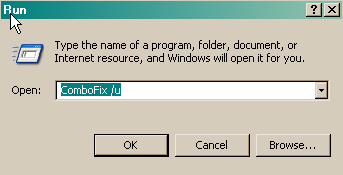
OTCleanIt:
Please download OTCleanIt and save it to desktop. This tool will remove all the tools we used to clean your pc.
- Double-click OTCleanIt.exe.
- Click the CleanUp! button.
- Select Yes when the "Begin cleanup Process?" prompt appears.
- If you are prompted to Reboot during the cleanup, select Yes.
- The tool will delete itself once it finishes, if not delete it by yourself.
Now some advice for on-line safety:
Malwarebyte's Anti-Malware:
This is a excellent application and I advise you keep this installed. Check for updates and run a scan once a week.
Other installed security software:
Your presently installed combination security application, ESET Smart Security automatically checks for updates and downloads/installs them with every system reboot and or periodically if the machine is left running providing a internet connection is active.
I advise you also run a complete scan with this also once per week.
Erunt:
Emergency Recovery Utility NT, I advice you keep this installed as a means to keep a complete backup of your registry and restore it when needed.
Myself I would actually create a new back up once per week as this along with System Restore may prove to be invaluable if something unforeseen occurs!
Keep your system updated:
Microsoft releases patches for Windows and other products regularly:
- I advise you visit: http://update.microsoft.com/microsoftupdate/v6/default.aspx?ln=en-us
- Install the Active X
- Once installed it will advise set Auto-Updates if not set and you then you will be able to manually check for updates also via:
- Start >> All Programs >> Microsoft Updates
Be careful when opening attachments and downloading files:
- Never open email attachments, not even if they are from someone you know. If you need to open them, scan them with your antivirus program before opening.
- Never open emails from unknown senders.
- Beware of emails that warn about viruses that are spreading, especially those from antivirus vendors. These email addresses can be easily spoofed. Check the antivirus vendor websites to be sure.
- Be careful of what you download. Only download files from known sources. Also, avoid cracked programs. If you need a particular program that costs too much for you, try finding free alternatives on Sourceforge or Pricelessware.
Stop malicious scripts:
Windows by default allow scripts (which is VBScript and JavaScript) to run and some of these scripts are malicious. Use Noscript by Symantec or Script Defender by AnalogX to handle these scripts.
Make your Internet Explorer safer:
For Internet Explorer 7
Please read this article to configure Internet Explorer 7 properly.
Avoid Peer to Peer software:
P2P may be a great way to get lots of seemingly freeware, but it is a great way to get infected as well. There's no way to tell if the file being shared is infected. Worse still, some worms spread via P2P networks, infecting you as well. My advice avoid these types of software applications.
Hosts File:
A Hosts file is like a phone book. You look up someone's name in the phone book before calling him/her. Similarly, your computer will look up the website's IP address before you can view the website.
Hosts file will replace your current Hosts file with another one containing well-known advertisement sites, spyware sites and other bad sites. This new Hosts file will protect you by re-directing these bad sites to 127.0.0.1.
Here are some Hosts files:
Only use one of the above.
Finally a educational source:
To learn more about how to protect yourself while on the internet read this article by Tony Klein:
So how did I get infected in the first place?
Some consider this article outdated, personally I still think it bares relevance and the author is well respected in the Anti-Malware community and by myself also!
Any questions ? feel free to ask, if not stay safe!
Hi
In short no I will not provide advice about such what so ever. Plus do not be under the misapprehension I would ever provide such criminal advice and or insult my integrity ever again!
I have provided you with some tips on how to stay safe online and what not to do. Plus much more, against my better judgment concerning your computers actual compromised state.
You're welcome!thanks for all your help
OK do you actually understand what the term warez means in the Information Technology world and not to be confused with the old English definition taken from and or implies to at all ? Or what you have exactly asked myself!sometimes search for warez on the internet and i think that is how i got these spyware, how is it possible for spyware to install just by going on a site? and is there anyway to prevent it if i just want to surf the site?
In short no I will not provide advice about such what so ever. Plus do not be under the misapprehension I would ever provide such criminal advice and or insult my integrity ever again!
I have provided you with some tips on how to stay safe online and what not to do. Plus much more, against my better judgment concerning your computers actual compromised state.

chryssi2001
Emeritus- Malware Team
Since this issue appears to be resolved ... this Topic has been closed.
Note: If it has been four days or more since your last post, and the helper assisting you posted a response to that post to which you did not reply, your topic will not be reopened. At that point, if you still require help, please start a new topic and include a fresh HijackThis log and a link to your previous thread.
If it has been less than four days since your last response and you need the thread re-opened, please send me or your helper a private message (pm). A valid, working link to the closed topic is required.
Note: If it has been four days or more since your last post, and the helper assisting you posted a response to that post to which you did not reply, your topic will not be reopened. At that point, if you still require help, please start a new topic and include a fresh HijackThis log and a link to your previous thread.
If it has been less than four days since your last response and you need the thread re-opened, please send me or your helper a private message (pm). A valid, working link to the closed topic is required.