virtumonde strikes again

Miche

New member
Having lots of trouble with this. Began with "Spyware2009" inserted in start tray and scanned part of my c drive before I stopped it. Running spybot s&d 1.6.2 and unable to completely remove.
Laptop boots in XP and immediately a Data Execution Prevention window opens, indicating WMI program has been closed. If wireless drive is on, "IE encountered an error" window pops-up every 60 seconds, no error codes listed. I rarely use IE, this happens without (me) running it.
Eventually a Generic Host process for Win32 Services window pops-up and system shuts down.
Please help!
Thanks, Miche


HJT log
Platform: Windows XP SP2 (WinNT 5.01.2600)
MSIE: Internet Explorer v6.00 SP2 (6.00.2900.2180)
Boot mode: Normal

Running processes:
C:\WINDOWS\System32\smss.exe
C:\WINDOWS\system32\csrss.exe
C:\WINDOWS\system32\winlogon.exe
C:\WINDOWS\system32\services.exe
C:\WINDOWS\system32\lsass.exe
C:\WINDOWS\system32\svchost.exe
C:\WINDOWS\System32\svchost.exe
C:\Program Files\Intel\Wireless\Bin\S24EvMon.exe
C:\WINDOWS\system32\svchost.exe
C:\WINDOWS\system32\spoolsv.exe
C:\Program Files\Common Files\Acronis\Schedule2\schedul2.exe
C:\WINDOWS\system32\EtmService.exe
C:\Program Files\Intel\Wireless\Bin\EvtEng.exe
C:\Program Files\Intel\Intel Matrix Storage Manager\Iaantmon.exe
c:\Program Files\Microsoft SQL Server\MSSQL.1\MSSQL\Binn\sqlservr.exe
C:\Program Files\Panasonic\OPDOFF\opdoffsv.exe
C:\Program Files\Panasonic\pcinfo\PCInfoPi.exe
C:\Program Files\Panasonic\pcinfo\PCInfoSV.exe
C:\Program Files\Intel\Wireless\Bin\RegSrvc.exe
C:\Program Files\Spyware Doctor\pctsAuxs.exe
C:\Program Files\Spyware Doctor\pctsSvc.exe
C:\WINDOWS\Explorer.EXE
C:\WINDOWS\system32\svchost.exe
C:\WINDOWS\system32\wdfmgr.exe
C:\Program Files\Spyware Doctor\pctsTray.exe
C:\WINDOWS\System32\alg.exe
C:\WINDOWS\system32\inf\rundll33.exe
C:\Program Files\Common Files\Real\Update_OB\realsched.exe
C:\Program Files\Synaptics\SynTP\SynTPLpr.exe
C:\Program Files\Synaptics\SynTP\SynTPEnh.exe
C:\Program Files\Java\jre1.6.0_07\bin\jusched.exe
C:\Program Files\Analog Devices\Core\smax4pnp.exe
C:\WINDOWS\system32\igfxpers.exe
C:\Program Files\Intel\Wireless\bin\ZCfgSvc.exe
C:\Program Files\Intel\Wireless\Bin\ifrmewrk.exe
C:\WINDOWS\system32\igfxtray.exe
C:\WINDOWS\system32\igfxsrvc.exe
C:\WINDOWS\system32\spool\drivers\w32x86\3\hpztsb09.exe
C:\Program Files\HP\HP Software Update\HPWuSchd.exe
C:\Program Files\HP\hpcoretech\hpcmpmgr.exe
C:\WINDOWS\system32\hkcmd.exe
C:\Program Files\Common Files\Acronis\Schedule2\schedhlp.exe
C:\Program Files\Skype\Phone\Skype.exe
C:\WINDOWS\system32\dumprep.exe
C:\WINDOWS\system32\ctfmon.exe
C:\Program Files\Panasonic\CHGBMODE\ChgBmode.exe
C:\Program Files\HP\Digital Imaging\bin\hpqtra08.exe
C:\Program Files\Panasonic\LANPSAVE\LanPsave.exe
C:\Program Files\Panasonic\OPDOFF\opdoff.exe
C:\Program Files\Panasonic\WheelPad\Touchpad.exe
C:\Program Files\Intel\Wireless\Bin\Dot1XCfg.exe
C:\Program Files\OpenOffice.org 3\program\soffice.exe
C:\Program Files\OpenOffice.org 3\program\soffice.bin
C:\WINDOWS\system32\rundll32.exe
C:\Program Files\Internet Explorer\IEXPLORE.EXE
C:\WINDOWS\system32\dwwin.exe
C:\Program Files\Trend Micro\HijackThis\HijackThis.exe
C:\WINDOWS\system32\wbem\wmiprvse.exe

R0 - HKCU\Software\Microsoft\Internet Explorer\Main,Start Page = http://thewidercircle.org/
R0 - HKLM\Software\Microsoft\Internet Explorer\Main,Start Page = http://go.microsoft.com/fwlink/?LinkId=69157
O1 - Hosts: 195.245.119.131 browser-security.microsoft.com
O2 - BHO: (no name) - {02478D38-C3F9-4efb-9B51-7695ECA05670} - (no file)
O2 - BHO: (no name) - {0294B493-7B37-400A-B69E-66B5CC94E500} - (no file)
O2 - BHO: Adobe PDF Reader Link Helper - {06849E9F-C8D7-4D59-B87D-784B7D6BE0B3} - C:\Program Files\Common Files\Adobe\Acrobat\ActiveX\AcroIEHelper.dll
O2 - BHO: Skype add-on (mastermind) - {22BF413B-C6D2-4d91-82A9-A0F997BA588C} - C:\Program Files\Skype\Toolbars\Internet Explorer\SkypeIEPlugin.dll
O2 - BHO: RealPlayer Download and Record Plugin for Internet Explorer - {3049C3E9-B461-4BC5-8870-4C09146192CA} - C:\Program Files\Real\RealPlayer\rpbrowserrecordplugin.dll
O2 - BHO: (no name) - {3E42326D-4562-4C7A-B88F-2F0D42A779B5} - (no file)
O2 - BHO: Yahoo! IE Services Button - {5BAB4B5B-68BC-4B02-94D6-2FC0DE4A7897} - C:\Program Files\Yahoo!\Common\yiesrvc.dll
O2 - BHO: SSVHelper Class - {761497BB-D6F0-462C-B6EB-D4DAF1D92D43} - C:\Program Files\Java\jre1.6.0_07\bin\ssv.dll
O2 - BHO: (no name) - {A3A8512F-FDF4-4B04-8C39-C5A3911EA5D3} - C:\WINDOWS\system32\fccaApMe.dll
O2 - BHO: {55e567ff-d6cb-25da-6884-bc25b398b8ac} - {ca8b893b-52cb-4886-ad52-bc6dff765e55} - C:\WINDOWS\system32\pqzixz.dll
O2 - BHO: (no name) - {F09522A2-54AF-4D80-886D-C3D65A99C8CD} - (no file)
O4 - HKLM\..\Run: [TkBellExe] "C:\Program Files\Common Files\Real\Update_OB\realsched.exe" -osboot
O4 - HKLM\..\Run: [SynTPLpr] C:\Program Files\Synaptics\SynTP\SynTPLpr.exe
O4 - HKLM\..\Run: [SynTPEnh] C:\Program Files\Synaptics\SynTP\SynTPEnh.exe
O4 - HKLM\..\Run: [SunJavaUpdateSched] "C:\Program Files\Java\jre1.6.0_07\bin\jusched.exe"
O4 - HKLM\..\Run: [SoundMAXPnP] C:\Program Files\Analog Devices\Core\smax4pnp.exe
O4 - HKLM\..\Run: [QuickTime Task] "C:\Program Files\QuickTime\QTTask.exe" -atboottime
O4 - HKLM\..\Run: [PHIME2002ASync] C:\WINDOWS\system32\IME\TINTLGNT\TINTSETP.EXE /SYNC
O4 - HKLM\..\Run: [PHIME2002A] C:\WINDOWS\system32\IME\TINTLGNT\TINTSETP.EXE /IMEName
O4 - HKLM\..\Run: [Persistence] C:\WINDOWS\system32\igfxpers.exe
O4 - HKLM\..\Run: [MSPY2002] C:\WINDOWS\system32\IME\PINTLGNT\ImScInst.exe /SYNC
O4 - HKLM\..\Run: [IntelZeroConfig] "C:\Program Files\Intel\Wireless\bin\ZCfgSvc.exe"
O4 - HKLM\..\Run: [IntelWireless] "C:\Program Files\Intel\Wireless\Bin\ifrmewrk.exe" /tf Intel PROSet/Wireless
O4 - HKLM\..\Run: [IMJPMIG8.1] "C:\WINDOWS\IME\imjp8_1\IMJPMIG.EXE" /Spoil /RemAdvDef /Migration32
O4 - HKLM\..\Run: [IgfxTray] C:\WINDOWS\system32\igfxtray.exe
O4 - HKLM\..\Run: [HPDJ Taskbar Utility] C:\WINDOWS\system32\spool\drivers\w32x86\3\hpztsb09.exe
O4 - HKLM\..\Run: [HP Software Update] "C:\Program Files\HP\HP Software Update\HPWuSchd.exe"
O4 - HKLM\..\Run: [HP Component Manager] "C:\Program Files\HP\hpcoretech\hpcmpmgr.exe"
O4 - HKLM\..\Run: [HotKeysCmds] C:\WINDOWS\system32\hkcmd.exe
O4 - HKLM\..\Run: [DXDllRegExe] dxdllreg.exe
O4 - HKLM\..\Run: [Adobe Reader Speed Launcher] "C:\Program Files\Adobe\Reader 8.0\Reader\Reader_sl.exe"
O4 - HKLM\..\Run: [Acronis Scheduler2 Service] "C:\Program Files\Common Files\Acronis\Schedule2\schedhlp.exe"
O4 - HKLM\..\Run: [Cxiwugid] rundll32.exe "C:\WINDOWS\odunahuko.dll",e
O4 - HKLM\..\Run: [UserFaultCheck] %systemroot%\system32\dumprep 0 -u
O4 - HKLM\..\Run: [ISTray] "C:\Program Files\Spyware Doctor\pctsTray.exe"
O4 - HKLM\..\RunOnce: [SpybotSnD] "C:\Program Files\Spybot - Search & Destroy\SpybotSD.exe"
O4 - HKCU\..\Run: [Skype] "C:\Program Files\Skype\Phone\Skype.exe" /nosplash /minimized
O4 - HKCU\..\Run: [ctfmon.exe] C:\WINDOWS\system32\ctfmon.exe
O4 - HKCU\..\Run: [rundll32.exe] rundll32.exe "C:\Documents and Settings\n\Application Data\Macromedia\Common\9ddc204a1.dll""
O4 - HKLM\..\Policies\Explorer\Run: [xccinit] C:\WINDOWS\system32\inf\rundll33.exe C:\WINDOWS\xccdf16_090131a.dll xccd16
O4 - HKUS\S-1-5-19\..\Run: [rundll32.exe] rundll32.exe "C:\Documents and Settings\LocalService\Application Data\Macromedia\Common\9ddc204a1.dll"" (User 'LOCAL SERVICE')
O4 - HKUS\S-1-5-20\..\Run: [rundll32.exe] rundll32.exe "C:\Documents and Settings\NetworkService\Application Data\Macromedia\Common\9ddc204a1.dll"" (User 'NETWORK SERVICE')
O4 - HKUS\S-1-5-18\..\Run: [CTFMON.EXE] C:\WINDOWS\system32\CTFMON.EXE (User 'SYSTEM')
O4 - HKUS\.DEFAULT\..\Run: [CTFMON.EXE] C:\WINDOWS\system32\CTFMON.EXE (User 'Default user')
O4 - Startup: OpenOffice.org 3.0.lnk = C:\Program Files\OpenOffice.org 3\program\quickstart.exe
O4 - Global Startup: Adobe Gamma Loader.lnk = C:\Program Files\Common Files\Adobe\Calibration\Adobe Gamma Loader.exe
O4 - Global Startup: Economy Mode(ECO) Setting Utility.lnk = ?
O4 - Global Startup: HP Digital Imaging Monitor.lnk = C:\Program Files\HP\Digital Imaging\bin\hpqtra08.exe
O4 - Global Startup: LAN Power-Saving Utility.lnk = ?
O4 - Global Startup: Optical Disc Drive Power-Saving Utility.lnk = ?
O4 - Global Startup: Touch Pad Utility.lnk = ?
O8 - Extra context menu item: E&xport to Microsoft Excel - res://C:\PROGRA~1\MICROS~2\Office12\EXCEL.EXE/3000
O9 - Extra button: (no name) - {08B0E5C0-4FCB-11CF-AAA5-00401C608501} - C:\Program Files\Java\jre1.6.0_07\bin\ssv.dll
O9 - Extra 'Tools' menuitem: Sun Java Console - {08B0E5C0-4FCB-11CF-AAA5-00401C608501} - C:\Program Files\Java\jre1.6.0_07\bin\ssv.dll
O9 - Extra button: Yahoo! Services - {5BAB4B5B-68BC-4B02-94D6-2FC0DE4A7897} - C:\Program Files\Yahoo!\Common\yiesrvc.dll
O9 - Extra button: Skype - {77BF5300-1474-4EC7-9980-D32B190E9B07} - C:\Program Files\Skype\Toolbars\Internet Explorer\SkypeIEPlugin.dll
O9 - Extra button: Research - {92780B25-18CC-41C8-B9BE-3C9C571A8263} - C:\PROGRA~1\MICROS~2\Office12\REFIEBAR.DLL
O9 - Extra button: Messenger - {FB5F1910-F110-11d2-BB9E-00C04F795683} - C:\Program Files\Messenger\msmsgs.exe
O9 - Extra 'Tools' menuitem: Windows Messenger - {FB5F1910-F110-11d2-BB9E-00C04F795683} - C:\Program Files\Messenger\msmsgs.exe
O20 - AppInit_DLLs: pqzixz
O23 - Service: Acronis Scheduler2 Service (AcrSch2Svc) - Acronis - C:\Program Files\Common Files\Acronis\Schedule2\schedul2.exe
O23 - Service: Intel(R) Extended Thermal Model Service Application (ETMService) - Intel Corporation - C:\WINDOWS\system32\EtmService.exe
O23 - Service: Intel(R) PROSet/Wireless Event Log (EvtEng) - Intel Corporation - C:\Program Files\Intel\Wireless\Bin\EvtEng.exe
O23 - Service: Google Updater Service (gusvc) - Google - C:\Program Files\Google\Common\Google Updater\GoogleUpdaterService.exe
O23 - Service: Intel(R) Matrix Storage Event Monitor (IAANTMON) - Intel Corporation - C:\Program Files\Intel\Intel Matrix Storage Manager\Iaantmon.exe
O23 - Service: InstallDriver Table Manager (IDriverT) - Macrovision Corporation - C:\Program Files\Common Files\InstallShield\Driver\1050\Intel 32\IDriverT.exe
O23 - Service: Panasonic Opdoff Utility (OPDOFFSV) - Matsushita Electric Industrial Co., Ltd. - C:\Program Files\Panasonic\OPDOFF\opdoffsv.exe
O23 - Service: Panasonic PC Information Viewer Service 2 (PcInfoPi) - Matsushita Electric Industrial Co., Ltd. - C:\Program Files\Panasonic\pcinfo\PCInfoPi.exe
O23 - Service: Panasonic PC Information Viewer (PcInfoSV) - Matsushita Electric Industrial Co., Ltd. - C:\Program Files\Panasonic\pcinfo\PCInfoSV.exe
O23 - Service: Pml Driver HPZ12 - HP - C:\WINDOWS\system32\HPZipm12.exe
O23 - Service: Intel(R) PROSet/Wireless Registry Service (RegSrvc) - Intel Corporation - C:\Program Files\Intel\Wireless\Bin\RegSrvc.exe
O23 - Service: Intel(R) PROSet/Wireless Service (S24EventMonitor) - Intel Corporation - C:\Program Files\Intel\Wireless\Bin\S24EvMon.exe
O23 - Service: PC Tools Auxiliary Service (sdAuxService) - PC Tools - C:\Program Files\Spyware Doctor\pctsAuxs.exe
O23 - Service: PC Tools Security Service (sdCoreService) - PC Tools - C:\Program Files\Spyware Doctor\pctsSvc.exe

--
End of file - 10839 bytes

 
Hello and welcome to Safer Networking.

My name is km2357 and I will be helping you to remove any infection(s) that you may have.

I will be giving you a series of instructions that need to be followed in the order in which I give them to you.

If for any reason you do not understand an instruction or are just unsure then please do not guess, simply post back with your questions/concerns and we will go through it again.

Please do not start another thread or topic, I will assist you at this thread until we solve your problems.

Lastly the fix may take several attempts and my replies may take some time but I will stick with it if you do the same.

I will be back as soon as possible with your first instructions!
 
Does your Spyware Doctor have an Anti-Virus with it?


Step # 1 Download CCleaner

Download CCleaner from here to clean temp files from your computer.
  • Double click on the ccsetup.exe file to start the installation of the program.
  • Select your language and click OK, then next.
  • Read the license agreement and click I Agree.
  • Click next to use the default install location.
  • Under Install Options, choose all the default settings except I would recommend that you unclick/untick install the Yahoo! Toolbar, unless you want it. You can also Uncheck the 'Automatically check for updates' box.
  • Click Install then finish to complete installation.


Step # 2 Retrieve the Installed Programs List from CCleaner

Open CCleaner if it's not already running.
In the Left Pane, click Tools
Verify that Uninstall is highlighted in color, or click on it.
In the lower Right, click Save to Text File.
Pull down the arrow at the top of the Save dialog and choose Desktop as the location.
You can leave the filename as install.txt
Click Save
Exit CCleaner by clicking on the X button in the upper right of the CCleaner window.


Step # 3: Download and Run ComboFix

We will begin with ComboFix.exe. Please visit this webpage for download links, and instructions for running the tool:

http://www.bleepingcomputer.com/combofix/how-to-use-combofix

*Ensure you have disabled all anti virus and anti malware programs so they do not interfere with the running of ComboFix.

* IMPORTANT !!! Save ComboFix.exe to your Desktop

When finished, it shall produce a log for you. Please include the CCleaner Install List,C:\ComboFix.txt and a fresh HiJackThis Log in your next reply.

Use multiple posts if you can't fit everything into one post.
 
q on ComboFix

I have this downloaded to desktop. Per instructions I am attempting to close all windows, but am having an issue. The data execution prevention window pops up saying, "To help protect your computer, Windows has closed this program. Name: WMI Publisher: Microsoft" When I click "close message" or the X, another popup states "WMI encountered a problem and needed to close. Error ocurred on 3/2/09 at 2:46:18pm" there is a click here for more information, listing error signature:
Event Type: BEX P1:wmiprvse.exe P2: 5.1.2600.2180 P3: 41107bbd
P4: unknown P5:0.0.0.0 P6: 00000000 P7: 00b09b2f
P8: c0000005 P9: 00000008
After closing error code window and WMI encountered problem window, the entire sequence starts again.

Should I run ComboFix with the first window open?
 
CCleaner install txt file

yes, I have Spyware Doctor with AntiVirus. Here is #2, installed programs list
I'll wait for reply before running ComboFix

2007 Microsoft Office system
3ivx D4 4.5.1 Decoder (remove only)
Acronis*True*Image
Adobe Digital Editions
Adobe Flash Player 10 Plugin
Adobe Flash Player ActiveX
Adobe Photoshop 7.0
Adobe Reader 8.1.2
Apple Software Update
AVOne MP3 Ringtone Converter
Battery Recalibration
Business Contact Manager for Outlook 2007
CCleaner (remove only)
Compatibility Pack for the 2007 Office system
CPU Idle Setting
Dell Digital Jukebox Driver
Dell DJ Explorer
DMI Viewer
Economy Mode(ECO) Setting Utility
ERUNT 1.1j
FreeMind
HashTab 2.1.1
HDAUDIO Soft Data Fax Modem with SmartCP
High Definition Audio Driver Package - KB888111
HijackThis 2.0.2
Hotkey Appendix
Hotkey Settings
HP Photo & Imaging 3.1
HP PSC & OfficeJet 3.0
HP Software Update
HP Unload DLL Patch
InfraRecorder
Intel(R) Extended Thermal Model
Intel(R) Graphics Media Accelerator Driver
Intel(R) Matrix Storage Manager
Intel(R) PROSet/Wireless Software
InterVideo WinDVD
Java(TM) 6 Update 4
Java(TM) 6 Update 5
Java(TM) 6 Update 7
Juice 2.2
LAN Power-Saving Utility
Loupe Utility
Macromedia Dreamweaver MX
Macromedia Extension Manager
Memories Disc Creator 2.0
Microsoft .NET Framework 1.1
Microsoft .NET Framework 2.0
Microsoft Kernel-Mode Driver Framework Feature Pack 1.1
Microsoft Office 2003 Web Components
Microsoft Office 2007 Primary Interop Assemblies
Microsoft Office Accounting 2007
Microsoft Office Accounting ADP Payroll Addin
Microsoft Office Accounting Equifax Addin
Microsoft Office Accounting Fixed Asset Manager
Microsoft Office Accounting PayPal Addin
Microsoft Office Small Business Connectivity Components
Microsoft Silverlight
Microsoft SQL Server 2005
Microsoft SQL Server Native Client
Microsoft SQL Server Setup Support Files (English)
Microsoft SQL Server VSS Writer
Mozilla Firefox (3.0.6)
Mozilla Thunderbird (2.0.0.19)
OpenOffice.org 3.0
Optical Disc Drive Letter-Setting Utility
Optical Disc Drive Power-Saving Utility
Panasonic Common Components
PC Information Viewer
Picasa 3
QuickTime
RealPlayer
RegCure 1.5.2.7
SD Utility
Skype™ 3.8
Sony USB Driver
Spybot - Search & Destroy
Spybot - Search & Destroy 1.5.2.20
Spyware Doctor 6.0
Synaptics Pointing Device Driver
TBS WMP Plug-in
Touch Pad Utility
USB Power Save Mode Switching Utility
Windows Installer 3.1 (KB893803)
Windows Internet Explorer 7
Wireless Switch Utility
Yahoo! Browser Services
Yahoo! Internet Mail
Yahoo! Messenger
 
Try booting your computer into Safe Mode (You can go in Safe Mode by restarting your computer, then continually tapping F8 until a menu appears. Use your up arrow key to highlight Safe Mode, then hit enter.). Once in Safe Mode, does the WMI error messages/popups still occur? If not, then go ahead and run ComboFix in Safe Mode and post back its log and a fresh HiJackThis Log in your next post.

If the WMI errors occur in Safe Mode, then let me know and don't run ComboFix.
 
windows recovery console

Good morning and thanks for your help.

Booted up this morning, and no WMI popups at all. Disabled antivirus and firewall and ran ComboFix.

I am being prompted to install WINDOWS RECOVERY CONSOLE, requiring active internet connection. I have wireless adapter turned off. When connection is established, I receive Explorer error popups (IE enountered a problem and needs to close...) every 60 seconds, even without any browser open.

Please advise. Connect and install Windows Recovery Console before continuing?
 
When ComboFix asks you if you want to install Recovery Console, click No and let ComboFix run. I'll show you a different way of installing the Recovery Console once ComboFix has finished running.

Please post the ComboFix Log and a fresh HiJackThis Log in your next post. :)
 
ComboFix log

Thanks for your patience km2357!

When running ComboFix, it food some rootkit problem and asked me to write down 6 file names in case they are needed later. I will attach in separate post. It rebooted. Then ran again and rebooted windows after the scan, but this seemed normal. While preparing the log report another error popup related to C:\Documents and Settings\n\Application\macromedia\common\9ddc20a1.dll

Here is ComboFix log
ComboFix 09-03-03.01 - n 2009-03-05 13:35:20.1 - NTFSx86
Microsoft Windows XP Professional 5.1.2600.2.1252.1.1033.18.1526.951 [GMT -6:00]
Running from: c:\documents and settings\n\Desktop\ComboFix.exe
AV: Spyware Doctor with AntiVirus *On-access scanning disabled* (Updated)

WARNING -THIS MACHINE DOES NOT HAVE THE RECOVERY CONSOLE INSTALLED !!
.

((((((((((((((((((((((((((((((((((((((( Other Deletions )))))))))))))))))))))))))))))))))))))))))))))))))
.

C:\Autorun.inf
c:\program files\\setup.exe
c:\windows\sysguard.exe
c:\windows\system32\config\systemprofile\Application Data\Macromedia\Common
c:\windows\system32\config\systemprofile\Application Data\Macromedia\Common\9ddc204a1.dll
c:\windows\system32\drivers\seneka.sys
c:\windows\system32\drivers\senekabiwionff.sys
c:\windows\system32\eMpAaccf.ini
c:\windows\system32\eMpAaccf.ini2
c:\windows\system32\iehelper.dll
c:\windows\system32\inf\rundll33.exe
c:\windows\system32\inf\xccdfb16_090131.dll
c:\windows\system32\inf\xccefb090131.scr
c:\windows\system32\kaouyfkh.dll
c:\windows\system32\pqzixz.dll
c:\windows\system32\senekabmpfuhud.dll
c:\windows\system32\senekakkllrmhs.dat
c:\windows\system32\senekaqphcwkuv.dll
c:\windows\system32\senekaqvrrdyud.dat
c:\windows\system32\senekarrjixeto.dll
c:\windows\system32\wofbblhp.dll_old
c:\windows\xccdf16_090131a.dll
c:\windows\xccdf32_090131a.dll
c:\windows\xccwinsys.ini

.
((((((((((((((((((((((((((((((((((((((( Drivers/Services )))))))))))))))))))))))))))))))))))))))))))))))))
.

-------\Service_SENEKA


((((((((((((((((((((((((( Files Created from 2009-02-05 to 2009-03-05 )))))))))))))))))))))))))))))))
.

2009-03-04 17:44 . 2009-03-04 17:44 <DIR> d-------- c:\program files\CCleaner
2009-03-02 16:22 . 2009-03-02 16:22 <DIR> d-------- c:\program files\ERUNT
2009-03-02 15:01 . 2009-03-02 15:01 <DIR> d-------- c:\program files\RegCure
2009-03-02 14:35 . 2009-03-02 14:35 <DIR> d-------- c:\program files\Trend Micro
2009-03-02 11:59 . 2009-03-05 13:40 <DIR> d-a------ c:\documents and settings\All Users\Application Data\TEMP
2009-03-02 11:58 . 2009-03-05 13:39 <DIR> d-------- c:\program files\Spyware Doctor
2009-03-02 11:58 . 2009-03-02 12:01 <DIR> d-------- c:\program files\Common Files\PC Tools
2009-03-02 11:58 . 2009-03-02 11:58 <DIR> d-------- c:\documents and settings\n\Application Data\PC Tools
2009-03-02 11:58 . 2009-03-02 11:58 <DIR> d-------- c:\documents and settings\All Users\Application Data\PC Tools
2009-03-02 11:58 . 2008-07-28 11:29 160,792 --a------ c:\windows\system32\drivers\pctfw2.sys
2009-03-02 11:58 . 2009-03-02 12:02 81,288 --a------ c:\windows\system32\drivers\iksyssec.sys
2009-03-02 11:58 . 2009-03-02 12:02 66,952 --a------ c:\windows\system32\drivers\iksysflt.sys
2009-03-02 11:58 . 2009-03-02 12:02 40,840 --a------ c:\windows\system32\drivers\ikfilesec.sys
2009-03-02 11:58 . 2008-06-02 15:19 29,576 --a------ c:\windows\system32\drivers\kcom.sys
2009-03-02 10:59 . 2009-03-02 10:59 <DIR> d-------- c:\documents and settings\All Users\Application Data\Acronis
2009-03-02 10:53 . 2004-08-04 00:56 116,224 --a--c--- c:\windows\system32\dllcache\xrxwiadr.dll
2009-03-02 10:53 . 2001-08-17 22:36 23,040 --a--c--- c:\windows\system32\dllcache\xrxwbtmp.dll
2009-03-02 10:51 . 2001-08-17 13:28 765,884 --a--c--- c:\windows\system32\dllcache\usrti.sys
2009-03-02 10:50 . 2001-08-17 13:28 794,654 --a--c--- c:\windows\system32\dllcache\usr1801.sys
2009-03-02 10:49 . 2001-08-17 22:36 525,568 --a--c--- c:\windows\system32\dllcache\tridxp.dll
2009-03-02 10:48 . 2001-08-17 12:18 285,760 --a--c--- c:\windows\system32\dllcache\stlnata.sys
2009-03-02 10:47 . 2001-08-17 22:36 114,688 --a--c--- c:\windows\system32\dllcache\sonypi.dll
2009-03-02 10:46 . 2004-08-03 22:41 404,990 --a--c--- c:\windows\system32\dllcache\slntamr.sys
2009-03-02 10:45 . 2001-08-17 22:36 386,560 --a--c--- c:\windows\system32\dllcache\sgiul50.dll
2009-03-02 10:44 . 2001-08-17 22:36 495,616 --a--c--- c:\windows\system32\dllcache\sblfx.dll
2009-03-02 10:43 . 2001-08-17 13:28 899,146 --a--c--- c:\windows\system32\dllcache\r2mdkxga.sys
2009-03-02 10:42 . 2004-08-04 00:56 363,520 --a--c--- c:\windows\system32\dllcache\psisdecd.dll
2009-03-02 10:42 . 2001-08-17 22:36 35,328 --a--c--- c:\windows\system32\dllcache\psisload.dll
2009-03-02 10:42 . 2004-08-04 00:56 33,280 --a--c--- c:\windows\system32\dllcache\psisrndr.ax
2009-03-02 10:42 . 2001-08-17 13:53 17,792 --a--c--- c:\windows\system32\dllcache\ppa.sys
2009-03-02 10:42 . 2004-08-03 23:00 17,664 --a--c--- c:\windows\system32\dllcache\ppa3.sys
2009-03-02 10:42 . 2001-08-17 13:51 16,128 --a--c--- c:\windows\system32\dllcache\pscr.sys
2009-03-02 10:42 . 2001-08-17 13:53 7,552 --a--c--- c:\windows\system32\dllcache\powerfil.sys
2009-03-02 10:42 . 2001-08-17 13:53 7,168 --a--c--- c:\windows\system32\dllcache\pnrmc.sys
2009-03-02 10:42 . 2001-08-17 22:36 5,632 --a--c--- c:\windows\system32\dllcache\ptpusb.dll
2009-03-02 10:36 . 2004-08-04 00:56 4,274,816 --a--c--- c:\windows\system32\dllcache\nv4_disp.dll
2009-03-02 10:35 . 2004-08-03 23:00 28,672 --a--c--- c:\windows\system32\dllcache\nscirda.sys
2009-03-02 10:35 . 2001-08-17 13:47 9,344 --a--c--- c:\windows\system32\dllcache\ntapm.sys
2009-03-02 10:35 . 2001-08-17 13:53 7,552 --a--c--- c:\windows\system32\dllcache\nsmmc.sys
2009-03-02 10:33 . 2004-08-04 00:56 1,737,856 --a--c--- c:\windows\system32\dllcache\mtxparhd.dll
2009-03-02 10:32 . 2001-08-17 22:36 58,880 --a--c--- c:\windows\system32\dllcache\m3092dc.dll
2009-03-02 10:32 . 2001-08-17 22:36 58,368 --a--c--- c:\windows\system32\dllcache\m3091dc.dll
2009-03-02 10:32 . 2001-08-17 12:19 48,768 --a--c--- c:\windows\system32\dllcache\maestro.sys
2009-03-02 10:32 . 2001-08-17 12:49 22,848 --a--c--- c:\windows\system32\dllcache\lwusbhid.sys
2009-03-02 10:32 . 2004-08-03 22:39 20,864 --a--c--- c:\windows\system32\dllcache\lwadihid.sys
2009-03-02 10:21 . 2004-08-04 00:56 152,576 --a--c--- c:\windows\system32\dllcache\irftp.exe
2009-03-02 10:21 . 2001-08-17 22:36 90,200 --a--c--- c:\windows\system32\dllcache\io8ports.dll
2009-03-02 10:21 . 2004-08-03 23:00 87,424 --a--c--- c:\windows\system32\dllcache\irda.sys
2009-03-02 10:21 . 2001-08-17 12:12 45,632 --a--c--- c:\windows\system32\dllcache\ip5515.sys
2009-03-02 10:21 . 2004-08-03 23:08 40,832 --a--c--- c:\windows\system32\dllcache\irbus.sys
2009-03-02 10:21 . 2001-08-17 13:50 38,784 --a--c--- c:\windows\system32\dllcache\io8.sys
2009-03-02 10:21 . 2004-08-04 00:56 27,136 --a--c--- c:\windows\system32\dllcache\irmon.dll
2009-03-02 10:21 . 2001-08-17 13:49 26,624 --a--c--- c:\windows\system32\dllcache\irstusb.sys
2009-03-02 10:21 . 2001-08-17 13:49 23,552 --a--c--- c:\windows\system32\dllcache\irmk7.sys
2009-03-02 10:21 . 2001-08-17 13:51 18,688 --a--c--- c:\windows\system32\dllcache\irsir.sys
2009-03-02 10:21 . 2001-08-17 13:52 16,000 --a--c--- c:\windows\system32\dllcache\ini910u.sys
2009-03-02 10:21 . 2001-08-17 13:47 13,056 --a--c--- c:\windows\system32\dllcache\inport.sys
2009-03-02 10:21 . 2004-08-03 22:59 5,504 --a--c--- c:\windows\system32\dllcache\intelide.sys
2009-03-02 10:19 . 2001-08-17 13:28 542,879 --a--c--- c:\windows\system32\dllcache\hsf_msft.sys
2009-03-02 10:18 . 2001-08-17 14:56 1,733,120 --a--c--- c:\windows\system32\dllcache\g400d.dll
2009-03-02 10:17 . 2001-08-17 13:28 595,647 --a--c--- c:\windows\system32\dllcache\es56cvmp.sys
2009-03-02 10:16 . 2001-08-17 12:14 952,007 --a--c--- c:\windows\system32\dllcache\diwan.sys
2009-03-02 10:15 . 2001-08-17 22:36 614,429 --a--c--- c:\windows\system32\dllcache\digiview.exe
2009-03-02 10:14 . 2001-08-17 12:13 980,034 --a--c--- c:\windows\system32\dllcache\cicap.sys
2009-03-02 10:13 . 2004-08-04 00:56 1,888,992 --a--c--- c:\windows\system32\dllcache\ati3duag.dll
2009-03-02 10:12 . 2001-08-17 13:28 762,780 --a--c--- c:\windows\system32\dllcache\3cwmcru.sys
2009-03-01 11:56 . 2009-03-01 11:56 <DIR> d-------- c:\windows\system32\config\systemprofile\Application Data\Yahoo!
2009-03-01 11:56 . 2009-03-01 11:56 131,072 --a------ c:\windows\odunahuko.dll
2009-03-01 11:55 . 2009-03-05 13:36 <DIR> d-------- c:\windows\system32\inf
2009-03-01 11:55 . 2009-03-01 11:55 155,175 --a------ c:\windows\system32\icv.exe
2009-03-01 11:55 . 2009-03-01 11:55 155,175 --a------ c:\windows\system\xccef090131.exe
2009-03-01 11:44 . 2009-03-01 11:44 39,424 --a------ c:\windows\Tsavuqejako.dll
2009-03-01 11:28 . 2009-03-05 13:38 2,204 --a------ c:\windows\lcwrcdos

.
(((((((((((((((((((((((((((((((((((((((( Find3M Report ))))))))))))))))))))))))))))))))))))))))))))))))))))
.
2009-03-02 20:55 --------- d-----w c:\documents and settings\n\Application Data\Skype
2009-03-02 15:53 --------- d-----w c:\program files\Mozilla Thunderbird
2009-03-02 15:16 --------- d-----w c:\documents and settings\n\Application Data\Yahoo!
2009-03-01 21:14 --------- d-----w c:\program files\Yahoo!
2009-03-01 17:40 --------- d-----w c:\program files\Spybot - Search & Destroy
2009-03-01 17:40 --------- d-----w c:\documents and settings\All Users\Application Data\Spybot - Search & Destroy
2009-01-15 21:46 --------- d-----w c:\program files\FreeMind
2009-01-15 20:26 --------- d-----w c:\documents and settings\n\Application Data\Move Networks
2009-01-15 01:38 --------- d--h--w c:\program files\InstallShield Installation Information
2009-01-15 01:38 --------- d-----w c:\program files\Sony_usb
2009-01-09 16:53 --------- d-----w c:\documents and settings\n\Application Data\InfraRecorder
2009-01-09 15:52 --------- d-----w c:\program files\InfraRecorder
2009-01-09 15:48 --------- d-----w c:\program files\HashTab Shell Extension
2009-01-06 20:41 --------- d-----w c:\program files\Juice
2008-09-30 17:06 128,535,711 ----a-w c:\program files\openofficeorg1.cab
2008-09-30 16:29 9,772,544 ----a-w c:\program files\openofficeorg30.msi
2008-09-30 16:29 217 ----a-w c:\program files\setup.ini
2002-03-11 09:06 1,822,520 ----a-w c:\program files\instmsiw.exe
2002-03-11 08:45 1,708,856 ----a-w c:\program files\instmsia.exe
.

((((((((((((((((((((((((((((((((((((( Reg Loading Points ))))))))))))))))))))))))))))))))))))))))))))))))))
.
.
*Note* empty entries & legit default entries are not shown
REGEDIT4

[HKEY_CURRENT_USER\SOFTWARE\Microsoft\Windows\CurrentVersion\Run]
"Skype"="c:\program files\Skype\Phone\Skype.exe" [2008-09-23 21757224]
"ctfmon.exe"="c:\windows\system32\ctfmon.exe" [2004-08-04 15360]

[HKEY_LOCAL_MACHINE\SOFTWARE\Microsoft\Windows\CurrentVersion\Run]
"TkBellExe"="c:\program files\Common Files\Real\Update_OB\realsched.exe" [2008-12-17 185872]
"SynTPLpr"="c:\program files\Synaptics\SynTP\SynTPLpr.exe" [2004-10-14 98394]
"SynTPEnh"="c:\program files\Synaptics\SynTP\SynTPEnh.exe" [2004-10-14 688218]
"SunJavaUpdateSched"="c:\program files\Java\jre1.6.0_07\bin\jusched.exe" [2008-06-10 144784]
"SoundMAXPnP"="c:\program files\Analog Devices\Core\smax4pnp.exe" [2007-03-15 868352]
"QuickTime Task"="c:\program files\QuickTime\QTTask.exe" [2008-05-27 413696]
"PHIME2002ASync"="c:\windows\system32\IME\TINTLGNT\TINTSETP.EXE" [2004-08-04 455168]
"PHIME2002A"="c:\windows\system32\IME\TINTLGNT\TINTSETP.EXE" [2004-08-04 455168]
"Persistence"="c:\windows\system32\igfxpers.exe" [2007-04-12 138008]
"MSPY2002"="c:\windows\system32\IME\PINTLGNT\ImScInst.exe" [2004-08-04 59392]
"IntelZeroConfig"="c:\program files\Intel\Wireless\bin\ZCfgSvc.exe" [2007-02-21 819200]
"IntelWireless"="c:\program files\Intel\Wireless\Bin\ifrmewrk.exe" [2007-02-21 970752]
"IMJPMIG8.1"="c:\windows\IME\imjp8_1\IMJPMIG.EXE" [2004-08-04 208952]
"IgfxTray"="c:\windows\system32\igfxtray.exe" [2007-04-12 138008]
"HPDJ Taskbar Utility"="c:\windows\system32\spool\drivers\w32x86\3\hpztsb09.exe" [2003-08-11 188416]
"HP Software Update"="c:\program files\HP\HP Software Update\HPWuSchd.exe" [2003-06-25 49152]
"HP Component Manager"="c:\program files\HP\hpcoretech\hpcmpmgr.exe" [2004-05-12 241664]
"HotKeysCmds"="c:\windows\system32\hkcmd.exe" [2007-04-12 162584]
"Adobe Reader Speed Launcher"="c:\program files\Adobe\Reader 8.0\Reader\Reader_sl.exe" [2008-01-11 39792]
"Acronis Scheduler2 Service"="c:\program files\Common Files\Acronis\Schedule2\schedhlp.exe" [2007-04-23 149024]
"Cxiwugid"="c:\windows\odunahuko.dll" [2009-03-01 131072]
"ISTray"="c:\program files\Spyware Doctor\pctsTray.exe" [2009-03-02 1168264]

[HKEY_USERS\.DEFAULT\Software\Microsoft\Windows\CurrentVersion\Run]
"CTFMON.EXE"="c:\windows\system32\CTFMON.EXE" [2004-08-04 15360]

c:\documents and settings\n\Start Menu\Programs\Startup\
ERUNT AutoBackup.lnk - c:\program files\ERUNT\AUTOBACK.EXE [2005-10-20 38912]
OpenOffice.org 3.0.lnk - c:\program files\OpenOffice.org 3\program\quickstart.exe [2008-09-12 384000]

c:\documents and settings\All Users\Start Menu\Programs\Startup\
Adobe Gamma Loader.lnk - c:\program files\Common Files\Adobe\Calibration\Adobe Gamma Loader.exe [2008-04-19 113664]
Economy Mode(ECO) Setting Utility.lnk - c:\program files\Panasonic\CHGBMODE\ChgBmode.exe [2007-12-01 321168]
HP Digital Imaging Monitor.lnk - c:\program files\HP\Digital Imaging\bin\hpqtra08.exe [2003-07-07 233472]
LAN Power-Saving Utility.lnk - c:\program files\Panasonic\LANPSAVE\LanPsave.exe [2007-12-01 181904]
Optical Disc Drive Power-Saving Utility.lnk - c:\program files\Panasonic\OPDOFF\opdoff.exe [2007-12-01 1513104]
Touch Pad Utility.lnk - c:\program files\Panasonic\WheelPad\Touchpad.exe [2007-12-01 456336]

[HKLM\~\services\sharedaccess\parameters\firewallpolicy\standardprofile]
"EnableFirewall"= 0 (0x0)

[HKLM\~\services\sharedaccess\parameters\firewallpolicy\standardprofile\AuthorizedApplications\List]
"c:\\Program Files\\Microsoft Office\\Office12\\OUTLOOK.EXE"=
"c:\\WINDOWS\\system32\\sessmgr.exe"=
"c:\\Program Files\\Macromedia\\Dreamweaver MX\\Dreamweaver.exe"=
"c:\\Program Files\\Real\\RealPlayer\\realplay.exe"=
"c:\\WINDOWS\\system32\\mshta.exe"=
"c:\\Program Files\\Yahoo!\\Messenger\\YServer.exe"=
"c:\\Program Files\\Yahoo!\\Messenger\\YahooMessenger.exe"=
"c:\\Program Files\\Skype\\Phone\\Skype.exe"=

R1 pctfw2;pctfw2;c:\windows\system32\drivers\pctfw2.sys [2009-03-02 160792]
R2 ETMService;Intel(R) Extended Thermal Model Service Application;c:\windows\system32\etmservice.exe [2007-12-01 217088]
R2 MSSQL$MSSMLBIZ;SQL Server (MSSMLBIZ);c:\program files\Microsoft SQL Server\MSSQL.1\MSSQL\Binn\sqlservr.exe [2006-04-14 28933976]
R2 OPDOFFSV;Panasonic Opdoff Utility;c:\program files\Panasonic\OPDOFF\opdoffsv.exe [2007-12-01 206480]
R2 PcInfoPi;Panasonic PC Information Viewer Service 2;c:\program files\Panasonic\pcinfo\PCInfoPi.exe [2007-12-01 54928]
R2 PcInfoSV;Panasonic PC Information Viewer;c:\program files\Panasonic\pcinfo\PCInfoSV.exe [2007-12-01 186000]
R2 sdAuxService;PC Tools Auxiliary Service;c:\program files\Spyware Doctor\pctsAuxs.exe [2009-03-02 356920]
R2 SDKEY;Panasonic SD Misc. Function Driver;c:\program files\Panasonic\SDKEY\SDKEY.sys [2007-12-01 8192]
R3 Etm;Etm;c:\windows\system32\drivers\EtmDrvMgr.sys [2007-12-01 38528]
R3 EtmCpu;EtmCpu;c:\windows\system32\drivers\EtmDevCpu.sys [2007-12-01 19456]
R3 EtmFan;EtmFan;c:\windows\system32\drivers\EtmDevFan.sys [2007-12-01 9472]
R3 EtmGmch;EtmGmch;c:\windows\system32\drivers\EtmDevGmch.sys [2007-12-01 34304]
R3 EtmTempSense;EtmTempSense;c:\windows\system32\drivers\EtmTempSense.sys [2007-12-01 12160]
R3 HOTKEY;Panasonic Hotkey Driver;c:\windows\system32\drivers\hotkey.sys [2007-11-30 19840]
R3 IFXTPM;IFXTPM;c:\windows\system32\drivers\ifxtpm.sys [2007-11-30 36608]
R3 NewMisc;Panasonic Misc Driver;c:\windows\system32\drivers\newmisc.sys [2007-11-30 42624]
S0 lcwrcdos;lcwrcdos;c:\windows\system32\drivers\dewlywzj.sys []

--- Other Services/Drivers In Memory ---

*Deregistered* - mchInjDrv

[HKEY_CURRENT_USER\software\microsoft\windows\currentversion\explorer\mountpoints2\{ae60f2a6-4911-11dd-91a6-000b97dcaa47}]
\Shell\AutoRun\command - e:\system\viewer\FlipVideoforPC.exe
\Shell\Flip Video for PC\command - e:\system\viewer\FlipVideoforPC.exe

[HKEY_CURRENT_USER\software\microsoft\windows\currentversion\explorer\mountpoints2\{f0d7c4f9-0fc8-11dd-913b-000b97dcaa47}]
\Shell\AutoRun\command - t.com
\Shell\explore\Command - t.com
\Shell\open\Command - t.com
.
Contents of the 'Scheduled Tasks' folder

2008-12-27 c:\windows\Tasks\AppleSoftwareUpdate.job
- c:\program files\Apple Software Update\SoftwareUpdate.exe [2008-04-11 16:57]

2008-04-21 c:\windows\Tasks\HP DArC Task #Hewlett-Packard#hp psc 2400 series#1208782125.job
- c:\program files\HP\hpcoretech\comp\hpdarc.exe [2004-05-12 15:18]

2009-03-05 c:\windows\Tasks\RegCure Program Check.job
- c:\program files\RegCure\RegCure.exe [2008-12-29 11:58]

2009-03-02 c:\windows\Tasks\RegCure.job
- c:\program files\RegCure\RegCure.exe [2008-12-29 11:58]

2008-05-19 c:\windows\Tasks\Spybot - Search & Destroy - Scheduled Task.job
- c:\program files\Spybot - Search & Destroy\SpybotSD.exe [2009-01-26 15:31]
.
- - - - ORPHANS REMOVED - - - -

BHO-{0294B493-7B37-400A-B69E-66B5CC94E500} - (no file)
BHO-{3E42326D-4562-4C7A-B88F-2F0D42A779B5} - (no file)
BHO-{BA233343-9EC9-4E18-89ED-5E1F13837671} - c:\windows\system32\fccaApMe.dll
BHO-{ca8b893b-52cb-4886-ad52-bc6dff765e55} - c:\windows\system32\pqzixz.dll
BHO-{F09522A2-54AF-4D80-886D-C3D65A99C8CD} - (no file)
HKCU-Run-rundll32.exe - c:\documents and settings\n\Application Data\Macromedia\Common\9ddc204a1.dll
HKLM-Run-DXDllRegExe - dxdllreg.exe
HKLM-Explorer_Run-xccinit - c:\windows\system32\inf\rundll33.exe


.
------- Supplementary Scan -------
.
uStart Page = hxxp://thewidercircle.org/
uDefault_Search_URL = hxxp://www.google.com/ie
uSearchMigratedDefaultURL = hxxp://www.google.com/search?q={searchTerms}&sourceid=ie7&rls=com.microsoft:en-US&ie=utf8&oe=utf8
uSearchURL,(Default) = hxxp://www.google.com/search?q=%s
IE: E&xport to Microsoft Excel - c:\progra~1\MICROS~2\Office12\EXCEL.EXE/3000
LSP: c:\program files\Common Files\PC Tools\LSP\PCTLsp.dll
FF - ProfilePath - c:\documents and settings\n\Application Data\Mozilla\Firefox\Profiles\w67m6jac.default\
FF - prefs.js: browser.startup.homepage - hxxp://google.com
FF - component: c:\program files\Mozilla Firefox\extensions\{B13721C7-F507-4982-B2E5-502A71474FED}\components\NPComponent.dll
FF - component: c:\program files\Real\RealPlayer\browserrecord\components\nprpbrowserrecordplugin.dll
FF - plugin: c:\documents and settings\n\Application Data\Mozilla\Firefox\Profiles\w67m6jac.default\extensions\moveplayer@movenetworks.com\platform\WINNT_x86-msvc\plugins\npmnqmp071301000019.dll
FF - plugin: c:\program files\Google\Picasa3\npPicasa3.dll
FF - plugin: c:\program files\Mozilla Firefox\plugins\NPTURNMED.dll
.

**************************************************************************

catchme 0.3.1367 W2K/XP/Vista - rootkit/stealth malware detector by Gmer, http://www.gmer.net
Rootkit scan 2009-03-05 13:39:25
Windows 5.1.2600 Service Pack 2 NTFS

scanning hidden processes ...

scanning hidden autostart entries ...

scanning hidden files ...


c:\windows\system32\drivers\dewlywzj.sys 25088 bytes executable

scan completed successfully
hidden files: 1

**************************************************************************
.
--------------------- DLLs Loaded Under Running Processes ---------------------

- - - - - - - > 'lsass.exe'(996)
c:\program files\Common Files\PC Tools\LSP\PCTLsp.dll
.
------------------------ Other Running Processes ------------------------
.
c:\program files\Intel\Wireless\Bin\S24EvMon.exe
c:\program files\Common Files\Acronis\Schedule2\schedul2.exe
c:\program files\Intel\Wireless\Bin\EvtEng.exe
c:\program files\Intel\Intel Matrix Storage Manager\IAANTmon.exe
c:\program files\Intel\Wireless\Bin\RegSrvc.exe
c:\program files\Spyware Doctor\pctsSvc.exe
c:\windows\system32\wdfmgr.exe
c:\windows\system32\igfxsrvc.exe
c:\program files\OpenOffice.org 3\program\soffice.exe
c:\program files\OpenOffice.org 3\program\soffice.bin
c:\windows\system32\wscntfy.exe
.
**************************************************************************
.
Completion time: 2009-03-05 13:44:39 - machine was rebooted [n]
ComboFix-quarantined-files.txt 2009-03-05 19:44:35

Pre-Run: 134,198,788,096 bytes free
Post-Run: 134,150,397,952 bytes free

289
 
new HJTlog

Logfile of Trend Micro HijackThis v2.0.2
Scan saved at 1:49:36 PM, on 3/5/2009
Platform: Windows XP SP2 (WinNT 5.01.2600)
MSIE: Internet Explorer v6.00 SP2 (6.00.2900.2180)
Boot mode: Normal

Running processes:
C:\WINDOWS\System32\smss.exe
C:\WINDOWS\system32\csrss.exe
C:\WINDOWS\system32\winlogon.exe
C:\WINDOWS\system32\services.exe
C:\WINDOWS\system32\lsass.exe
C:\WINDOWS\system32\svchost.exe
C:\WINDOWS\System32\svchost.exe
C:\Program Files\Intel\Wireless\Bin\S24EvMon.exe
C:\WINDOWS\system32\svchost.exe
C:\WINDOWS\system32\spoolsv.exe
C:\Program Files\Common Files\Acronis\Schedule2\schedul2.exe
C:\WINDOWS\system32\EtmService.exe
C:\Program Files\Intel\Wireless\Bin\EvtEng.exe
C:\Program Files\Intel\Intel Matrix Storage Manager\Iaantmon.exe
c:\Program Files\Microsoft SQL Server\MSSQL.1\MSSQL\Binn\sqlservr.exe
C:\Program Files\Panasonic\OPDOFF\opdoffsv.exe
C:\Program Files\Panasonic\pcinfo\PCInfoPi.exe
C:\Program Files\Panasonic\pcinfo\PCInfoSV.exe
C:\Program Files\Intel\Wireless\Bin\RegSrvc.exe
C:\Program Files\Spyware Doctor\pctsAuxs.exe
C:\Program Files\Spyware Doctor\pctsSvc.exe
C:\Program Files\Spyware Doctor\pctsTray.exe
C:\WINDOWS\system32\svchost.exe
C:\WINDOWS\system32\wdfmgr.exe
C:\Program Files\Common Files\Real\Update_OB\realsched.exe
C:\Program Files\Synaptics\SynTP\SynTPLpr.exe
C:\Program Files\Synaptics\SynTP\SynTPEnh.exe
C:\Program Files\Java\jre1.6.0_07\bin\jusched.exe
C:\Program Files\Analog Devices\Core\smax4pnp.exe
C:\WINDOWS\system32\igfxpers.exe
C:\Program Files\Intel\Wireless\bin\ZCfgSvc.exe
C:\WINDOWS\system32\igfxsrvc.exe
C:\Program Files\Intel\Wireless\Bin\ifrmewrk.exe
C:\WINDOWS\system32\igfxtray.exe
C:\WINDOWS\system32\spool\drivers\w32x86\3\hpztsb09.exe
C:\Program Files\HP\HP Software Update\HPWuSchd.exe
C:\Program Files\HP\hpcoretech\hpcmpmgr.exe
C:\WINDOWS\system32\hkcmd.exe
C:\Program Files\Common Files\Acronis\Schedule2\schedhlp.exe
C:\Program Files\Skype\Phone\Skype.exe
C:\WINDOWS\system32\ctfmon.exe
C:\Program Files\Panasonic\CHGBMODE\ChgBmode.exe
C:\Program Files\HP\Digital Imaging\bin\hpqtra08.exe
C:\Program Files\Panasonic\LANPSAVE\LanPsave.exe
C:\Program Files\Panasonic\OPDOFF\opdoff.exe
C:\Program Files\Panasonic\WheelPad\Touchpad.exe
C:\Program Files\OpenOffice.org 3\program\soffice.exe
C:\Program Files\OpenOffice.org 3\program\soffice.bin
C:\WINDOWS\System32\alg.exe
C:\WINDOWS\system32\wscntfy.exe
C:\WINDOWS\system32\wuauclt.exe
C:\WINDOWS\explorer.exe
C:\Program Files\Trend Micro\HijackThis\HijackThis.exe
C:\WINDOWS\system32\wbem\wmiprvse.exe

R0 - HKCU\Software\Microsoft\Internet Explorer\Main,Start Page = http://thewidercircle.org/
R1 - HKLM\Software\Microsoft\Internet Explorer\Main,Default_Page_URL = http://go.microsoft.com/fwlink/?LinkId=69157
R1 - HKLM\Software\Microsoft\Internet Explorer\Main,Default_Search_URL = http://go.microsoft.com/fwlink/?LinkId=54896
R1 - HKLM\Software\Microsoft\Internet Explorer\Main,Search Page = http://go.microsoft.com/fwlink/?LinkId=54896
R0 - HKLM\Software\Microsoft\Internet Explorer\Main,Start Page = http://go.microsoft.com/fwlink/?LinkId=69157
O2 - BHO: (no name) - {02478D38-C3F9-4efb-9B51-7695ECA05670} - (no file)
O2 - BHO: Adobe PDF Reader Link Helper - {06849E9F-C8D7-4D59-B87D-784B7D6BE0B3} - C:\Program Files\Common Files\Adobe\Acrobat\ActiveX\AcroIEHelper.dll
O2 - BHO: Skype add-on (mastermind) - {22BF413B-C6D2-4d91-82A9-A0F997BA588C} - C:\Program Files\Skype\Toolbars\Internet Explorer\SkypeIEPlugin.dll
O2 - BHO: RealPlayer Download and Record Plugin for Internet Explorer - {3049C3E9-B461-4BC5-8870-4C09146192CA} - C:\Program Files\Real\RealPlayer\rpbrowserrecordplugin.dll
O2 - BHO: Yahoo! IE Services Button - {5BAB4B5B-68BC-4B02-94D6-2FC0DE4A7897} - C:\Program Files\Yahoo!\Common\yiesrvc.dll
O2 - BHO: SSVHelper Class - {761497BB-D6F0-462C-B6EB-D4DAF1D92D43} - C:\Program Files\Java\jre1.6.0_07\bin\ssv.dll
O4 - HKLM\..\Run: [TkBellExe] "C:\Program Files\Common Files\Real\Update_OB\realsched.exe" -osboot
O4 - HKLM\..\Run: [SynTPLpr] C:\Program Files\Synaptics\SynTP\SynTPLpr.exe
O4 - HKLM\..\Run: [SynTPEnh] C:\Program Files\Synaptics\SynTP\SynTPEnh.exe
O4 - HKLM\..\Run: [SunJavaUpdateSched] "C:\Program Files\Java\jre1.6.0_07\bin\jusched.exe"
O4 - HKLM\..\Run: [SoundMAXPnP] C:\Program Files\Analog Devices\Core\smax4pnp.exe
O4 - HKLM\..\Run: [QuickTime Task] "C:\Program Files\QuickTime\QTTask.exe" -atboottime
O4 - HKLM\..\Run: [PHIME2002ASync] C:\WINDOWS\system32\IME\TINTLGNT\TINTSETP.EXE /SYNC
O4 - HKLM\..\Run: [PHIME2002A] C:\WINDOWS\system32\IME\TINTLGNT\TINTSETP.EXE /IMEName
O4 - HKLM\..\Run: [Persistence] C:\WINDOWS\system32\igfxpers.exe
O4 - HKLM\..\Run: [MSPY2002] C:\WINDOWS\system32\IME\PINTLGNT\ImScInst.exe /SYNC
O4 - HKLM\..\Run: [IntelZeroConfig] "C:\Program Files\Intel\Wireless\bin\ZCfgSvc.exe"
O4 - HKLM\..\Run: [IntelWireless] "C:\Program Files\Intel\Wireless\Bin\ifrmewrk.exe" /tf Intel PROSet/Wireless
O4 - HKLM\..\Run: [IMJPMIG8.1] "C:\WINDOWS\IME\imjp8_1\IMJPMIG.EXE" /Spoil /RemAdvDef /Migration32
O4 - HKLM\..\Run: [IgfxTray] C:\WINDOWS\system32\igfxtray.exe
O4 - HKLM\..\Run: [HPDJ Taskbar Utility] C:\WINDOWS\system32\spool\drivers\w32x86\3\hpztsb09.exe
O4 - HKLM\..\Run: [HP Software Update] "C:\Program Files\HP\HP Software Update\HPWuSchd.exe"
O4 - HKLM\..\Run: [HP Component Manager] "C:\Program Files\HP\hpcoretech\hpcmpmgr.exe"
O4 - HKLM\..\Run: [HotKeysCmds] C:\WINDOWS\system32\hkcmd.exe
O4 - HKLM\..\Run: [Adobe Reader Speed Launcher] "C:\Program Files\Adobe\Reader 8.0\Reader\Reader_sl.exe"
O4 - HKLM\..\Run: [Acronis Scheduler2 Service] "C:\Program Files\Common Files\Acronis\Schedule2\schedhlp.exe"
O4 - HKLM\..\Run: [Cxiwugid] rundll32.exe "C:\WINDOWS\odunahuko.dll",e
O4 - HKLM\..\Run: [ISTray] "C:\Program Files\Spyware Doctor\pctsTray.exe"
O4 - HKCU\..\Run: [Skype] "C:\Program Files\Skype\Phone\Skype.exe" /nosplash /minimized
O4 - HKCU\..\Run: [ctfmon.exe] C:\WINDOWS\system32\ctfmon.exe
O4 - HKUS\S-1-5-18\..\Run: [CTFMON.EXE] C:\WINDOWS\system32\CTFMON.EXE (User 'SYSTEM')
O4 - HKUS\.DEFAULT\..\Run: [CTFMON.EXE] C:\WINDOWS\system32\CTFMON.EXE (User 'Default user')
O4 - Startup: ERUNT AutoBackup.lnk = C:\Program Files\ERUNT\AUTOBACK.EXE
O4 - Startup: OpenOffice.org 3.0.lnk = C:\Program Files\OpenOffice.org 3\program\quickstart.exe
O4 - Global Startup: Adobe Gamma Loader.lnk = C:\Program Files\Common Files\Adobe\Calibration\Adobe Gamma Loader.exe
O4 - Global Startup: Economy Mode(ECO) Setting Utility.lnk = ?
O4 - Global Startup: HP Digital Imaging Monitor.lnk = C:\Program Files\HP\Digital Imaging\bin\hpqtra08.exe
O4 - Global Startup: LAN Power-Saving Utility.lnk = ?
O4 - Global Startup: Optical Disc Drive Power-Saving Utility.lnk = ?
O4 - Global Startup: Touch Pad Utility.lnk = ?
O8 - Extra context menu item: E&xport to Microsoft Excel - res://C:\PROGRA~1\MICROS~2\Office12\EXCEL.EXE/3000
O9 - Extra button: (no name) - {08B0E5C0-4FCB-11CF-AAA5-00401C608501} - C:\Program Files\Java\jre1.6.0_07\bin\ssv.dll
O9 - Extra 'Tools' menuitem: Sun Java Console - {08B0E5C0-4FCB-11CF-AAA5-00401C608501} - C:\Program Files\Java\jre1.6.0_07\bin\ssv.dll
O9 - Extra button: Yahoo! Services - {5BAB4B5B-68BC-4B02-94D6-2FC0DE4A7897} - C:\Program Files\Yahoo!\Common\yiesrvc.dll
O9 - Extra button: Skype - {77BF5300-1474-4EC7-9980-D32B190E9B07} - C:\Program Files\Skype\Toolbars\Internet Explorer\SkypeIEPlugin.dll
O9 - Extra button: Research - {92780B25-18CC-41C8-B9BE-3C9C571A8263} - C:\PROGRA~1\MICROS~2\Office12\REFIEBAR.DLL
O9 - Extra button: Messenger - {FB5F1910-F110-11d2-BB9E-00C04F795683} - C:\Program Files\Messenger\msmsgs.exe
O9 - Extra 'Tools' menuitem: Windows Messenger - {FB5F1910-F110-11d2-BB9E-00C04F795683} - C:\Program Files\Messenger\msmsgs.exe
O23 - Service: Acronis Scheduler2 Service (AcrSch2Svc) - Acronis - C:\Program Files\Common Files\Acronis\Schedule2\schedul2.exe
O23 - Service: Intel(R) Extended Thermal Model Service Application (ETMService) - Intel Corporation - C:\WINDOWS\system32\EtmService.exe
O23 - Service: Intel(R) PROSet/Wireless Event Log (EvtEng) - Intel Corporation - C:\Program Files\Intel\Wireless\Bin\EvtEng.exe
O23 - Service: Google Updater Service (gusvc) - Google - C:\Program Files\Google\Common\Google Updater\GoogleUpdaterService.exe
O23 - Service: Intel(R) Matrix Storage Event Monitor (IAANTMON) - Intel Corporation - C:\Program Files\Intel\Intel Matrix Storage Manager\Iaantmon.exe
O23 - Service: InstallDriver Table Manager (IDriverT) - Macrovision Corporation - C:\Program Files\Common Files\InstallShield\Driver\1050\Intel 32\IDriverT.exe
O23 - Service: Panasonic Opdoff Utility (OPDOFFSV) - Matsushita Electric Industrial Co., Ltd. - C:\Program Files\Panasonic\OPDOFF\opdoffsv.exe
O23 - Service: Panasonic PC Information Viewer Service 2 (PcInfoPi) - Matsushita Electric Industrial Co., Ltd. - C:\Program Files\Panasonic\pcinfo\PCInfoPi.exe
O23 - Service: Panasonic PC Information Viewer (PcInfoSV) - Matsushita Electric Industrial Co., Ltd. - C:\Program Files\Panasonic\pcinfo\PCInfoSV.exe
O23 - Service: Pml Driver HPZ12 - HP - C:\WINDOWS\system32\HPZipm12.exe
O23 - Service: Intel(R) PROSet/Wireless Registry Service (RegSrvc) - Intel Corporation - C:\Program Files\Intel\Wireless\Bin\RegSrvc.exe
O23 - Service: Intel(R) PROSet/Wireless Service (S24EventMonitor) - Intel Corporation - C:\Program Files\Intel\Wireless\Bin\S24EvMon.exe
O23 - Service: PC Tools Auxiliary Service (sdAuxService) - PC Tools - C:\Program Files\Spyware Doctor\pctsAuxs.exe
O23 - Service: PC Tools Security Service (sdCoreService) - PC Tools - C:\Program Files\Spyware Doctor\pctsSvc.exe

--
End of file - 9758 bytes
 
ComboFix error codes

ComboFix requested I write these down . . .

c:\windows\system32\drivers\senekabiwionff.sys
c:\windows\system32\senekarrjixeto.dll
c:\windows\system32\senekaqvrrdyud.dat
c:\windows\system32\senekabmpfuhud.dll
c:\windows\system32\senekaqphcwkuv.dll
c:\windows\system32\senekakkllrmhs.dat
 
Ok, let's install the Recovery Console now:

Seems your missing an important part of your operating system. Let's get it reinstalled in case you ever need it.
Nothing is going to change on your computer other than we are going to reinstall the Recovery Console.


Go to Microsoft's website => http://support.microsoft.com/kb/310994

At that page, scroll down and click on the appropriate download for your version of Windows XP (Home or Professional) and the service pack level that you have installed. When you click on the link to download the file, make sure you save it directly to your desktop. If you are using Windows XP Service Pack 3 (SP3), then select the Service Pack 2 download. If you are using Windows XP Media Center, then you should select the Windows XP Pro Service Pack 2 download. If you are unsure what version of Windows you have and what Service Pack is installed, you can follow these instructions to gain that information.

Click on the Start button.

Click on the Run menu option.

In the Open: field type the following: sysdm.cpl and then click on the OK button.

A screen will appear showing information about your installation. Under the System: category you should see your Windows version and the installed Service Pack.

Now close all open windows and programs, including all anti virus and anti malware programs so they do not interfere with the running of ComboFix.

  • Click and drag the setup package onto ComboFix.exe and drop it.

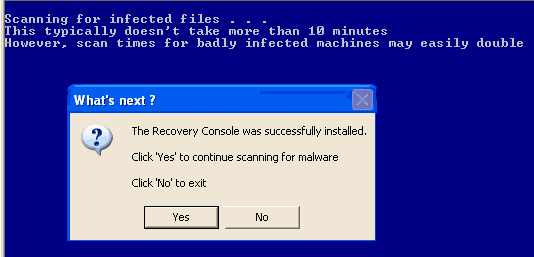
  • Follow the prompts to start ComboFix and when prompted, agree to the End-User License Agreement to install the Microsoft Recovery Console.

  • At the next prompt, click 'No'.

    RC_whatnext.gif


  • When the tool is finished, it will produce a report for you.


Step # 1: Download and Run Flash_Disinfector

Download Flash_Disinfector from here and save it to your desktop.
Doubleclick on Flash_Disinfector.exe to run it and follow the prompts.
Wait until it has finished scanning and then exit the program.
The utility may ask you to insert your flash drive and/or other removable drives. This may include your mobile phone.
Please do so and allow the utility to clean up those drives as well.


Step # 2: Run CFScript

  • Please open Notepad (Start -> Run -> type notepad in the Open field -> OK) and copy and paste the text present inside the code box below:

    Code:
    KILLALL::
    
    Driver::
    
    lcwrcdos
    
    File::
    
    c:\windows\odunahuko.dll
    c:\windows\system32\icv.exe
    c:\windows\system\xccef090131.exe
    c:\windows\Tsavuqejako.dll
    c:\windows\lcwrcdos
    
    RootKit::
    
    c:\windows\system32\drivers\dewlywzj.sys
    
    Registry::
    
    [HKEY_LOCAL_MACHINE\SOFTWARE\Microsoft\Windows\CurrentVersion\Run]
    "Cxiwugid"=-
    [-HKEY_CURRENT_USER\software\microsoft\windows\currentversion\explorer\mountpoints2\{ae60f2a6-4911-11dd-91a6-000b97dcaa47}]
    [-HKEY_CURRENT_USER\software\microsoft\windows\currentversion\explorer\mountpoints2\{f0d7c4f9-0fc8-11dd-913b-000b97dcaa47}]

  • Save this as CFScript.txt and change the "Save as type" to "All Files" and place it on your desktop.


    CFScriptB-4.gif


    Note: This CFScript is for use on Miche's computer only! Do not use it on your computer.

  • Referring to the screenshot above, drag CFScript.txt into ComboFix.exe.
  • ComboFix will now run a scan on your system. It may reboot your system when it finishes. This is normal.
  • When finished, it shall produce a log for you. Copy and paste the contents of the log in your next reply.

CAUTION: Do not mouse-click ComboFix's window while it is running. That may cause it to stall.

In your next post/reply, I need to see the following:

1. Recovery Console Log
2. The ComboFix Log that appears after Step 2 has been completed.
3. A fresh HiJackThis Log taken after Step 2 has been completed.
 
connect to internet?

I've been offline and doing installs via external drive from another (clean) laptop. Just want to double check that I should be connecting to the internet. Currently all firewall and antivirus is turned off.

thanks again!!
 
You can keep your computer disconnected from the Internet for now and keep downloading files/tools and transferring them over via the clean laptop and external drive. I'll let you know when to reconnect your computer back to the Internet.
 
recovery console didn't install

I downloaded the Windows XP ProSP2 boot disk from the website you sent. I transferred to my machine via external drive and after dragging to ComboFix, that program began to run. An alert popup stated that Recovery Console was not installed, recommended doing so, and that requires internet connection.
ComboFix did the scan and then abruptly shut down, program failed to initialize. After reboot, ComboFix was preparing log report.

I did this twice, the first time selecting "yes, install Recovery Console" (which produced error box that I was not connected to internet) and the second time selecting "no" as I was not connected.

Both times there was an abrupt shut down. Attached is the last log report, I have the one run right before it too, if you need it.

ComboFix 09-03-03.01 - n 2009-03-06 9:35:04.3 - NTFSx86
Microsoft Windows XP Professional 5.1.2600.2.1252.1.1033.18.1526.911 [GMT -6:00]
Running from: c:\documents and settings\n\Desktop\ComboFix.exe
Command switches used :: c:\documents and settings\n\Desktop\WindowsXP-KB310994-SP2-Pro-BootDisk-ENU.exe
AV: Spyware Doctor with AntiVirus *On-access scanning disabled* (Updated)
* Created a new restore point

WARNING -THIS MACHINE DOES NOT HAVE THE RECOVERY CONSOLE INSTALLED !!
.

((((((((((((((((((((((((( Files Created from 2009-02-06 to 2009-03-06 )))))))))))))))))))))))))))))))
.

2009-03-04 17:44 . 2009-03-04 17:44 <DIR> d-------- c:\program files\CCleaner
2009-03-02 16:22 . 2009-03-02 16:22 <DIR> d-------- c:\program files\ERUNT
2009-03-02 15:01 . 2009-03-02 15:01 <DIR> d-------- c:\program files\RegCure
2009-03-02 14:35 . 2009-03-02 14:35 <DIR> d-------- c:\program files\Trend Micro
2009-03-02 11:59 . 2009-03-06 09:39 <DIR> d-a------ c:\documents and settings\All Users\Application Data\TEMP
2009-03-02 11:58 . 2009-03-06 09:38 <DIR> d-------- c:\program files\Spyware Doctor
2009-03-02 11:58 . 2009-03-02 12:01 <DIR> d-------- c:\program files\Common Files\PC Tools
2009-03-02 11:58 . 2009-03-02 11:58 <DIR> d-------- c:\documents and settings\n\Application Data\PC Tools
2009-03-02 11:58 . 2009-03-02 11:58 <DIR> d-------- c:\documents and settings\All Users\Application Data\PC Tools
2009-03-02 11:58 . 2008-07-28 11:29 160,792 --a------ c:\windows\system32\drivers\pctfw2.sys
2009-03-02 11:58 . 2009-03-02 12:02 81,288 --a------ c:\windows\system32\drivers\iksyssec.sys
2009-03-02 11:58 . 2009-03-02 12:02 66,952 --a------ c:\windows\system32\drivers\iksysflt.sys
2009-03-02 11:58 . 2009-03-02 12:02 40,840 --a------ c:\windows\system32\drivers\ikfilesec.sys
2009-03-02 11:58 . 2008-06-02 15:19 29,576 --a------ c:\windows\system32\drivers\kcom.sys
2009-03-02 10:59 . 2009-03-02 10:59 <DIR> d-------- c:\documents and settings\All Users\Application Data\Acronis
2009-03-02 10:53 . 2004-08-04 00:56 116,224 --a--c--- c:\windows\system32\dllcache\xrxwiadr.dll
2009-03-02 10:53 . 2001-08-17 22:36 23,040 --a--c--- c:\windows\system32\dllcache\xrxwbtmp.dll
2009-03-02 10:51 . 2001-08-17 13:28 765,884 --a--c--- c:\windows\system32\dllcache\usrti.sys
2009-03-02 10:50 . 2001-08-17 13:28 794,654 --a--c--- c:\windows\system32\dllcache\usr1801.sys
2009-03-02 10:49 . 2001-08-17 22:36 525,568 --a--c--- c:\windows\system32\dllcache\tridxp.dll
2009-03-02 10:48 . 2001-08-17 12:18 285,760 --a--c--- c:\windows\system32\dllcache\stlnata.sys
2009-03-02 10:47 . 2001-08-17 22:36 114,688 --a--c--- c:\windows\system32\dllcache\sonypi.dll
2009-03-02 10:46 . 2004-08-03 22:41 404,990 --a--c--- c:\windows\system32\dllcache\slntamr.sys
2009-03-02 10:45 . 2001-08-17 22:36 386,560 --a--c--- c:\windows\system32\dllcache\sgiul50.dll
2009-03-02 10:44 . 2001-08-17 22:36 495,616 --a--c--- c:\windows\system32\dllcache\sblfx.dll
2009-03-02 10:43 . 2001-08-17 13:28 899,146 --a--c--- c:\windows\system32\dllcache\r2mdkxga.sys
2009-03-02 10:42 . 2004-08-04 00:56 363,520 --a--c--- c:\windows\system32\dllcache\psisdecd.dll
2009-03-02 10:42 . 2001-08-17 22:36 35,328 --a--c--- c:\windows\system32\dllcache\psisload.dll
2009-03-02 10:42 . 2004-08-04 00:56 33,280 --a--c--- c:\windows\system32\dllcache\psisrndr.ax
2009-03-02 10:42 . 2001-08-17 13:53 17,792 --a--c--- c:\windows\system32\dllcache\ppa.sys
2009-03-02 10:42 . 2004-08-03 23:00 17,664 --a--c--- c:\windows\system32\dllcache\ppa3.sys
2009-03-02 10:42 . 2001-08-17 13:51 16,128 --a--c--- c:\windows\system32\dllcache\pscr.sys
2009-03-02 10:42 . 2001-08-17 13:53 7,552 --a--c--- c:\windows\system32\dllcache\powerfil.sys
2009-03-02 10:42 . 2001-08-17 13:53 7,168 --a--c--- c:\windows\system32\dllcache\pnrmc.sys
2009-03-02 10:42 . 2001-08-17 22:36 5,632 --a--c--- c:\windows\system32\dllcache\ptpusb.dll
2009-03-02 10:36 . 2004-08-04 00:56 4,274,816 --a--c--- c:\windows\system32\dllcache\nv4_disp.dll
2009-03-02 10:35 . 2004-08-03 23:00 28,672 --a--c--- c:\windows\system32\dllcache\nscirda.sys
2009-03-02 10:35 . 2001-08-17 13:47 9,344 --a--c--- c:\windows\system32\dllcache\ntapm.sys
2009-03-02 10:35 . 2001-08-17 13:53 7,552 --a--c--- c:\windows\system32\dllcache\nsmmc.sys
2009-03-02 10:33 . 2004-08-04 00:56 1,737,856 --a--c--- c:\windows\system32\dllcache\mtxparhd.dll
2009-03-02 10:32 . 2001-08-17 22:36 58,880 --a--c--- c:\windows\system32\dllcache\m3092dc.dll
2009-03-02 10:32 . 2001-08-17 22:36 58,368 --a--c--- c:\windows\system32\dllcache\m3091dc.dll
2009-03-02 10:32 . 2001-08-17 12:19 48,768 --a--c--- c:\windows\system32\dllcache\maestro.sys
2009-03-02 10:32 . 2001-08-17 12:49 22,848 --a--c--- c:\windows\system32\dllcache\lwusbhid.sys
2009-03-02 10:32 . 2004-08-03 22:39 20,864 --a--c--- c:\windows\system32\dllcache\lwadihid.sys
2009-03-02 10:21 . 2004-08-04 00:56 152,576 --a--c--- c:\windows\system32\dllcache\irftp.exe
2009-03-02 10:21 . 2001-08-17 22:36 90,200 --a--c--- c:\windows\system32\dllcache\io8ports.dll
2009-03-02 10:21 . 2004-08-03 23:00 87,424 --a--c--- c:\windows\system32\dllcache\irda.sys
2009-03-02 10:21 . 2001-08-17 12:12 45,632 --a--c--- c:\windows\system32\dllcache\ip5515.sys
2009-03-02 10:21 . 2004-08-03 23:08 40,832 --a--c--- c:\windows\system32\dllcache\irbus.sys
2009-03-02 10:21 . 2001-08-17 13:50 38,784 --a--c--- c:\windows\system32\dllcache\io8.sys
2009-03-02 10:21 . 2004-08-04 00:56 27,136 --a--c--- c:\windows\system32\dllcache\irmon.dll
2009-03-02 10:21 . 2001-08-17 13:49 26,624 --a--c--- c:\windows\system32\dllcache\irstusb.sys
2009-03-02 10:21 . 2001-08-17 13:49 23,552 --a--c--- c:\windows\system32\dllcache\irmk7.sys
2009-03-02 10:21 . 2001-08-17 13:51 18,688 --a--c--- c:\windows\system32\dllcache\irsir.sys
2009-03-02 10:21 . 2001-08-17 13:52 16,000 --a--c--- c:\windows\system32\dllcache\ini910u.sys
2009-03-02 10:21 . 2001-08-17 13:47 13,056 --a--c--- c:\windows\system32\dllcache\inport.sys
2009-03-02 10:21 . 2004-08-03 22:59 5,504 --a--c--- c:\windows\system32\dllcache\intelide.sys
2009-03-02 10:19 . 2001-08-17 13:28 542,879 --a--c--- c:\windows\system32\dllcache\hsf_msft.sys
2009-03-02 10:18 . 2001-08-17 14:56 1,733,120 --a--c--- c:\windows\system32\dllcache\g400d.dll
2009-03-02 10:17 . 2001-08-17 13:28 595,647 --a--c--- c:\windows\system32\dllcache\es56cvmp.sys
2009-03-02 10:16 . 2001-08-17 12:14 952,007 --a--c--- c:\windows\system32\dllcache\diwan.sys
2009-03-02 10:15 . 2001-08-17 22:36 614,429 --a--c--- c:\windows\system32\dllcache\digiview.exe
2009-03-02 10:14 . 2001-08-17 12:13 980,034 --a--c--- c:\windows\system32\dllcache\cicap.sys
2009-03-02 10:13 . 2004-08-04 00:56 1,888,992 --a--c--- c:\windows\system32\dllcache\ati3duag.dll
2009-03-02 10:12 . 2001-08-17 13:28 762,780 --a--c--- c:\windows\system32\dllcache\3cwmcru.sys
2009-03-01 11:56 . 2009-03-01 11:56 <DIR> d-------- c:\windows\system32\config\systemprofile\Application Data\Yahoo!
2009-03-01 11:56 . 2009-03-01 11:56 131,072 --a------ c:\windows\odunahuko.dll
2009-03-01 11:55 . 2009-03-05 13:36 <DIR> d-------- c:\windows\system32\inf
2009-03-01 11:55 . 2009-03-01 11:55 155,175 --a------ c:\windows\system32\icv.exe
2009-03-01 11:55 . 2009-03-01 11:55 155,175 --a------ c:\windows\system\xccef090131.exe
2009-03-01 11:44 . 2009-03-01 11:44 39,424 --a------ c:\windows\Tsavuqejako.dll
2009-03-01 11:28 . 2009-03-06 09:37 2,204 --a------ c:\windows\lcwrcdos

.
(((((((((((((((((((((((((((((((((((((((( Find3M Report ))))))))))))))))))))))))))))))))))))))))))))))))))))
.
2009-03-06 15:05 --------- d-----w c:\documents and settings\n\Application Data\Skype
2009-03-02 15:53 --------- d-----w c:\program files\Mozilla Thunderbird
2009-03-02 15:16 --------- d-----w c:\documents and settings\n\Application Data\Yahoo!
2009-03-01 21:14 --------- d-----w c:\program files\Yahoo!
2009-03-01 17:40 --------- d-----w c:\program files\Spybot - Search & Destroy
2009-03-01 17:40 --------- d-----w c:\documents and settings\All Users\Application Data\Spybot - Search & Destroy
2009-01-15 21:46 --------- d-----w c:\program files\FreeMind
2009-01-15 20:26 --------- d-----w c:\documents and settings\n\Application Data\Move Networks
2009-01-15 01:38 --------- d--h--w c:\program files\InstallShield Installation Information
2009-01-15 01:38 --------- d-----w c:\program files\Sony_usb
2009-01-09 16:53 --------- d-----w c:\documents and settings\n\Application Data\InfraRecorder
2009-01-09 15:52 --------- d-----w c:\program files\InfraRecorder
2009-01-09 15:48 --------- d-----w c:\program files\HashTab Shell Extension
2009-01-06 20:41 --------- d-----w c:\program files\Juice
2008-09-30 17:06 128,535,711 ----a-w c:\program files\openofficeorg1.cab
2008-09-30 16:29 9,772,544 ----a-w c:\program files\openofficeorg30.msi
2008-09-30 16:29 217 ----a-w c:\program files\setup.ini
2002-03-11 09:06 1,822,520 ----a-w c:\program files\instmsiw.exe
2002-03-11 08:45 1,708,856 ----a-w c:\program files\instmsia.exe
.

((((((((((((((((((((((((((((( SnapShot@2009-03-05_13.42.46.95 )))))))))))))))))))))))))))))))))))))))))
.
+ 2005-10-20 18:02:28 163,328 ----a-w c:\windows\ERDNT\AutoBackup\2009-03-06\ERDNT.EXE
+ 2009-03-06 15:29:05 7,286,784 ----a-w c:\windows\ERDNT\AutoBackup\2009-03-06\Users\00000001\NTUSER.DAT
+ 2009-03-06 15:29:05 319,488 ----a-w c:\windows\ERDNT\AutoBackup\2009-03-06\Users\00000002\UsrClass.dat
.
((((((((((((((((((((((((((((((((((((( Reg Loading Points ))))))))))))))))))))))))))))))))))))))))))))))))))
.
.
*Note* empty entries & legit default entries are not shown
REGEDIT4

[HKEY_CURRENT_USER\SOFTWARE\Microsoft\Windows\CurrentVersion\Run]
"Skype"="c:\program files\Skype\Phone\Skype.exe" [2008-09-23 21757224]
"ctfmon.exe"="c:\windows\system32\ctfmon.exe" [2004-08-04 15360]

[HKEY_LOCAL_MACHINE\SOFTWARE\Microsoft\Windows\CurrentVersion\Run]
"TkBellExe"="c:\program files\Common Files\Real\Update_OB\realsched.exe" [2008-12-17 185872]
"SynTPLpr"="c:\program files\Synaptics\SynTP\SynTPLpr.exe" [2004-10-14 98394]
"SynTPEnh"="c:\program files\Synaptics\SynTP\SynTPEnh.exe" [2004-10-14 688218]
"SunJavaUpdateSched"="c:\program files\Java\jre1.6.0_07\bin\jusched.exe" [2008-06-10 144784]
"SoundMAXPnP"="c:\program files\Analog Devices\Core\smax4pnp.exe" [2007-03-15 868352]
"QuickTime Task"="c:\program files\QuickTime\QTTask.exe" [2008-05-27 413696]
"PHIME2002ASync"="c:\windows\system32\IME\TINTLGNT\TINTSETP.EXE" [2004-08-04 455168]
"PHIME2002A"="c:\windows\system32\IME\TINTLGNT\TINTSETP.EXE" [2004-08-04 455168]
"Persistence"="c:\windows\system32\igfxpers.exe" [2007-04-12 138008]
"MSPY2002"="c:\windows\system32\IME\PINTLGNT\ImScInst.exe" [2004-08-04 59392]
"IntelZeroConfig"="c:\program files\Intel\Wireless\bin\ZCfgSvc.exe" [2007-02-21 819200]
"IntelWireless"="c:\program files\Intel\Wireless\Bin\ifrmewrk.exe" [2007-02-21 970752]
"IMJPMIG8.1"="c:\windows\IME\imjp8_1\IMJPMIG.EXE" [2004-08-04 208952]
"IgfxTray"="c:\windows\system32\igfxtray.exe" [2007-04-12 138008]
"HPDJ Taskbar Utility"="c:\windows\system32\spool\drivers\w32x86\3\hpztsb09.exe" [2003-08-11 188416]
"HP Software Update"="c:\program files\HP\HP Software Update\HPWuSchd.exe" [2003-06-25 49152]
"HP Component Manager"="c:\program files\HP\hpcoretech\hpcmpmgr.exe" [2004-05-12 241664]
"HotKeysCmds"="c:\windows\system32\hkcmd.exe" [2007-04-12 162584]
"Adobe Reader Speed Launcher"="c:\program files\Adobe\Reader 8.0\Reader\Reader_sl.exe" [2008-01-11 39792]
"Acronis Scheduler2 Service"="c:\program files\Common Files\Acronis\Schedule2\schedhlp.exe" [2007-04-23 149024]
"Cxiwugid"="c:\windows\odunahuko.dll" [2009-03-01 131072]
"ISTray"="c:\program files\Spyware Doctor\pctsTray.exe" [2009-03-02 1168264]

[HKEY_USERS\.DEFAULT\Software\Microsoft\Windows\CurrentVersion\Run]
"CTFMON.EXE"="c:\windows\system32\CTFMON.EXE" [2004-08-04 15360]

c:\documents and settings\n\Start Menu\Programs\Startup\
ERUNT AutoBackup.lnk - c:\program files\ERUNT\AUTOBACK.EXE [2005-10-20 38912]
OpenOffice.org 3.0.lnk - c:\program files\OpenOffice.org 3\program\quickstart.exe [2008-09-12 384000]

c:\documents and settings\All Users\Start Menu\Programs\Startup\
Adobe Gamma Loader.lnk - c:\program files\Common Files\Adobe\Calibration\Adobe Gamma Loader.exe [2008-04-19 113664]
Economy Mode(ECO) Setting Utility.lnk - c:\program files\Panasonic\CHGBMODE\ChgBmode.exe [2007-12-01 321168]
HP Digital Imaging Monitor.lnk - c:\program files\HP\Digital Imaging\bin\hpqtra08.exe [2003-07-07 233472]
LAN Power-Saving Utility.lnk - c:\program files\Panasonic\LANPSAVE\LanPsave.exe [2007-12-01 181904]
Optical Disc Drive Power-Saving Utility.lnk - c:\program files\Panasonic\OPDOFF\opdoff.exe [2007-12-01 1513104]
Touch Pad Utility.lnk - c:\program files\Panasonic\WheelPad\Touchpad.exe [2007-12-01 456336]

[HKLM\~\services\sharedaccess\parameters\firewallpolicy\standardprofile]
"EnableFirewall"= 0 (0x0)

[HKLM\~\services\sharedaccess\parameters\firewallpolicy\standardprofile\AuthorizedApplications\List]
"c:\\Program Files\\Microsoft Office\\Office12\\OUTLOOK.EXE"=
"c:\\WINDOWS\\system32\\sessmgr.exe"=
"c:\\Program Files\\Macromedia\\Dreamweaver MX\\Dreamweaver.exe"=
"c:\\Program Files\\Real\\RealPlayer\\realplay.exe"=
"c:\\WINDOWS\\system32\\mshta.exe"=
"c:\\Program Files\\Yahoo!\\Messenger\\YServer.exe"=
"c:\\Program Files\\Yahoo!\\Messenger\\YahooMessenger.exe"=
"c:\\Program Files\\Skype\\Phone\\Skype.exe"=

R1 pctfw2;pctfw2;c:\windows\system32\drivers\pctfw2.sys [2009-03-02 160792]
R2 ETMService;Intel(R) Extended Thermal Model Service Application;c:\windows\system32\etmservice.exe [2007-12-01 217088]
R2 MSSQL$MSSMLBIZ;SQL Server (MSSMLBIZ);c:\program files\Microsoft SQL Server\MSSQL.1\MSSQL\Binn\sqlservr.exe [2006-04-14 28933976]
R2 OPDOFFSV;Panasonic Opdoff Utility;c:\program files\Panasonic\OPDOFF\opdoffsv.exe [2007-12-01 206480]
R2 PcInfoPi;Panasonic PC Information Viewer Service 2;c:\program files\Panasonic\pcinfo\PCInfoPi.exe [2007-12-01 54928]
R2 PcInfoSV;Panasonic PC Information Viewer;c:\program files\Panasonic\pcinfo\PCInfoSV.exe [2007-12-01 186000]
R2 sdAuxService;PC Tools Auxiliary Service;c:\program files\Spyware Doctor\pctsAuxs.exe [2009-03-02 356920]
R2 SDKEY;Panasonic SD Misc. Function Driver;c:\program files\Panasonic\SDKEY\SDKEY.sys [2007-12-01 8192]
R3 Etm;Etm;c:\windows\system32\drivers\EtmDrvMgr.sys [2007-12-01 38528]
R3 EtmCpu;EtmCpu;c:\windows\system32\drivers\EtmDevCpu.sys [2007-12-01 19456]
R3 EtmFan;EtmFan;c:\windows\system32\drivers\EtmDevFan.sys [2007-12-01 9472]
R3 EtmGmch;EtmGmch;c:\windows\system32\drivers\EtmDevGmch.sys [2007-12-01 34304]
R3 EtmTempSense;EtmTempSense;c:\windows\system32\drivers\EtmTempSense.sys [2007-12-01 12160]
R3 HOTKEY;Panasonic Hotkey Driver;c:\windows\system32\drivers\hotkey.sys [2007-11-30 19840]
R3 IFXTPM;IFXTPM;c:\windows\system32\drivers\ifxtpm.sys [2007-11-30 36608]
R3 NewMisc;Panasonic Misc Driver;c:\windows\system32\drivers\newmisc.sys [2007-11-30 42624]
S0 lcwrcdos;lcwrcdos;c:\windows\system32\drivers\dewlywzj.sys []

--- Other Services/Drivers In Memory ---

*Deregistered* - mchInjDrv

[HKEY_CURRENT_USER\software\microsoft\windows\currentversion\explorer\mountpoints2\{ae60f2a6-4911-11dd-91a6-000b97dcaa47}]
\Shell\AutoRun\command - e:\system\viewer\FlipVideoforPC.exe
\Shell\Flip Video for PC\command - e:\system\viewer\FlipVideoforPC.exe

[HKEY_CURRENT_USER\software\microsoft\windows\currentversion\explorer\mountpoints2\{f0d7c4f9-0fc8-11dd-913b-000b97dcaa47}]
\Shell\AutoRun\command - t.com
\Shell\explore\Command - t.com
\Shell\open\Command - t.com
.
Contents of the 'Scheduled Tasks' folder

2008-12-27 c:\windows\Tasks\AppleSoftwareUpdate.job
- c:\program files\Apple Software Update\SoftwareUpdate.exe [2008-04-11 16:57]

2008-04-21 c:\windows\Tasks\HP DArC Task #Hewlett-Packard#hp psc 2400 series#1208782125.job
- c:\program files\HP\hpcoretech\comp\hpdarc.exe [2004-05-12 15:18]

2009-03-06 c:\windows\Tasks\RegCure Program Check.job
- c:\program files\RegCure\RegCure.exe [2008-12-29 11:58]

2009-03-02 c:\windows\Tasks\RegCure.job
- c:\program files\RegCure\RegCure.exe [2008-12-29 11:58]

2008-05-19 c:\windows\Tasks\Spybot - Search & Destroy - Scheduled Task.job
- c:\program files\Spybot - Search & Destroy\SpybotSD.exe [2009-01-26 15:31]
.
.
------- Supplementary Scan -------
.
uStart Page = hxxp://thewidercircle.org/
uDefault_Search_URL = hxxp://www.google.com/ie
uSearchMigratedDefaultURL = hxxp://www.google.com/search?q={searchTerms}&sourceid=ie7&rls=com.microsoft:en-US&ie=utf8&oe=utf8
uSearchURL,(Default) = hxxp://www.google.com/search?q=%s
IE: E&xport to Microsoft Excel - c:\progra~1\MICROS~2\Office12\EXCEL.EXE/3000
LSP: c:\program files\Common Files\PC Tools\LSP\PCTLsp.dll
FF - ProfilePath - c:\documents and settings\n\Application Data\Mozilla\Firefox\Profiles\w67m6jac.default\
FF - prefs.js: browser.startup.homepage - hxxp://google.com
FF - component: c:\program files\Mozilla Firefox\extensions\{B13721C7-F507-4982-B2E5-502A71474FED}\components\NPComponent.dll
FF - component: c:\program files\Real\RealPlayer\browserrecord\components\nprpbrowserrecordplugin.dll
FF - plugin: c:\documents and settings\n\Application Data\Mozilla\Firefox\Profiles\w67m6jac.default\extensions\moveplayer@movenetworks.com\platform\WINNT_x86-msvc\plugins\npmnqmp071301000019.dll
FF - plugin: c:\program files\Google\Picasa3\npPicasa3.dll
FF - plugin: c:\program files\Mozilla Firefox\plugins\NPTURNMED.dll
.

**************************************************************************

catchme 0.3.1367 W2K/XP/Vista - rootkit/stealth malware detector by Gmer, http://www.gmer.net
Rootkit scan 2009-03-06 09:38:50
Windows 5.1.2600 Service Pack 2 NTFS

scanning hidden processes ...

scanning hidden autostart entries ...

scanning hidden files ...


c:\windows\system32\drivers\dewlywzj.sys 25088 bytes executable

scan completed successfully
hidden files: 1

**************************************************************************
.
--------------------- DLLs Loaded Under Running Processes ---------------------

- - - - - - - > 'lsass.exe'(996)
c:\program files\Common Files\PC Tools\LSP\PCTLsp.dll
.
------------------------ Other Running Processes ------------------------
.
c:\program files\Intel\Wireless\Bin\S24EvMon.exe
c:\program files\Common Files\Acronis\Schedule2\schedul2.exe
c:\program files\Intel\Wireless\Bin\EvtEng.exe
c:\program files\Intel\Intel Matrix Storage Manager\IAANTmon.exe
c:\program files\Intel\Wireless\Bin\RegSrvc.exe
c:\program files\Spyware Doctor\pctsSvc.exe
c:\windows\system32\wdfmgr.exe
c:\windows\system32\igfxsrvc.exe
c:\windows\system32\wscntfy.exe
c:\program files\OpenOffice.org 3\program\soffice.exe
c:\program files\OpenOffice.org 3\program\soffice.bin
.
**************************************************************************
.
Completion time: 2009-03-06 9:44:02 - machine was rebooted
ComboFix-quarantined-files.txt 2009-03-06 15:43:59
ComboFix2.txt 2009-03-06 15:32:18
ComboFix3.txt 2009-03-05 19:44:50

Pre-Run: 134,004,142,080 bytes free
Post-Run: 133,988,028,416 bytes free

260
 
Let's hold off on installing the Recovery Console for now, we still have some cleaning to do with ComboFix. Go ahead and keep the Windows XP ProSP2 boot disk file you downloaded earlier on your Desktop as we'll be coming back to it.

Then go ahead and do Steps 1 and 2 from post 13 of this thread. You can stay offline during these steps and remember to click No when it asks if you want to install the Recovery Console.

Post back a new ComboFix Log and a fresh HiJackThis Log in your next post.
 
ComboFix log after Flash Disinfector

ComboFix 09-03-03.01 - n 2009-03-07 11:13:31.4 - NTFSx86
Microsoft Windows XP Professional 5.1.2600.2.1252.1.1033.18.1526.956 [GMT -6:00]
Running from: c:\documents and settings\n\Desktop\ComboFix.exe
Command switches used :: c:\documents and settings\n\Desktop\CFScript.txt
AV: Spyware Doctor with AntiVirus *On-access scanning disabled* (Updated)
* Created a new restore point

WARNING -THIS MACHINE DOES NOT HAVE THE RECOVERY CONSOLE INSTALLED !!

FILE ::
c:\windows\lcwrcdos
c:\windows\odunahuko.dll
c:\windows\system\xccef090131.exe
c:\windows\system32\icv.exe
c:\windows\Tsavuqejako.dll
.

((((((((((((((((((((((((((((((((((((((( Other Deletions )))))))))))))))))))))))))))))))))))))))))))))))))
.

c:\windows\lcwrcdos
c:\windows\odunahuko.dll
c:\windows\system\xccef090131.exe
c:\windows\system32\drivers\dewlywzj.sys
c:\windows\system32\icv.exe
c:\windows\Tsavuqejako.dll

.
((((((((((((((((((((((((((((((((((((((( Drivers/Services )))))))))))))))))))))))))))))))))))))))))))))))))
.

-------\Legacy_LCWRCDOS
-------\Service_lcwrcdos


((((((((((((((((((((((((( Files Created from 2009-02-07 to 2009-03-07 )))))))))))))))))))))))))))))))
.

2009-03-04 17:44 . 2009-03-04 17:44 <DIR> d-------- c:\program files\CCleaner
2009-03-02 16:22 . 2009-03-02 16:22 <DIR> d-------- c:\program files\ERUNT
2009-03-02 15:01 . 2009-03-02 15:01 <DIR> d-------- c:\program files\RegCure
2009-03-02 14:35 . 2009-03-02 14:35 <DIR> d-------- c:\program files\Trend Micro
2009-03-02 11:59 . 2009-03-07 11:18 <DIR> d-a------ c:\documents and settings\All Users\Application Data\TEMP
2009-03-02 11:58 . 2009-03-07 11:17 <DIR> d-------- c:\program files\Spyware Doctor
2009-03-02 11:58 . 2009-03-02 12:01 <DIR> d-------- c:\program files\Common Files\PC Tools
2009-03-02 11:58 . 2009-03-02 11:58 <DIR> d-------- c:\documents and settings\n\Application Data\PC Tools
2009-03-02 11:58 . 2009-03-02 11:58 <DIR> d-------- c:\documents and settings\All Users\Application Data\PC Tools
2009-03-02 11:58 . 2008-07-28 11:29 160,792 --a------ c:\windows\system32\drivers\pctfw2.sys
2009-03-02 11:58 . 2009-03-02 12:02 81,288 --a------ c:\windows\system32\drivers\iksyssec.sys
2009-03-02 11:58 . 2009-03-02 12:02 66,952 --a------ c:\windows\system32\drivers\iksysflt.sys
2009-03-02 11:58 . 2009-03-02 12:02 40,840 --a------ c:\windows\system32\drivers\ikfilesec.sys
2009-03-02 11:58 . 2008-06-02 15:19 29,576 --a------ c:\windows\system32\drivers\kcom.sys
2009-03-02 10:59 . 2009-03-02 10:59 <DIR> d-------- c:\documents and settings\All Users\Application Data\Acronis
2009-03-02 10:53 . 2004-08-04 00:56 116,224 --a--c--- c:\windows\system32\dllcache\xrxwiadr.dll
2009-03-02 10:53 . 2001-08-17 22:36 23,040 --a--c--- c:\windows\system32\dllcache\xrxwbtmp.dll
2009-03-02 10:51 . 2001-08-17 13:28 765,884 --a--c--- c:\windows\system32\dllcache\usrti.sys
2009-03-02 10:50 . 2001-08-17 13:28 794,654 --a--c--- c:\windows\system32\dllcache\usr1801.sys
2009-03-02 10:49 . 2001-08-17 22:36 525,568 --a--c--- c:\windows\system32\dllcache\tridxp.dll
2009-03-02 10:48 . 2001-08-17 12:18 285,760 --a--c--- c:\windows\system32\dllcache\stlnata.sys
2009-03-02 10:47 . 2001-08-17 22:36 114,688 --a--c--- c:\windows\system32\dllcache\sonypi.dll
2009-03-02 10:46 . 2004-08-03 22:41 404,990 --a--c--- c:\windows\system32\dllcache\slntamr.sys
2009-03-02 10:45 . 2001-08-17 22:36 386,560 --a--c--- c:\windows\system32\dllcache\sgiul50.dll
2009-03-02 10:44 . 2001-08-17 22:36 495,616 --a--c--- c:\windows\system32\dllcache\sblfx.dll
2009-03-02 10:43 . 2001-08-17 13:28 899,146 --a--c--- c:\windows\system32\dllcache\r2mdkxga.sys
2009-03-02 10:42 . 2004-08-04 00:56 363,520 --a--c--- c:\windows\system32\dllcache\psisdecd.dll
2009-03-02 10:42 . 2001-08-17 22:36 35,328 --a--c--- c:\windows\system32\dllcache\psisload.dll
2009-03-02 10:42 . 2004-08-04 00:56 33,280 --a--c--- c:\windows\system32\dllcache\psisrndr.ax
2009-03-02 10:42 . 2001-08-17 13:53 17,792 --a--c--- c:\windows\system32\dllcache\ppa.sys
2009-03-02 10:42 . 2004-08-03 23:00 17,664 --a--c--- c:\windows\system32\dllcache\ppa3.sys
2009-03-02 10:42 . 2001-08-17 13:51 16,128 --a--c--- c:\windows\system32\dllcache\pscr.sys
2009-03-02 10:42 . 2001-08-17 13:53 7,552 --a--c--- c:\windows\system32\dllcache\powerfil.sys
2009-03-02 10:42 . 2001-08-17 13:53 7,168 --a--c--- c:\windows\system32\dllcache\pnrmc.sys
2009-03-02 10:42 . 2001-08-17 22:36 5,632 --a--c--- c:\windows\system32\dllcache\ptpusb.dll
2009-03-02 10:36 . 2004-08-04 00:56 4,274,816 --a--c--- c:\windows\system32\dllcache\nv4_disp.dll
2009-03-02 10:35 . 2004-08-03 23:00 28,672 --a--c--- c:\windows\system32\dllcache\nscirda.sys
2009-03-02 10:35 . 2001-08-17 13:47 9,344 --a--c--- c:\windows\system32\dllcache\ntapm.sys
2009-03-02 10:35 . 2001-08-17 13:53 7,552 --a--c--- c:\windows\system32\dllcache\nsmmc.sys
2009-03-02 10:33 . 2004-08-04 00:56 1,737,856 --a--c--- c:\windows\system32\dllcache\mtxparhd.dll
2009-03-02 10:32 . 2001-08-17 22:36 58,880 --a--c--- c:\windows\system32\dllcache\m3092dc.dll
2009-03-02 10:32 . 2001-08-17 22:36 58,368 --a--c--- c:\windows\system32\dllcache\m3091dc.dll
2009-03-02 10:32 . 2001-08-17 12:19 48,768 --a--c--- c:\windows\system32\dllcache\maestro.sys
2009-03-02 10:32 . 2001-08-17 12:49 22,848 --a--c--- c:\windows\system32\dllcache\lwusbhid.sys
2009-03-02 10:32 . 2004-08-03 22:39 20,864 --a--c--- c:\windows\system32\dllcache\lwadihid.sys
2009-03-02 10:21 . 2004-08-04 00:56 152,576 --a--c--- c:\windows\system32\dllcache\irftp.exe
2009-03-02 10:21 . 2001-08-17 22:36 90,200 --a--c--- c:\windows\system32\dllcache\io8ports.dll
2009-03-02 10:21 . 2004-08-03 23:00 87,424 --a--c--- c:\windows\system32\dllcache\irda.sys
2009-03-02 10:21 . 2001-08-17 12:12 45,632 --a--c--- c:\windows\system32\dllcache\ip5515.sys
2009-03-02 10:21 . 2004-08-03 23:08 40,832 --a--c--- c:\windows\system32\dllcache\irbus.sys
2009-03-02 10:21 . 2001-08-17 13:50 38,784 --a--c--- c:\windows\system32\dllcache\io8.sys
2009-03-02 10:21 . 2004-08-04 00:56 27,136 --a--c--- c:\windows\system32\dllcache\irmon.dll
2009-03-02 10:21 . 2001-08-17 13:49 26,624 --a--c--- c:\windows\system32\dllcache\irstusb.sys
2009-03-02 10:21 . 2001-08-17 13:49 23,552 --a--c--- c:\windows\system32\dllcache\irmk7.sys
2009-03-02 10:21 . 2001-08-17 13:51 18,688 --a--c--- c:\windows\system32\dllcache\irsir.sys
2009-03-02 10:21 . 2001-08-17 13:52 16,000 --a--c--- c:\windows\system32\dllcache\ini910u.sys
2009-03-02 10:21 . 2001-08-17 13:47 13,056 --a--c--- c:\windows\system32\dllcache\inport.sys
2009-03-02 10:21 . 2004-08-03 22:59 5,504 --a--c--- c:\windows\system32\dllcache\intelide.sys
2009-03-02 10:19 . 2001-08-17 13:28 542,879 --a--c--- c:\windows\system32\dllcache\hsf_msft.sys
2009-03-02 10:18 . 2001-08-17 14:56 1,733,120 --a--c--- c:\windows\system32\dllcache\g400d.dll
2009-03-02 10:17 . 2001-08-17 13:28 595,647 --a--c--- c:\windows\system32\dllcache\es56cvmp.sys
2009-03-02 10:16 . 2001-08-17 12:14 952,007 --a--c--- c:\windows\system32\dllcache\diwan.sys
2009-03-02 10:15 . 2001-08-17 22:36 614,429 --a--c--- c:\windows\system32\dllcache\digiview.exe
2009-03-02 10:14 . 2001-08-17 12:13 980,034 --a--c--- c:\windows\system32\dllcache\cicap.sys
2009-03-02 10:13 . 2004-08-04 00:56 1,888,992 --a--c--- c:\windows\system32\dllcache\ati3duag.dll
2009-03-02 10:12 . 2001-08-17 13:28 762,780 --a--c--- c:\windows\system32\dllcache\3cwmcru.sys
2009-03-01 11:56 . 2009-03-01 11:56 <DIR> d-------- c:\windows\system32\config\systemprofile\Application Data\Yahoo!
2009-03-01 11:55 . 2009-03-05 13:36 <DIR> d-------- c:\windows\system32\inf
2009-03-01 11:28 . 2009-03-01 11:28 301,056 --a------ c:\windows\system32\fccaApMe.dll

.
(((((((((((((((((((((((((((((((((((((((( Find3M Report ))))))))))))))))))))))))))))))))))))))))))))))))))))
.
2009-03-07 16:58 --------- d-----w c:\documents and settings\n\Application Data\Skype
2009-03-06 18:00 --------- d-----w c:\program files\Mozilla Thunderbird
2009-03-02 15:16 --------- d-----w c:\documents and settings\n\Application Data\Yahoo!
2009-03-01 21:14 --------- d-----w c:\program files\Yahoo!
2009-03-01 17:40 --------- d-----w c:\program files\Spybot - Search & Destroy
2009-03-01 17:40 --------- d-----w c:\documents and settings\All Users\Application Data\Spybot - Search & Destroy
2009-01-15 21:46 --------- d-----w c:\program files\FreeMind
2009-01-15 20:26 --------- d-----w c:\documents and settings\n\Application Data\Move Networks
2009-01-15 01:38 --------- d--h--w c:\program files\InstallShield Installation Information
2009-01-15 01:38 --------- d-----w c:\program files\Sony_usb
2009-01-09 16:53 --------- d-----w c:\documents and settings\n\Application Data\InfraRecorder
2009-01-09 15:52 --------- d-----w c:\program files\InfraRecorder
2009-01-09 15:48 --------- d-----w c:\program files\HashTab Shell Extension
2008-09-30 17:06 128,535,711 ----a-w c:\program files\openofficeorg1.cab
2008-09-30 16:29 9,772,544 ----a-w c:\program files\openofficeorg30.msi
2008-09-30 16:29 217 ----a-w c:\program files\setup.ini
2002-03-11 09:06 1,822,520 ----a-w c:\program files\instmsiw.exe
2002-03-11 08:45 1,708,856 ----a-w c:\program files\instmsia.exe
.

((((((((((((((((((((((((((((( SnapShot@2009-03-05_13.42.46.95 )))))))))))))))))))))))))))))))))))))))))
.
+ 2005-10-20 18:02:28 163,328 ----a-w c:\windows\ERDNT\AutoBackup\2009-03-06\ERDNT.EXE
+ 2009-03-06 15:29:05 7,286,784 ----a-w c:\windows\ERDNT\AutoBackup\2009-03-06\Users\00000001\NTUSER.DAT
+ 2009-03-06 15:29:05 319,488 ----a-w c:\windows\ERDNT\AutoBackup\2009-03-06\Users\00000002\UsrClass.dat
+ 2005-10-20 18:02:28 163,328 ----a-w c:\windows\ERDNT\AutoBackup\3-7-2009\ERDNT.EXE
+ 2009-03-07 15:58:45 7,286,784 ----a-w c:\windows\ERDNT\AutoBackup\3-7-2009\Users\00000001\NTUSER.DAT
+ 2009-03-07 15:58:46 319,488 ----a-w c:\windows\ERDNT\AutoBackup\3-7-2009\Users\00000002\UsrClass.dat
.
((((((((((((((((((((((((((((((((((((( Reg Loading Points ))))))))))))))))))))))))))))))))))))))))))))))))))
.
.
*Note* empty entries & legit default entries are not shown
REGEDIT4

[HKEY_CURRENT_USER\SOFTWARE\Microsoft\Windows\CurrentVersion\Run]
"Skype"="c:\program files\Skype\Phone\Skype.exe" [2008-09-23 21757224]
"ctfmon.exe"="c:\windows\system32\ctfmon.exe" [2004-08-04 15360]

[HKEY_LOCAL_MACHINE\SOFTWARE\Microsoft\Windows\CurrentVersion\Run]
"TkBellExe"="c:\program files\Common Files\Real\Update_OB\realsched.exe" [2008-12-17 185872]
"SynTPLpr"="c:\program files\Synaptics\SynTP\SynTPLpr.exe" [2004-10-14 98394]
"SynTPEnh"="c:\program files\Synaptics\SynTP\SynTPEnh.exe" [2004-10-14 688218]
"SunJavaUpdateSched"="c:\program files\Java\jre1.6.0_07\bin\jusched.exe" [2008-06-10 144784]
"SoundMAXPnP"="c:\program files\Analog Devices\Core\smax4pnp.exe" [2007-03-15 868352]
"QuickTime Task"="c:\program files\QuickTime\QTTask.exe" [2008-05-27 413696]
"PHIME2002ASync"="c:\windows\system32\IME\TINTLGNT\TINTSETP.EXE" [2004-08-04 455168]
"PHIME2002A"="c:\windows\system32\IME\TINTLGNT\TINTSETP.EXE" [2004-08-04 455168]
"Persistence"="c:\windows\system32\igfxpers.exe" [2007-04-12 138008]
"MSPY2002"="c:\windows\system32\IME\PINTLGNT\ImScInst.exe" [2004-08-04 59392]
"IntelZeroConfig"="c:\program files\Intel\Wireless\bin\ZCfgSvc.exe" [2007-02-21 819200]
"IntelWireless"="c:\program files\Intel\Wireless\Bin\ifrmewrk.exe" [2007-02-21 970752]
"IMJPMIG8.1"="c:\windows\IME\imjp8_1\IMJPMIG.EXE" [2004-08-04 208952]
"IgfxTray"="c:\windows\system32\igfxtray.exe" [2007-04-12 138008]
"HPDJ Taskbar Utility"="c:\windows\system32\spool\drivers\w32x86\3\hpztsb09.exe" [2003-08-11 188416]
"HP Software Update"="c:\program files\HP\HP Software Update\HPWuSchd.exe" [2003-06-25 49152]
"HP Component Manager"="c:\program files\HP\hpcoretech\hpcmpmgr.exe" [2004-05-12 241664]
"HotKeysCmds"="c:\windows\system32\hkcmd.exe" [2007-04-12 162584]
"Adobe Reader Speed Launcher"="c:\program files\Adobe\Reader 8.0\Reader\Reader_sl.exe" [2008-01-11 39792]
"Acronis Scheduler2 Service"="c:\program files\Common Files\Acronis\Schedule2\schedhlp.exe" [2007-04-23 149024]
"ISTray"="c:\program files\Spyware Doctor\pctsTray.exe" [2009-03-02 1168264]

[HKEY_USERS\.DEFAULT\Software\Microsoft\Windows\CurrentVersion\Run]
"CTFMON.EXE"="c:\windows\system32\CTFMON.EXE" [2004-08-04 15360]

c:\documents and settings\n\Start Menu\Programs\Startup\
ERUNT AutoBackup.lnk - c:\program files\ERUNT\AUTOBACK.EXE [2005-10-20 38912]
OpenOffice.org 3.0.lnk - c:\program files\OpenOffice.org 3\program\quickstart.exe [2008-09-12 384000]

c:\documents and settings\All Users\Start Menu\Programs\Startup\
Adobe Gamma Loader.lnk - c:\program files\Common Files\Adobe\Calibration\Adobe Gamma Loader.exe [2008-04-19 113664]
Economy Mode(ECO) Setting Utility.lnk - c:\program files\Panasonic\CHGBMODE\ChgBmode.exe [2007-12-01 321168]
HP Digital Imaging Monitor.lnk - c:\program files\HP\Digital Imaging\bin\hpqtra08.exe [2003-07-07 233472]
LAN Power-Saving Utility.lnk - c:\program files\Panasonic\LANPSAVE\LanPsave.exe [2007-12-01 181904]
Optical Disc Drive Power-Saving Utility.lnk - c:\program files\Panasonic\OPDOFF\opdoff.exe [2007-12-01 1513104]
Touch Pad Utility.lnk - c:\program files\Panasonic\WheelPad\Touchpad.exe [2007-12-01 456336]

[HKLM\~\services\sharedaccess\parameters\firewallpolicy\standardprofile]
"EnableFirewall"= 0 (0x0)

[HKLM\~\services\sharedaccess\parameters\firewallpolicy\standardprofile\AuthorizedApplications\List]
"c:\\Program Files\\Microsoft Office\\Office12\\OUTLOOK.EXE"=
"c:\\WINDOWS\\system32\\sessmgr.exe"=
"c:\\Program Files\\Macromedia\\Dreamweaver MX\\Dreamweaver.exe"=
"c:\\Program Files\\Real\\RealPlayer\\realplay.exe"=
"c:\\WINDOWS\\system32\\mshta.exe"=
"c:\\Program Files\\Yahoo!\\Messenger\\YServer.exe"=
"c:\\Program Files\\Yahoo!\\Messenger\\YahooMessenger.exe"=
"c:\\Program Files\\Skype\\Phone\\Skype.exe"=

R1 pctfw2;pctfw2;c:\windows\system32\drivers\pctfw2.sys [2009-03-02 160792]
R2 ETMService;Intel(R) Extended Thermal Model Service Application;c:\windows\system32\etmservice.exe [2007-12-01 217088]
R2 MSSQL$MSSMLBIZ;SQL Server (MSSMLBIZ);c:\program files\Microsoft SQL Server\MSSQL.1\MSSQL\Binn\sqlservr.exe [2006-04-14 28933976]
R2 OPDOFFSV;Panasonic Opdoff Utility;c:\program files\Panasonic\OPDOFF\opdoffsv.exe [2007-12-01 206480]
R2 PcInfoPi;Panasonic PC Information Viewer Service 2;c:\program files\Panasonic\pcinfo\PCInfoPi.exe [2007-12-01 54928]
R2 PcInfoSV;Panasonic PC Information Viewer;c:\program files\Panasonic\pcinfo\PCInfoSV.exe [2007-12-01 186000]
R2 sdAuxService;PC Tools Auxiliary Service;c:\program files\Spyware Doctor\pctsAuxs.exe [2009-03-02 356920]
R2 SDKEY;Panasonic SD Misc. Function Driver;c:\program files\Panasonic\SDKEY\SDKEY.sys [2007-12-01 8192]
R3 Etm;Etm;c:\windows\system32\drivers\EtmDrvMgr.sys [2007-12-01 38528]
R3 EtmCpu;EtmCpu;c:\windows\system32\drivers\EtmDevCpu.sys [2007-12-01 19456]
R3 EtmFan;EtmFan;c:\windows\system32\drivers\EtmDevFan.sys [2007-12-01 9472]
R3 EtmGmch;EtmGmch;c:\windows\system32\drivers\EtmDevGmch.sys [2007-12-01 34304]
R3 EtmTempSense;EtmTempSense;c:\windows\system32\drivers\EtmTempSense.sys [2007-12-01 12160]
R3 HOTKEY;Panasonic Hotkey Driver;c:\windows\system32\drivers\hotkey.sys [2007-11-30 19840]
R3 IFXTPM;IFXTPM;c:\windows\system32\drivers\ifxtpm.sys [2007-11-30 36608]
R3 NewMisc;Panasonic Misc Driver;c:\windows\system32\drivers\newmisc.sys [2007-11-30 42624]

--- Other Services/Drivers In Memory ---

*Deregistered* - mchInjDrv
.
Contents of the 'Scheduled Tasks' folder

2008-12-27 c:\windows\Tasks\AppleSoftwareUpdate.job
- c:\program files\Apple Software Update\SoftwareUpdate.exe [2008-04-11 16:57]

2008-04-21 c:\windows\Tasks\HP DArC Task #Hewlett-Packard#hp psc 2400 series#1208782125.job
- c:\program files\HP\hpcoretech\comp\hpdarc.exe [2004-05-12 15:18]

2009-03-07 c:\windows\Tasks\RegCure Program Check.job
- c:\program files\RegCure\RegCure.exe [2008-12-29 11:58]

2009-03-02 c:\windows\Tasks\RegCure.job
- c:\program files\RegCure\RegCure.exe [2008-12-29 11:58]

2008-05-19 c:\windows\Tasks\Spybot - Search & Destroy - Scheduled Task.job
- c:\program files\Spybot - Search & Destroy\SpybotSD.exe [2009-01-26 15:31]
.
.
------- Supplementary Scan -------
.
uStart Page = hxxp://thewidercircle.org/
uDefault_Search_URL = hxxp://www.google.com/ie
uSearchMigratedDefaultURL = hxxp://www.google.com/search?q={searchTerms}&sourceid=ie7&rls=com.microsoft:en-US&ie=utf8&oe=utf8
uSearchURL,(Default) = hxxp://www.google.com/search?q=%s
IE: E&xport to Microsoft Excel - c:\progra~1\MICROS~2\Office12\EXCEL.EXE/3000
LSP: c:\program files\Common Files\PC Tools\LSP\PCTLsp.dll
FF - ProfilePath - c:\documents and settings\n\Application Data\Mozilla\Firefox\Profiles\w67m6jac.default\
FF - prefs.js: browser.startup.homepage - hxxp://google.com
FF - component: c:\program files\Mozilla Firefox\extensions\{B13721C7-F507-4982-B2E5-502A71474FED}\components\NPComponent.dll
FF - component: c:\program files\Real\RealPlayer\browserrecord\components\nprpbrowserrecordplugin.dll
FF - plugin: c:\documents and settings\n\Application Data\Mozilla\Firefox\Profiles\w67m6jac.default\extensions\moveplayer@movenetworks.com\platform\WINNT_x86-msvc\plugins\npmnqmp071301000019.dll
FF - plugin: c:\program files\Google\Picasa3\npPicasa3.dll
FF - plugin: c:\program files\Mozilla Firefox\plugins\NPTURNMED.dll
.

**************************************************************************

catchme 0.3.1367 W2K/XP/Vista - rootkit/stealth malware detector by Gmer, http://www.gmer.net
Rootkit scan 2009-03-07 11:17:14
Windows 5.1.2600 Service Pack 2 NTFS

scanning hidden processes ...

scanning hidden autostart entries ...

scanning hidden files ...

scan completed successfully
hidden files: 0

**************************************************************************
.
--------------------- DLLs Loaded Under Running Processes ---------------------

- - - - - - - > 'lsass.exe'(1012)
c:\program files\Common Files\PC Tools\LSP\PCTLsp.dll
.
------------------------ Other Running Processes ------------------------
.
c:\program files\Intel\Wireless\Bin\S24EvMon.exe
c:\program files\Common Files\Acronis\Schedule2\schedul2.exe
c:\program files\Intel\Wireless\Bin\EvtEng.exe
c:\program files\Intel\Intel Matrix Storage Manager\IAANTmon.exe
c:\program files\Intel\Wireless\Bin\RegSrvc.exe
c:\program files\Spyware Doctor\pctsSvc.exe
c:\windows\system32\wdfmgr.exe
c:\windows\system32\igfxsrvc.exe
c:\program files\OpenOffice.org 3\program\soffice.exe
c:\program files\OpenOffice.org 3\program\soffice.bin
c:\windows\system32\wscntfy.exe
.
**************************************************************************
.
Completion time: 2009-03-07 11:21:44 - machine was rebooted
ComboFix-quarantined-files.txt 2009-03-07 17:21:41
ComboFix2.txt 2009-03-06 15:44:09
ComboFix3.txt 2009-03-06 15:32:18
ComboFix4.txt 2009-03-05 19:44:50

Pre-Run: 133,882,703,872 bytes free
Post-Run: 133,812,600,832 bytes free

268
 
new HJTlog

Logfile of Trend Micro HijackThis v2.0.2
Scan saved at 11:22:38 AM, on 3/7/2009
Platform: Windows XP SP2 (WinNT 5.01.2600)
MSIE: Internet Explorer v6.00 SP2 (6.00.2900.2180)
Boot mode: Normal

Running processes:
C:\WINDOWS\System32\smss.exe
C:\WINDOWS\system32\csrss.exe
C:\WINDOWS\system32\winlogon.exe
C:\WINDOWS\system32\services.exe
C:\WINDOWS\system32\lsass.exe
C:\WINDOWS\system32\svchost.exe
C:\WINDOWS\System32\svchost.exe
C:\Program Files\Intel\Wireless\Bin\S24EvMon.exe
C:\WINDOWS\system32\svchost.exe
C:\WINDOWS\system32\spoolsv.exe
C:\Program Files\Common Files\Acronis\Schedule2\schedul2.exe
C:\WINDOWS\system32\EtmService.exe
C:\Program Files\Intel\Wireless\Bin\EvtEng.exe
C:\Program Files\Intel\Intel Matrix Storage Manager\Iaantmon.exe
c:\Program Files\Microsoft SQL Server\MSSQL.1\MSSQL\Binn\sqlservr.exe
C:\Program Files\Panasonic\OPDOFF\opdoffsv.exe
C:\Program Files\Panasonic\pcinfo\PCInfoPi.exe
C:\Program Files\Panasonic\pcinfo\PCInfoSV.exe
C:\Program Files\Intel\Wireless\Bin\RegSrvc.exe
C:\Program Files\Spyware Doctor\pctsAuxs.exe
C:\Program Files\Spyware Doctor\pctsSvc.exe
C:\Program Files\Spyware Doctor\pctsTray.exe
C:\WINDOWS\system32\svchost.exe
C:\WINDOWS\system32\wdfmgr.exe
C:\Program Files\Common Files\Real\Update_OB\realsched.exe
C:\Program Files\Synaptics\SynTP\SynTPLpr.exe
C:\Program Files\Synaptics\SynTP\SynTPEnh.exe
C:\Program Files\Java\jre1.6.0_07\bin\jusched.exe
C:\Program Files\Analog Devices\Core\smax4pnp.exe
C:\WINDOWS\system32\igfxpers.exe
C:\Program Files\Intel\Wireless\bin\ZCfgSvc.exe
C:\Program Files\Intel\Wireless\Bin\ifrmewrk.exe
C:\WINDOWS\system32\igfxtray.exe
C:\WINDOWS\system32\spool\drivers\w32x86\3\hpztsb09.exe
C:\WINDOWS\system32\igfxsrvc.exe
C:\Program Files\HP\HP Software Update\HPWuSchd.exe
C:\Program Files\HP\hpcoretech\hpcmpmgr.exe
C:\WINDOWS\system32\hkcmd.exe
C:\Program Files\Adobe\Reader 8.0\Reader\Reader_sl.exe
C:\Program Files\Common Files\Acronis\Schedule2\schedhlp.exe
C:\Program Files\Skype\Phone\Skype.exe
C:\WINDOWS\system32\ctfmon.exe
C:\Program Files\Panasonic\CHGBMODE\ChgBmode.exe
C:\Program Files\HP\Digital Imaging\bin\hpqtra08.exe
C:\Program Files\Panasonic\LANPSAVE\LanPsave.exe
C:\Program Files\Panasonic\OPDOFF\opdoff.exe
C:\Program Files\Panasonic\WheelPad\Touchpad.exe
C:\WINDOWS\system32\wuauclt.exe
C:\Program Files\OpenOffice.org 3\program\soffice.exe
C:\Program Files\OpenOffice.org 3\program\soffice.bin
C:\WINDOWS\system32\wuauclt.exe
C:\WINDOWS\System32\alg.exe
C:\WINDOWS\system32\wscntfy.exe
C:\WINDOWS\explorer.exe
C:\Program Files\Trend Micro\HijackThis\HijackThis.exe
C:\WINDOWS\system32\wbem\wmiprvse.exe

R0 - HKCU\Software\Microsoft\Internet Explorer\Main,Start Page = http://thewidercircle.org/
R1 - HKLM\Software\Microsoft\Internet Explorer\Main,Default_Page_URL = http://go.microsoft.com/fwlink/?LinkId=69157
R1 - HKLM\Software\Microsoft\Internet Explorer\Main,Default_Search_URL = http://go.microsoft.com/fwlink/?LinkId=54896
R1 - HKLM\Software\Microsoft\Internet Explorer\Main,Search Page = http://go.microsoft.com/fwlink/?LinkId=54896
R0 - HKLM\Software\Microsoft\Internet Explorer\Main,Start Page = http://go.microsoft.com/fwlink/?LinkId=69157
O2 - BHO: (no name) - {02478D38-C3F9-4efb-9B51-7695ECA05670} - (no file)
O2 - BHO: Adobe PDF Reader Link Helper - {06849E9F-C8D7-4D59-B87D-784B7D6BE0B3} - C:\Program Files\Common Files\Adobe\Acrobat\ActiveX\AcroIEHelper.dll
O2 - BHO: Skype add-on (mastermind) - {22BF413B-C6D2-4d91-82A9-A0F997BA588C} - C:\Program Files\Skype\Toolbars\Internet Explorer\SkypeIEPlugin.dll
O2 - BHO: RealPlayer Download and Record Plugin for Internet Explorer - {3049C3E9-B461-4BC5-8870-4C09146192CA} - C:\Program Files\Real\RealPlayer\rpbrowserrecordplugin.dll
O2 - BHO: Yahoo! IE Services Button - {5BAB4B5B-68BC-4B02-94D6-2FC0DE4A7897} - C:\Program Files\Yahoo!\Common\yiesrvc.dll
O2 - BHO: SSVHelper Class - {761497BB-D6F0-462C-B6EB-D4DAF1D92D43} - C:\Program Files\Java\jre1.6.0_07\bin\ssv.dll
O4 - HKLM\..\Run: [TkBellExe] "C:\Program Files\Common Files\Real\Update_OB\realsched.exe" -osboot
O4 - HKLM\..\Run: [SynTPLpr] C:\Program Files\Synaptics\SynTP\SynTPLpr.exe
O4 - HKLM\..\Run: [SynTPEnh] C:\Program Files\Synaptics\SynTP\SynTPEnh.exe
O4 - HKLM\..\Run: [SunJavaUpdateSched] "C:\Program Files\Java\jre1.6.0_07\bin\jusched.exe"
O4 - HKLM\..\Run: [SoundMAXPnP] C:\Program Files\Analog Devices\Core\smax4pnp.exe
O4 - HKLM\..\Run: [QuickTime Task] "C:\Program Files\QuickTime\QTTask.exe" -atboottime
O4 - HKLM\..\Run: [PHIME2002ASync] C:\WINDOWS\system32\IME\TINTLGNT\TINTSETP.EXE /SYNC
O4 - HKLM\..\Run: [PHIME2002A] C:\WINDOWS\system32\IME\TINTLGNT\TINTSETP.EXE /IMEName
O4 - HKLM\..\Run: [Persistence] C:\WINDOWS\system32\igfxpers.exe
O4 - HKLM\..\Run: [MSPY2002] C:\WINDOWS\system32\IME\PINTLGNT\ImScInst.exe /SYNC
O4 - HKLM\..\Run: [IntelZeroConfig] "C:\Program Files\Intel\Wireless\bin\ZCfgSvc.exe"
O4 - HKLM\..\Run: [IntelWireless] "C:\Program Files\Intel\Wireless\Bin\ifrmewrk.exe" /tf Intel PROSet/Wireless
O4 - HKLM\..\Run: [IMJPMIG8.1] "C:\WINDOWS\IME\imjp8_1\IMJPMIG.EXE" /Spoil /RemAdvDef /Migration32
O4 - HKLM\..\Run: [IgfxTray] C:\WINDOWS\system32\igfxtray.exe
O4 - HKLM\..\Run: [HPDJ Taskbar Utility] C:\WINDOWS\system32\spool\drivers\w32x86\3\hpztsb09.exe
O4 - HKLM\..\Run: [HP Software Update] "C:\Program Files\HP\HP Software Update\HPWuSchd.exe"
O4 - HKLM\..\Run: [HP Component Manager] "C:\Program Files\HP\hpcoretech\hpcmpmgr.exe"
O4 - HKLM\..\Run: [HotKeysCmds] C:\WINDOWS\system32\hkcmd.exe
O4 - HKLM\..\Run: [Adobe Reader Speed Launcher] "C:\Program Files\Adobe\Reader 8.0\Reader\Reader_sl.exe"
O4 - HKLM\..\Run: [Acronis Scheduler2 Service] "C:\Program Files\Common Files\Acronis\Schedule2\schedhlp.exe"
O4 - HKLM\..\Run: [ISTray] "C:\Program Files\Spyware Doctor\pctsTray.exe"
O4 - HKCU\..\Run: [Skype] "C:\Program Files\Skype\Phone\Skype.exe" /nosplash /minimized
O4 - HKCU\..\Run: [ctfmon.exe] C:\WINDOWS\system32\ctfmon.exe
O4 - HKUS\S-1-5-18\..\Run: [CTFMON.EXE] C:\WINDOWS\system32\CTFMON.EXE (User 'SYSTEM')
O4 - HKUS\.DEFAULT\..\Run: [CTFMON.EXE] C:\WINDOWS\system32\CTFMON.EXE (User 'Default user')
O4 - Startup: ERUNT AutoBackup.lnk = C:\Program Files\ERUNT\AUTOBACK.EXE
O4 - Startup: OpenOffice.org 3.0.lnk = C:\Program Files\OpenOffice.org 3\program\quickstart.exe
O4 - Global Startup: Adobe Gamma Loader.lnk = C:\Program Files\Common Files\Adobe\Calibration\Adobe Gamma Loader.exe
O4 - Global Startup: Economy Mode(ECO) Setting Utility.lnk = ?
O4 - Global Startup: HP Digital Imaging Monitor.lnk = C:\Program Files\HP\Digital Imaging\bin\hpqtra08.exe
O4 - Global Startup: LAN Power-Saving Utility.lnk = ?
O4 - Global Startup: Optical Disc Drive Power-Saving Utility.lnk = ?
O4 - Global Startup: Touch Pad Utility.lnk = ?
O8 - Extra context menu item: E&xport to Microsoft Excel - res://C:\PROGRA~1\MICROS~2\Office12\EXCEL.EXE/3000
O9 - Extra button: (no name) - {08B0E5C0-4FCB-11CF-AAA5-00401C608501} - C:\Program Files\Java\jre1.6.0_07\bin\ssv.dll
O9 - Extra 'Tools' menuitem: Sun Java Console - {08B0E5C0-4FCB-11CF-AAA5-00401C608501} - C:\Program Files\Java\jre1.6.0_07\bin\ssv.dll
O9 - Extra button: Yahoo! Services - {5BAB4B5B-68BC-4B02-94D6-2FC0DE4A7897} - C:\Program Files\Yahoo!\Common\yiesrvc.dll
O9 - Extra button: Skype - {77BF5300-1474-4EC7-9980-D32B190E9B07} - C:\Program Files\Skype\Toolbars\Internet Explorer\SkypeIEPlugin.dll
O9 - Extra button: Research - {92780B25-18CC-41C8-B9BE-3C9C571A8263} - C:\PROGRA~1\MICROS~2\Office12\REFIEBAR.DLL
O9 - Extra button: Messenger - {FB5F1910-F110-11d2-BB9E-00C04F795683} - C:\Program Files\Messenger\msmsgs.exe
O9 - Extra 'Tools' menuitem: Windows Messenger - {FB5F1910-F110-11d2-BB9E-00C04F795683} - C:\Program Files\Messenger\msmsgs.exe
O23 - Service: Acronis Scheduler2 Service (AcrSch2Svc) - Acronis - C:\Program Files\Common Files\Acronis\Schedule2\schedul2.exe
O23 - Service: Intel(R) Extended Thermal Model Service Application (ETMService) - Intel Corporation - C:\WINDOWS\system32\EtmService.exe
O23 - Service: Intel(R) PROSet/Wireless Event Log (EvtEng) - Intel Corporation - C:\Program Files\Intel\Wireless\Bin\EvtEng.exe
O23 - Service: Google Updater Service (gusvc) - Google - C:\Program Files\Google\Common\Google Updater\GoogleUpdaterService.exe
O23 - Service: Intel(R) Matrix Storage Event Monitor (IAANTMON) - Intel Corporation - C:\Program Files\Intel\Intel Matrix Storage Manager\Iaantmon.exe
O23 - Service: InstallDriver Table Manager (IDriverT) - Macrovision Corporation - C:\Program Files\Common Files\InstallShield\Driver\1050\Intel 32\IDriverT.exe
O23 - Service: Panasonic Opdoff Utility (OPDOFFSV) - Matsushita Electric Industrial Co., Ltd. - C:\Program Files\Panasonic\OPDOFF\opdoffsv.exe
O23 - Service: Panasonic PC Information Viewer Service 2 (PcInfoPi) - Matsushita Electric Industrial Co., Ltd. - C:\Program Files\Panasonic\pcinfo\PCInfoPi.exe
O23 - Service: Panasonic PC Information Viewer (PcInfoSV) - Matsushita Electric Industrial Co., Ltd. - C:\Program Files\Panasonic\pcinfo\PCInfoSV.exe
O23 - Service: Pml Driver HPZ12 - HP - C:\WINDOWS\system32\HPZipm12.exe
O23 - Service: Intel(R) PROSet/Wireless Registry Service (RegSrvc) - Intel Corporation - C:\Program Files\Intel\Wireless\Bin\RegSrvc.exe
O23 - Service: Intel(R) PROSet/Wireless Service (S24EventMonitor) - Intel Corporation - C:\Program Files\Intel\Wireless\Bin\S24EvMon.exe
O23 - Service: PC Tools Auxiliary Service (sdAuxService) - PC Tools - C:\Program Files\Spyware Doctor\pctsAuxs.exe
O23 - Service: PC Tools Security Service (sdCoreService) - PC Tools - C:\Program Files\Spyware Doctor\pctsSvc.exe

--
End of file - 9776 bytes
 
Reconfigure Windows XP to show hidden files:
To enable the viewing of Hidden files follow these steps:

  • Close all programs so that you are at your desktop.
  • Double-click on the My Computer icon.
  • Select the Tools menu and click Folder Options.
  • After the new window appears select the View tab.
  • Put a checkmark in the checkbox labeled Display the contents of system folders.
  • Under the Hidden files and folders section select the radio button labeled Show hidden files and folders.
  • Remove the checkmark from the checkbox labeled Hide file extensions for known file types.
  • Remove the checkmark from the checkbox labeled Hide protected operating system files.
  • Press the Apply button and then the OK button and shutdown My Computer.
  • Now your computer is configured to show all hidden files.

Be sure to re-hide your files once you are finished cleaning your computer.


Registry Cleaners

Re. RegCure 1.5.2.7

I don't personally recommend the use of ANY registry cleaners.
Here is an excerpt from a discussion on regcleaners:

Most reg cleaners aren't "bad" as such, but they aren't perfect and even the best have been known to cause problems. The point we are trying to make is that the risk of using one far outweighs any benefit. If it does work perfectly you will not see any difference. If it doesn't work properly you may end up with an expensive doorstop.

http://forums.whatthetech.com/Regcleaner_t42862.html

I recommend that you uninstall RegCure 1.5.2.7 from your computer.


Step # 1 Update Java

Your Java is out of date. Older versions have vulnerabilities that malware can use to infect your system.

Please follow these steps to remove older version Java components and update.

Updating Java:
  • Download the latest version of Java Runtime Environment (JRE) 6u12.
  • Click on the link to download Windows Offline Installation and save to your desktop. Do NOT use the Sun Download Manager.
  • Close any programs you may have running - especially your web browser.
  • Go to Start > Control Panel double-click on Add/Remove programs and remove all older versions of Java.
  • Remove the following old versions of Java:

  • Java(TM) 6 Update 4

    Java(TM) 6 Update 5

    Java(TM) 6 Update 7


  • Click the Remove or Change/Remove button.
  • Repeat as many times as necessary to remove each Java versions.
  • Reboot your computer once all Java components are removed.
  • From your desktop double-click on the download to install the newest version.


Step # 2 Run CCleaner

CCleaner will remove everything from the temp/temporary folders but please note that it will not make back ups!

  • Before first use, select Options > Advanced and UNCHECK Only delete files in Windows Temp folder older than 48 hours
  • Then select the items you wish to clean up.
  • In the Windows Tab:
  • Clean all entries in the Internet Explorer section except Cookies
  • Clean all the entries in the Windows Explorer section
  • Clean all entries in the System section
  • Clean all entries in the Advanced section
  • Clean any others that you choose
  • In the Applications Tab:
  • Clean all except cookies in the Firefox/Mozilla section if you use it
  • Clean all in the Opera section if you use it
  • Clean Sun Java in the Internet Section
  • Clean any others that you choose
  • Click the Run Cleaner button.
  • A pop up box will appear advising this process will permanently delete files from your system.
  • Click OK and it will scan and clean your system.
  • Click exit when done.
  • If it asks you to reboot at the end, click NO


Step # 3: Remove Hijackthis Entries

  • Run HijackThis
  • Click on the Scan button
  • Put a check beside all of the items listed below (if present):


    O2 - BHO: (no name) - {02478D38-C3F9-4efb-9B51-7695ECA05670} - (no file)

  • Close all open windows and browsers/email, etc...
  • Click on the "Fix Checked" button
  • When completed, close the application.


Step # 4: Deleting Files/Folders

I need you to delete the file I have marked in Red(if found):

c:\windows\system32\fccaApMe.dll


Step # 5 Download and Run Malwarebytes' Anti-Malware

Please download Malwarebytes' Anti-Malware to your desktop.
  • Double-click mbam-setup.exe and follow the prompts to install the program.
  • Be sure a checkmark is placed next to Update Malwarebytes' Anti-Malware and Launch Malwarebytes' Anti-Malware, then click Finish.
  • If an update is found, it will download and install the latest version.
  • Before running a scan, click the Update tab, next click Check for Updates to download any updates, if available.
  • Next click the Scanner tab and select Perform Quick Scan, then click Scan.
  • When the scan is complete, click OK, then Show Results to view the results.
  • Be sure that everything is checked, and click Remove Selected.
  • When completed, a log will open in Notepad. Please save it to a convenient location.
  • You can also access the log by doing the following:
  • Click on the Malwarebytes' Anti-Malware icon to launch the program.
  • Click on the Logs tab.
  • Click on the log at the bottom of those listed to highlight it.
  • Click Open.


In your next post/reply, I need to see the following:

1. MalwareBytes' Log
2. A fresh HiJackThis Log
 
Back
Top