ZeroAccess or more

Status
Not open for further replies.

jm1223

New member
I was a Spybot user for years until I tried the McAfee Anti-Virus Software (If you call it that)with my DSL service. It found after the fact ZeroAccess. As you know you have to un-install Spybot to run McAfee. So, now ZeroAccess or whatever else is on this PC is blocking McAfee and Windows Firewall. I reloaded Spybot but it didn't find all the problems. Hense I'm am here for help.
Attached is my DDS Report.
Thanks,
Jack

Ok, I see DDS is screwed up.

Here's My Attact.Zip and DDS report:

.
DDS (Ver_2011-08-26.01) - NTFSx86
Internet Explorer: 8.0.6001.18702
Run by Jack at 15:36:58 on 2012-06-11
.
============== Running Processes ===============
.
.
============== Pseudo HJT Report ===============
.
uStart Page = hxxp://www.yahoo.com/
uURLSearchHooks: McAfee SiteAdvisor Toolbar: {0ebbbe48-bad4-4b4c-8e5a-516abecae064} - c:\progra~1\mcafee\sitead~1\mcieplg.dll
uURLSearchHooks: YTNavAssistPlugin Class: {81017ea9-9aa8-4a6a-9734-7af40e7d593f} - c:\program files\yahoo!\companion\installs\cpn0\yt.dll
mWinlogon: Userinit=userinit.exe,
BHO: &Yahoo! Toolbar Helper: {02478d38-c3f9-4efb-9b51-7695eca05670} - c:\program files\yahoo!\companion\installs\cpn0\yt.dll
BHO: AcroIEHlprObj Class: {06849e9f-c8d7-4d59-b87d-784b7d6be0b3} - e:\program files\adobe\acrobat 6.0\acrobat\activex\AcroIEHelper.dll
BHO: Adobe PDF Link Helper: {18df081c-e8ad-4283-a596-fa578c2ebdc3} - c:\program files\common files\adobe\acrobat\activex\AcroIEHelperShim.dll
BHO: Spybot-S&D IE Protection: {53707962-6f74-2d53-2644-206d7942484f} - c:\progra~1\spybot~1\SDHelper.dll
BHO: RoboForm: {724d43a9-0d85-11d4-9908-00400523e39a} - c:\program files\siber systems\ai roboform\roboform.dll
BHO: Groove GFS Browser Helper: {72853161-30c5-4d22-b7f9-0bbc1d38a37e} - c:\program files\microsoft office\office12\GrooveShellExtensions.dll
BHO: scriptproxy: {7db2d5a0-7241-4e79-b68d-6309f01c5231} - c:\program files\common files\mcafee\systemcore\ScriptSn.20120502063618.dll
BHO: Google Toolbar Helper: {aa58ed58-01dd-4d91-8333-cf10577473f7} - c:\program files\google\google toolbar\GoogleToolbar_32.dll
BHO: AcroIEToolbarHelper Class: {ae7cd045-e861-484f-8273-0445ee161910} - e:\program files\adobe\acrobat 6.0\acrobat\AcroIEFavClient.dll
BHO: Google Toolbar Notifier BHO: {af69de43-7d58-4638-b6fa-ce66b5ad205d} - c:\program files\google\googletoolbarnotifier\5.7.7227.1100\swg.dll
BHO: McAfee SiteAdvisor BHO: {b164e929-a1b6-4a06-b104-2cd0e90a88ff} - c:\progra~1\mcafee\sitead~1\mcieplg.dll
BHO: Java(tm) Plug-In 2 SSV Helper: {dbc80044-a445-435b-bc74-9c25c1c588a9} - c:\program files\java\jre6\bin\jp2ssv.dll
BHO: JQSIEStartDetectorImpl Class: {e7e6f031-17ce-4c07-bc86-eabfe594f69c} - c:\program files\java\jre6\lib\deploy\jqs\ie\jqs_plugin.dll
BHO: SingleInstance Class: {fdad4da1-61a2-4fd8-9c17-86f7ac245081} - c:\progra~1\yahoo!\companion\installs\cpn\YTSingleInstance.dll
TB: Adobe PDF: {47833539-d0c5-4125-9fa8-0819e2eaac93} - e:\program files\adobe\acrobat 6.0\acrobat\AcroIEFavClient.dll
TB: Yahoo! Toolbar: {ef99bd32-c1fb-11d2-892f-0090271d4f88} - c:\program files\yahoo!\companion\installs\cpn0\yt.dll
TB: &RoboForm: {724d43a0-0d85-11d4-9908-00400523e39a} - c:\program files\siber systems\ai roboform\roboform.dll
TB: McAfee SiteAdvisor Toolbar: {0ebbbe48-bad4-4b4c-8e5a-516abecae064} - c:\progra~1\mcafee\sitead~1\mcieplg.dll
TB: Google Toolbar: {2318c2b1-4965-11d4-9b18-009027a5cd4f} - c:\program files\google\google toolbar\GoogleToolbar_32.dll
EB: Adobe PDF: {182ec0be-5110-49c8-a062-beb1d02a220b} - e:\program files\adobe\acrobat 6.0\acrobat\AcroIEFavClient.dll
uRun: [ctfmon.exe] c:\windows\system32\ctfmon.exe
uRun: [RoboForm] "c:\program files\siber systems\ai roboform\RoboTaskBarIcon.exe"
uRun: [SpybotSD TeaTimer] c:\program files\spybot - search & destroy\TeaTimer.exe
mRun: [RTHDCPL] RTHDCPL.EXE
mRun: [QuickTime Task] "e:\program files\quicktime\qttask.exe" -atboottime
mRun: [NvCplDaemon] RUNDLL32.EXE c:\windows\system32\NvCpl.dll,NvStartup
StartupFolder: c:\docume~1\jack\startm~1\programs\startup\acroba~1.lnk - e:\program files\adobe\acrobat 6.0\distillr\acrotray.exe
StartupFolder: c:\docume~1\jack\startm~1\programs\startup\adxprod.lnk - m:\xcel\AdxProd.xls
StartupFolder: c:\docume~1\jack\startm~1\programs\startup\outloo~1.lnk - c:\program files\outlook express\msimn.exe
StartupFolder: c:\docume~1\alluse~1\startm~1\programs\startup\acroba~1.lnk - e:\program files\adobe\acrobat 6.0\distillr\acrotray.exe
StartupFolder: c:\docume~1\alluse~1\startm~1\programs\startup\codeme~1.lnk - c:\program files\codemeter\runtime\bin\CodeMeterCC.exe
StartupFolder: c:\documents and settings\all users\start menu\programs\startup\Microsoft Office Outlook 2007.lnk.disabled
IE: Customize Menu - file://c:\program files\siber systems\ai roboform\RoboFormComCustomizeIEMenu.html
IE: E&xport to Microsoft Excel - c:\progra~1\micros~2\office12\EXCEL.EXE/3000
IE: Fill Forms - file://c:\program files\siber systems\ai roboform\RoboFormComFillForms.html
IE: Google Sidewiki... - c:\program files\google\google toolbar\component\GoogleToolbarDynamic_mui_en_6CE5017F567343CA.dll/cmsidewiki.html
IE: RoboForm Toolbar - file://c:\program files\siber systems\ai roboform\RoboFormComShowToolbar.html
IE: Save Forms - file://c:\program files\siber systems\ai roboform\RoboFormComSavePass.html
IE: {320AF880-6646-11D3-ABEE-C5DBF3571F46} - c:\program files\siber systems\ai roboform\RoboFormComFillForms.html
IE: {320AF880-6646-11D3-ABEE-C5DBF3571F49} - c:\program files\siber systems\ai roboform\RoboFormComSavePass.html
IE: {724d43aa-0d85-11d4-9908-00400523e39a} - c:\program files\siber systems\ai roboform\RoboFormComShowToolbar.html
IE: {e2e2dd38-d088-4134-82b7-f2ba38496583} - %windir%\Network Diagnostic\xpnetdiag.exe
IE: {FB5F1910-F110-11d2-BB9E-00C04F795683} - c:\program files\messenger\msmsgs.exe
IE: {2670000A-7350-4f3c-8081-5663EE0C6C49} - {48E73304-E1D6-4330-914C-F5F514E3486C} - c:\progra~1\micros~2\office12\ONBttnIE.dll
IE: {92780B25-18CC-41C8-B9BE-3C9C571A8263} - {FF059E31-CC5A-4E2E-BF3B-96E929D65503} - c:\progra~1\micros~2\office12\REFIEBAR.DLL
IE: {DFB852A3-47F8-48C4-A200-58CAB36FD2A2} - {53707962-6F74-2D53-2644-206D7942484F} - c:\progra~1\spybot~1\SDHelper.dll
DPF: {17492023-C23A-453E-A040-C7C580BBF700} - hxxp://go.microsoft.com/fwlink/?linkid=39204
TCP: DhcpNameServer = 192.168.1.1
TCP: Interfaces\{F6C99A06-8442-4196-B396-5CA6B6360D60} : DhcpNameServer = 192.168.1.1
Filter: application/x-mfe-ipt - {3EF5086B-5478-4598-A054-786C45D75692} - c:\progra~1\mcafee\msc\McSnIePl.dll
Handler: dssrequest - {5513F07E-936B-4E52-9B00-067394E91CC5} - c:\progra~1\mcafee\sitead~1\McIEPlg.dll
Handler: grooveLocalGWS - {88FED34C-F0CA-4636-A375-3CB6248B04CD} - c:\program files\microsoft office\office12\GrooveSystemServices.dll
Handler: sacore - {5513F07E-936B-4E52-9B00-067394E91CC5} - c:\progra~1\mcafee\sitead~1\McIEPlg.dll
SSODL: WPDShServiceObj - {AAA288BA-9A4C-45B0-95D7-94D524869DB5} - c:\windows\system32\WPDShServiceObj.dll
SEH: Groove GFS Stub Execution Hook: {b5a7f190-dda6-4420-b3ba-52453494e6cd} - c:\program files\microsoft office\office12\GrooveShellExtensions.dll
SEH: Windows Desktop Search Namespace Manager: {56f9679e-7826-4c84-81f3-532071a8bcc5} - c:\program files\windows desktop search\MSNLNamespaceMgr.dll
SEH: WinFax PRO IShellExecuteHook: {a213b520-c6c2-11d0-af9d-008029e1027e} - c:\program files\winfax\WfxSeh32.Dll
Hosts: 127.0.0.1 www.spywareinfo.com
.
============= SERVICES / DRIVERS ===============
.
.
=============== File Associations ===============
.
.scr=DWGTrueViewScriptFile
.
=============== Created Last 30 ================
.
2012-06-11 17:45:10 56200 ----a-w- c:\documents and settings\all users\application data\microsoft\microsoft antimalware\definition updates\{5b01b6ff-8e09-443c-be04-54d852869568}\offreg.dll
2012-06-11 17:44:52 29904 ----a-w- c:\documents and settings\all users\application data\microsoft\microsoft antimalware\definition updates\{5b01b6ff-8e09-443c-be04-54d852869568}\MpKslcce9a6c4.sys
2012-06-11 14:41:30 6737808 ----a-w- c:\documents and settings\all users\application data\microsoft\microsoft antimalware\definition updates\{5b01b6ff-8e09-443c-be04-54d852869568}\mpengine.dll
2012-06-11 14:41:30 237072 ------w- c:\windows\system32\MpSigStub.exe
2012-06-11 14:37:16 -------- d-----w- c:\program files\Microsoft Security Client
2012-06-07 12:18:47 -------- d-----w- c:\windows\system32\wbem\repository\FS
2012-06-07 12:18:47 -------- d-----w- c:\windows\system32\wbem\Repository
2012-06-01 14:22:39 26112 -c--a-w- c:\windows\system32\dllcache\usbser.sys
2012-06-01 14:22:39 26112 ----a-w- c:\windows\system32\drivers\usbser.sys
2012-05-30 13:15:01 -------- d-----w- c:\documents and settings\jack\local settings\application data\Temp
2012-05-30 13:10:36 -------- d-----w- c:\documents and settings\jack\local settings\application data\Google
.
==================== Find3M ====================
.
2012-05-31 13:22:09 599040 ----a-w- c:\windows\system32\crypt32.dll
2012-05-07 11:53:41 419488 ----a-w- c:\windows\system32\FlashPlayerApp.exe
2012-05-07 11:53:40 70304 ----a-w- c:\windows\system32\FlashPlayerCPLApp.cpl
2012-04-11 13:14:41 2148352 ----a-w- c:\windows\system32\ntoskrnl.exe
2012-04-11 13:12:06 1862272 ----a-w- c:\windows\system32\win32k.sys
2012-04-11 12:35:51 2026496 ----a-w- c:\windows\system32\ntkrnlpa.exe
2012-03-21 01:44:12 171064 ----a-w- c:\windows\system32\drivers\MpFilter.sys
2012-03-20 18:11:32 151880 ----a-w- c:\windows\system32\mfevtps.exe
2001-08-23 11:00:00 94784 --sh--w- c:\windows\twain.dll
2008-04-14 04:42:08 50688 --sh--w- c:\windows\twain_32.dll
2011-02-08 13:33:55 978944 --sha-w- c:\windows\system32\mfc42.dll
2008-04-14 04:42:02 57344 -csh--w- c:\windows\system32\msvcirt.dll
2008-04-14 04:42:02 413696 --sh--w- c:\windows\system32\msvcp60.dll
2008-04-14 04:42:02 343040 --sh--w- c:\windows\system32\msvcrt.dll
2010-12-20 17:32:15 551936 --sh--w- c:\windows\system32\oleaut32.dll
2008-04-14 04:42:04 84992 --sh--w- c:\windows\system32\olepro32.dll
2008-04-14 04:42:34 11776 --sh--w- c:\windows\system32\regsvr32.exe
.
=================== ROOTKIT ====================
.
Stealth MBR rootkit/Mebroot/Sinowal/TDL4 detector 0.4.2 by Gmer, http://www.gmer.net
Windows 5.1.2600 Disk: ST350041 rev.CC38 -> Harddisk1\DR1 -> \Device\Scsi\nvgts1Port2Path0Target0Lun0
.
device: opened successfully
user: MBR read successfully
.
Disk trace:
called modules: ntkrnlpa.exe CLASSPNP.SYS disk.sys iomdisk.sys hal.dll ACPI.sys SCSIPORT.SYS nvgts.sys
c:\windows\system32\drivers\iomdisk.sys Iomega Corporation Microsoft(R) Windows NT(R) Operating System
c:\windows\system32\drivers\nvgts.sys NVIDIA Corporation NVIDIA nForce(TM) SATA Driver
1 ntkrnlpa!IofCallDriver[0x804EF1B0] -> \Device\Harddisk1\DR1[0x8B62A030]
3 CLASSPNP[0xBA0E8FD7] -> ntkrnlpa!IofCallDriver[0x804EF1B0] -> [0x8B5CF248]
5 iomdisk[0xBA340BC3] -> ntkrnlpa!IofCallDriver[0x804EF1B0] -> \Device\0000006b[0x8B610920]
7 ACPI[0xB9F7F620] -> ntkrnlpa!IofCallDriver[0x804EF1B0] -> \Device\Scsi\nvgts1Port2Path1Target1Lun0[0x8B63C030]
kernel: MBR read successfully
_asm { XOR AX, AX; MOV SS, AX; MOV SP, 0x7c00; STI ; PUSH AX; POP ES; PUSH AX; POP DS; CLD ; MOV SI, 0x7c1b; MOV DI, 0x61b; PUSH AX; PUSH DI; MOV CX, 0x1e5; REP MOVSB ; RETF ; MOV BP, 0x7be; MOV CL, 0x4; CMP [BP+0x0], CH; JL 0x2e; JNZ 0x3a; }
user != kernel MBR !!!
.
============= FINISH: 15:37:43.37 ===============
 
Last edited by a moderator:
Hi jm1223, welcome to the forum.

To make cleaning this machine easier
  • Please do not uninstall/install any programs unless asked to
    It is more difficult when files/programs are appearing in/disappearing from the logs.
  • Please do not run any scans other than those requested
  • Please follow all instructions in the order posted
  • All logs/reports, etc.. must be posted in Notepad. Please ensure that word wrap is unchecked. In notepad click format, uncheck word wrap if it is checked.
  • Do not attach any logs/reports, etc.. unless specifically requested to do so.
  • If you have problems with or do not understand the instructions, Please ask before continuing.
  • Please stay with this thread until given the All Clear. A absence of symptoms does not mean a clean machine.

Download aswMBR.exe to your desktop.

Double click the aswMBR.exe to run it. If asked to download Avast's database please do so.

Click the "Scan" button to start scan
aswMBR1.png


On completion of the scan click save log, save it to your desktop and post in your next reply
aswMBR2.png


There shall also be a file on your desktop named MBR.dat. Right click that file and select Send To>Compressed (zipped) folder. Please attach that zipped file in your next reply.
 
Thanks,
Here's the report. I see it found something in an old update file for my cad program.
I plan to be out of town tomorrow thur monday so there might be a delay in my replies.


aswMBR version 0.9.9.1665 Copyright(c) 2011 AVAST Software
Run date: 2012-06-14 10:45:29
-----------------------------
10:45:29.812 OS Version: Windows 5.1.2600 Service Pack 3
10:45:29.812 Number of processors: 2 586 0x602
10:45:29.812 ComputerName: ALPHA2 UserName: Jack
10:45:33.406 Initialize success
10:48:01.562 AVAST engine defs: 12061400
10:48:46.625 Disk 0 \Device\Harddisk0\DR0 -> \Device\Scsi\nvgts1Port2Path0Target0Lun0
10:48:46.625 Disk 0 Vendor: ST350041 CC38 Size: 476940MB BusType: 3
10:48:46.625 Disk 1 (boot) \Device\Harddisk1\DR1 -> \Device\Scsi\nvgts1Port2Path1Target1Lun0
10:48:46.625 Disk 1 Vendor: ST350041 CC38 Size: 476940MB BusType: 3
10:48:46.625 Disk 2 \Device\Harddisk2\DR4 -> \Device\0000007a
10:48:46.625 Disk 2 Vendor: Size: 476940MB BusType: 0
10:48:46.640 Disk 1 MBR read successfully
10:48:46.640 Disk 1 MBR scan
10:48:46.656 Disk 1 Windows XP default MBR code
10:48:46.656 Disk 1 Partition 1 80 (A) 07 HPFS/NTFS NTFS 476929 MB offset 63
10:48:46.671 Disk 1 scanning sectors +976752000
10:48:46.750 Disk 1 scanning C:\WINDOWS\system32\drivers
10:49:05.453 Service scanning
10:49:23.734 Service MpKsl531041bb C:\Documents and Settings\All Users\Application Data\Microsoft\Microsoft Antimalware\Definition Updates\{5B01B6FF-8E09-443C-BE04-54D852869568}\MpKsl531041bb.sys **LOCKED** 32
10:49:32.843 Modules scanning
10:49:37.203 Disk 1 trace - called modules:
10:49:37.218 ntkrnlpa.exe CLASSPNP.SYS disk.sys iomdisk.sys hal.dll ACPI.sys SCSIPORT.SYS nvgts.sys
10:49:37.218 1 nt!IofCallDriver -> \Device\Harddisk1\DR1[0x8b39dab8]
10:49:37.218 3 CLASSPNP.SYS[ba0e8fd7] -> nt!IofCallDriver -> [0x8b39d020]
10:49:37.218 5 iomdisk.sys[ba340bc3] -> nt!IofCallDriver -> \Device\0000006c[0x8b436968]
10:49:37.218 7 ACPI.sys[b9f7f620] -> nt!IofCallDriver -> \Device\Scsi\nvgts1Port2Path1Target1Lun0[0x8b435a38]
10:49:41.968 AVAST engine scan C:\WINDOWS
10:49:56.484 AVAST engine scan C:\WINDOWS\system32
10:54:35.484 AVAST engine scan C:\WINDOWS\system32\drivers
10:55:06.406 AVAST engine scan C:\Documents and Settings\Jack
11:10:42.421 AVAST engine scan C:\Documents and Settings\All Users
11:11:53.468 File: C:\Documents and Settings\All Users\Documents\DCad97Update.exe **INFECTED** Win32:CIH-G@dam
11:12:17.515 Scan finished successfully
11:12:44.812 Disk 1 MBR has been saved successfully to "C:\Documents and Settings\Jack\Desktop\MBR.dat"
11:12:44.828 The log file has been saved successfully to "C:\Documents and Settings\Jack\Desktop\aswMBR.txt"
 
Hi jm1223,

Thanks for letting me know.


Please read through the instructions to familarize youself with what to expect when the tool runs.

It is vitally important that combofix is renamed before it is even started to download


Please download ComboFix from Link 1or Link 2 to your Desktop.

**Note: In the event you already have Combofix, this is a new version that I need you to download. It is important that it is saved directly to your desktop**

  • If you are using Firefox, make sure that your download settings are as follows:
    -Tools->Options->Main tab
    -Set to "Always ask me where to Save the files".
  • During the download, before you save it to your desktop, rename Combofix to jgh.exe

  • It is important you rename Combofix during the download, but not after.
  • Please do not rename Combofix to other names, but only to the one indicated.
  • Close any open browsers.
  • Close/disable all anti virus and anti malware programs so they do not interfere with the running of ComboFix

-----------------------------------------------------------​
  • Very Important! Temporarily disable your anti-virus, script blocking and any anti-malware real-time protection before performing a scan. They can interfere with ComboFix or remove some of its embedded files which may cause "unpredictable results".
  • Click on this link to see a list of programs that should be disabled. The list is not all inclusive. If yours is not listed and you don't know how to disable it, please ask.
    -----------------------------------------------------------​
  • Double click on ComboFix.exe (jgh.exe in your case) & follow the prompts.
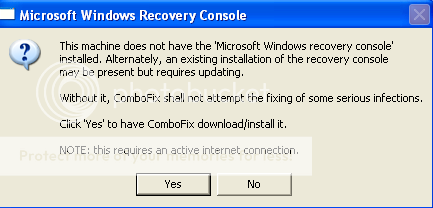
  • As part of it's process, ComboFix will check to see if the Microsoft Windows Recovery Console is installed. With malware infections being as they are today, it's strongly recommended to have this pre-installed on your machine before doing any malware removal. It will allow you to boot up into a special recovery/repair mode that will allow us to more easily help you should your computer have a problem after an attempted removal of malware.
  • Follow the prompts to allow ComboFix to download and install the Microsoft Windows Recovery Console, and when prompted, agree to the End-User License Agreement to install the Microsoft Windows Recovery Console.

**Please note: If the Microsoft Windows Recovery Console is already installed, ComboFix will continue it's malware removal procedures.

RCUpdate1.png

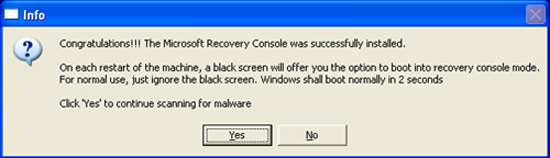
Once the Microsoft Windows Recovery Console is installed using ComboFix, you should see the following message:

RC2-1.png


Click on Yes, to continue scanning for malware.

When finished, it shall produce a log for you. Please include the C:\ComboFix.txt in your next reply.

Notes:

1.Do not mouse-click Combofix's window while it is running. That may cause it to stall.
2. ComboFix may reset a number of Internet Explorer's settings, including making I-E the default browser.
3. CF disconnects your machine from the internet. The connection is automatically restored before CF completes its run. If CF runs into difficulty and terminates prematurely, the connection can be manually restored by restarting your machine.[/b]

Please post back with
  • combofix log
How is the computer?

Thanks
 
I'm here, as I noted in my last post I was away for the weekend.
I will see how my PC works today and let you know.
Attached is the ComboFix Log
Thanks for the help.


ComboFix 12-06-15.06 - Jack 06/18/2012 7:15.1.2 - x86
Running from: c:\documents and settings\Jack\Desktop\jgh.exe
* Created a new restore point
.
.
((((((((((((((((((((((((((((((((((((((( Other Deletions )))))))))))))))))))))))))))))))))))))))))))))))))
.
.
c:\documents and settings\All Users\Application Data\TEMP
c:\documents and settings\Jack\WINDOWS
c:\windows\desktop
c:\windows\desktop\WatView.lnk
c:\windows\system32\SET68C.tmp
c:\windows\system32\SET68D.tmp
c:\windows\system32\SET68E.tmp
c:\windows\system32\UNWISE.EXE
E:\install.exe
.
.
((((((((((((((((((((((((( Files Created from 2012-05-18 to 2012-06-18 )))))))))))))))))))))))))))))))
.
.
2012-06-17 17:11 . 2012-06-17 17:11 56200 ----a-w- c:\documents and settings\All Users\Application Data\Microsoft\Microsoft Antimalware\Definition Updates\{0B2676B3-801E-47C9-A3BA-9AC3C9E9BB9B}\offreg.dll
2012-06-17 17:11 . 2012-06-17 17:11 29904 ----a-w- c:\documents and settings\All Users\Application Data\Microsoft\Microsoft Antimalware\Definition Updates\{0B2676B3-801E-47C9-A3BA-9AC3C9E9BB9B}\MpKsl3f62bde3.sys
2012-06-17 11:54 . 2012-05-15 06:43 6737808 ----a-w- c:\documents and settings\All Users\Application Data\Microsoft\Microsoft Antimalware\Definition Updates\{0B2676B3-801E-47C9-A3BA-9AC3C9E9BB9B}\mpengine.dll
2012-06-13 13:09 . 2010-04-14 01:10 54776 ----a-w- c:\windows\system32\drivers\MOBK.sys
2012-06-13 13:09 . 2012-06-13 13:09 -------- d-----w- c:\program files\McAfee Online Backup
2012-06-13 13:08 . 2011-04-11 19:29 64048 ----a-w- c:\windows\system32\drivers\McPvDrv.sys
2012-06-13 13:08 . 2012-06-13 13:08 -------- d-----w- c:\documents and settings\Jack\Local Settings\Application Data\McAfee Anti-Theft
2012-06-13 13:08 . 2012-02-22 18:29 9608 ----a-w- c:\windows\system32\drivers\mfeclnk.sys
2012-06-13 13:07 . 2012-02-22 18:29 89792 ----a-w- c:\windows\system32\drivers\mfetdi2k.sys
2012-06-13 13:07 . 2012-02-22 18:29 87656 ----a-w- c:\windows\system32\drivers\mferkdet.sys
2012-06-13 13:07 . 2012-02-22 18:29 83856 ----a-w- c:\windows\system32\drivers\mfendisk.sys
2012-06-13 13:07 . 2012-02-22 18:29 59456 ----a-w- c:\windows\system32\drivers\mfebopk.sys
2012-06-13 13:07 . 2012-02-22 18:29 57600 ----a-w- c:\windows\system32\drivers\cfwids.sys
2012-06-13 13:07 . 2012-02-22 18:29 340920 ----a-w- c:\windows\system32\drivers\mfefirek.sys
2012-06-13 13:07 . 2012-02-22 18:29 180848 ----a-w- c:\windows\system32\drivers\mfeavfk.sys
2012-06-13 13:07 . 2012-06-13 13:08 -------- d-----w- c:\program files\Common Files\Mcafee
2012-06-13 13:07 . 2012-06-13 13:08 -------- d-----w- c:\program files\McAfee
2012-06-13 12:53 . 2012-03-20 18:11 151880 ----a-w- c:\windows\system32\mfevtps.exe
2012-06-13 12:10 . 2012-06-13 12:10 -------- d-----w- c:\documents and settings\Jack\Application Data\pchc
2012-06-12 15:57 . 2012-06-12 15:57 -------- d-----w- c:\documents and settings\Jack\Application Data\FixZeroAccess
2012-06-11 14:41 . 2012-05-15 06:43 6737808 ----a-w- c:\documents and settings\All Users\Application Data\Microsoft\Microsoft Antimalware\Definition Updates\Backup\mpengine.dll
2012-06-11 14:41 . 2012-02-23 15:18 237072 ------w- c:\windows\system32\MpSigStub.exe
2012-06-11 14:37 . 2012-06-11 14:37 -------- d-----w- c:\program files\Microsoft Security Client
2012-06-07 12:18 . 2012-06-07 12:18 -------- d-----w- c:\windows\system32\wbem\Repository
2012-06-01 14:22 . 2008-04-14 05:15 26112 -c--a-w- c:\windows\system32\dllcache\usbser.sys
2012-06-01 14:22 . 2008-04-14 05:15 26112 ----a-w- c:\windows\system32\drivers\usbser.sys
2012-05-30 13:15 . 2012-05-30 13:48 -------- d-----w- c:\documents and settings\Jack\Local Settings\Application Data\Temp
2012-05-30 13:15 . 2012-05-30 13:15 -------- d-----w- c:\documents and settings\NetworkService\Local Settings\Application Data\Google
2012-05-30 13:10 . 2012-05-30 13:10 -------- d-----w- c:\documents and settings\LocalService\Local Settings\Application Data\Google
2012-05-30 13:10 . 2012-05-30 13:12 -------- d-----w- c:\documents and settings\Jack\Local Settings\Application Data\Google
2012-05-30 13:10 . 2012-05-30 13:11 -------- d-----w- c:\program files\Google
.
.
.
(((((((((((((((((((((((((((((((((((((((( Find3M Report ))))))))))))))))))))))))))))))))))))))))))))))))))))
.
2012-05-31 13:22 . 2008-04-14 04:41 599040 ----a-w- c:\windows\system32\crypt32.dll
2012-05-07 11:53 . 2012-04-11 15:28 419488 ----a-w- c:\windows\system32\FlashPlayerApp.exe
2012-05-07 11:53 . 2011-05-17 11:48 70304 ----a-w- c:\windows\system32\FlashPlayerCPLApp.cpl
2012-04-11 13:14 . 2008-04-13 23:54 2148352 ----a-w- c:\windows\system32\ntoskrnl.exe
2012-04-11 13:12 . 2008-04-14 00:00 1862272 ----a-w- c:\windows\system32\win32k.sys
2012-04-11 12:35 . 2008-04-14 00:01 2026496 ----a-w- c:\windows\system32\ntkrnlpa.exe
2012-03-21 01:44 . 2012-03-21 01:44 171064 ----a-w- c:\windows\system32\drivers\MpFilter.sys
2001-08-23 11:00 94784 --sh--w- c:\windows\twain.dll
2008-04-14 04:42 50688 --sh--w- c:\windows\twain_32.dll
2011-02-08 13:33 978944 --sha-w- c:\windows\system32\mfc42.dll
2008-04-14 04:42 57344 -csh--w- c:\windows\system32\msvcirt.dll
2008-04-14 04:42 413696 --sh--w- c:\windows\system32\msvcp60.dll
2008-04-14 04:42 343040 --sh--w- c:\windows\system32\msvcrt.dll
2010-12-20 17:32 551936 --sh--w- c:\windows\system32\oleaut32.dll
2008-04-14 04:42 84992 --sh--w- c:\windows\system32\olepro32.dll
2008-04-14 04:42 11776 --sh--w- c:\windows\system32\regsvr32.exe
.
.
((((((((((((((((((((((((((((((((((((( Reg Loading Points ))))))))))))))))))))))))))))))))))))))))))))))))))
.
.
*Note* empty entries & legit default entries are not shown
REGEDIT4
.
[HKEY_CURRENT_USER\Software\Microsoft\Internet Explorer\URLSearchHooks]
"{81017EA9-9AA8-4A6A-9734-7AF40E7D593F}"= "c:\program files\Yahoo!\Companion\Installs\cpn0\yt.dll" [2012-03-21 1523512]
.
[HKEY_CLASSES_ROOT\clsid\{81017ea9-9aa8-4a6a-9734-7af40e7d593f}]
[HKEY_CLASSES_ROOT\yt.YTNavAssistPlugin.1]
[HKEY_CLASSES_ROOT\TypeLib\{003028C2-EA1C-4676-A316-B5CB50917002}]
[HKEY_CLASSES_ROOT\yt.YTNavAssistPlugin]
.
[HKEY_LOCAL_MACHINE\software\microsoft\windows\currentversion\explorer\shelliconoverlayidentifiers\MOBK]
@="{3c3f3c1a-9153-7c05-f938-622e7003894d}"
[HKEY_CLASSES_ROOT\CLSID\{3c3f3c1a-9153-7c05-f938-622e7003894d}]
2010-04-14 01:11 2872120 ----a-w- c:\program files\McAfee Online Backup\MOBKshell.dll
.
[HKEY_LOCAL_MACHINE\software\microsoft\windows\currentversion\explorer\shelliconoverlayidentifiers\MOBK2]
@="{e6ea1d7d-144e-b977-98c4-84c53c1a69d0}"
[HKEY_CLASSES_ROOT\CLSID\{e6ea1d7d-144e-b977-98c4-84c53c1a69d0}]
2010-04-14 01:11 2872120 ----a-w- c:\program files\McAfee Online Backup\MOBKshell.dll
.
[HKEY_LOCAL_MACHINE\software\microsoft\windows\currentversion\explorer\shelliconoverlayidentifiers\MOBK3]
@="{b4caf489-1eec-c617-49ad-8d7088598c06}"
[HKEY_CLASSES_ROOT\CLSID\{b4caf489-1eec-c617-49ad-8d7088598c06}]
2010-04-14 01:11 2872120 ----a-w- c:\program files\McAfee Online Backup\MOBKshell.dll
.
[HKEY_CURRENT_USER\SOFTWARE\Microsoft\Windows\CurrentVersion\Run]
"RoboForm"="c:\program files\Siber Systems\AI RoboForm\RoboTaskBarIcon.exe" [2011-01-18 160328]
"SpybotSD TeaTimer"="c:\program files\Spybot - Search & Destroy\TeaTimer.exe" [2009-03-05 2260480]
.
[HKEY_LOCAL_MACHINE\SOFTWARE\Microsoft\Windows\CurrentVersion\Run]
"RTHDCPL"="RTHDCPL.EXE" [2009-08-24 18702336]
"QuickTime Task"="e:\program files\QuickTime\qttask.exe" [2011-10-24 421888]
"NvCplDaemon"="c:\windows\system32\NvCpl.dll" [2006-10-31 7634944]
"mcui_exe"="c:\program files\McAfee.com\Agent\mcagent.exe" [2012-03-22 1318816]
"McPvTray_exe"="c:\program files\McAfee\MAT\McPvTray.exe" [2011-04-08 419904]
.
c:\documents and settings\Jack\Start Menu\Programs\Startup\
Acrobat Assistant.lnk - e:\program files\Adobe\Acrobat 6.0\Distillr\acrotray.exe [2003-10-23 217194]
AdxProd.lnk - m:\xcel\AdxProd.xls [2012-6-18 796160]
Microsoft Office Outlook 2007.lnk - c:\windows\Installer\{90120000-0030-0000-0000-0000000FF1CE}\outicon.exe [2010-12-8 845584]
Outlook Express.lnk - c:\program files\Outlook Express\msimn.exe [2010-12-8 60416]
.
c:\documents and settings\All Users\Start Menu\Programs\Startup\
Acrobat Assistant.lnk - e:\program files\Adobe\Acrobat 6.0\Distillr\acrotray.exe [2003-10-23 217194]
CodeMeter Control Center.lnk - c:\program files\CodeMeter\Runtime\bin\CodeMeterCC.exe [2011-7-6 6904208]
Microsoft Office Outlook 2007.lnk.disabled [2012-6-11 2533]
.
[hkey_local_machine\software\microsoft\windows\currentversion\explorer\ShellExecuteHooks]
"{56F9679E-7826-4C84-81F3-532071A8BCC5}"= "c:\program files\Windows Desktop Search\MSNLNamespaceMgr.dll" [2009-05-25 304128]
"{A213B520-C6C2-11d0-AF9D-008029E1027E}"= "c:\program files\WinFax\WfxSeh32.Dll" [1998-07-27 38400]
.
[HKEY_LOCAL_MACHINE\SYSTEM\CurrentControlSet\Control\SafeBoot\Minimal\mcmscsvc]
@=""
.
[HKEY_LOCAL_MACHINE\SYSTEM\CurrentControlSet\Control\SafeBoot\Minimal\MCODS]
@=""
.
[HKEY_LOCAL_MACHINE\SYSTEM\CurrentControlSet\Control\SafeBoot\Minimal\MsMpSvc]
@="Service"
.
[HKLM\~\startupfolder\C:^Documents and Settings^All Users^Start Menu^Programs^Startup^Acrobat Assistant.lnk]
path=c:\documents and settings\All Users\Start Menu\Programs\Startup\Acrobat Assistant.lnk
backup=c:\windows\pss\Acrobat Assistant.lnkCommon Startup
.
[HKLM\~\startupfolder\C:^Documents and Settings^All Users^Start Menu^Programs^Startup^Windows Search.lnk]
path=c:\documents and settings\All Users\Start Menu\Programs\Startup\Windows Search.lnk
backup=c:\windows\pss\Windows Search.lnkCommon Startup
.
[HKEY_LOCAL_MACHINE\software\microsoft\shared tools\msconfig\startupreg\AGRSMMSG]
2007-09-27 07:17 90112 -c----w- c:\windows\AGRSMMSG.exe
.
[HKEY_LOCAL_MACHINE\software\microsoft\shared tools\msconfig\startupreg\GrooveMonitor]
2009-02-27 00:36 30040 -c--a-w- c:\program files\Microsoft Office\Office12\GrooveMonitor.exe
.
[HKEY_CURRENT_USER\software\microsoft\windows\currentversion\run-]
"SpybotSD TeaTimer"=c:\program files\Spybot - Search & Destroy\TeaTimer.exe
"Messenger (Yahoo!)"="c:\progra~1\Yahoo!\MESSEN~1\YahooMessenger.exe" -quiet
.
[HKEY_LOCAL_MACHINE\software\microsoft\windows\currentversion\run-]
"CXMon"="c:\program files\Hewlett-Packard\PhotoSmart\Photo Imaging\Hpi_Monitor.exe"
"HPHmon03"=c:\windows\system32\hphmon03.exe
"Iomega Drive Icons"=e:\program files\Iomega\DriveIcons\ImgIcon.exe
"NvCplDaemon"=RUNDLL32.EXE c:\windows\system32\NvCpl.dll,NvStartup
"NvMediaCenter"=RUNDLL32.EXE c:\windows\system32\NvMcTray.dll,NvTaskbarInit
"nwiz"=nwiz.exe /install
"QuickTime Task"="c:\program files\QuickTime\qttask.exe" -atboottime
"SunJavaUpdateSched"="c:\program files\Common Files\Java\Java Update\jusched.exe"
"GrooveMonitor"="c:\program files\Microsoft Office\Office12\GrooveMonitor.exe"
"MSC"="c:\program files\Microsoft Security Client\msseces.exe" -hide -runkey
"UserFaultCheck"=%systemroot%\system32\dumprep 0 -u
.
[HKEY_LOCAL_MACHINE\software\microsoft\security center\Monitoring\McAfeeAntiVirus]
"DisableMonitoring"=dword:00000001
.
[HKEY_LOCAL_MACHINE\software\microsoft\security center\Monitoring\McAfeeFirewall]
"DisableMonitoring"=dword:00000001
.
R2 clr_optimization_v4.0.30319_32;Microsoft .NET Framework NGEN v4.0.30319_X86;c:\windows\Microsoft.NET\Framework\v4.0.30319\mscorsvw.exe [2010-03-18 130384]
R2 gupdate;Google Update Service (gupdate);c:\program files\Google\Update\GoogleUpdate.exe [2012-05-30 136176]
R3 AdobeFlashPlayerUpdateSvc;Adobe Flash Player Update Service;c:\windows\system32\Macromed\Flash\FlashPlayerUpdateService.exe [2012-05-07 257696]
R3 Ambfilt;Ambfilt;c:\windows\system32\drivers\Ambfilt.sys [2008-08-06 1684736]
R3 gupdatem;Google Update Service (gupdatem);c:\program files\Google\Update\GoogleUpdate.exe [2012-05-30 136176]
R3 mfendisk;McAfee Core NDIS Intermediate Filter;c:\windows\system32\DRIVERS\mfendisk.sys [2012-02-22 83856]
R3 mferkdet;McAfee Inc. mferkdet;c:\windows\system32\drivers\mferkdet.sys [2012-02-22 87656]
R3 PaUSB;Panasonic LightPix USB Driver Ver.1.0;c:\windows\system32\Drivers\pausb.sys [2004-12-04 12416]
R3 WinRM;Windows Remote Management (WS-Management);c:\windows\system32\svchost.exe [2008-04-14 14336]
R3 WPFFontCache_v0400;Windows Presentation Foundation Font Cache 4.0.0.0;c:\windows\Microsoft.NET\Framework\v4.0.30319\WPF\WPFFontCache_v0400.exe [2010-03-18 753504]
S0 McPvDrv;McPvDrv Driver;c:\windows\system32\drivers\McPvDrv.sys [2011-04-11 64048]
S0 ppa;Iomega Parallel Port Filter Driver;c:\windows\system32\DRIVERS\ppa.sys [2001-08-17 17792]
S1 BIOS;BIOS;c:\windows\system32\drivers\BIOS.sys [2005-03-16 13696]
S1 mfetdi2k;McAfee Inc. mfetdi2k;c:\windows\system32\drivers\mfetdi2k.sys [2012-02-22 89792]
S1 MOBKFilter;MOBKFilter;c:\windows\system32\DRIVERS\MOBK.sys [2010-04-14 54776]
S1 MpKsl3f62bde3;MpKsl3f62bde3;c:\documents and settings\All Users\Application Data\Microsoft\Microsoft Antimalware\Definition Updates\{0B2676B3-801E-47C9-A3BA-9AC3C9E9BB9B}\MpKsl3f62bde3.sys [2012-06-17 29904]
S2 CodeMeter.exe;CodeMeter Runtime Server;c:\program files\CodeMeter\Runtime\bin\CodeMeter.exe [2011-07-06 2304912]
S2 hasplms;Sentinel HASP License Manager;c:\windows\system32\hasplms.exe -run [x]
S2 HLServer;HL-Server;c:\windows\system32\HLS32SVC.EXE [2003-12-03 327680]
S2 McAfee SiteAdvisor Service;McAfee SiteAdvisor Service;c:\program files\Common Files\Mcafee\McSvcHost\McSvHost.exe [2011-01-27 214904]
S2 McMPFSvc;McAfee Personal Firewall Service;c:\program files\Common Files\Mcafee\McSvcHost\McSvHost.exe [2011-01-27 214904]
S2 McNaiAnn;McAfee VirusScan Announcer;c:\program files\Common Files\Mcafee\McSvcHost\McSvHost.exe [2011-01-27 214904]
S2 mfefire;McAfee Firewall Core Service;c:\program files\Common Files\McAfee\SystemCore\\mfefire.exe [2012-03-20 161632]
S2 mfevtp;McAfee Validation Trust Protection Service;c:\windows\system32\mfevtps.exe [2012-03-20 151880]
S2 MOBKbackup;McAfee Online Backup;c:\program files\McAfee Online Backup\MOBKbackup.exe [2010-04-14 229688]
S3 cfwids;McAfee Inc. cfwids;c:\windows\system32\drivers\cfwids.sys [2012-02-22 57600]
S3 Dot4Usb HPH09;Dot4Usb HPH09;c:\windows\system32\drivers\hphius09.sys [2001-10-25 18864]
S3 mfefirek;McAfee Inc. mfefirek;c:\windows\system32\drivers\mfefirek.sys [2012-02-22 340920]
S3 mfendiskmp;mfendiskmp;c:\windows\system32\DRIVERS\mfendisk.sys [2012-02-22 83856]
S3 NmPar;PCI Parallel Port;c:\windows\system32\DRIVERS\NmPar.sys [2008-12-24 80256]
S3 nmserial;PCI Serial Port;c:\windows\system32\DRIVERS\nmserial.sys [2008-12-16 70016]
.
.
--- Other Services/Drivers In Memory ---
.
*NewlyCreated* - MPKSL3F62BDE3
*NewlyCreated* - MPKSL658C6B1A
*Deregistered* - mfeavfk01
*Deregistered* - MpKsl658c6b1a
.
[HKEY_LOCAL_MACHINE\software\microsoft\windows nt\currentversion\svchost]
WINRM REG_MULTI_SZ WINRM
.
Contents of the 'Scheduled Tasks' folder
.
2012-06-08 c:\windows\Tasks\Adobe Acrobat 6.0 Standard.job
- c:\documents and settings\All Users\Start Menu\Programs\Adobe Acrobat 6.0 Standard.lnk [2010-12-09 11:26]
.
2012-06-18 c:\windows\Tasks\Adobe Flash Player Updater.job
- c:\windows\system32\Macromed\Flash\FlashPlayerUpdateService.exe [2012-04-11 11:53]
.
2012-06-08 c:\windows\Tasks\AdxProd.job
- m:\xcel\AdxProd.xls [2012-06-18 12:19]
.
2012-06-04 c:\windows\Tasks\Disk Cleanup.job
- c:\windows\system32\cleanmgr.exe [2008-04-14 04:42]
.
2012-06-17 c:\windows\Tasks\GoogleUpdateTaskMachineCore.job
- c:\program files\Google\Update\GoogleUpdate.exe [2012-05-30 13:10]
.
2012-06-18 c:\windows\Tasks\GoogleUpdateTaskMachineUA.job
- c:\program files\Google\Update\GoogleUpdate.exe [2012-05-30 13:10]
.
2012-06-08 c:\windows\Tasks\OGALogon.job
- c:\windows\system32\OGAEXEC.exe [2009-08-03 21:07]
.
2012-06-08 c:\windows\Tasks\Outlook Express.job
- c:\progra~1\OUTLOO~1\msimn.exe [2010-12-09 04:42]
.
.
------- Supplementary Scan -------
.
uStart Page = hxxp://www.yahoo.com/
IE: Customize Menu - file://c:\program files\Siber Systems\AI RoboForm\RoboFormComCustomizeIEMenu.html
IE: E&xport to Microsoft Excel - c:\progra~1\MICROS~2\Office12\EXCEL.EXE/3000
IE: Fill Forms - file://c:\program files\Siber Systems\AI RoboForm\RoboFormComFillForms.html
IE: Google Sidewiki... - c:\program files\Google\Google Toolbar\Component\GoogleToolbarDynamic_mui_en_6CE5017F567343CA.dll/cmsidewiki.html
IE: RoboForm Toolbar - file://c:\program files\Siber Systems\AI RoboForm\RoboFormComShowToolbar.html
IE: Save Forms - file://c:\program files\Siber Systems\AI RoboForm\RoboFormComSavePass.html
TCP: DhcpNameServer = 192.168.1.1
.
.
------- File Associations -------
.
.scr=DWGTrueViewScriptFile
.
- - - - ORPHANS REMOVED - - - -
.
AddRemove-Hardlock Device Drivers - c:\windows\system32\UNWISE.EXE
AddRemove-Hardlock Server - c:\windows\system32\UNWISE.EXE
.
.
.
**************************************************************************
.
catchme 0.3.1398 W2K/XP/Vista - rootkit/stealth malware detector by Gmer, http://www.gmer.net
Rootkit scan 2012-06-18 07:21
Windows 5.1.2600 Service Pack 3 NTFS
.
scanning hidden processes ...
.
scanning hidden autostart entries ...
.
scanning hidden files ...
.
scan completed successfully
hidden files: 0
.
**************************************************************************
.
Stealth MBR rootkit/Mebroot/Sinowal/TDL4 detector 0.4.2 by Gmer, http://www.gmer.net
Windows 5.1.2600 Disk: ST350041 rev.CC38 -> Harddisk1\DR1 -> \Device\Scsi\nvgts1Port2Path0Target0Lun0
.
device: opened successfully
user: MBR read successfully
kernel: MBR read successfully
user != kernel MBR !!!
.
**************************************************************************
.
[HKEY_LOCAL_MACHINE\System\ControlSet002\Services\Iomega Activity Disk2]
"ImagePath"="\"\""
.
Completion time: 2012-06-18 07:23:22
ComboFix-quarantined-files.txt 2012-06-18 12:23
.
Pre-Run: 475,544,244,224 bytes free
Post-Run: 476,588,912,640 bytes free
.
WindowsXP-KB310994-SP2-Home-BootDisk-ENU.exe
[boot loader]
timeout=2
default=multi(0)disk(0)rdisk(0)partition(1)\WINDOWS
[operating systems]
c:\cmdcons\BOOTSECT.DAT="Microsoft Windows Recovery Console" /cmdcons
UnsupportedDebug="do not select this" /debug
multi(0)disk(0)rdisk(0)partition(1)\WINDOWS="Microsoft Windows XP Professional" /noexecute=optin /fastdetect /usepmtimer
.
- - End Of File - - 1669E0051B8038AC67BE328D8B662C4B
 
My PC seems to be running good now. Allot faster with programs and the Internet is back to normal. The only quirk I have is when I got infected it blocked the Window Security with the Firewall and Restore would not start. Well Restore still will not start and it still said: “System Restore is not protecting your computer. Please restart your computer, and then run System Restore again.”
I rebooted a couple times with no luck. I do see that CF added a Restore
when you do a F8 start but not sure if one in the same.

Any thoughts there?
 
Hi jm1223,

Sorry about that, I forgot you mentiond it.

Please download Farbar Service Scanner and save it to the Desktop.
  • Check the boxes beside these items
    • Internet Services
    • System Restore
    • Windows Firewall
    • Security Center/Action Center
    • Windows Updates
  • Press "Scan".
  • It will create a log (FSS.txt) in the same directory the tool is run.
  • Please copy and paste the log to your reply.

Please post back with the
  • FSS log
 
Here's the FSS Report.
Thanks again.

Farbar Service Scanner Version: 19-06-2012
Ran by Jack (administrator) on 19-06-2012 at 06:50:29
Running from "C:\Documents and Settings\Jack\Desktop"
Microsoft Windows XP Professional Service Pack 3 (X86)
Boot Mode: Normal
****************************************************************

Internet Services:
============
Dnscache Service is not running. Checking service configuration:
Checking Start type: ATTENTION!=====> Unable to open Dnscache registry key. The service key does not exist.
Checking ImagePath: ATTENTION!=====> Unable to open Dnscache registry key. The service key does not exist.
Checking ServiceDll: ATTENTION!=====> Unable to open Dnscache registry key. The service key does not exist.


Connection Status:
==============
Localhost is accessible.
LAN connected.
Google IP is accessible.
Google.com is accessible.
Yahoo IP is accessible.
Yahoo.com is accessible.


Windows Firewall:
=============
sharedaccess Service is not running. Checking service configuration:
The start type of sharedaccess service is OK.
The ImagePath of sharedaccess service is OK.
The ServiceDll of sharedaccess service is OK.

netman Service is not running. Checking service configuration:
Checking Start type: ATTENTION!=====> Unable to open netman registry key. The service key does not exist.
Checking ImagePath: ATTENTION!=====> Unable to open netman registry key. The service key does not exist.
Checking ServiceDll: ATTENTION!=====> Unable to open netman registry key. The service key does not exist.


Firewall Disabled Policy:
==================


System Restore:
============
Srservice Service is not running. Checking service configuration:
The start type of Srservice service is OK.
The ImagePath of Srservice service is OK.
The ServiceDll of Srservice service is OK.


System Restore Disabled Policy:
========================


Security Center:
============

Windows Update:
============
EventSystem Service is not running. Checking service configuration:
Checking Start type: ATTENTION!=====> Unable to open EventSystem registry key. The service key does not exist.
Checking ImagePath: ATTENTION!=====> Unable to open EventSystem registry key. The service key does not exist.
Checking ServiceDll: ATTENTION!=====> Unable to open EventSystem registry key. The service key does not exist.


Windows Autoupdate Disabled Policy:
============================


File Check:
========
C:\WINDOWS\system32\dhcpcsvc.dll => MD5 is legit
C:\WINDOWS\system32\Drivers\afd.sys => MD5 is legit
C:\WINDOWS\system32\Drivers\netbt.sys => MD5 is legit
C:\WINDOWS\system32\Drivers\tcpip.sys => MD5 is legit
C:\WINDOWS\system32\Drivers\ipsec.sys => MD5 is legit
C:\WINDOWS\system32\dnsrslvr.dll => MD5 is legit
C:\WINDOWS\system32\ipnathlp.dll => MD5 is legit
C:\WINDOWS\system32\netman.dll => MD5 is legit
C:\WINDOWS\system32\wbem\WMIsvc.dll => MD5 is legit
C:\WINDOWS\system32\srsvc.dll => MD5 is legit
C:\WINDOWS\system32\Drivers\sr.sys => MD5 is legit
C:\WINDOWS\system32\wscsvc.dll => MD5 is legit
C:\WINDOWS\system32\wbem\WMIsvc.dll => MD5 is legit
C:\WINDOWS\system32\wuauserv.dll => MD5 is legit
C:\WINDOWS\system32\qmgr.dll => MD5 is legit
C:\WINDOWS\system32\es.dll => MD5 is legit
C:\WINDOWS\system32\cryptsvc.dll => MD5 is legit
C:\WINDOWS\system32\svchost.exe => MD5 is legit
C:\WINDOWS\system32\rpcss.dll => MD5 is legit
C:\WINDOWS\system32\services.exe => MD5 is legit


**** End of log ****
 
Hi jm1223,

That showed some of the problems. Let's see if there are any others before we attempt to fix this.

I need you to create a batch file.

Open a new Notepad session
  • Click the Start button, click run
  • in the run box type notepad
  • click ok
  • In the notepad, Click "Format" and be certain that Word Wrap is not checked.
  • Copy and paste all the text in the code box below into the Notepad.
Do Not copy the word CODE

Code:
@echo off
swreg query hklm\system\currentcontrolset\services /s |(
SED -r "/^HK|^ +ImagePath.*-k netsvcs/I!d" |(
SED -r ":a; $!N;s/\n.*\t.*/\t/;ta;P;D" |(
SED -r "/.*\\(.*)\t/!d; s//\1/"
)))>net.txt
Start Notepad Log.txt

In the notepad
  • Click File, Save as..., and set the Save in to your Desktop
  • In the filename box, type (including quotation marks) as the filename: "net.bat"
  • Click save

You will have a new file on your desktop called myfix.bat with an icon that looks like this
index.php


Double click net.bat to run it. A notepad named net.txt will open, please post it's contents.
 
I found another issue today which is other PC's can't see this PC's on my network and the Network tools won't run. But I can see the other PC's and open files also I can print to my network printer.

Here's the net.txt:

AppMgmt
AudioSrv
BITS
Browser
CryptSvc
Dhcp
dmserver
ERSvc
FastUserSwitchingCompatibility
helpsvc
HidServ
hkmsvc
LanmanServer
lanmanworkstation
Messenger
napagent
Nla
NtmsSvc
RasAuto
RasMan
RemoteAccess
Schedule
seclogon
SharedAccess
ShellHWDetection
srservice
TapiSrv
Themes
TrkWks
W32Time
winmgmt
Wmi
wscsvc
wuauserv
WZCSVC
xmlprov
 
jm1223,

Please download DDS and transfer it to the sisck computer's desktop.
  • Disable any script blocking protection
  • Double click dds.scr to run the tool.
  • When done, DDS.txt will open.An additional log called Attach.txt should appear minimized on the task bar.
  • Save both reports to your desktop before closing the DDS window.

Do the same with SystemLook from one of the links below
Download Mirror #1
Download Mirror #2

  • Double-click SystemLook.exe to run it.
  • Copy the content of the following codebox into the main textfield
  • Do not copy the word CODE , please note the script starts with the :
    Code:
    :reg
    HKEY_LOCAL_MACHINE\SOFTWARE\Microsoft\Windows NT\CurrentVersion\SvcHost
  • Click the Look button to start the scan.
  • When finished, a notepad window will open with the results of the scan. Please post this log in your next reply.
Note: The log can also be found on your Desktop entitled SystemLook.txt
 
I wasn't sure if you needed the McAfee and TeaTimer turned off. So they are on.

Here's the DDS Report with the attached Attach.zip. and the SystemLook Report:

.
DDS (Ver_2011-08-26.01) - NTFSx86
Internet Explorer: 8.0.6001.18702
Run by Jack at 7:34:43 on 2012-06-20
Microsoft Windows XP Professional 5.1.2600.3.1252.1.1033.18.3039.2347 [GMT -5:00]
.
AV: Microsoft Security Essentials *Enabled/Updated* {EDB4FA23-53B8-4AFA-8C5D-99752CCA7095}
AV: McAfee Anti-Virus and Anti-Spyware *Enabled/Updated* {84B5EE75-6421-4CDE-A33A-DD43BA9FAD83}
FW: McAfee Firewall *Enabled*
.
============== Running Processes ===============
.
C:\WINDOWS\system32\svchost.exe -k DcomLaunch
svchost.exe
C:\Program Files\Microsoft Security Client\MsMpEng.exe
C:\WINDOWS\System32\svchost.exe -k netsvcs
svchost.exe
C:\WINDOWS\system32\spoolsv.exe
C:\WINDOWS\System32\spool\DRIVERS\W32X86\3\OPHALDCS.EXE
C:\WINDOWS\system32\hasplms.exe
C:\WINDOWS\system32\HLS32SVC.EXE
C:\PROGRA~1\Iomega\System32\AppServices.exe
C:\Program Files\Java\jre6\bin\jqs.exe
C:\Program Files\Common Files\Mcafee\McSvcHost\McSvHost.exe
C:\WINDOWS\system32\mfevtps.exe
C:\Program Files\McAfee Online Backup\MOBKbackup.exe
C:\WINDOWS\system32\nvsvc32.exe
C:\Program Files\Dantz\Retrospect 7.0\retrorun.exe
C:\WINDOWS\system32\svchost.exe -k imgsvc
C:\Program Files\Yahoo!\SoftwareUpdate\YahooAUService.exe
C:\Program Files\Iomega\AutoDisk\ADService.exe
C:\Program Files\CodeMeter\Runtime\bin\CodeMeter.exe
C:\Program Files\Common Files\McAfee\SystemCore\mfefire.exe
C:\WINDOWS\system32\SearchIndexer.exe
C:\WINDOWS\Explorer.EXE
C:\WINDOWS\system32\rundll32.exe
C:\WINDOWS\RTHDCPL.EXE
C:\Program Files\McAfee.com\Agent\mcagent.exe
C:\Program Files\McAfee\MAT\McPvTray.exe
C:\Program Files\Siber Systems\AI RoboForm\RoboTaskBarIcon.exe
C:\Program Files\Spybot - Search & Destroy\TeaTimer.exe
C:\WINDOWS\system32\ctfmon.exe
E:\Program Files\Adobe\Acrobat 6.0\Distillr\acrotray.exe
C:\Program Files\CodeMeter\Runtime\bin\CodeMeterCC.exe
E:\Program Files\Adobe\Acrobat 6.0\Acrobat\Acrobat.exe
C:\WINDOWS\system32\WISPTIS.EXE
C:\Program Files\Microsoft Office\Office12\EXCEL.EXE
C:\Program Files\Microsoft Office\Office12\OUTLOOK.EXE
C:\Program Files\Outlook Express\msimn.exe
C:\Program Files\Common Files\McAfee\SystemCore\mcshield.exe
C:\Program Files\Internet Explorer\iexplore.exe
C:\WINDOWS\system32\SearchProtocolHost.exe
.
============== Pseudo HJT Report ===============
.
uStart Page = hxxp://www.yahoo.com/
uURLSearchHooks: YTNavAssistPlugin Class: {81017ea9-9aa8-4a6a-9734-7af40e7d593f} - c:\program files\yahoo!\companion\installs\cpn0\yt.dll
BHO: &Yahoo! Toolbar Helper: {02478d38-c3f9-4efb-9b51-7695eca05670} - c:\program files\yahoo!\companion\installs\cpn0\yt.dll
BHO: AcroIEHlprObj Class: {06849e9f-c8d7-4d59-b87d-784b7d6be0b3} - e:\program files\adobe\acrobat 6.0\acrobat\activex\AcroIEHelper.dll
BHO: Adobe PDF Link Helper: {18df081c-e8ad-4283-a596-fa578c2ebdc3} - c:\program files\common files\adobe\acrobat\activex\AcroIEHelperShim.dll
BHO: Spybot-S&D IE Protection: {53707962-6f74-2d53-2644-206d7942484f} - c:\progra~1\spybot~1\SDHelper.dll
BHO: RoboForm: {724d43a9-0d85-11d4-9908-00400523e39a} - c:\program files\siber systems\ai roboform\roboform.dll
BHO: Groove GFS Browser Helper: {72853161-30c5-4d22-b7f9-0bbc1d38a37e} - c:\program files\microsoft office\office12\GrooveShellExtensions.dll
BHO: scriptproxy: {7db2d5a0-7241-4e79-b68d-6309f01c5231} - c:\program files\common files\mcafee\systemcore\ScriptSn.20120613115349.dll
BHO: Google Toolbar Helper: {aa58ed58-01dd-4d91-8333-cf10577473f7} - c:\program files\google\google toolbar\GoogleToolbar_32.dll
BHO: AcroIEToolbarHelper Class: {ae7cd045-e861-484f-8273-0445ee161910} - e:\program files\adobe\acrobat 6.0\acrobat\AcroIEFavClient.dll
BHO: Google Toolbar Notifier BHO: {af69de43-7d58-4638-b6fa-ce66b5ad205d} - c:\program files\google\googletoolbarnotifier\5.7.7227.1100\swg.dll
BHO: McAfee SiteAdvisor BHO: {b164e929-a1b6-4a06-b104-2cd0e90a88ff} - c:\progra~1\mcafee\sitead~1\mcieplg.dll
BHO: Java(tm) Plug-In 2 SSV Helper: {dbc80044-a445-435b-bc74-9c25c1c588a9} - c:\program files\java\jre6\bin\jp2ssv.dll
BHO: JQSIEStartDetectorImpl Class: {e7e6f031-17ce-4c07-bc86-eabfe594f69c} - c:\program files\java\jre6\lib\deploy\jqs\ie\jqs_plugin.dll
BHO: SingleInstance Class: {fdad4da1-61a2-4fd8-9c17-86f7ac245081} - c:\progra~1\yahoo!\companion\installs\cpn\YTSingleInstance.dll
TB: Adobe PDF: {47833539-d0c5-4125-9fa8-0819e2eaac93} - e:\program files\adobe\acrobat 6.0\acrobat\AcroIEFavClient.dll
TB: Yahoo! Toolbar: {ef99bd32-c1fb-11d2-892f-0090271d4f88} - c:\program files\yahoo!\companion\installs\cpn0\yt.dll
TB: &RoboForm: {724d43a0-0d85-11d4-9908-00400523e39a} - c:\program files\siber systems\ai roboform\roboform.dll
TB: Google Toolbar: {2318c2b1-4965-11d4-9b18-009027a5cd4f} - c:\program files\google\google toolbar\GoogleToolbar_32.dll
TB: McAfee SiteAdvisor Toolbar: {0ebbbe48-bad4-4b4c-8e5a-516abecae064} - c:\progra~1\mcafee\sitead~1\mcieplg.dll
EB: Adobe PDF: {182ec0be-5110-49c8-a062-beb1d02a220b} - e:\program files\adobe\acrobat 6.0\acrobat\AcroIEFavClient.dll
uRun: [RoboForm] "c:\program files\siber systems\ai roboform\RoboTaskBarIcon.exe"
uRun: [SpybotSD TeaTimer] c:\program files\spybot - search & destroy\TeaTimer.exe
uRun: [ctfmon.exe] c:\windows\system32\ctfmon.exe
mRun: [RTHDCPL] RTHDCPL.EXE
mRun: [QuickTime Task] "e:\program files\quicktime\qttask.exe" -atboottime
mRun: [NvCplDaemon] RUNDLL32.EXE c:\windows\system32\NvCpl.dll,NvStartup
mRun: [mcui_exe] "c:\program files\mcafee.com\agent\mcagent.exe" /runkey
mRun: [McPvTray_exe] "c:\program files\mcafee\mat\McPvTray.exe"
StartupFolder: c:\docume~1\jack\startm~1\programs\startup\acroba~1.lnk - e:\program files\adobe\acrobat 6.0\distillr\acrotray.exe
StartupFolder: c:\docume~1\jack\startm~1\programs\startup\adobea~1.lnk - e:\program files\adobe\acrobat 6.0\acrobat\Acrobat.exe
StartupFolder: c:\docume~1\jack\startm~1\programs\startup\adxprod.lnk - m:\xcel\AdxProd.xls
StartupFolder: c:\docume~1\jack\startm~1\programs\startup\micros~1.lnk - c:\windows\installer\{90120000-0030-0000-0000-0000000ff1ce}\outicon.exe
StartupFolder: c:\docume~1\jack\startm~1\programs\startup\outloo~1.lnk - c:\program files\outlook express\msimn.exe
StartupFolder: c:\docume~1\alluse~1\startm~1\programs\startup\acroba~1.lnk - e:\program files\adobe\acrobat 6.0\distillr\acrotray.exe
StartupFolder: c:\docume~1\alluse~1\startm~1\programs\startup\codeme~1.lnk - c:\program files\codemeter\runtime\bin\CodeMeterCC.exe
StartupFolder: c:\documents and settings\all users\start menu\programs\startup\Microsoft Office Outlook 2007.lnk.disabled
IE: Customize Menu - file://c:\program files\siber systems\ai roboform\RoboFormComCustomizeIEMenu.html
IE: E&xport to Microsoft Excel - c:\progra~1\micros~2\office12\EXCEL.EXE/3000
IE: Fill Forms - file://c:\program files\siber systems\ai roboform\RoboFormComFillForms.html
IE: Google Sidewiki... - c:\program files\google\google toolbar\component\GoogleToolbarDynamic_mui_en_6CE5017F567343CA.dll/cmsidewiki.html
IE: RoboForm Toolbar - file://c:\program files\siber systems\ai roboform\RoboFormComShowToolbar.html
IE: Save Forms - file://c:\program files\siber systems\ai roboform\RoboFormComSavePass.html
IE: {320AF880-6646-11D3-ABEE-C5DBF3571F46} - c:\program files\siber systems\ai roboform\RoboFormComFillForms.html
IE: {320AF880-6646-11D3-ABEE-C5DBF3571F49} - c:\program files\siber systems\ai roboform\RoboFormComSavePass.html
IE: {724d43aa-0d85-11d4-9908-00400523e39a} - c:\program files\siber systems\ai roboform\RoboFormComShowToolbar.html
IE: {e2e2dd38-d088-4134-82b7-f2ba38496583} - %windir%\Network Diagnostic\xpnetdiag.exe
IE: {FB5F1910-F110-11d2-BB9E-00C04F795683} - c:\program files\messenger\msmsgs.exe
IE: {2670000A-7350-4f3c-8081-5663EE0C6C49} - {48E73304-E1D6-4330-914C-F5F514E3486C} - c:\progra~1\micros~2\office12\ONBttnIE.dll
IE: {92780B25-18CC-41C8-B9BE-3C9C571A8263} - {FF059E31-CC5A-4E2E-BF3B-96E929D65503} - c:\progra~1\micros~2\office12\REFIEBAR.DLL
IE: {DFB852A3-47F8-48C4-A200-58CAB36FD2A2} - {53707962-6F74-2D53-2644-206D7942484F} - c:\progra~1\spybot~1\SDHelper.dll
DPF: {17492023-C23A-453E-A040-C7C580BBF700} - hxxp://go.microsoft.com/fwlink/?linkid=39204
TCP: DhcpNameServer = 192.168.1.1
TCP: Interfaces\{F6C99A06-8442-4196-B396-5CA6B6360D60} : DhcpNameServer = 192.168.1.1
Filter: application/x-mfe-ipt - {3EF5086B-5478-4598-A054-786C45D75692} - c:\progra~1\mcafee\msc\McSnIePl.dll
Handler: dssrequest - {5513F07E-936B-4E52-9B00-067394E91CC5} - c:\progra~1\mcafee\sitead~1\McIEPlg.dll
Handler: grooveLocalGWS - {88FED34C-F0CA-4636-A375-3CB6248B04CD} - c:\program files\microsoft office\office12\GrooveSystemServices.dll
Handler: sacore - {5513F07E-936B-4E52-9B00-067394E91CC5} - c:\progra~1\mcafee\sitead~1\McIEPlg.dll
SSODL: WPDShServiceObj - {AAA288BA-9A4C-45B0-95D7-94D524869DB5} - c:\windows\system32\WPDShServiceObj.dll
SEH: Groove GFS Stub Execution Hook: {b5a7f190-dda6-4420-b3ba-52453494e6cd} - c:\program files\microsoft office\office12\GrooveShellExtensions.dll
SEH: Windows Desktop Search Namespace Manager: {56f9679e-7826-4c84-81f3-532071a8bcc5} - c:\program files\windows desktop search\MSNLNamespaceMgr.dll
SEH: WinFax PRO IShellExecuteHook: {a213b520-c6c2-11d0-af9d-008029e1027e} - c:\program files\winfax\WfxSeh32.Dll
Hosts: 127.0.0.1 www.spywareinfo.com
.
============= SERVICES / DRIVERS ===============
.
R0 McPvDrv;McPvDrv Driver;c:\windows\system32\drivers\McPvDrv.sys [2012-6-13 64048]
R0 mfehidk;McAfee Inc. mfehidk;c:\windows\system32\drivers\mfehidk.sys [2012-2-22 464304]
R0 MpFilter;Microsoft Malware Protection Driver;c:\windows\system32\drivers\MpFilter.sys [2012-3-20 171064]
R0 ppa;Iomega Parallel Port Filter Driver;c:\windows\system32\drivers\ppa.sys [2010-12-15 17792]
R1 BIOS;BIOS;c:\windows\system32\drivers\BIOS.sys [2010-12-8 13696]
R1 mfetdi2k;McAfee Inc. mfetdi2k;c:\windows\system32\drivers\mfetdi2k.sys [2012-6-13 89792]
R1 MOBKFilter;MOBKFilter;c:\windows\system32\drivers\MOBK.sys [2012-6-13 54776]
R1 MpKsl67e1f605;MpKsl67e1f605;c:\documents and settings\all users\application data\microsoft\microsoft antimalware\definition updates\{6c8a4ff0-8981-456a-81fc-f7efc3f79402}\MpKsl67e1f605.sys [2012-6-20 29904]
R2 CodeMeter.exe;CodeMeter Runtime Server;c:\program files\codemeter\runtime\bin\CodeMeter.exe [2011-7-6 2304912]
R2 hasplms;Sentinel HASP License Manager;c:\windows\system32\hasplms.exe -run --> c:\windows\system32\hasplms.exe -run [?]
R2 HLServer;HL-Server;c:\windows\system32\HLS32SVC.EXE [2010-12-9 327680]
R2 McAfee SiteAdvisor Service;McAfee SiteAdvisor Service;c:\program files\common files\mcafee\mcsvchost\McSvHost.exe [2012-6-13 214904]
R2 McMPFSvc;McAfee Personal Firewall Service;c:\program files\common files\mcafee\mcsvchost\McSvHost.exe [2012-6-13 214904]
R2 McNaiAnn;McAfee VirusScan Announcer;c:\program files\common files\mcafee\mcsvchost\McSvHost.exe [2012-6-13 214904]
R2 McProxy;McAfee Proxy Service;c:\program files\common files\mcafee\mcsvchost\McSvHost.exe [2012-6-13 214904]
R2 McShield;McAfee McShield;c:\program files\common files\mcafee\systemcore\mcshield.exe [2012-6-13 166288]
R2 mfefire;McAfee Firewall Core Service;c:\program files\common files\mcafee\systemcore\mfefire.exe [2012-6-13 161632]
R2 mfevtp;McAfee Validation Trust Protection Service;c:\windows\system32\mfevtps.exe [2012-6-13 151880]
R2 MOBKbackup;McAfee Online Backup;c:\program files\mcafee online backup\MOBKbackup.exe [2010-4-13 229688]
R3 cfwids;McAfee Inc. cfwids;c:\windows\system32\drivers\cfwids.sys [2012-6-13 57600]
R3 Dot4Usb HPH09;Dot4Usb HPH09;c:\windows\system32\drivers\hphius09.sys [2010-12-16 18864]
R3 mfeavfk;McAfee Inc. mfeavfk;c:\windows\system32\drivers\mfeavfk.sys [2012-6-13 180848]
R3 mfebopk;McAfee Inc. mfebopk;c:\windows\system32\drivers\mfebopk.sys [2012-6-13 59456]
R3 mfefirek;McAfee Inc. mfefirek;c:\windows\system32\drivers\mfefirek.sys [2012-6-13 340920]
R3 mfendiskmp;mfendiskmp;c:\windows\system32\drivers\mfendisk.sys [2012-6-13 83856]
R3 NmPar;PCI Parallel Port;c:\windows\system32\drivers\NmPar.sys [2010-12-8 80256]
R3 nmserial;PCI Serial Port;c:\windows\system32\drivers\NmSerial.sys [2010-12-8 70016]
S2 clr_optimization_v4.0.30319_32;Microsoft .NET Framework NGEN v4.0.30319_X86;c:\windows\microsoft.net\framework\v4.0.30319\mscorsvw.exe [2010-3-18 130384]
S2 gupdate;Google Update Service (gupdate);c:\program files\google\update\GoogleUpdate.exe [2012-5-30 136176]
S3 AdobeFlashPlayerUpdateSvc;Adobe Flash Player Update Service;c:\windows\system32\macromed\flash\FlashPlayerUpdateService.exe [2012-4-11 257696]
S3 Ambfilt;Ambfilt;c:\windows\system32\drivers\Ambfilt.sys [2010-12-8 1684736]
S3 gupdatem;Google Update Service (gupdatem);c:\program files\google\update\GoogleUpdate.exe [2012-5-30 136176]
S3 mfendisk;McAfee Core NDIS Intermediate Filter;c:\windows\system32\drivers\mfendisk.sys [2012-6-13 83856]
S3 mferkdet;McAfee Inc. mferkdet;c:\windows\system32\drivers\mferkdet.sys [2012-6-13 87656]
S3 PaUSB;Panasonic LightPix USB Driver Ver.1.0;c:\windows\system32\drivers\pausb.sys [2010-12-15 12416]
S3 WinRM;Windows Remote Management (WS-Management);c:\windows\system32\svchost.exe -k WINRM [2008-4-13 14336]
S3 WPFFontCache_v0400;Windows Presentation Foundation Font Cache 4.0.0.0;c:\windows\microsoft.net\framework\v4.0.30319\wpf\WPFFontCache_v0400.exe [2010-3-18 753504]
UnknownUnknown MpKslb6704a0f;MpKslb6704a0f; [x]
.
=============== File Associations ===============
.
.scr=DWGTrueViewScriptFile
.
=============== Created Last 30 ================
.
2012-06-20 11:52:32 29904 ----a-w- c:\documents and settings\all users\application data\microsoft\microsoft antimalware\definition updates\{6c8a4ff0-8981-456a-81fc-f7efc3f79402}\MpKsl67e1f605.sys
2012-06-20 11:47:33 56200 ----a-w- c:\documents and settings\all users\application data\microsoft\microsoft antimalware\definition updates\{6c8a4ff0-8981-456a-81fc-f7efc3f79402}\offreg.dll
2012-06-20 11:47:05 29904 ----a-w- c:\documents and settings\all users\application data\microsoft\microsoft antimalware\definition updates\{6c8a4ff0-8981-456a-81fc-f7efc3f79402}\MpKslb6704a0f.sys
2012-06-20 11:27:48 29904 ----a-w- c:\documents and settings\all users\application data\microsoft\microsoft antimalware\definition updates\{6c8a4ff0-8981-456a-81fc-f7efc3f79402}\MpKslfe0dfddc.sys
2012-06-19 17:14:20 6762896 ----a-w- c:\documents and settings\all users\application data\microsoft\microsoft antimalware\definition updates\{6c8a4ff0-8981-456a-81fc-f7efc3f79402}\mpengine.dll
2012-06-19 16:49:15 5904 ----a-w- c:\windows\system32\Autoexnt.exe
2012-06-19 16:49:15 2364 ----a-w- c:\windows\system32\1.reg
2012-06-19 16:49:15 2320 ----a-w- c:\windows\system32\Servmess.dll
2012-06-19 16:49:15 175 ----a-w- c:\windows\system32\Autoexnt.bat
2012-06-19 16:49:14 34064 ----a-w- c:\windows\system32\Instexnt.exe
2012-06-18 16:35:23 6737808 ------w- c:\documents and settings\all users\application data\microsoft\microsoft antimalware\definition updates\backup\mpengine.dll
2012-06-18 13:14:31 521728 -c----w- c:\windows\system32\dllcache\jsdbgui.dll
2012-06-18 12:14:04 -------- d-sha-r- C:\cmdcons
2012-06-18 12:09:30 518144 ----a-w- c:\windows\SWREG.exe
2012-06-18 12:09:30 256000 ----a-w- c:\windows\PEV.exe
2012-06-18 12:09:30 208896 ----a-w- c:\windows\MBR.exe
2012-06-18 12:09:29 98816 ----a-w- c:\windows\sed.exe
2012-06-13 13:10:02 -------- d-----w- c:\program files\McAfeeMOBK
2012-06-13 13:09:52 54776 ----a-w- c:\windows\system32\drivers\MOBK.sys
2012-06-13 13:09:39 -------- d-----w- c:\program files\McAfee Online Backup
2012-06-13 13:08:54 64048 ----a-w- c:\windows\system32\drivers\McPvDrv.sys
2012-06-13 13:08:46 -------- d-----w- c:\documents and settings\jack\local settings\application data\McAfee Anti-Theft
2012-06-13 13:08:03 9608 ----a-w- c:\windows\system32\drivers\mfeclnk.sys
2012-06-13 13:07:58 89792 ----a-w- c:\windows\system32\drivers\mfetdi2k.sys
2012-06-13 13:07:58 87656 ----a-w- c:\windows\system32\drivers\mferkdet.sys
2012-06-13 13:07:58 83856 ----a-w- c:\windows\system32\drivers\mfendisk.sys
2012-06-13 13:07:58 59456 ----a-w- c:\windows\system32\drivers\mfebopk.sys
2012-06-13 13:07:58 57600 ----a-w- c:\windows\system32\drivers\cfwids.sys
2012-06-13 13:07:58 340920 ----a-w- c:\windows\system32\drivers\mfefirek.sys
2012-06-13 13:07:58 180848 ----a-w- c:\windows\system32\drivers\mfeavfk.sys
2012-06-13 13:07:56 -------- d-----w- c:\program files\common files\Mcafee
2012-06-13 13:07:55 -------- d-----w- c:\program files\McAfee.com
2012-06-13 13:07:43 -------- d-----w- c:\program files\McAfee
2012-06-13 12:53:59 151880 ----a-w- c:\windows\system32\mfevtps.exe
2012-06-13 12:10:45 -------- d-----w- c:\documents and settings\jack\application data\pchc
2012-06-12 15:57:35 -------- d-----w- c:\documents and settings\jack\application data\FixZeroAccess
2012-06-11 14:41:30 237072 ------w- c:\windows\system32\MpSigStub.exe
2012-06-11 14:37:16 -------- d-----w- c:\program files\Microsoft Security Client
2012-06-07 12:18:47 -------- d-----w- c:\windows\system32\wbem\repository\FS
2012-06-07 12:18:47 -------- d-----w- c:\windows\system32\wbem\Repository
2012-06-01 14:22:39 26112 -c--a-w- c:\windows\system32\dllcache\usbser.sys
2012-06-01 14:22:39 26112 ----a-w- c:\windows\system32\drivers\usbser.sys
2012-05-30 13:15:01 -------- d-----w- c:\documents and settings\jack\local settings\application data\Temp
2012-05-30 13:10:36 -------- d-----w- c:\documents and settings\jack\local settings\application data\Google
.
==================== Find3M ====================
.
2012-05-31 13:22:09 599040 ----a-w- c:\windows\system32\crypt32.dll
2012-05-16 15:08:26 916992 ----a-w- c:\windows\system32\wininet.dll
2012-05-15 13:20:33 1863168 ----a-w- c:\windows\system32\win32k.sys
2012-05-11 14:42:33 43520 ------w- c:\windows\system32\licmgr10.dll
2012-05-11 14:42:33 1469440 ------w- c:\windows\system32\inetcpl.cpl
2012-05-11 11:38:02 385024 ----a-w- c:\windows\system32\html.iec
2012-05-07 11:53:41 419488 ----a-w- c:\windows\system32\FlashPlayerApp.exe
2012-05-07 11:53:40 70304 ----a-w- c:\windows\system32\FlashPlayerCPLApp.cpl
2012-05-04 13:16:13 2148352 ----a-w- c:\windows\system32\ntoskrnl.exe
2012-05-04 12:32:19 2026496 ----a-w- c:\windows\system32\ntkrnlpa.exe
2012-05-02 13:46:36 139656 ----a-w- c:\windows\system32\drivers\rdpwd.sys
2001-08-23 11:00:00 94784 --sh--w- c:\windows\twain.dll
2008-04-14 04:42:08 50688 --sh--w- c:\windows\twain_32.dll
2011-02-08 13:33:55 978944 --sha-w- c:\windows\system32\mfc42.dll
2008-04-14 04:42:02 57344 -csh--w- c:\windows\system32\msvcirt.dll
2008-04-14 04:42:02 413696 --sh--w- c:\windows\system32\msvcp60.dll
2010-12-20 17:32:15 551936 --sh--w- c:\windows\system32\oleaut32.dll
2008-04-14 04:42:34 11776 --sh--w- c:\windows\system32\regsvr32.exe
.
=================== ROOTKIT ====================
.
Stealth MBR rootkit/Mebroot/Sinowal/TDL4 detector 0.4.2 by Gmer, http://www.gmer.net
Windows 5.1.2600 Disk: ST350041 rev.CC38 -> Harddisk1\DR1 -> \Device\Scsi\nvgts1Port2Path0Target0Lun0
.
device: opened successfully
user: MBR read successfully
.
Disk trace:
called modules: ntkrnlpa.exe CLASSPNP.SYS disk.sys iomdisk.sys hal.dll ACPI.sys SCSIPORT.SYS nvgts.sys
c:\windows\system32\drivers\iomdisk.sys Iomega Corporation Microsoft(R) Windows NT(R) Operating System
c:\windows\system32\drivers\nvgts.sys NVIDIA Corporation NVIDIA nForce(TM) SATA Driver
1 ntkrnlpa!IofCallDriver[0x804EF1B0] -> \Device\Harddisk1\DR1[0x8B42E810]
3 CLASSPNP[0xBA0E8FD7] -> ntkrnlpa!IofCallDriver[0x804EF1B0] -> [0x8B42ED78]
5 iomdisk[0xBA340BC3] -> ntkrnlpa!IofCallDriver[0x804EF1B0] -> \Device\0000006f[0x8B3E1808]
7 ACPI[0xB9F7F620] -> ntkrnlpa!IofCallDriver[0x804EF1B0] -> \Device\Scsi\nvgts1Port2Path1Target1Lun0[0x8B3E1A38]
kernel: MBR read successfully
_asm { XOR AX, AX; MOV SS, AX; MOV SP, 0x7c00; STI ; PUSH AX; POP ES; PUSH AX; POP DS; CLD ; MOV SI, 0x7c1b; MOV DI, 0x61b; PUSH AX; PUSH DI; MOV CX, 0x1e5; REP MOVSB ; RETF ; MOV BP, 0x7be; MOV CL, 0x4; CMP [BP+0x0], CH; JL 0x2e; JNZ 0x3a; }
user != kernel MBR !!!
.
============= FINISH: 7:35:35.73 ===============


SystemLook 30.07.11 by jpshortstuff
Log created at 07:40 on 20/06/2012 by Jack
Administrator - Elevation successful

========== reg ==========

[HKEY_LOCAL_MACHINE\SOFTWARE\Microsoft\Windows NT\CurrentVersion\SvcHost]
"HTTPFilter"="HTTPFilter"
"LocalService"="Alerter WebClient LmHosts RemoteRegistry upnphost SSDPSRV"
"NetworkService"="DnsCache"
"netsvcs"="6to4 AppMgmt AudioSrv Browser CryptSvc DMServer DHCP ERSvc EventSystem FastUserSwitchingCompatibility HidServ Ias Iprip Irmon LanmanServer LanmanWorkstation Messenger Netman Nla Ntmssvc NWCWorkstation Nwsapagent Rasauto Rasman Remoteaccess Schedule Seclogon SENS Sharedaccess SRService Tapisrv Themes TrkWks W32Time WZCSVC Wmi WmdmPmSp winmgmt wscsvc xmlprov napagent hkmsvc BITS wuauserv ShellHWDetection helpsvc WmdmPmSN"
"DcomLaunch"="DcomLaunch TermService"
"rpcss"="RpcSs"
"eapsvcs"="eaphost"
"dot3svc"="dot3svc"
"imgsvc"="StiSvc"
"termsvcs"="TermService"
"WudfServiceGroup"="WUDFSvc"
"WINRM"="WINRM"

[HKEY_LOCAL_MACHINE\SOFTWARE\Microsoft\Windows NT\CurrentVersion\SvcHost\DComLaunch]

[HKEY_LOCAL_MACHINE\SOFTWARE\Microsoft\Windows NT\CurrentVersion\SvcHost\dot3svc]

[HKEY_LOCAL_MACHINE\SOFTWARE\Microsoft\Windows NT\CurrentVersion\SvcHost\eapsvcs]

[HKEY_LOCAL_MACHINE\SOFTWARE\Microsoft\Windows NT\CurrentVersion\SvcHost\HTTPFilter]

[HKEY_LOCAL_MACHINE\SOFTWARE\Microsoft\Windows NT\CurrentVersion\SvcHost\LocalService]

[HKEY_LOCAL_MACHINE\SOFTWARE\Microsoft\Windows NT\CurrentVersion\SvcHost\netsvcs]

[HKEY_LOCAL_MACHINE\SOFTWARE\Microsoft\Windows NT\CurrentVersion\SvcHost\PCHealth]

[HKEY_LOCAL_MACHINE\SOFTWARE\Microsoft\Windows NT\CurrentVersion\SvcHost\termsvcs]

[HKEY_LOCAL_MACHINE\SOFTWARE\Microsoft\Windows NT\CurrentVersion\SvcHost\WINRM]


-= EOF =-
 
Hi jm1223,

Download the attached zip file, fix.zip and save it to your desktop. Extract the contents to your desktop.

You should now have a file on your desktop named myfix.reg with an icon like this
regtg8.jpg


Right click the file and click merge. Accept any warnings.

Reboot your computer. Are any of the issues still present?

Rerun Farbar Service Scanner with the same settings as before and post the log.

Thanks
 
No change I can see. The Network Connects won't display and when you refresh you get: Please make sure that the Network Connections Service is enabled and running.
Also the Network Connection Wizard will not start.

The Windows Firewall is on but if you double click on it you get: Windows cannot start the Windows Firewall/Internet Connection Sharing (ICS) Service.

Attach is the lastest FSS Report:


Farbar Service Scanner Version: 19-06-2012
Ran by Jack (administrator) on 21-06-2012 at 07:27:19
Running from "C:\Documents and Settings\Jack\Desktop"
Microsoft Windows XP Professional Service Pack 3 (X86)
Boot Mode: Normal
****************************************************************

Internet Services:
============

Connection Status:
==============
Localhost is accessible.
LAN connected.
Google IP is accessible.
Google.com is accessible.
Yahoo IP is accessible.
Yahoo.com is accessible.


Windows Firewall:
=============
sharedaccess Service is not running. Checking service configuration:
The start type of sharedaccess service is OK.
The ImagePath of sharedaccess service is OK.
The ServiceDll of sharedaccess service is OK.

netman Service is not running. Checking service configuration:
Checking Start type: ATTENTION!=====> Unable to open netman registry key. The service key does not exist.
Checking ImagePath: ATTENTION!=====> Unable to open netman registry key. The service key does not exist.
Checking ServiceDll: ATTENTION!=====> Unable to open netman registry key. The service key does not exist.


Firewall Disabled Policy:
==================


System Restore:
============
Srservice Service is not running. Checking service configuration:
The start type of Srservice service is OK.
The ImagePath of Srservice service is OK.
The ServiceDll of Srservice service is OK.


System Restore Disabled Policy:
========================


Security Center:
============

Windows Update:
============

Windows Autoupdate Disabled Policy:
============================


File Check:
========
C:\WINDOWS\system32\dhcpcsvc.dll => MD5 is legit
C:\WINDOWS\system32\Drivers\afd.sys => MD5 is legit
C:\WINDOWS\system32\Drivers\netbt.sys => MD5 is legit
C:\WINDOWS\system32\Drivers\tcpip.sys => MD5 is legit
C:\WINDOWS\system32\Drivers\ipsec.sys => MD5 is legit
C:\WINDOWS\system32\dnsrslvr.dll => MD5 is legit
C:\WINDOWS\system32\ipnathlp.dll => MD5 is legit
C:\WINDOWS\system32\netman.dll => MD5 is legit
C:\WINDOWS\system32\wbem\WMIsvc.dll => MD5 is legit
C:\WINDOWS\system32\srsvc.dll => MD5 is legit
C:\WINDOWS\system32\Drivers\sr.sys => MD5 is legit
C:\WINDOWS\system32\wscsvc.dll => MD5 is legit
C:\WINDOWS\system32\wbem\WMIsvc.dll => MD5 is legit
C:\WINDOWS\system32\wuauserv.dll => MD5 is legit
C:\WINDOWS\system32\qmgr.dll => MD5 is legit
C:\WINDOWS\system32\es.dll => MD5 is legit
C:\WINDOWS\system32\cryptsvc.dll => MD5 is legit
C:\WINDOWS\system32\svchost.exe => MD5 is legit
C:\WINDOWS\system32\rpcss.dll => MD5 is legit
C:\WINDOWS\system32\services.exe => MD5 is legit


**** End of log ****
 
Hi jm1223,

Seems I missed adding one to the last fix you ran. Download the attached zip file and run it the same way you ran the last one. When you extract the contents the file will be named netman.reg


After you have completed the above do this. Click start > run. In the run box copy and paste the following and hit enter

services.msc

When th services console opens scroll down to System Restore Service
  • right click on it and click properties
  • in the service status box click the start button
What error if any, do you recieve?
 
Last edited:
System Restore Service is not there.

I ran a FSS report if it helps.

Farbar Service Scanner Version: 19-06-2012
Ran by Jack (administrator) on 21-06-2012 at 12:56:42
Running from "C:\Documents and Settings\Jack\Desktop"
Microsoft Windows XP Professional Service Pack 3 (X86)
Boot Mode: Normal
****************************************************************

Internet Services:
============

Connection Status:
==============
Localhost is accessible.
LAN connected.
Google IP is accessible.
Google.com is accessible.
Yahoo IP is accessible.
Yahoo.com is accessible.


Windows Firewall:
=============
sharedaccess Service is not running. Checking service configuration:
The start type of sharedaccess service is OK.
The ImagePath of sharedaccess service is OK.
The ServiceDll of sharedaccess service is OK.

netman Service is not running. Checking service configuration:
Checking Start type: ATTENTION!=====> Unable to open netman registry key. The service key does not exist.
Checking ImagePath: ATTENTION!=====> Unable to open netman registry key. The service key does not exist.
Checking ServiceDll: ATTENTION!=====> Unable to open netman registry key. The service key does not exist.


Firewall Disabled Policy:
==================


System Restore:
============
Srservice Service is not running. Checking service configuration:
The start type of Srservice service is OK.
The ImagePath of Srservice service is OK.
The ServiceDll of Srservice service is OK.


System Restore Disabled Policy:
========================


Security Center:
============

Windows Update:
============

Windows Autoupdate Disabled Policy:
============================


File Check:
========
C:\WINDOWS\system32\dhcpcsvc.dll => MD5 is legit
C:\WINDOWS\system32\Drivers\afd.sys => MD5 is legit
C:\WINDOWS\system32\Drivers\netbt.sys => MD5 is legit
C:\WINDOWS\system32\Drivers\tcpip.sys => MD5 is legit
C:\WINDOWS\system32\Drivers\ipsec.sys => MD5 is legit
C:\WINDOWS\system32\dnsrslvr.dll => MD5 is legit
C:\WINDOWS\system32\ipnathlp.dll => MD5 is legit
C:\WINDOWS\system32\netman.dll => MD5 is legit
C:\WINDOWS\system32\wbem\WMIsvc.dll => MD5 is legit
C:\WINDOWS\system32\srsvc.dll => MD5 is legit
C:\WINDOWS\system32\Drivers\sr.sys => MD5 is legit
C:\WINDOWS\system32\wscsvc.dll => MD5 is legit
C:\WINDOWS\system32\wbem\WMIsvc.dll => MD5 is legit
C:\WINDOWS\system32\wuauserv.dll => MD5 is legit
C:\WINDOWS\system32\qmgr.dll => MD5 is legit
C:\WINDOWS\system32\es.dll => MD5 is legit
C:\WINDOWS\system32\cryptsvc.dll => MD5 is legit
C:\WINDOWS\system32\svchost.exe => MD5 is legit
C:\WINDOWS\system32\rpcss.dll => MD5 is legit
C:\WINDOWS\system32\services.exe => MD5 is legit


**** End of log ****
 
Hi jm1223,

Let's give this one more shot. Download the attached zip. Extract the contents. the extracted contents is a file named netman1.reg Merge it like you did before and reboot. Windows Firewall/Internet Connection Sharing (ICS) Service ok now?

After the reboot please rerun FSS.

In services.msc please tell me what is in the services that start with S

Thanks
 
Now were getting somewhere. Network Connections are back and I could Run the Network Connection Wizard. The Window Firewall will open now too.
Just the Systerm Restore with not open. Here is the list of "S" services I have:
Secondary Logon: Started
Security Accounts Manager: Started
Sentinel HASP License Manager: Started
Server: Started
Shell Hardware Detection: Started
Smart Card: Manual
SSDP Discovery Service: Started


Here is the latest FSS Report:


Farbar Service Scanner Version: 19-06-2012
Ran by Jack (administrator) on 22-06-2012 at 07:33:21
Running from "C:\Documents and Settings\Jack\Desktop"
Microsoft Windows XP Professional Service Pack 3 (X86)
Boot Mode: Normal
****************************************************************

Internet Services:
============

Connection Status:
==============
Localhost is accessible.
LAN connected.
Google IP is accessible.
Google.com is accessible.
Yahoo IP is accessible.
Yahoo.com is accessible.


Windows Firewall:
=============

Firewall Disabled Policy:
==================
[HKEY_LOCAL_MACHINE\SYSTEM\CurrentControlSet\Services\SharedAccess\Parameters\FirewallPolicy\StandardProfile]
"EnableFirewall"=DWORD:0


System Restore:
============
Srservice Service is not running. Checking service configuration:
The start type of Srservice service is OK.
The ImagePath of Srservice service is OK.
The ServiceDll of Srservice service is OK.


System Restore Disabled Policy:
========================


Security Center:
============

Windows Update:
============

Windows Autoupdate Disabled Policy:
============================


File Check:
========
C:\WINDOWS\system32\dhcpcsvc.dll => MD5 is legit
C:\WINDOWS\system32\Drivers\afd.sys => MD5 is legit
C:\WINDOWS\system32\Drivers\netbt.sys => MD5 is legit
C:\WINDOWS\system32\Drivers\tcpip.sys => MD5 is legit
C:\WINDOWS\system32\Drivers\ipsec.sys => MD5 is legit
C:\WINDOWS\system32\dnsrslvr.dll => MD5 is legit
C:\WINDOWS\system32\ipnathlp.dll => MD5 is legit
C:\WINDOWS\system32\netman.dll => MD5 is legit
C:\WINDOWS\system32\wbem\WMIsvc.dll => MD5 is legit
C:\WINDOWS\system32\srsvc.dll => MD5 is legit
C:\WINDOWS\system32\Drivers\sr.sys => MD5 is legit
C:\WINDOWS\system32\wscsvc.dll => MD5 is legit
C:\WINDOWS\system32\wbem\WMIsvc.dll => MD5 is legit
C:\WINDOWS\system32\wuauserv.dll => MD5 is legit
C:\WINDOWS\system32\qmgr.dll => MD5 is legit
C:\WINDOWS\system32\es.dll => MD5 is legit
C:\WINDOWS\system32\cryptsvc.dll => MD5 is legit
C:\WINDOWS\system32\svchost.exe => MD5 is legit
C:\WINDOWS\system32\rpcss.dll => MD5 is legit
C:\WINDOWS\system32\services.exe => MD5 is legit


**** End of log ****
 
Hi jm1223,

AV: Microsoft Security Essentials *Enabled/Updated* {EDB4FA23-53B8-4AFA-8C5D-99752CCA7095}
AV: McAfee Anti-Virus and Anti-Spyware *Enabled/Updated* {84B5EE75-6421-4CDE-A33A-DD43BA9FAD83}
FW: McAfee Firewall *Enabled*
You have mulitple antivirus programs running. This will lead to conflicts between the 2 and leave you with less protection. Since McAfee is a paid for program and seems current please uninstall Microsoft Security Essentials

Open FSS
  • in the Search box copy and paste Srservice
  • click the Export Service button
Please post the log.
 
Status
Not open for further replies.
Back
Top